Do these 3 things before closing this tab:
1Clear out junk files and repair common Windows errors2Fix the driver behind crashes, sound loss and screen glitches3Repair Windows errors before they cause bigger problemsBase Power can automatically keep a home running when the grid fails, but it is a managed battery service—not a battery you own. Base installs and operates an outdoor lithium-iron-phosphate system, controls its normal charging and discharging, and provides outage backup through an inverter. The service is most attractive for homeowners who want quiet, automatic protection without buying and maintaining a large battery upfront.
It is not unlimited whole-home power, a guaranteed multi-day emergency system, or a suitable sole backup for life-critical medical equipment. Runtime depends primarily on household load, while the contract, local pricing, electricity-provider requirements, and Base’s control of the battery are as important as the advertised capacity.
As an Amazon Associate I earn from qualifying purchases.
What Base Power actually is
Base Power installs a battery at your home, retains ownership of it, and operates it as part of a managed energy network. During ordinary conditions, Base controls when the battery charges and discharges based on grid demand and energy prices. Base says its revenue comes from grid-balancing activity rather than separately charging members for ordinary battery activity; electricity consumed by the home remains part of the household energy bill. Depending on the market and agreement, Base may also become the home’s electricity provider.
The Tool Desk
Outbyte Driver Updater FREEFix the driver behind crashes, sound loss and screen glitchesFind Drivers →Outbyte PC Repair FREEClear out junk files and repair common Windows errorsFree Scan →The system is monitored through the Base app, which can show outage status, battery condition, estimated runtime, energy use, and instructions for reducing heavy loads. The homeowner receives the benefit of backup power and maintenance without owning the equipment, but gives up normal control over battery dispatch and reserve settings. See Base’s explanations of the equipment and the managed-service model.
#1 Best Overall

- 49 Min UltraFast Recharging: With upgraded HyperFlash tech, fully recharge at 1,600W—for outage prepping, camping trips, or tailgating events. Enable it in the Anker app.
- 2,000W Output via 10 Ports: Delivers 2,000W (3,000W peak) and 1,024Wh capacity. Power up to 10 devices—ideal for emergency backup, remote work setups, tiny homes, and off‑grid living.
- Compact and Portable: Easily carry, store, and move from room to room, your RV, or even on beach and park outings. C1000 Gen 2 is 14% smaller and 11% lighter than similar models.
- 10 Years of InfiniPower: Built to last through years of daily backup and RV and van life. After 4,000 cycles, the battery still has at least 80% capacity.
- 1.8 Hr Solar Recharging: Go fully off‑grid with sustainable power for tiny homes, camping RV off‑grid setups, and remote locations. Plug in 600W (60V max) of solar and recharge in just 1.8 hours.
How Base backup works during an outage
Base says the system detects a grid outage and starts backing up the home automatically in approximately one second. The battery is isolated from the grid, and its remaining energy is then dedicated to the home. That does not necessarily mean every appliance will operate without interruption: sensitive electronics may reboot during the transfer, so servers, networking equipment, security systems, and other sensitive loads may still benefit from an uninterruptible power supply.
Automatic startup depends on the home’s instantaneous demand. Base states that a single battery generally needs the home to be using no more than 11 kW to begin backup. With two batteries, the stated restart threshold can rise to 22 kW after the system has started. Large compressors, electric heat, pumps, water heaters, and several motors starting together can exceed that limit even when the battery has plenty of stored energy.
If backup does not start, turn off high-load appliances and reduce demand below the applicable threshold. Base’s documented restart workflow calls for allowing up to three automatic attempts, then opening the app’s “Learn more” workflow, selecting the appliances that were turned off, and tapping “confirm” to restart the battery. Follow Base’s current instructions at its outage guide and startup and restart guide.
Crashes, No Sound, or Screen Glitches?
Random freezes, missing sound and display glitches usually trace back to one bad driver. Find and replace yours safely.Free scan · under a minutePC Slower Than It Used to Be?
A free scan shows the junk files, broken settings and background clutter dragging Windows down - then fixes them in one click.Free scan · Windows 10 & 11“Whole-home” does not mean unlimited power
Four different questions are often confused:
- Coverage: which circuits are connected to the backup system?
- Power capability: how much wattage can the inverter provide at one time?
- Energy capacity: how many kilowatt-hours are stored?
- Runtime: how long will that stored energy last at the home’s changing load?
Base describes its installation as whole-home backup, but the 11-kW inverter and motor-starting limits still apply. A home may be connected throughout while needing to turn off electric heat, an EV charger, a pool pump, or central air-conditioning to prevent overload and preserve runtime.
How long will a Base battery last?
Base currently publishes the following illustrative estimates for a single battery. They are first-party planning estimates, not guarantees or independent test results.
| Battery and load scenario | Base’s stated estimate |
|---|---|
| 39.2 kWh at about 750 W | 22–36 hours |
| 39.2 kWh at about 1.5 kW | 12–18 hours |
| 39.2 kWh at about 4 kW | 4–6 hours |
| 39.2 kWh at about 8 kW | 2–3 hours |
| 25 kWh at low usage | 15–24 hours |
| 25 kWh at average usage | 8–12 hours |
| 25 kWh at high usage | 3–4 hours |
| 25 kWh at very high usage | 1–2 hours |
A useful approximation is:
Runtime in hours ≈ usable battery energy in kWh ÷ average household load in kW.
For example, 30 kWh at a 1-kW average load is approximately 30 hours; at 3 kW, approximately 10 hours; and at 8 kW, approximately 3.75 hours. Real results vary with inverter losses, changing demand, temperature, starting state of charge, reserve settings, and whether the system can recharge. Do not treat the nameplate capacity as guaranteed usable energy.
Free tools Windows power users keep installed
One-click scans. No signup required.
Base says it maintains at least five hours of low-usage backup for one battery and 10 hours for two batteries during normal grid-support operations. That means the battery may not be full when an outage begins. Check the current reserve explanation at Base’s support page.
Can Base run central air-conditioning?
Air-conditioning is one of the most important installation questions. A compressor can require a large surge of current when it starts, and that starting demand can matter more than its normal running wattage.
Base says homes with combined air-conditioner locked-rotor amperage (LRA) below 160 should generally back up normally. If combined LRA exceeds 160, the homeowner may need to reduce or disable air-conditioning so the battery can start. A qualified HVAC contractor may be able to install a soft-start device that reduces compressor-start demand. Base says that, after the battery has started, its instructions allow the homeowner to wait five minutes before restarting air-conditioning, although doing so can substantially shorten runtime. Details are in Base’s HVAC guidance.
Before signing up, record the LRA on every outdoor condenser and identify other large loads:
Rank #2
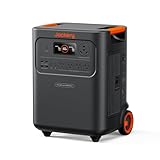
- Essential Home Backup: The Jackery HomePower 3600 Plus delivers 3600W output (7200W in parallel) to run pumps, heaters, and dryers with ease. With dual voltage (120V & 240V in parallel) and 3584Wh capacity expandable to 21kWh per unit or 43kWh with multiple units, it can power a 3-person household for over 2 weeks.
- Safe Power That Lasts: Built with high-temp resistant ceramic membrane battery cells tested at 302 °F, the Jackery HomePower 3600 Plus Portable Power Station prevents thermal runaway from heat or overcharge. Offering 6,000 cycles and a 10-year lifespan, it delivers safe, reliable even in -4 °F blizzards.
- Plug-and-Play: With its easy plug-and-play design, the Jackery HomePower 3600 Plus, paired with MTS, powers your home effortlessly—no complex installation required. Whether at work, in the kitchen, or with family, simply plug in, press "Power-On" and keep life running smoothly through any outage.
- 4 Charging Options: With 4 convenient ways to charge, the Jackery HomePower 3600 Plus solar generator can be fully recharged from 0–100% in just 2 hours via hybrid AC+DC. It also supports charging via AC in 2.5 hours, solar in 4 hours, or a gas generator in 2.5 hours —delivering a full day of quiet, clean energy.
- Ultra-Portable & Lightweight: The Jackery HomePower 3600 Plus, the lightest 3.6kWh LFP power station, boasts automotive-grade CTB tech and is 34% smaller and 29.3% lighter than other models. Its luggage-style design with wheels and a telescopic handle allows effortless rolling from kitchen to garage or beyond.
- Heat-pump auxiliary heat or electric resistance furnaces
- Electric water heaters
- Well and sump pumps
- Pool pumps and heaters
- Electric ovens and clothes dryers
- EV chargers
A home that can start its air-conditioner may still drain a battery quickly if the compressor runs for much of the outage.
Battery sizes and technical specifications
Base currently lists 25-kWh, 39.2-kWh, and 50-kWh systems, each described with an 11-kW inverter. Base identifies the chemistry as lithium iron phosphate (LiFePO₄) and describes the equipment as suitable for outdoor installation and certified to applicable UL standards. Base also publishes lifespan claims, but a claimed equipment lifespan is not the same as a warranty period or the length of the service agreement.
The actual system offered to a home may depend on the site assessment, utility, electrical service, plan, and equipment availability. Ask for the assigned battery size and inverter configuration in writing rather than assuming the largest advertised system will be installed. See Base’s equipment information.
What does Base cost?
There is no universal Base price. The current help center lists a typical $50 refundable deposit, a one-time installation fee that varies by utility provider, and installation payment in full on installation day. Base says it does not offer payment plans for that fee. The optional generator recharge port is listed at $1,000.
Base currently lists Texas membership at typically $19 or $29 per month, depending on plan, and Illinois at a $0 membership fee. These figures are market-specific and can change. They also do not represent the complete cost, which may include household electricity usage, electrical work, HVAC modifications, taxes, or other site requirements. Confirm pricing through the location-specific signup flow using your ZIP code and utility.
Before agreeing, obtain a written quote that identifies:
- Battery size and inverter
- Installation fee and payment date
- Monthly membership
- Electricity-provider and rate terms
- Generator-port selection and cost
- Site-specific electrical work
- Any required soft-start or panel modifications
Start with Base’s current signup and availability page and verify the details for your address.
The contract and ownership trade-off
Base is a service arrangement, not a conventional battery purchase. Base’s current help information says the Battery Services Agreement for its 39.2-kWh batteries lasts 12 years. Base keeps access to operate and service the equipment. The agreement may transfer to a buyer if you sell the home, and cancellation during the agreement can involve a $500 deinstallation fee; damage may create additional charges.
In eligible retail-choice markets, retaining the battery may generally require using Base as the electricity provider. Base’s help page describes the energy-provider agreement as typically three years. Read both agreements before signing, especially the clauses covering:
- Early cancellation and removal
- Moving or selling the property
- Buyer assumption of the agreement
- Battery damage and insurance
- Access for maintenance
- Utility changes and rate changes
- Service commitments and the end of the term
These obligations are the main difference between Base and buying a battery outright. Review the current terms at Base’s agreement summary.
Base with solar
Base says it can work with or without solar and can integrate with most existing solar systems without rewiring the solar installation. Solar may recharge the battery during a grid outage and extend backup duration. However, rooftop panels do not automatically work during a blackout. The solar inverter, islanding controls, interconnection design, utility rules, and battery configuration must all support safe off-grid operation.
Rank #3

- 1500VA/1000W PFC Sinewave Uninterruptible Power Supply (UPS): Uses sine wave output to provide battery backup power for Active PFC & conventional power supplies; Safeguards computers, workstations, network devices, and telecom equipment
- 12 NEMA 5-15R OUTLETS: 6 battery backup & surge protected outlets, 6 surge protected outlets; INPUT: NEMA 5-15P right angle, 45 degree offset plug with 5 foot power cord; 2 USB charge ports (1 Type-A, 1 Type-C) quickly charge phones and tablets
- MULTIFUNCTION, COLOR LCD PANEL: Displays immediate, detailed information on battery and power conditions; Color display alerts users to potential issues before they can affect critical equipment and cause downtime; Screen tilts up to 22 degrees
- AUTOMATIC VOLTAGE REGULATION (AVR): Corrects minor power fluctuations without switching to battery power; UL SAFETY CERTIFIED: Product has been tested in a UL certified lab and listed with UL as meeting or exceeding safety standards
- 3-YEAR WARRANTY – INCLUDING THE BATTERY; $500,000 Connected Equipment Guarantee; FREE PowerPanel Management Software (Download)
Base’s current market information describes Texas solar overproduction as receiving a flat 4¢/kWh credit and warns that Illinois solar customers may have better economics under ComEd’s hourly pricing and net-metering arrangements. These are location- and time-sensitive terms. Compare them with the current utility program before changing providers or signing a long-term agreement. See Base’s solar guidance.
Base with a generator
Base documents two different generator arrangements:
Generator interlock
A portable generator can connect through a properly installed main-panel interlock. This can power the home after the Base battery is depleted, but it does not recharge the Base battery and does not allow simultaneous full-capacity operation of the generator and battery.
Generator recharge port
The optional recharge port is listed at $1,000 and must be selected as a new-member checkout option; Base says it cannot be retrofitted after installation. It requires a portable generator with 240-volt output and an L14-30 connection, has a stated 3,000-watt charging limit, and is not compatible with whole-home standby generators. Within those limits, it can power the home and recharge the battery.
Never connect a generator directly to a home without an approved transfer switch or interlock. Never operate a fuel-burning generator indoors or near doors, windows, or vents. The generator details are at Base’s generator guide.
Base compared with other backup choices
| Question | Base Power | Purchased battery | Standby generator |
|---|---|---|---|
| Who owns the equipment? | Base | Homeowner | Homeowner |
| Normal dispatch control | Base | Owner or software | Usually automatic controller |
| Upfront commitment | Location-specific installation fee | Equipment, installation, permits, and possible financing | Equipment, installation, fuel connection, permits, and maintenance |
| Quiet operation | Yes | Yes | No |
| Long-duration capability | Needs solar or generator support | Needs solar or generator support | Fuel-dependent and potentially extended |
| Relocation | Transfer or removal terms | Owner manages sale or removal | Owner manages sale or removal |
Choose Base when automatic backup, quiet operation, and reduced ownership responsibility matter more than dispatch control and ownership.
Choose a purchased battery when you want to set reserves, control cycling, own the equipment, or combine it with a preferred solar and utility arrangement. Tesla describes Powerwall as an automatically detecting purchased battery that can provide whole-home backup depending on design and the number of units; capacity and installation remain site-specific. See Tesla’s backup explanation.
Choose a generator when the priority is sustained high-load operation over a multi-day outage and fuel is available. Generators require installation, maintenance, fuel, and safe outdoor operation.
Choose a portable or modular power station when you mainly need a refrigerator, lights, internet equipment, or selected small appliances. These systems are generally less suitable for central air, electric heat, large pumps, and automatic whole-home operation unless paired with additional transfer equipment.
Quick wins for a faster PC:
Scan for outdated or missing drivers - takes under a minuteDriver Scan →Repair Windows errors before they cause bigger problemsFix Now →Who should choose Base?
Base is a strong fit for a homeowner who:
- Lives in an eligible service area and accepts the local electricity-provider terms
- Wants automatic, quiet backup for short or medium outages
- Does not want to purchase, maintain, or monitor a large battery as an owner
- Has electrical and HVAC loads compatible with the inverter’s startup limits
- Accepts Base controlling normal battery operation
- Is comfortable with a long-term agreement
It is a weak fit if you need guaranteed multi-day backup without solar or a generator, rely on electric resistance heat, have multiple high-LRA HVAC systems, need complete battery control, expect to move soon, already own suitable backup equipment, or do not want to change electricity providers where required.
Base also says its backup should not be relied upon for life-critical medical equipment. Anyone using an oxygen concentrator, ventilator, powered medical device, or refrigerated medication should work with medical and electrical professionals to create a redundant backup plan rather than relying on one Base battery. See Base’s medical and contract guidance.
Before signing up
- Confirm service availability for your ZIP code and utility.
- Get the exact installation fee, membership, energy rate, and battery size in writing.
- Read the Battery Services Agreement and energy-provider agreement.
- Check cancellation, relocation, home-sale, damage, and access provisions.
- Inspect the electrical panel and service capacity.
- Record the LRA of every air-conditioning compressor.
- List electric heat, water heating, pumps, EV charging, ovens, and dryers.
- Ask whether a soft-start device or other electrical work is required.
- Decide on the generator recharge port before installation.
- Check HOA, setback, fire-code, and insurance requirements.
What to do during and after an outage
- Enable Base app push notifications.
- When an outage begins, turn off or reduce high-load appliances.
- Avoid starting several motors or compressors at the same time.
- Watch the app’s estimated runtime and energy-use information.
- If the battery does not start, reduce demand below the applicable startup threshold.
- After three automatic attempts, use the app’s “Learn more” restart workflow.
- For high-LRA air-conditioning, follow Base’s instructions and wait five minutes after startup before restarting it.
- After power returns, check status and error notifications and allow the battery to recharge.
- Do not repeatedly reset breakers when the system reports a fault; arrange professional service.
After a long outage, inspect the system for visible damage. If a generator is connected, use only the approved interlock or recharge-port procedure.
Quick Recap
Product prices and availability are accurate as of the date/time indicated and are subject to change. Any price and availability information displayed on Amazon at the time of purchase will apply.
Recommended Free Tools

