Recommended Free Tools
For an Atlas Copco compressor, the safest troubleshooting PDF is the instruction book for the exact machine—not a generic fault-code list. Alarm wording and causes can differ by compressor series, Elektronikon controller generation and installed options. Find the model and serial number, record the full message, then use the matching official instruction book before changing settings or parts.
How to get the correct Atlas Copco instruction-book PDF
Start with Atlas Copco’s official manuals library, listed on its USA site as “Atlas Copco official manuals.” Find the machine identification plate and have the serial number ready: Atlas Copco says it needs that information to identify the machine. The documentation process can cover safety, operating instructions, maintenance, servicing, problem solving, technical data and conformity documents.
Access may involve a documentation request, a contact form or a service center; a PDF is not necessarily available as an instant public download for every machine. Access terms can vary by market and machine. If you are outside the United States, contact your local Atlas Copco customer center. The manuals page also describes a service-center process for registering second-hand machines in SMARTLINK to access manuals and documentation.
Instruction book versus the Compressed Air Manual
| Reference | Best for | Limitation | Access |
|---|---|---|---|
| Machine-specific instruction book | Safety procedures, alarm interpretation, settings, servicing, parts and troubleshooting for the identified compressor | It must match the compressor and relevant controller; a manual for a similar model may not apply | Request it through Atlas Copco’s official manuals route; the serial number and local market may matter |
| Atlas Copco Compressed Air Manual, 9th edition | General compressed-air system principles and technical background | It is not a substitute for the instruction book for an individual machine | Offered through regional Atlas Copco pages; availability can vary |
The Compressed Air Manual discusses using logged temperature, pressure and operating-status data to review trends. Its description says memory may cover the last 24 hours on some equipped compressors; that duration does not apply to every machine.
#1 Best Overall

- POWERFUL COMPRESSOR: Unleash the potential of your tools with this portable air compressor, the Klutch 29-Gallon Air Compressor's robust 2.5 HP motor. Operating at 120 Volts and delivering a maximum pressure of 175 PSI, this air compressor portable is perfect for intermediate to continuous air tool use, nailing/stapling, painting, blow guns, and other pneumatic applications.
- MAINTENANCE-FREE: Say goodbye to regular maintenance with the tire inflator portable air compressor's oil-free pump design. This feature eliminates the need for frequent oil changes and reduces the risk of oil spills, allowing you to focus more on the task at hand with these portable air compressors.
- QUICK RECOVERY: Experience uninterrupted work flow with the 120v compressor's quick recovery and cycle time provided by the 5.1 SCFM @ 90 PSI. This feature ensures a steady, reliable air supply, enhancing your productivity and efficiency during continuous use with this tire inflator 120v.
- TOOL SWITCHING: Switch between tools effortlessly with the pump's brass quick-connect coupler. This feature allows for easy one-handed hose connection, enabling you to transition from one task to another seamlessly, saving you time and effort with this portable air compressor.
- EASY MOBILITY: Move around your workspace with ease thanks to the large flat-free tires. This feature ensures easy maneuverability, allowing you to transport your tool to where it's needed most, ensuring efficient and effective work, regardless of the location.
What to record before troubleshooting
Atlas Copco’s guidance on Elektronikon alarms says: “For accurate diagnostics, operators should always consult the instruction manual specific to their compressor model.” The company’s August 26, 2026 article, “Elektronikon fault codes and alarms explained,” also recommends recording the message and operating context. Capture:
- The complete alarm text or symptom, exactly as displayed. Include any separate drive fault code; do not rely on an abbreviated code copied from another machine.
- Compressor model and serial number from the identification plate, plus the controller generation and installed options if known.
- Displayed pressure and temperature, operating mode and what the compressor was doing when the problem occurred.
- Recent maintenance, supply quality, cooling and ventilation conditions, and any event immediately before the fault.
These details help match the symptom to the correct manual and distinguish an operating condition from a component fault. Do not infer a pressure setting, temperature limit or fault-code meaning from another GA model or Elektronikon variant.
A safe general troubleshooting sequence
- Read the full message. Record the exact alarm or describe the symptom, including whether the compressor stopped, continued running or failed to load.
- Identify the machine. Use the nameplate and controller to establish the model, serial number, controller generation and options.
- Record the conditions. Note pressure, temperature, operating mode, maintenance history, cooling conditions and events preceding the fault.
- Follow the matching instruction book. Compare the readings with that manual’s specified limits and diagnostic sequence. Do not substitute values from a different machine.
- Make the machine safe before physical inspection. Stop it, isolate and lock out electrical power, then follow the manual’s procedure to release and verify system pressure before opening panels or inspecting internal components.
- Stay within your training and the manual’s permitted checks. Basic checks discussed in Atlas Copco’s general troubleshooting guidance include oil level, filter condition and cooling airflow. Electrical-cubicle, variable-speed-drive (VSD), refrigerant-circuit and internal component work should be handled by qualified personnel.
- Correct the cause before resetting. After an authorized correction, follow the manual’s restart and reset procedure and observe whether the same condition returns. A recurring protection alarm calls for stopping repeated resets and contacting service.
Common symptoms and possible causes
The examples below are general screening clues drawn from Atlas Copco’s article “How to troubleshoot an air compressor” and its Elektronikon alarm guidance. They are not a universal fault-code table or a diagnosis for an unspecified unit. Confirm causes and permissible checks in the exact machine’s instruction book.
Rank #2

- Replacement part number: 1622087100 1513033701 1613900100
- Packing list for 2901091900 filter kit: 1622087100 oil separator * 1; 1513033701 oil filter * 11613900100 air filter * 1
- Compatible with Atlas Copco, reducing maintenance costs
- Quality Assurance, Manufactured to strict specifications ensuring reliable performance and durability in air compressor systems
- Regular filter replacement helps maintain optimal air compressor performance and extends equipment life
Compressor will not start or stops with a motor-overload indication
Atlas Copco’s general chart lists an overload relay, circuit breaker or fan overload, motor thermistor, phase-sequence relay and interrupted wiring among possible causes. An overload can involve electrical components, so use the machine-specific instructions and qualified service for electrical diagnosis. If overload events recur, do not keep restarting the compressor.
Air delivery or pressure is below normal
Possible causes in the general chart include demand exceeding compressor capacity, a choked air filter, a clogged oil separator, air leakage, or a problem involving a safety valve, solenoid valve, inlet valve or compressor element. Compare system demand with the compressor’s specified delivery and use the correct manual before changing components.
If the manual confirms that the air filter needs replacement, check its part number and compatibility against the exact machine before buying one. Atlas Copco advises checking the product manual to ensure the correct parts are purchased; the model is not specified here, so no universal filter SKU can be identified.
Rank #3

- Made in the USA – Manufactured in the United States following established industry manufacturing standards for rotary screw compressor lubricants.
- Synthetic Formulation – Designed for rotary screw compressors, meeting common industry specifications.
- Long Service Life – Helps protect internal components and reduce maintenance frequency for up to 8,000 hours under standard operating conditions.
- Consistent Performance – Maintains viscosity and performance across a wide range of operating temperatures.
- Significant Savings – Same performance as OEM lubricants at a fraction of the cost
Compressor starts but does not load
Possible causes include a failed solenoid, stuck inlet valve, leaking control-air tubing or leakage at the minimum-pressure valve. These are screening possibilities, not instructions to dismantle a valve. Escalate internal valve work to qualified service.
Compressor does not unload or the safety valve blows
The general chart lists solenoid or inlet-valve problems among possible causes. Treat a safety-valve event as serious: stop and consult the exact instruction book and service support rather than repeatedly restarting the unit or trying to adjust the valve.
Free tools Windows power users keep installed
One-click scans. No signup required.
Element-outlet or delivery-air temperature is high
Possible causes listed in Atlas Copco’s guidance include low oil, restricted cooling airflow, high ambient or cooling-air temperature, dirty oil or air coolers, a malfunctioning bypass valve or an element fault. Its Elektronikon guidance also names blocked ventilation, fan malfunction and poor oil condition. Check only the items the manual permits an operator to inspect; internal faults and repeated high-temperature shutdowns warrant service.
Rank #4

- Part number: 2911.0068.01 1625.0010.57 1615.9436.81 1615.9436.80 1615.9436.01 1615.7695.00 1613.9436.01 1605.0736.00
- Compatible with ATLAS COPCO Air Compressor XAS130DD7 XAS150DD7 XAS37DD XAS46 XAS47DD XAS56DD XAS57DD XAS66DD XAS67DD XAS67KD XAS76 XAS77DD XAS87DD XAS87KD XAS96DD XAS97DD XATS125DD7 XATS67DD
- Package Contains: 1x Air Oil Separator 2911.0068.01
- Manufacturer According to OEM Standard and Specifications.
Pressure dew point is high on a compressor with an integrated dryer
The general chart lists high inlet or ambient temperature, low inlet pressure, excess flow, refrigerant shortage or leakage, and fan or refrigeration problems as possible causes. Refrigerant-circuit diagnosis and repair belong with qualified service.
Elektronikon warning, shutdown warning, shutdown or service reminder
Record the exact wording and distinguish a warning from a protective shutdown; the categories do not necessarily call for the same response. A service reminder may relate to a filter, oil, separator or preventive-maintenance interval. Reset a service reminder only after completing the required service, as specified in the manual.
VSD or converter alarm
Record both the controller message and any separate drive fault code. Atlas Copco’s alarm guidance lists drive overheating, electrical disturbances, an internal converter fault and out-of-design conditions among possible contributors. Persistent drive problems require qualified service rather than repeated resets.
Best Value
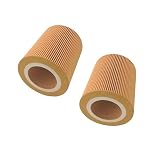
- Part Number: 1613872000, 89295976, 6211472350, 1613-8720-00,1092200283,16138720,17200096,2255300114,6211464150,C150
- Size: 68X120X135mm
- For Atlas Copco Compressor
- Package: Air Filter * 2
When to stop and call for service
Atlas Copco recommends service for recurring alarms, persistent overload or drive problems, suspected sensor or controller failures, repeated electrical trips and frequent high-temperature shutdowns. Its general troubleshooting guidance also identifies internal valve, oil-separator and refrigerant-circuit work as service tasks.
- Stop repeated resets when a protective alarm returns or the underlying cause is not clear.
- Do not open or work on electrical cubicles, VSDs or refrigerant circuits unless qualified and authorized to do so.
- Use Atlas Copco service or a qualified provider able to support the exact model and controller. When choosing a provider, consider model experience, authorization where applicable, response time and capability for the work involved; the cited guidance does not establish independent provider rankings.
For accurate diagnosis, give the service team the model and serial number, the full alarm text, recorded readings and the operating history around the fault.
Quick Recap
Product prices and availability are accurate as of the date/time indicated and are subject to change. Any price and availability information displayed on Amazon at the time of purchase will apply.




