Do these 3 things before closing this tab:
1Repair Windows errors before they cause bigger problems2Scan for outdated or missing drivers - takes under a minute3Clear out junk files and repair common Windows errorsYou can build a useful particulate-detection project with an Arduino Uno and a DSM501A by measuring how long its digital output stays LOW during a defined sampling window. The result is best treated as a relative particle-density estimate: it can reveal changes caused by dust, smoke, cooking aerosols, or sweeping, but it is not a certified PM2.5 monitor, a complete air-quality station, or an official AQI instrument.
This guide covers the wiring, a beginner-friendly sketch, measurement limitations, warm-up, troubleshooting, logging, and upgrade options.

As an Amazon Associate I earn from qualifying purchases.
What the DSM501A actually measures
The DSM501A is an optical dust sensor. An infrared optical system detects particles passing through its sensing path, while an internal heater helps establish the sensor’s airflow conditions. Its output is a stream of pulses whose LOW-time occupancy changes with the amount of detected particulate matter.
The Tool Desk
Outbyte PC Repair FREEClear out junk files and repair common Windows errorsFree Scan →Outbyte Driver Updater FREEScan for outdated or missing drivers - takes under a minuteDriver Scan →A typical Arduino calculation converts that LOW-time ratio into an approximate particle-count value, commonly expressed as particles per 0.01 ft³ of air. It is not automatically a reading in µg/m³.
#1 Best Overall
Some modules and project examples label the two outputs as PM2.5 and PM10. Treat those labels as particle-size-related channels unless the documentation for your exact sensor supports a more precise interpretation. The DSM501A’s optical response depends on particle size, shape, composition, reflectivity, humidity, airflow, and sensor condition.
For background, see the DSM501A datasheet reference and the discussion of the common calculation on the Arduino Forum.
What it does not measure
- Carbon dioxide (CO₂)
- Carbon monoxide
- Ozone
- Volatile organic compounds
- Nitrogen dioxide
- Temperature or humidity
- Official PM2.5 or PM10 mass concentration
- Regulatory air-quality index values
If your aim is ventilation monitoring, use a CO₂ sensor. If you need quantitative particulate data, choose a modern particulate sensor with a documented serial interface and calibration guidance.
Quick wins for a faster PC:
Repair Windows errors before they cause bigger problemsFix Now →Scan for outdated or missing drivers - takes under a minuteDriver Scan →Clear out junk files and repair common Windows errorsFree Scan →Parts required
- Arduino Uno or another compatible 5-V Arduino board
- DSM501A sensor or module
- Breadboard and jumper wires
- USB cable and computer
- Stable 5-V power source
Useful additions include a 0.1 µF decoupling capacitor close to the sensor supply pins, an OLED or LCD, LEDs or a buzzer, an SD-card module, and a ventilated enclosure. The DSM501A contains a heater and can draw substantially more current than a simple digital sensor, so avoid weak or noisy supplies.
DSM501A to Arduino Uno wiring
A common Uno arrangement is:
| DSM501A connection | Arduino Uno |
|---|---|
| VCC | 5V |
| GND | GND |
| VOUT1 | Digital pin 2 |
| VOUT2 | Digital pin 3 |
Many hobby projects call VOUT1 the PM2.5-style channel and VOUT2 the PM10-style channel. Confirm the labels and pin order on your particular module before connecting power. Pin numbering varies between boards and clones.
- Do not power a 5-V DSM501A from 3.3 V unless that exact module explicitly supports it.
- Do not connect its output directly to a 3.3-V-only board until you have checked the output-high voltage and input tolerance.
- Use a common ground if the sensor has a separate regulated supply.
- Keep the inlet and outlet unobstructed, but do not place the sensor directly in a fan’s exhaust.
- Do not seal it inside an airtight enclosure.
For official board documentation and current Arduino software guidance, use Arduino’s documentation.
How the measurement works
The basic method is:
- Choose a sampling interval.
- Measure the duration of LOW pulses from the sensor output.
- Add those LOW durations together.
- Divide the total LOW time by the sampling interval.
- Apply the approximate curve formula associated with the sensor.
For a sampling interval in milliseconds, the commonly used ratio is:
What’s actually slowing this PC down?
Pick the symptom - the matching free tool is one click away.
ratio = lowPulseOccupancy / (sampleTimeMs * 10.0);With a 10,000-millisecond interval, the denominator is 100,000, so the ratio is approximately a percentage from zero to 100 when the timing is valid.
A frequently reproduced curve approximation is:
estimate = 1.1 * pow(ratio, 3)
         - 3.8 * pow(ratio, 2)
         + 520 * ratio
         + 0.62;
Use the result as an approximate sensor-unit reading. Do not silently relabel it as µg/m³. Converting particle counts to mass requires assumptions about density, shape, size distribution, optical properties, and humidity, followed by calibration against a suitable reference.
Rank #2

- DSM501A Dust Sensor Module Detection Dector Allergic Particles Sensor Module For Arduino For Air Condition
Beginner Arduino sketch
This teaching sketch measures the two channels sequentially and includes a timeout so the program does not wait forever if a pulse never arrives:
const byte PM25_PIN = 2;
const byte PM10_PIN = 3;

const unsigned long SAMPLE_TIME_MS = 10000UL;

float calculateEstimate(unsigned long lowPulseOccupancy,
                        unsigned long sampleTimeMs) {
  float ratio = lowPulseOccupancy / (sampleTimeMs * 10.0);

  return 1.1 * pow(ratio, 3)
       - 3.8 * pow(ratio, 2)
       + 520.0 * ratio
       + 0.62;
}

void setup() {
  Serial.begin(115200);
  pinMode(PM25_PIN, INPUT);
  pinMode(PM10_PIN, INPUT);
}

void loop() {
  unsigned long startTime = millis();
  unsigned long lowPulse25 = 0;
  unsigned long lowPulse10 = 0;

  while (millis() - startTime < SAMPLE_TIME_MS) {
    lowPulse25 += pulseIn(PM25_PIN, LOW, 1000000UL);
    lowPulse10 += pulseIn(PM10_PIN, LOW, 1000000UL);
  }

  float estimate25 = calculateEstimate(lowPulse25, SAMPLE_TIME_MS);
  float estimate10 = calculateEstimate(lowPulse10, SAMPLE_TIME_MS);

  Serial.print("Channel 1 estimate: ");
  Serial.println(estimate25);

  Serial.print("Channel 2 estimate: ");
  Serial.println(estimate10);

  Serial.println();
}
In the Arduino IDE, select the correct board and serial port, upload the sketch, and open Serial Monitor at 115200 baud.
PC Slower Than It Used to Be?
A free scan shows the junk files, broken settings and background clutter dragging Windows down - then fixes them in one click.Free scan · Windows 10 & 11Outdated Drivers Are Slowing You Down
One free scan finds every outdated or missing driver and matches the right update for your exact hardware.Free scan · exact hardware matchWhat this sketch gets right—and wrong
The timeout prevents an absent or stuck signal from causing an indefinite wait. However, pulseIn() is blocking: while the Arduino is waiting for one pulse, it cannot measure the other channel. The sketch is therefore suitable for learning and rough demonstrations, not simultaneous, validated two-channel measurement.
For better two-channel timing, use pin-change interrupts, a suitable pulse-width library, timer-based measurement, or a board with more flexible interrupt hardware. On an Uno, external interrupts are limited, so a production design needs more careful timing than simply attaching one conventional interrupt to each signal.
Sampling, warm-up, and averaging
Choose the sampling interval according to the project:
| Interval | Best use |
|---|---|
| 1 second | Fast demonstrations and event detection; readings are noisy. |
| 10 seconds | A practical display refresh with less fluctuation. |
| 30 seconds | Better trend monitoring and smoother output. |
| Several minutes | Environmental logging; too slow for rapid alerts. |
Do not confuse sampling interval with display interval or averaging interval. A useful design can collect one-second samples, average the last 5–10 readings, and update the display every 5–10 seconds.
Allow several minutes for initial stabilization before treating the readings as representative. A short startup delay such as delay(30) or delay(60) does not guarantee a stable measurement. The heater also makes supply quality and airflow important. The sensor may become warm, and a weak USB port or regulator can produce unstable readings.
Interpreting the output
Use language such as “particle-count estimate,” “dust-density estimate,” “relative particulate level,” or “sensor output.” The most useful question is often whether the reading rises and falls consistently during a known event.
Smoke, household dust, pollen, cooking aerosol, and water droplets scatter light differently. Consequently, two environments with the same particle mass can produce different optical readings, and two sensors may not agree closely even when placed together.
Rank #3
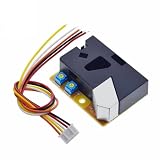
- DSM501A Sensor Module Detection Dector Allergic Particles Sensor Module For Arduino For Air Condition
Do not present the result as:
- Actual PM2.5 concentration
- Certified PM10
- Official AQI
- Proof that air is safe or unsafe
An AQI calculation requires a pollutant concentration in the appropriate units and the breakpoint table for the relevant jurisdiction. A DSM501A estimate is not automatically interchangeable with regulatory PM2.5 or PM10 data.
Recommended Free Tools
Establishing a useful baseline
- Place the sensor in a stable indoor location away from direct drafts, steam, condensation, heaters, and exhaust outlets.
- Allow it to stabilize.
- Record readings for 10–30 minutes.
- Repeat the baseline test on more than one day if possible.
- Introduce a controlled particle event at a safe distance, such as briefly disturbing dust in a ventilated area.
- Confirm that the output rises and later falls.
- Repeat the event and compare the trend rather than expecting identical numbers.
- Compare it side by side with a better particle monitor if one is available.
Keep the reference monitor nearby, but do not place either device directly in the other’s exhaust airflow. Record temperature and humidity if possible. This is a correlation test or project-specific baseline adjustment, not traceable laboratory calibration. A review of low-cost particulate-sensor calibration methods explains why environmental conditions and individual instrument response matter; see this calibration-method review.
Adding a display or alarm
An I²C SSD1306 OLED can show both channel estimates, the sampling interval, and a status such as LOW, ELEVATED, or HIGH. Define those thresholds from your own baseline and label them as project-specific sensor thresholds.
Likewise, a green, yellow, and red LED or a buzzer can indicate relative changes. Avoid labels such as “safe” and “dangerous” unless you have a defensible measurement system and clearly identified health criteria. A disconnected sensor should produce a visible “sensor error” state rather than a reassuring zero.
Logging the readings
The simplest logger is the USB Serial connection. Print a timestamp, channel values, raw LOW-time totals, and the sampling interval so later data remains interpretable.
For standalone logging, add an SD-card module. For wireless dashboards, an ESP8266 or ESP32 can upload readings, but check logic levels carefully: their GPIO inputs are generally 3.3 V, while a DSM501A module may produce a 5-V output. A level shifter or another electrically suitable interface may be required.
The DSM501A generally requires custom pulse-timing code rather than a current first-party Arduino library. The broader Arduino library and hardware ecosystem is documented at Arduino Docs.
Independent reader supportYour contribution helps us test, update, and keep practical guides available for everyone.Troubleshooting
Readings are always zero
- Confirm the sensor receives the required 5 V.
- Confirm that Arduino ground and sensor ground are connected.
- Check the sensor’s actual pin labels and output selection.
- Allow several minutes for warm-up.
- Use the
pulseIn()timeout and print raw pulse durations. - Test one output channel at a time.
- Check whether the output responds to a controlled, ventilated particle event.
Readings are always extremely high
- Inspect for contamination or a blocked inlet.
- Move the sensor away from strong airflow, heaters, and exhaust outlets.
- Check for a floating or incorrectly wired input.
- Use a regulated 5-V supply and local decoupling.
- Verify that the actual sampling interval matches
SAMPLE_TIME_MS. - Print the raw LOW-time total and calculated ratio.
Values are negative
The polynomial can produce implausible or negative results when the ratio is outside its intended curve range or the timing is wrong. You may clamp negative values for display:
if (estimate < 0) {
  estimate = 0;
}
That only hides the symptom. Check wiring, timing, sample duration, and raw pulse data before relying on the output.
Rank #4

- DSM501A Dust Sensor Module PM2.5 Detection Dector Allergic Smoke Particles Sensor Module For For Air Condition
Both channels behave identically
Check whether both wires are connected to the same output, whether the pin constants are correct, and whether your module or clone actually exposes two independent outputs. Similar readings can also occur when a broad particle event affects both channels.
The Arduino resets
The heater may cause a supply dip. Try a separate regulated 5-V supply with a common ground, shorter wiring, better breadboard contacts, and local decoupling. Stay within the Arduino board’s power limits.
Readings drift over time
Drift can result from dust accumulation, sensor aging, temperature, humidity, changing airflow, changing particle composition, or supply variation. Inspect and clean the inlet according to the module’s instructions, then repeat the baseline test.
Placement and enclosure guidance
Use an enclosure with a clear inlet and outlet path. Do not cover the airflow openings with fabric or foam, and protect the sensor from insects and large debris. Avoid condensation, steam, water droplets, direct sunlight heating, and direct fan blasts.
Free tools Windows power users keep installed
One-click scans. No signup required.
For construction environments, remember that a dust-event indicator is not a substitute for an occupational exposure assessment, respiratory-protection program, or required workplace monitoring. Construction dust can contain hazardous materials that demand controls beyond a hobby sensor.
Better alternatives
UART laser particulate sensor
A modern UART module such as the DFRobot SEN0233 provides structured serial data, documented Arduino examples, and PM1.0-, PM2.5-, and PM10-style outputs. It is a better fit when you want less timing-sensitive code and more structured particulate data.
Serial PM sensor from Adafruit
Adafruit’s PM2.5 sensor guide demonstrates Arduino integration with a serial particulate sensor and library support. This is easier than deriving readings from pulse occupancy, though availability and product specifications should be checked for the exact model.
Broader environmental sensing
The Arduino Nicla Sense Env is aimed at broader environmental monitoring, including temperature, humidity, and gas or air-quality sensing. It is not a drop-in Uno replacement or a DSM501A interface; it requires a compatible Portenta or MKR system.
CO₂ monitoring
If the real question is whether a room needs ventilation or is occupied, choose a CO₂ sensor. CO₂ and particulate sensors measure different aspects of indoor conditions.
Bottom line
The Arduino–DSM501A combination is a worthwhile low-cost electronics project. It teaches pulse timing, sensor interfacing, averaging, data logging, and the difference between a raw sensor signal and a validated environmental measurement.
Build it if you want to detect relative changes in airborne particles. Do not use it as a certified PM2.5 or PM10 monitor, an official AQI source, or the basis for medical or regulatory decisions. If you need more dependable particulate data, use a modern serial laser sensor; if you need ventilation information, use CO₂ sensing instead.
Quick Recap
Product prices and availability are accurate as of the date/time indicated and are subject to change. Any price and availability information displayed on Amazon at the time of purchase will apply.

