Windows Errors? Fix Them Before They Spread
Repair common Windows errors and clear accumulated junk for a smoother, more stable PC - no reinstall needed.Free scan · no reinstallOutdated Drivers Are Slowing You Down
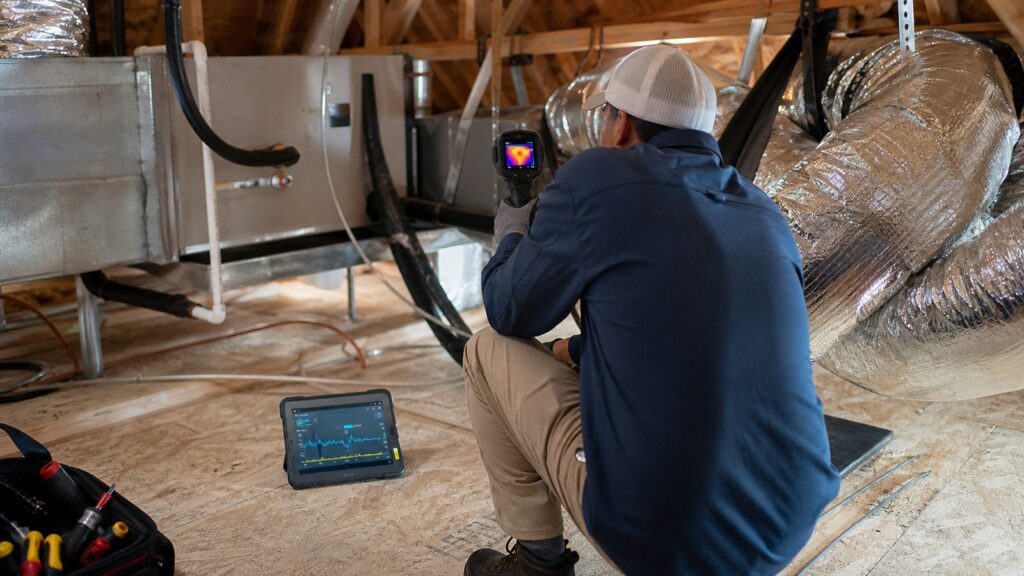
One free scan finds every outdated or missing driver and matches the right update for your exact hardware.Free scan · exact hardware matchAI-driven HVAC fault diagnosis is most useful when it does one practical thing well: it helps a technician find the problem faster and prove it with evidence. Sound recordings can flag abnormal compressor, fan, bearing, motor, airflow, and refrigerant noises. Thermal images can show uneven heat transfer, duct leakage patterns, overheated electrical parts, missing insulation, frozen coil conditions, and room-to-room comfort problems.
That does not mean a phone app or thermal camera replaces an HVAC professional. It means the service call can become more targeted. Instead of guessing whether a hot bedroom is caused by a bad unit, a leaky attic duct, poor return air, low airflow, or an oversized system short cycling, the contractor can combine acoustic clues, infrared images, static pressure, temperature split, amperage, refrigerant readings, and visual inspection.
As an Amazon Associate I earn from qualifying purchases.
On our job sites, that evidence matters. A homeowner should not be told to replace a $12,000 system because of one noisy startup or one warm room. The better process is to document the symptom, isolate likely causes, verify with field measurements, repair what is actually wrong, and then compare the after-repair readings. AI can support that process. It cannot skip it.
Free tools Windows power users keep installed
One-click scans. No signup required.
What AI-Based HVAC Diagnosis Actually Means
AI HVAC fault detection and diagnostics, often called FDD or AFDD, is already common in larger commercial buildings. Those systems compare equipment behavior against expected patterns: run time, discharge temperature, airflow, valve position, energy use, compressor cycling, and alarm history. The newer residential and light-commercial version adds two signals that are easy to understand: sound and thermal images.
#1 Best Overall

- 【Enhanced Thermal Clarity】Start with 128x128 thermal imaging and enhance to 240x240 resolution with TISR technology for greater details. The wide 40°x 30° field of view and a 25Hz refresh rate deliver accurate, smooth thermal images—ideal for detailed inspections in homes and on electrical systems and machinery
- 【Wide Application with Smart Alerts and Photograph】From underfloor heating to leak detection and electrical inspections, the TC004 Mini adapts to every challenge. When temperatures exceed preset levels, an on screen warning alerts you instantly while automatically capturing a photo to streamline your diagnostics. In addition, TC004 Mini also supports manual photo taking to help you record and solve problems, and the built-in 512MB eMMC storage can store up to 8,000 photos
- 【Effortless Temp Measurement with Alerts】Easily measure temperatures between -4°F to 842°F (-20°C to 450°C), with an accuracy error within ±3.6°F/2%, the thermal camera automatically pinpointing the highest, lowest, and central spots. Plus, you can choose from 5 different color palettes - White Hot, Black Hot, Iron, Rainbow, and Red Hot - to meet your specific work needs. Instant warnings will alert you when the temperature exceeds your preset level, making your job more efficient
- 【Longer Runtime, Fewer Charges】Designed for efficiency, this thermal imaging camera gives you 15 hours of power and automatic shut-off options at 5, 10, and 20-minute intervals to extend battery life. Keep going without the hassle of frequent charging, no matter how long your inspections last. A charging cable is given with the machine, but no charging head.
- 【Portable, Durable & Hassle-Free】Take this thermal imaging camera anywhere with its mini, pocket-friendly design. The ergonomic design makes it easier for you to hold during use, and the lightweight design is more suitable for long-term use. Engineered for durability, it can survive drops up to 2 meters without skipping a beat. Supports IP54 waterproof rating to ensure worry-free daily use. Get peace of mind with TOPDON's lifetime technical support to keep it running smoothly
Sound-based diagnosis looks for patterns in recordings. A failing bearing, loose blower wheel, rattling access panel, contactor buzz, refrigerant hiss, duct rumble, or compressor hard start can each produce a different acoustic signature. Software may convert the recording into a spectrogram, compare it against known fault patterns, and rank likely causes.
Thermal image-based diagnosis uses infrared data to show temperature differences. A thermal camera does not see through walls, but it can reveal surface temperature patterns that point to air leakage, missing insulation, overheating components, uneven supply air, wet insulation, blocked airflow, or an evaporator area that is getting too cold.
The strongest use case is not “AI says the compressor is bad.” The stronger use case is “AI flagged an abnormal compressor startup sound, the technician measured high starting amps, inspected the capacitor and contactor, and documented the repair with a normal post-repair startup recording.” That is a defensible diagnosis.
Where Sound Analysis Helps Most
HVAC equipment talks before it fails. A good technician already listens during startup, steady operation, and shutdown. AI-assisted sound tools make that listening more consistent and easier to document, especially when the noise is intermittent.
Common HVAC sounds and what they may indicate
A high-pitched squeal often points to belt, bearing, or motor issues. Many residential systems no longer use belts in the air handler, but older furnaces, commercial units, and some packaged equipment still do. A grinding sound can mean bearing damage, a motor problem, or a blower wheel contacting the housing. Buzzing may come from a failing contactor, transformer, relay, loose electrical connection, or struggling compressor. Rattling can be as simple as a loose panel or as serious as a damaged blower assembly. Hissing may be duct leakage, refrigerant flow noise, a metering device issue, or an actual refrigerant leak. Repetitive clicks, starts, and stops can point to short cycling, control problems, dirty coils, restricted airflow, or improper sizing.
For the homeowner, the most useful recording is simple: 20 to 30 seconds at startup, 20 to 30 seconds during steady operation, and 20 to 30 seconds at shutdown. Stand in the same location each time, keep the phone 3 to 6 feet from the equipment, and note whether the system is heating, cooling, defrosting, or running the fan only. Background noise matters. A lawn mower, dryer, dog bark, or nearby traffic can confuse both people and software.
For a contractor, sound analysis is more useful when combined with direct measurements. If the blower sounds strained, we want external static pressure, filter size, return grille area, blower speed, duct condition, and temperature split. If the condenser buzzes, we want voltage, capacitance, contactor condition, amp draw, and wiring condition. The sound narrows the suspect list; the meter confirms the fault.
What’s actually slowing this PC down?
Pick the symptom - the matching free tool is one click away.
Where Thermal Imaging Helps Most
Thermal imaging is one of the clearest ways to show a homeowner what an HVAC problem is doing to the house. The key word is “show.” A thermal image shows a surface temperature pattern. It does not automatically prove the cause.
In heating season, a weak supply register may show lower-than-expected heat delivery compared with other rooms. In cooling season, a duct leak in a hot attic may show as a warm streak, a weak room, or an uneven register pattern. Around an air handler, thermal imaging can help identify cold areas near a frozen evaporator coil, hot motor housings, overheated electrical connections, or poorly insulated duct transitions.
We also use infrared evidence in the building envelope. A perfectly good HVAC unit can look undersized when the real problem is attic heat gain, missing insulation, unsealed chases, duct runs buried under loose insulation with crushed flex, or a return pulling air from a hot cavity. In those cases, replacing equipment may only repeat the comfort problem with newer equipment.
Thermal readings need the right conditions
Thermal imaging works best when there is a meaningful temperature difference. For building envelope scans, a 15 degree Fahrenheit or greater indoor-outdoor temperature difference is a practical target. Wind, direct sun, reflective metal, wet surfaces, humidity, and recent equipment cycling can all skew the image. A shiny duct jacket or electrical cover may reflect the technician’s body heat and look hotter than it really is.
That is why a serious thermal scan includes normal photos, thermal images, location notes, system mode, indoor and outdoor temperature, and follow-up measurements. A pretty color image without context is not a diagnosis.
Rank #2

- 【Dual Mode Inspection】Combines conventional thermal imaging (Center/Hot/Cold spot modes) with thermometer mode for flexible temperature analysis. Use full-screen thermal imaging to monitor moving animals, machinery, automotive, or HVAC systems in real time, ensuring continuous observation with no detail loss. When you need exact numbers such as kitchen use, thermometer mode provides quick, point-and-shoot readings with a clear digital display.
- 【User-Friendly Operation】Weighing just 240g, this compact thermal imager offers a balanced feel with a non-slip grip even during extended use. Intuitive button controls let you power on, navigate menus, capture images, and switch between seven color palettes effortlessly—so you can start inspecting right away.
- 【Multi-Scenario Application】Built with high-precision sensors (NETD < 50mK), it detects subtle temperature differences down to 0.05°C. The -4°F to 1022°F temperature range handles everything from household inspections to high-heat diagnostics, including home kitchens, insulation checks, and automotive maintenance.Adjustable emissivity and distance settings help improve accuracy across materials like cement, ceramic,etc.
- 【Fast Anomaly Detection with Instant Alerts】A 50° wide field of view lets you scan larger areas in less time. Set custom high and low temperature alarms for instant alerts when temperatures exceed your limits. Adjustable level and span settings enhance thermal contrast, making it easier to identify issues such as insulation gaps and floor heat loss.
- 【All-Day Battery Life 】The built-in 2500mAh rechargeable battery provides up to 14 hours of continuous use for uninterrupted inspections. Backed by a 1-year warranty for added peace of mind.
What Problems AI, Sound, and Thermal Imaging Can Help Prioritize
The best results come from matching the tool to the symptom. A noisy condenser, a hot upstairs bedroom, and a system that runs all day require different evidence.
| Symptom | Useful diagnostic signal | Likely issues to verify | Field confirmation |
|---|---|---|---|
| Rattling or grinding air handler | Sound recording | Loose panel, blower wheel, motor bearing, debris | Visual inspection, amp draw, blower inspection |
| Weak cooling in one room | Thermal scan of registers and duct route | Duct leakage, crushed duct, bad damper, poor return path | Airflow test, duct inspection, static pressure |
| Short cycling | Sound pattern and runtime data | Oversizing, dirty coil, low airflow, control fault, refrigerant issue | Load review, temperature split, pressure readings, thermostat check |
| Burning smell or buzzing | Thermal image and sound | Overheated contactor, loose connection, failing capacitor, motor stress | Power-off electrical inspection, voltage, capacitance, amperage |
| High utility bills | Thermal scan and performance data | Duct leakage, low charge, fouled coil, insulation gaps, poor commissioning | Duct testing, refrigerant check, coil inspection, Manual J review |
These tools are also valuable after repair. If a duct joint was leaking into an attic, a post-sealing thermal scan should show stronger and more even supply temperatures. If a motor bearing was failing, the after-repair recording should have a cleaner startup and steady run. If an electrical connection was overheating, the post-repair thermal image should show normal operating temperature under load.
Costs in 2026: Diagnostics, Repairs, Cameras, and Replacement
The cost question matters because better diagnostics should prevent bad spending. In 2026, many standard HVAC repairs fall in the $150 to $600 range, while broader national repair ranges commonly run about $130 to $2,000 depending on the failed part, labor time, urgency, and system type. A service visit or AC tune-up is often reported around $170 to $752, with many homeowners paying near $354. Annual maintenance plans commonly run about $150 to $500 per year, while basic scheduled tune-ups may be $75 to $150 per visit in some markets.
The Tool Desk
Outbyte PC Repair FREEClear out junk files and repair common Windows errorsFree Scan →Outbyte Driver Updater FREEFix the driver behind crashes, sound loss and screen glitchesFind Drivers →Thermal imaging is usually an add-on, not a full HVAC diagnosis by itself. Home inspection and diagnostic providers commonly price a thermal scan add-on around $100 to $300. Some charge $50 to $100 extra when it is bundled into a larger inspection. Larger houses, multi-system homes, detailed reports, and commercial properties cost more.
| Item | Typical 2026 US cost | What it buys |
|---|---|---|
| Basic HVAC tune-up | $75-$150 per visit in some markets | Filter check, coil check, electrical inspection, basic performance review |
| AC service visit | $170-$752, often around $354 | Diagnostic visit, minor checks, repair estimate |
| Annual maintenance plan | $150-$500 per year | Scheduled visits, priority service, sometimes discounts |
| Thermal imaging add-on | $100-$300 | Infrared scan with documented temperature patterns |
| Common HVAC repairs | $150-$600 for many standard repairs | Capacitors, contactors, controls, minor blower or drain repairs |
| Broad HVAC repair range | $130-$2,000 | Varies by part, access, labor, system type, and emergency timing |
| Full HVAC replacement | $5,000-$28,000 | Equipment, labor, system complexity, efficiency, duct or code upgrades |
Thermal camera equipment ranges widely. Entry-level smartphone attachments may start around $129 to $400. Practical inspector-grade handheld cameras commonly run about $600 to $1,500. Professional cameras can exceed $4,000, especially when they offer better resolution, thermal sensitivity, calibration, radiometric reporting, rugged housings, and reporting software.
Acoustic diagnostic tools are less standardized. A technician may start with a mechanic’s stethoscope, sound meter, and phone recording. More advanced workflows can include calibrated microphones, vibration sensors, cloud analytics, and building automation integration. Commercial FDD systems are often subscription-priced or portfolio-priced instead of sold like a retail tool.
The Right Diagnostic Workflow
A good AI-supported HVAC diagnosis should follow a sequence. Skipping steps is how homeowners end up paying for the wrong repair.
Quick wins for a faster PC:
Clear out junk files and repair common Windows errorsFree Scan →Fix the driver behind crashes, sound loss and screen glitchesFind Drivers →1. Start with the homeowner symptom
The first clue is usually plain language: the bedroom is 6 degrees hotter than the hallway, the outdoor unit screams at startup, the furnace runs for 4 minutes and shuts off, or the electric bill jumped 25 percent. We want the time of day, weather, thermostat setting, filter age, recent work, and whether the problem is new or seasonal.
2. Capture sound or thermal evidence
A sound sample should capture startup, steady operation, and shutdown. A thermal scan should include the equipment, supply and return registers, duct areas, attic or crawlspace conditions when accessible, and electrical components where safe and appropriate. For electrical panels and live HVAC equipment, this belongs with trained personnel using proper safety procedures.
3. Let AI flag anomalies, not make the final call
The AI can compare the sound or image to known patterns and rank likely issues. It may flag a bearing-like sound, airflow restriction pattern, abnormal cycling rhythm, hot electrical component, or duct temperature loss. That is useful, but it is still a lead.
4. Verify with trade measurements
This is the step that separates a real diagnosis from a guess. Depending on the fault, verification may include external static pressure, temperature split across the coil, refrigerant superheat and subcooling, voltage, amperage, capacitance, combustion safety testing, airflow measurement, duct leakage testing, thermostat signal checks, condensate drain inspection, and visual inspection of coils and blower components.
Do these 3 things before closing this tab:
1Clear out junk files and repair common Windows errors2Scan for outdated or missing drivers - takes under a minute3Repair Windows errors before they cause bigger problems5. Document before and after
For meaningful work, the service record should include the complaint, images or recordings, measured readings, repair performed, and post-repair comparison. A before-and-after thermal image of a sealed duct joint or a before-and-after sound recording of a repaired blower motor is more useful than a vague note that says “system checked.”
Rank #3

- Larger Display, Clearer Decisions: TC004 features a 3.5-inch display that provides a wider and more comfortable viewing experience, making it easier to identify hot spots and temperature differences quickly during daily inspections
- Sharper Thermal Images: With a 256×192 infrared resolution enhanced by TISR technology up to 512×384, TC004 captures sharp and detailed thermal images, allowing you to detect subtle temperature variations accurately and make confident decisions on the first pass
- Pinpoint Your Inspection Target: A built-in red laser pointer clearly indicates the measurement area, helping you quickly match the thermal image with the real-world target and locate anomalies more efficiently during inspections
- Store More, Worry Less: Equipped with 64GB of built-in storage, TC004 allows you to store thousands of images and videos, ensuring complete documentation throughout the workday without interruptions
- Wireless Connectivity, Faster Reporting: Integrated Wi-Fi enables fast, cable-free transfer to the TopInfrared mobile app, allowing you to sync files instantly, perform in-depth analysis, and generate professional reports more efficiently
Construction Quality Often Looks Like HVAC Failure
Many comfort complaints start with installation or building conditions, not a failed machine. Poor duct design, undersized returns, unsealed chases, long flex duct runs, crushed duct, missing balancing dampers, attic heat gain, and bad equipment sizing can all produce symptoms that look like a tired air conditioner or furnace.
On new construction and remodels, our crews treat HVAC performance as part of the building, not a box dropped outside. The equipment has to match the load, the ducts have to move the air, the returns have to let air get back, and the envelope has to control heat gain and loss. If one of those pieces is wrong, the system can be new and still perform badly.
Manual J load calculation remains the residential standard for sizing heating and cooling equipment. AI cannot replace that. A replacement quote should account for square footage, insulation, windows, orientation, infiltration, local climate, occupancy, and room-by-room loads. Rule-of-thumb sizing, such as one ton per 500 square feet, is not enough for a serious installation.
Recommended Free Tools
Commissioning is just as important. After installation, a contractor should verify airflow, refrigerant charge, controls, condensate drainage, duct connections, thermostat operation, safety switches, and room-by-room comfort. Thermal imaging and sound baselines are useful here because they create a record of how the system behaved when it was healthy.
What AI Cannot Tell You
AI cannot legally handle refrigerant. It cannot recover, charge, or open a refrigeration circuit. That work requires properly certified personnel and code-compliant procedures.
AI cannot guarantee that a heat exchanger is safe, that combustion is correct, or that an electrical connection is safe to touch. Combustion testing, carbon monoxide safety, gas piping, venting, and live electrical troubleshooting require trained professionals.
AI cannot see inside sealed components. It can infer that a compressor, motor, or bearing may be failing, but confirmation still comes from readings, inspection, and sometimes controlled replacement of known failed parts.
AI cannot replace permits. Equipment replacement, refrigerant changes, electrical work, gas work, duct alterations, and new construction HVAC work may require permits and inspections depending on the local jurisdiction. The shift to A2L refrigerants also adds code, labeling, handling, storage, and installation considerations. Homeowners should expect legitimate contractors to follow current refrigerant rules and local inspection requirements.
AI cannot make a bad installation good. If the duct system is undersized, the return path is poor, or the unit was oversized from the beginning, software may help identify the pattern, but the solution is still construction work: duct redesign, sealing, insulation, balancing, load calculation, or equipment correction.
Independent reader supportYour contribution helps us test, update, and keep practical guides available for everyone.When to DIY vs. When to Hire a Pro
Homeowners can do useful first-pass documentation. You can record the noise, note when it happens, replace a standard filter, check that supply and return grilles are open, clear leaves from around the outdoor unit, and take non-contact thermal images with a consumer camera if you already own one. Keep at least 2 feet of clearance around the outdoor condenser where possible, and do not remove service panels unless you are qualified.
DIY stops at safety covers, electrical components, refrigerant lines, gas appliances, combustion venting, blower removal, control wiring beyond thermostat basics, and anything that requires opening the sealed refrigerant system. A buzzing contactor, hot breaker, iced coil, burning smell, repeated breaker trip, gas odor, water near electrical components, or system that short cycles repeatedly is a pro call.
For a smart homeowner, the best DIY move is evidence gathering. Take a 30-second video with sound. Write down the thermostat setting, indoor temperature, outdoor temperature, filter size and age, and which rooms are uncomfortable. If you have a thermal camera, capture normal photos and thermal photos from the same angle. That information can shorten the diagnostic visit.
Rank #4
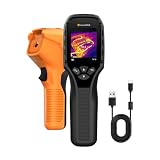
- 【Dual Mode Inspection】Combines thermal imaging with Center/Hot/Cold spot modes for real-time visual temperature display, and integrates thermometer mode for fast point-and-shoot readings with precise digital output. Full-screen thermal imaging enables continuous monitoring of moving targets,ensuring stable observation without loss of detail during dynamic inspections.
- 【User-Friendly Operation】 At just 240g, this compact thermal imager features a non-slip grip and balanced handheld design for comfortable long-duration inspections or mobile use. It offers intuitive button controls for power on/off, menu navigation, and image capture, and supports 7 selectable color palettes, enabling fast switching.
- 【Multi-Scenario Application】It supports a broad measurement range from -4°F to 1022°F with enhanced with adjustable emissivity and distance settings,making it suitable for applications.Equipped with a high-sensitivity sensor (NETD < 50mK), the thermal camera can detect extremely subtle temperature differences as small as 0.05°C.
- 【Quick Anomaly Detection with Alerts 】Featuring a 50° wide field of view, the device enables faster scanning of large surfaces and broader inspection coverage. It supports custom high/low temperature alarms for instant notification when abnormal thermal conditions are detected. Level and span adjustment functions make it easier to clearly identify localized issues.
- 【All-Day Battery Life】Built-in 2500mAh rechargeable battery provides up to 14 hours of continuous operation, supporting full-day inspection without frequent recharging. The device also includes a 1-year warranty, ensuring long-term reliability and peace of mind for using.
Privacy and Data Notes for Sound-Based Diagnostics
Sound recordings can capture conversations, television audio, children, visitors, or other private household information. If a contractor uses AI sound analysis, ask where the recording is stored, whether it is tied to your address, how long it is retained, and whether it is used to train future models.
A practical job-site policy is simple: record only the equipment area, keep clips short, avoid conversations during recording, label the operating mode, and store the file with the service record only when it supports the diagnosis. For commercial buildings, ownership and retention of acoustic data should be spelled out before installing ongoing sensors.
Questions to Ask Before Paying for Advanced HVAC Diagnostics
Ask whether the contractor saves images, recordings, and readings in the service record. Ask what measurements will confirm the suspected fault. Ask whether the quote separates diagnosis, repair, duct work, commissioning, and replacement. Ask whether permits are needed if equipment, refrigerant piping, electrical circuits, gas piping, or duct layouts change.
If replacement is recommended, ask for the evidence. A legitimate replacement recommendation may be based on age, refrigerant phaseout, repeated repairs, compressor failure, heat exchanger failure, poor efficiency, or unavailable parts. But it should still be tied to measurements and site conditions. A $5,000 to $28,000 replacement decision deserves more than “the unit is old.”
For builders and remodelers, ask for commissioning documents before handoff. At minimum, the file should include equipment model numbers, filter size, thermostat setup, airflow or static pressure readings, refrigerant charge verification, condensate drainage confirmation, duct sealing notes, and owner maintenance instructions. Thermal images and sound baselines are a useful addition, especially on high-performance homes and complex additions.
The Bottom Line
AI-driven sound and thermal image-based HVAC diagnosis is not a magic replacement for trade skill. It is a better flashlight. Used correctly, it helps uncover hidden faults, reduce guesswork, document what changed, and protect homeowners from unnecessary repairs or premature replacement.
The best results come from pairing the technology with disciplined field work: listen to the system, scan the thermal patterns, measure airflow and electrical performance, verify refrigerant and controls, check the duct system, and document before and after. That is how HVAC diagnostics become useful instead of just impressive.
Crashes, No Sound, or Screen Glitches?
Random freezes, missing sound and display glitches usually trace back to one bad driver. Find and replace yours safely.Free scan · under a minutePC Slower Than It Used to Be?
A free scan shows the junk files, broken settings and background clutter dragging Windows down - then fixes them in one click.Free scan · Windows 10 & 11Frequently Asked Questions
Can AI diagnose my HVAC problem from a sound recording?
It can flag likely issues such as bearing noise, blower imbalance, buzzing electrical components, short cycling, or airflow restriction. A licensed technician still needs to confirm the cause with measurements and inspection.
Is thermal imaging worth it for HVAC troubleshooting?
Often, yes. A thermal scan can reveal duct leakage patterns, uneven supply air, hot electrical components, missing insulation, frozen coil symptoms, and comfort problems that are hard to see otherwise.
How much does advanced HVAC diagnosis cost in 2026?
A service visit commonly runs about $170-$752, with many homeowners near $354. Thermal imaging add-ons often cost $100-$300. Repairs commonly range from $150-$600 for standard issues, but can reach $2,000 or more.
Can thermal imaging prove I need a new HVAC system?
No. Thermal imaging shows temperature patterns, not full equipment condition. Replacement should be backed by load calculations, equipment testing, age, repair history, refrigerant considerations, and code requirements.
Quick wins for a faster PC:
Repair Windows errors before they cause bigger problemsFix Now →Scan for outdated or missing drivers - takes under a minuteDriver Scan →Clear out junk files and repair common Windows errorsFree Scan →What HVAC diagnostics can I do myself?
You can record noises, note when problems happen, replace filters, check open registers, clear debris around the outdoor unit, and document room temperatures. Leave electrical, refrigerant, gas, combustion, and internal equipment work to a qualified pro.
Quick Recap
Product prices and availability are accurate as of the date/time indicated and are subject to change. Any price and availability information displayed on Amazon at the time of purchase will apply.

