Home PCB milling is practical for fast, solderable prototypes—especially simple single-sided, through-hole, breakout, adapter, and sensor boards. It is not a substitute for a manufactured PCB: milled boards normally lack plated-through holes, solder mask, silkscreen, controlled impedance, reliable fine-pitch capability, and multilayer interconnects.
The process uses a desktop CNC mill to remove copper around traces, drill component holes, and cut the board outline. If you design around generous clearances, keep the board flat, verify every toolpath, and use FR-1 material, you can produce useful prototypes quickly. For dense layouts, RF circuits, production quantities, or boards requiring professional finishes, ordering fabricated PCBs is usually the better choice.
As an Amazon Associate I earn from qualifying purchases.
What milling a PCB actually involves
Home PCB milling is usually isolation routing, not removing all unused copper from the board. A small cutter removes narrow channels around electrically connected areas so that traces, pads, power areas, and ground regions are separated.
A complete job normally contains four operations:
- Isolation routing: cuts channels around traces and pads.
- Copper clearing: removes larger unused copper areas where necessary.
- Drilling: creates component and mounting holes.
- Profiling: cuts the external board outline.
The board is generally made from copper-clad FR-1. Ordinary milling does not plate the holes, so a drilled hole is simply a hole through the substrate and copper. Vias therefore require a short soldered wire, an eyelet or rivet, a component-side jumper, or a redesigned single-sided circuit.
#1 Best Overall

- Smart and Affordable Desktop CNC Machine: Carvera Air is a precise and versatile desktop CNC mill for milling, carving, and engraving. Easy to use with user-friendly software. Endless Materials | Quick Tool Changer | Auto Probing and Leveling | Optional 4th Axis and Laser supported | All-in-one CAM Software
- 4th Axis Module for Expanded Capabilities: The 4th axis module expands your capabilities, enabling cylindrical machining, double-sided objects, and 3D shapes. With a rotary work area of 3.6 inch diameter x 7.9 inch length (9.2cm x 20cm), Carvera Air supports true 4th-axis simultaneous machining for crafting detailed 3D models
- Quick Tool Changer for Efficient Workflow: Speed up your workflow with the quick tool changer, switching tools in just 10 seconds. Whether milling wood, plastics, or metals, transitions between tools are seamless for advanced multi-step projects
- Precision Auto-Probing and Leveling System: With auto-probing and leveling, Carvera Air ensures precise calibration and flawless cuts on uneven materials. The closed-loop spindle control (0-13,000 RPM) and spindle runout less than 0.01mm guarantee exceptional accuracy and surface quality, even for high-complexity machining
- Cross-Platform Software Compatibility: Operate your CNC effortlessly with WiFi or USB connectivity. The intuitive Makera CAM software supports Mac OS and Windows; The Controller supports iOS, Android, Mac OS, Windows, and Linux, and integrates with popular CAD/CAM tools such as Fusion360, SolidWorks, and VCarve Pro
For material and dust guidance, see Bantam Tools’ FR-1 PCB blank guidance.
When home milling is—and is not—a good choice
Good candidates
- Single-sided boards.
- Through-hole circuits.
- Large-pitch surface-mount parts, such as SOIC packages and larger SMD passives.
- Breakout boards, adapters, sensor boards, and simple microcontroller prototypes.
- Projects where obtaining a board immediately matters more than having a production finish.
- Small boards with wide traces, generous clearances, and relatively large holes.
Poor candidates
- QFN, BGA, and very small-pitch QFP packages.
- RF or controlled-impedance designs.
- High-voltage boards whose creepage and clearance must be tightly controlled.
- Dense two-layer designs with many vias.
- Boards requiring solder mask, silkscreen, plated slots, or repeatable multilayer construction.
- Flexible substrates, unusual hole shapes, and production quantities.
A useful rule is: if your design requires the smallest cutter everywhere, redesign it before milling or order it from a board manufacturer.
What you need
- A CNC mill with a sufficiently rigid frame and repeatable Z axis.
- A PCB engraving cutter, such as a V-bit or flat engraving cutter.
- Flat end mills and small carbide drills.
- Flat FR-1 copper-clad blanks.
- A surfaced spoilboard or flat machine bed.
- Even double-sided CNC tape or a dedicated fixture.
- A probe or height-mapping system, if supported.
- Dust extraction or a suitable vacuum enclosure.
- Magnification, calipers, and a digital multimeter.
- CAM software that can create isolation, drilling, and profile toolpaths.
Choosing a machine
Purpose-built desktop PCB mill
A dedicated machine is generally the easiest starting point. It may provide PCB-oriented software, tool libraries, probing, predictable workholding, an enclosure, safety interlocks, and an emergency stop. For example, the Bantam Tools Desktop CNC Milling Machine is marketed with an enclosure, safety interlocks, emergency stop, and dedicated software.
Quick wins for a faster PC:
Fix the driver behind crashes, sound loss and screen glitchesFind Drivers →Clear out junk files and repair common Windows errorsFree Scan →Check the exact model before relying on published dimensions. Bantam’s specifications for an earlier Desktop PCB Milling Machine list a working volume of approximately 5.5 × 4.5 × 1.6 inches; those dimensions should not automatically be applied to the larger Desktop CNC model.
Open-frame desktop CNC router
A 3018-style or other small GRBL-compatible router can be a sensible budget choice, particularly if you also want to machine wood, plastics, or light aluminium. However, the advertised work area does not determine PCB suitability.
Pay closer attention to:
- Spindle runout.
- Z-axis repeatability and backlash.
- Bed flatness.
- Frame rigidity and vibration.
- Probe and height-map support.
- Controller and G-code compatibility.
- Enclosure and extraction options.
- Availability of replacement cutters and documentation.
Generic routers require more calibration and troubleshooting. A well-surfaced and mapped bed can produce better results than a more expensive machine used with a bowed board and one Z-zero point.
Converted or improvised machines
A plotter, drill press, or manually converted router may work for an experienced builder, but PCB isolation requires accurate, repeatable shallow cuts. These machines are not a reliable default unless their Z-axis control, workholding, and surface compensation have already been proven.
FR-1 versus FR-4
FR-1 should be the default material for home milling. It uses a phenolic-resin substrate and is generally easier to machine than fiberglass-reinforced FR-4. It must still be kept flat, and its dust should not be allowed into the eyes, lungs, or onto skin.
FR-4 is fiberglass-reinforced epoxy and is common in manufactured PCBs, but machining it can create hazardous fiberglass-containing dust. A respirator by itself does not prevent contamination of the machine, room, clothing, and surrounding surfaces. Avoid FR-4 in an ordinary home workspace unless you have an appropriately enclosed machine, effective local extraction, suitable filtration, and a controlled cleanup procedure.
Store blanks flat. A bowed board can be too high for the cutter in one area and too low in another: shallow cuts leave copper connected, while deeper cuts damage the substrate and accelerate tool wear. Use an even adhesive layer, a surfaced spoilboard, and probing or height mapping where possible.
Rank #2

- Smart and Affordable Desktop CNC Machine: Carvera Air is a smart and affordable desktop CNC machine designed for makers, hobbyists, and small workshops. Mill, carve, and engrave with ease using our intuitive Makera CAM software for creating prototypes, custom parts, jewelry, electronics projects, and DIY crafts
- Compact Size with Professional Workspace: Carvera Air features a 11.8" x 7.9" x 5.1" work area for detailed CNC machining while maintaining a compact fully enclosed footprint of 19.7" x 17.7" x 17.7". The enclosed design helps reduce noise, contain chips and dust, and improve safety for home workshops, desktops, maker spaces, labs, and small studios
- Quick Tool Changer Switch Tools in 10 Seconds: Speed up your workflow with the built-in quick tool changing system. Change milling bits in just 10 seconds, making multi-step machining faster and easier for CNC jobs that require multiple tools such as engraving, drilling, and cutting in a single project. Spend less time setting up and more time creating
- High Precision CNC with Auto Probing & Leveling: Carvera Air is designed for industrial-level accuracy in a desktop CNC machine. Spindle runout < 0.0004in, Motor resolution 0.0002in, automatic probing and surface leveling. The system automatically calibrates your workpiece, ensuring accurate cuts even on uneven materials for precision parts, PCB milling, and detailed engraving
- Smart CNC Control with Cross-Platform Software: Control your CNC machine easily with Wi-Fi or USB connectivity. Makera CAM software supports MacOS and Windows. Makera Controller compatibility includes iOS, Android, MacOS, Windows, and Linux. Carvera Air also integrates with popular CAD/CAM software including Fusion360, SolidWorks, and VCarve Pro for both beginners and professional makers
Designing a PCB for milling
Design constraints must be considered before exporting Gerbers. Milling is not a process that can reliably rescue a dense manufactured-PCB layout.
Trace width and clearance
For an initial test on a generic home CNC, start with 10–16 mil traces and use wider traces for power. Larger traces are easier to isolate, inspect, and solder. Bantam recommends a 6 mil minimum trace width for some of its machines, but that is a machine-specific recommendation, not a universal guarantee. See its PCB design considerations.
Clearance must account for cutter diameter, V-bit angle, cutting depth, spindle runout, board flatness, vibration, and copper burrs. A 1/32-inch cutter has a nominal diameter of 0.03125 inch, so adjacent features need substantially more than that separation if the cutter must pass between them. Use the largest tool that fits the geometry; reserve very small cutters for limited areas.
Pads, holes, and annular rings
Because the holes are not plated, use larger pads and drill sizes than the component’s absolute minimum. The copper ring must tolerate drill wander, registration error, tool variation, and hand soldering. Bantam lists minimum annular-ring recommendations of 6 mil for some current machines and 10 mil for an older Othermill; treat these as machine-specific starting points.
Vias and two-layer designs
Ordinary milling does not create plated vias. Avoid vias with jumpers where practical, or plan to solder wires or install eyelets. A single-sided board with a few wire links is often more reliable than a dense two-sided board.
Recommended Free Tools
Parts, slots, and copper pours
Prefer 2.54 mm through-hole parts, large SMD passives, SOIC-sized packages, and connectors with generous pads. Treat fine-pitch packages as an advanced challenge.
Slots and oval holes may not be supported by every PCB CAM workflow. Some KiCad-to-machine workflows specifically warn about unsupported slotted or oval-hole commands. Model a slot as a routed outline only if your CAM software explicitly supports that method; otherwise use a manufactured PCB.
Make a capability test coupon first
Your first board should test the machine rather than carry an important circuit. Include:
- Several trace widths.
- Several trace-to-trace clearances.
- Different pad sizes.
- Multiple drill diameters.
- A ground-pour example.
- A board-outline test with optional tabs.
- A registration feature for double-sided work.
- Optional large SMD footprints.
Inspect the coupon under magnification and check continuity between isolated nets. Record the smallest geometry that works reliably—not merely the narrowest feature that succeeded once.
The Tool Desk
Outbyte PC Repair FREEClear out junk files and repair common Windows errorsFree Scan →Outbyte Driver Updater FREEScan for outdated or missing drivers - takes under a minuteDriver Scan →KiCad to Gerbers and drill files
A transferable workflow is KiCad → Gerbers and Excellon drill files → CAM → G-code.
Rank #3

- READY TO CREATE OUT OF THE BOX: Skip the lengthy assembly of traditional CNC kits. Cubiko comes pre-assembled and is designed for beginners, helping you move from unboxing to your first CNC project faster with a simpler setup and learning experience.
- ENCLOSED FOR DESKTOP CNC PROJECTS: The integrated enclosure helps contain chips and debris while reducing operating noise, making Cubiko better suited for home workshops and maker spaces. Opening the cover automatically pauses operation for added protection during use.
- EASIER AUTO Z-PROBING SETUP: Spend less time manually finding the Z-zero point. Enter your material thickness and Cubiko automatically sets the tool height, simplifying one of the most important setup steps before engraving, carving, and milling.
- SMART SURFACE MAPPING FOR PCB MILLING: Cubiko measures multiple points across the work surface and compensates for small height variations during machining, helping maintain more consistent engraving depth for PCB traces and other precision projects on uneven surfaces.
- VERSATILE MATERIALS & FLEXIBLE CONTROL: Create projects in wood, acrylic, PCB, plastics, and suitable soft metals with ±0.1 mm positioning accuracy. Control Cubiko through the Genmitsu App, WiFi, compatible PC software, or offline control for a flexible desktop CNC workflow.
- Design the schematic and PCB in KiCad.
- Run the electrical rules checker.
- Confirm that the outline is one closed shape on
Edge.Cuts. - Increase trace widths, clearances, pad sizes, and hole diameters for the milling process.
- Plot top copper, bottom copper if needed, and the board outline.
- Generate Excellon drill files.
- Inspect the exported files in a Gerber viewer or CAM program.
KiCad 9’s command-line documentation distinguishes between gerber and gerbers; separate files per layer are normally the useful fabrication output. Example KiCad 9 commands are:
kicad-cli pcb export gerbers
  --output gerbers/
  --layers F.Cu,B.Cu,Edge.Cuts
  board.kicad_pcb

kicad-cli pcb export drill
  --output gerbers/
  --format excellon
  board.kicad_pcb
These are KiCad 9 examples, not universal drop-in commands. Adjust filenames, paths, layers, and output settings to your installation and CAM workflow. Consult the KiCad 9 CLI documentation and the official KiCad download page.
Inspect the exported files
Before creating toolpaths, verify scale, origin, polarity, mirroring, outline alignment, drill alignment, pads, traces, and copper pours. Make sure no drawing-sheet graphics, accidental text layers, or missing pads have entered the output.
Free tools Windows power users keep installed
One-click scans. No signup required.
Generating CAM and G-code
CAM software converts the copper and drill geometry into machine movements. Create separate operations for:
- Isolation routing.
- Copper clearing, if required.
- Drilling.
- Board profiling.
Purpose-built software may import Gerbers directly. FlatCAM is commonly associated with this workflow, but its versions, forks, installers, and interfaces vary; confirm the current project source and post-processor requirements before relying on a particular release. pcb2gcode is an open-source alternative that accepts Gerber and Excellon files and generates G-code, but it requires more manual configuration.
Preview every toolpath. Check that:
- No traces or pads disappear.
- Isolation reaches fully around each net.
- Drills land inside pads.
- The outline does not cut into the circuit.
- Bottom-side geometry is mirrored exactly once.
- Tool changes are expected.
- The post-processor produces commands your controller supports.
Where practical, perform an air cut above the workpiece or run a dry simulation. A correct CAD drawing does not prove that the generated G-code is correct.
Fixturing, probing, and Z-zero
Clean the back of the blank and the bed. Use a flat spoilboard and one even layer of high-strength double-sided CNC tape across most or all of the board. Avoid wrinkles, overlaps, unsupported regions, and debris. The blank must not move or flex.
Windows Errors? Fix Them Before They Spread
Repair common Windows errors and clear accumulated junk for a smoother, more stable PC - no reinstall needed.Free scan · no reinstallCrashes, No Sound, or Screen Glitches?
Random freezes, missing sound and display glitches usually trace back to one bad driver. Find and replace yours safely.Free scan · under a minuteThe copper layer is thin, so Z-zero is critical. If the tool is too high, copper remains between nets. If it is too low, the substrate is gouged, the cutter wears faster, and small tools are more likely to break.
Use the machine’s touch-off routine, PCB probe, height map, or multiple Z measurements. Do not copy a fixed depth from another machine: cutter geometry, copper thickness, runout, flatness, and calibration all change the result. Bantam’s guidance on FR-1 blanks and fixturing recommends flat storage and consistent taping.
Tool choice and cutting settings
V-bits
V-bits can make narrow isolation channels and are widely used on generic CNC routers. Their effective cutting width changes with depth, so a small Z error changes the isolation width. A damaged tip can also produce dramatically different results.
Rank #4
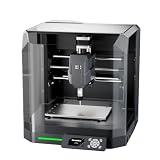
- Pre-Assembled Desktop CNC for Learning & DIY Projects: Ships factory-assembled to reduce setup time and help users get started faster with CNC workflows. Compatible with Genmitsu App, Fusion 360, Candle, Easel, and Carveco for flexible engraving and carving projects.
- Auto Z-Probing & Height Mapping Support: Supports automatic Z-probing and surface mapping workflows to assist with PCB milling, engraving, and uneven material setup. Proper calibration and conductive probe connection are required for optimal probing performance.
- Designed for Wood, Acrylic, PCB & Light-Duty Metal Projects: Suitable for engraving and light carving applications on wood, acrylic, PCB boards, plastics, and selected soft metals using appropriate tooling and machining parameters.
- One-Piece Frame for Stable Engraving Performance: Built with a reinforced integrated frame structure to improve stability during desktop CNC carving and engraving operations. Ideal for hobby projects, prototyping, maker workshops, and creative CNC applications.
- Enclosure Design with Dust & Noise Reduction: Includes a protective enclosure designed to help contain dust and reduce operating noise. The cover-open stop function pauses machine operation when the enclosure is opened for additional user safety.
Flat engraving cutters
Flat PCB engraving cutters provide a more predictable cutting width and are common on dedicated PCB mills, but they can be fragile and still require accurate Z control.
What’s actually slowing this PC down?
Pick the symptom - the matching free tool is one click away.
Tool diameter
Use the largest cutter that fits between features. Bantam lists 0.003-inch and 0.005-inch PCB engraving bits for isolation and a 1/32-inch flat end mill as a common choice for holes and outlines. Smaller 1/64-inch tools may be needed for restricted geometry, but they are slower and more breakable.
There is no universal feed rate, spindle speed, or depth of cut. Settings depend on cutter type and diameter, included angle, board material, copper thickness, spindle runout, frame rigidity, and controller limits. Start with a test coupon and adjust one variable at a time.
Independent reader supportYour contribution helps us test, update, and keep practical guides available for everyone.The complete milling procedure
1. Prepare and verify the design
Use a generous grid, wide traces, increased clearances, large pads, and practical drill sizes. Add registration holes for a double-sided board and tabs to keep the outline attached during machining.
2. Inspect fabrication data
Open the Gerbers and drill file together. Confirm origin, scale, layer orientation, closed outline, and drill placement before generating G-code.
Do these 3 things before closing this tab:
1Scan for outdated or missing drivers - takes under a minute2Repair Windows errors before they cause bigger problems3Fix the driver behind crashes, sound loss and screen glitches3. Preview the toolpaths
Inspect isolation, clearing, drilling, and profile operations separately. Look for missing isolation, cut-away pads, incorrect offsets, and unsupported commands.
4. Fixture and surface-map the blank
Hold the board uniformly against a flat surface. Probe or map it if possible, then set Z-zero on the actual copper surface.
5. Mill isolation and copper-clearance areas
Use the appropriate engraving tool. Stop if the board shifts, the cutter catches, or the isolation appears inconsistent.
6. Drill holes
Confirm the drill tool, origin, and hole diameters. Drill after isolation unless your machine’s documented workflow requires another sequence.
7. Cut the outline last
Leaving the board attached during earlier operations reduces movement and registration errors. Use tabs when the profile would otherwise release the board.
Best Value

- START YOUR CNC JOURNEY – The Genmitsu 3018-PRO is a compact desktop CNC router machine designed for beginners, makers, and DIY projects. Its upgraded assembly reduces setup complexity while the raised base improves stability, giving you an approachable way to learn CNC carving, engraving, and milling
- CREATE WITH MULTIPLE MATERIALS – Take on CNC projects in wood, acrylic, PVC, plastic, PCB, and soft aluminum with the right bits and cutting settings. From signs and custom parts to circuit board prototypes, this 3-axis CNC milling machine gives makers room to explore different applications
- PROVEN GRBL CONTROL – Built around open-source GRBL control for a flexible CNC workflow with extensive community resources. Use Candle to control movement and run G-code files, making it easier to learn the fundamentals of CNC machining and move from your first test cut to custom projects
- COMPACT SIZE, PRACTICAL WORKSPACE – The 300 x 180 x 45 mm XYZ working area provides useful capacity for small woodworking, engraving, PCB milling, and prototype projects without taking over your workbench. A practical mini CNC machine for home workshops, classrooms, and maker spaces
- WORK WITH OR WITHOUT A COMPUTER – The included offline controller lets you operate basic CNC functions and run compatible G-code files without keeping a computer connected. Use computer-based GRBL control when you want a more complete workflow, giving you flexibility for different projects and setups
8. Clean and inspect
Vacuum debris rather than blowing it into the air. Inspect every channel and drilled hole under magnification. Look for copper whiskers, burrs, delamination, and lifted pads.
9. Electrically test the board
Check continuity along every trace and verify that supposedly isolated nets are not shorted. Check for shorts to ground before applying power. Remove adhesive residue and clean the board before soldering.
Double-sided PCB milling
Double-sided milling is possible but significantly more difficult. The board must be flipped with accurate X/Y registration, the bottom layer must be mirrored correctly, the height change from tape or the fixture must be accounted for, and holes must align with pads on both sides.
Free tools Windows power users keep installed
One-click scans. No signup required.
A reliable approach is to use two fixed registration pins. Drill registration holes before flipping, define the flip axis explicitly, keep the origin consistent, and verify the bottom layer in a viewer with an asymmetric reference feature. Some workflows also require the tape-thickness value so the software can compensate for the board’s changed height; see Bantam’s double-sided board guidance.
Begin with a simple two-sided coupon, not a dense project board. If the circuit can be made single-sided with a few jumpers, that is often the more dependable home solution.
Safety
Mechanical safety
- Use an enclosure where possible.
- Keep hands, hair, loose clothing, and jewellery away from the spindle.
- Never reach into a moving machine.
- Know how pause, stop, and emergency-stop controls behave.
- Do not leave the machine unattended.
- Stop immediately if the board shifts or the cutter catches.
Dust and cleanup
Prefer FR-1 for home use. Use local extraction and suitable filtration, vacuum debris, and clean the machine and surrounding area afterward. Do not blow PCB dust around the room. FR-4 requires substantially stronger controls because of fiberglass-containing dust; a respirator alone is not a complete control strategy.
Soldering and chemicals
Milling avoids chemical etchant, but soldering can produce fumes and may involve lead-containing solder, flux, isopropyl alcohol, and adhesive removers. Ventilate the soldering area separately, wash hands, and handle lead-contaminated waste appropriately.
Quick wins for a faster PC:
Repair Windows errors before they cause bigger problemsFix Now →Fix the driver behind crashes, sound loss and screen glitchesFind Drivers →Clear out junk files and repair common Windows errorsFree Scan →Troubleshooting common failures
| Symptom | Likely causes | Recovery |
|---|---|---|
| Copper remains between traces | Z-zero too high, bowed board, damaged cutter, insufficient isolation, or incorrect CAM settings. | Stop, inspect and test continuity, then re-zero or map the surface, add an isolation pass, or replace the cutter. |
| Traces are cut or too thin | Cutter too large, V-bit too deep, or clearance too small. | Increase design clearance, correct depth, and use a smaller cutter only where necessary. Redesign if reliability is marginal. |
| Tool breaks | Excessive depth, unsuitable feed, board movement, plunge, collision, runout, or unsuitable material. | Inspect workholding, tool length, Z-zero, and the toolpath. Test shallowly on scrap before restarting. |
| Drills are off-center | Board shift, wrong origin, poor registration, mirroring error, backlash, or mismatched drill and Gerber origins. | Overlay the drill file, verify coordinate settings, calibrate the machine, use registration pins, and enlarge annular rings. |
| Bottom layer is wrong | Missing or duplicated mirroring, or an incorrect flip axis. | Preview the bottom layer with asymmetric text or a coupon and confirm exactly where mirroring occurs. |
| Outline cuts into circuitry | Incorrect profile offset, open or duplicated outline, or missing tabs. | Use a closed outline, inspect the cutter centreline, correct tool compensation, add tabs, and profile last. |
| Pads lift or copper delaminates | Excessive depth, dull tool, heat, weak fixturing, poor blank, or undersized geometry. | Improve workholding, use a sharp tool, reduce cutting aggression, and redesign with larger pads and rings. |
When ordering a PCB is better
Manufactured boards are usually the better option when you need plated through-holes, solder mask, silkscreen, fine-pitch components, controlled dimensions, two or more layers, multiple copies, or a board intended for external users or sale. They also remove much of the machine setup, dust control, inspection, and rework burden.
Home milling is most valuable when the board is simple, the iteration is urgent, you already own suitable equipment, or learning CNC is part of the project. Do not assume it is cheaper: compare machine ownership, cutters, blanks, setup time, failed boards, manual vias, and your time against a live fabrication quote.
Before buying a machine, answer these questions:
- Can the machine reliably achieve the smallest trace and clearance?
- Can it keep a blank flat or map its surface?
- Can the board be held without obstructing the toolpath?
- Is dust extraction adequate for the chosen material?
- Does the software accept your Gerbers and Excellon files?
- Can the controller run the required G-code?
- Can you register a flipped board accurately?
- Can the design avoid vias or provide manual connections?
- Is the quantity small enough to justify manual processing?
- What is the cost if the first board fails?
For software, start with KiCad for design and fabrication output. Use an integrated PCB workflow if your machine supports it, or evaluate pcb2gcode for a scriptable Gerber-to-G-code process. Always verify the post-processor on your controller before cutting copper.
Quick Recap
Product prices and availability are accurate as of the date/time indicated and are subject to change. Any price and availability information displayed on Amazon at the time of purchase will apply.
Do these 3 things before closing this tab:
1Clear out junk files and repair common Windows errors2Scan for outdated or missing drivers - takes under a minute3Repair Windows errors before they cause bigger problems
