Do these 3 things before closing this tab:
1Fix the driver behind crashes, sound loss and screen glitches2Clear out junk files and repair common Windows errors3Scan for outdated or missing drivers - takes under a minuteThe best intercom system for a home is the one that matches how the house is actually used. A kitchen-to-kids-room announcement is a different problem than answering a front gate from the primary suite, unlocking a side door for a contractor, or checking on an aging parent in an in-law suite.
On our job sites, we treat intercom planning as part of the home’s low-voltage design, not as a last-minute gadget decision. Wireless smart displays and video doorbells are fine for many homes. Hardwired and PoE/IP systems are better when reliability, clean placement, cameras, gates, door release, or long-term serviceability matter.
For 2026 budgeting, small plug-in wireless intercom kits often run about $35 to $200. Smart speaker or display setups commonly land around $50 to $250 per station. Video doorbells are usually about $80 to $250 per entry before accessories or cloud plans. Professionally installed whole-home intercom systems can range from about $1,500 to $15,000 or more depending on wiring, stations, cameras, network gear, and access-control features.
If you are building new or opening walls during a remodel, the most valuable decision is usually not which screen to buy. It is whether to rough in Cat6, conduit, power, and a structured media location while the framing is exposed. Cable is inexpensive while walls are open. It gets expensive after drywall, tile, masonry, or exterior finishes are complete.
#1 Best Overall

- 【Easy to Use】- Experience the simplicity and power of our full-duplex wireless intercom. Just plug in and start communicating instantly. No complicated setup or pairing is required. Just press the channel button and start talking. It's that simple! No need to read the instructions. Specifically designed to be user-friendly. ✨Note: "Wireless" in the title means wireless communication; intercoms can only be plugged in and cannot use batteries.
- 【Superior Sound Quality】- Enjoy crystal-clear sound with our high-quality wireless intercom system. Whether you're working in an office or at home, Hosmart intercom guarantees stable and clear communication. Renowned for its exceptional sound quality, the HY812 intercom stands out among all other intercoms in our lineup. Thanks to its outstanding audio quality, it earned the name UltraSpeak.
- 【Real-Time Two-Way Communication】- Connect and converse hands-free with our unique design. No need to hold a button to talk and release to listen. Whether you're at home or in the office, our wireless room to room intercom ensures quick, easy, and effective communication. Enjoy a communication distance of approximately 1200 ft(in the open outdoor environment).
- 【Use in Different Places】- You can use our home intercom system in various places throughout your house, such as the bedroom, kitchen, living room, garage, and basement! Additionally, this full-duplex wireless intercom is perfect for use in offices, restaurants, back kitchens, hotels, reception areas, and more. The Hosmart intercom is designed to meet your multi-scene communication needs and serve as your reliable assistant.
- 【Hands-Free Auto Answer】- HY812 now features Auto Answer mode. Simply long-press the Answer button to activate it, and calls will be answered automatically after 5 sec of ringing. No need to rush over or press any buttons. Stay connected while keeping your hands free, even during your busiest moments. Note✨: Your purchase includes a hassle-free 30-day money-back guarantee. If you're not satisfied with your intercoms, we offer free returns.
Best Home Intercom System by Use Case
There is no single best intercom for every house. A 1,600-square-foot ranch with a front porch needs a different solution than a 7,000-square-foot home with a gate, detached garage, office, workshop, pool house, and multiple exterior entries.
| Best fit | Recommended system type | Typical 2026 cost | Where it works best |
|---|---|---|---|
| Budget room-to-room communication | Plug-in or battery wireless intercom kit | $35-$200 for small multi-unit sets | Small homes, workshops, garages, temporary setups |
| Smart-display household calling | Amazon Echo Show-style or similar smart displays | $50-$250 per station | Kitchens, offices, kids’ areas, casual announcements |
| Front-door communication | Video doorbell intercom | $80-$250 per entry device, plus accessories and plans | Porches, package zones, everyday visitor screening |
| Remodel or new-home room stations | Hardwired 2-wire or Cat6 intercom | $1,500-$7,000 installed for many residential scopes | Homes where walls are open or attic/crawl access is good |
| Premium home, gate, or detached structure | PoE/IP intercom and access-control system | $7,000-$15,000+ installed | Large homes, estates, gates, cameras, door strikes, multiple buildings |
| Aging-in-place support | Hybrid room stations, displays, and entry video | $1,500-$10,000+ depending on scope | Primary suites, bathrooms, kitchens, in-law suites, caregiver communication |
For most homeowners, the right answer is a hybrid. A video doorbell may handle the front porch. Smart displays may cover kitchen and office announcements. A hardwired or PoE backbone may support gates, exterior doors, cameras, access points, and future upgrades.
Wireless Smart Intercoms: Cheap, Flexible, and Limited by the House
Wireless intercom kits are the lowest-cost way to add room-to-room communication. They are useful in garages, detached workshops near the house, basements, and homes where a full wiring project does not make sense. Basic multi-station kits commonly cost about $35 to $200.
The tradeoff is reliability. Wireless range on the box rarely matches real-world range inside a finished house. Walls, insulation, brick, stone, metal lath, appliances, mirrors, ductwork, Wi-Fi congestion, and router placement all matter. A device that works across open air may struggle through three interior walls and a masonry fireplace.
Wireless intercoms can be a good fit when you need simple voice communication and do not care about video, app access, door release, or clean wall-mounted controls. They are also easy to replace. If a $90 kit fails in five years, replacement is usually simpler than repair.
Where wireless makes sense
Use wireless systems for lower-risk communication points: garage to kitchen, upstairs to basement, home office to main living area, or a workshop where running cable would require drywall repair. They are also useful during phased remodels when the permanent wiring plan is not finished yet.
Where wireless falls short
We avoid relying on wireless-only intercoms for gates, primary security entries, large homes with masonry or steel framing, and homes where the homeowner expects the system to work during network problems. Battery-powered stations also add maintenance. Someone has to charge or replace batteries, and that usually happens after the device has already gone dead.
Smart Displays as Home Intercoms
Smart displays, such as Echo Show-style devices, have become common substitutes for traditional room intercoms. They can make household announcements, support voice or video calling, and allow drop-in style communication when the account and privacy settings allow it. They are attractive because the hardware is inexpensive and familiar.
Quick wins for a faster PC:
Fix the driver behind crashes, sound loss and screen glitchesFind Drivers →Clear out junk files and repair common Windows errorsFree Scan →For budgeting, expect roughly $50 to $250 per station depending on screen size and brand. A practical setup might place one display in the kitchen, one in the primary suite, one in a home office, and one in a kids’ homework area. That can create a useful communication network for a few hundred dollars before any mounts, outlet changes, or network upgrades.
The construction detail that gets missed is power placement. Countertop displays are easy, but wall-mounted displays need outlets in the right place. If the device is meant to sit in a mudroom, pantry command center, or kitchen desk area, we coordinate outlet height, cabinet clearances, Wi-Fi coverage, and sightlines before finishes go in.
Privacy and account setup matter
Smart displays depend on cloud accounts, internet service, app permissions, household profiles, and privacy settings. That is fine for many families, but it is not the same as a closed hardwired intercom. Before installing displays in bedrooms, kids’ rooms, or caregiver spaces, decide who can call in, who can drop in, whether cameras are enabled, and how notifications are handled.
Rank #2

- 【Easy to Use】- Experience the simplicity and power of our full-duplex wireless intercom. Just plug in and start communicating instantly. No complicated setup or pairing is required. Just press the channel button and start talking. It's that simple! No need to read the instructions. Specifically designed to be user-friendly. ✨Note: "Wireless" means wireless communication; intercoms can only be plugged in and cannot use batteries.
- 【Superior Sound Quality】- Enjoy crystal-clear sound with our high-quality wireless intercom system. Whether you're working in an office or at home, Hosmart intercom guarantees stable and clear communication. Thanks to its outstanding audio quality, it earned the name UltraSpeak.
- 【Real-Time Two-Way Communication】- Connect and converse hands-free with our unique design. No need to hold a button to talk and release to listen. Whether you're at home or in the office, our wireless room to room intercom ensures quick, easy, and effective communication. Enjoy a communication distance of approximately 1200 ft(in the open outdoor environment).
- 【Use in Different Places】- You can use our home intercom system in various places throughout your house, such as the bedroom, kitchen, living room, garage, and basement! Additionally, this full-duplex wireless intercom is perfect for use in offices, restaurants, back kitchens, hotels, reception areas, and more. The Hosmart intercom is designed to meet your multi-scene communication needs and serve as your reliable assistant.
- 【Our Promise to You】- Your purchase includes a hassle-free 30-day money-back guarantee. If, for ANY REASON, you're not satisfied with your brand-new intercom, we offer free returns. Our 24/7 customer service is always here to assist you.
Network quality matters more than device specs
If the Wi-Fi is poor, the intercom experience will be poor. A strong smart-display setup often requires better access point placement, not more expensive displays. In new homes, we prefer ceiling-mounted access points connected by Cat6 back to a structured media panel. In larger homes, relying on one router in a closet is asking for dead zones.
Video Doorbells: The Best Front-Door Intercom for Many Homes
For front-door communication, a video doorbell is often the most practical intercom. It lets the homeowner speak with visitors, see deliveries, and answer the door from a phone or compatible indoor display. Current mainstream video-entry hardware sits around $80 to $250 per doorbell, with common accessories such as plug-in adapters around $25 and angle kits around $10.
Video doorbells are a strong fit when the main need is visitor screening, package awareness, and two-way talk at one or two exterior doors. They are less effective as a true whole-home intercom because they do not solve room-to-room communication by themselves.
Subscription cost is part of the real price. In 2026, common Ring-style cloud plans are about $4.99 per month or $49.99 per year for one device, $9.99 per month or $99.99 per year for multiple devices, and about $19.99 per month or $199.99 per year for higher-tier features. Other major camera ecosystems commonly charge monthly fees for cloud storage, advanced detection, or longer video history.
Placement details we check before siding and trim
Doorbell placement should be coordinated before exterior finishes are installed. We check door swing, trim width, porch columns, lighting glare, package drop zones, stair approach, siding profile, and accessibility height. A clean install on lap siding, brick, stone, or stucco may require a mounting block, wedge, angle kit, back box, or carefully planned conduit.
What’s actually slowing this PC down?
Pick the symptom - the matching free tool is one click away.
For a front door, the camera should see faces, not just hats and shoulders. It should also avoid being blinded by porch lights or direct western sun. If the porch is deep, dark, or side-lit, lighting placement matters as much as camera resolution.
When a video doorbell is not enough
A video doorbell is not a complete solution for a long driveway gate, a side service entry with door release, or a home where multiple interior stations need to answer calls without phones. In those cases, a hardwired or PoE/IP intercom is usually a better foundation.
Hardwired 2-Wire and Cat6 Intercom Systems
Hardwired intercoms still make sense, especially during new construction and remodels. A 2-wire residential video intercom can be a practical choice for a front door station and one or two answering stations. Cat6-based systems create more flexibility for IP devices, cameras, access points, and future equipment.
Aiphone’s JO Series, for example, is positioned for homes and small offices and supports up to 2 door stations, 2 answering stations, and up to 8 mobile apps. That type of system fits a homeowner who wants dedicated entry communication without building a full estate-scale access-control network.
Free tools Windows power users keep installed
One-click scans. No signup required.
Installed costs vary widely. A basic hardwired audio/video intercom serving one entry and a few stations might run about $1,500 to $3,500. Larger hardwired or video systems commonly land around $3,500 to $7,000. Finished-wall retrofit work can push costs higher because fishing cable, cutting access holes, patching drywall, repainting, and working around masonry or tile all add labor.
2-wire versus Cat6
Two-wire systems can be efficient for simple door-to-station communication. They often reduce cabling complexity and are good for defined residential layouts. Cat6 is more flexible. It can support IP intercom stations, cameras, wireless access points, network devices, and future technology that has not been selected yet.
When walls are open, we generally favor Cat6 or Cat6A rough-in to likely device locations even if the homeowner starts with basic hardware. Current contractor-published 2026 benchmarks put Cat6 or Cat6A rough-in at about $150 to $250 per drop when walls are open. After drywall, retrofit drops can jump to roughly $400 to $750 or more each depending on access and repair work.
Rank #3

- Upgraded Intercom: Our home intercom system is as easy and fast as your mobile phone. Intercom Effortlessly connects and converses hands-free, with no need to hold down a button to talk. For your convenience, we pre-installed intercoms wireless for home so that it works right out of the box
- Technical Innovation: Intercoms Wireless for Home has passed FCC certification and features 2 independent group channels (A/B), each supporting up to 9 intercoms. With high-fidelity processing, they deliver crystal-clear audio and block interference, ensuring stable, private communication for a reliable experience
- Multi-Function Intercom: Intercoms Wireless for Home has 7 main functions: Full Duplex Function, Automatic Answer, Silent Mode, Replay Function, Good Range, Clear Sound, and Group Call to meet your different communication requirements in different situations. Group function (conference call) can call all the stations in the portable intercom. Home intercom system wireless can real-time two-way communication, which is convenient for business offices and hotel
- Wide Using Range: Home intercom system wireless transmission at a safe frequency will not interfere with other devices. The intercom system allows you to communicate easily and effectively at home or in the office. Wireless intercoms for home are widely used in homes, offices, hotels, restaurants, hospitals, banks, stores, and other places
- Wireless Intercom System for Home: There are 2 slots on the back of the home intercom system, which can be easily installed. Four rubber foot pads that do not scratch any surface. Our intercom is easy to use, with detailed pictures and videos to explain the operation of the intercom
Plan stations around daily routines
More stations are not always better. The highest-value locations are usually the kitchen, mudroom, primary suite, home office, kids’ common area, garage, workshop, and exterior entries. Every bedroom does not need a station in most homes. Too many devices can add cost, wall clutter, notifications, and future service points without improving daily use.
PoE/IP Intercoms for Premium Homes, Gates, and Detached Buildings
PoE/IP intercoms are the premium choice when reliability and integration matter. PoE means Power over Ethernet, so one cable can carry both network data and power to a station when connected to the right switch or injector. That makes device placement cleaner and troubleshooting easier than juggling separate power supplies.
Aiphone’s IX/IXG platform is an example of a larger IP-based system family that can scale far beyond a typical single-family installation. In residential work, that kind of platform becomes relevant for estates, multifamily-style layouts, gates, detached garages, service entries, camera integration, and controlled door release.
Premium PoE/IP systems with gate or door release, network gear, cameras, multiple interior stations, and access-control coordination can reach $7,000 to $15,000 or more in large or complex homes. The hardware is only part of the cost. The design has to include cable pathways, switch capacity, backup power, weather-rated stations, door hardware, gate operators, and service access.
Distance limits for gates and outbuildings
Standard copper Ethernet is normally limited to 100 meters, or 328 feet, between active devices. That number matters early. If the gate is 600 feet from the house, you cannot just pull one long Cat6 cable and expect a standard PoE station to work correctly.
Recommended Free Tools
Long driveway and detached-structure designs may require fiber, conduit, Ethernet extenders, intermediate switches, local power, surge protection, or a different network topology. These decisions should be made before trenching. Reopening a driveway trench because the intercom design was an afterthought is an expensive mistake.
Backup power and labeling
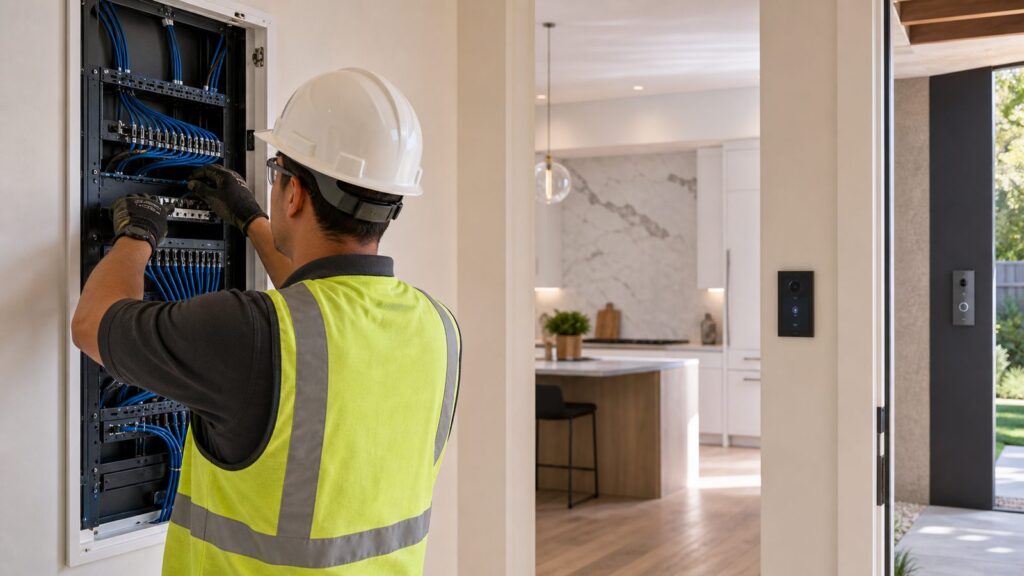
For premium systems, we put the network closet or structured media panel on a UPS. If the intercom, PoE switch, router, and access-control hardware all lose power during a short outage, the system is only as reliable as the weakest plug-in transformer. We also label every drop. A beautiful rack with unlabeled blue cables is slow and expensive to service later.
What to Prewire During New Construction or a Remodel
If you are building or remodeling, prewire first and choose devices second. That is the practical builder’s answer. The specific screen or door station you buy in 2026 may be replaced in 2031. Good cable pathways, conduit, boxes, and a documented media panel can serve the house for decades.
For a typical new home, we look at Cat6 drops for likely intercom stations, doorbell or door camera locations, exterior camera corners, ceiling wireless access points, TVs, offices, gate-control interfaces, garage work areas, and any detached structures. We also think about where a future homeowner might want a keypad, smart lock, door strike, or package camera.
Outdated Drivers Are Slowing You Down
One free scan finds every outdated or missing driver and matches the right update for your exact hardware.Free scan · exact hardware matchPC Slower Than It Used to Be?
A free scan shows the junk files, broken settings and background clutter dragging Windows down - then fixes them in one click.Free scan · Windows 10 & 11Whole-home low-voltage prewire packages commonly run about $1,500 to $8,000 for typical Ethernet scopes. Larger 30- to 40-drop packages with cameras, speakers, and access-control wiring may run about $6,000 to $12,000. Comparable retrofit work in complex finished homes can exceed $18,000 to $30,000 once access, drywall, paint, masonry, and finish repair are included.
Recommended rough-in locations
Good intercom prewire locations include the kitchen command area, mudroom, primary suite, home office, kids’ common area, garage entry, workshop, front door, side service door, rear patio door, gate pedestal, and detached garage. We also plan ceiling access points because intercom performance depends heavily on network coverage.
Use conduit where change is likely
Conduit is useful at exterior entries, gate pedestals, media panels, and places where future equipment may change. A short conduit path from a doorbell location to an accessible basement, attic, or structured panel can save major repair work later. For long driveways, conduit size, pull boxes, sweeps, burial depth, local code, and separation from power should be coordinated before excavation.
Rank #4
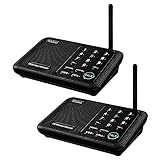
- [ Excellent Signal ] Clear sound quality and long range. An enhanced signal with 5280 feet range helps ensure crisp sound quality. The most trusted wireless intercom system for home!
- [ 10 Channel and 3 Digital Code ] 10 channels and 3 digital codes in a secure wireless intercom system. Features an enhanced anti-interference and can work with other intercoms with the same digital channel code!
- [ Wuloo Brand ] Wuloo are specialized in FM / ASK /FSK wireless techology for more than 20 years. Package equiped with quick start guide and detailed manual.
- [ Easy to Use with Detailed Manual ] Features include Monitor, Talk, VOX, Group, and Calling function. Adjustable volume too! This intercom system is easier to use than others with user-friendly multi-functions and included step-by-step instructions!
- [ Supported by Power Bank for Outdoor ] This device is compatible with Power Bank (5V 1A) making it easy to take these intercoms any place you want.
Cost Breakdown for 2026
Intercom pricing is driven by the number of stations, audio versus video, wired versus wireless design, open-wall versus retrofit labor, finish materials, distance to gates or detached buildings, and whether the system includes door release or camera integration.
| Project type | Typical 2026 budget | What is usually included |
|---|---|---|
| Simple wireless room intercom | $35-$200 | Small plug-in or battery multi-unit set, usually DIY |
| Smart-display communication setup | $50-$250 per station | Display hardware, app setup, household calling, announcements |
| Basic wireless or smart-home setup installed | $300-$1,500 | Device placement, account setup, Wi-Fi checks, mounting, minor accessories |
| Video doorbell entry intercom | $80-$250 per entry device | Doorbell camera hardware, two-way talk, app access before plans |
| Basic hardwired intercom | $1,500-$3,500 | One entry and a few room or answering stations |
| Larger hardwired video system | $3,500-$7,000 | Multiple stations, more wiring, video, finish coordination |
| Premium PoE/IP intercom and access control | $7,000-$15,000+ | Network gear, PoE stations, gates, cameras, door release, programming |
Ongoing costs also matter. Cloud recording and smart detection plans can add about $50 to $200 per year per household depending on provider and tier. Battery devices add charging and replacement maintenance. Premium access-control systems may require app licensing, firmware support, service visits, or monitoring integration.
The most common cost surprise is finished-wall retrofit labor. Pulling one cable across an open stud bay is simple. Fishing that same cable through insulation, fire blocking, plaster, tile, masonry, or a finished exterior wall is a different job. That is why rough-in timing is so important.
When to DIY and When to Hire a Pro
DIY is reasonable for plug-in intercom kits, countertop smart displays, and many battery video doorbells. A careful homeowner can usually handle account setup, basic mounting, Wi-Fi pairing, and device naming in a few hours.
Hire a pro when the work touches permanent wiring, exterior penetrations, door strikes, gate operators, structured media panels, PoE switches, attic or crawlspace cable runs, masonry, stucco, or finished-wall fishing. Also hire a pro when the intercom is part of a larger security, access-control, or networking plan.
The Tool Desk
Outbyte PC Repair FREEClear out junk files and repair common Windows errorsFree Scan →Outbyte Driver Updater FREEScan for outdated or missing drivers - takes under a minuteDriver Scan →Good DIY projects
Good DIY projects include placing smart displays in rooms with existing outlets, installing a battery-powered doorbell on wood trim, setting up announcements between smart speakers, or testing a wireless intercom kit between a garage and kitchen. The cost risk is low, and mistakes are usually reversible.
Good pro projects
Professional installation is the better fit for hardwired video stations, Cat6 rough-in, PoE/IP intercoms, gate stations, door-release hardware, exterior conduit, and any work where a bad hole in brick, stone, tile, or siding would be expensive to repair. A pro should also verify that the network, switch, transformer, and power backup are sized correctly.
Safety, Permits, and Privacy Notes
Low-voltage does not mean no rules. Intercom, signaling, power-limited, and remote-control circuits are covered by electrical code requirements, and local permitting or licensing rules vary by state and city. Some jurisdictions allow certain low-voltage work without a permit. Others require a licensed low-voltage contractor or electrician, especially when wiring is concealed in walls, tied into access control, or coordinated with life-safety systems.
National Electrical Code concepts around Class 2, power-limited, and signaling circuits matter because cable type, separation from line-voltage wiring, firestopping, box fill, support, and penetrations are not just cosmetic details. In new construction, the cleanest path is to coordinate intercom wiring with the electrical and low-voltage plans before inspection stages.
Free tools Windows power users keep installed
One-click scans. No signup required.
Privacy is another real design issue. Video and audio recording laws vary by state, and audio recording can be more sensitive than video. A doorbell camera pointed at your porch is different from recording a neighbor’s private area or capturing conversations without proper consent. For interior intercoms, be careful with bedrooms, bathrooms, caregiver suites, and children’s rooms. The best system design includes privacy settings, camera disable options, account access control, and clear household expectations.
Our Practical Recommendation Framework
For a small finished home, start with a video doorbell at the main entry and smart displays or speakers in the kitchen, office, and primary suite. Expect a few hundred dollars in hardware, plus possible subscription costs if you want cloud video history.
Best Value

- 【Easy to Use】- Experience the simplicity and power of our full-duplex wireless intercom. Just plug in and start communicating instantly. No complicated setup or pairing is required. Just press the channel button and start talking. It's that simple! No need to read the instructions. Specifically designed to be user-friendly. ✨Note: "Wireless" in title means wireless communication; intercoms can only be plugged in and can not use batteries.
- 【Superior Sound Quality】- Enjoy crystal-clear sound with our high-quality wireless intercom system. Whether you're working in an office or at home, Hosmart intercom guarantees stable and clear communication. Renowned for its exceptional sound quality, the HY812 intercom stands out among all other intercoms in our lineup. Thanks to its outstanding audio quality, it earned the name UltraSpeak.
- 【Real-Time Two-Way Communication】- Connect and converse hands-free with our unique design. No need to hold a button to talk and release to listen. Whether you're at home or in the office, our wireless room to room intercom ensures quick, easy, and effective communication. Enjoy a communication distance of approximately 1200 ft(in the open outdoor environment).
- 【Use in Different Places】- You can use our home intercom system in various places throughout your house, such as the bedroom, kitchen, living room, garage, and basement! Additionally, this full-duplex wireless intercom is perfect for use in offices, restaurants, back kitchens, hotels, reception areas, and more. The Hosmart intercom is designed to meet your multi-scene communication needs and serve as your reliable assistant.
- 【Our Promise to You】- Your purchase includes a hassle-free 30-day money-back guarantee. If, for ANY REASON, you're not satisfied with your brand-new intercoms, we offer free returns. We are always here to assist you.
For a remodel with open walls, rough in Cat6 to the front door, kitchen, mudroom, primary suite, office, garage, exterior camera points, and ceiling access point locations. Even if you install inexpensive devices now, the wiring gives you better options later.
For a large custom home, design a PoE/IP backbone from the start. Put the structured media panel in a serviceable location, size the PoE switch for future devices, add UPS backup, label every cable, and plan long gate or outbuilding runs before trenching. Use dedicated intercom stations where reliability matters and smart displays where convenience is enough.
For aging-in-place, prioritize communication points over gadget count. Good locations include the primary suite, bathroom-adjacent hallway, kitchen, favorite sitting area, garage entry, and caregiver or guest suite. The system should be simple to answer, loud enough to hear, mounted at accessible heights, and backed by reliable Wi-Fi or wired networking.
The best intercom system is not always the most expensive one. It is the one that fits the house, keeps ownership costs clear, respects privacy, and can be serviced without tearing apart finished work. That starts with planning the wiring and network before the final device decision.
Frequently Asked Questions
What is the best intercom system for a large house?
For a large house, a PoE/IP intercom system is usually the best foundation, especially if the home has gates, detached garages, cameras, or door-release hardware. Standard copper Ethernet is limited to 328 feet between active devices, so long gate runs may need fiber, extenders, conduit, or local network equipment.
Is a wired or wireless home intercom better?
Wired intercoms are better for reliability, clean placement, and long-term serviceability. Wireless intercoms are cheaper and easier to add to finished homes, but performance depends on walls, Wi-Fi congestion, appliances, masonry, metal, and router placement.
The Tool Desk
Outbyte Driver Updater FREEFix the driver behind crashes, sound loss and screen glitchesFind Drivers →Outbyte PC Repair FREERepair Windows errors before they cause bigger problemsFix Now →How much does it cost to install a home intercom system in 2026?
Simple wireless kits often cost $35-$200. Smart displays usually run $50-$250 per station. Video doorbells are commonly $80-$250 per entry. Professionally installed whole-home systems typically range from about $1,500-$15,000 depending on wiring, stations, cameras, gates, and access control.
Can I use Alexa, Google Nest, or smart speakers as a home intercom?
Yes. Smart speakers and displays can work well for announcements, room-to-room calling, and casual household communication. They depend on internet service, account settings, Wi-Fi coverage, outlet locations, and privacy permissions, so they are not the same as a dedicated hardwired intercom.
Do I need a permit to install a low-voltage intercom system?
Permit and licensing rules vary by city and state. Battery or plug-in devices usually need no permit, but concealed low-voltage wiring, exterior penetrations, door strikes, gate controls, and structured wiring may require a licensed contractor or inspection.
What should I prewire for during new construction or a remodel?
Prewire Cat6 to likely intercom stations, doorbell and camera locations, ceiling access points, TVs, offices, garages, gate controls, and detached structures. Open-wall Cat6 rough-in commonly costs $150-$250 per drop, while retrofit drops after drywall can cost $400-$750 or more each.
Quick wins for a faster PC:
Scan for outdated or missing drivers - takes under a minuteDriver Scan →Repair Windows errors before they cause bigger problemsFix Now →Fix the driver behind crashes, sound loss and screen glitchesFind Drivers →Quick Recap
Product prices and availability are accurate as of the date/time indicated and are subject to change. Any price and availability information displayed on Amazon at the time of purchase will apply.