The Tool Desk
Outbyte PC Repair FREEClear out junk files and repair common Windows errorsFree Scan →Outbyte Driver Updater FREEFix the driver behind crashes, sound loss and screen glitchesFind Drivers →If your MaxxFan will not start, its remote is unresponsive, or the lid closes in wet weather, first identify the exact model. MaxxFan Deluxe versions differ in controls and features, so a fix that applies to one unit may not apply to another. Then check the relevant power supply and controls before assuming a motor or circuit board has failed.
Why is my MaxxFan not turning on?
MaxxFan roof fans use 12-volt power. Maxxair lists a blown fuse or tripped breaker, loose wiring connections, a faulty switch or remote, and motor or circuit-board failure among possible causes of a fan that will not turn on. These symptoms do not, by themselves, identify which component is at fault.
- Identify the model and controls. Find the model number and check whether the fan uses a keypad, remote, or both. Maxxair’s Deluxe product comparison shows that models differ in features, including speed settings, thermostat, and remote.
- Check the applicable 12-volt supply. Check the relevant fuse or breaker for the fan. If you are unsure which circuit or rating applies, consult the RV and fan documentation rather than substituting a fuse or guessing.
- Inspect accessible connections and controls. Look for a loose wiring connection and check the control that applies to your model. Avoid working on wiring unless you can do so safely.
- Use model-matched repair information if it still will not start. Maxxair’s document library lists manuals and a MaxxFan Deluxe repair parts list. The published FAQ does not provide a universal test to distinguish motor failure from circuit-board failure, so do not order a component from the symptom alone.
Why is my MaxxFan remote not responding?
First confirm that your particular model includes a remote. Some Deluxe versions do not. On remote-equipped models, the handset uses infrared and needs a clear line of sight to the ceiling unit.
- Check the remote’s battery indicator. One or zero bars means the batteries need replacing.
- Press a button while aiming the remote at the fan. The guide says the screen shows a transmission indicator when a button is pressed; a beep from the ceiling unit confirms the signal was received.
- If the fan beeps but does not do what you expect, check the selected mode and the operating guide for your model before concluding the remote is defective.
These remote instructions apply to the Deluxe remote models covered by Maxxair’s remote guide; they are not proof that every MaxxFan has a remote or the same controls.
Quick wins for a faster PC:
Fix the driver behind crashes, sound loss and screen glitchesFind Drivers →Clear out junk files and repair common Windows errorsFree Scan →#1 Best Overall

- Compatible with Maxxfan MaxxAir Deluxe RV Roof Vents 4000K 4301K 4401K 4500K 5100K 5101K 5301K 6200K 6201K 6401K 7000K 7001K 7500K 7501K 8000K 8001K 8500K 8501K 8700K 8751K 8900K 8951K 8700N 8900N
- 00-04000K,00A04301K,00A04401K,00A04501K,00-04500K,00-05100K,00-05101K,00-05301K,00-06200K,00-06201K,00-06401K,00-07000K,00-07001K,00-07500K,00-08000K,00-08001K,00-08500K,00-08501K
- 00-08700K,00-08751K,00-08900K,00-08951K,00-08700N,00-08900N
- Motor Dimensions 2-1/2"D x 3"L;Shaft Dimensions 5/16" D-Shaped x 1-1/2";Mounting Bolt Distance 2"
- K Model Fans manufactured before FEB 2012 will use 10-20966 Motor. All units manufactured after FEB 2012 will use 10-20968 Motor
Can I use a MaxxFan while it’s raining?
It depends on the model and its rain-sensor feature. On applicable models, a wet sensor turns the fan off and closes the lid. If the sensor is still wet, pressing a key produces three beeps; wait for it to dry, then press FAN ON to restart.
The operating guide also says that if the lid was opened manually, the rain sensor will not close it. Maxxair says the rain sensor on the Plus can be disabled, but warns that water may enter the RV when it is disabled. Do not assume that sensor behavior or a disable option applies to every Deluxe model; check the model-specific MaxxFan/Plus operating guide and product specifications.
Rank #2

- 𝐆𝐞𝐧𝐮𝐢𝐧𝐞 𝐎𝐄𝐌 𝐑𝐞𝐩𝐥𝐚𝐜𝐞𝐦𝐞𝐧𝐭: 10-20968 is an authentic 12V fan motor, ensuring optimal compatibility and performance for your roof vent system.
- 𝐁𝐫𝐨𝐚𝐝 𝐌𝐨𝐝𝐞𝐥 𝐂𝐨𝐦𝐩𝐚𝐭𝐢𝐛𝐢𝐥𝐢𝐭𝐲:Designed to work seamlessly with Deluxe, Plus Standard Seriesmodel fans manufactured after February 2012, 00-04000, 00A04301K, 00A04401K, 00-04500K, 00-05100K, 00-05301K, 00-06200K, 00-06401K, 00-07000K, 00-07500K providing a versatile solution for various setups.
- 𝐕𝐚𝐫𝐢𝐚𝐛𝐥𝐞 𝐒𝐩𝐞𝐞𝐝 𝐎𝐩𝐞𝐫𝐚𝐭𝐢𝐨𝐧: This DC motor supports multiple fan speeds, controlled by the fan's circuit board, allowing for customized airflow to suit your comfort needs.
- 𝐄𝐚𝐬𝐲 𝐈𝐧𝐬𝐭𝐚𝐥𝐥𝐚𝐭𝐢𝐨𝐧:Engineered for straightforward replacement, this motor allows RV owners to quickly and efficiently restore their units without extensive technical expertise.
- 𝐄𝐧𝐡𝐚𝐧𝐜𝐞𝐝 𝐃𝐮𝐫𝐚𝐛𝐢𝐥𝐢𝐭𝐲:Manufactured to meet high-quality standards, the 10-20968 fan motor offers durability and long-lasting performance, ensuring your RV's ventilation system operates smoothly for years to come.
Does MaxxFan have a thermostat or remote control?
Some MaxxFan Deluxe models have a thermostat and remote; others do not. The lineup also includes models with four or ten speeds and intake and exhaust capability. Maxxair states that the Deluxe models fit standard 14-by-14-inch roof openings, but that does not make their controls interchangeable. Check the model number against the official product comparison before treating a missing feature as a fault or choosing a replacement.
What should I do if the lid will not open or close?
Check whether your unit is manual-opening or automatic-opening, then follow its own operating guide. On the automatic-opening models covered by Maxxair’s Deluxe guide, the ceiling knob can operate the lid if RV power is lost. The guide warns not to use excessive force.
Rank #3
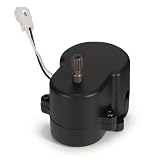
- 【Compatible With】Replacement lift motor for part numbers 1020270 and 10-20270. Compatible with Maxxair Deluxe and MaxxFan roof vents, including models 7000K–8951K and 4500K–4900K
- 【Premium Quality】Built for frequent RV vent operation, this lift motor features durable construction and reliable components designed to deliver long-lasting, stable performance
- 【Efficient Airflow Performance】The lift motor restores responsive vent operation, quickly circulating fresh air, reducing stale odors, and removing excess humidity, helping maintain a comfortable interior environment inside your RV
- 【Quiet & Smooth Operation】Designed with an optimized motor structure and noise-reduction features, it operates smoothly with low vibration and minimal noise, helping maintain a quiet and comfortable RV environment during travel, camping, or daily use
- 【Specifications】①Voltage Rating: DC 12V, ②Rated Speed: 40.5 RPM, ③Rotation Direction: CW, ④Positive Lead: White Line, ⑤Negative Lead: Black Line, ⑥Safety Certification: UL Recognized
If the lid binds or the control behaves differently from the instructions for your model, stop rather than forcing it. Maxxair’s published materials do not provide one universal stuck-lid repair procedure. See the Deluxe operating guide or consult the document library for model-matched information.
Independent reader supportYour contribution helps us test, update, and keep practical guides available for everyone.How do I clean and maintain my MaxxFan?
For screen cleaning, follow the Deluxe guide’s safety instructions before removing anything:
Rank #4

- Why Need This: This 10-20270 is a great lift motor replacement compatible with Maxxair Deluxe roof vents, prevent bad odors in your RV and keep the air fresh
- Compatibility: The 10-20270 Lift Motor is a roof vent lift motor designed for MaxxFan 7000K to 8951K, and 4500K to 4900K model roof vents
- Easy To Replace: 1. Open the 4 buckles with your hands and take off the circle 2. Remove the screws and take off the panel 3. Remove the screws on the motor and can get the old motor 4. Unplug the wire and replace it
- Worth Buying: You have to replace your RV vent when it get problem, and this is less expensive to save money and time
- Premium Quality: Each product has been tested before being sold, providing high durability and long-lasting performance with reliable solutions for your home appliances
- Turn the fan off.
- Disconnect the vehicle’s 12-volt power to the fan.
- Remove and clean the screen with mild detergent.
- Reinstall the screen before restoring power or operating the fan.
Never run the fan with the screen removed. Maxxair’s FAQ also recommends cleaning the screen regularly, wiping the blades and housing, clearing debris from the vent cover, and inspecting seals and wiring annually. Cleaning can remove an obstruction, but it does not establish that a motor or electrical component is working correctly. See the Deluxe operating guide for the applicable model’s instructions.
Where can I find the right repair parts or manual?
Use the model number to find the matching operating guide and repair parts list in Maxxair’s document library. The library provides documentation, but a symptom alone does not establish that a particular motor, board, or other part has failed. Verify the model and exact part documentation before ordering or arranging a repair.
Recommended Free Tools
Quick Recap
Product prices and availability are accurate as of the date/time indicated and are subject to change. Any price and availability information displayed on Amazon at the time of purchase will apply.




