Crashes, No Sound, or Screen Glitches?
Random freezes, missing sound and display glitches usually trace back to one bad driver. Find and replace yours safely.Free scan · under a minuteWindows Errors? Fix Them Before They Spread
Repair common Windows errors and clear accumulated junk for a smoother, more stable PC - no reinstall needed.Free scan · no reinstallThe Makera Carvera Air is a compact, three-axis desktop CNC mill designed to simplify tool changes and small-shop setup. Makera lists a 300 × 200 × 130 mm work area, a 200 W spindle rated up to 13,000 rpm, and support for materials including wood, plastics, aluminum, brass, and copper. Those features make it worth considering for small parts and project work—but “makes milling a breeze” is a description of the intended workflow, not an independently measured result.
What the Carvera Air is built to do
Makera specifies a work area of 300 × 200 × 130 mm (11.8 × 7.9 × 5.1 in) and a 200 W spindle with speeds up to 13,000 rpm. The machine has three axes; its listed 0.01 mm resolution and spindle runout of less than 0.01 mm are machine specifications, not promises of finished-part accuracy or tolerance. Makera explicitly cautions that published resolution and runout do not guarantee the dimensions or finish of a completed part.
For construction, fabrication, and workshop projects, that envelope is best understood as a small-part capacity: check the stock size, cutter clearance, and required workholding before planning a job. See Makera’s Carvera Air specifications and its Carvera comparison guide.
What materials can it mill?
Makera lists hardwoods, softwoods, MDF, plywood, plastics, composites, aluminum, brass, and copper as workable materials. Its product information marks steel and titanium as limited and not advised for prolonged processing. That distinction matters: the Air should not be treated as a general-purpose steel mill, and listed material compatibility does not establish a particular cutting rate, finish, or service life.
#1 Best Overall

- Smart and Affordable Desktop CNC Machine: Carvera Air is a smart and affordable desktop CNC machine designed for makers, hobbyists, and small workshops. Mill, carve, and engrave with ease using our intuitive Makera CAM software for creating prototypes, custom parts, jewelry, electronics projects, and DIY crafts
- Compact Size with Professional Workspace: Carvera Air features a 11.8" x 7.9" x 5.1" work area for detailed CNC machining while maintaining a compact fully enclosed footprint of 19.7" x 17.7" x 17.7". The enclosed design helps reduce noise, contain chips and dust, and improve safety for home workshops, desktops, maker spaces, labs, and small studios
- Quick Tool Changer Switch Tools in 10 Seconds: Speed up your workflow with the built-in quick tool changing system. Change milling bits in just 10 seconds, making multi-step machining faster and easier for CNC jobs that require multiple tools such as engraving, drilling, and cutting in a single project. Spend less time setting up and more time creating
- High Precision CNC with Auto Probing & Leveling: Carvera Air is designed for industrial-level accuracy in a desktop CNC machine. Spindle runout < 0.0004in, Motor resolution 0.0002in, automatic probing and surface leveling. The system automatically calibrates your workpiece, ensuring accurate cuts even on uneven materials for precision parts, PCB milling, and detailed engraving
- Smart CNC Control with Cross-Platform Software: Control your CNC machine easily with Wi-Fi or USB connectivity. Makera CAM software supports MacOS and Windows. Makera Controller compatibility includes iOS, Android, MacOS, Windows, and Linux. Carvera Air also integrates with popular CAD/CAM software including Fusion360, SolidWorks, and VCarve Pro for both beginners and professional makers
Material alone does not determine whether a job is suitable. Match the cutter geometry, tool material, feed and speed settings, workholding, and stock dimensions to the specific operation. Makera’s New to CNC introduction is a starting point for understanding the workflow.
How tool changes and software work
The Carvera Air has a quick tool changer operated by a lever and an integrated 1/8-inch collet. Makera lists optional collet sizes as well, so buyers should confirm that the chosen collet and cutter shank match. A 1/8-inch-shank CNC milling bit is compatible with the integrated collet, but compatibility by shank size alone does not mean every cutter is appropriate for every material or operation.
Rank #2
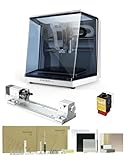
- 【Smart and Affordable】Carvera Air is a smart and affordable desktop CNC machine designed for makers, hobbyists, and small workshops. Mill, carve, and engrave with ease using our intuitive Makera CAM software. Perfect for creating prototypes, custom parts, jewelry, electronics projects, and DIY crafts.
- 【Compact Size with Professional Workspace】Carvera Air features a 11.8" x 7.9" x 5.1" work area for detailed CNC machining while maintaining a compact fully enclosed footprint of 19.7" x 17.7" x 17.7". The enclosed design helps: reduce noise/contain chips and dust/improve safety for home workshops. Perfect for desktops, maker spaces, labs, and small studios.
- 【Quick Tool Changer – Switch Tools in 10 Seconds】Speed up your workflow with the built-in quick tool changing system. Change milling bits in just 10 seconds, making multi-step machining faster and easier. Ideal for CNC jobs that require multiple tools such as engraving, drilling, and cutting in a single project. Spend less time setting up and more time creating.
- 【High Precision CNC with Auto Probing & Leveling】Carvera Air is designed for industrial-level accuracy in a desktop CNC machine. Spindle runout < 0.0004in/Motor resolution 0.0002in/automatic probing and surface leveling.The system automatically calibrates your workpiece, ensuring accurate cuts even on uneven materials.Perfect for precision parts, PCB milling, and detailed engraving.
- 【Smart CNC Control with Cross-Platform Software】Control your CNC machine easily with Wi-Fi or USB connectivity. Makera CAM software supports MacOS/Windows. Makera Controller compatibility:iOS/Android/MacOS/Windows/Linux. Carvera Air also integrates with popular CAD/CAM software including Fusion360, SolidWorks, and VCarve Pro, making it ideal for both beginners and professional makers.
Makera recommends Makera CAM for the Carvera series and says the machine is compatible with mainstream commercial and open-source CAM software. Plan to verify that the CAM software can generate suitable toolpaths and post-process output for the machine before committing to a workflow.
The Air’s lever-based quick tool change is not the automatic tool changer found on the larger Carvera, according to Makera’s comparison guide. If a project depends on unattended changes between multiple cutters, that difference is more important than the convenience implied by the word “quick.”
The Tool Desk
Outbyte Driver Updater FREEFix the driver behind crashes, sound loss and screen glitchesFind Drivers →Outbyte PC Repair FREERepair Windows errors before they cause bigger problemsFix Now →Rank #3

- Smart and Affordable Desktop CNC Machine: Carvera Air is a precise and versatile desktop CNC mill for milling, carving, and engraving. Easy to use with user-friendly software. Endless Materials | Quick Tool Changer | Auto Probing and Leveling | Optional 4th Axis and Laser supported | All-in-one CAM Software
- 4th Axis Module for Expanded Capabilities: The 4th axis module expands your capabilities, enabling cylindrical machining, double-sided objects, and 3D shapes. With a rotary work area of 3.6 inch diameter x 7.9 inch length (9.2cm x 20cm), Carvera Air supports true 4th-axis simultaneous machining for crafting detailed 3D models
- Quick Tool Changer for Efficient Workflow: Speed up your workflow with the quick tool changer, switching tools in just 10 seconds. Whether milling wood, plastics, or metals, transitions between tools are seamless for advanced multi-step projects
- Precision Auto-Probing and Leveling System: With auto-probing and leveling, Carvera Air ensures precise calibration and flawless cuts on uneven materials. The closed-loop spindle control (0-13,000 RPM) and spindle runout less than 0.01mm guarantee exceptional accuracy and surface quality, even for high-complexity machining
- Cross-Platform Software Compatibility: Operate your CNC effortlessly with WiFi or USB connectivity. The intuitive Makera CAM software supports Mac OS and Windows; The Controller supports iOS, Android, Mac OS, Windows, and Linux, and integrates with popular CAD/CAM tools such as Fusion360, SolidWorks, and VCarve Pro
Dust collection and accessories to plan for
Makera says an external dust collector is required and recommends its cyclone collector. That means dust handling is part of the setup, not an optional afterthought: reserve room and budget for collection equipment, ducting or a hose, and the space needed around the machine. The product listing has shown bundles with accessories such as a cyclone collector, milling-bit set, laser module, PCB pack, and optional 4th axis, but bundle contents and availability vary by listing and region. Check the live product variant before relying on any bundle contents.
- For ordinary milling: confirm compatible cutters and collets for the materials and operations you plan to run.
- For dust-producing stock: arrange an external dust collector and a practical hose route.
- For rotary work: consider the optional 4th axis only if the part requires machining around a rotational axis.
Makera’s current product page and its listed accessory-bundle variant are the relevant places to verify present configuration details.
Rank #4

- 【Smart and Affordable :A Hobbyist's Dream Desktop CNC Machine】Carvera Air, a precise and versatile desktop CNC mill. Perfect for milling, carving, and engraving. Easy to use with our user-friendly software. Endless Materials | Quick Tool Changer | Auto Probing and Leveling | Optional 4th Axis and Laser supported | All-in-one CAM Software
- 【One More Axis, Infinite Possibilities】The 4th axis module expands your capabilities, enabling cylindrical machining, double-sided objects, and 3D shapes. With a rotary work area of 3.6" diameter x 7.9" length (9.2cm x 20cm), Carvera Air supports true 4th-axis simultaneous machining, perfect for crafting detailed 3D models.
- 【Quick Tool Changes for Complex Projects】Speed up your workflow with the quick tool changer, switching tools in just 10 seconds. Whether you're milling wood, plastics, or metals, transitions between tools are seamless, making it ideal for advanced multi-step projects.
- 【Precision Meets Automation】With auto-probing and leveling, Carvera Air ensures precise calibration and flawless cuts on uneven materials. The closed-loop spindle control (0–13,000 RPM) and spindle runout <0.01mm guarantee exceptional accuracy and surface quality, even for high-complexity machining.
- 【Smart Control with Cross-Platform Software】Operate your CNC effortlessly with WiFi or USB connectivity. The intuitive Makera CAM software supports Mac OS, Windows; The Controller supports iOS, Android, Mac OS, Windows, and Linux, and integrates with popular CAD/CAM tools such as Fusion360, SolidWorks, and VCarve Pro.
Carvera Air or the larger Carvera?
Makera positions the Air as a smaller-scale, more affordable option, while its comparison guide describes the larger Carvera as having an automatic tool changer and built-in dust collection. These are manufacturer-framed distinctions; assess them against your actual job size, tooling changes, and workshop setup rather than assuming either machine will suit every workflow.
| Decision point | Carvera Air | Larger Carvera, as described by Makera |
|---|---|---|
| Work area | 300 × 200 × 130 mm (11.8 × 7.9 × 5.1 in), per Makera’s product specifications. | Not stated in the cited comparison material. |
| Spindle | 200 W; up to 13,000 rpm, per Makera’s product specifications. | Not stated in the cited comparison material. |
| Tool changes | Lever-operated quick tool changer. | Automatic tool changer. |
| Dust collection | External dust collector required; Makera recommends its cyclone collector. | Built-in dust collection, according to Makera’s comparison guide. |
| Material limits | Makera lists wood, plastics, composites, aluminum, brass, and copper; steel and titanium are limited and not advised for prolonged processing. | Not stated in the cited comparison material. |
| Software | Makera CAM recommended; mainstream commercial and open-source CAM compatibility stated by Makera. | Not stated in the cited comparison material. |
What “makes milling a breeze” means in practice
The Air’s approachable features are specific: a compact work envelope, lever-operated quick tool changes, and stated compatibility with multiple CAM options. They can reduce some setup friction, but they do not remove the need to choose cutters, prepare toolpaths, secure stock, manage dust, and check the finished part. Makera’s published specifications are not independent tests of ease of use, machining quality, throughput, or reliability.
Quick wins for a faster PC:
Scan for outdated or missing drivers - takes under a minuteDriver Scan →Clear out junk files and repair common Windows errorsFree Scan →Best Value

- Side Clamp Set (2pcs) for Makera Carvera and Carvera Air Desktop CNC Makchine
- These works both for Carvera and Carvera Air. The side clamp is typically used in conjunction with the thick L-Bracket to secure workpieces thicker than 2 cm.
- used to fix processing materials and also compatible with other CNC machines
For a shop weighing the machine, the practical question is whether its modest work envelope and 200 W spindle match the parts you expect to make, and whether you are comfortable supplying the required external dust collection. For larger stock, frequent unattended tool changes, or prolonged steel and titanium cutting, the Air’s stated configuration is a poor fit.
Quick Recap
Product prices and availability are accurate as of the date/time indicated and are subject to change. Any price and availability information displayed on Amazon at the time of purchase will apply.




