You can replace a Samsung TV power supply board by unplugging the set, removing its rear cover, swapping in a board matched to the TV’s exact model and board number, and reconnecting everything as documented. But a TV that will not turn on does not prove the power board has failed, and the board can remain hazardous after unplugging. If you cannot identify the correct part or work safely around electronics, use a qualified repair service.
Before you start: confirm the fault and decide whether to proceed
A “won’t turn on” symptom is a reason to troubleshoot, not proof that the power supply board is defective. Other components, including the main board, can cause similar symptoms. Samsung’s troubleshooting guidance also notes that a blown fuse on a power board often indicates another failure rather than an isolated fuse problem. Inspecting for burn marks or swollen components may provide clues, but it does not by itself confirm a diagnosis. See iFixit’s Samsung TV troubleshooting guide.
Opening the TV exposes electrical hazards. Samsung’s 2020 UNxxTU7000 service manual says, “Disconnect the AC power and DC power jack before servicing,” and cautions, “For continued safety, do not attempt to modify the circuit board.” Those statements apply to that model family; check the manual for your own set. iFixit also warns that capacitors can retain charge after disconnection and that the power board’s area marked HOT carries appreciably higher voltages. Do not probe a powered board or try to discharge capacitors with improvised tools. If safe handling is uncertain, stop and contact a qualified repairer. Samsung UNxxTU7000 service manual; iFixit monitor power-supply guide.
Identify the correct replacement board
Compatibility is specific to the TV, not just the Samsung brand. Record the complete model code from the set’s label or documentation, then compare the part number printed on the installed board with the replacement listing. Confirm both before ordering; do not assume a board shown for another Samsung television will fit yours. The available LNT4669FX-XAA replacement guide describes one specific TV and cannot establish compatibility for other models.
Crashes, No Sound, or Screen Glitches?
Random freezes, missing sound and display glitches usually trace back to one bad driver. Find and replace yours safely.Free scan · under a minutePC Slower Than It Used to Be?
A free scan shows the junk files, broken settings and background clutter dragging Windows down - then fixes them in one click.Free scan · Windows 10 & 11#1 Best Overall
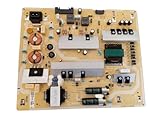
- It is imperative to purchase by PART number ONLY. The listed TV model number is a reference only and should not be used to make a purchase decision. The reason is that there can be several different parts that go into the same TV model. These different parts are NOT interchangeable.
- If you are not sure how to check and match your PART number (NOT TV model number), please contact us first so that we can help you save time and money.
Use the exact model’s service manual or repair guide to verify the cover construction, fasteners, connector layout, and board fit. A Phillips #3 screwdriver is specified in the LNT4669FX-XAA guide, but other TVs may use different fasteners. Have the correct driver and a clean, stable work surface ready before opening the set.
Replace the power supply board
The sequence below follows the LNT4669FX-XAA guide’s general approach. Screw locations, connector count, and construction vary by model, so follow your own model’s documentation rather than treating this as a universal layout.
Rank #2
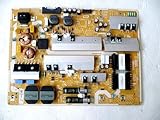
- It is imperative to purchase by PART number ONLY. The listed TV model number is a reference only and should not be used to make a purchase decision. The reason is that there can be several different parts that go into the same TV model. These different parts are NOT interchangeable.
- If you are not sure how to check and match your PART number (NOT TV model number), please contact us first so that we can help you save time and money.
- Unplug the TV. Disconnect it from AC power before servicing. Do not proceed if the set is connected to power.
- Protect the screen and remove the rear cover. Place the TV screen-down on a clean, flat surface that will not scratch or put pressure on the display. Remove the rear-cover screws with the driver appropriate for your model, then lift the cover carefully.
- Document the connectors. Before disconnecting anything from the power board, take clear photos showing each connector’s position and orientation. You can also label connectors if that helps. Pull on connector bodies rather than wires, and avoid disturbing unrelated parts.
- Remove the board. After confirming the board and its connections, remove its mounting fasteners and disconnect the attached cables. Keep track of the screws and do not force a connector that resists removal.
- Fit the matching replacement. Position the replacement board and secure it using the original fasteners. Reconnect each cable to the corresponding socket, checking your photos and the model-specific guide.
- Check your work and close the TV. Confirm that connectors are seated, no wires are trapped, and all protective covers and fasteners have been restored before reinstalling the rear cover.
- Test the set. Once the cover is back in place, reconnect the TV to power and check whether it starts and operates normally. If it still will not turn on, do not assume the replacement board is defective; the original diagnosis may have been wrong or another fault may remain.
Board replacement or component-level repair?
Replacing the complete board is different from replacing a capacitor or another component on it. Component-level work requires electronics repair skills; some components are polarity-sensitive, and Samsung’s service manual advises against modifying the circuit board. The LNT4669FX-XAA guide mentions a BN44-00166C repair kit only as a possible lead for that particular board, not as a general solution. iFixit’s capacitor replacement guide assumes soldering ability.
Choose a repair path only after considering compatibility, confirmed diagnosis, your electrical repair experience, and the availability and total cost of the part and service. The cited guides do not establish comparative success rates or current prices. Use professional repair if you cannot identify the exact board, see burning or extensive damage, or would need to test the board while powered.
Do these 3 things before closing this tab:
1Scan for outdated or missing drivers - takes under a minute2Repair Windows errors before they cause bigger problems3Fix the driver behind crashes, sound loss and screen glitchesQuick Recap
Best Value

- [Wide Compatibility]: This power supply board is perfectly compatible with Samsung TV models QN75Q6DRAF, QE75Q60RAT and QA75Q60RA, helping you quickly find the right replacement part for your TV without extra effort.
- [Steady Power Output]: It delivers stable and continuous power to your TV, preventing unexpected screen blackouts or picture distortion when you’re enjoying your favorite TV shows or streaming content.
- [Hassle-Free Installation]: With a design that matches the original TV’s structure, it can be easily installed into the correct position of compatible TVs, no professional repair skills or complex tools required.
- [Long-Lasting Performance]: Crafted from tough and durable materials, this board can withstand regular use and maintain its functionality over time, keeping your TV in good working order.
- [Accurate Component Configuration]: Every component on the board is carefully selected and adjusted to meet the exact power needs of TVs, effectively avoiding device malfunctions caused by mismatched parts.
Rank #4
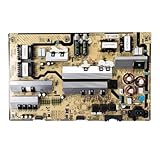
- Motherboard model: BN44-00874F L82E8N_RHS
- Perfect compatibility: Compatible with Samsung UE82RU8000U, QN82Q60RAFXZA, QN82Q6DRAFXZA motherboard power control board ensures seamless installation and stable operation.
- Package Contents: 1 x Brand New TV Power Supply Board (BN44-00874F L82E8N_RHS)
- Safety protection for peace of mind: Multiple built-in protection mechanisms, including overvoltage, overcurrent, and short-circuit protection, ensure safe operation of the TV and power supply motherboard, preventing accidental damage.
- Good Customer Service: If you have any questions about the product, you can contact us directly, we will provide you with the best solution
Rank #3
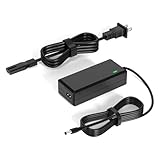
- 【Replacement for Samsung Monitor Power Cord】: for Samsung SyncMaster CF390 CF391 CF396 CF398 Series 22" 24" 27" 32" Curved Screen LED-Lit FHD Monitor CF-390 CF-391 CF-398 /MODELS:(C22F390, C24F390);150MP UE590 B300 S22A300B S20A350B S22A100N S22E310 S24B150BL S24B300HL S24D300H S240D590 S240D590PL S27E310 S32F351FU, etc; For Samsung SyncMaster 15" 17"18" 19"monitor.
- 【dc 14v power cord for samsung monitor 】P/N : AD-3014, PN3014, AD-3014STN, PA-1031-21, PA-1031-21-FH, AD-3014B, SB350, AD-3014N, A3014VE, 14030GPCN, ADS-30NJ-12, PS30W-14J1, AD-3014B, BN44-00394K, BN44-00394M, BN44-00394A, BN44-00394B, C27F390FHN , LC22F390FHXZA , LC24F390FHNXZA
- 【Power Specification 】Output Max :14V 4A (1.78A 2.14A 2.37A 3A Compatible),Input Volt Range: 110-240V / Replacement for Samsung monitors AC Adapter Power Cord
- 【Safety & Reliability】: All Monitor Power Cord have been tested and ensure & available. We guarantee our products will charge your devices as efficiently as the original monitor power supply. Furthermore, Monitor Power Adapter are ETL CE FCC RoHS certified with over-voltage, over-load, over-current, short circuit protection.
- 【What You Get】: 1* 14V for Samsung monitors Power Adapter.If you have any other questions,Please contact us and we will provide support and solutions as soon as possible
Product prices and availability are accurate as of the date/time indicated and are subject to change. Any price and availability information displayed on Amazon at the time of purchase will apply.