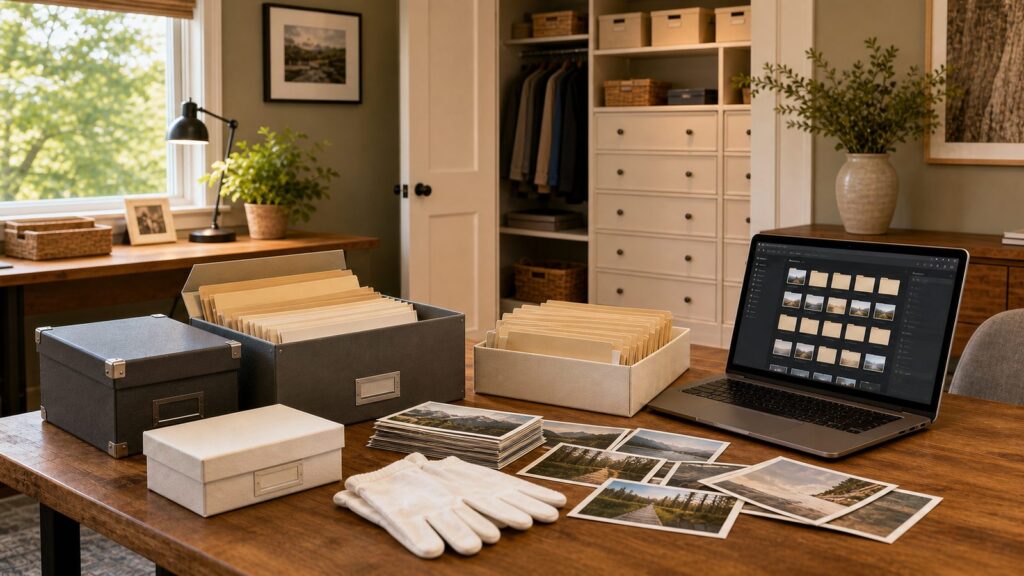
To declutter photos without losing memories, do not start with storage bins. Start with a decision rule. Keep the best image from each moment, preserve the photos that carry names, places, relationships, and stories, scan before making irreversible decisions, and store the irreplaceable originals in archival materials inside the conditioned part of the house.
That sounds simple, but most families get stuck because photos are not ordinary clutter. A box of old prints can include duplicates, vacation scenery, school pictures, blurry snapshots, wedding proofs, inherited albums, negatives, and one-of-a-kind images of people who are no longer here. Professional organizers usually break the work into stages: inventory, triage, digitizing, physical preservation, digital backup, and maintenance. That staged approach works because it keeps you from trying to make 2,000 emotional decisions in one weekend.
On our job sites, we see the home side of this problem all the time. Photos get parked in garages, attics, laundry rooms, basement shelves, and deep closets because there is no better system. Then a remodel uncovers damp boxes, warped albums, or tubs of loose prints that no one has opened in 15 years. The fix is part organizing project and part building-performance issue: reduce the volume, protect what matters, and give the remaining archive a dry, stable, accessible place to live.
Start With a Photo Inventory, Not a Sorting Marathon
Before you decide what to keep, find out what you actually have. Pull photo materials from the obvious places first: closets, under-bed boxes, office cabinets, media consoles, garage shelves, and old luggage. Do not empty the entire house into one giant pile if you have decades of photos. Work in batches you can finish in 60 to 90 minutes.
#1 Best Overall

- Brand Background: Lineco is a leading and trusted brand for archival quality art, photography, and framing supplies
- Preservation: Our box can storage your photos and important documents. It is used by professional photographers to house prized photos, albums, and scrapbooks
- Premium Quality: Lineco storage boxes are manufactured in USA. This box is made with 60 point board and lined with acid-free archival quality and lignin-free
- Drop front design: Created with metal edge construction on the corners, adding great durability and strength. The lid does come off and it has a drop-front design, meaning it's super easy for you to storage your items in and out
- Overall Size: 9.75" x 12.75" x 3" for 9x12 Documents, Newspapers, Certificates, Pictures, Important Delicate Prints, and Old Pictures
Set up four temporary zones on a dining table, folding table, or clean counter:
- Keep originals: irreplaceable prints, heirloom portraits, old albums, negatives, slides, and anything with strong family context.
- Scan then decide: photos you may not need physically but do not want to lose digitally.
- Share: duplicates or branch-specific family photos that belong with a sibling, child, cousin, or parent.
- Discard: blurry shots, near-identical duplicates, damaged prints with no usable image, empty scenery, and photos with no people, place, date, or story value.
Use sticky notes or index cards to mark years, branches of the family, major homes, schools, vacations, or events. At this stage, rough categories are enough. Do not stop to identify every person in every photo. Your first goal is to reduce chaos and prevent accidental loss.
A good first pass can move quickly. For a standard shoebox holding 700 to 1,000 loose 4-by-6 prints, plan on 1 to 2 hours for rough triage if the prints are already loose and not stuck in albums. For inherited mixed boxes, plan on 2 to 4 sessions because the decision-making is slower.
Use a Two-Pass Rule So Sentiment Does Not Run the Project
The best professional organizer trick for family photos is the two-pass sort. The first pass is fast and factual. The second pass is slower and more selective.
Pass 1: Remove the Easy No’s
On the first pass, discard obvious nonkeepers: closed eyes, accidental floor shots, duplicate school portraits, blurry landscapes, out-of-focus group shots, dark restaurant photos where no one is identifiable, and five copies of the same print. If the photo has no person, no event, no place, no date, and no story, it needs to earn its space.
Do not spend 10 minutes deciding between six similar birthday photos. Pick the clearest image where faces are visible and the moment is represented. If two photos each tell a different part of the story, keep both. If they are nearly identical, keep one.
Pass 2: Build the Story Set
For major events, keep a small story set instead of the whole envelope. For a wedding, graduation, new baby, first home, military service, family reunion, or once-in-a-lifetime trip, a strong set might include:
- One clear group photo.
- One candid with emotion or movement.
- One image that shows the place.
- One detail shot, such as the house, dress, table, car, uniform, or handwritten sign.
- One photo of each key person if they are not well represented elsewhere.
For ordinary events, one to three photos is usually enough. A child’s third-grade classroom party does not need 42 prints unless there is a special reason. One good image of the child, one friend or teacher photo, and one room/context photo will usually preserve the memory better than a stuffed envelope no one can navigate.
Quick wins for a faster PC:
Repair Windows errors before they cause bigger problemsFix Now →Fix the driver behind crashes, sound loss and screen glitchesFind Drivers →This rule is compassionate because it does not ask you to prove a memory is unimportant. It simply asks which photo carries the memory best.
Decide What to Keep, Scan, Share, or Let Go
Printed photos fall into different value categories. Treating them all the same is how families end up storing 12 plastic tubs for another decade.
| Photo Type | Best Decision | Reason |
|---|---|---|
| One-of-a-kind heirloom portraits | Keep original and scan | These have family, historical, and often emotional value beyond the image file. |
| Duplicates of the same print | Keep one, share or discard extras | Duplicates consume space without adding memory value. |
| Blurry or dark photos | Discard unless historically important | If the person or event cannot be identified, the photo rarely serves the family. |
| Photos with unknown people | Scan before deciding, then ask relatives | Older relatives may identify people, places, and dates while that knowledge is still available. |
| Stuck magnetic album pages | Handle carefully or hire help | Adhesive albums can damage prints during removal. |
| Slides, negatives, and fragile prints | Consider professional digitizing | Special media often needs better handling and equipment than a phone app. |
If family members disagree, set a physical boundary. A useful rule is one archival box per household branch, decade, or major life chapter. A common archival photo box can hold hundreds of standard prints depending on sleeve thickness and divider layout. The box limit gives everyone a fair constraint without turning the conversation into a vote on whose memories matter.
Rank #2
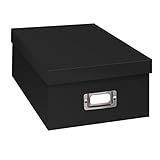
- Solid black only
- Heavy duty storage box
- Metal identification plate
- Index cards included
- Photo safe: acid free
For distant relatives, scan first and then share a digital folder before offering physical duplicates. Digital access often makes it easier for family members to release extra prints because they know the image is not disappearing.
What’s actually slowing this PC down?
Pick the symptom - the matching free tool is one click away.
Label Photos Without Damaging Them
Names, dates, places, and stories are often more valuable than the print itself. A photo of four people on a porch is nice. A photo labeled “Martha, Joe, Ellen, and Ray at the first house in Ohio, summer 1968” becomes family history.
The safest labeling method is to write on archival sleeves, dividers, envelopes, or index cards rather than directly on fragile prints. Use clear categories such as “Dad’s Navy years, 1969-1972” or “Grandma Rose’s house, Denver, early 1980s.” If you must label the back of a print, use a soft pencil with light pressure where the surface accepts it. Avoid ballpoint pens, markers, sticky notes on photo surfaces, tape, paper clips, and rubber bands.
Do not try to perfectly label every image before scanning. A practical workflow is to label groups first, scan in batches, and then add file names or folder names that preserve the same context. For example: “1978-06_family-reunion_cleveland_001.jpg” is more useful than “IMG_4837.jpg.”
Scan Before You Throw Away Anything With Family Context
Scanning is not a license to discard everything. It is a way to reduce volume while preserving access. The original print still matters for heirlooms, old portraits, rare images, and anything with handwriting, photographer marks, or physical context. But for duplicate snapshots and bulky albums, scanning can make decluttering realistic.
300 DPI vs. 600 DPI
For standard 4-by-6 prints that you only want to view, share, and reprint at the same size, 300 DPI is usually workable. For older prints, small prints, images you may enlarge, and important family photos, 600 DPI is the better baseline. Slides and negatives often need specialized scanning at much higher effective resolution, so they are better handled separately.
Do a quality check before discarding any original. Open random files at full size, confirm faces are sharp enough, check that the full photo was captured, and make sure file names or folders make sense. If a scanning service returns 1,000 images and you never inspect them, you have not preserved the collection yet.
DIY, App, Mail-In, or Local Studio
DIY scanning can work for small batches, but it is slow. A flatbed scanner may take 1 to 3 minutes per photo when you include handling and naming. At that pace, 1,000 photos can become a 20-to-40-hour project. Phone scanning apps are fast for casual sharing, but glare, distortion, cropping, and inconsistent color can be problems.
Professional scanning costs vary widely in 2026. Bulk quick-scan promotions may be as low as about $0.20 per standard print when the job qualifies. Professional hand-scanning commonly starts around $0.35 per photo at 600 DPI. Many current US services advertise roughly $0.48 to $0.49 per photo, which puts 1,000 photos around $480 to $490, 3,500 photos around $1,680 to $1,715, and 5,000 photos above $2,400 before add-ons.
Outdated Drivers Are Slowing You Down
One free scan finds every outdated or missing driver and matches the right update for your exact hardware.Free scan · exact hardware matchPC Slower Than It Used to Be?
A free scan shows the junk files, broken settings and background clutter dragging Windows down - then fixes them in one click.Free scan · Windows 10 & 11Costs rise when prints are stuck in albums, fragile, oversized, curled, or mixed with slides and negatives. Restoration, color correction, detailed file naming, metadata, rush work, and return media also add cost. If you have only 200 loose prints, DIY may be fine. If you have 4,000 inherited photos and a deadline before a move or remodel, paying for scanning can be the more realistic choice.
Store Originals Like Family Archives, Not Craft Supplies
The safest place for family photos in most homes is an interior closet or conditioned living-area cabinet. Avoid garages, attics, basements, crawlspaces, laundry rooms, exterior-wall benches, damp mudrooms, and any cabinet near plumbing, vents, fireplaces, radiators, or direct sun.
Rank #3

- Brand Background: Lineco is a leading and trusted brand for archival quality art, photography, and framing supplies
- Preservation: Our box can storage your photos and important documents. It is used by professional photographers to house prized photos, albums, and scrapbooks
- Premium Quality: Lineco storage boxes are manufactured in USA. This box is made with 60 point board and lined with acid-free archival quality and lignin-free
- Drop front design: Created with metal edge construction on the corners, adding great durability and strength. The lid does come off and it has a drop-front design, meaning it's super easy for you to storage your items in and out
- Overall Size: 9.75" x 12.75" x 3" for 9x12 Documents, Newspapers, Certificates, Pictures, Important Delicate Prints, and Old Pictures
The Library of Congress recommends a cool, relatively dry, stable environment for photos: 30% to 50% relative humidity and 70 degrees Fahrenheit or below, with limited light exposure. The National Archives advises keeping family photos and papers below 75 degrees and below 65% relative humidity to reduce mold and insect risk, while avoiding extremely low humidity below 15% because materials can become brittle.
In construction terms, that means photos belong inside the building envelope, away from temperature swings and moisture risk. An interior hall closet is usually better than a beautiful built-in bench on an exterior wall. A drawer bank in a home office is usually better than a garage cabinet. A dry primary-suite closet can work if it is not against a damp exterior corner and has enough air movement.
Do these 3 things before closing this tab:
1Fix the driver behind crashes, sound loss and screen glitches2Clear out junk files and repair common Windows errors3Scan for outdated or missing drivers - takes under a minuteArchival Materials to Use
Use acid-free, lignin-free archival boxes and sleeves. Look for photo-safe paper or stable plastic sleeves such as polyester, polypropylene, or polyethylene. Avoid PVC sleeves, magnetic or sticky albums, rubber bands, tape, acidic envelopes, and metal fasteners.
For supplies, common museum-style photo and document boxes often run about $10 to $40 each. Larger corrugated document cases or specialty boxes can run about $70 to $115. Add acid-free sleeves, dividers, tabs, soft pencils, and cotton or nitrile gloves if you are handling older or fragile prints. For many families, a serious archival supply setup lands in the $75 to $250 range before any professional scanning or organizing help.
Store prints upright or flat depending on the box design, but do not overpack. Photos should be supported, not compressed. If a lid requires force, the box is too full. Keep boxes off the floor, especially in closets near bathrooms, laundry areas, or water heaters.
Build a Digital Backup System That Is More Than Phone Sync
Cloud photo libraries are convenient, but sync is not the same as backup. If you delete a synced photo on one device, that deletion may propagate. If an account is compromised, files can be changed or lost. If you stop paying for storage, you may lose capacity or access over time. For family archives, use the 3-2-1 backup rule: three copies, two storage types, and one offsite or cloud copy.
The Tool Desk
Outbyte PC Repair FREERepair Windows errors before they cause bigger problemsFix Now →Outbyte Driver Updater FREEScan for outdated or missing drivers - takes under a minuteDriver Scan →A practical family photo backup system looks like this:
- Copy 1: the organized photo library on your main computer or home storage drive.
- Copy 2: an external hard drive stored separately from the computer.
- Copy 3: a cloud backup or cloud storage copy.
As of 2026, Google One lists 100 GB at $1.99 per month and 2 TB at $9.99 per month in the US. Backblaze Personal Backup is listed at $99 per year per computer. Backblaze B2 object storage starts around $6.95 per TB per month. The right choice depends on storage size, number of devices, version history, restore options, download fees, and whether the product is true backup or mainly sync.
Twice a year, test restores. Open five random files from the external drive and five from the cloud copy. Confirm they are readable, named clearly, and not trapped in an app you no longer use. A backup you have never restored is an assumption, not a system.
Design Home Storage Where Photos Will Actually Be Used
Photo storage fails when it is too remote. If the archive goes into a high garage cabinet or deep basement shelf, it becomes forgotten storage. The best location is close to where family life, paperwork, or storytelling already happens: a home office, family room, interior hallway, library wall, or dry closet near the main living area.
Free tools Windows power users keep installed
One-click scans. No signup required.
For remodel clients, we like to design memory storage into real cabinetry instead of leaving it as loose tubs. Useful options include shallow drawers for albums, deeper drawers for archival boxes, adjustable shelving for labeled document cases, and a small counter-height surface for sorting. Drawer interiors should be sized before cabinets are ordered. Many archival photo boxes are roughly 12 to 15 inches deep, and larger document boxes may need 16 to 18 inches of usable depth. Check your actual boxes, then allow finger clearance so they are easy to lift.
Rank #4

- Scrapbook storage box for scrapbooks, papers and supplies
- Made from acid Free material
- Sturdy construction; metal nameplate
- Archival, photo safe; acid, lignin and PVC Free
- Outside Dimensions: 14-3/4"D x 13"W x 3-3/4"H. Inside Dimensions: 14-1/2"D x 12-3/4"W x 3-1/2"H"
Lighting matters, but heat and UV exposure matter too. Use low-heat LED closet lighting on a switch or motion sensor. Do not install a hot fixture directly above stored photos. If adding outlets for a scanner or backup drive, place them where cords will not cross a walkway or pinch behind drawers.
Moisture is the larger concern. Avoid building photo storage against known damp exterior walls, below plumbing lines, or in closets with poor air circulation. If the only available closet smells musty, solve that first. Storage cabinetry should not hide a moisture problem.
Independent reader supportYour contribution helps us test, update, and keep practical guides available for everyone.When to DIY and When to Hire a Pro
DIY is the right choice when the collection is modest, the photos are mostly loose modern prints, and you can make decisions without family conflict. A homeowner can usually sort 500 to 1,000 loose prints over a few evenings with basic supplies: a clean table, sticky notes, archival dividers, one or two photo boxes, and a clear keep-scan-share-discard system.
Hire a professional organizer when the volume is large, the emotions are high, the photos are mixed with inherited papers, or the project is blocking a move, estate cleanout, or remodel. In 2026, professional home organizing commonly runs about $65 to $200 per hour nationally, with many local organizers charging roughly $45 to $150 per hour depending on the metro area, certification, project complexity, and whether a team is used. One recent homeowner benchmark was $1,000 for 10 hours of hands-on organizing, or $100 per hour.
Photo-specific organizers may quote by project instead of hourly because the scope can include scanning, metadata, restoration coordination, album design, cloud setup, and family sharing. If you are hiring help, ask what deliverables are included: sorted originals, discard recommendations, archival boxing, digital folder structure, file naming, duplicate removal, cloud upload, and a written maintenance plan.
Hire a scanning service when you have thousands of prints, fragile albums, slides, negatives, or a firm deadline. Hire a contractor or cabinetmaker when the storage solution involves built-ins, closet modifications, lighting, outlets, wall repair, anchoring, or ventilation changes.
Permit and Safety Notes for Built-In Photo Storage
Freestanding shelving inside a closet usually does not require a building permit. Simple cosmetic work, painting, and loose furniture are typically outside permit requirements in many jurisdictions. But permit rules are local, and the line can change when the work becomes structural, electrical, mechanical, or part of a larger remodel.
Recommended Free Tools
You may need a permit or licensed trade involvement if the project includes new electrical outlets, new hardwired lighting, moving walls, changing framing, altering HVAC, adding plumbing-adjacent cabinetry, or converting a space to a different use. Some jurisdictions also have rules for anchoring tall built-ins, especially in seismic regions. Commercial or multifamily projects can trigger additional code requirements, including inspections for certain structural elements and anchorage.
Our practical rule is simple: if the storage is freestanding and plugs into an existing outlet, it is usually a furniture project. If it is fastened to the building, wired, framed, or tied into HVAC or moisture control, treat it like construction and check local requirements before work starts.
A Simple Weekend Plan That Actually Works
For a typical family collection, do not try to finish everything at once. Use a staged plan.
Friday evening: Gather photos from the main storage areas and set up a clean work surface. Create keep, scan, share, and discard zones. Stop after inventory. Do not start deep sorting at 10 p.m.
Best Value

- Premium Materials: Acid-free, BPA-free, and PVC-free, making it suitable for long-term photo storage. The high-quality recyclable PP plastic won't yellow or crack over time, helping preserve your photos safely
- Large Capacity: Packed with 1pcs 13.8"x 8.9”x4.8" outer box size and 16pcs 6.5" x 4.6" x 0.9” inner boxes. Each inner box can hold up to 100 4"x6" picture, and a total of about 1600
- Versatile Use: Ideal for bulk storage of large collections like trading cards, index cards, stickers, seeds, diamond arts, crafts, keepsakes, classroom, offices must haves
- Easy Categorization: Transparent plastic lets you quickly identify which cards are in each compartment without opening them. Comes with writable label stickers for easy categorization of different photo by category or date
- Double Buckle& Handle Design: Lifewit photo storage boxes has secure buckle closures on both the inner and outer boxes. The buckles are designed to keep dirt out and prevent the lids from opening accidentally. And the outer case comes with a handle for easy transport
Saturday morning: Do the fast first pass. Remove obvious duplicates, blurry photos, empty scenery, and damaged nonessential prints. Group the rest by decade, person, household branch, or event.
Saturday afternoon: Build story sets for the largest categories. For each major event, keep the best people, place, detail, group, and candid shots. Put uncertain family-history photos in the scan pile.
Sunday morning: Label groups on archival dividers or sleeves. Choose what gets scanned first. Important old photos, unknown relatives, and fragile images should move to the front of the line.
Sunday afternoon: Put keepers into archival boxes and place them in an interior conditioned closet or cabinet. Set up a digital folder structure before scanning begins. Decide who gets shared copies and what can leave the house after scans are checked and backed up.
What’s actually slowing this PC down?
Pick the symptom - the matching free tool is one click away.
That weekend may not finish a lifetime of photos, but it should reduce the pile, protect the best originals, and create a system you can keep using. That is the real goal. Decluttering photos is not about having fewer memories. It is about making the memories easier to find, safer to store, and better prepared for the next generation.
Frequently Asked Questions
How do I decide which printed photos to keep and which to throw away?
Keep the clearest photo that best tells the story. Prioritize people, dates, places, milestones, and rare family context. Discard blurry shots, near-identical duplicates, empty scenery, and photos with no identifiable subject unless they have known historical value.
Should I scan old photos before decluttering them?
Yes, scan before discarding anything with family context. For standard prints, 300 DPI is acceptable for same-size viewing and sharing, while 600 DPI is better for important, older, or small prints.
What is the safest place in a house to store family photos?
Use an interior closet or conditioned living-area cabinet. Avoid attics, basements, garages, crawlspaces, laundry rooms, exterior-wall benches, vents, fireplaces, and plumbing-risk areas.
How much does professional photo organizing or scanning cost in 2026?
Home organizing commonly runs about $65 to $200 per hour nationally, with many local organizers around $45 to $150 per hour. Photo scanning often ranges from about $0.20 per print for qualifying bulk promotions to roughly $0.48 to $0.49 per print for many professional services.
Is Google Photos or iCloud enough backup for family pictures?
Not by itself. Sync services are convenient, but family archives should follow the 3-2-1 backup rule: three copies, two storage types, and one offsite or cloud copy. Test restores twice a year.
Do I need a permit to add built-in photo storage?
Freestanding shelves usually do not require a permit. Built-ins may require review if they involve electrical work, lighting, framing, HVAC changes, wall modifications, or other construction. Requirements vary by local jurisdiction.
Quick Recap
Product prices and availability are accurate as of the date/time indicated and are subject to change. Any price and availability information displayed on Amazon at the time of purchase will apply.