Recommended Free Tools
If a home battery will not charge or supply backup power, first identify whether the problem is missing app data, a low battery, or a battery that has stopped delivering power. Record the exact alert, state of charge, utility-power status, and whether solar is producing. Check only the status indicators and owner instructions for your exact system; do not open the battery or inverter. App labels, controls, and restart procedures vary by model.
Start by identifying what has stopped working
“Not working” can describe several different problems. A blank app display does not by itself show that the battery has failed: Tesla notes that missing power-flow data can result from an offline gateway or meter. A battery that is not gaining charge and a charged battery that is not powering the home call for different checks.
- App data is missing: Note whether the app says the system or gateway is offline, and whether the home otherwise has utility power.
- The battery is not charging: Record its displayed state of charge, any alert, and whether solar production is visible.
- The battery is not powering the home: Check whether utility power is available, whether the home is in an outage or backup mode, and whether the app reports low charge or an output-related alert.
- Both charging and backup have stopped: Record when the problem began and any recent outage, weather event, or change in system status.
Keep the exact wording of alerts rather than translating them into a presumed diagnosis. Tesla labels such as “Breaker Open,” “Powerwall Overloaded,” “Waiting for Solar,” “Calibration in Progress,” and “Side Switch Off” apply to that manufacturer’s system; other brands may use different labels or meanings. See Tesla’s Powerwall troubleshooting guidance.
Check the operating conditions and alert
Before taking action, establish whether the home has utility power and whether the battery is in normal operation or backup mode. Note whether solar is producing, but do not assume that solar is available just because panels are installed. Tesla advises against using its general troubleshooting process during a grid outage or extreme weather; follow the instructions for your installed model and operating situation instead.
Quick wins for a faster PC:
Repair Windows errors before they cause bigger problemsFix Now →Scan for outdated or missing drivers - takes under a minuteDriver Scan →Clear out junk files and repair common Windows errorsFree Scan →#1 Best Overall

- 1500VA/1000W PFC Sinewave Uninterruptible Power Supply (UPS): Uses sine wave output to provide battery backup power for Active PFC & conventional power supplies; Safeguards computers, workstations, network devices, and telecom equipment
- 12 NEMA 5-15R OUTLETS: 6 battery backup & surge protected outlets, 6 surge protected outlets; INPUT: NEMA 5-15P right angle, 45 degree offset plug with 5 foot power cord; 2 USB charge ports (1 Type-A, 1 Type-C) quickly charge phones and tablets
- MULTIFUNCTION, COLOR LCD PANEL: Displays immediate, detailed information on battery and power conditions; Color display alerts users to potential issues before they can affect critical equipment and cause downtime; Screen tilts up to 22 degrees
- AUTOMATIC VOLTAGE REGULATION (AVR): Corrects minor power fluctuations without switching to battery power; UL SAFETY CERTIFIED: Product has been tested in a UL certified lab and listed with UL as meeting or exceeding safety standards
- 3-YEAR WARRANTY – INCLUDING THE BATTERY; $500,000 Connected Equipment Guarantee; FREE PowerPanel Management Software (Download)
Some alerts describe a temporary system state rather than a failed battery. For example, Tesla says Powerwall calibration can last up to 24 hours, during which the battery may not charge from solar. Tesla’s “Waiting for Solar” alert indicates that the system is waiting for solar conditions. Those details and labels are specific to Powerwall, not a general rule for other home batteries. Tesla’s alert explanations are at Powerwall alerts and troubleshooting.
If backup stopped, check for low charge or heavy loads
After a long outage or substantial backup use, the stored energy may be too low to keep supplying the home. Tesla says a Powerwall below 10% can enter standby. When paired with solar, it may try to recharge during daylight; if there is not enough energy to restart, it may wait for a grid connection. This threshold and behavior are specific to Powerwall.
Rank #2

- One Powers All. The unit of DELTA Pro Ultra whole house generator includes an inverter and a battery. One inverter supports 120V & 240V and has an exceptional 7200W output, allowing you to run almost any heavy household appliance, even a 3-ton central air conditioner. Triple the inverters for an incredible 21.6kW AC output, allowing you to live life to the fullest even during an outage. The electric generator achieves a total 7200W output even during charging.
- Strong Power Security. Scalable from one battery of 6144Wh, two days of essential power, all the way to 15, it multiplies the energy to a gigantic 90kWh. For a standard North American household, that's over 30 days of essential power secured.
- Customize Your Home Power. Use the EcoFlow app to priolritize specific circuits in your home, extending your backup even longer. For more than just blackouts, it intelligently analyses your home power usage to offset peak rates while utilizing solar to lower energy bills.
- Multi Ways to Charge. One battery of 6144Wh can be fully recharged in 2 hours. Faster than any other 6kWh solar generator. Users can choose among electric vehicle piles, solar, wall outlets or outdoor generators for charging.
- Uninterrupted Life. Online UPS with 0-ms transfer time, offering 24/7 protection for sensitive electrical devices against power disturbances or grid failure. All fans are off for the first half hour of outputting 2000W, giving you absolute silence for tranquility in everyday life.
If the system reports overload, reduce high-power loads where it is safe and practical to do so. Tesla says an overloaded Powerwall may retry after loads are reduced. During an outage, reducing large loads can also help preserve the available backup energy. Do not use another brand’s thresholds, alert meanings, or restart steps as a substitute for its own instructions. See Tesla’s Powerwall alert guidance.
Observe status indicators; do not open the equipment
Read the app and, if it is safe to do so, note any visible indicator lights from outside the equipment. Use the owner manual for the exact model to interpret them and to identify controls the manufacturer explicitly permits owners to use. A breaker alert, an unexpected off status, or an inverter fault is a reason to consult that model’s support instructions, not to investigate wiring yourself.
Rank #3

- UL9540 | UL1973 | CEC LISTED - Completed comprehensive testing by Intertek and has officially earned two key North American safety certifications.And has met the standards set by the California Energy Commission.The outstanding performance in design, electrical safety, and thermal runaway management,providing users with greater quality assurance
- Whole-Home Off-Grid Power: The 6-pack 51.2V 100Ah system delivers up to 30.72kWh of capacity, enough to cover an entire household’s daily electricity needs. It helps reduce reliance on rising electricity costs and serves as a reliable solution for achieving true off-grid living and energy independence.
- Closed-Loop Communication Battery: ECO-WORTHY 48V (51.2V) server rack battery features integrated CAN/RS485 interfaces and multiple communication protocols, enabling communication with leading integrated solar inverters for more intelligent system operation. Built-in Bluetooth and WiFi functionality allow you to easily monitor battery status via ECO-WORTHY APP.
- Powerful Expansion Capability: Designed for server rack compatibility with vertical mounting support, this 48V 100Ah battery maximizes space efficiency. It allows paralleling of up to 32 units (up to 163.8kWh), enabling flexible capacity expansion to meet a wide range of needs. Built with Grade A LiFePO₄ cells, it delivers reliable power output, exceptional cycle life, and stable safety performance.
- Complete Plug-and-Play Kit: We include every accessory you need: parallel cables, communication cables, grounding wires, protective terminal covers, screws, and a user manual. Unbox, install, and start enjoying clean power—it's that easy.
Do not remove a battery cover, open an inverter or gateway, or open an electrical panel to test connections. Tesla describes Powerwall and Gateway as not user-serviceable and warns that opening the Gateway deadfront can expose wiring and create an electric-shock hazard. Its Powerwall 3 manual also identifies the Gateway and Backup Switch as non-user-serviceable. Other systems have their own service boundaries; Generac’s PWRcell manual, for example, gives product-specific instructions that should not be applied to a different system. Consult the manual for the installed model: Tesla Powerwall manuals and Generac product support.
Do not try a generic power-cycle sequence. Shutdown and restart steps can depend on the battery, inverter, gateway, and connected solar equipment; Tesla manuals specify sequences for its systems and caution that interconnected solar may need to be turned off before certain Powerwall shutdown steps. Use the exact model’s manual or contact its support team for any restart procedure.
Rank #4

- 1500VA/900W Intelligent LCD Uninterruptible Power Supply (UPS): Uses simulated sine wave technology to provide battery backup power to safeguard workstations, networking devices, and home entertainment equipment
- 12 NEMA 5-15R OUTLETS: Six battery backup & surge protected outlets; six surge protected outlets; INPUT: NEMA 5-15P plug with 6-foot power cord; USB charge ports (1 Type-A, 1 Type-C) quickly charge mobile phones and tablets
- MULTIFUNCTION, COLOR LCD PANEL: Displays immediate, detailed information on battery and power conditions; Color display alerts users to potential issues before they can affect critical equipment and cause downtime
- AUTOMATIC VOLTAGE REGULATION (AVR): Corrects minor power fluctuations without switching to battery power; UL SAFETY CERTIFIED: Product has been tested in a UL certified lab and listed with UL as meeting or exceeding safety standards
- 3-YEAR WARRANTY – INCLUDING THE BATTERY; 500,000 Connected Equipment Guarantee; FREE PowerPanel Personal Software (Download)
Stop immediately if the equipment may be dangerous
Do not continue troubleshooting if there is smoke, a burning smell, unusual heat, visible damage, flooding, or another immediate hazard. Move affected people away and contact the fire department or relevant emergency response team if health or safety is threatened. If battery equipment, a gateway, or wiring is submerged, stay out of the water. Follow emergency directions from the manufacturer and local responders. Tesla’s emergency guidance is at Tesla Powerwall troubleshooting and Powerwall Emergency Response Guide.
When to contact the manufacturer or installer
Contact the system maker or an installer qualified for the installed equipment if an alert persists, the system is unresponsive, charge remains unexpectedly low, backup repeatedly stops, or the symptoms suggest a breaker or wiring problem. Any repair that requires opening equipment belongs with qualified service personnel—not an owner-level check.
Best Value
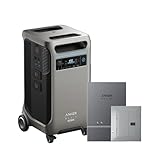
- The F3800 Plus Power Station and Home Power Panel will be dispatched separately. If you receive one item before the others, please await the arrival of the remaining items.
- Power Your Home for Weeks: F3800 Plus starts at 3.84kWh, enough to power your home for a full day. Need more? Expand to 26.9kWh with 6 batteries, or double up to 53.8kWh with 12 for weeks of power.
- Power More Appliances Simultaneously: F3800 Plus offers a massive 6,000W output, 58% more than other portable power stations at the same capacity. For more power, pair two for up to 12,000W max AC output.
- Dual-Voltage for Any Appliance: With 120V / 240V dual-voltage support, you can run everything at home without limitations, including your dryer.
- 63 Minutes UltraFast Recharging: Get outage-ready in just 63 minutes via solar and generator, and recharge flexibly in 4 ways—solar, generator, home power panel, or AC outlet.
When you call, have these details ready:
- Battery and inverter make and model, if known
- The exact alert text and any visible indicator-light state
- The displayed state of charge and when you observed it
- Whether utility power is available and whether the system is in an outage or backup mode
- Whether solar production is visible
- When the problem began and whether it followed an outage or other event
Manufacturer procedures are system-specific. For another example of product-specific support, consult Generac’s PWRcell product support; do not use its procedures for a different brand.
Quick Recap
Product prices and availability are accurate as of the date/time indicated and are subject to change. Any price and availability information displayed on Amazon at the time of purchase will apply.