Free tools Windows power users keep installed
One-click scans. No signup required.
A circular saw can wander off a pencil line when the panel shifts, the saw is poorly set up, or its guide loses contact. For repeat cuts measured from a straight sheet edge, the Kreg Rip-Cut is the better fit; for a marked line, a crosscut, or an angled cut, use a track guide such as the Kreg Accu-Cut. Stable support, a compatible saw, and a controlled pass matter as much as the guide.
Choose the guide that matches your reference
First decide what the guide should follow: the panel edge or the cut line. A guide cannot correct a warped edge or a misaligned track, so choose a reference you can trust.
| Your job | Guide to consider | What it does and what to check |
|---|---|---|
| Repeat a set width from a straight sheet edge | Kreg Rip-Cut | An edge guide rides along the panel while the saw sled follows it. Kreg’s international product page lists a width range of 25–610 mm (1–24 inches); check the specification for the regional model you are buying. |
| Follow a marked line, make a crosscut or angled cut, or cut a panel without a dependable straight edge | Kreg Accu-Cut | Align the track to the cut marks and guide the saw sled along it. Kreg lists the standard Accu-Cut for cuts up to 50 inches. Its anti-slip strips grip the work and its anti-chip strips support the cut edge, but neither guarantees a splinter-free result. |
| Make a longer track-guided cut | Kreg Accu-Cut XL | Kreg lists capacity up to 100 inches. Confirm the saw fits and follow the XL’s assembly and support instructions. |
For a [Kreg Rip-Cut circular saw guide], verify the saw’s fit before purchase: Kreg’s international product page says it accepts most circular saws but excludes worm-drive models and discourages saws with plastic upper blade guards. Accu-Cut and Accu-Cut XL have their own compatibility limits; the standard Accu-Cut page excludes Kreg’s Plunge Saw, and the XL page says it is not intended for worm-drive saws. These are model-specific statements, not a promise that every saw fits every guide. Check the exact guide manual and your saw manual.
Prepare the saw, panel, and cutoff
- Support the work. Set the panel on stable sacrificial support or another arrangement that keeps both the workpiece and cutoff supported through the cut. Secure the panel against movement while keeping your hands away from the blade path. Arrange the supports so the cutoff will not sag, shift, or pinch the blade as it separates.
- Disconnect power before setup. Unplug the saw or remove its battery before mounting it, changing settings, or adjusting the guide.
- Inspect and set the saw. Use a sharp blade suited to the material, set the bevel to 0 degrees if you want a square cut, and set blade depth according to both manuals. Kreg’s 2021 Rip-Cut Owner’s Manual recommends about 1/8 inch (3 mm) of blade projection beyond the workpiece. Treat that as Kreg’s guidance for the Rip-Cut setup, not a substitute for your saw manufacturer’s instructions. The same manual recommends a 40-tooth-or-better blade for its Rip-Cut instructions; tooth count alone does not establish the right blade for every material or saw. Check blade diameter, arbor, and saw compatibility when selecting a [plywood circular saw blade].
- Check the guide and guard. Mount the saw as its guide manual directs. Confirm it moves freely in the sled or track, and that the blade guard moves and returns normally. Never tie the trigger on or disable a guard.
Set the guide for the cut
For a Rip-Cut: measure from the sheet edge
Check that the edge the guide will ride against is straight and sound. Set the desired width using the Rip-Cut’s scale and calibration instructions, then measure or test the setup rather than relying on the scale alone when the dimension is critical. The edge guide must remain against that same edge for the full pass; an irregular or damaged edge can transfer its variation into the cut.
Outdated Drivers Are Slowing You Down
One free scan finds every outdated or missing driver and matches the right update for your exact hardware.Free scan · exact hardware matchPC Slower Than It Used to Be?
A free scan shows the junk files, broken settings and background clutter dragging Windows down - then fixes them in one click.Free scan · Windows 10 & 11#1 Best Overall
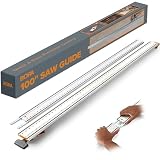
- 100 Inch Circular Saw Guide Rail: Professional track saw guide rail system combines 50 inch clamp edge and 50 inch extension; delivers precise straight edge cuts on plywood and large sheet materials with any circular saw
- Built-In T-Track System: Integrated dual T tracks transform this saw guide into a versatile workbench accessory; clamp edge saw guide adds instant functionality for routers, jigsaws and other circular saw accessories
- Quick Lock Clamp Technology: Ergonomic clamp handle provides one-sided adjustability for fast setup; straight edge clamp secures tightly to materials without movement, saving time on every cut with reliable grip
- Heavy-Duty Aluminum Construction: Rigid straight edge tool crafted from thick aluminum ensures your saw track stays perfectly straight; this cutting guide for circular saw delivers stable, consistent results on any project
- Universal Compatibility Kit: Complete saw guide rail for circular saw works with all brands; bora track saw guide includes connectors and large locking handles; perfect straight cut guide for woodworking and remodeling
For an Accu-Cut: align the track to the marked line
Measure and mark the cut clearly at the needed points, then position the track’s cut indicator according to the Accu-Cut instructions. Confirm which side of the line is waste before setting the track. Press the track strips firmly onto a clean, supported surface as directed, and ensure the track is straight between the marks. For a [Kreg Accu-Cut track guide], choose standard or XL based on the required cut length and check the exact model’s compatibility and support instructions.
Make the cut without losing alignment
- Position yourself so you can guide the saw steadily without reaching across the blade path. Start the saw as its manufacturer instructs and let it reach operating speed before advancing into the work.
- Feed at a steady pace without forcing the saw. With the Rip-Cut, keep the edge guide in firm contact with the sheet edge and move the saw and guide together. With the Accu-Cut, keep the sled engaged with the track throughout the pass.
- When the cut is complete, release the trigger and keep the saw steady until the blade has stopped. Do not lift the saw from the work while the blade is still turning.
If exact dimensions matter or you have just calibrated a guide, make a test cut on scrap and check the result before cutting the finished panel. The cited Kreg instructions describe setup and calibration but do not establish a guaranteed cutting tolerance.
Rank #2

- Premium Home Improvement Tools: Universal compatibility fits most circular saws in the market with blades up to 7-1/4”
- Multiple Length Settings: Cuts 50” out of the box, or extends to any length required with optional GuideRail extensions to rip entire sheets
- Sturdy Woodworking Tools: All-metal construction Increases rigidity and reduces the flex for a more accurate cut
- Versatile Carpentry Tools: The low profile lets you cut over 1-3/4" deep - enough to cut through common interior door thickness
- Straight-Edge Guide: The red cutting-strip acts as a guide and helps reduce splintering and chipping
Reduce tearout at the cut edge
A guide controls the saw’s path; it does not by itself determine the finish. Kreg’s general cutting guidance recommends a sharp blade suited to plywood and suggests scoring the cut line, applying tape, or using sacrificial support to help reduce splintering. The Accu-Cut’s anti-chip strips support material along the track, but the result still depends on the material, blade, setup, and technique. Choose a remedy appropriate to the panel and test on scrap when the visible face matters.
Independent reader supportYour contribution helps us test, update, and keep practical guides available for everyone.When a cut goes wrong
- The cut drifts: Stop safely and check whether the panel moved, the Rip-Cut edge guide lost contact, or the Accu-Cut track shifted. Also check that the track or reference edge is straight and the saw is mounted securely.
- The blade binds or the cutoff closes on it: Do not force the saw. Release the trigger, wait for the blade to stop, and reassess panel support and the cut path before continuing. Keep both sides controlled so the cutoff cannot sag into the blade.
- The edge splinters: Check blade sharpness and suitability, the supported face, and whether scoring, tape, or sacrificial backing suits the material. Do not assume an anti-chip strip guarantees a clean edge.
- The width or line is off: Recheck Rip-Cut calibration and the panel edge, or Accu-Cut track placement, cut-indicator position, and waste side. Verify the setup with a scrap cut before making another finished cut.
- The saw does not fit or travel smoothly: Stop and consult the exact guide and saw manuals. Do not modify the guard or force an incompatible saw into the sled.
Use the guide’s current product page and manual for final specifications: capacities, regional models, and compatibility can differ or change. Kreg’s current Rip-Cut product page lists a 3-year limited warranty; check that page for the terms applicable to your model and location.
Quick Recap
Rank #4

- Saw Guide Compatibility: This saw guide turns your circular saw into a precision edge-guided tool; works best with a regular (side-blade) circular saw, corded or cordless, that has a blade guard or base that allows the sled to clamp securely
- Woodworking Tools: Universal sled holds guide rail and edge guide, making the circular saw guide portable; not ideal for saws with plastic upper blade guard because guard might interfere with the sled clamping or alignment
- Versatile Carpenter Tools: Works for left- or right-bladed saws and users; please note, this guide does not work with worm drive saws, as the base or motor housing tends to interfere with the sled’s ability to sit flat and clamp properly
- Accessible Workshop Accessories: Large handle on the edge guide maintains contact with the material;, this saw guide is not ideal for saws with bulky or odd shape guards that prevent a flat fit with the sled plate
- Premium Kreg Tools: We offer products that help woodworkers close the gap between idea and outcome
Rank #3

- Accurate Straight Cuts & 90° Cross Cutting: With this 50-inch circular saw track rail kit, you can achieve clean rip cuts, square cuts, and 90-degree crosscuts with greater precision and control. This circular saw guide ist an excellent choice for cutting plywood, MDF, cabinet panels, shelf boards, drawer fronts, and a variety of other sheet goods for woodworking.
- Aluminum Alloy: Crafted from professional-grade 6mm thick aluminum alloy, this circular saw rail guide is rigid, lightweight, and built to resist bending or flexing during operation. The solid metal structure helps keep the rail guide for circular saw stable for smoother, more accurate cutting.
- Guide Rail Kit: This track saw guide rail set includes two 25.59-inch guide rails, one 13.78-inch rail connector, a 90° angle cutting module, movable stop blocks, and a storage bag. The circular saw guide rails can be rapidly connected and fine-tuned to support straight cuts, cross cuts, panel trimming, and layout tasks.
- Dual Inch & Metric Scale Markings: Designed with clear imperial and metric graduations for quick measuring and accurate positioning. The easy-to-read scale markings on these circular saw guide rails help you align cut lines, set repeatable measurements, and boost precision when working with wood panels and sheet goods.
- Versatile for Woodworking Projects: Functions as a saw guide rail, circular saw cutting guide, track saw guide, and router guide for DIY woodworking, cabinet making, shelving, panel cutting, baseboard trimming, and custom storage projects. This circular saw rail guide features a compact design and includes a storage bag for easy carrying, organizing, and storing.
Product prices and availability are accurate as of the date/time indicated and are subject to change. Any price and availability information displayed on Amazon at the time of purchase will apply.