Do these 3 things before closing this tab:
1Repair Windows errors before they cause bigger problems2Fix the driver behind crashes, sound loss and screen glitches3Clear out junk files and repair common Windows errorsThe simplest reliable way to build an Arduino 8×8 LED matrix display is to use a preassembled MAX7219 module. It reduces the display connection to power, ground, data, clock and chip select while the MAX7219 handles multiplexing, LED-current control and brightness. This tutorial shows how to identify your matrix, wire one module to an Arduino Uno, upload working code, create custom bitmap graphics, and diagnose the problems that most often make matrix projects fail.
Do not connect a bare 16-pin matrix as though it were a MAX7219 module. Bare matrices need a suitable driver circuit, current limiting, multiplexing and a confirmed pinout.
As an Amazon Associate I earn from qualifying purchases.
What you will build
You will connect an Arduino Uno or compatible 5 V board to one monochrome 8×8 MAX7219 display module. The example program displays a custom smiley bitmap. After it works, you can replace the bitmap, add animation, or chain several modules for scrolling text.
Identify your 8×8 display first
“8×8 LED matrix” describes the visible layout, not a single electrical standard. Check the labels, connector count and components on your board before choosing wiring or code.
#1 Best Overall

- 1. Single module can drive an 8 * 8 dot matrix common cathode
- 2. Module Operating voltage: 5V
- 3. Module dimensions: length 3.2 cm X 3.2 cm wide X 1.5 cm high
- 4. Holes with four screws, diameter 3mm
- 5. Modules with input and output interfaces, support for cascading multiple modules
| Hardware | Typical connections | Controller | Code path |
|---|---|---|---|
| Bare 16-pin matrix | 16 LED row/column pins | None | External driver or multiplexing code |
| MAX7219 module | VCC, GND, DIN, CLK, CS; often DOUT |
MAX7219 | LedControl, MD_MAX72xx or direct SPI |
| I2C LED backpack | VCC, GND, SDA, SCL |
Backpack controller | Adafruit LED Backpack and Adafruit GFX |
| 8×8 NeoPixel matrix | 5 V, ground and data; sometimes data out | Individually addressable RGB LEDs | NeoPixel-compatible library |
The remainder of the main tutorial assumes the second row: a MAX7219 module. The Adafruit LED Backpack wiring guide covers the separate I2C approach, while Adafruit’s NeoMatrix product page describes the RGB, single-data-line alternative.
How an 8×8 matrix works
An 8×8 monochrome matrix contains 64 LED positions arranged as eight rows and eight columns. A bare display normally does not provide 64 independent connections. Its internal wiring shares row and column lines, so the controller selects one row at a time and switches the required columns quickly.
This process is called multiplexing. The scan repeats fast enough that persistence of vision makes the selected LEDs appear continuously lit. A bare matrix therefore needs an appropriate refresh routine, current limiting and a circuit that can safely drive the rows and columns. A MAX7219 performs that work for a compatible matrix and provides brightness control through its serial interface.
Free tools Windows power users keep installed
One-click scans. No signup required.
Each visible dot is one monochrome pixel: it is normally on or off. A display can appear to have intermediate brightness because the controller changes duty cycle during multiplexing. The same bitmap may also appear rotated or mirrored because physical matrix wiring and module layouts are not universal.
Recommended parts
- Arduino Uno, Nano or compatible board
- One preassembled MAX7219 8×8 matrix module
- Male-to-female jumper wires
- USB cable
- Optional breadboard
- Optional regulated 5 V supply for larger module chains
For a first project, buy a module that clearly identifies the input connector and labels such as VCC, GND, DIN, CLK and CS or LOAD. Connector orientation, matrix orientation and even board layout vary between manufacturers.
MAX7219 wiring to an Arduino Uno
| MAX7219 module | Arduino Uno | Purpose |
|---|---|---|
VCC |
5V |
Module supply |
GND |
GND |
Common ground |
DIN |
D11 / MOSI | Serial data |
CLK |
D13 / SCK | Serial clock |
CS or LOAD |
D10 | Chip select or latch |
DOUT |
Leave unconnected for one module | Data output for chaining |
D11, D12 and D13 are the conventional hardware-SPI pins on an Uno-class ATmega328P board; they are not universal Arduino pin numbers. On another board, use that board’s hardware SPI pins or a library constructor that explicitly supports software SPI.
Text wiring schematic
Arduino Uno                 MAX7219 module
-----------                 --------------
5V       -----------------> VCC
GND      -----------------> GND
D11/MOSI -----------------> DIN
D13/SCK  -----------------> CLK
D10      -----------------> CS or LOAD

DOUT     -- not connected for a single module
On a preassembled module, the MAX7219, current-setting resistor, matrix connections and supply bypass capacitor are already fitted. A module schematic is not the same as a bare-matrix schematic.
Rank #2

- 【46 TINKERBLOCK SENSOR MODULES IN ONE KIT】Includes 1.8" TFT LCD, 8x8 LED Matrix, 4-Digit 7-Segment Clock Display, Rotary Encoder, IR Sender & Receiver, Hall Sensor, Microphone, Joystick, Steam Sensor, EEPROM Memory, and 36 more. Every module takes standard 2.54mm jumper wires — no soldering. Storage case and quick-start card included; jumper wires and development board not included.
- 【WORKS WITH EVERY MAJOR BOARD】Compatible with UNO R3, ESP32, ESP32-S3, Raspberry Pi Pico, and other 3.3V/5V microcontrollers. Supports DIGITAL, ANALOG, I2C, SPI, PWM, and IR interfaces. No soldering required. Each module clearly labeled.
- 【IMMERSION GOLD (ENIG) PCB】Gold-plated contacts via the ENIG process for good signal integrity and corrosion resistance. Lead-free and RoHS-compliant.
- 【BEGINNER-FRIENDLY GUIDED LEARNING】Each module comes with reference code, wiring diagrams, and step-by-step tutorials. Suitable for beginners, students (ages 12+), STEM educators, hobbyists, and engineers. Build weather stations, alarms, clocks, and games.
- 【ORGANIZED FOR EDUCATION AND DIY】All modules are neatly packaged in a storage case with labeling for easy identification. Suitable for STEM classrooms, makerspaces, and personal projects — expand your skills in electronics and coding without sourcing parts individually.
Install the Arduino library
- Open Arduino IDE 2.x.
- Choose Sketch → Include Library → Manage Libraries….
- Search for
LedControl. - Install the library.
- Select the correct board and port using the IDE’s current board and port controls.
The labels can differ between Arduino IDE editions, but the important point is that the sketch’s pins and the physical wiring must agree.
First working project: a smiley bitmap
Upload this sketch after checking power, ground and the three signal wires.
#include <LedControl.h>

// DIN, CLK, CS, number of devices
LedControl matrix = LedControl(11, 13, 10, 1);

const byte smiley[8] = {
  B00111100,
  B01000010,
  B10100101,
  B10000001,
  B10100101,
  B10011001,
  B01000010,
  B00111100
};

void setup() {
  matrix.shutdown(0, false);  // Wake the MAX7219
  matrix.setIntensity(0, 5);   // 0 through 15
  matrix.clearDisplay(0);

  for (byte row = 0; row < 8; row++) {
    matrix.setRow(0, row, smiley[row]);
  }
}

void loop() {
}
The first argument in each display call is the device index. With one module it is 0. The intensity range is 0 through 15.
If LEDs respond but the face is upside down, mirrored or rotated, the controller is probably working. The physical orientation of the matrix and the library’s row/column mapping do not necessarily match the bitmap’s assumed orientation.
Quick wins for a faster PC:
Scan for outdated or missing drivers - takes under a minuteDriver Scan →Repair Windows errors before they cause bigger problemsFix Now →Bitmap format explained
Each byte in the array represents one row. Each binary digit represents one column:
const byte heart[8] = {
  B01100110,
  B11111111,
  B11111111,
  B01111110,
  B00111100,
  B00011000,
  B00000000,
  B00000000
};1means the corresponding LED is on.0means it is off.- The first array element is the first logical row sent to the display.
- Left-to-right direction depends on the module’s electrical orientation.
To display the heart, replace smiley in the first sketch with heart, or rename the array in the declaration and loop.
Correcting a mirrored bitmap in software
If every row is correct but left and right are reversed, reverse the eight bits before sending them:
Rank #3

- 【3-COLOR VARIETY PACK】Includes 1 Red, 1 Green, and 1 Blue 32x8 dot matrix LED display module (256 LEDs each, single fixed color per module — not full-color RGB). Mix modules for animations, status indicators, scrolling messages, retro game displays, or layered pixel art.
- 【3D-PRINTED ENCLOSURES INCLUDED】Three color-matched custom-fit 3D-printed PLA cases (Red, Green, Blue) protect each module from dust and scratches with a finished look. Suitable for desktop, wall-mount, or embedded installations.
- 【CASCADABLE DAISY-CHAIN DESIGN】Standard MAX7219 chaining via DOUT to DIN ports lets you build wider displays (64x8, 96x8, or larger). Suitable for scrolling text banners, music visualizers, large pixel animations, or game graphics.
- 【MAX7219 DRIVER + SPI CONTROL】Onboard MAX7219 IC with 16-level software-adjustable brightness, constant-current LED drive, and low-power shutdown. Simple 5-pin SPI control (VCC 5V, GND, DIN, CS, CLK). Works with ESP32, ESP32-S3, ESP8266, Raspberry Pi Pico, STM32, Micro:bit, C++, MicroPython, and CircuitPython.
- 【COMPLETE DIY KIT】Includes 3 × 32x8 MAX7219 modules (Red/Green/Blue), 3 × 3D-printed enclosures, plus pin headers (1 long male strip + 3 female sockets) for soldering, breadboard, or wired use. Build clocks, scrolling tickers, scoreboards, audio visualizers, or educational demos. Sample code on Lonely Binary GitHub.
byte reverseBits(byte value) {
  byte result = 0;
  for (byte bit = 0; bit < 8; bit++) {
    result |= ((value >> bit) & 1) << (7 - bit);
  }
  return result;
}

// Use this instead of smiley[row] when the image is mirrored:
matrix.setRow(0, row, reverseBits(smiley[row]));
For a 90-degree rotation, it is usually clearer to rotate the bitmap data in an image editor or use the orientation and hardware-mapping options provided by a matrix library.
PC Slower Than It Used to Be?
A free scan shows the junk files, broken settings and background clutter dragging Windows down - then fixes them in one click.Free scan · Windows 10 & 11Outdated Drivers Are Slowing You Down
One free scan finds every outdated or missing driver and matches the right update for your exact hardware.Free scan · exact hardware matchUseful first test patterns
A test pattern helps separate a wiring problem from an orientation problem. Replace the smiley loop with one of these patterns:
// One full row at a time
for (byte row = 0; row < 8; row++) {
  matrix.setRow(0, row, B11111111);
  delay(150);
  matrix.setRow(0, row, B00000000);
}

// Checkerboard
for (byte row = 0; row < 8; row++) {
  matrix.setRow(0, row, (row % 2) ? B10101010 : B01010101);
}
If the lit line moves consistently, the display is receiving data even if its direction is unexpected. If no line appears, troubleshoot power, signal pins and the module type before changing bitmap orientation.
Animation and scrolling text
Static bitmap output and scrolling text are different tasks. A static image fits within eight rows and eight columns. Scrolling text requires a font, a stream of columns and a timing routine; several chained modules also require correct device count and module order.
For scrolling MAX7219 displays, use a library designed for matrix mapping and text, such as MD_MAX72xx or a compatible higher-level scrolling library. These libraries can account for common module layouts such as FC16-style boards, but you must select the hardware type documented by your particular module.
Recommended Free Tools
Daisy-chaining modules
Arduino CS/LOAD -----------------> CS/LOAD on every module
Arduino CLK       -----------------> CLK on every module
Arduino DIN       -----------------> DIN on module 1
Module 1 DOUT     -----------------> DIN on module 2
Module 2 DOUT     -----------------> DIN on module 3
Configure the library’s device count to match the physical chain. A wrong count can produce shifted graphics, blank panels or text on the wrong display. Confirm the physical order of DOUT to DIN and rotate modules consistently before debugging the font code.
Use a stable 5 V supply for longer chains. The Arduino’s 5 V pin and USB connection should not be treated as an unlimited power source, particularly when several displays and other peripherals share the supply.
Rank #4
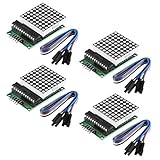
- Module Operating voltage : 5V
- Module size : 5 cm X 3.2 cm wide X 1.5 cm high
- Single module can drive a common cathode 8 * 8 dot matrix
- Holes with four screws , diameter 3mm, can be fixed by using our M3 studs
- Modules with input and output interfaces , support for cascading multiple modules
Advanced alternative: a bare 16-pin matrix
A bare matrix is a component, not a plug-and-play display module. A typical 8×8 matrix has 16 pins: eight row connections and eight column connections. Exact pin assignments are not universal, even among similarly named parts. Confirm the datasheet or identify the pinout with a controlled test procedure.
The cited Adafruit discrete matrices are common-cathode displays and require 1:8 multiplexing. The MAX7219 is intended for compatible common-cathode arrangements. A common-anode matrix is not automatically interchangeable.
Do not connect all 16 pins directly to an Arduino and switch arbitrary combinations. That can exceed GPIO or LED current limits, cause ghosting and uneven brightness, or damage the display or board. A robust design uses one of the following:
- A MAX7219 and a compatible common-cathode matrix
- Two shift registers with suitable transistor or driver stages
- A dedicated LED-matrix driver designed for the display’s electrical arrangement
Bare MAX7219 circuit concept
Regulated 5 V  -----------------> MAX7219 V+
Common ground  -----------------> MAX7219 GND
Arduino data   -----------------> MAX7219 DIN
Arduino clock  -----------------> MAX7219 CLK
Arduino latch  -----------------> MAX7219 LOAD/CS

MAX7219 row/column outputs ----> compatible matrix pins
MAX7219 ISET ------------------> current-setting resistor
Supply bypass capacitor -------> close to MAX7219 supply pins
The current-setting resistor value must suit the MAX7219 design and LED characteristics; “one resistor” does not mean that one arbitrary resistor value is safe for every display. Use the controller documentation and the matrix’s electrical specifications. The MAX7219 product information describes its serial interface and external current-setting arrangement.
Independent reader supportYour contribution helps us test, update, and keep practical guides available for everyone.I2C backpack: a different wiring and code path
An I2C backpack is useful when you want compact wiring and Adafruit GFX drawing primitives. Connect:
VCCto the appropriate supplyGNDto groundSDAto the board’s I2C data pinSCLto the board’s I2C clock pin
Install the Adafruit LED Backpack and Adafruit GFX libraries, then follow the setup for the backpack’s matrix size and address. The relevant 1.2-inch guide and 0.8-inch guide show the supported wiring and library path.
I2C examples are not interchangeable with MAX7219 examples: they use different pins, controller protocols and libraries. Multiple backpacks also require compatible I2C addresses.
Best Value

- High Performance LED Matrix Driver:This module is designed to efficiently drive a single 8x8 dot matrix common cathode LED display, providing high-quality visual output for your projects.
- Compatible with 5V Power Supply:Operates at 5V with stable performance and is compatible with a wide range of microcontrollers and development boards such as Arduino.
- Durable and Easy-to-Install Design:Features four screw holes with a 3mm diameter, allowing for secure mounting using M3 studs or screws, ensuring a stable setup for your projects.
- Compact and Space-Saving Module:Dimensions of 3.2cm x 3.2cm x 1.5cm make it perfect for projects where space is limited, while still maintaining high functionality.
- Expandable with Cascading Support:Equipped with input and output interfaces, this module allows for easy cascading of multiple units, enabling the creation of larger LED displays.
NeoPixel 8×8 matrix: RGB rather than multiplexed monochrome
An 8×8 NeoPixel matrix contains 64 individually addressable RGB LEDs. It normally uses one data line rather than eight rows and eight columns, so it is programmed with a NeoPixel-compatible library rather than LedControl.
This is a better choice for color icons, gradients and animated effects, but power requirements are substantially higher. Adafruit lists approximately 3.5 A for a panel under its specified full-white maximum condition and recommends a 5 V, 2 A supply for typical use. Actual consumption depends on brightness, colors and power-management settings. Use an adequate regulated supply, connect grounds together and distribute power carefully. The product listing also notes a change from WS2812B to SK6812 LEDs as of May 9, 2023.
Troubleshooting checklist
Nothing lights
- Check that
VCCandGNDare not reversed. - Measure or confirm the module is receiving the expected 5 V.
- Verify that
DIN,CLKandCS/LOADmatch the sketch. - Confirm the
LedControllibrary is installed and the correct board and port are selected. - Ensure
shutdown(0, false), or the equivalent wake-up command, is present. - Use the module’s input side. The output side is normally marked
DOUTand is for chaining. - Make sure the board is not a raw 16-pin matrix being mistaken for a MAX7219 module.
LEDs respond but the picture is mirrored or rotated
This usually indicates an orientation or library-mapping mismatch, not a failed controller. Reverse bits, transform the bitmap, change the library’s hardware mapping, or physically rotate the module.
What’s actually slowing this PC down?
Pick the symptom - the matching free tool is one click away.
Only one row or column works
Check for a wrong bare-matrix pinout, a damaged MAX7219 output, an incorrect module connection, or a common-anode/common-cathode mismatch. A bare matrix connected without a proper driver is a primary suspect.
The display is dim
Check the intensity setting, supply voltage, supply capability, jumper and breadboard connections, multiplexing load and the length of daisy-chain wiring. Do not bypass current limiting to make the display brighter.
Random pixels or flicker appear
Check the common ground, shorten or secure signal wires, provide adequate supply bypassing near the module, and use a stable 5 V source. Motors, relays and wireless hardware can inject noise. Also verify logic-level compatibility when using a board other than a 5 V Uno.
Text is shifted across chained modules
Check the DIN/DOUT order, configured device count, module orientation and library-specific hardware mapping. MAX7219 modules are not guaranteed to use one universal PCB layout.
Quick Recap
Which type should you choose?
| Choose | Best for | Main trade-off |
|---|---|---|
| MAX7219 module | First monochrome project, animation and chained text | Orientation and library mapping can be confusing |
| Bare matrix | Learning multiplexing or designing a custom PCB | Needs a driver, verified pinout and careful current control |
| I2C backpack | Simple two-wire graphics on a compact display | Not compatible with MAX7219 code or its chaining method |
| NeoPixel matrix | RGB animations and effects | Higher cost and substantially higher power demand |
Project ideas
- Scroll a name or construction-site message across two or four modules.
- Display animated warning icons or status symbols.
- Show temperature, distance or another sensor reading.
- Build a reaction-time game with a joystick or push buttons.
- Create a small clock or countdown timer.
- Send bitmap art to the Arduino over the serial monitor.
Product prices and availability are accurate as of the date/time indicated and are subject to change. Any price and availability information displayed on Amazon at the time of purchase will apply.

