Recommended Free Tools
If your video doorbell worked through the fall but went offline during a freeze, the most likely explanation is a cold-weather power problem—not necessarily a dead camera. Cold reduces lithium-ion battery output, shortens runtime, and can prevent charging even while the device continues to operate.
A video doorbell that fails during a freeze is often not permanently dead. Cold can temporarily reduce a lithium-ion battery’s ability to deliver power, shorten runtime, and stop the battery from charging. A doorbell may therefore show a remaining charge yet shut down when its camera, infrared night vision, Wi-Fi radio, speaker, or live-view function demands a burst of power.
As an Amazon Associate I earn from qualifying purchases.
The exact result depends on the model, battery type, installation, temperature, weather exposure, Wi-Fi strength, and battery age. Do not assume that every doorbell stops working at 32°F (0°C): many can still operate below freezing, even though their batteries will not charge there.
What cold does to a video-doorbell battery
Most rechargeable battery-powered doorbells use lithium-ion batteries. In cold conditions, the battery’s internal resistance increases temporarily. Its stored charge may still be reported in the app, but the battery cannot deliver peak current as effectively as it can in mild weather.
#1 Best Overall

- UPGRADE LARGER BATTERY CAPACITY: We have upgraded our ring camera batteries with long lasting power 3.6V rechargeable Li-ion cells, the capacity of rechargeable battery Upgraded up to 7200mAh (No fake marking of capacity!), which means your Ring cameras will have a continuous and reliable source of power; Premium li-ion cells for longer battery life, ring camera batteries can be charged or discharged at any time without harm
- PERFECT FULLY COMPATIBLE: Our ring doorbell battery replacement works with Ring Video Doorbell 2/3/3 Plus/4, Battery Doorbell Plus/Pro, Stick Up Cam Battery/Solar (all gens), Stick Up Cam Pro Battery/Solar, Spotlight Cam Battery/Solar, Spotlight Cam Plus Battery/Solar/Wired, Spotlight Cam Pro Battery/Solar/Wired, Solar Floodlight(NOT Compatible with Ring Doorbell Pro, Pro 2, Wired, Plug-in models, or any device with a non-removable battery.)
- DUAL CHARGING METHODS: Built-in charger port, you can charge them using a charging cable with a micro-USB port. our ring camera battery 2 pack can be conveniently charged using any 5V USB ports, such as a PC, car charger, or power bank. Additionally, our charger station enables simultaneous charging of up to 2 Ring batteries. This allows you to effortlessly swap out the batteries of your Ring cameras, reducing the downtime and ensuring uninterrupted surveillance
- INTUITIVE LED INDICATORS: Our V4/8AB1S7-0EN0 batteries for ring camera are easy to diagnose the charging status through the changing of red and green indicators. When red and green lights are on, the battery is starting charging. When the 2 lights both green, the battery is fully charged
- RELIABLE PROTECTION: The ring doorbell battery charger built-in multiple circuit protection against overcharging, overload, over-current, overheating, over-voltage and short circuits to ensure the safety of you and your equipment, these safeguards guarantee the performance, safety, and longevity of the batteries
That is why a doorbell may appear to have 30 or 40 percent charge and then go offline as soon as someone opens live view, speaks through two-way audio, activates night vision, or triggers a motion recording. These features increase the electrical load.
Cold also reduces practical runtime. Ring states that battery life becomes shorter around freezing and should move back toward normal after the weather warms and the battery is recharged. Google warns that cold shortens the battery life of Nest battery doorbells and says that, near the minimum operating temperature, runtime for affected models may be less than half the warm-weather figure.
Why the doorbell may operate but refuse to charge
Charging a lithium-ion battery in cold conditions is more temperature-sensitive than simply drawing power from it. For example, Google specifies a minimum operating temperature of -4°F (-20°C) for the Nest Doorbell (battery), but a minimum charging temperature of 32°F (0°C). Between -4°F (-20°C) and 32°F (0°C), the doorbell may continue running while its battery does not charge.
Quick wins for a faster PC:
Clear out junk files and repair common Windows errorsFree Scan →Fix the driver behind crashes, sound loss and screen glitchesFind Drivers →Repair Windows errors before they cause bigger problemsFix Now →Ring likewise says its battery-powered devices are designed to stop charging below freezing. This is a protective function, not necessarily a failed charger. Charging a lithium-ion battery when it is too cold can damage the cell and create an unsafe condition.
Existing doorbell wiring does not always solve this problem. A battery doorbell connected to a transformer may use the battery as its primary operating source while receiving only a trickle charge from the wires. If the battery is too cold to charge, the wiring may not prevent the battery from gradually draining.
Symptoms and the most likely causes
| Symptom | Likely cold-related explanation | Other causes to check |
|---|---|---|
| Battery percentage drops much faster than normal | Cold reduces usable capacity and increases the power needed for reconnects or high-demand features. | Aging battery, excessive motion events, poor Wi-Fi, frequent live views, or high-quality recording settings. |
| App says charging is paused or slow | The battery is below the model’s charging-temperature limit. | Bad cable, incompatible adapter, dirty connector, damaged battery, or inadequate transformer. |
| Doorbell works indoors but fails outside | Temperature, wind, moisture, or exposure is affecting the outdoor installation. | Weak outdoor Wi-Fi, water intrusion, damaged seals, or a battery that no longer holds charge. |
| Live view or night vision causes shutdown | The cold battery cannot supply the temporary power spike. | Battery wear, firmware problems, unstable Wi-Fi, or a failing device. |
| Battery-backed wired doorbell goes offline after several cold days | The battery has been draining faster than the wiring can replenish it. | Incorrect transformer voltage, loose wiring, failed transformer, or a defective charging circuit. |
| Video is delayed or the doorbell repeatedly reconnects | Cold-related battery drain may be worsened by repeated Wi-Fi reconnections. | Weak signal, router failure, broadband outage, interference, or service outage. |
These symptoms are clues, not proof. A weak Wi-Fi connection, damaged cable, incorrect transformer, moisture intrusion, aging battery, app problem, or manufacturer service outage can look very similar to a cold-weather failure.
How to restore a doorbell that stopped working in the cold
1. Check the app and the conditions
Before removing anything, open the manufacturer’s app and look for messages such as low battery, charging paused, charging slowly, temperature warning, or offline. Note the actual outdoor temperature and when the problem began.
The Tool Desk
Outbyte Driver Updater FREEScan for outdated or missing drivers - takes under a minuteDriver Scan →Outbyte PC Repair FREERepair Windows errors before they cause bigger problemsFix Now →Rank #2

- Get an extra rechargeable battery pack so you'll always have backup power ready to go.
- Works with Ring Video Doorbell 2, Ring Video Doorbell 3, Ring Video Doorbell 3 Plus, Ring Video Doorbell 4, Ring Battery Doorbell Plus, Ring Battery Doorbell Pro, Ring Outdoor Cam Plus, Ring Stick Up Cam Battery/Solar (all generations), Stick Up Cam Pro Battery/Solar, Ring Spotlight Cam Battery/Solar, Ring Spotlight Cam Plus Battery/Solar/Wired, Ring Spotlight Cam Pro Battery/Solar/Wired, Ring Peephole Cam, Ring Solar Floodlight, Ring Spotlight Cam 2K, Ring Outdoor Cam 2K, and Ring Peephole Cam 2K
- Includes a quick-release tab to easily change the battery without moving the device.
Check whether other devices on the same Wi-Fi network are online. If phones, cameras, or other smart-home devices also lost connection, troubleshoot the network or internet service before blaming the doorbell battery.
2. Warm the device gradually
If the battery is removable, remove it according to the manufacturer’s instructions and bring it indoors. If the battery is built in, bring the complete doorbell indoors only if the installation allows safe removal. Let the battery or device reach room temperature naturally before charging.
Do not use a hair dryer, heat gun, radiator, space heater, heating pad, hot towel, or other concentrated heat source. Google specifically warns against wrapping a cold Nest battery or doorbell in a heated towel or placing it near heating elements. Rapid or localized heating can damage the battery, electronics, seals, or housing.
If condensation appears after bringing the doorbell inside, leave it unplugged until the exterior, contacts, and charging port are completely dry. Do not charge a wet device.
3. Charge it with the specified equipment
Once the battery is at room temperature, use the supplied or manufacturer-approved cable and adapter. Check the outlet with another device, inspect the cable and connector for cuts or bent contacts, and make sure the charging plug is fully inserted.
Ring’s troubleshooting guidance recommends testing the outlet and trying another cable or USB adapter when appropriate. If the battery is removable, confirm that it is fully seated after charging. A questionable cable or adapter can imitate a temperature problem.
For a genuinely model-compatible replacement, a video doorbell replacement battery may be appropriate when the original battery is old and still cannot hold a charge after a complete, warm indoor charge. Match the exact model and battery specification. Never substitute random lithium cells, alter the battery pack, or charge a battery that is swollen, cracked, leaking, hot, or physically damaged.
Rank #3
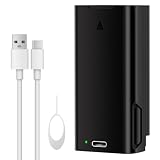
- 【7000mAh Ultra-High Capacity】:Equipped with a massive 7000mAh premium lithium-ion cell, delivering 24/7 stable power and consistent signal output for your eufy E340 doorbell.
- 【Precise Compatibility】:Designed specifically for eufy Security Video Doorbell E340. Perfect replacement for the original battery, featuring the same quick-release clasp for easy swap-outs.
- 【Intuitive LED Indicator】:Built-in LED light shows real-time charging status. Red light – charging in progress; Green light – fully charged. No more guessing, know exactly when your battery is ready.
- 【Multi-Layer Safety Protection】:Built-in smart circuit provides over-charge, over-discharge, over-voltage, over-current, and over-temperature protection. Certified with CE, FCC, and RoHS for safe and stable performance.
- 【What You Get & Warranty】:Package includes 1 Fulpower 7000mAh rechargeable battery, 1 USB-C charging cable, and 1 disassembly tool . Brand new, fully tested. Ideal as a spare for seamless rotation.
4. Reinstall and test every important function
After charging, reinstall the battery until it is fully seated, reconnect the doorbell, and test:
Free tools Windows power users keep installed
One-click scans. No signup required.
- Live video
- Motion detection and recording
- The doorbell button
- Night vision, if fitted
- Two-way audio
- Push notifications
- The indoor chime, if one is installed
If the unit works indoors but fails again at the same outdoor location, the temperature, exposure, battery condition, or installation remains suspect.
5. Diagnose Wi-Fi separately
Cold does not normally stop radio communication by itself, but a weak connection can make the battery problem worse. Ring and Blink both note that repeated disconnects and reconnects consume additional battery power.
Check the doorbell’s signal indicator or RSSI reading if the app provides one. Restart the router where appropriate, reduce obstructions, and check whether the outdoor mounting position is at the edge of the network’s coverage. A properly positioned outdoor-rated or indoor Wi-Fi mesh node may help.
Do not buy a Wi-Fi extender simply because the doorbell went offline during a freeze. First establish that the signal is actually weak. A networking product will not repair a depleted battery, failed charger, water-damaged doorbell, or frozen charging lockout. If coverage is the documented problem, a Wi-Fi mesh system for smart home or suitable extender can be considered after checking compatibility and placement.
6. Inspect wired power only when relevant
For a battery-backed doorbell connected to existing doorbell wires, verify that the transformer and wiring meet the exact model requirements. Ring says compatible Ring devices may use an 8–24V AC transformer, with a 40V maximum, and warns that intercom systems and DC transformers are not compatible. Google likewise recommends checking wire voltage and using a transformer with sufficient output when the supplied power is inadequate.
Do not replace a transformer merely because the weather is cold. First confirm the device’s specifications and, if possible, measure the installation correctly. Turn off power at the breaker before handling doorbell wiring. If the wiring is unfamiliar, the transformer is in a difficult location, local electrical rules apply, or you are considering a conversion, use a qualified electrician.
Rank #4

- Battery info: Condition: New, Model:S2 (6-Pins), Capacity:5200mAh /19.76Wh;
- Compatible Device: Check your old battery model first before buy, Only for S2 (6 Pin) Ring Video Doorbell 2nd Gen Version Only, thank you!
- Instructions: Please install the battery correctly. Please use the original charger to charge it.
- Warranty: 30 days payment back, 12 months of warranty; Support: Welcome to email us if you have any issues, questions or concerns, we will response to solve the problem within 24 hours.
A compatible 8-24V AC doorbell transformer is relevant only to a supported wired installation and only after the required voltage and VA rating have been confirmed. An incorrect transformer can damage the doorbell or create an electrical hazard.
Separate troubleshooting paths by doorbell design
Removable-battery models
- Remove the battery and warm it indoors naturally.
- Charge it with the specified equipment.
- Inspect the contacts and confirm the battery is fully seated.
- Replace it only if it is model-compatible and no longer retains charge.
- Keep a charged spare only if the manufacturer supports using spare batteries for that model.
Built-in-battery models
- Follow the manufacturer’s removal instructions; do not pry open a sealed housing.
- Bring the whole unit indoors only when it can be removed safely.
- Allow it to warm and dry before connecting a charger.
- Do not attempt to replace an internal cell with a generic battery.
- Contact the manufacturer if it remains dead after a warm, complete charge.
Battery-backed wired models
These can be misunderstood. Wiring may provide a trickle charge rather than continuous operating power. A freeze can expose a marginal battery, an undersized transformer, loose terminals, or a wiring fault that was not apparent in warmer weather. Test the battery and the low-voltage supply independently rather than assuming that “wired” means the battery is irrelevant.
Fully wired and PoE models
A fully wired doorbell removes rechargeable-battery maintenance, but it does not eliminate every winter failure. It can still lose power through a tripped breaker, bad transformer, damaged cable, network outage, water intrusion, or a failed network switch.
Power-over-Ethernet models use Ethernet for both network connectivity and power. Reolink describes its PoE doorbells as avoiding battery maintenance and Wi-Fi dropouts, while its battery doorbell supports rechargeable-battery or hardwired operation. A PoE video doorbell can be a durable long-term option for a property that already has suitable Ethernet cabling, a compatible switch or injector, and a practical route for installation.
Independent reader supportYour contribution helps us test, update, and keep practical guides available for everyone.Preventing the next cold-weather failure
Reduce unnecessary battery workload
- Lower motion sensitivity where appropriate.
- Narrow motion zones so the camera does not record roads, trees, or other constant movement.
- Reduce unnecessary live views and two-way-audio sessions.
- Use lower video quality, shorter clips, fewer events, or lower wake-up sensitivity if the manufacturer provides those settings.
- Check battery condition before a forecast freeze rather than waiting for the first offline alert.
Google identifies activity level and camera settings as important contributors to Nest battery consumption. Ring similarly recommends adjusting motion settings, zones, and motion frequency when battery drain is excessive.
Shelter the installation without blocking it
An eave or naturally sheltered mounting position can reduce exposure to wind, snow, rain, and rapid temperature swings. A weather cover or silicone skin may help with direct precipitation and wind, but it cannot make a device operate outside its rated temperature range.
What’s actually slowing this PC down?
Pick the symptom - the matching free tool is one click away.
If you use a video doorbell weather cover, choose one designed for the exact model. Confirm that it does not obstruct the camera, microphone, speaker, motion sensor, button, status light, or required ventilation. A cover that narrows the field of view or traps moisture can create a new problem.
Best Value

- 2-Pack 6040mAh Replacement Battery with Charger Station for Ring-Doorbell Camera 2/3/3 Plus/4, Spotlight and Stick Up Cam, Rechargeable Upgraded Lithium Li-ion Camera Batteries 3.65V
- 【MULTIPLE CHARGING OPTIONS with Charger Station】 The Replacement Ring Camera battery can be charged with any 5V USB C ports like PC, car charger or power bank etc. This Charger staition can charge Original batteries as well.
- 【Real 6040mAh POWERFUL BATTERY CAPACITY】 Premium cells create quality batteries. 6040mAh high battery capacity for continuous surveillance. Take 4hours can be full charged.
- 【Dual Charging】 This Ring rechargeable Camera battery charger station can charge up to 2 ring batteries simultaneously, allowing you to change the batteries of your ring cameras via hot-swap and thereby reducing the downtime of your Ring camera. Compatible with Spotlight Cam Battery, Spotlight Cam Solar, Video Doorbell 2/3/3 plus/4 and ALL-new Ring Stick Up Cam Battery.
- 【100% FULLY COMPATIBLE with ALL Ring Model Devices 】Rechargeable Quick Release Camera Battery Pack V4 Works with Ring Video Doorbell 2, Video Doorbell 3, Video Doorbell 3 Plus, Video Doorbell 4, Battery Doorbell Plus, Battery Doorbell Pro, Stick Up Cam Battery/Solar (all gens), Stick Up Cam Pro Battery/Solar, Spotlight Cam Battery/Solar, Spotlight Cam Plus Battery/Solar/Wired, Spotlight Cam Pro Battery/Solar/Wired, Peephole Cam, Solar Floodlight.
Temperature examples from major brands
These figures illustrate why the model specification matters; they are not universal cold-weather guarantees. Rated operating ranges also do not promise unchanged battery runtime throughout the range.
| Model or product family | Published example | Important qualification |
|---|---|---|
| Google Nest Doorbell (battery) | Minimum operating temperature of -4°F (-20°C); minimum charging temperature of 32°F (0°C). | It may operate below freezing while the battery drains and does not charge. |
| Ring battery devices | Ring states many devices can operate from -4°F (-20°C) to 122°F (50°C). | Battery life shortens around freezing and charging stops below freezing; limits vary by product. |
| Arlo Essential Video Doorbell Wire-Free | -4°F (-20°C) to 113°F (45°C) operating range in the cited specification. | This describes operation, not unchanged runtime or charging performance. |
| Blink Outdoor 4 | -4°F (-20°C) to 113°F (45°C) operating range; uses two 1.5V lithium non-rechargeable AA batteries. | Blink still warns that extreme cold can affect battery performance. |
| Reolink Video Doorbell (Battery) | 14°F (-10°C) to 131°F (55°C) operating range in the cited specification. | It supports battery or hardwired operation; other Reolink models may differ. |
Always check the exact product page and the battery or charging documentation for the installed model. A manufacturer’s operating specification is generally a rated range under defined conditions, not a promise of real-world performance in wind, snow, shade, heavy activity, or poor Wi-Fi.
When cold probably is not the main cause
Investigate other faults when the doorbell:
- Remains dead after warming and receiving a complete charge indoors.
- Fails indoors in moderate temperatures.
- Shows swelling, cracks, leakage, corrosion, or other physical damage.
- Has a damaged charging connector or cable.
- Loses power repeatedly in mild weather.
- Cannot connect even when other devices have a strong Wi-Fi signal.
Check the transformer, breaker, low-voltage connections, router, app and firmware status, and the manufacturer’s service status. Moisture intrusion deserves particular attention if the problem follows rain or melting snow rather than temperature alone.
Crashes, No Sound, or Screen Glitches?
Random freezes, missing sound and display glitches usually trace back to one bad driver. Find and replace yours safely.Free scan · under a minutePC Slower Than It Used to Be?
A free scan shows the junk files, broken settings and background clutter dragging Windows down - then fixes them in one click.Free scan · Windows 10 & 11Replace the battery, repair the installation, or change the doorbell?
| Situation | Most sensible next step |
|---|---|
| Battery is old and will not hold charge after a warm indoor charge | Use a model-compatible replacement battery, if the manufacturer supports replacement. |
| Battery is cold but otherwise healthy | Warm it gradually, charge it indoors, reduce power demand, and shelter the device. |
| Battery is swollen, leaking, cracked, or hot | Stop using and charging it. Follow the manufacturer’s battery-disposal and service guidance. |
| Doorbell has documented weak Wi-Fi | Improve access-point placement or consider a compatible mesh system or extender. |
| Battery-backed wired unit reports insufficient power | Verify voltage, transformer compatibility, wiring, and terminals; use an electrician when necessary. |
| Recurring freezes exhaust the battery every winter | Consider a fully wired or PoE model if the property supports the required electrical or Ethernet work. |
| Device is damaged or fails after proper testing | Use the manufacturer’s warranty or service process before buying unrelated accessories. |
For a construction or renovation project, planning the power path is often better than repeatedly replacing batteries. A suitable transformer, protected low-voltage route, or Ethernet cable can be designed into the installation, but the final choice must follow the doorbell’s specifications and local electrical requirements.
Frequently Asked Questions
Do all video doorbells stop working at 32°F?
No. Many video doorbells can operate below 32°F (0°C), but their lithium-ion batteries may stop charging at that temperature. The exact operating and charging limits depend on the model.
How do I safely warm a video doorbell battery?
Bring a removable battery indoors, or the entire device if it can be removed safely, and let it warm naturally. Do not use a hair dryer, radiator, space heater, heating pad, or other direct heat. Charge it only after it reaches room temperature and is dry.
Why does my wired battery doorbell still die in cold weather?
It may be receiving only a trickle charge from the wires while the battery remains the primary power source. If the battery cannot charge below freezing, it can continue draining even though the doorbell is wired.
Should I replace a battery doorbell with a wired or PoE model?
Check the exact model’s operating and charging specifications. A fully wired or PoE model can reduce rechargeable-battery problems, but it still requires suitable electrical or Ethernet infrastructure and can have separate network or power failures.
The Bottom Line
Cold weather can make a healthy battery deliver less power, consume its remaining charge faster, and stop charging below the model’s charging limit. Warm the device gradually, charge it with approved equipment, test Wi-Fi and wiring separately, and replace only the component that the evidence identifies. For repeated winter failures, a correctly installed wired or PoE doorbell may be a better long-term design than adding generic cold-weather accessories.
Quick Recap
Product prices and availability are accurate as of the date/time indicated and are subject to change. Any price and availability information displayed on Amazon at the time of purchase will apply.

