Recommended Free Tools
A short-throw projector produces a large image from a comparatively short distance—usually a few feet from the screen. Its throw ratio, rather than the label alone, determines whether it will fit a particular room, screen size, and mounting position.
A short-throw projector is designed to produce a large image from only a few feet away from the screen. Most manufacturers describe short-throw projection as roughly 3 to 8 feet from the projector lens to the screen, although there is no universal cutoff. The projector’s throw ratio and installation chart are the reliable ways to determine whether a particular model will fit your room.
As an Amazon Associate I earn from qualifying purchases.
How throw ratio works
Throw ratio describes the relationship between the projector’s lens-to-screen distance and the width of the projected image:
Throw ratio = throw distance ÷ image width
A lower throw ratio means the projector can create a given image width from a shorter distance. For example, a projector with a 0.75:1 throw ratio would sit approximately 6 feet from a screen to produce an image 8 feet wide:
#1 Best Overall

- Short Throw WXGA Projector: Experience crisp visuals with WXGA (1280x800p) resolution and a 0.5 throw ratio; ideal for projecting large, clear images in classrooms or small meeting rooms without shadows
- Clear Performance in Ambient Light: Deliver punchy images with 4,000 ANSI lumens that hold up against moderate ambient lighting; ensuring presentations stay visible and detailed during daytime sessions
- Vibrant and Cinematic Colors: Enjoy stunningly beautiful images powered by proprietary SuperColor technology; providing a wide color gamut for lifelike visuals in educational or professional settings
- Big Images in Tight Spaces: Transform small rooms with screen sizes up to 150 inches; conveniently projecting a massive 100-inch image from just 4.5 feet away to maximize limited floor space
- Easy Setup and Image Adjustment: Achieve a perfectly squared display with vertical auto-keystone correction and digital zoom; ensuring a stress-free setup for mobile presenters or permanent installs
0.75 × 8 feet = 6 feet
This is a planning estimate, not a final installation measurement. The listed distance is normally measured from the projector lens to the screen. Projector depth, mounting hardware, lens offset, ventilation space, and cable clearance must be added separately.
Short throw versus standard throw versus ultra-short throw
The names describe lens geometry, not simply whether a projector happens to be placed near a wall. A standard-throw projector generally needs to be farther back in the room to create a large image. A short-throw model uses a wider-angle lens so it can project a comparable image while sitting closer to the screen.
| Projector type | Typical placement | Best suited to | Main installation concern |
|---|---|---|---|
| Standard throw | Middle or rear portion of a room | Rooms with adequate depth and a clear rear mounting position | Keeping people and furniture out of the light path |
| Short throw | Roughly 3–8 feet from the screen, depending on the model | Small rooms, classrooms, offices, gaming areas, and home theaters | Accurate distance and square alignment |
| Ultra-short throw (UST) | Immediately below or beside the screen, often on a cabinet | Rooms where the projector must sit directly at the front wall | Very precise alignment, a flat screen surface, ventilation, and suitable mounting |
Short throw and UST are related but are not interchangeable. UST models typically project from approximately 0 to 4 feet and use a much more extreme projection angle. A conventional short-throw projector can usually be placed on a table, shelf, ceiling mount, wall mount, or rear area several feet from the screen.
A practical rule is to choose short throw when the projector can sit a few feet from the screen but cannot be placed across the room. Choose UST when it must live directly below or beside the screen. Always confirm the manufacturer’s throw-ratio range and projection-distance chart before purchasing.
Why use a short-throw projector?
It fits rooms with limited depth
In an apartment, bedroom, conference room, classroom, or multipurpose space, a standard projector may need to sit in the middle of the room or at the back near a wall. A short-throw model can create a large picture near the front, leaving more of the floor available for seating, circulation, desks, or equipment.
It reduces shadows and beam interference
Presenters, teachers, players, and other people are less likely to walk through the light path when the projector is near the screen. That can reduce shadows across the image and make the setup more practical for presentations, teaching, gaming, and simulation spaces.
It can simplify a permanent room layout
A front-of-room installation may avoid a ceiling mount in the center of the room or a coffee table positioned between the audience and the screen. It still requires careful measurement: small changes in distance affect image size, while sideways movement or tilting affects image geometry.
Quick wins for a faster PC:
Fix the driver behind crashes, sound loss and screen glitchesFind Drivers →Repair Windows errors before they cause bigger problemsFix Now →It can work well for gaming and simulation
Short-throw projectors are used for gaming and golf simulation because they can provide a large image without placing the projector directly behind the player or golfer. Input lag, refresh-rate support, brightness, installation height, and the location of the player or hitting area remain important.
For example, BenQ’s TK710STi is a model-specific short-throw example marketed for home entertainment, gaming, and golf simulation. Its published specifications include a 0.69–0.83 throw-ratio range, 4K UHD resolution, 3,200 ANSI lumens, HDMI 2.0 inputs, and a laser light source rated for 20,000 hours. Those figures describe that particular model; they are not requirements or guarantees for every short-throw projector.
Rank #2
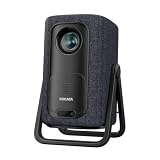
- 【1.1:1 Short Throw Ratio – Big Screen in Small Spaces】 Get a massive 100-inch image from just 2.44m (8 ft) away. Unlike long-throw mini projectors, this short throw portable projector fits apartments, dorms, or cozy bedrooms without rearranging furniture. True 1.1:1 ratio means you can place it on a coffee table or bookshelf and still enjoy giant, immersive visuals. Ideal for patios, balconies, or any tight space where you thought a big screen was impossible.
Example: calculating placement for a 100-inch screen
Suppose you want a 100-inch, 16:9 image.
- Convert the diagonal to image width. A 16:9 image is approximately 0.872 times as wide as its diagonal measurement.
- A 100-inch diagonal therefore produces an image approximately 87.2 inches wide, or 7.27 feet.
- Multiply that width by the projector’s throw ratio.
With a 0.75:1 throw ratio:
7.27 feet × 0.75 = approximately 5.45 feet
The lens would be approximately 5.45 feet from the screen at that setting. If the projector has a throw-ratio range of 0.69–0.83:1, the nominal lens-to-screen distance for the same image would be approximately 5.02 to 6.03 feet. The manufacturer’s installation table may show slightly different usable limits because of zoom, focus, image offset, and model-specific tolerances.
Do not measure from the back of the projector and assume the result is correct. Add the projector’s body depth, bracket position, screen frame, power connection, HDMI routing, and ventilation clearance to determine the real cabinet, shelf, or wall-mount location.
Do these 3 things before closing this tab:
1Scan for outdated or missing drivers - takes under a minute2Repair Windows errors before they cause bigger problems3Fix the driver behind crashes, sound loss and screen glitchesWhat a short-throw projector does not solve automatically
It does not defeat daylight
Short throw changes projection distance, not the amount of ambient light reflected from the image. A large picture in a bright living room, classroom, or office may look washed out even when the projector’s headline lumen rating appears high.
Match brightness to screen size, room lighting, and content. For dark-room home theater, contrast and black-level performance may be more important than maximum brightness. For sports, presentations, classrooms, and daytime viewing, brightness becomes more important. When comparing products, check both color brightness and white brightness where the manufacturer provides both measurements. A single lumen figure is not a complete prediction of daytime image quality.
It does not remove alignment requirements
The projector and screen should be square and parallel. If the lens is aimed at the screen from an angle, the image can become trapezoidal, with one side wider or taller than the other. Tilting the projector can produce the same effect.
Digital keystone correction can make an image look rectangular, but it does so by digitally reshaping the picture and should not be treated as a substitute for accurate physical placement. Optical lens shift, when available, is generally preferable because it moves the image without digitally discarding or remapping as much of the projected frame. For a permanent installation, start by positioning the projector squarely and use keystone only for modest correction.
PC Slower Than It Used to Be?
A free scan shows the junk files, broken settings and background clutter dragging Windows down - then fixes them in one click.Free scan · Windows 10 & 11Outdated Drivers Are Slowing You Down
One free scan finds every outdated or missing driver and matches the right update for your exact hardware.Free scan · exact hardware matchIt does not make every wall suitable
A painted wall can work for a temporary setup, but bumps, seams, waviness, gloss, and uneven paint can become especially distracting with a large image. UST projection is particularly sensitive to surface irregularities because of its steep projection angle. A smooth, flat, correctly sized screen can improve uniformity, contrast, and geometry.
Short-throw projector buying checklist
1. Throw ratio and usable distance
Start with the room, not the projector’s marketing label. Measure the likely lens-to-screen distance and determine the desired image width. Then check whether the model’s complete throw-ratio range supports that combination. A projector advertised as short throw may still be too far away—or too close—for your intended screen.
Use the manufacturer’s projection calculator or installation table whenever possible. It should also show vertical offset, zoom limits, mounting orientation, and image-size ranges.
Rank #3
![[4500 ANSI/Built in Apps/65W Audio] Outdoor 4K-Projector with WiFi and Bluetooth 5.4, Auto Focus Smart Projector Support DoIby Audio, Upgrade GO2 Short Throw Projector with 360°Stand](https://m.media-amazon.com/images/I/41WlmVV28sL._SL160_.jpg)
- 4500 ANSI Highest Brightness & Sturdy 360° Rotatable Stand---With upgrade LED lamp built in, the GO2 outdoor projector offers 100% brighter images than other smart projectors. It offers bright, vibrant and clear images even with some light on(not suitable for full light bright room). Perfect for rooms with little light or outdoor night movie. Plus, it comes with a exclusive 360° rotatable stand, offering ultimate flexibility—easily project onto ceilings, walls, or any surface from any angle. Redefine your space with brilliant, big-screen projection anywhere you desire. P.S: Brighter projectors will cause louder fan noise
- Built in Apps and Unparalleled Inner 65W Stereo DoIby Audio---The projector 4k with wifi and bluetooth is pre-installed apps like NetfIix, YouTube and prime video. No need to connect extra devices to watch these apps. Powered by an advanced built-in chip, it ensures smooth and seamless performance across all apps, no lag and slowdowns. Moreover, experience cinema-grade audio with our 65W DoIby-supported stereo speakers. Featuring deep bass and crystal-clear highs, it delivers room-filling sound—perfect for movie nights, parties, or outdoor gatherings. The inner sound ranks No.1 among USD 1000 outdoor 4k projectors. No need to connect with external speakers
- 1:1 Short Throw Ratio and 50000:1 Contrast Ratio and Giant Display Size---The GO2 projector for bedroom offers a 100" image from just 8 feet—30% closer than other home projectors (others require 10.8 ft). With same projection distance, the image size is 30% larger than others. Small rooms can enjoy big screens too. Contrast is the difference between the darkest part of the image and the brightest. 50,000:1 contrast ratio delivers deeper blacks and brighter whites—no washed-out images, just lifelike clarity. Moreover, the projector 4k+ offers 50" to 500" image(4-25 ft distance)—the largest scalable display in its class. (Recommended: 100" for optimal viewing)
- Native 1080P, MEMC and HDR10---GO2 movie projector adopted 0.47’’ DMD chip, which provides 2 times sharper and more detailed image compared to other native 1080P projectors with 0.33’’ chip. Every Frame in Stunning Detail. The MEMC function ensures smoother motion, reduced blur, and enhanced clarity for fast-moving content. With HDR 10, dark areas are deeper without losing detail, enhanced with advanced image processing, every scene comes alive with breathtaking clarity. Our proprietary image processing transforms your living room into a IMAX-level cinema, with image quality that rivals commercial theaters
- Smart AI Auto Focus & Auto Keystone Correction& Auto Screen Fit &Auto Obstacle Avoidance---Say goodbye to time-consuming manual adjustments! This proyector delivers a crisp, perfectly aligned image within just 3 seconds when we move it to a new place. The exclusive auto obstacle avoidance function detects and works around obstacles automatically and never let furniture or decor ruin your viewing experience. More, the intelligent screen alignment instantly adapts to your screen’s boundaries, keeping images perfectly framed. P.S: Please make sure the function is enabled before starting
2. Brightness for the actual room
Consider window light, overhead lighting, screen size, wall color, and whether the projector will be used for movies, presentations, sports, games, or simulation. More brightness is not automatically better for a dark home theater, but too little brightness is a serious limitation in a bright room.
The Tool Desk
Outbyte Driver Updater FREEFix the driver behind crashes, sound loss and screen glitchesFind Drivers →Outbyte PC Repair FREERepair Windows errors before they cause bigger problemsFix Now →3. Resolution and aspect ratio
1080p is often adequate for general movies, presentations, and gaming. A 4K-capable model can provide finer detail on a large screen, although the source, viewing distance, processing, and projector design also matter.
Most modern video uses a 16:9 aspect ratio. Business and education equipment may use 16:10 or 4:3, so check the content and existing screen before buying. The TK710STi example uses a 16:9 4K UHD format, but that specification should not be generalized to all short-throw products.
4. Lens shift, keystone, and image offset
Determine where the image must land relative to the lens. A projector mounted above a screen may require a particular vertical offset; a projector on a low shelf may require another. Lens shift can provide valuable installation flexibility. Keystone is useful when perfect alignment is not possible, but it should not justify mounting the projector at a severe angle.
5. Light source and maintenance
Lamp, LED, and laser projectors differ in replacement requirements, startup behavior, brightness consistency, and rated life. Do not assume every short-throw projector is laser-based. As one model-specific example, BenQ lists a 20,000-hour laser light-source life for the TK710STi. Compare the exact light-source rating and warranty for the model you are considering.
6. Inputs, audio, and playback
Check HDMI version and bandwidth, HDCP support, audio output, ARC or eARC, wireless features, operating-system support, and compatibility with your console, computer, Blu-ray player, or streaming hardware.
The TK710STi product information lists dual HDMI 2.0b inputs, ARC/eARC support, Android TV functionality, and compatibility with consoles and streaming devices. Other projectors may have different app support, DRM compatibility, audio routing, or input limitations.
Screen, mount, cable, and audio requirements
The projector is only one part of the installation. Choose accessories after confirming the projector’s geometry and connection requirements.
- Screen: A fixed-frame or retractable screen provides a flatter, more uniform surface than many walls. In a bright room, consider a screen designed for ambient-light control, but verify that its viewing angle and gain are appropriate. UST projectors may require a screen specifically designed for UST projection.
- Mount: A ceiling or wall mount must match the projector’s mounting pattern, weight, orientation, lens offset, and ventilation requirements. A mount that physically attaches to the projector may still place the lens at the wrong height or distance.
- HDMI cable: Select a cable rated for the resolution and refresh rate you intend to send. A more expensive cable does not improve picture quality beyond the signal format it can reliably carry, but an inadequate or excessively long cable can cause dropouts, handshake failures, or a blank image.
- Audio: Built-in speakers may be sufficient for a presentation or casual viewing. A soundbar or external speaker system is more appropriate for a home theater or gaming room. Confirm whether the projector supports the required optical, analog, Bluetooth, ARC, or eARC connection.
- Streaming device: If the projector lacks suitable built-in apps, a separate streaming device can provide playback. Check app availability, DRM support, network requirements, and how audio will be routed before installing the projector out of reach.
Installation guidance for a room or renovation
- Choose the screen size and aspect ratio first. Confirm that the image will fit the wall, furniture, sightlines, and viewing distance.
- Mark the lens-to-screen distance. Use the manufacturer’s distance chart rather than the projector’s overall body dimensions.
- Account for image offset. The lens may not be centered vertically within the projected image. This affects shelf height and mount position.
- Provide ventilation. Leave the manufacturer-specified clearance around intake and exhaust vents. Do not bury the projector in a tightly enclosed cabinet unless the installation instructions specifically allow it.
- Plan power and signal paths. Decide where the console, computer, streaming device, receiver, and speakers will live. Route cables so they are accessible for replacement and do not create a trip hazard.
- Mount to suitable structure. For a ceiling or wall installation, use a mounting point and hardware rated for the projector and the building surface. Verify the manufacturer’s mounting pattern before closing walls or finishing a ceiling.
- Align mechanically before using digital correction. Set the projector square to the screen, level the mount, focus the image, and adjust optical controls before applying keystone.
- Test all sources before finalizing the installation. Confirm the intended resolution, refresh rate, HDR behavior, audio return path, remote-control access, and cable length while the equipment remains accessible.
Who should choose a short-throw projector?
A short-throw projector is a strong fit when you need a large image but have limited room depth, want to keep people out of the light path, or need to preserve open floor space. It is commonly useful for small-room home theaters, gaming, classrooms, offices, portable presentations, and golf simulators.
Rank #4
![Portable Smart Projector [Bundled with Google TV Stick 14.0 & 4K Support & Dolby] with WiFi and Bluetooth HDR10,Ceiling Mini Movie Short Throw Projector Outdoor Auto Focus for Home Theater Bedroom](https://m.media-amazon.com/images/I/51NiI6zAPpL._SL160_.jpg)
- [Google TV 14.0 | 10,000+ Apps | Sports & Live TV | Voice Control] This 2026 smart mini projector with WiFi and Bluetooth features the latest Android 14.0 system, giving you direct access to 10,000+ apps—Netflix, YouTube, Prime Video, Disney+, Sling TV, Hulu + Live TV, YouTube TV, and more—all on one easy home screen, no TV stick needed. With 1+32GB storage for smooth performance, it offers personalized recommendations and a unified entertainment hub. Use the voice remote with built-in Google Assistant to watch live channels—ESPN, Fox Sports, CNN, NBC, etc.—perfect for live events. This Google TV projector transforms any room into a personal theater.
- [Native 1080P with 4K Support | Ultra Short Throw] This 4K projector features native 1080P resolution with 4K decoding support — it reads 4K content and displays it at 1080P, delivering vibrant colors, deep contrast, and sharp details. With a 0.8:1 ratio, this ultra short throw projector delivers 60" at 3.5 ft / 80" at 4.6 ft / 100" at 5.9 ft, and up to 120" from just 6.9 ft — ideal for small spaces. For best clarity, keep it closer to the screen; larger distances may soften image quality. HDR10 enhances brightness and color accuracy, bringing every scene to life with cinema-quality clarity. Whether you're watching movies or gaming, proyector 4k transforms any room into a personal theater.
- [AI Auto-Setup: Focus | Keystone | Obstacle Avoidance | Screen Fit] No more manual adjustments. This projector for bedroom features an advanced AI auto-setup system that delivers a perfectly rectangular, crystal-clear image within seconds of power-on. Auto focus, keystone correction, obstacle avoidance, and intelligent screen alignment work together for a flawless picture every time—whether you place this portable projector outdoor on a nightstand, shelf, or at an angle. Zoom-out allows flexible screen sizing. 【Pro tip】If kept in a fixed spot, turn off Auto Focus & Auto Four-Corner Correction. Manually adjust once, and this movie projector will remember—no need to readjust next power-on.
- [WiFi 6 | Bluetooth 5.3 | Multi-Device Screen Mirroring] Equipped with next-generation WiFi 6 technology, this bluetooth projector ensures buffer-free streaming and lag-free gaming, even for 4K content. Bluetooth 5.3 enables seamless connectivity for headphones, speakers, or mobile devices. This phone projector supports screen mirroring from iOS, Android, laptops, and more—cast movies, photos, or presentations instantly to the big screen. HDMI ARC/CEC and USB ports offer versatile connections for soundbars, gaming consoles, or Fire TV Stick, making this tv projector the central hub of your home entertainment setup.
- [Ultra-Compact & Built-in Rotatable Stand] Weighing just 2.6 lbs (1.2 kg) and as compact as an iPad Mini, this small projector is designed for true mobility—perfect for travel, RV trips, dorm rooms, or backyard movie nights. The built-in rotatable stand allows flexible projection onto walls, ceilings, or even attic spaces. Whether you're lying in bed, camping under the stars, or hosting a party, this mini projector for iphone delivers big-screen entertainment anywhere you go.
It may not be the best choice when the projector must sit directly against the wall—that is usually a UST requirement—or when the room is bright and there is no plan for suitable light control or a screen. It is also a poor fit if the intended mounting location falls outside the model’s projection-distance range.
Bottom line
A short-throw projector is not simply a projector placed close to a wall. It is a projector with lens geometry that produces a large image from a comparatively short lens-to-screen distance. Use throw ratio to calculate placement, distinguish short throw from UST, match brightness to the room, and plan alignment, ventilation, cabling, screen surface, and mounting together. The right model is the one whose installation chart fits your room—not necessarily the one with the shortest advertised distance or the highest lumen number.
Frequently Asked Questions
What is a short-throw projector?
A short-throw projector uses a wide-angle lens to create a large image while sitting relatively close to the screen—commonly around 3 to 8 feet, depending on the model. The exact distance is determined by its throw ratio and installation chart.
Is short throw the same as ultra-short throw?
No. Ultra-short-throw projectors are designed to sit immediately below or beside the screen, often within roughly 0 to 4 feet. A conventional short-throw projector usually sits several feet away on a shelf, table, wall, or ceiling mount.
What’s actually slowing this PC down?
Pick the symptom - the matching free tool is one click away.
How far should a short-throw projector be from a 100-inch screen?
Measure the desired image width and multiply it by the projector’s throw ratio. For example, a 100-inch 16:9 image is about 7.27 feet wide; at a 0.75:1 throw ratio, the lens-to-screen distance is approximately 5.45 feet. Confirm the result using the manufacturer’s installation table.
Are short-throw projectors good in bright rooms?
Not by itself. Short throw reduces the distance and can reduce shadows, but it does not overcome daylight. Brightness, screen size, room lighting, screen surface, and the manufacturer’s color- and white-brightness specifications all affect the result.
Do I need a special screen for a short-throw projector?
A flat, smooth wall can work temporarily, but a projector screen generally provides a more uniform surface and can improve contrast and image consistency. UST projectors are particularly sensitive to surface waves and may require a UST-compatible screen.
The Bottom Line
In short: choose a short-throw projector when you want a large image from a few feet away and need to preserve room space. Confirm the model’s throw ratio, brightness, image offset, alignment controls, ventilation requirements, and connection options before designing the installation.
Free tools Windows power users keep installed
One-click scans. No signup required.
Quick Recap
Product prices and availability are accurate as of the date/time indicated and are subject to change. Any price and availability information displayed on Amazon at the time of purchase will apply.

