Recommended Free Tools
Yes, the U.S. recall is real—but it does not cover every Tesla Powerwall 2. On November 13, 2025, the U.S. Consumer Product Safety Commission announced that Tesla was recalling about 10,500 certain Powerwall 2 AC battery systems sold in the United States from November 2020 through December 2022. Certain lithium-ion cells can fail during normal operation, creating overheating, smoke, and fire hazards.
Tesla reported 22 overheating incidents, including six involving smoke and five involving fire. The reports involved minor property damage and no injuries reported to the CPSC. The remedy is replacement at no cost. Owners should check the Tesla app and use Tesla’s recall-specific support channel rather than trying to identify an affected unit from its appearance or an online serial-number list.

As an Amazon Associate I earn from qualifying purchases.
What Powerwall owners should do first
- Do not assume every Powerwall 2 is recalled. Tesla must confirm whether your exact system is affected.
- Keep the system connected to the internet if it can be done safely. Tesla’s remote mitigation applies to affected units that are online.
- Open the Tesla app and look for a recall notification.
- Do not open, dismantle, repair, move, or modify the Powerwall yourself.
- If you see smoke, flames, unusual heat, or smell burning, leave the area and call emergency services.
The CPSC recall notice says affected systems will be replaced at no cost. Tesla has remotely discharged affected systems that were online while owners waited for replacement.
What exactly was recalled?
The recall concerns certain Tesla Powerwall 2 AC battery power systems. These are stationary home-energy-storage systems used for solar self-consumption, time-based energy control, and backup power.
#1 Best Overall

- Whole‑Home Backup Hub: Maximize your DELTA Pro Ultra system. Support up to 3 plug‑and‑play inverters & 15 stackable 6kWh batteries, or 3 DELTA Pro 3 + 6 Extra Batteries for 36kWh storage to power all household appliances.
- Multi‑Source Smart Energy Management: Harness solar for low‑cost green power to cut electricity bills. Seamlessly switch to EcoFlow Smart Generator 4000 or 3‑12kW gas generators during sun‑outage storms for uninterrupted home power.
- Savings just roll on in: Backup Reserve mode in app locks your designated battery percentage. Boost reserve for incoming outages, or lower it for daily use. Fine‑tune performance with Self‑Power, Scheduled Tasks and TOU Modes to reduce energy costs.
- 20-ms Auto-Switchover: When an outage hits, there's no need to brave the dark, cold night to switch to your backup manually. EcoFlow Smart Home Panel 2's automatic switchover feature ensures your home remains powered even when you're away.
- Professional‑Installation Required: Smart Home Panel 2 must be professionally installed before operation
The affected products were sold in the United States from November 2020 through December 2022, online and through certified Tesla installers. The original selling price was approximately $8,000, according to the CPSC.
The Powerwall 2 model name appears on the unit’s side nameplate. That label can help establish the product family, but it does not by itself establish recall status. Installation date, exterior appearance, a normal-looking app, or fragments of a serial number posted online are not reliable substitutes for Tesla’s confirmation.
Products that should not be automatically included
- Powerwall+: Tesla lists it separately from the Powerwall 2 AC system named in the CPSC notice.
- Powerwall 3: The notice does not identify Powerwall 3 as the recalled product.
- Powerwall 2 systems outside the U.S.: The U.S. sales dates and remedy process should not be applied automatically in other countries.
- Powerwall 2 units sold before or after the stated U.S. period: The sales window alone cannot confirm inclusion or exclusion.
What caused the fire hazard?
The stated hazard is failure of certain lithium-ion battery cells during normal operation. A failing cell can cause the system to stop functioning, overheat, smoke, or emit flames. The CPSC description does not say that every Powerwall 2 cell or every Powerwall 2 system has the defect.
Free tools Windows power users keep installed
One-click scans. No signup required.
An Australian recall published on September 16, 2025, described certain cells from a third-party supplier that could fail and overheat. The Australian notice also referred to smoking and flame emissions, property damage, remote discharge, and free replacement. That chronology provides useful context, but the available U.S. CPSC notice does not identify the cell supplier in the same terms. It should not be assumed that the U.S. and Australian recalls involve exactly the same cell batch unless Tesla or the relevant regulator confirms that connection.
How many incidents were reported?
Tesla reported the following figures to the CPSC:
- 22 reports of overheating
- 6 reports involving smoke
- 5 reports involving fire
- Minor property damage
- No injuries reported to the CPSC
The five fire reports are included within the 22 overheating reports. It would be inaccurate to describe all 22 incidents as fires.
How to check whether your Powerwall is affected
- Confirm that the Powerwall and the home’s communications equipment are connected to the internet, provided doing so does not require electrical work or unsafe access.
- Open the Tesla app and check for a recall notification.
- If Tesla identifies the system as affected, follow the replacement instructions in the app.
- If the system is installed or serviced through a third-party installer, check whether the app displays that installer’s contact information.
- Save screenshots, support messages, service numbers, and appointment details for your records.
Tesla says app notifications depend on the phone and Tesla energy products being connected to the internet. If the Powerwall is offline, a missing notification does not prove that it is unaffected. Reconnect it only through normal, safe operation; do not perform electrical work simply to bring it online.
Tesla’s general service route is Support → Contact support in the app. If a site visit is required, the app provides Support → Schedule Service under the Service section. Some third-party-installer service features require Tesla app version 4.21.0 or later, while viewing service-request status requires version 4.29.0 or later.
Crashes, No Sound, or Screen Glitches?
Random freezes, missing sound and display glitches usually trace back to one bad driver. Find and replace yours safely.Free scan · under a minutePC Slower Than It Used to Be?
A free scan shows the junk files, broken settings and background clutter dragging Windows down - then fixes them in one click.Free scan · Windows 10 & 11For this recall, the CPSC notice lists 877-961-7652 and [email protected]. Tesla’s general U.S. energy support number is (877) 798-3752; Tesla’s customer-support page directs energy customers to option 4, then option 2. Use the recall-specific contact first for this issue.
What remote discharge means
Remote discharge removes stored energy from an affected Powerwall when Tesla can communicate with it. Reducing the energy stored in the battery can reduce the consequences if a cell fault occurs while the owner waits for replacement.
It also has an important downside: the home may lose some or all Powerwall backup capability. Solar self-consumption and time-based energy savings may also be reduced. The owner may see a low state of charge or a disabled system in the Tesla app.
Remote discharge is an interim risk-reduction measure, not proof that a physically affected unit is permanently safe to operate. It also does not establish a universal U.S. compensation policy for lost backup power, energy savings, or utility-program revenue. The Australian regulator said Tesla would consider lost energy-savings compensation case by case; that statement should not automatically be applied to U.S. customers.
Do these 3 things before closing this tab:
1Repair Windows errors before they cause bigger problems2Fix the driver behind crashes, sound loss and screen glitches3Clear out junk files and repair common Windows errorsWhat if the Powerwall is offline?
The CPSC’s remote-discharge instruction applies to affected units that are online. The notice does not establish that an offline unit has been discharged or that it is safe to leave disconnected.
Rank #3
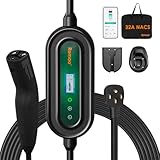
- 【Dual-Outlet Level 2 Charger for Any Charging Need】Experience the perfect blend of power and convenience. For faster charging, use the NEMA 14-50 (240V) plug to deliver approximately 7.6kW of output at 32 amps, adding approximately 25–30 miles per hour and dramatically reducing your charging time. As a truly portable EV charger, it seamlessly adapts to both home and travel use, effortlessly solving the problem of incompatible sockets wherever you go.
- 【Smart App Control, Simplified for Everyone】This fast charger connects via Wi-Fi to the user-friendly Smart Life App, offering powerful remote management to maximize your convenience and savings. Through the app, you can monitor charging in real time, review detailed session history, schedule charges during off-peak hours, set delayed start timers, and remotely adjust the charging current (from 16A to 32A) to precisely match your home circuit's capacity. For setup, please ensure both your phone and the charger are connected to the same 2.4 GHz Wi-Fi network (note that 5 GHz networks are not supported).
- 【25ft Charging Cable for All NACS EVs】 Our portable charger features a native NACS connector, fully compatible with all Tesla models (Model 3, Y, S, X, Cybertruck) and newer non-Tesla EVs/PHEVs adopting the NACS standard. The 25-foot cable ensures effortless reach to your vehicle’s charge port, regardless of your parking position. Whether parked deep in a garage, in a crowded driveway, or far from a roadside outlet, you can charge without hassle. Say goodbye to cable anxiety and enjoy convenient, stress-free charging every time.
- 【Certified Safety for Year-Round Peace of Mind】The Romaa charger is officially ETL Listed for electrical safety in the United States and Canada and is FCC compliant, meeting rigorous independent testing standards. Built with six core safety protections—including safeguards against over-voltage, under-voltage, over-current, over-temperature, grounding faults, and leakage—it delivers reliable and secure performance every time you charge. Designed for durability, it features robust NEMA Type 4 and IP66 weatherproof ratings, with sealed construction that fully protects against rain, dust, and snow, allowing you to charge confidently outdoors in any weather, year-round.
- 【Reliable Support and Accessories】If you encounter any issues with the charger for Tesla, please let us know. We are here to provide technical support and ensure everything works smoothly. Packing List: an EV charger(including a magic strap for preventing tangling), a handbag, a fixing cover, a holder, and a user manual.
Contact Tesla or the installer if the system cannot connect. Do not open the enclosure, bypass controls, move the unit, or carry out electrical work to resolve an app problem. If there are visible safety symptoms—smoke, flames, unusual heat, or a burning odor—treat the situation as an emergency rather than a connectivity issue.
What does “Powerwall Disabled” mean?
Tesla’s support documentation says the Powerwall Disabled alert means one or more Powerwall operations have been disabled because of an internal fault requiring replacement. Tesla instructs owners to turn off the Powerwall enable switch and contact the installer to arrange service.
That alert is not, by itself, proof that the unit is part of the CPSC recall. It can indicate a service-required internal fault. Recall status should come from Tesla’s recall notification or support confirmation.
Is the replacement free?
Yes. The CPSC lists the remedy as replace and says affected units will be replaced at no cost under the recall remedy.
“Free replacement” does not necessarily answer every cost question at a particular site. Ask Tesla or the installer in advance about:
- Permits, inspections, or utility approvals
- Gateway, meter, breaker, or wiring changes
- Electrical-system modifications required by the replacement
- Compatibility with an existing solar or backup configuration
- Damage unrelated to the recalled unit
- Lost backup service, energy savings, or utility-program payments
The available CPSC notice confirms free replacement but does not promise that every incidental expense will be covered.
Rank #4

- 【Fast Charging with NEMA 14-50 Plug】This 40A tesla level 2 charger features a NEMA 14-50 plug for reliable 240V output. It’s widely compatible with home-installed NEMA 14-50 outlets and 50-amp power sources in campgrounds, it's perfect for fast and convenient EV charging anywhere
- 【With NACS Connector, Built for Tesla and Future-Ready】The SEGUMA tesla charger level 2 with 40Amp features a NACS coupler for seamless charging with Tesla Vehicles including Model Y/3/S/X/Cybertruck. It also It’s also compatible with non-Tesla EVs adopting the NACS charging port starting in 2025, ensuring long-term versatility
- 【Fast, Safe & Smart Charging – Up to 40A Output】SEGUMA level 2 tesla mobile charger allows to charge your Tesla quickly and confidently with up to 40 amps (40A, 240V, 9.6kW) of power. Choose from flexible current settings (10A/16A/20A/24A/32A/40A) to match your home's circuit and avoid overload. Use the delay start timer to schedule charging during off-peak hours—saving on energy costs and reducing grid strain
- 【Extra-Long 25FT Cable for Easy Reach】The 25-foot tesla charger extension cable allows easy tesla charging at home or public stations. The included portable storage bag lets you take the tesla home charger level 2 anywhere —perfect for garages, driveways, and camgrounds or other travel spaces
- 【Safety designed nacs charger】SEGUMA level 2 ev charger tesla features IP66 waterproof, UL 94V-0 rated, and withstands temperatures from -22°F to 122°F, providing multiple protections against lightning, current leakage, grounding, low-voltage, over-voltage, over-charge, over-heat and over-current
Could Tesla replace it with a Powerwall 3?
Possibly, but owners should not assume that every recalled system will receive a Powerwall 3. Tesla’s current technical documentation says it no longer manufactures new Powerwall 2 or Powerwall+ batteries except for some remanufactured warranty returns, and it provides procedures for converting some Powerwall 2 installations to Powerwall 3.
A single-Powerwall-2 conversion may, in Tesla’s reference procedure, reuse an existing 30-amp circuit while configuring the Powerwall 3 to 5.8 kW / 24 A. Local electrical code, site conditions, equipment compatibility, and Tesla’s final design control the actual installation.
Multi-Powerwall systems can be more complicated. Tesla’s procedures identify possible gateway, meter, wiring, power-control-system, and compliance considerations. A replacement may therefore be free without being a simple one-for-one physical swap.
Independent reader supportYour contribution helps us test, update, and keep practical guides available for everyone.Questions to ask Tesla before the appointment
- Is my exact Powerwall included in the recall?
- Has Tesla remotely discharged it?
- Is backup power currently disabled?
- Which replacement model will be installed?
- Will the gateway, meter, breaker, wiring, or power settings change?
- Who handles permits, inspections, and utility paperwork?
- Which incidental costs are covered?
- What appointment timeline applies to my location?
- How should lost backup service or energy savings be documented?
- What completion and warranty paperwork will I receive?
Special cases owners should consider
Multiple Powerwalls
Several Powerwall 2 units at one property may require a system-level replacement plan rather than a simple one-unit swap. Ask specifically how Tesla will handle the gateway, metering, wiring, and power-control equipment.
Third-party installation
The installer may be the practical contact for a site visit, permitting, or electrical work, but recall confirmation and the recall remedy should come from Tesla or the regulator. Use the installer information shown in the Tesla app where available.
The Tool Desk
Outbyte PC Repair FREEClear out junk files and repair common Windows errorsFree Scan →Outbyte Driver Updater FREEScan for outdated or missing drivers - takes under a minuteDriver Scan →Medical equipment and critical loads
If the home relies on the Powerwall for medical equipment, refrigeration, communications, or other critical loads, document the loss of backup capability and ask Tesla, the installer, and the relevant emergency or utility contacts about interim arrangements. Do not assume remote discharge leaves the normal backup function available.
Best Value
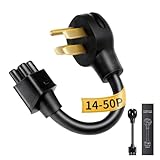
- NEMA 14-50P Adapter for Tesla: Verified for Tesla Gen 2 Mobile Connector. Connects to 4-Prong 240V RV/Range outlets. VISUAL CHECK: 1 round pin on top, 1 FLAT pin at bottom. (NOT for Gen 1 units; NOT for 14-30 outlets because the 14-30 requires an L-shaped bottom pin)
- Durable NEMA 14-50 Adapter Build: Constructed with reinforced premium materials, this nema 14-50 adapter withstands daily charging. The rugged cable and high-quality connector deliver stable 240V power for your Tesla. Outperforms generic nema 14-50 tesla adapter options, ideal for indoor and outdoor use
- Premium Copper-Alloy Materials: Built with copper-alloy pins and reinforced insulation, the WenStorm tesla charging adapter ensures cleaner, safer current for your Tesla. Compatible with all standard nema 14-50 outlet types, this tesla 14-50 adapter guarantees long-term durability for home or travel charging
- Supports Up to 32A Level 2 Charging: Delivering up to 32 Amps at 240V, this tesla 14-50 adapter supports Level 2 charging for all Tesla models using the tesla mobile connector. Perfect for daily home charging, RV parks, or road trips, ensuring consistent power through any properly installed nema 14-50 outlet
- ETL-Certified & Travel-Ready: ETL-listed with nickel-plated, corrosion-resistant pins, the WenStorm tesla charger adapter delivers long-term reliability and durability. Compact, rugged, and weather-resistant, this nema 14-50 adapter is perfect for home use or as a dependable travel backup
Home sale or ownership transfer
Record the recall status, open service case, planned replacement, and any loss of backup function before a property sale. Tesla has a separate Powerwall ownership-transfer process; buyers may need transfer documents and photographs of the gateway and Powerwalls.
Insurance and local authorities
Ask your insurer, fire department where appropriate, installer, utility, and local authority having jurisdiction whether they require notice, updated equipment records, a permit, inspection, or amended interconnection paperwork. The CPSC recall does not create one uniform process for every property.
This is not a Tesla vehicle recall
This is a stationary energy-storage product recall, not a Tesla vehicle recall. Tesla’s VIN recall search is for Tesla vehicles and is not the correct method for identifying a Powerwall recall.
What owners outside the United States should know
Australia published a Powerwall 2 recall on September 16, 2025, before the U.S. announcement on November 13, 2025. That does not establish that Canada, Europe, or every other market has the same recall, sales dates, affected units, or compensation policy.
Owners outside the United States should check their national product-safety regulator and contact Tesla through the local support process. Do not assume that the U.S. November 2020–December 2022 sales window applies in another country.
Recall timeline
- September 16, 2025: Australian product-safety authorities published a Powerwall 2 recall.
- November 13, 2025: The CPSC announced the U.S. recall of about 10,500 certain Powerwall 2 AC systems.
- 2026: Tesla documentation describes current support processes and some Powerwall 2-to-Powerwall 3 replacement configurations.
For official updates, consult the CPSC notice and Tesla’s Powerwall service guidance.
Quick Recap
Product prices and availability are accurate as of the date/time indicated and are subject to change. Any price and availability information displayed on Amazon at the time of purchase will apply.
What’s actually slowing this PC down?
Pick the symptom - the matching free tool is one click away.

