Windows Errors? Fix Them Before They Spread
Repair common Windows errors and clear accumulated junk for a smoother, more stable PC - no reinstall needed.Free scan · no reinstallOutdated Drivers Are Slowing You Down
One free scan finds every outdated or missing driver and matches the right update for your exact hardware.Free scan · exact hardware matchPrepare construction workers with machine- and task-specific instruction before they are assigned to a robot-enabled job, involve them in the hazard assessment, define risk zones and emergency actions, and repeat the coordination whenever the site, equipment, software or weather changes. Train operators, programmers, installers, maintainers and repair personnel to demonstrate competence; brief every other worker who could enter or work beside the robot area.
Why construction-robot preparation requires a different approach
Construction robots can reduce exposure to strenuous, repetitive or hazardous work, but they also introduce hazards that do not exist in the same form when a person performs the task alone. Construction automation now includes autonomous earthmoving and hauling equipment, remotely operated demolition machines, collaborative masonry and bricklaying systems, robotic additive construction, drywall-finishing equipment, climbing inspection robots, drones and coordinated multi-robot systems.
As an Amazon Associate I earn from qualifying purchases.
The work environment is the critical difference from a controlled factory. A construction site is reconfigured as the project advances. Trades overlap, access routes move, lighting changes, dust obscures sensors, rain affects traction and visibility, and temporary materials can create new blind spots. A procedure that was safe yesterday may be inadequate after an attachment change, a software update, a new subcontractor or a shift in the robot’s travel path.
NIOSH summarizes the principle this way: “Safe implementation depends not only on the capabilities of the robot but also on how work is organized, how workers interact with robotic systems, and how changing site conditions are managed throughout the project.” Preparation is therefore an operating system for people, machines and changing work—not a one-time orientation.
#1 Best Overall

- 【Comfortable Fit】: SAFEBUILDER Work Hard Hat with 6-points suspension, Good at Shock Impact when workers work in danger, Protection For Head. Y-Type Chinstrap to keep Hard Hat Fixed on the head and Adjustable to be good feeling. Head size adjustable range is 53-63cm/ 20.87-24.80 inch.
- 【Humanized Design】: SAFEBUILDER Work Hard Hat design is humanized, with multiple adjusting devices, which can adjust the size and depth of the Hat shell according to the size and contour of the workers' head, so that the Hat fits the workers' head more closely and improves the comfort and stability of wearing.
- 【Quality Material】:SAFEBUILDER Work Hard Hat is made of high strength ABS (Acrylonitrile butadiene Styrene) material, which can provide reliable protection for workers in dangerous operating environments.
- 【Certificates Approved】: SAFEBUILDER Work Hard Hat meet ANSI Z89.1-2014 ,Type 1 Class C Standards, Also meet CE EN397-2012 ,-20℃. Can be used in Construction, Industrial,Decoration, Outdoor Work ,Rescue,Electricity, Mining and other places To get Head Protection, Improve the work safety Level and workers Get Happy daily working time.
- 【Accessories of SAFEBUILDER】SAFEBUILDER Brand Safety Hard Hats Support Ear Muffs mounted to get Hearing Protection, Safety Visor installed Inside & Outside of Hat Shell ,Clear visor & Tinted Visor for choices help workers get Clear vision In Daily work or at Night. Choose Safebuilder Choose a full set Head Protection.
Start by mapping the robot, task and people
Do not begin with a generic “robot safety” presentation. First document what the system will do, where it will move and who can be exposed. The same worker may need different instruction on different projects or even different shifts.
| Work situation | Primary people requiring instruction | Preparation emphasis |
|---|---|---|
| Autonomous earthmoving or material hauling | Equipment operators, remote supervisors, spotters, drivers, laborers and other trades crossing the route | Travel paths, blind spots, separation distances, communication loss, unexpected movement and interaction at loading or dumping points |
| Remote demolition | Remote operator, demolition crew, spotters, utilities personnel and workers entering adjacent areas | Exclusion zones, structural instability, line-of-sight limits, emergency stop, de-energization and debris movement |
| Collaborative masonry, bricklaying or drywall assistance | Robot operator, masons or finishers, material handlers, supervisors and nearby trades | Shared workspace, robot path and speed, hand-guiding or force-limiting functions, load handling and communication of intended movement |
| Robotic additive construction | System operator, material and pumping crew, electricians, maintenance staff and workers entering the print area | Moving axes, hose and material pressure, curing or setting materials, access control and restart behavior after interruption |
| Inspection robots or drones | Pilot or controller, inspectors, workers below or near the flight or climbing path and site management | Fall or dropped-object exposure, flight boundaries, loss of control, battery handling and coordination with other work |
OSHA’s technical manual says workers who assemble, install, program, integrate, operate, maintain or repair robot systems need adequate safety training before assignment and must demonstrate competency. That requirement does not make other workers irrelevant. Anyone who may enter the robot’s operating area needs a clear briefing on boundaries, signals, prohibited actions and what to do when the system behaves unexpectedly.
Conduct a worker-involved hazard assessment before each assignment
Use the manufacturer’s instructions together with a job hazard analysis for the actual machine configuration and task. Operators and affected trades should participate because they know how the work will really be performed, where congestion occurs and which shortcuts are tempting.
- Describe the job. Record the location, sequence, materials, attachment, payload, operating mode, expected travel or motion and nearby simultaneous work.
- Draw the operating and risk zones. Mark the robot’s full movement envelope, swing or reach, travel route, loading and charging points, areas exposed to dropped or ejected material, and places where a person could be caught between the robot and a fixed object.
- List credible deviations. Consider a blocked route, a lost wireless link, a failed sensor, a person entering the zone, a software or firmware change, a jam, an unstable load, poor lighting, rain, dust, glare, a dead battery or an emergency stop followed by an attempted restart.
- Assign controls and owners. Decide which hazards require physical barriers, a spotter, a trained operator, a geofence, a lockout or de-energization step, a revised route, a work pause or a different attachment. Name the person responsible for each control.
- Brief affected workers. Explain the map, signals, entry rules and emergency actions at the pre-task meeting. Include subcontractors and workers who are not assigned to the robot.
- Authorize the start. The supervisor or designated competent person should verify that controls are in place, communication works and only trained personnel are in the operating area.
Fixed barriers or a permanent exclusion zone may not be enough on a changing site. Reassess whenever the work area, trades, attachment, environmental conditions, robot behavior or software changes.
Match training to each role
Operators and remote supervisors
Operators need hands-on instruction for the exact model, controller, attachment and operating modes they will use. Training should cover startup and shutdown, normal and reduced-speed modes, route or mission setup, manual takeover, alarms, visibility limits, communication checks, emergency stop, recovery after a stop and the conditions that require a work pause. A worker should be able to explain the machine’s limits and perform the required actions under observation before being authorized to operate independently.
Installers, programmers and integrators
People who configure or integrate a robot need to understand how changes affect the risk assessment. Their instruction should address safeguarded spaces, interlocks, safety-rated monitored stops where applicable, speed and separation settings, software and firmware change control, restart logic, sensor configuration and validation after modification. A programming change is not complete until the affected task is reviewed and tested in the site environment.
Maintenance and repair personnel
Maintenance workers face hazards from stored electrical, hydraulic, pneumatic and mechanical energy as well as unexpected automatic restart. Their procedures must identify every energy source, isolation point and verification step. They should know how to place the system in a safe state, release or block stored energy, secure elevated or suspended parts, control access during testing and return the machine to service only after guards and safety functions are restored.
Spotters, material handlers and nearby trades
These workers may not touch the controls, but they can be exposed to crushing, struck-by events or a moving load. Brief them on the robot’s travel and reach, the meaning of warning signals, the boundaries they must not cross, who has authority to stop work and how to report a fault or unauthorized entry. A spotter must have a position that remains visible to the operator and does not place the spotter inside a pinch point.
Rank #2

- Low profile design
- Tested and marked for reverse donning
- Shell constructed from high density polyethylene materials
- The Package Weight Of The Product Is 3 Pounds
Visitors, supervisors and emergency personnel
Visitors and managers need a short site-specific induction before entering the area. It should identify active robot zones, required escorts, prohibited behavior and the person to contact. Emergency responders need access information, shutdown locations, battery and electrical hazards and any special rescue considerations.
Teach safe interaction, not just machine operation
Risk-zone discipline
Workers should know exactly where they may stand, walk and work. Explain the robot’s blind spots, turning radius, reach, elevation changes, dropped-load area and possible paths after a control or sensor fault. Use visible markings, signs, barriers or controlled access where appropriate, but do not treat a line on the floor as a substitute for a working control. Conditions must be checked at the start of each shift and after layout changes.
Communication and right to stop
Establish one communication method for each task: radio channel, approved hand signals, visual indicators or a combination. Define who can issue a stop command and make clear that any worker may call for a work pause when a person, object or condition enters the risk zone. Operators must acknowledge critical instructions, and the crew should know what to do if the radio, network or visual link fails.
Quick wins for a faster PC:
Clear out junk files and repair common Windows errorsFree Scan →Scan for outdated or missing drivers - takes under a minuteDriver Scan →Repair Windows errors before they cause bigger problemsFix Now →Emergency stop and de-energization
Show workers the location and operation of emergency-stop devices, remote stop controls and isolation points. Explain what an emergency stop does and does not do: it may stop commanded motion without removing all stored energy or eliminating every hazard. After a stop, no one should enter the risk zone until the equipment is in the required emergency-stop state or has been de-energized and verified safe under the site procedure. The Washington FACE cases reviewed by NIOSH illustrate the danger of entering a robot area before that condition is established.
Unexpected movement and restart
Workers should never assume that silence means the robot is safe. Teach them to expect movement after a reset, communication recovery, mode change or fault clearance unless the procedure specifically prevents it. Establish a controlled restart: identify the cause, clear people and tools, verify guards and boundaries, announce the restart, test at the prescribed speed and return to normal operation only with authorization.
Prepare for sensing, communication and software failures
Robots depend on sensors, computers and communications that can be degraded by construction conditions. Dust, rain, glare and poor lighting can reduce detection performance. Object-recognition systems may not identify every person, tool, cable or temporary obstruction. Wireless interference or network loss can interrupt commands, while a firmware or software change can alter behavior.
- Inspect cameras, lidar, proximity sensors, guards and warning devices before use and keep them clean according to the manufacturer’s instructions.
- Define operating limits for dust, rain, glare, darkness, temperature, terrain and visibility; stop or switch to a controlled mode when those limits are exceeded.
- Use a known-safe response to lost communication, such as a monitored stop or shutdown, and test it during commissioning.
- Record software and firmware versions and require a documented review after updates, configuration changes or integration work.
- Never rely on object recognition alone to protect a person. Combine sensing with separation, barriers, supervision and work rules.
Control energy, loads and charging hazards
Construction robots can store energy in batteries, hydraulic accumulators, pneumatic systems, elevated arms, rotating parts and tensioned components. A load that appears stationary can shift when a brake releases or a controller resets. Training should identify the energy sources for the specific machine and the sequence for isolation, blocking, dissipation and verification.
The Tool Desk
Outbyte Driver Updater FREEScan for outdated or missing drivers - takes under a minuteDriver Scan →Outbyte PC Repair FREERepair Windows errors before they cause bigger problemsFix Now →Battery charging deserves its own procedure. Define the charging location, ventilation, ignition controls, inspection criteria, damaged-battery response, access restrictions and emergency contacts. Workers should know the signs of thermal runaway or other battery failure and understand that a charging fault is not a routine equipment alarm.
Rank #3
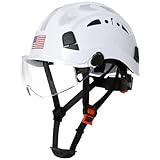
- Hard Hats Construction Osha Approved:AOLAMEGS safety helmet made of high impact penetration resistant ABS materials,lightweight,strong and comfortable. A good choice to protect heads against falling objects, impacts, bumps, and scrapes.AOLAMEGS safety hard hats meet ANSI Z89.1-2014 Type I Class C standards,visors meet ANSI Z87.1-2015 standards
- Package Including :1pc White Reflective Construction Hard Hats with Clear Visor + 1 Pack Hi-Viz Reflective Stickers .The construction hard hat Kit help complete comprehensive above-the-neck safety systems
- More Humanized Design:Rapid-Dial ratcheting headgear,one-handed adjustment design allows workers to modify fit without removing work helmet.Helmet size range from 53-63cm/ 20.86-24.80 inch.Sliding vent holes allow easy opening and closing based on weather conditions .Universal slots design ensures that safety hardhats to install attachments.And the safety helmet has Hi-Viz design on the front-rear-and sides of the helmet allows the user increased visibility under low light conditions
- Adjustable & Comfort Fit:Adjustable 6-point suspension system for improved shock absorption and overall comfort.Comfortable and convenient soft cup style chinstrap for extra security and stability, remove freely.Equipped with a pack of hard hat reflctive stickers ,provide a safe protection on dark outdoor work .Easy flip-up clear visor provides eye protection in debris protection
- Applicable Environment:Safety helmet with the clear visor,Suitable for construction,tree climbing work,woodworking,mechanics, forestry,manufacturing,height and scaffolding work, in any trade that requiring general head protection
Use standards intelligently—and recognize their limits
NIOSH’s 2024 discussion of construction automation references industrial-robot concepts such as safety-rated monitored stops, power and force limiting, speed and separation monitoring and hand guiding, with reference to ANSI/RIA R15.06 and ISO/TS 15066. These concepts can inform a design or task assessment, but they were developed largely for controlled environments. A construction site adds moving trades, uneven ground, temporary barriers, weather and changing geometry.
A “collaborative” label does not make every contact safe, and compliance with a robot standard does not replace an employer’s task-specific risk assessment. Confirm what the function was designed to protect against, under which speed, payload and environmental conditions, and what happens when a sensor or communication channel fails.
Reassess as the project changes
Make robot coordination part of routine site management rather than a one-time launch event. Revisit the assessment when:
Do these 3 things before closing this tab:
1Fix the driver behind crashes, sound loss and screen glitches2Clear out junk files and repair common Windows errors3Scan for outdated or missing drivers - takes under a minute- The robot moves to a new floor, route, room or elevation.
- A new trade, subcontractor, delivery route or temporary structure enters the area.
- The attachment, payload, speed, autonomy level or operating mode changes.
- Lighting, weather, dust, terrain, housekeeping or visibility changes.
- Software, firmware, network configuration or safety settings are modified.
- A worker reports a near miss, unexpected movement, sensor fault, emergency-stop activation or unauthorized entry.
At each change, update the map, brief affected workers and verify that barriers, signals and emergency controls still work. Keep the current procedure where operators and supervisors can access it; remove obsolete versions so a worker does not follow an outdated route or shutdown instruction.
Verify competence and refresh training
Attendance is not proof that a worker can perform the task safely. Use a demonstration or practical check appropriate to the role. An operator might be asked to place the machine in a safe state, respond to a simulated communication loss, identify the risk zone and complete a controlled restart. A maintainer might demonstrate isolation and verification of stored energy. A nearby worker might identify the boundary, explain the stop signal and describe what to do before entering.
NIOSH’s incident review recommends refresher training and spot checks for required procedures. Schedule refreshers after observed errors, equipment changes, revised procedures, new hazards or a long period without operating the system. Keep records of the equipment and version covered, instructor, date, practical demonstration, authorization and any corrective coaching.
Independent reader supportYour contribution helps us test, update, and keep practical guides available for everyone.Track leading indicators instead of waiting for an injury
Robot programs should review signals that controls are weakening. Useful indicators include near misses, emergency-stop activations, manual overrides, sensor faults, communication interruptions, unauthorized entries, repeated boundary violations, unplanned downtime caused by unsafe conditions and work pauses triggered by changing weather or visibility. Examine patterns by shift, task, location and machine configuration.
Free tools Windows power users keep installed
One-click scans. No signup required.
A rise in stop events may indicate that workers are appropriately using the control—or that the route, interface or procedure needs redesign. Treat the event as information, investigate without discouraging reporting and involve the affected workers in the corrective action. Prevention through Design is preferable to relying on memory or vigilance: change the route, guarding, attachment, control interface or workflow when the hazard can be removed at its source.
Rank #4

- Country Of Origin : United States
- The Package Height Of The Product Is 9 Inches
- The Package Length Of The Product Is 14 Inches
- The Package Width Of The Product Is 13 Inches
A practical implementation sequence
- Before procurement or mobilization: define the task and exposure the robot is intended to change; obtain manufacturer safety information; identify integration, maintenance and emergency requirements.
- Before arrival on site: assign accountable supervisors, operators and maintainers; establish competence criteria; plan routes, charging and restricted areas.
- At commissioning: verify sensors, stops, interlocks, communications, warning devices, geofences and restart behavior in the actual environment. Test failure responses rather than assuming they work.
- Before each shift: inspect the machine and work area, confirm the current configuration, review weather and visibility, conduct the task briefing and check communication.
- During work: maintain the agreed separation and signals, stop when conditions exceed limits and record deviations, faults and near misses.
- After a change or event: place the system in a safe state, investigate the cause, revise controls and retrain affected workers before resuming.
- At project close or transfer: document lessons, maintenance status, software versions and unresolved hazards for the next crew or site.
How to evaluate a robot deployment
When comparing systems for a construction task, focus on operational fit rather than a generic autonomy rating. Examine:
- The task and exposure it removes or changes.
- Autonomous, supervised, teleoperated and manual modes.
- How close workers must work to the machine and whether interaction is continuous or occasional.
- Mobility, terrain, sensing performance and environmental limits.
- Risk-zone controls, emergency response, communication failure behavior and restart logic.
- Training, maintenance, software-update and integration responsibilities.
- How the employer and manufacturer support reassessment as the site changes.
These criteria help reveal whether a system fits the work sequence and the crew’s ability to control risk. They are more informative than calling a machine “safe” because it is autonomous or collaborative.
What current evidence does—and does not—show
NIOSH reported 41 robot-related workplace fatalities in the United States from 1992 through 2017. That is a workplace-wide figure, not a construction-only count, so it should not be used to estimate construction risk. NIOSH also reported, citing the International Federation of Robotics’ World Robotics 2023 presentation, that U.S. industrial-robot installations grew by 10% in 2022 and professional-use service-robot sales reached 158,000 units in 2022. Those figures describe broad U.S. robotics activity, not construction employment or injury rates.
NIOSH is still studying human-robot communication and collaborative masonry, including how robot size, movement path and movement communication affect worker comfort and task performance. The available guidance supports equipment-specific instruction, worker involvement, risk assessment and continual coordination; it does not establish one construction-wide course with published outcome measures. Employers should therefore evaluate their own controls and leading indicators rather than claim that attendance at a universal curriculum guarantees safety.
Frequently Asked Questions
Do workers who never operate the robot need training?
Yes. Anyone who may enter or work near the operating area needs a site-specific briefing on risk-zone boundaries, signals, prohibited actions, stop authority and the response to a fault or unexpected movement. The depth of instruction can match the person’s exposure, but operator-only training leaves nearby workers unprepared.
Is a collaborative robot automatically safe for shared construction work?
No. Collaborative functions such as monitored stops, force limiting or speed-and-separation monitoring must be assessed for the actual payload, speed, attachment and environment. Construction sites are dynamic, and a collaborative label does not replace a task-specific risk assessment, physical controls and emergency procedures.
When should a construction employer retrain the crew?
Retrain after a machine, attachment, software version, route, operating mode or procedure changes; when environmental conditions create a new hazard; after a near miss, sensor fault, emergency stop or unauthorized entry; and when spot checks show that workers cannot perform required actions.
Recommended Free Tools
What should happen after a robot loses communication?
Workers should follow the machine-specific failure procedure, which should place the system in a defined safe state such as a monitored stop or shutdown. No one should enter the risk zone until the equipment is stopped or de-energized as required, the cause is addressed, people and tools are clear and an authorized person controls the restart.
How can supervisors tell whether preparation is working?
Check practical competence, observe boundary and communication practices, review near misses and emergency-stop events, track sensor and communication faults, and investigate repeated manual overrides or unauthorized entries. Trends should lead to changes in design, routing, staffing or procedures—not only another reminder to be careful.
Quick Recap
Product prices and availability are accurate as of the date/time indicated and are subject to change. Any price and availability information displayed on Amazon at the time of purchase will apply.

