Do these 3 things before closing this tab:
1Fix the driver behind crashes, sound loss and screen glitches2Clear out junk files and repair common Windows errors3Scan for outdated or missing drivers - takes under a minuteUse AI monitoring as a narrowly defined, human-reviewed warning layer inside your existing safety program—not as a replacement for hazard elimination, competent supervision, inspections, fall protection, or personal protective equipment (PPE). Start with one hazard and one response, verify the system under your actual site conditions, establish worker-data rules before activation, and keep conventional controls mandatory throughout the pilot and afterward.
What AI safety monitoring can—and cannot—do
Computer-vision systems analyze video or other sensor inputs to flag a defined condition, such as missing safety gear, an opening, a worker-equipment interaction, or a person entering a restricted area. NIOSH describes construction computer-vision work as emerging research that can provide earlier warning of potential hazards. That wording matters: it describes a possible aid, not proven universal accuracy or a demonstrated reduction in injuries.
As an Amazon Associate I earn from qualifying purchases.
An alert is information for a qualified person to assess. It is not proof that a violation or emergency exists, and the absence of an alert is not proof that a hazard is absent. Dust, rain, glare, poor lighting, occlusion, camera movement, changing work phases, and unusual worker or equipment interactions can all affect detection.
- AI can add visibility: it may watch a defined camera view continuously and surface events for a human review.
- AI cannot remove a hazard: redesign, isolation, guarding, safe sequencing, and other physical or administrative controls still do that work.
- AI cannot take legal responsibility: the employer and designated competent safety personnel remain responsible for meeting applicable requirements and responding to conditions.
- AI cannot replace required PPE or fall protection: warnings do not stop a fall or absorb its energy.
NIOSH’s Prevention through Design (PtD) toolkit, DHHS Publication No. 2024-124 (September 2024), states: “Prevention through Design (PtD) is the process of designing work to remove hazards, and it is the most reliable and effective way to protect workers.” Treat that hierarchy as the starting point for any technology project.
#1 Best Overall
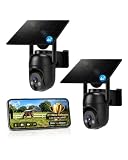
- 【4G LTE Network & No WiFi Needed】Cellular security camera include a pre-installed SIM card with 7-day unlimited trial data; auto-connects to the strongest U.S. network (Verizon/T-Mobile/AT&T). After the 7-day trial ends, subscribe to unlimited data for $19.90/month or $169.90/year via the UBox app to maintain remote access. Note: Each device requires a separate data plan subscription and cannot be shared. 100% wireless & no wifi needed—ideal for ranches, construction sites, vacation homes, or home security. (SIM card is non-replaceable)
- 【High-capacity Battery & Non-stop Solar Powered】 No wifi security camera that works without WiFi comes with a rechargeable battery and a 6W solar panel; the high-capacity battery and solar panel together provide continuous power for 365 days of uninterrupted operation, so you don't need to worry about it running out of power. Plus, with an IP65 weatherproof rating, this solar outdoor camera withstands rain, dust, heat, and cold, delivering reliable performance in harsh outdoor environments year-round. (Do not support WiFi)
- 【2K Color Night Vision & 360° Wide View】 This jobsite camera offers a 360° wide view and 4X digital zoom. You can remotely pan 355° and tilt 100° via the UBox App, which increases the flexibility of the 360 camera to get the broadest view without blind spots. By adopting color 2K HD night vision mode, the non wifi security camera could capture colorful footage up to 65ft. Even in the dark, the full-color night vision lets you always keep an eye on your assets. (Do not support auto-tracking)
- 【Smart Motion Detection & Real-Time Alerts】 Solar security cameras wireless outdoor features an advanced PIR motion sensor that detects movement and immediately sends an alarm notification to your mobile phone when humans or animals are detected. Built-in microphone and speaker let you listen and speak through the app to deter intruders. If you turn on white light alarm & siren alarm, solar camera will also emit dazzling lights and sirens, and you can customize detection zones and sensitivity to reduce unnecessary notifications.
- 【Flexible Dual Storage Options & Multi-Sharing】 Enjoy 30-day free trial cloud storage with easy playback anytime via the app— subscription is required after the 30-day trial ends. For added flexibility and data security, the 4g camera also supports local storage with a TF card up to 128GB (not included). Easily share cellular camera access with family members through the app, allowing remote property monitoring anytime, anywhere, even when abroad. (TF Card not included)
Choose a bounded use case before choosing a system
Do not begin with “monitor the whole site.” Map the current safety process, then select one hazard in one area where an alert can trigger a specific, timely human action.
Examples of appropriately narrow first uses
- PPE detection at a defined site entrance or transition point, followed by a supervisor check before entry.
- Detection of a particular physical opening in a fixed, well-lit work zone, followed by barricade verification.
- Notification when a worker and a specified type of mobile equipment occupy a defined interaction zone, followed by a spotter or operator intervention.
- Monitoring a changing hazard during one work phase, with the responsible foreperson named in advance.
These examples have different sensor, placement, and response requirements. A system demonstrated for worker safety-gear detection is not evidence that it can recognize openings, struck-by risks, or every other construction hazard. NIOSH research has examined identifying workers, equipment, and openings from aerial video; that is a different scope from a fixed entrance camera.
Write the alert-to-action rule
For the selected hazard, document:
- Trigger: the visual or sensor condition that generates an alert.
- Recipient: the named role that receives and reviews it.
- Response time: the operational expectation for checking the condition, stated in site terms rather than an invented universal threshold.
- Action: the physical or administrative control the person applies after verification.
- Escalation: who is contacted when the condition is confirmed, disputed, or unresolved.
- Record: what is logged, including the site condition, action, and whether the alert was useful, false, missed, or unavailable.
Write the rule so a worker can understand what happens after an alert. “The model monitors safety” is not an operating procedure.
Check the regulatory boundary (U.S. projects)
The regulatory facts in this guide are U.S.-specific. OSHA-approved State Plans may impose requirements that differ from, or are more stringent than, federal OSHA requirements. Have a competent safety professional and, where needed, legal counsel map the exact task, site, and standard before describing an AI system as an alternative control.
Rank #2

- NO WIFI NEEDED — WORKS ANYWHERE WITH CELL SIGNAL — Connects over LTE cellular, not your home network, so it works at a remote gate, barn, or cabin with zero WiFi setup or dropped connections.
- 360° PAN, TILT & ZOOM FROM YOUR PHONE — Remotely rotate the camera to check any angle of your property on demand, instead of installing multiple fixed cameras to cover the same ground.
- SOLAR + RECHARGEABLE BATTERY — RUNS OFF-GRID — Solar charging keeps the built-in battery topped off, so the DEFEND 360 runs continuously anywhere, with no wall outlet required.
- 4K PHOTOS, 1080P VIDEO, INSTANT MOTION ALERTS — Get real-time notifications and imagery the moment motion is detected, sent straight to your phone.
- WEATHER-RESISTANT, BUILT TO STAY OUTSIDE — Handles rain, heat, cold, and years of exposure without missing a trigger.
Fall protection remains a physical-control question
OSHA’s residential fall-protection FAQ says workers six feet or more above lower levels generally need conventional fall protection or an applicable alternative under the specified provisions. The cited guidance identifies guardrail systems, safety nets, and personal fall-arrest systems as conventional approaches. A personal fall-arrest system can include a full-body harness, deceleration device, lanyard, and anchor point selected for the application.
OSHA permits safety monitoring only in specified circumstances. Its guidance describes a monitor who is competent to recognize fall hazards, remains in visual sight and oral-communication range of the workers, and has no other duty that could distract from monitoring. Those conditions concern a human safety monitor. Do not claim that an AI camera fulfills them or replaces a required monitor or conventional protection without a task-specific regulatory determination.
PPE fit is an explicit requirement
OSHA’s construction PPE page states that the rule explicitly requiring proper fit took effect January 13, 2025. A detection model can flag that a hard hat, vest, or harness may be absent or incorrectly worn; it cannot establish that equipment fits a particular worker or is suitable for the job. Select PPE for the task and each worker, train workers in its use, and use qualified personnel to determine compliance.
Quick wins for a faster PC:
Clear out junk files and repair common Windows errorsFree Scan →Fix the driver behind crashes, sound loss and screen glitchesFind Drivers →Repair Windows errors before they cause bigger problemsFix Now →Survey the site, cameras, and data path
Before activation, walk the proposed coverage area through the work phases in which the system will operate. Record conditions that can create blind spots or unreliable detections.
Rank #3

- Forever Power: Empower your viewing to go anywhere you desire. Enjoy off-the-grid freedom with the upgraded solar panel and a powerful 9,400 mAh battery.
- Seamless Connectivity with 4G and Wi-Fi: The Dual-Mode technology of eufy 4G LTE Cam S330 Ultimates security with uninterrupted access compared to traditional cellular no wifi cameras. If Wi-Fi signal is lost, the auto-switching 4G feature swaps to mobile data. Guaranteeing continuous use.
- Works with EIOTCLUB to Automatically Switch to the Strongest Network:eufy 4G LTE Cam S330 includes an EIOTCLUB SIM card, which is compatible with the three major U.S. networks: AT&T, T-Mobile, and Verizon. For consistent, reliable coverage, we recommend using the provided EIOTCLUB SIM, which supports cross-network roaming to connect to the strongest signal automatically. If you prefer using SIMs from AT&T, T-Mobile, or Verizon, please ensure they are data-only plans.
- 4K in Color, Day and Night: The color 4K camera gives you the clarity to identify a license plate 30 feet (10 meters) away. Shine a light on your surroundings with the 100-lumen spotlight to continue seeing colorful details up to 26 feet (8 meters) away, all through the night.
- 360° Viewing with AI Tracking:All-around viewing with pan and tilt. AI detects and tracks people, and vehicles, with an extensive range of motion.
Coverage and environment checklist
- Camera height, angle, field of view, blind spots, and line-of-sight obstructions.
- Lighting changes between daylight, night work, temporary lighting, and shadows.
- Dust, rain, glare, steam, vibration, mud, and lens contamination.
- Scaffolds, temporary walls, stored materials, cranes, lifts, and other layout changes.
- Worker clothing, high-visibility requirements, helmets, respirators, and other visual variations.
- Mobile equipment routes, changing exclusion zones, and areas where people are partly occluded.
- Power, network connectivity, local recording capacity, and what happens during an outage.
- Privacy-sensitive areas such as break rooms, changing areas, toilets, and medical or access-control locations.
Verify whether existing camera feeds can be used and where processing occurs. Intel documents a sample architecture that connects construction-site camera streams to an AI pipeline and describes on-premises processing. That is an example of a possible design, not a compatibility guarantee for a particular camera, network, or project. Ask the system provider to diagram every path: camera, gateway, model, storage, user interface, backups, support access, and deletion.
Compare approaches by operational fit, not marketing claims
At least two technically different approaches appear in the available evidence: fixed camera-stream PPE detection and aerial-video hazard-recognition research. Use the following axes to compare any proposed system or build.
| Decision area | Questions to answer |
|---|---|
| Hazard scope | Does it address one defined hazard, such as PPE at an entry, a physical opening, or a worker-equipment interaction? What is outside scope? |
| Sensor and coverage | Is the input a fixed camera, aerial or mobile sensor, or another source? Can it maintain visibility when work moves, objects occlude people, or the view changes? |
| Site robustness | Has performance been evaluated in the project’s lighting, weather, dust, motion, clothing, and layout conditions? |
| Architecture and data | Is processing on site or off site? What leaves the project, what is stored, for how long, and who can access it? |
| Alert workflow | Can a named human interpret the alert and act? How are duplicates, false alerts, missed hazards, and outages handled? |
| Evidence and accountability | Can you identify the model and software version, review changes, obtain support, and export an audit record without surrendering needed data rights? |
Do not substitute vendor-declared detection counts, throughput, or a demonstration video for a safety-outcome statistic. No independently substantiated general effectiveness statistic for introducing AI safety monitoring on construction sites was established in the cited material.
The Tool Desk
Outbyte Driver Updater FREEScan for outdated or missing drivers - takes under a minuteDriver Scan →Outbyte PC Repair FREERepair Windows errors before they cause bigger problemsFix Now →Set worker-information and privacy rules before activation
NIOSH identifies worker privacy and the need to inform workers about personal-data use as concerns in advanced construction technology. Explain the system before it is turned on, in language workers can understand.
Rank #4

- 【Built-in SIM Card & Data Service】Comes with a pre-installed & pre-activated 4G LTE SIM card with a 7-day free data trial. Multiple flexible plan options are available, including unlimited data plans with both monthly and annual billing cycles. (For US use only)
- 【Wireless Solar-Powered & 4G LTE Network】: Forget about messy wires! This wireless camera no internet needed is completely wire-free in design, no need power or wifi connection, this Cell camera is powered by solar panel and rechargeable battery, connected to internet via its own SIM card, 100% wire-free, very easy to install.
- 【PTZ & 2K HD Color Night Vision】: This non wifi camera supports 270° pan, 90° tilt and 4x digital zoom, fully cover all around, the cellular camera has 2K HD image sensor and 4pcs spotlight, which can offer stunning clear color pictures for day and night.
- 【Human Motion Detection & Phone Notification】: The 4G camera is built-in sensitive PIR sensor, that can detect moving people, vehicles and animals, once it is triggered, the no wifi security camera outdoor will push instant alerts to your mobile phone. 4G Security camera no WIFI needed, allows you to leave one eye on what you care.
- 【Remote Playback & Two-Way Audio】: Ubox camera can save events to the local micro SD card (excluded) and free cloud storage(Need to apply), allows playback on the free Ubox phone app. Built-in speaker and microphone help you to talk to visitors under the LTE security camera through your mobile phone.
Publish a short, accessible notice
- What areas and times are monitored.
- The specific safety purpose and the hazards in scope.
- Whether video is analyzed live, recorded, or both.
- Whether faces, names, location histories, or other identifiers are created.
- Where processing and storage occur, including any transfer away from the site.
- Who can view alerts or footage and under what authorization.
- Retention and deletion periods, including exceptions for a documented incident.
- How a worker can report a false alert, privacy concern, or suspected misuse.
- What the system will not be used for, such as unrelated productivity or disciplinary surveillance, unless a separately explained and lawful policy applies.
Limit collection to the stated safety purpose where feasible. Restrict accounts by role, use strong authentication, log access, encrypt transfers and storage where appropriate, and review vendor personnel access. Require notification and an approval process for model, software, camera, or data-flow changes. Define how a cybersecurity incident, lost device, or unauthorized disclosure is contained and reported.
Use a risk-management framework without confusing it with a rule
NIST’s voluntary, non-sector-specific AI Risk Management Framework organizes trustworthiness and risk management across design, deployment, use, and evaluation. It is useful for assigning owners and documenting decisions, but it is not a construction regulation. The framework is under revision, so check the current version when you adopt it.
Independent reader supportYour contribution helps us test, update, and keep practical guides available for everyone.Run a controlled pilot with human review
Begin in a bounded area or single use case while qualified safety personnel continue normal inspections, toolbox talks, required supervision, and emergency procedures. The pilot tests the combined work system—people, controls, cameras, connectivity, model, and response—not just the model in isolation.
Outdated Drivers Are Slowing You Down
One free scan finds every outdated or missing driver and matches the right update for your exact hardware.Free scan · exact hardware matchWindows Errors? Fix Them Before They Spread
Repair common Windows errors and clear accumulated junk for a smoother, more stable PC - no reinstall needed.Free scan · no reinstall- Baseline the existing process. Document the current hazard, controls, inspection frequency, responsible roles, and escalation path before adding alerts.
- Define the pilot boundary. Identify the location, work phase, cameras or sensors, operating hours, data fields, system version, and the controls that remain mandatory.
- Train responders. Show supervisors how to interpret an alert, verify conditions in person, record an outage, and continue the ordinary process when the system is unavailable.
- Log conditions with each event. Record lighting, weather, dust, obstructions, work activity, alert type, human finding, action taken, and whether the event was useful, false, missed, or duplicated.
- Test failure paths. Exercise power loss, network loss, blocked lenses, camera relocation, software changes, delayed notifications, and a known hazard that the model does not recognize.
- Review with workers and safety staff. Look for unsafe behavior caused by distraction, alert fatigue, privacy concerns, workarounds, and differences between day and night or between work phases.
- Adjust or stop. Change placement, thresholds, training, or the selected use case only through a documented decision. Stop using the system for that purpose if it creates more risk than useful visibility.
The cited sources do not prescribe one correct pilot length, accuracy target, or alert threshold. Set acceptance criteria that reflect the hazard and response capacity, and record why those criteria are appropriate. NIOSH emphasizes evaluating interactions between workers and automated systems as conditions change; NIST treats piloting and evaluation as lifecycle activities.
Best Value

- 4G LTE outdoor security camera with included SIM card, ideal for construction sites, and storage areas where Wi-Fi is not available.
- Wireless surveillance powered by a frameless solar panel and high-capacity battery, delivering up to 6 months of autonomy with no external power.
- Detects motion up to 100 ft and sends instant photo alerts or 15-second video clips on demand, giving real-time visibility of your tools, equipment, and site.
- Integrated deterrent light signals the camera’s presence and repels intruders, protecting valuable materials, trailers, and storage containers.
- Rugged antenna, IP65 weather resistance, and durable solar design ensure continuous operation in rain, snow, dust, and harsh jobsite conditions.
Keep conventional controls in force
AI-generated warnings add visibility; they do not physically prevent falls, provide a rated anchor, block an opening, separate traffic, or make PPE fit. During a pilot and routine operation:
- Maintain guardrails, covers, safety nets, personal fall-arrest systems, barricades, exclusion zones, lockout or isolation procedures, and other required controls.
- Continue competent-person inspections and the site’s established reporting and corrective-action process.
- Require the specified PPE even when the system reports compliance or is offline.
- Provide a manual fallback for every alert path. A lost connection or model outage must not suspend the safety process.
- Make clear that a worker may stop and report an unsafe condition without waiting for an AI alert.
Operate, maintain, and reassess the system
Construction changes faster than a fixed model’s assumptions. Assign ownership for each operational task and review the assignment when the project changes.
| Event | Required response |
|---|---|
| Camera moved, blocked, dirty, or damaged | Mark coverage as impaired, restore the view, and use the manual control until verification. |
| Power or connectivity loss | Notify the responsible role, record the outage, and continue the established inspection and response process. |
| Model or software update | Record the version and change, test the defined use case under current conditions, and authorize return to service. |
| Site layout or work phase changes | Remap views, blind spots, exclusion zones, and alert recipients before relying on detections. |
| False or missed alert | Preserve the relevant record, investigate conditions, correct controls or configuration, and inform affected workers. |
| Cybersecurity or privacy incident | Follow the documented containment, access review, notification, and retention process. |
NIOSH lists sensor faults, communication failures, software changes, cybersecurity, and limitations in sensing or object recognition among evolving technology-related risks. Schedule reassessments at work-phase changes, after incidents and near misses, after significant weather, and whenever equipment or camera locations change.
Recommended Free Tools
A practical go/no-go checklist
Proceed only when all are true
- One hazard, location, and alert-to-action decision are clearly defined.
- Hazard removal and established controls were considered first.
- Applicable federal OSHA, State Plan, project, and client requirements were reviewed.
- No one is claiming the AI replaces a required human monitor, PPE, or conventional fall protection.
- Camera coverage, environmental limits, power, connectivity, and privacy-sensitive areas are mapped.
- Workers have received the monitoring and data-use notice.
- Retention, access, security, vendor support, model updates, and incident response are documented.
- A named human owns each alert and a manual fallback is ready.
- Pilot records will capture useful alerts, false alerts, missed hazards, outages, conditions, and actions.
- There is a defined decision to continue, modify, narrow, or stop the use case.
What success looks like
A responsible introduction does not mean installing the most cameras or generating the most alerts. It means the selected system reliably adds useful information for a defined decision under the project’s real conditions, while workers understand the monitoring, data are governed, and every required physical and human control remains effective. If those conditions cannot be maintained, discontinue or narrow the AI use case and return to the established safety process rather than treating a dashboard as protection.
Quick Recap
Product prices and availability are accurate as of the date/time indicated and are subject to change. Any price and availability information displayed on Amazon at the time of purchase will apply.

