At the University of Iowa Children’s Hospital, the artwork was not a finishing touch that could be measured after the wall was built. The artwork determined the wall’s layout. Gilbane Building Company used repeated laser scans and point-cloud modeling to keep a two-story field of more than 2,800 aluminum triangles aligned across a curved lobby wall interrupted by windows, doors and signage. Building Design + Construction reported that the workflow produced an average tolerance of just over 1 mm and removed 40 days from the installation sequence originally planned at 80 working days. Those are project-reported results from the 2016 case, not a guarantee for every scanning job.
The installation that dictated the wall
The project was a 14-story, $360 million University of Iowa Children’s Hospital development, according to Building Design + Construction’s July 11, 2016 case report. Its lobby included “The Blooming Wall,” a two-story curved installation made from more than 2,800 extruded aluminum triangles. Together, the pieces extended along more than 1,000 linear feet of radius wall.
As an Amazon Associate I earn from qualifying purchases.
The triangles were not arranged on a simple, uninterrupted cylinder. Windows, doors and signage broke up the surface, so the layout had to flow around openings while retaining a controlled pattern and color gradient. Each triangle was specified at 5 inches on center, with the outermost point of each piece held to plus or minus 1/4 inch. A small positional error repeated thousands of times could become visible in the pattern or force a piece to collide with an opening.
The supporting wall added another source of uncertainty. Its build-up consisted of two plywood layers followed by four sheetrock layers. Stud locations and openings had to remain coordinated through those successive surfaces, even as the wall curved across multiple radii.
#1 Best Overall

- 【Industrial-Grade Accuracy】Achieve single-frame accuracy up to 0.03 mm and volumetric accuracy of 0.03 mm + 0.05 mm x L(m), faithfully reproducing the finest surface details and complex geometries with exceptional consistency. Full-Field Structured Light accuracy reaches 0.08 mm; VCSEL mode delivers 0.10 mm @ 300-500 mm and 0.20 mm @ 500-800 mm. Engineered to meet the demanding requirements of 3D printing, reverse engineering, and precision modeling applications.
- 【Ultra-Fast Scanning & Robust Frame Rate】Multi-line Laser mode delivers up to 105 fps with NVIDIA GPU acceleration. Full-Field Structured Light mode achieves up to 5,000,000 points/s. The high frame rate ensures a smooth, uninterrupted scanning experience, especially suited for rapidly capturing large objects and complex scenes, significantly boosting overall workflow efficiency.
- 【AI-Powered & Photo-Grade Retopology】 AI object segmentation (Windows only) identifies your target in one click, tracks it throughout the scan, and auto-filters background noise — delivering clean data and streamlining post-processing. The patented 3D Gaussian Splatting converts point cloud and RGB data into true-to-life 1:1 photorealistic models; import photos from your phone or camera to apply real textures, then export in splat format for gaming, animation, and VR.
- 【All-Weather Outdoor Scanning】Multi-line Laser mode operates reliably up to 50,000 lux; with an outdoor filter attached, scanning remains stable in lighting conditions of up to 100,000 lux; VCSEL mode operates reliably in up to 100,000 lux ambient light. Designed to overcome lighting challenges, it provides consistent all-weather performance for construction sites, archaeological digs, and industrial fieldwork.
- 【5 Scanning Modes】NIR band supports Full-Field HD Scanning (markerless, fine structured light), Hybrid HD Scanning (dual projectors, fast high-quality modeling), and VCSEL Rapid Scanning (high-density pattern, fast markerless capture). Blue light band supports 30-Cross Laser Lines Scanning (handles high-reflectivity metals & dark objects) and Single-Line Deep Hole Scanning (captures from deep holes & narrow grooves). Five modes for comprehensive indoor and outdoor coverage.
Alexis Carver, Gilbane’s senior VDC manager, summarized the unusual relationship between the feature and the building: “The heart of the challenge was that the art installation drove the construction process and design of the wall layout, not the other way around.”
Why a conventional dimension check was not enough
Field dimensions taken at one stage would describe only one version of the wall. The metal stud frame could shift relative to the design, plywood could alter the face, and the final drywall surface could introduce additional variation. On a straight wall, a crew might resolve such differences with a few offsets. On this project, every offset had to be considered against a long curved path, changing radii and numerous interruptions.
A point cloud gave the team a dense, three-dimensional record of the surface and framing instead of a small set of isolated measurements. That record allowed Gilbane to compare the design position of each triangle with the as-built condition, then revise the modeled layout before the next construction layer concealed the information.
The Tool Desk
Outbyte Driver Updater FREEScan for outdated or missing drivers - takes under a minuteDriver Scan →Outbyte PC Repair FREEClear out junk files and repair common Windows errorsFree Scan →The objective was not simply to obtain a visually impressive scan. The useful result had to be clean enough to register accurately, detailed enough to locate framing and openings, and organized in a model and drawing package that an architect and fabricator could actually use.
Rank #2
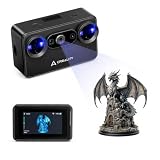
- Pocket-Sized & Wireless Freedom: At only 260g and 1006035mm, Pika fits in your palm. Features Wi-Fi 6 wireless PC mode, 3-inch HD touchscreen (500 nit), dual swappable 3350mAh batteries for extended sessions, and supports outdoor scanning up to 110,000 lux - scan anywhere, anytime without cables
- Dual-Mode Scanning with Blue Laser & NIR Structured Light: Switch between 7-line blue laser mode for fine detail capture and NIR structured light mode for full-body scanning with 24-bit true color. Scan objects from 101010mm to 200020002000mm - from tiny miniatures to life-size body scans - all with one device
- Ultra-High Precision 0.03mm Accuracy: Equipped with 7 parallel blue laser lines, Creality Pika delivers up to 0.03mm scanning accuracy and 0.1mm 3D resolution, capturing intricate details on small parts, figurines, mechanical components, and collectibles with professional-grade precision for 3D printing and reverse engineering
- AI-Powered Smart Features: Built-in AI Body Completion generates full-body 3D models from just a face scan and photos in as little as 10 seconds (10 faster). AI Retexturing maps real photo textures onto scanned models for lifelike results. AI Hole Filling automatically repairs incomplete scans for cleaner, print-ready output
- Scan Black & Metal Without Spray and Multi-Platform Export: Directly scans dark and metallic surfaces without scanning spray. Exports STL/OBJ/PLY/ASC formats compatible with all major 3D printing and CAD software. Works with Windows, macOS, iOS, and Android via CrealityScan app. Includes tripod, turntable, calibration board, and full accessories
How Gilbane scanned the wall through construction
Framing first: seeing the structure before it disappeared
Gilbane used a FARO Focus3D X 330 laser scanner to capture the curved wall and check metal-stud locations and openings before sheetrock installation. The team placed scan stations about 15 feet apart in some areas so adjacent views overlapped around the framing. Overlap mattered because a single position could not reliably see every stud face, return, opening edge and changing radius.
Ken Grothman, a Gilbane VDC engineer, described the spacing and pace this way: “We had to be very thoughtful and take our time, with a methodical scanning approach. We were only moving about 15 feet between each scan location in order to get a really good solid look at the wall framing from every angle.”
The crew generally scanned near the end of shifts. That timing reduced moving workers, equipment and other jobsite clutter in the captured data, making the later cleaning and registration work more manageable. Two people operated two scanners for most of the project.
Free tools Windows power users keep installed
One-click scans. No signup required.
Three construction stages, not one survey
The scans were repeated as the wall changed. Building Design + Construction reported approximately 250 scans over three to four months, including more than 100 scans of the framing and 60 scans at the initial drywall stage.
Rank #3

- Wireless Scanning & Interactive Streaming: Built-in WiFi 6.0 enables on-the-go, structured light mobile scanning or real-time PC-to-mobile interactive scan streaming for seamless remote operations and more flexibility.
- Scan Challenging Surfaces Without Scanning Spray: Easily capture details on reflective or dark surfaces with 11 infrared laser lines, no scanning spray needed.
- Dual Scanning Modules: Boost scanning efficiency with INSPIRE 2's infrared structured light and multi-line laser scanning modes, making it easy to handle different materials, sizes, and environments.
- Accurate Models & Advanced Calibration: Create highly detailed models with an accuracy of up to 0.05 mm and precision of up to 0.03 mm. A high-precision calibration board boosts point cloud accuracy by 75%, ensuring consistent, precise data for 3D printing, reverse engineering, and detailed modeling.
- Outdoor Scans & Lightweight Design: Scan in outdoor environments with up to 20,000 lux lighting, ensuring reliable performance in shaded or semi-bright conditions. At only 190g, the INSPIRE 2 is lightweight, and its aerospace-grade aluminum alloy front panel offers increased durability and portability.
| Construction stage | What the team checked | Reported scan detail |
|---|---|---|
| Metal stud framing | Stud locations, openings and the geometric condition that would be covered by the wall build-up | More than 100 framing scans |
| Intermediate plywood | How the first finished layers changed the modeled face and whether the triangle layout still fit | Stage included in the project’s scan sequence; separate count not stated |
| Initial and final drywall surfaces | The visible wall face, opening relationships and the final suitability of the modeled installation pattern | 60 scans at the initial drywall stage; final drywall scans also completed |
Scanning at framing, plywood and drywall stages let the team respond to actual conditions rather than assuming that each layer landed exactly where the design model predicted. The report says the team used the scans to assess whether openings needed adjustment to meet the visual tolerance; some did, while others did not.
Cleaning and registering the point cloud
Raw scans contain more than the wall. They can include people, tools, temporary protection and other objects that obscure the geometry. Gilbane filtered and cropped the scans, removed scan debris, and then assembled the remaining data into a common coordinate system.
The registration process began with targets and was refined with cloud-to-cloud registration. Grothman explained why this quality-control step mattered: “Having the laser bounce all around the studs produces a ‘fuzzy’ quality that diminishes our ability to pinpoint framing locations.” He also described the final checks: “Once we had the scans pulled down to only the best data, registration (assembling all the scans into one cloud) was next. We used target-based registration to begin and with a fine tooth comb ensured the tightest registration tolerances by removing poor sphere fits and visually inspecting the cloud to verify accuracy.”
SCENE Software handled most of the scan processing. Autodesk ReCap served as a file converter, and the team imported the resulting scan data into Autodesk Revit. The named software and scanner describe the tools used on this 2016 project; their mention does not establish current versions, availability or a present-day product recommendation.
Rank #4

- Industrial-Grade Accuracy: Flawlessly capture intricate geometric details with up to a 0.01 mm single-frame precision and 0.015 + 0.04 mm x L (m) volumetric accuracy. Powered by advanced blue laser technology, the MetroY Ultra produces 3D is ideal for tight tolerance measurement, reverse engineering, and industrial inspection.
- 5 Versatile Scanning Modes: Handle every scenario, from small parts to medium-sized objects, with Metro Ultra's 5 scanning modes: 34 laser cross-lines for rapid scans, 15 parallel lines for fine details, a single-line mode for deep holes, full-field blue structured light for marker-free scans, and one-click automatic turntable scanning.
- Ultra-Fast 90 FPS Scanning Speed: Get scans done fast at up to 90 fps (NVIDIA GPU) or 60 fps (CPU). MetroY Ultra's 34-laser cross-line mode enables quick, large-area scans, reducing data acquisition time and boosting productivity without compromising data quality.
- No-Spray Scanning for Dark or Shiny Surfaces: Scan black, high-gloss, and metallic industrial components directly without scanning spray. Protect delicate parts from spray, save prep time, and keep a clean, professional inspection environment for sensitive equipment.
- Scan Outdoors: Capture industrial parts even in harsh sunlight up to 100,000 lux with MetroY Ultra's powerful laser-scanning modes.
From point cloud to installation documents
Once the as-built information was in the model, Gilbane modeled the individual triangles and the complete pattern against the measured wall. The deliverable was more than a colored three-dimensional view. The team produced plans, sections and 3D views for the architect and fabricator, showing:
- the quantity of triangles required;
- the length and location of each piece;
- the color assigned to each triangle;
- the arrangement around windows, doors and signage; and
- the color gradient across the wall.
This documentation converted a complex curved surface into installation information that could be checked before pieces arrived at the wall. It also gave the fabricator a coordinated reference for different triangle lengths and colors instead of leaving the crew to infer the pattern from a general elevation.
The model could be updated after each scan stage. If the drywall face moved relative to the plywood or an opening differed from the design, the triangle positions could be adjusted in the digital layout and reflected in the plans, sections and views. Where the measured condition already met the visual requirement, the team could avoid unnecessary changes.
The workflow in practical sequence
- Define the installation control. The team established the triangle spacing, the plus-or-minus 1/4-inch requirement at each triangle’s outermost point, the wall radii and the locations of openings and signage.
- Capture the framing. Scan stations were kept close enough to provide overlapping views, with stations about 15 feet apart in areas where the framing required dense coverage.
- Clean the data. Filters and cropping removed irrelevant objects and scan debris that could blur stud and opening locations.
- Register the scans. Target-based registration provided the initial alignment; cloud-to-cloud registration, removal of poor sphere fits and visual inspection tightened the combined cloud.
- Compare the model with the as-built wall. The framing cloud was brought into the Revit-based coordination process to check whether the triangle pattern and openings could coexist.
- Rescan after the wall build-up. Plywood and drywall scans captured the conditions that the installer would actually face, rather than relying on the earlier framing geometry.
- Issue fabrication and installation views. Plans, sections and 3D views communicated quantities, dimensions, colors, locations and the gradient to the architect and fabricator.
What the reported accuracy and schedule figures mean
Building Design + Construction reported an average tolerance of just over 1 mm for the point-cloud result. That figure should be read alongside the project requirement: each triangle’s outermost point was to be within plus or minus 1/4 inch of its intended position. The case report does not present an independent audit, a comparative control project or a statistical study showing that the same tolerance would result elsewhere.
Best Value

- Wireless Scanning & Interactive Streaming: Built-in WiFi 6.0 enables on-the-go, structured light mobile scanning or real-time PC-to-mobile interactive scan streaming for seamless remote operations and more flexibility.
- Scan Challenging Surfaces Without Scanning Spray: Easily capture details on reflective or dark surfaces with 11 infrared laser lines, no scanning spray needed.
- 【AI-Powered & Photo-Grade Retopology】 AI object segmentation (Windows only) identifies your target in one click, tracks it throughout the scan, and auto-filters background noise — delivering clean data and streamlining post-processing. The patented 3D Gaussian Splatting converts point cloud and RGB data into true-to-life 1:1 photorealistic models; import photos from your phone or camera to apply real textures, then export in splat format for gaming, animation, and VR.
- Dual Scanning Modules: Boost scanning efficiency with INSPIRE 2's infrared structured light and multi-line laser scanning modes, making it easy to handle different materials, sizes, and environments.
- Accurate Models & Advanced Calibration: Create highly detailed models with an accuracy of up to 0.05 mm and precision of up to 0.03 mm. A high-precision calibration board boosts point cloud accuracy by 75%, ensuring consistent, precise data for 3D printing, reverse engineering, and detailed modeling.
The schedule claim is similarly specific. The initial plan allowed 80 working days for artwork installation. The report says the scanning-and-modeling approach reduced the planned sequence by 40 days. It does not provide a separate measured cost saving, and it does not establish that scanning alone caused the entire reduction. The shortened sequence depended on the coordinated work of the construction, VDC, design and fabrication teams.
Lessons for teams considering a similar curved installation
The Iowa case is useful because it shows where scanning effort creates practical value, rather than treating a point cloud as an end in itself.
- Start with the tolerance. A tight requirement at the visible tip of every repeated piece determines scan density, registration checks and the level of model detail needed.
- Plan coverage for the geometry. Curves with multiple radii and interrupted surfaces need overlapping viewpoints. A sparse scan may miss the very edges that control fit around an opening.
- Scan before information is hidden. Framing data is most useful before plywood and drywall cover it. Later scans then verify the surface the installer will touch.
- Treat data cleaning as part of measurement. Debris and poor target fits can reduce confidence even when the scanner itself captured enough points.
- Make the output installable. A model becomes valuable to the field only when it supplies unambiguous locations, quantities, dimensions, colors and views for the people fabricating and placing the work.
- Assign time for review. The reported process used repeated scans over several months and deliberate registration checks. The case does not support assuming that a quick single visit will deliver the same result.
What this case does—and does not—prove
The project demonstrates a coordinated method for managing a difficult, tolerance-sensitive curved-wall installation: measure the wall repeatedly, compare the cloud with the design, update the layout and issue clear installation documents. It does not compare laser scanning with another survey method, evaluate multiple scanner brands or provide independently verified cost savings.
PC Slower Than It Used to Be?
A free scan shows the junk files, broken settings and background clutter dragging Windows down - then fixes them in one click.Free scan · Windows 10 & 11Outdated Drivers Are Slowing You Down
One free scan finds every outdated or missing driver and matches the right update for your exact hardware.Free scan · exact hardware matchIts strongest evidence is the project account itself. Building Design + Construction published the figures and practitioner quotations on July 11, 2016, and the reported 1-mm average tolerance and 40-day reduction should remain attributed to that account. For another project, the appropriate questions are whether the wall has comparable geometric complexity, whether the required tolerance justifies repeated scanning, whether scan stations can be kept free of traffic, and whether the project team can turn the resulting cloud into fabrication-ready information.
Quick Recap
Product prices and availability are accurate as of the date/time indicated and are subject to change. Any price and availability information displayed on Amazon at the time of purchase will apply.

