A GSM-based home security system uses a cellular network to report alarms when a door, window, motion, smoke, water, or other sensor detects an event. Depending on the equipment, it can send SMS messages, place voice calls, deliver app notifications, or transmit alarm signals to a professional monitoring center.
In 2026, “GSM” often means cellular alarm communication generally. For a new installation—particularly in the United States—choose a documented 4G LTE, LTE-M, or newer communicator, rather than a 2G-only or 3G-only alarm. A SIM card provides network access; it does not, by itself, provide professional monitoring or emergency dispatch.
As an Amazon Associate I earn from qualifying purchases.
What is a GSM-based home security system?
A traditional alarm panel communicates through a telephone line, broadband connection, or local siren. A GSM or cellular system adds a cellular communicator: hardware that converts alarm-panel events into messages carried over a mobile network.
The main parts are:
- Door, window, motion, smoke, water, glass-break, or panic sensors
- An alarm control panel
- A GSM/LTE communicator, either built in or added separately
- A compatible SIM card and cellular service plan
- A siren or other local alarm
- A backup battery
- A destination for alerts, such as the homeowner’s phone, a cloud app, or a central monitoring station
GSM technically refers to Global System for Mobile Communications and is associated with older 2G services. Many current product listings use the term loosely for any cellular alarm. Check the actual network generation, LTE bands, carrier certification, and support policy before buying.
#1 Best Overall
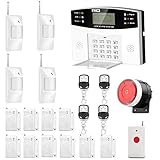
- No monthly fees and contracts with security companies,Just pay the cell phone operation service provider; Put-in a GSM SIM card (This alarm do not including GSM sim card) to call/send alert message, you can choose one of two ways or use all of them. The whole system complete with fully programmable main unit and wireless sensors. Before using, please kindly read user's manual
- Network Support: The alarm panel built-in GSM Module, it support GSM SIM card, T-Mobile sim card can work with our system (This alarm do not including GSM sim card). When the sensor is triggered, the alarm panel will make an call or send alert message to the alert phone number you set before. The GSM (only) frequency is 850/900/1800/1900MHZ, which can be applied in all over the world; In GSM status, 6 groups calling alert phone number and 2 groups help SMS number you can set
- Loud Emergency Alarm and Easy to Get Help: Children and seniors at home in emergency, press the emergency alarm button of the remote controller, which will trigger all alarms and send emergency calls and messages to other families, so they can get help in time. Support 6 groups preset alarm phone number, if alarm occurs, the host will dial preset number automatically and 10 seconds help voice recording
- Defense Zone Support: Allow up to 99 wireless defense zones and 7 wired zones, 5 groups of scheduled arm/disarmed function; 2 wired siren for different size houses as you need; DIY home security, tool-free setup and assembling, plug and play installation
- With 10 second manual recording function to leave messages
How does a cellular alarm work?
- A sensor detects an event.
- The control panel applies its programmed rules, such as entry or exit delays.
- The panel activates the local siren.
- The communicator registers with the cellular network.
- It sends an SMS, voice call, app message, or structured alarm signal.
- The homeowner or monitoring operator receives the event and responds.
A cellular connection is only the communications path. It is not automatically a complete alarm system, camera system, professional monitoring service, or guaranteed emergency response.
Does it need Wi-Fi?
Usually not. A cellular communicator can report over the mobile network without home Wi-Fi or broadband. This can help when a home has no fixed internet connection or when a burglar unplugs the router.
Cellular is not failure-proof. Reporting can be interrupted by weak indoor signal, carrier outages, congestion, an expired SIM plan, incompatible bands, antenna damage, deliberate jamming, or a depleted backup battery. A dual-path system uses two routes—commonly broadband and cellular—to reduce dependence on one connection.
Quick wins for a faster PC:
Scan for outdated or missing drivers - takes under a minuteDriver Scan →Repair Windows errors before they cause bigger problemsFix Now →SMS self-monitoring or professional monitoring?
| Option | How it works | Strengths | Limitations |
|---|---|---|---|
| SMS or voice alerts | The alarm contacts the owner directly. | Lower recurring cost; simple; may work with a prepaid plan. | The owner may be asleep, unavailable, traveling, or out of coverage. An alert does not automatically dispatch emergency services. |
| App monitoring | The communicator reports to a vendor’s cloud platform. | Richer status information, event history, and remote control. | Requires continued vendor and cloud support, account security, and usually a subscription. |
| Professional monitoring | A staffed central station receives structured alarm events and follows an escalation procedure. | Operators can respond when the owner cannot; events may distinguish burglary, fire, panic, tamper, or communication failure. | Monthly fees, activation or installation costs, provider restrictions, and location-specific dispatch rules. |
A SIM plan is not a central-station account. Professional monitoring also does not guarantee dispatch in every situation; procedures, verification requirements, permits, and false-alarm rules vary by provider and jurisdiction.
Rank #2

- NO WIFI REQUIRED: Operates completely offline, keeping your home protected without relying on internet connectivity or a router.
- EASY SETUP: Simple installation process allows you to get your security alarm system up and running quickly without professional help.
- LOUD ALARM DETERRENT: Emits a powerful siren to alert you and scare off potential intruders the moment a threat is detected.
- VERSATILE PLACEMENT: Designed for use on doors, windows, and entry points throughout your home for comprehensive coverage.
- RELIABLE PROTECTION: Provides around-the-clock home security monitoring that functions independently of network outages or signal loss.
What can it report?
Features depend on the panel, communicator, SIM plan, cloud platform, and monitoring provider. Possible events include:
- Intrusion, fire, smoke, water, medical, and panic alarms
- Tamper, low-battery, power-failure, and power-restoration notifications
- Arm, disarm, sensor-fault, and communication-failure events
- SMS messages, voice calls, push notifications, or Contact ID/SIA signals to a central station
For example, AlarmSIM describes SMS support for alarm, arming, disarming, and power events on compatible systems. That does not mean every device or plan supports every event.
Is GSM still suitable in 2026?
For a new U.S. installation, avoid 2G-only and 3G-only equipment. U.S. network availability has changed by carrier and location, and older hardware may no longer register reliably. SpeedTalk warns that 2G and 3G service may not be available in all U.S. areas and recommends 4G or newer equipment.
Recommended Free Tools
LTE is the safer current choice, but it is not permanently future-proof. Verify the carrier, supported LTE bands, SIM type, voice/SMS/data capability, carrier certification, and the manufacturer’s replacement or end-of-life policy.
Rank #3
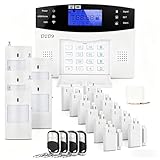
- 24PCS Complete Kit & Full Coverage – Includes door/window sensors, motion detectors, remote control and siren, covering all key areas of your home/office, meeting the security needs of most families and small businesses.(Need a SIM card or wifi)
- Wireless DIY Installation & No Monthly Fee – No professional installation required, peel-and-stick design, easy to install in 30 minutes; no monthly subscription fee, saving your long-term costs significantly.
- 4G & WiFi Connectivity – Stay connected to your home security system anytime, anywhere with 4G wifi network compatibility for real-time alerts and control.
- Expandable & Customizable – Easily add more sensors or integrate with other smart devices for a personalized and scalable security solution.
- Multi-scenario Application – Ideal for homes, offices, vacation properties, and elderly care; provides peace of mind in any setting.
For an existing alarm, the panel may be reusable even if its old communicator is not. The replacement must match the panel model, firmware, signaling protocol, power requirements, carrier, and monitoring platform. DSC’s LE4010, for example, is described as a universal LTE communicator for panels supporting Contact ID or SIA. ADT describes CellBridge and technician-installed LTE upgrades for qualifying ADT systems affected by 3G retirement.
How to install or upgrade one
Exact wiring and programming must follow the manufacturer’s manual. The general process is:
- Identify the communicator and alarm-panel models and confirm their network generation.
- Check panel compatibility, including Contact ID, SIA, bus connections, firmware, and monitoring requirements.
- Check cellular coverage at the actual installation point—not just on a general coverage map.
- Choose a plan that supports the required SMS, voice, data, or machine-to-machine traffic.
- Power down as directed, install the SIM in the correct orientation, and do not remove it while energized unless the manufacturer permits this.
- Configure recipients, monitoring credentials, APN settings, zones, entry and exit delays, tamper behavior, and communication supervision.
- Confirm that the panel and communicator share suitable backup power.
- Arm the system and test every sensor, the siren, each notification destination, mains-power failure, restoration, and low-battery reporting.
- If professionally monitored, notify the monitoring center before testing.
Do not invent an APN. Use the current instructions from the SIM provider. Record the SIM number, APN, account details, panel and communicator models, battery date, and monitoring-center information.
What’s actually slowing this PC down?
Pick the symptom - the matching free tool is one click away.
Coverage, antennas, and backup power
Basements, metal enclosures, reinforced concrete, foil-backed insulation, and utility rooms can weaken cellular signal. Check the provider’s map, identify the underlying carrier and LTE bands, test signal at the panel, and use an approved external antenna or a better location if necessary. AlarmSIM notes that actual coverage may differ from map graphics; see its coverage and setup guidance.
During a power cut, the alarm must have enough battery capacity to operate both the panel and communicator. Check whether the communicator uses the panel’s battery or has its own. Runtime depends on battery condition, temperature, signal quality, transmission frequency, and connected equipment. A manufacturer’s “24-hour backup” statement applies to a specified configuration, not every installation.
Rank #4

- 4.3" Color Touchscreen — Security for the Whole Family. Just tap "Arm" or "Disarm". See your alarm system's status, time, and alerts—all at a glance. Kid & senior friendly with a multi-language menu. A wireless house alarm that works for everyone, not just the tech-savvy. For home or business.
- One App Controls ALL — Peace of Mind Included. Get instant push alerts or phone calls when motion or doors trigger. Works with Smart Life/Tuya App. Never worry about home security again—even on holiday. A wireless security system that turns your phone into a home monitoring system for elderly or business alarm. Smart home devices done right.
- Accessories Factory-Pre-Paired — 3-Step Tuning: 1.Menu-Parts 2.Sensors. 3.+.That's it. All accessories factory-pre-paired—no manual connection. Perfect alarm system for DIY home security. Smart home security systems simplified.
- SOS Button – Help at Your Fingertips — One press triggers the siren instantly. Located on the base station, remote, and SOS button. Perfect for home monitoring system for elderly parents or as a business alarm. When every second counts, this security alarm delivers. A wireless security system that protects what matters most.
- Dual Wi-Fi & 4G Connectivity — Powered by 2.4GHz Wi-Fi and 2G/4G connectivity (5G not supported), this home alarm system ensures a stable, always-on connection. No subscriptions, no hidden fees. Get instant alerts via APP, SMS, or voice call (GSM card needed), even if your home network goes down. Enjoy 24/7 peace of mind with a wireless alarm system that’s built to be powerful, dependable, and long-lasting.
How to choose a system
- Network: Prefer documented 4G LTE, LTE-M, or newer support. Treat “GSM” or “4G” without technical details as insufficient.
- Carrier compatibility: Verify local bands, carrier certification, SIM type, APN, and whether roaming or multi-network operation is supported.
- Reporting: Decide whether SMS, calls, an app, central-station monitoring, or dual-path communication is appropriate.
- Existing panel: Match the manufacturer, model, firmware, signaling protocol, connection method, and power requirements.
- Power and supervision: Require power-failure, low-battery, sensor-fault, and communication-failure reporting where possible.
- Security: Look for protected remote commands, strong account credentials, software updates, documented encryption, and a credible support lifecycle. Do not generalize one product’s security features to all alarms.
- Life-safety use: For fire, medical, or insurance-sensitive applications, verify the exact model’s listing, monitoring arrangement, and local requirements. A low-cost SMS burglar alarm is not automatically equivalent to a listed professional fire alarm communicator.
Common problems and fixes
It sounds locally but sends no message
Check SIM activation, plan balance, signal strength, APN, SIM PIN status, phone-number format, carrier lock, supported bands, and whether the plan supports SMS, voice, or data. A 2G/3G-only communicator may simply be obsolete.
The owner receives alerts but the monitoring center does not
The system may be configured only for self-monitoring. A SIM does not create a central-station account. Confirm account activation, communicator programming, and the required alarm protocol.
The Tool Desk
Outbyte PC Repair FREERepair Windows errors before they cause bigger problemsFix Now →Outbyte Driver Updater FREEFix the driver behind crashes, sound loss and screen glitchesFind Drivers →The panel works but the replacement communicator does not
Check panel model, firmware, Contact ID/SIA or other protocol support, wiring or bus connection, power capacity, and provider approval. “Universal” does not mean installation-free.
Communication stops during an outage
Inspect the backup battery for age, disconnection, undersizing, or failure under transmission load. Confirm that the communicator is powered by the backup circuit and that low-battery reporting works.
Best Value

- ✅WiFi Wireless Home Alarm System:Equipped with a 2.4GHz WiFi, this home alarm system ensures stable and reliable transmission, without any subscription or hidden monthly fees. Receive instant notifications via APP, SMS or voice call, even in the event of a network outage, for 24/7 protection. Ideal for a powerful and durable wireless home alarm.(SMS notifications and voice intercom require a SIM card.)
- ✅Smart Touchscreen Interface:A 4.3-inch color touch screen interface instead of a basic keypad, clearly displays home alarm system status, time and alerts in real time. Designed to be easy to use, even for children and the elderly, with a user-friendly multilingual menu. A modern and practical solution to enhance the security of your home.
- ✅Voice-Enabled Security System:Smart Home Security with Voice Control can integrate your home alarm system seamlessly with Alexa & Google Assistant. Use voice commands to manage alarms and monitor entry points from anywhere. True smart home safety.
- ✅4-Operation Alarm System:Manage your home security system via Touch Screen, Mobile App(iOS/Android), Remote, or RFID Card. Ideal for controlling door/window sensors and smart home devices. Simple, secure, and smart. Your home, your way.
- ✅10-15 Minutes Easy Installation:Without wiring, the installation of this wireless home alarm kit is done in 10 minutes. Supports several alarm scenarios: main entrance, entry points, emergencies, rooms, windows, etc.
The SIM plan expires
Prepaid service requires renewal. Test remote reporting after every renewal and enable service-failure notifications if the system supports them.
The vendor or cloud service is discontinued
Ask whether the alarm still sends local SMS or calls without the cloud. Cloud-dependent equipment may become unusable when the vendor ends support. A documented replacement path is a significant buying criterion.
Do these 3 things before closing this tab:
1Fix the driver behind crashes, sound loss and screen glitches2Clear out junk files and repair common Windows errors3Scan for outdated or missing drivers - takes under a minuteCellular systems can also be affected by jamming. Dual-path communication, local sirens, tamper detection, communication supervision, and a separate wired route can reduce—but not eliminate—the risk.
Cellular versus Wi-Fi, landline, and dual-path systems
| Connection | Advantages | Trade-offs |
|---|---|---|
| Cellular | Independent of home broadband; useful where fixed internet is unavailable; can provide backup. | Needs a SIM and service; depends on coverage, bands, carrier availability, and battery power. |
| Wi-Fi or Ethernet | Often supports rich apps, cameras, and smart-home features without a separate cellular plan. | Depends on router, broadband, local networking, and power; equipment can be unplugged or disrupted. |
| Landline | Can work independently of broadband where legacy service remains available. | Legacy infrastructure may be unavailable, discontinued, or physically vulnerable. |
| Dual-path | Uses internet and cellular redundancy; suitable where communication reliability matters most. | More equipment, configuration, cost, and maintenance. |
Honeywell’s legacy dual-path documentation illustrates cellular-only, internet-only, and internet-primary/cellular-backup architectures, but the referenced product is marked discontinued and should not be treated as a current buying recommendation.
Quick Recap
Practical equipment paths
- New DIY installation: Choose a complete modern LTE-capable alarm platform, or an unlocked LTE controller with a compatible SIM plan if you are comfortable programming and testing it.
- Existing wired alarm: Ask an installer to match an LTE communicator to the panel and monitoring platform. DSC and Telguard provide examples of professional communicator approaches; see Telguard TG-4 for a primary or backup LTE communicator.
- Existing ADT system: Contact ADT about eligibility for CellBridge or an LTE communicator conversion rather than buying an unrelated module.
- Higher-consequence protection: Use a provider-approved, supervised communicator and professional monitoring, with tested backup power and a suitable dual path where justified.
- Local-only protection: A siren and keypad can operate without a subscription, but there is no remote notification unless another communication route is added.
Final checklist before buying
- Is it LTE, LTE-M, or newer—not merely branded “GSM”?
- Does it support the local carrier’s bands?
- Will the SIM provide the required SMS, voice, or data service?
- Is the existing panel compatible?
- Does the system have tested battery backup?
- Are power and communication failures supervised?
- Is it self-monitored or connected to a staffed central station?
- Will the system continue working if the cloud subscription ends?
- Is the exact equipment suitable for fire, medical, insurance, or other regulated use?
- Can you test every sensor and notification path?
Product prices and availability are accurate as of the date/time indicated and are subject to change. Any price and availability information displayed on Amazon at the time of purchase will apply.

