A bevel gauge is primarily an angle-transfer tool, not a numerical angle-measuring instrument. Loosen its lock, fit the handle and adjustable blade to two faces of an existing angle, tighten it, and the captured geometry can be transferred to another workpiece or used to set a saw, fence, table, or other fixture.
That distinction makes a sliding bevel—also called a sliding T-bevel or false square—useful when an angle is unknown, slightly irregular, or not exactly 45 or 90 degrees. You can copy the relationship accurately without first calculating its degree value.
As an Amazon Associate I earn from qualifying purchases.
What a bevel gauge does
A typical sliding bevel has three essential parts:
- Handle or body: the reference surface that registers against one face of an angle.
- Adjustable blade: the thin blade that swings to match the other face.
- Locking mechanism: a screw, lever, or similar fastener that holds the blade at the captured angle.
To capture an angle, place the handle against one surface and swing the blade against the other. Once the blade fits snugly, tighten the lock without moving either face. The locked gauge becomes a physical copy of the angle.
Free tools Windows power users keep installed
One-click scans. No signup required.
This is different from using a protractor or digital angle finder. A protractor tells you a numerical angle. A sliding bevel tells you how two surfaces relate to each other. If a plan specifies 37 degrees, you can lay out 37 degrees with a protractor and then use the bevel gauge to preserve and transfer that line. If an existing wall, roof member, molding corner, or workpiece has an unknown angle, the bevel gauge can copy it directly.
#1 Best Overall

- PATENTED MEASURING TECHNOLOGY -- Ruler and protractor combination for easy measuring inside and outside angles.
- DURABLE RULERS -- Well-made stainless steel rulers and laser etched measurements offer clear reading and years' usage.
- HIGH ACCURACY -- Accuracy of this protractor is ±0.3 degree. It is a good choice for most projects like woodworking, crown molding and daily use. Folded length: about 7.5 inch/220mm.Total length 400mm.
- LOCKING FUNCTION -- For read it easily, GemRed angle finder could be locked at any angle. *NO REVERSE ANGLE/DISPLAY FUNCTION.
- BATTERY -- CR2032 battery. Package contains battery.
The word bevel also causes confusion. In construction and woodworking, a bevel can mean a sloped cut or surface. In sharpening, the bevel is the ground surface leading to a chisel or plane iron’s cutting edge. The adjustable sliding gauge discussed here transfers project angles; a fixed-slot sharpening gauge checks tool-edge angles.
How to copy an angle from an existing workpiece
- Loosen the lock. The blade should move freely but should not be so loose that it flops around.
- Register the handle. Place the handle firmly against one face of the corner or angled joint.
- Fit the blade. Swing the blade until it contacts the second face. Keep both the handle and blade fully seated rather than balancing the gauge on an edge.
- Snug the lock. Hold the gauge in position while tightening. Overtightening can shift the blade or damage the mechanism.
- Check the setting. Lift and replace the gauge on the same corner. It should return to both faces without a visible gap.
- Transfer the angle. Use the locked gauge to mark another workpiece or align a machine component.
For marking, place the handle or blade against the appropriate reference edge and scribe along the other member. Keep the gauge oriented consistently. If you flip it or reference a different face, you may transfer the complementary angle rather than the angle you intended.
A bevel gauge can be reset from a different face when the same geometric relationship must be marked on another surface. That is often more useful than trying to read a degree value from the original corner.
The Tool Desk
Outbyte Driver Updater FREEScan for outdated or missing drivers - takes under a minuteDriver Scan →Outbyte PC Repair FREEClear out junk files and repair common Windows errorsFree Scan →Affiliate disclosure: If you purchase through our product links, the site may receive compensation. For a first tool, a sliding bevel gauge is the direct choice because it performs the angle-capture and transfer work described here.
Bisecting an angle for a tight miter
A non-square corner cannot automatically be handled by setting a saw to 45 degrees. The two mating pieces need cuts that divide the actual included corner angle equally. A bevel gauge helps you capture the corner; a compass or divider helps you find its bisector.
- Capture the corner. Fit the handle to one side of the corner and the blade to the other, then lock the gauge.
- Transfer the angle. Lay the gauge on paper or another straight reference surface. Mark a baseline and reproduce the two sides of the captured angle from a common point.
- Bisect the drawn angle. With a compass, draw arcs from the vertex or use equal-radius construction arcs from the two sides. Connect the vertex to the intersection of the equal arcs. That line is the angle bisector.
- Set the bevel to half the angle. Place the handle on the baseline and align the blade with the bisector. Lock the gauge.
- Set the saw or miter gauge. Use the physical setting to guide the machine adjustment, then make test cuts.
For example, if a corner is slightly more or less than 90 degrees, dividing it into two equal parts gives each mating piece the correct miter. This is valuable for trim, molding, cabinetry, built-ins, frames, and other work where a nominal 45-degree setting leaves an open joint.
Rank #2
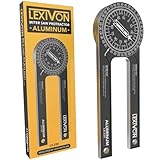
- ACCURATE - Crafted from CNC-machined Anodized Aluminum Alloy Steel. Features easy-to-read precision laser engraved scales.
- DESIGN - Internal Teflon O-ring mechanism swivels during operation and ensures smooth & precise read on inside/outside corners.
- FORGET ABOUT THE GUESSWORK - Two scales transfer your work angle directly to the miter saw for an accurate Miter cut, and Single cut.
- DO IT RIGHT THE FIRST TIME! - Perfect for crown molding, trim work, plumbing, and a variety of other carpentry applications.
- QUALITY - The 1/4-Inch thick aluminum alloy is stronger and won't bend like the plastic ones | Backed by our Lifetime Limited Warranty for your complete peace of mind!
Do not assume that the number displayed on a machine is automatically the angle captured by the bevel. The machine may reference the blade to the table, the fence, or the workpiece in a different way. Set the relationship physically and confirm it with scrap.
Do these 3 things before closing this tab:
1Fix the driver behind crashes, sound loss and screen glitches2Clear out junk files and repair common Windows errors3Scan for outdated or missing drivers - takes under a minuteCopying an angle from a full-size drawing or plan
A drawn angle is easier to copy when one side is made into a stable reference. Holding the bevel above the drawing and trying to align both edges at once invites parallax and accidental movement.
- Place a straightedge along one side of the drawn angle.
- Put the bevel blade against the straightedge.
- Align the handle with the other side of the drawn angle.
- Lock the blade while keeping the straightedge and gauge in contact.
- Transfer the locked setting to the workpiece or machine.
If a drawing has no stated degree measurement, make a durable angle board from square-edged scrap. Lay out the rise-and-run relationship on the scrap, draw the required line, and set the bevel against it. The resulting physical reference can be retained for repeated layout instead of returning to a paper plan each time.
Setting a tablesaw, miter gauge, or other machine
A locked bevel gauge can transfer an angle to a tablesaw blade, miter gauge, fence, jointer fence, bandsaw table, drill press setup, or angled fixture. The general procedure is to place the gauge body against the machine’s reference surface and align its blade with the component being adjusted.
Tablesaw example
- Capture the required angle from the workpiece, drawing, or angle board.
- Retract or remove the blade guard only according to the saw manufacturer’s procedure and with the saw disconnected from power when appropriate for the adjustment.
- Place the bevel gauge on the saw table with its body fully flat.
- Align the gauge blade with the sawblade face, not with a tooth.
- Adjust the blade tilt until the sawblade face matches the bevel blade.
- Lock the saw adjustment and recheck the setting.
- Make a test cut in scrap and inspect the resulting joint or bevel.
The bevel blade should sit fully through the gauge head when the gauge is used on a machine. If its rounded end protrudes or prevents the gauge from lying flat, the reading can be false. Keep the gauge blade square to the sawblade face and avoid resting it on a sawtooth, which can change the apparent angle.
Quick wins for a faster PC:
Scan for outdated or missing drivers - takes under a minuteDriver Scan →Clear out junk files and repair common Windows errorsFree Scan →Fix the driver behind crashes, sound loss and screen glitchesFind Drivers →Accurate machine setup also depends on the machine and the material. Before cutting, verify that the blade is parallel to the miter slot and that the fence is parallel to the slot. Use stock that is flat, straight, and square where the operation requires it. On bevel cuts—especially a second pass where an angled edge may climb the fence—a featherboard and suitable hold-down can help keep the stock controlled. Follow the machine manufacturer’s guarding and operating instructions.
Rank #3

- Durable high-impact molded body for maximum strength and lasting performance
- Measure using our easy-to-read 0-90° increments in all four quadrants, printed on a durable acrylic lens
- Our extra-strong ceramic magnet firmly adheres to ferrous metal surfaces
- Achieve a secure fit with our V-Groove edge, designed for use on pipes and conduits
- Featuring ruled edges with both inch and metric graduations for versatile measurements
A bevel gauge is not a substitute for safe machine operation. Keep hands clear of the cutter, use push devices and appropriate workholding, and confirm the setup with a stopped machine before making the cut.
Joinery and layout applications
Dovetails and angled tenons
Dovetail slopes, angled tenons, and other non-square joinery can be laid out directly with a bevel gauge. Set the gauge from a reference drawing, an existing joint, or an angle board, then use it to mark repeated lines. This avoids repeatedly estimating the same slope with a ruler.
When transferring a dovetail or tenon angle around a workpiece, pay attention to which face is the reference face. A gauge can preserve the same geometric relationship, but a careless change of orientation can put the slope on the wrong side of the line.
Miters and compound work
A bevel cut changes the angle across the thickness or face of a board. A miter cut changes the angle across the board’s width or face. A compound cut combines both. The terms and machine scales can be used differently by manufacturers, so always identify the reference surface when discussing an angle.
For a compound joint, capture each required relationship separately and make a labeled test piece. A bevel gauge can establish one plane of the cut, but it does not automatically tell you whether the machine should use the captured angle, its complement, or half of it.
Checking a chamfer while forming it
When forming a chamfer with a bench plane, periodically place the bevel gauge against the new sloped surface and its adjacent face. The gauge gives a quick physical comparison as material is removed. It is especially useful when the chamfer must match an existing edge or continue consistently along a long member.
Rank #4

- VERSATILE 3-IN-1 DIGITAL ANGLE FINDER: Measure inside and outside angles, lengths, and calculate miter saw cut angles with precision
- EFFICIENT MITER SAW PROTRACTOR: Easily calculate the perfect saw blade angle for precise miter joints every time
- MACHINED RULER EDGES: Accurate measurements with +/- 0.2-Degree precision for reliable results
- BRIGHT LED DISPLAY: White LED display ensures easy visibility in any lighting conditions
- DURABLE AND RUST RESISTANT: Long-lasting metallic ruler with deeply etched markings for clear readings
Bevel angles in hand planes and sharpening
Do not confuse a project-angle sliding bevel with the bevel geometry of a cutting tool. A sliding bevel can help you set or check a plane blade’s ground angle, but the correct sharpening geometry depends on the tool, steel, wood species, cutting direction, and desired edge life.
Plane-blade geometry
In a bevel-up plane, changing the blade’s face bevel changes the effective cutting angle. In a conventional bevel-down bench plane, the bed or frog angle largely determines the cutting angle because the blade bevel faces down.
As an explanatory example, a low-angle block plane with a 12-degree bed and a 25-degree blade bevel has an effective cutting angle of approximately 37 degrees. That is a geometry example, not a universal recommendation. A standard bench-plane arrangement near 45 degrees behaves differently because of its bevel-down blade orientation.
Primary bevel and microbevel
Sharpening commonly involves grinding a primary bevel and then honing the edge. A microbevel is a narrow secondary bevel set a little steeper than the primary bevel. WOOD Magazine describes a typical increase of roughly 3 to 5 degrees. Because only a small strip must be honed during later maintenance, a microbevel can reduce honing time.
There is no single correct bevel angle for every chisel, plane iron, or turning tool. A durable edge for hard wood may call for different geometry from a fine edge used in soft material; the tool’s design and steel also matter.
PC Slower Than It Used to Be?
A free scan shows the junk files, broken settings and background clutter dragging Windows down - then fixes them in one click.Free scan · Windows 10 & 11Crashes, No Sound, or Screen Glitches?
Random freezes, missing sound and display glitches usually trace back to one bad driver. Find and replace yours safely.Free scan · under a minuteFor sharpening checks, use a dedicated fixed-angle tool rather than expecting a sliding T-bevel to provide numerical slots. The fixed-angle sharpening bevel gauge category is intended for checking chisel, plane-blade, and turning-tool bevels. One example, the Veritas Bevel Gauge, has slots from 15 to 45 degrees in 5-degree increments. It complements, rather than replaces, an adjustable sliding bevel for construction and joinery angles.
Independent reader supportYour contribution helps us test, update, and keep practical guides available for everyone.Choosing the right type of bevel tool
| Tool or accessory | Best use | What to look for |
|---|---|---|
| Basic sliding bevel gauge | Copying angles from workpieces, drawings, and templates | A rigid handle, smooth blade movement, and a lock that holds without shifting |
| Premium sliding bevel gauge | Frequent layout, dovetails, repeat work, and controlled locking tension | Positive locking, adjustable tension, a flat reference body, and a blade that seats cleanly |
| bevel angle reference block | Repeating common miters, complementary or supplementary angles, and dovetail slopes | Clearly marked reference faces and angles that match your work |
| Fixed-angle sharpening gauge | Checking chisel, plane-iron, and turning-tool bevels | Known numerical slots; do not substitute it for an adjustable angle-transfer gauge |
| Build-your-own sliding bevel | Project-based work and custom dimensions | A square-edged body, suitable hardware, accurate layout, and a reliable locking arrangement |
Basic sliding bevel
A straightforward option such as Stanley’s 200 mm Joiners’ Sliding Bevel, model 46-825, is specified with an adjustable stainless-steel blade, built-in blade lock, plastic handle, and an overall length listed as 8 inches. Specifications and availability can change, so check the current manufacturer listing before buying.
Premium sliding bevel
Woodpeckers offers 4-inch and 7-inch Sliding Bevel Gauges with adjustable locking tension and a positive locking mechanism. These features are aimed at layout tasks such as dovetail marking, capturing angles from existing work, transferring angles from plans, and repeated setup. A premium gauge is most defensible when the tool will be used often and repeatability, handling, and lock control matter more than obtaining the lowest-cost tool.
A bevel angle reference block can be useful when the same settings recur. The Woodpeckers Bevel Block instructions identify common miter angles of 15, 22.5, 30, 36, and 45 degrees, along with complementary and supplementary positions and common dovetail ratios. Verify the exact product and current availability before purchase.
Build-your-own gauge
A Woodsmith Sliding Bevel Gauge plan is an option for readers who want to make the tool. The plan includes step-by-step instructions, exploded views, a cutting diagram, materials information, and retail sources for hardware and supplies. A homemade gauge can be a useful shop project, but its usefulness depends on accurately making the body square and ensuring the blade locks without movement.
Best Value

- VERSATILE DIGITAL ANGLE GAUGE AND LEVEL: Measure angles, check relative angles with zero calibration feature, or use as a digital level with ease
- HIGH VISIBILITY AND AUTO-ROTATING DISPLAY: Reverse contrast display improves visibility in low light conditions and automatically rotates when upside-down for easy viewing
- STRONG MAGNETIC BASE: Attach to ferromagnetic surfaces like pipe, electrical conduit, miter saw blades for woodworking, vents, ducts, and more for convenient hands-free operation
- V-GROOVE EDGES: Ensure optimal alignment on conduits and pipes for bending and alignment tasks
- WIDE MEASUREMENT RANGE: Measure between 0-90, or 0-180 degrees - useful when accounting for springback when bending conduit
Accuracy checks and common mistakes
- Using the gauge as a protractor: A sliding bevel preserves an angle but does not inherently give its degree value.
- Referencing the wrong face: Mark the handle-side reference face before transferring an angle.
- Forgetting to bisect a corner: A corner angle and each mating miter are not the same thing.
- Allowing the blade to slip while locking: Support the gauge near the lock and tighten gradually.
- Holding the gauge above a drawing: Use a straightedge along one drawn side so the alignment is controlled.
- Resting on a sawtooth: Align with the flat face of the sawblade.
- Leaving the blade rounded end in the way: Make sure the blade sits fully through the head and the gauge lies flat.
- Trusting a machine scale without testing: Scales may reference a different surface from the one you captured.
- Testing on finished material: Use scrap first, especially for miters, bevels, and compound cuts.
- Assuming one sharpening angle fits all tools: Separate primary bevel, microbevel, back bevel, and effective cutting angle.
A dependable workflow
- Identify the reference surfaces. Decide which two faces define the angle.
- Capture or lay out the angle. Use the workpiece, a straightedge and drawing, or a numerical layout tool.
- Lock the bevel carefully. Recheck it against the original reference.
- Determine whether the operation needs the full angle, its complement, or half. This depends on the machine and joint geometry.
- Transfer the setting. Mark the work, align the machine, or make an angle board.
- Test in scrap. Check the joint, cut face, and fit before committing to final stock.
- Recheck after adjustment. Vibration, lock movement, stock irregularity, and machine alignment can all affect the result.
Frequently Asked Questions
Is a bevel gauge the same as a protractor?
No. A bevel gauge copies and transfers the relationship between two surfaces. A protractor measures or lays out a numerical angle. You can use a protractor to create a specified angle, then use a bevel gauge to preserve it.
How do I find the correct miter setting for an odd corner?
Capture the included corner angle with the bevel gauge, transfer it to a reference surface, bisect the drawn angle with a compass, and set the gauge from the baseline to that bisector. Confirm the setting with scrap before cutting the finished pieces.
Can I use a sliding bevel to sharpen a chisel?
It can help transfer or compare a bevel, but a fixed-angle sharpening gauge is usually more convenient when you need a known numerical setting. The correct angle depends on the chisel, steel, work, and whether you are setting a primary bevel or microbevel.
What’s actually slowing this PC down?
Pick the symptom - the matching free tool is one click away.
What is the difference between a bevel cut and a miter cut?
A bevel changes the angle across the thickness or face of a board, while a miter changes the angle across its width or face. A compound cut combines both. Always state the reference surface because machine scales and terminology can vary.
The Bottom Line
Use a sliding bevel when the important fact is the relationship between two surfaces—not necessarily the number of degrees between them. Capture the angle, lock it without movement, transfer it with the correct reference face, and verify the result with a scrap cut. For sharpening, use a dedicated fixed-angle gauge and choose bevel geometry for the specific tool and work.
Quick Recap
Product prices and availability are accurate as of the date/time indicated and are subject to change. Any price and availability information displayed on Amazon at the time of purchase will apply.

