The right corner TV mount depends on the room’s geometry, the TV’s weight and VESA pattern, and where the wall or ceiling structure allows a secure installation. There is no evidence-based ranking of five tested products here; instead, this guide compares three manufacturer-documented models and two useful mount categories so you can choose by fit.
How to choose a corner TV mount
Before comparing options, establish how the mount will sit and move in your room. Mounting a TV in a corner may mean attaching a mount to one wall near the corner, spanning two adjacent walls, or fixing a mount to the ceiling. Those configurations are not interchangeable.
- Check compatibility: Match the mount to your TV’s actual weight and VESA hole pattern. A screen-size range alone does not confirm fit. Also check for clearance around the TV’s mounting area.
- Measure geometry: Measure the corner depth, the TV’s dimensions, and the distance the screen must extend to reach the viewing position. Compare those measurements with the mount’s published extension and installation instructions.
- Plan movement: Decide how far the screen needs to swivel or tilt. A maximum swivel figure is not a guarantee for every TV size or installation position; nearby walls can limit movement.
- Verify the structure: Locate studs or identify an appropriate masonry or ceiling structure. Follow the current manual for the exact mount and permitted surface. Do not assume drywall alone is an approved anchor surface.
Kanto’s corner-mounting guide notes that stud spacing varies and that some mounts use wider wall plates to accommodate different stud positions. Measure your own wall and consult the selected mount’s instructions rather than relying on a general spacing assumption: Kanto’s corner-mounting guide.
Five options by room and installation scenario
The first three options below have model-specific specifications published by their manufacturers. The last two are categories, not specific product recommendations or independently tested picks.
The Tool Desk
Outbyte Driver Updater FREEFix the driver behind crashes, sound loss and screen glitchesFind Drivers →Outbyte PC Repair FREERepair Windows errors before they cause bigger problemsFix Now →#1 Best Overall

- Wide Compatibility: This Long Arm TV wall mount accommodates screens from 37 to 75 inches with 200 x 100mm to 600 x 400mm VESA mounting patterns. Whether you have concrete, brick, or wood stud walls, this wall mount TV bracket is designed for easy installation. Note: do not mount on drywall alone.
- Enhanced Security: Prioritize your TV's security with this upgraded long-arm TV wall mount. This corner TV mount 75 inch is UL-listed to securely hold TVs up to 100 lbs, even with its long reach. The swivel joint features a solid hinge pin to ensure firm hold and smooth TV wall mount motion.
- Maximized Flexibility: Get the right TV position and viewing angle. This extra long arm TV wall mount can extend 32.37” from wall to cover more viewing positions and retract 3.12” to wall for saving space and a clean look. Our full motion TV wall mount swivels +/-90°, tilts -15° to +5°. The tilt is tool-free for total simplicity. Additionally, there’s +/-4° post-install leveling to precisely align the TV even after installation.
- Space-Efficient Corner TV Solution: This full motion TV wall mount 65 inch combines extended reach with impressive flexibility, making it ideal for corner installations. The corner TV mount expands TV positioning and room layout possibilities. Suitable for installation in living rooms, corners, bedrooms, kitchen entertainment halls, conference rooms, etc.
- Easy Installation: This single stud tv wall mount is easier to install and comes with a user-friendly manual. We've also simplified the TV wall mount 75 inch installation process, with all the necessary hardware included and clearly labeled.
1. Telescoping corner mount: Kanto FMC1
The Kanto FMC1 is designed to extend a TV out from a corner on a telescoping arm. Kanto specifies it for 40–60-inch TVs weighing up to 88 lb, with VESA patterns from 100×100 to 600×400. Its published arm extension is 20.4–29.8 inches from the corner. The product page lists up to 90 degrees of swivel when sufficiently extended, plus 10 degrees of forward tilt and 6 degrees backward. Kanto says it is suitable for wood-stud and concrete walls. Check the current manual and your room’s clearances before choosing it: Kanto FMC1 specifications.
This configuration may suit a room where the screen needs to project well away from the corner. Confirm that the arm can reach the viewing position without the TV striking either adjacent wall; the listed extension and swivel do not establish the movement achievable with every screen and room layout.
Rank #2

- Important: Watch the video and learn the”Designed for" details listed below!
- Designed for concrete, brick and wood studs wall (single stud).
- Designed for TVs up to 80 lbs (36.3 KG) and display sized 26" - 55" (66 CM - 140 CM).
- Designed for VESA sized from 3.9'' x 3.9'' through 15.7'' x 15.7''.
- Comfortable View with tilt range from +10° to -5°.
2. Two-wall corner mount: Kanto PDC650
The Kanto PDC650 uses two wall plates and is described by Kanto for inner and outer corner installations. The manufacturer also describes mounting it on an outer edge, column, or pillar. It is specified for 37–70-inch TVs up to 125 lb, with VESA patterns from 100×100 to 600×400. Kanto lists 2–21.2 inches of extension and swivel up to 40 degrees in either direction, depending on screen size and wall-plate placement: Kanto PDC650 specifications.
Consider this design when attaching to both adjoining walls matches the available structure and the TV does not need the reach of a longer arm. Verify the permitted configuration in the current instructions and check that the wall plates can be positioned where the structure supports them.
Recommended Free Tools
Rank #3
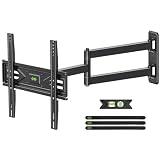
- Wide Compatibility: This Long-arm TV wall mount is compatible with 26" to 65" TVs and supports VESA patterns from 75x75mm up to 400x400mm. Additionally, this wall mount TV bracket ensures easy installation, whether your walls are concrete, brick, or wood stud.
- Enhanced Safety: Engineered for total peace of mind. This full motion TV wall mount is UL-listed to safely hold TVs up to 80 lbs, even at full extension. A solid hinge pin in the swivel joint guarantees a firm hold and smooth, wobble-free motion.
- Space-Saving Corner Solution: Unlock your room's potential. Specifically designed for corners, this corner TV wall mount combines extended reach with exceptional flexibility. It lets you place your TV exactly where you want it, turning unused corners into ideal viewing spots.
- Maximized Flexibility: Position your TV perfectly. The arm extends 31.22 inches from the wall to cover more seating areas, then retracts to just 2.52 inches for a sleek, space-saving look. Enjoy smooth +/-90° swivel, tilt (-12° to +5°), and even +/-4° post-installation leveling for a perfectly aligned screen.
- Easy Installation: Install it yourself in no time. This swivel TV wall mount comes with a clear manual and all hardware is pre-labeled, so you can get set up quickly and correctly. Tips: If you need concrete anchors or M8*50 screws feel free to reach out to us.
3. Ceiling-mounted corner option: SANUS MC1A
The SANUS MC1A is a full-motion ceiling mount, not a wall mount. SANUS identifies it for 23–40-inch TVs, up to 70 lb, and says it can suit corner placement or situations where wall mounting is not possible. The listed VESA patterns include 75×75, 100×100, 200×100, and 200×200: SANUS MC1A specifications.
This option is relevant only when a suitable ceiling structure and installation are available. Confirm that the ceiling attachment point and the mount’s configuration work for the room before purchasing.
Rank #4

- Wide Compatibility: This full motion TV mount fits most 26”-65” TVs up to 88 lbs with VESA mounting patterns 100x100 to 400x400mm. Please verify the size, weight, and VESA pattern of your TV before purchase.
- Height Adjustable Brackets: The corner TV wall mount features 3 levels of height adjustment after installation, ensuring your TV will be positioned at the right height for a more comfortable viewing experience.
- Full Motion Flexibility: Featuring +5°/-15° tilt and +/-90° swivel, the flexible wall mount TV bracket helps to minimize glare and enjoy better viewing from anywhere in the room. Extend the arm out 19.51” for viewing or retract it back to 3.53” to save space.
- Strong & Durable Construction: We are confident in the strength and durability of this swivel TV wall mount made of premium steel material. The 55 inch single stud TV mount features security lock screws to secure the TV to the wall plate to avoid sliding or falling.
- US-Based Customer Support: Step-by-step instruction manual and mounting hardware are included for easy installation, while the +/-3° post-installation leveling allows for perfect TV placement. Please contact our friendly product support team if you have any questions.
4. Conventional full-motion wall mount near the corner
A conventional articulating full-motion mount attached to a nearby wall can work when the wall plate fits the available stud position and the arm can bring the TV into the desired viewing area. This is a category, not a named product recommendation: the cited evidence does not establish a specific model’s compatibility, extension, or movement for your TV.
Check the actual wall-plate dimensions, supported VESA patterns and weight, arm reach, and the manufacturer’s installation instructions. A mount that fits the TV may still be unsuitable if its wall plate cannot be secured to the available structure or its arm cannot clear the corner.
Best Value

- Universal TV Mount: This wall mount TV bracket is suitable for most TVs ranging from 26-60 inches and can hold up to 80 lbs (36.4 kg). It supports VESA patterns from 75×75 mm to 400×400 mm. Be sure to verify your TV's weight, size, and vesa pattern before buying
- Full Motion Flexibility: With a tilt of +5°/-12° and up to +/-90° swivel(Maximum swivel angle depends on your TV size), this adjustable TV bracket reduces glare and enhances viewing from any spot in the room. You can extend the arm 19.37” for a better view or pull it back to 2.52” to save space
- Structural Solidity: Featuring premium heavy-duty steel and reinforced structure, and supports up to 80lbs with high stability and safety. It includes security lock screws to keep the TV firmly attached to the wall plate, preventing any sliding or falling
- Easy Installation: TV wall mounts with clear instruction and hardware in pre-labeled bags. +/-4° post-installation adjustment allows perfect TV leveling after installation. The paper template makes the installation of TV mounting bracket easier
- Warm tips: In order to avoid customer misusing concrete anchors onto wood studs directly causing any safety issues, we removed concrete anchors from our package. If you need concrete anchors, please contact us to get it
5. Ceiling mount where wall mounting is unsuitable
A ceiling mount may be an alternative when the walls cannot provide a suitable mounting position, provided the ceiling structure and the selected mount’s instructions support that installation. This is a category rather than a second model recommendation. Compare ceiling-mount compatibility, load rating, VESA pattern, reach, and movement with your TV and room; do not infer those details from the SANUS MC1A specifications, which apply to that model only.
Quick Recap
Compare the documented models
| Model and configuration | TV size and weight | VESA pattern | Published movement or reach | Installation notes |
|---|---|---|---|---|
| Kanto FMC1, telescoping corner mount | 40–60 inches; up to 88 lb (Kanto specification, accessed 2026) | 100×100 to 600×400 | 20.4–29.8 inches from the corner; up to 90° swivel when sufficiently extended; 10° forward and 6° backward tilt (Kanto specification) | Manufacturer says suitable for wood-stud and concrete walls; verify current manual and room constraints. |
| Kanto PDC650, two-wall corner mount | 37–70 inches; up to 125 lb (Kanto specification, accessed 2026) | 100×100 to 600×400 | 2–21.2 inches extension; swivel up to 40° in either direction depending on screen size and wall-plate placement (Kanto specification) | Described for inner and outer corners and for an outer edge, column, or pillar; confirm permitted setup in current instructions. |
| SANUS MC1A, ceiling mount | 23–40 inches; up to 70 lb (SANUS specification, accessed 2026) | 75×75, 100×100, 200×100, and 200×200 | Not stated on the cited product page | Ceiling installation; SANUS describes corner placement or use where wall mounting is not possible. |
Measure before buying
- Record the TV’s requirements. Check the TV manual or manufacturer specifications for its weight and VESA hole spacing. Confirm that both fall within the mount’s limits.
- Map the installation surface. Locate the studs or identify the suitable concrete or ceiling structure. Compare those positions with the mount’s plate and required fasteners in its current manual.
- Measure the corner and viewing position. Note the corner depth, adjacent-wall positions, and the distance the TV needs to travel. Measure the screen itself so you can assess whether it will clear the walls as it swivels.
- Compare reach and movement in context. Use the model’s published extension and movement as specifications, not guarantees for your geometry. The installer guide from Dan’s TV Mounting recommends measuring the corner and considering extension and load; its advice to choose a rating 50% above the TV’s weight is that installer’s recommendation, not a universal manufacturer or standards-body requirement: Dan’s TV Mounting corner-mount guide.
- Read the exact installation manual before work begins. Confirm the supported wall or ceiling type, fasteners, required structure, plate placement, and any TV-size or movement restrictions. If the instructions do not match the surface or structure in your room, do not proceed on an assumption.
Common fit problems to avoid
- Choosing by screen size alone: The TV must also meet the mount’s weight and VESA limits. A general buying guide from Tom’s Guide likewise treats those as key compatibility checks: Tom’s Guide TV-mount buying guide.
- Assuming maximum swivel is guaranteed: Screen dimensions, extension, wall-plate position, and adjacent walls all affect actual movement.
- Ignoring stud position: A wall plate that cannot align with suitable structure may rule out a mount even when its TV specifications match. Follow the mount-specific manual.
- Confusing mount types: A two-wall plate design, a telescoping mount installed at the corner, a nearby-wall arm, and a ceiling mount use different attachment points and have different structural requirements.
Product prices and availability are accurate as of the date/time indicated and are subject to change. Any price and availability information displayed on Amazon at the time of purchase will apply.