To draw a circle with a chosen radius, set a drawing compass to that radius, place its point at the center, and rotate it without letting the point slip or the opening change. For a larger circle, use a taut string fixed at the center. These methods follow the same rule: every point on the circumference stays the same distance from the center. “Perfect” is the geometric ideal; the cited practical instructions do not specify a physical accuracy tolerance.
Draw a measured circle on paper with a compass
- Choose the center and radius. The radius is the distance from the center to the circle’s edge. If you know the diameter instead, use half that distance for the compass opening.
- Set the compass with a ruler. Measure from the compass point to the pencil tip until that distance equals the required radius.
- Plant the point at the center. Hold it steady so it does not slide across the paper.
- Rotate the compass. Turn the handle smoothly to make a full sweep, keeping the opening fixed and the pencil in contact with the paper.
Slipping at the center or changing the compass width changes the radius and makes the line uneven. Practical guidance from The Open University OpenLearn, South Africa’s Department of Basic Education, and Cambridge International emphasizes holding the center point and keeping the radius consistent.
Make a larger circle with string
When an ordinary compass cannot reach the required radius, a string can extend the same fixed-center method to a larger surface or the ground.
- Mark the intended center and anchor one end of the string there.
- Set the string’s working length to the radius: measure from the anchor to the pencil tip, allowing for where the pencil will touch the surface.
- Keep the string taut as you move the pencil around the anchor. Do not let the anchor move or the string length change.
NRICH at the University of Cambridge describes practical circle-making with a fixed center and constant radius. A string setup reaches farther than an ordinary compass, but the result still depends on a stable anchor, taut string, and controlled movement.
#1 Best Overall

- Use With A Standard Pencil: Don’t fuss with similar drawing compass tools or certain protractors that require you to use a custom lead writing utensil. Ours allows you to use any #2 pencil.
- Carry In Your Toolbox – Unlike a Beam Compass : Draw circles and arcs of varying radius’ with our retractable circle drawing tool that measures just 5” long when contracted.
- Use It For Variable Straight Edges Too: Just flip it over and our measuring tape compass becomes a straight edge tool. Mark your desired distance from an edge with ease.
- Metric And Imperial Measurements Up to 6ft Long: Unless you need a circle drawn with a diameter larger than 12 feet, Rocksteel’s rotating tape measure will get the job done.
- Measurement NOT OFF by 2 inches: The tape measure measures the distance from the center point where the pin is placed to where the pencil is. Some users are thinking the accuracy is off because the tape starts at ~ 2.5" rather than 0, it is inaccurate. However, that is the distance between pencil & center when the tape is fully retracted. See Image #2 for clarification.
Use a beam compass for very large circles
A beam compass has two points mounted on a rod or slat. Set the points to the desired radius, place one at the center, and move the other around it to mark the circumference. It serves the same purpose as a drawing compass at a much larger scale. The Smithsonian Institution’s Beam Compasses overview describes their use in mechanical and architectural drawings for circles several feet in diameter.
Choose the method that fits the job
| Method | Best fit | Radius requirement | What to watch |
|---|---|---|---|
| Drawing compass and ruler | Measured circles on paper | Set the tool to a specific radius | Keep the center point from slipping and the opening unchanged. |
| Fixed center and taut string | Larger circles on a surface or ground | Set the string length to the radius | Keep the anchor secure and the string taut. |
| Beam compass | Very large circles where a rod or slat can span the radius | Set the two points to the required radius | Keep the center point stable while moving the marking point. |
| Trace a round object | A quick approximate circle when no chosen radius is required | Not adjustable to an arbitrary measured radius | The traced circle matches the object, not necessarily a specified size. |
| Circle tool in a computer application | A circle on a computer or calculator screen | Define the center and radius in the tool | Controls and units depend on the application. |
For construction layout, a string or beam setup is the practical extension of the compass principle: establish the center, control the radius, and mark the circumference without shifting either. The method descriptions above do not provide measured accuracy or a tolerance, so do not treat “perfect” as a guarantee of zero physical error.
Quick Recap
Best Value

- Easy to Use - Exactly what an artists, student, crafter, or hobbyist needs, this tool can be used as a drafting or drawing instrument for both projects and artwork.
- Ideal for Students - Perfectly useful for all levels, whether for geometry class, drafting, architectural design, construction, or engineering.
- Extra Features - Comes with two 13-inch non-graduated beam bars and includes spare leads and needlepoint, is also complete with interchangeable ruling pen, pencil, and divider legs.
- Conveniently Packaged - Comes in a hard, see-through plastic case for portability and easy storage and transport.
- Premium Quality - Made in Germany, each tool is constructed with heavy-duty materials and finish that can resist stains and tarnishing. Ideal for long-lasting use.
Rank #4

- Premium Material: This woodworking compass is made of solid aluminum alloy, the finish is smooth, and it is more comfortable to use. Not easy to rust or break, corrosion resistant and durable. The extended circle drawing tool makes your operation more convenient, is a good helper for your work.
- Clearly-Mark: Circle marking tool is very delicate, adopts the laser-engraved markings, metric/inch are tender and clear identification, easy to read and measure. They won't smudge, fade, or disappear, with a size of 340*30*14mm.
- Easy To Use: All you have to do is to remove the screws, fix the woodworking compass on the plank, and then adjust the radius size, you can draw different sizes of the circles as your need. Moreover, you can use it as a little ruler.
- Circle pen design: The fixed pen can be stored at the end of the main body, saving your time for consolidation and assembly, so you can take it as you go.
- Widely Application: This Woodworking Compass Scriber has Metric and imperial Dual-Scale, suitable for woodworking, metal processing, decorative Design, Industrial Drawing and etc., quite flexible and convenient to use.
Rank #3

- 1 High Quality Professional Bow Compass For Math, Geometry, Art, Drafting And Drawing; Creates Circles Up To 8 Inches In Diameter
- Precision Geometry Compass With Spring Bow Head And Center Wheel Prevents Unintentional Leg Movements
- All Metal, Nickel Plating Compass, Lifelong Satisfaction Guaranteed
- Easy To Adjust Legs, Great For Precise Drawings
- Packaged In A Clear, Reusable Pouch. Easy To Carry And Store
Rank #2
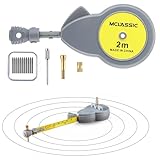
- 📐【Beam Compass with 10 Pencil Leads】 This is a retractable round drawing tool with a tape measure beam and comes with 10 spare refills; Can secure the included pencil lead in place for a stable and consistent drawing experience; Have enough refills for to have a spare
- 🛠️【Material and Auto Retract Button】 This circle drawing tool is made of plastic, the finish is smooth, and it is more comfortable to use; Not easy to break or rust, corrosion resistant; This rotape tape measure compass also has an auto retract button, when the button is pressed the tape measure automatically retract, lift up the button to fix the tape measure, the operation is convenient, is a good helper on the job
- 🎒【Portable Rotape Tape Measure Compass】 The size of this rotape tape measure compass is 1.97 x 4.72 inch, the thickness is 0.78 inch; The design is compact and easy to carry and store; Whether are an architect, artist, or woodworker, can carry this drafting compass around with for convenience
- 👍【Easy to Use】 This tape measure is easy to use, all need to do is to secure the pencil lead to the head with the included metal parts and insert the central axis needle into the small hole in the center of the tape measure to secure the tape measure and finish using it easily
- 📏【Versatile Double Scale Drawing Measure】 This compass geometry tool has metric and imperial dual scale up to 6 feet long, easy to read and measure; It can draw not only arcs, circles but also straight lines, suitable for woodworking, decorative design, Industrial drawing and etc., quite flexible and convenient to use
Product prices and availability are accurate as of the date/time indicated and are subject to change. Any price and availability information displayed on Amazon at the time of purchase will apply.
Independent reader supportYour contribution helps us test, update, and keep practical guides available for everyone.



