Recommended Free Tools
First identify what is failing: if the opener works from its wall control or remote but not through myQ, focus on the app, device connection, Wi-Fi, and compatibility. If the door also fails to move locally, the problem may be with the opener or door—not the app—and needs model-specific or professional troubleshooting.
Start by separating an app problem from an opener problem
Try the opener using its wall control or a compatible remote, staying clear of the door while it operates. This is a useful diagnostic distinction, not a guarantee of the fault: myQ requires electric power and internet connectivity, and connection problems can limit availability. The Chamberlain Group’s myQ terms describe those requirements.
- Local operation works, app operation does not: Check the phone’s internet connection, the myQ app, the opener’s power and network connection, and whether the opener is compatible.
- Local operation also fails: Treat this as an opener, power, safety-device, or door issue. Use the manual or support information for the exact model rather than assuming the app is the cause.
- The door moves unpredictably, appears jammed, or the cause is unclear: Stop troubleshooting and contact a qualified garage-door service provider.
Quick checks when the app cannot control the opener
- Check the phone’s connection. Confirm that the phone has internet access, then reopen myQ and try the command again.
- Update myQ. myQ recommends updating the app; its support page provides help for app, installation, and connectivity issues.
- Confirm opener power and network status. myQ depends on electric power and internet connectivity. If the opener is not powered or connected to the home network, app control may be unavailable.
- Check compatibility for the exact opener. Use myQ’s compatibility tool rather than relying on the brand name alone.
These checks do not establish a universal Wi-Fi-band, router-restart, or reset fix; requirements and remedies can vary by model. Avoid model-unspecific reset steps that could remove a device setup without addressing the underlying problem.
Use myQ Diagnostics on supported openers
myQ Diagnostics is available on select LiftMaster and Chamberlain openers marked with a Wi-Fi or Powered by myQ logo. Eligible users can view diagnostic status and share a report with a dealer. It is not available as a universal diagnostic tool for every opener.
#1 Best Overall

- “Did I shut the garage” No more worrying.
- Open or close your garage from anywhere. Simply download the free myQ app for iPhone or Android and get connected with your very own Smart Garage
- Works with Amazon Key In-Garage Delivery—an exclusive Prime member benefit that protects your Amazon packages.
- Give access to family or friends while on the go
- Never worry if the garage is closed at night by setting a close schedule
- In the myQ app, open the opener’s device menu.
- Go to Device Settings, then select myQ Diagnostics.
- Review the displayed device status and record any code shown.
- If you need help, use Send Report to share the diagnostic report with a dealer, or consult support for the exact opener model.
According to myQ’s diagnostics page, shared reports are automatically deleted from the dealer database after 30 days. The code’s meaning and the correct repair depend on the equipment; do not guess at a fix based on an unfamiliar code.
Check compatibility before adding a hub
Some openers have myQ built in; a compatible existing opener may instead be able to add app connectivity through the Chamberlain Smart Garage Control. A hub is a connectivity retrofit, not a repair part: it will not fix an opener that lacks power, a mechanical fault, or a door that is physically stuck.
Rank #2
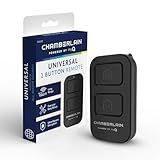
- Compatible with Leading Brands – Works seamlessly with Chamberlain, LiftMaster, Craftsman and most other garage door openers made after 1997.
- Long-Range Performance – Up to 1300 ft range for your garage door opener (conditions permitting) for smooth, reliable operation.
- Fast, Improved Programming – New setup process makes pairing with your garage door opener quick and frustration-free.
- Control Up to 2 Garage Doors or Gates – Each programmable button controls a different garage door openers or gate.
- myQ Smart Garage Control – Connect to the my Q app to manage access, receive notifications, and view garage door opener access history and more!
myQ says most opener brands may be compatible when the opener was manufactured after 1993 and has standard safety sensors that do not switch to low-power mode. That general guidance is not a substitute for checking the exact model in myQ’s compatibility tool before buying or installing a hub.
Independent reader supportYour contribution helps us test, update, and keep practical guides available for everyone.When to stop troubleshooting and get help
- The door itself does not move, moves erratically, or appears obstructed.
- A safety-related fault is indicated, or you are unsure whether the door can be operated safely.
- The displayed diagnostic code needs interpretation, or the suggested steps require model-specific instructions.
Consult the exact model’s official manual or contact Chamberlain Group support for code assistance; myQ also provides a dealer pathway through Diagnostics. Do not bypass safety devices or work on high-tension door components. The Chamberlain Group’s terms state that the myQ system is not an alarm or security system, so do not rely on it as one.
Free tools Windows power users keep installed
One-click scans. No signup required.
Quick Recap
Rank #4

- Compact Keychain Convenience – Easily attaches to keys or bag for garage door access on the go.
- Dual Button Control – Program up to two garage door openers or gates.
- Long-Range Reliability – Up to 1300 ft of range (conditions permitting).
- Broad Compatibility – Works with Chamberlain, LiftMaster, and most Craftsman garage openers made after 1997.
- myQ Smart Garage Control – Connect to the my Q app to manage access, receive notifications, and view garage door opener access history and more!
Rank #3

- Power Outage Protection: Ensure uninterrupted access during power failures. Chamberlain Garage Door Battery Backup keeps you in control when it matters most, for safety and peace of mind.
- Ultra-Quiet Operation: Garage door opener with a reinforced belt drive and ultra-quiet DC motor ideal for garages near living spaces or bedrooms.
- Smart Access for Smart Homes: Wi-Fi connected myQ garage door opener and myQ app let you control your garage opener from your phone - anytime, anywhere. Built-in video monitoring helps you keep eyes on what matters, bringing modern convenience to your fingertips
- Advanced Power for Bigger Demands: Choose the right garage door opener horsepower for the job-from everyday reliability to higher-cycle performance. Our 3/4 HP garage door motor is designed for frequent use, delivering smooth, consistent operation and long-term durability
- Bright When You Need It Most: Illuminate your entire garage with 2 LED Bulb lighting - providing front and rear coverage for safer, more complete visibility whenever you need it. Bulbs sold separately.
Product prices and availability are accurate as of the date/time indicated and are subject to change. Any price and availability information displayed on Amazon at the time of purchase will apply.