Start by checking the model label on your Neato and identifying the symptom: it will not start or charge, shows an error, picks up dirt poorly, or appears offline in the app. Use the manual for that exact model before trying a reset or interpreting an indicator. One important exception to ordinary Wi-Fi troubleshooting: Neato says its cloud servers for both connected model groups have shut down, although the robot can still clean manually.
Identify your Neato before troubleshooting
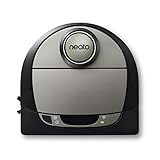
Find the model name or number on the robot’s product label, then use the matching manual. Neato separates manuals for Connected D3, D4, D5, D6 and D7 models from those for D8, D9 and D10; button sequences and LED meanings are not necessarily interchangeable. The Neato support knowledge base organizes its model-specific documentation. For the older Botvac family, use its own manual rather than assuming D-series instructions apply.
Classify the problem before changing settings:
- Won’t start or charge: check the model’s charging instructions and any displayed message or battery light.
- App says offline or Wi-Fi will not connect: consider the cloud shutdown before diagnosing your home network.
- Poor pickup or brush trouble: inspect the bin, filter and brush identified in your model’s manual.
- Persistent error light: check the exact model’s indicator guide; some battery faults require service, not repeated resets.
Why is my Neato offline?
An offline status may not mean your router is at fault. Neato support says the servers for both the D3–D7 and D800/D8/D9/D10 groups have shut down. In its announcement dated October 6, 2025, Neato Robotics Support said: “Your Neato robot will continue to function manually. Simply press the button once to launch a full house run.” Some app-dependent features may therefore be unavailable even when the robot can still clean. See Neato’s server status notice and its October 6, 2025 announcement.
If you have a D7 and Wi-Fi is off
The D7 guide’s indexed troubleshooting instructions describe a power cycle and app reconnection. This is D7-specific guidance, and it cannot restore discontinued cloud functions:
Windows Errors? Fix Them Before They Spread
Repair common Windows errors and clear accumulated junk for a smoother, more stable PC - no reinstall needed.Free scan · no reinstallCrashes, No Sound, or Screen Glitches?
Random freezes, missing sound and display glitches usually trace back to one bad driver. Find and replace yours safely.Free scan · under a minute#1 Best Overall

- INCREDIBLE SUCTION: Powerful Shark suction picks up dirt and debris on all floor types—tackling even the toughest of messes in your home.
- NO SPOTS MISSED: With Matrix Clean Navigation, the vacuum cleans in a precise matrix grid taking multiple passes over dirt and debris for whole home, deep cleaning coverage.
- IT EMPTIES ITSELF: The bagless, self-emptying base holds up to 30 days of dirt and debris while its true HEPA filtration captures and traps 99.97%* of dust and allergens (*down to .3 microns).
- PRECISION HOME MAPPING: 360° LiDAR vision quickly and accurately maps your home so your robot can methodically clean detecting and avoiding objects in its path, day or night, adapting to everyday changes in the home.
- PERFECT FOR HOMES WITH PETS: With powerful vacuum suction, Shark’s self-cleaning brushroll, and HEPA filtration system the robot captures pet hair, dust, dander and allergens with ease.
- Take the D7 off its charge base.
- Hold Start for 15 seconds to turn it off.
- Press Start again to turn it on, then wait several minutes and check the app for “READY TO CLEAN.”
- If the app still does not recognize the robot, remove it from the app and try reconnecting it. Neato’s server shutdown may prevent cloud-dependent setup or features from working.
The D7 guide also associates a fast-blinking red Wi-Fi indicator with a failed network connection and directs owners to check the app for where setup failed. Treat that indicator interpretation as D7 guidance, not a universal Neato code.
Why won’t my Neato charge or start?
Check the exact message or light against the manual before attempting a reset. Battery indicators differ by model, and a fault that persists after the model’s stated checks is a service issue rather than a reason to keep repeating a power cycle.
Rank #2

- Compatible with: for Neato Botvac D4 D8 D10 D7 D9 D6 D80 D5 D85 D75 D3 Robot Vacuum Cleaner.
- The accessories are high quality. It is made of high-strength and environmental friendly materials.
- The vacuum accessories are easy to remove dirt, dust and trash in corners and edges effectively. Especially your hair and your pets hair.
- The parts are easy to install, make your vacuum cleaner and longer.
- 【Manufacturer's Warranty】: There is a 60 day warranty after delivery.Please buy with confidence.
D8, D9 and D10 battery fault
The indexed D8/D9/D10 manual identifies a fast-blinking red battery LED as a battery fault requiring service. If that is the indicator on your robot, follow official service guidance rather than opening the chassis or trying an unverified battery replacement.
D7 battery indicator
D7 guidance says a blinking-red battery LED indicates an error and recommends contacting Customer Care. Use the D7 manual’s directions for the specific light and contact support if the error remains.
Quick wins for a faster PC:
Clear out junk files and repair common Windows errorsFree Scan →Scan for outdated or missing drivers - takes under a minuteDriver Scan →Repair Windows errors before they cause bigger problemsFix Now →Rank #3
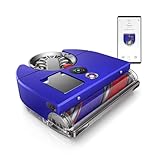
- The world's most powerful robot vacuum.¹ 2x the suction of any other robot vacuum.¹
- Sucks up more than any other robot on all floors.² Dyson's first brush bar to combine three ways to deep clean. Engineered with a wide diameter to reduce long hair and pet hair tangling.
- Control your clean or let your Dyson robot do it for you. Choose between four power modes: Auto, Boost, Quick, and Quiet. In Auto mode, the 360 Vis Nav robot vacuum automatically adapts suction power to debris level.³
- Unlike side sweepers that flick dirt away, Dyson sucks up dirt right to the edge of your wall. An automatic extending side duct redirects suction that's powerful enough to capture debris right up to the wall.
- Cleans far. Cleans fast. An 11.8-inch brush bar covers more floor with every sweep, and Quick mode prioritizes speedy cleans. Up to 65 minutes of run time, before automatically recharging, ready to clean again.⁴
Older Botvac battery messages
The older Botvac manual gives examples that should not be generalized to other series: it distinguishes a low battery that should be charged from other battery errors, advises charging a cold robot in a warmer environment, and says to let an overheated battery cool in a shaded area. Follow those steps only if your robot belongs to the Botvac family covered by that manual.
What does the red light mean?
There is no single red-light meaning across all Neato models. Identify whether the light is for the battery or Wi-Fi, note whether it is steady or blinking, and match that pattern to the manual for your model. For example, the indexed D8/D9/D10 guide maps a fast-blinking red battery LED to a service-requiring battery fault, while the D7 guide describes different battery and Wi-Fi indicators. Do not use one series’ code to diagnose another.
Rank #4

- UP TO 75 DAYS HANDS-FREE CLEANING. Dirt and dust stay gone because it empties into the AutoEmpty dock with a bag that traps 99% of allergens as small as 0.7 microns- That means no mess or cloud of dust when you empty it- Just drop the used bag into the trash and put a new one in the base.
- DEVOURS DIRT WITH 70X MORE POWER-LIFTING SUCTION. 3-Stage Cleaning includes 70X more power-lifting suction*, a Multi-Surface brush, and Edge-Sweeping brush to devour dirt and dust bunnies and leave floors barefoot clean *As compared to Roomba 600 series robots
- SUPER-SMART MAPPING AND NAVIGATION. ClearView LiDAR quickly maps your home to maximize coverage and provide a precise clean while steering smoothly around obstacles and specialized sensors prevent falling down stairs.
- FULLY CUSTOM & TARGETED CLEANING. Schedule and target rooms based on your daily routine and adjust the number of cleaning passes and levels of suction power.
- EASY-TO-USE ROOMBA HOME APP. Simply tap to set a custom clean, get time estimates, check on the filter life, or create keep-out zones to avoid specific areas.
Why is my Neato not picking up dirt?
Start with the maintenance items named in your model’s manual: the dirt bin, filter and brush. Clear accumulated debris and check whether the filter or brush is worn. Neato’s warranty terms identify batteries, filters and brushes as consumable parts subject to normal wear. If a part needs replacement, verify its compatibility against the exact model before ordering; the documentation does not establish compatibility for every third-party kit.
Avoid opening or modifying the robot as a quick fix. Neato’s warranty terms list unauthorized repair, modification, disassembly and some non-recommended parts among exclusions, subject to applicable law. Check the warranty that applies to your purchase and your local consumer protections before arranging repair or replacing parts. Neato’s warranty page states one year for hardware excluding batteries, six months for batteries and three months for certified refurbished products; those are stated warranty terms, not a guarantee that every claim is covered in every location. See Neato’s limited manufacturer’s warranty.
How do I reset my Neato?
Use a reset or power-cycle sequence only when the manual for your exact model recommends it for your symptom. The D7’s 15-second Start-button power cycle above is not a universal reset procedure. Before resetting, check whether the problem is an app/cloud feature affected by Neato’s server shutdown or a model-specific battery fault; neither is necessarily fixed by a reset.
When should I seek service or check an exchange offer?
Contact official support when the model’s manual identifies a service fault, a battery error persists, or the robot still will not operate after the manual’s owner-level checks. Do not buy a battery or attempt internal repair based only on a general symptom; the cited documentation does not establish a compatible battery listing or a universal replacement procedure.
For some Neato owners in Europe, Vorwerk announced a limited exchange offer for a Kobold VR7. The announcement describes eligibility for certain customers who bought a Neato from May 2023 and actively used cloud features. It is not a general repair or replacement program: check the official exchange announcement for current terms and eligibility.
Quick Recap
Product prices and availability are accurate as of the date/time indicated and are subject to change. Any price and availability information displayed on Amazon at the time of purchase will apply.
The Tool Desk
Outbyte PC Repair FREEClear out junk files and repair common Windows errorsFree Scan →Outbyte Driver Updater FREEFix the driver behind crashes, sound loss and screen glitchesFind Drivers →



