What’s actually slowing this PC down?
Pick the symptom - the matching free tool is one click away.
For most Hunter ceiling fan problems, start with the switch, remote or pull chain, and breaker before looking for a repair. Tighten and balance a wobbling fan; check the specified bulb for a failed light; and use the exact model’s instructions for remote pairing, direction, and replacement parts. Turn power off at the breaker before inspecting wiring or accessing a receiver. If wiring is loose or damaged—or electrical work feels beyond your comfort level—contact a qualified electrician.
Before troubleshooting: make it safe and identify the fan
Turn the fan off before checking it. Switch off power at the breaker before inspecting wiring, opening the canopy or switch housing, or reaching a remote receiver. Do not rely on the wall switch alone for electrical isolation. Follow the manual for the exact fan: Hunter models can differ in controls, wiring, light kits, and compatible service parts.
- Find the model number in the fan documentation or on the fan, and keep it available when contacting Hunter or choosing a replacement part.
- Use Hunter’s general troubleshooting guide as a supplement to—not a replacement for—the model manual.
- Leave wiring and electrical-component work to a qualified electrician if you are unsure. Hunter specifically advises professional help for loose wiring, burn marks, no power at the switch, or discomfort working with electrical components.
Why did my Hunter ceiling fan stop working?
Work through the accessible controls and power supply first. If these checks do not restore operation, avoid guessing at internal faults: Hunter lists wiring and other model-dependent components as possible causes, but the right diagnosis and procedure depend on the fan.
- Check that the wall switch is on and the circuit breaker has not tripped.
- If the fan uses a pull chain, pull it to an operating setting. If it uses a remote, try its on control and check the batteries.
- Check that the direction switch, if present, is fully in one position rather than left between positions.
- With the fan off, see whether the blades turn freely by hand. Do not force them if they meet resistance.
- If the fan still does not run, consult the model manual. Hunter lists canopy connections and the switch-housing plug among possible checks, but access and wiring differ by model. Cut power at the breaker and follow the exact wiring diagram; if you are not comfortable doing so, call an electrician.
How to fix a Hunter ceiling fan that wobbles
Start with mounting and loose hardware, not a replacement motor. Hunter’s guidance identifies installation and blade-balance problems as common things to check.
The Tool Desk
Outbyte PC Repair FREEClear out junk files and repair common Windows errorsFree Scan →Outbyte Driver Updater FREEFix the driver behind crashes, sound loss and screen glitchesFind Drivers →#1 Best Overall

- CEILING FAN WITH LIGHT: The Builder Deluxe includes energy efficient LED bulbs to deliver bright, reliable lighting for everyday comfort and visibility throughout the home
- DESIGNED FOR INDOOR COMFORT: This 52 inch ceiling fan helps maintain airflow and a comfortable environment in large bedrooms, living rooms, kitchens, and home offices
- TRADITIONAL STYLE IN BRONZE: Featuring a warm bronze finish and classic design elements, this ceiling fan brings timeless style and a welcoming feel to any room
- PULL CHAIN CONTROL: Easily adjust fan speed and lighting using traditional pull chains. This convenient option offers a dependable way to stay comfortable in any indoor space without a remote
- WHISPER QUIET MOTOR: Equipped with a 3 speed WhisperWind motor, this ceiling fan provides powerful airflow with ultra quiet operation and reversible settings for year round comfort
- Turn off the fan. Check that the fan and accessible components are secure.
- Following the model manual, tighten relevant hardware, including the mounting plate, downrod, set screw, blades, and light kit.
- If the fan remains unbalanced, follow Hunter’s balancing procedure. A balancing kit’s clip helps identify a problem blade; moving it along that blade can fine-tune balance.
A balancing kit can help with blade imbalance, but it will not correct every wobble. If the fan is not securely mounted or the wobble persists after the recommended checks, contact Hunter support and describe what you have checked.
What to do if a Hunter ceiling fan makes noise
Humming, buzzing, clicking, or squeaking does not by itself establish that the motor has failed. Hunter lists loose parts, installation issues, incompatible wall controls, and areas around the motor housing or light kit as possible sources.
Rank #2
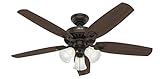
- CEILING FAN WITH LIGHTS: The Builder Plus includes energy efficient LED bulbs to deliver bright, reliable lighting for everyday comfort and visibility throughout the home
- DESIGNED FOR INDOOR COMFORT: This 52 inch ceiling fan helps maintain airflow and a comfortable environment in large bedrooms, living rooms, kitchens, and home offices
- TRADITIONAL STYLE IN BRONZE: Featuring a warm bronze finish and classic design elements, this ceiling fan brings timeless style and a welcoming feel to any room
- PULL CHAIN CONTROL: Easily adjust fan speed and lighting using traditional pull chains. This convenient option offers a dependable way to stay comfortable in any indoor space without a remote
- WHISPER QUIET MOTOR: Equipped with a 3 speed WhisperWind motor, this ceiling fan provides powerful airflow with ultra quiet operation and reversible settings for year round comfort
- With the fan off, check accessible components for looseness and follow the manual for any adjustment.
- Consider whether the fan is connected to an incompatible dimmer or speed control; consult the manual for approved controls.
- If noise continues, contact Hunter with the model number and a description of the sound. Hunter advises contacting customer service if you hear crackling or notice a popcorn-like odor.
Hunter ceiling fan works, but the light does not
- Check the fixture label or model manual for the correct bulb type and maximum wattage. Replace the bulb with one that matches; there is no single bulb specification established for every Hunter fan.
- If the light still does not work, look for visible socket damage without touching electrical contacts.
- Any wiring inspection requires power off at the breaker. If you are not comfortable examining connections, have a qualified electrician do it.
How to fix a Hunter ceiling fan remote
- Install fresh batteries of the type specified for that remote.
- Follow the pairing instructions for the exact fan and remote model. Hunter’s remote troubleshooting guidance notes that pairing is model-specific.
- If the remote remains unresponsive, the remote or receiver may need replacement. Confirm compatibility using the fan model before ordering. Turn off power at the breaker before accessing the receiver.
- If a pull-chain fan uses an added remote kit, Hunter says to set the pull-chain speed to high.
What to do if the fan speed control is not working
If the fan runs at only one speed or will not change speed, first rule out the control: check the remote’s model-specific instructions, or confirm that the wall control is compatible with the fan. For a physical direction switch, make sure it is fully in one position. Hunter lists the remote, wall control, reverse switch, capacitor, and wiring harness as possible causes; that list is not a diagnosis. Capacitor or harness replacement requires model-specific compatibility and a safe repair procedure, so consult Hunter or a qualified electrician rather than buying a generic part.
What to do when the fan direction will not change
Turn the fan off and wait until the blades stop completely. If the model has a physical direction switch, move it fully to the opposite position. Some remote-controlled models change direction through the remote and may not have a switch on the housing. Check the exact model instructions; if direction still will not change, Hunter identifies the wiring harness as a possible service issue.
Windows Errors? Fix Them Before They Spread
Repair common Windows errors and clear accumulated junk for a smoother, more stable PC - no reinstall needed.Free scan · no reinstallCrashes, No Sound, or Screen Glitches?
Random freezes, missing sound and display glitches usually trace back to one bad driver. Find and replace yours safely.Free scan · under a minuteRank #3
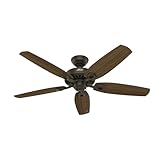
- STANDARD MOUNTING SYSTEM: The Builder Elite includes a 3 inch downrod for mounting on standard or angled ceilings, providing flexible installation options to fit a variety of room setups
- DESIGNED FOR INDOOR COMFORT: This 52 inch ceiling fan helps maintain airflow and a comfortable environment in large bedrooms, living rooms, kitchens, and home offices
- TRADITIONAL STYLE IN BRONZE: Featuring a warm bronze finish and classic design elements, this ceiling fan brings timeless style and a welcoming feel to any room
- PULL CHAIN CONTROL: Easily adjust fan speed using a traditional pull chain. This convenient option offers a dependable way to stay comfortable in any indoor space without a remote
- WHISPER QUIET MOTOR: Equipped with a 3 speed WhisperWind motor, this ceiling fan provides powerful airflow with ultra quiet operation and reversible settings for year round comfort
Fan has power, but the blades do not spin
Lights working do not establish which fan component has failed. Hunter lists the wiring harness, capacitor, remote receiver, and internal controls among possible causes. Check the controls using the model instructions, then contact Hunter with the model number for service guidance and compatible parts. Do not replace a capacitor, receiver, or harness based only on the symptom.
Quick Recap
Rank #4

- CEILING FAN WITH LIGHTS: The Builder Low Profile includes energy efficient LED bulbs to deliver bright, reliable lighting for everyday comfort and visibility throughout the home
- LOW PROFILE CEILING FAN: This flush mount ceiling fan features a hugger design that mounts close to ceilings under 9 feet high, offering a streamlined look and efficient performance
- DESIGNED FOR INDOOR COMFORT: This 52 inch ceiling fan helps maintain airflow and a comfortable environment in large bedrooms, living rooms, kitchens, and home offices
- TRADITIONAL STYLE IN BRONZE: Featuring a warm bronze finish and classic design elements, this ceiling fan brings timeless style and a welcoming feel to any room
- WHISPER QUIET MOTOR: Equipped with a 3 speed WhisperWind motor, this ceiling fan provides powerful airflow with ultra quiet operation and reversible settings for year round comfort
When to stop and call for help
- Call a qualified electrician for loose wiring, burn marks, no power at the switch, or any electrical inspection or repair you are not comfortable performing.
- Contact Hunter support when model-specific pairing, controls, parts, or service guidance are needed. Have the fan’s model number and a clear description of the symptom and checks already completed.
- Keep power off at the breaker whenever wiring or the receiver must be accessed.
Product prices and availability are accurate as of the date/time indicated and are subject to change. Any price and availability information displayed on Amazon at the time of purchase will apply.




