If your DEWALT FLEXVOLT battery will not charge, first check the outlet and charger, reseat the battery, and read the charger’s indicator lights. A hot or cold battery may simply be on a temperature delay. If those checks do not resolve it, have the battery and charger tested together at an authorized DEWALT service center; a light pattern alone may not identify which component has failed.
Start with the outlet and charger
Plug the charger into an appropriate outlet before inserting the battery. If the charger does not show its expected indicator, test the receptacle with a lamp or another appliance, and check whether a wall switch controls it. DEWALT includes these checks in the DCB118 instruction manual.
Reseat the battery
Remove the pack and install it again, pressing it fully into place until it clicks. DEWALT says the battery must be fully seated for the DCB118 charging sequence to start. If you use a different charger, consult its instructions for the correct fit and indicator behavior. DEWALT’s DCB118 support guidance describes the seating check.
Interpret the charger lights
The following patterns are for the DCB118, not a universal guide to every DEWALT charger. Match the pattern against the manual for your exact charger model.
Free tools Windows power users keep installed
One-click scans. No signup required.
#1 Best Overall

- Charges 18V XR and XR FLEXVOLT li-ion batteries
- Intelligent charger - varies output current according to battery
- Charges 6 Ah flexvolt battery pack in 60 minutes
- Diagnostic LED indicator communicates battery charge status
- Wall mountable
| DCB118 indicator | Meaning |
|---|---|
| Red light blinking | Battery is charging. |
| Red light steady | Battery is fully charged. |
| Red light blinking with yellow indicator | Hot/cold pack delay: charging is suspended until the battery reaches an acceptable temperature. |
During a hot/cold delay, the yellow indicator goes out and charging resumes automatically when the pack reaches an appropriate temperature, according to the DCB118 manual. A charger that shows no lights does not, by itself, prove the battery is defective: DEWALT says either the pack or charger may be at fault.
Let a hot or cold battery return to a suitable temperature
The DCB118 manual says not to charge below 40°F (4.5°C) or above 104°F (40°C). For best performance, it recommends ambient air between 65°F and 75°F (18°C to 24°C). If the pack is outside the charger’s acceptable temperature range, let it reach an appropriate temperature naturally; do not use direct heat, refrigeration, or another improvised method to force a change.
Rank #2

- Brand New in box. The product ships with all relevant accessories
Keep the charger and battery free of hazards
- Keep metal chips, grinding dust, steel wool, aluminum foil, and other conductive debris out of the charger cavities.
- Unplug the charger before cleaning. Clean its exterior with a cloth or soft, non-metallic brush.
- Do not use water or cleaning solutions on the charger, and do not allow liquid inside the charger or battery.
- Do not open, rebuild, jump-start, or bypass protection in the battery pack. DEWALT says never to open it; take a broken or cracked pack to a service center for recycling.
These precautions come from the DCB118 instruction manual.
When to get the battery and charger tested
If the outlet works, the battery is seated, and the issue persists after any temperature delay, take the tool, battery pack, and charger to a local DEWALT service center. The DCB118 manual recommends authorized service-center testing because a charger that refuses to light may indicate a faulty battery or a faulty charger. Testing both components is more useful than replacing one based only on an indicator pattern.
Windows Errors? Fix Them Before They Spread
Repair common Windows errors and clear accumulated junk for a smoother, more stable PC - no reinstall needed.Free scan · no reinstallOutdated Drivers Are Slowing You Down
One free scan finds every outdated or missing driver and matches the right update for your exact hardware.Free scan · exact hardware matchRank #3
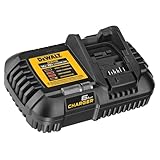
- Compatibility - DEWALT 12V MAX*, 20V MAX*, and FLEXVOLT 20V/60V MAX* batteries
- State Of Charge Indicator - Two-stage LED state of charge indicator
- Portability - Includes latch for charger mounting
- Mounting Capability - Thru-hole wall mounts (screws sold separately)
Check compatibility before considering a replacement
FLEXVOLT packs switch voltage automatically when moved between compatible DEWALT tools, as described in DEWALT’s FLEXVOLT Battery System overview. Compatibility still depends on the specific models. DEWALT lists the DCB118 8 Amp Fast Charger as compatible with 20V MAX* and 20/60V MAX* FLEXVOLT batteries, and says its internal fan helps limit hot/cold delays. DEWALT lists the DCB609 9.0Ah FLEXVOLT battery as compatible with all 20V MAX* chargers. Those statements apply to the named products; check your own charger and battery labels and manuals rather than assuming every combination is compatible.
A replacement charger is relevant only if the existing charger is confirmed faulty or incompatible. Consider replacing the battery only after testing confirms the pack itself is faulty.
Quick Recap
Rank #4

- Charges 18V XR and XR FLEXVOLT Li-Ion batteries
- Intelligent charger - varies output current according to battery
- The charge rate is 8 amps for premium batteries
- The charge rate is 4 amps for compact batteries
- Wall mountable
Product prices and availability are accurate as of the date/time indicated and are subject to change. Any price and availability information displayed on Amazon at the time of purchase will apply.




