What’s actually slowing this PC down?
Pick the symptom - the matching free tool is one click away.
A useful digital declutter is not just deleting 8,000 emails on January 2 and hoping the feeling lasts. For most households, the real problem is physical: phones charging on kitchen counters, school laptops stacked near breakfast dishes, mystery cords in five drawers, old tablets waiting for “someday,” a router hidden behind furniture, and paper records mixed with passwords, tax documents, and warranty booklets.
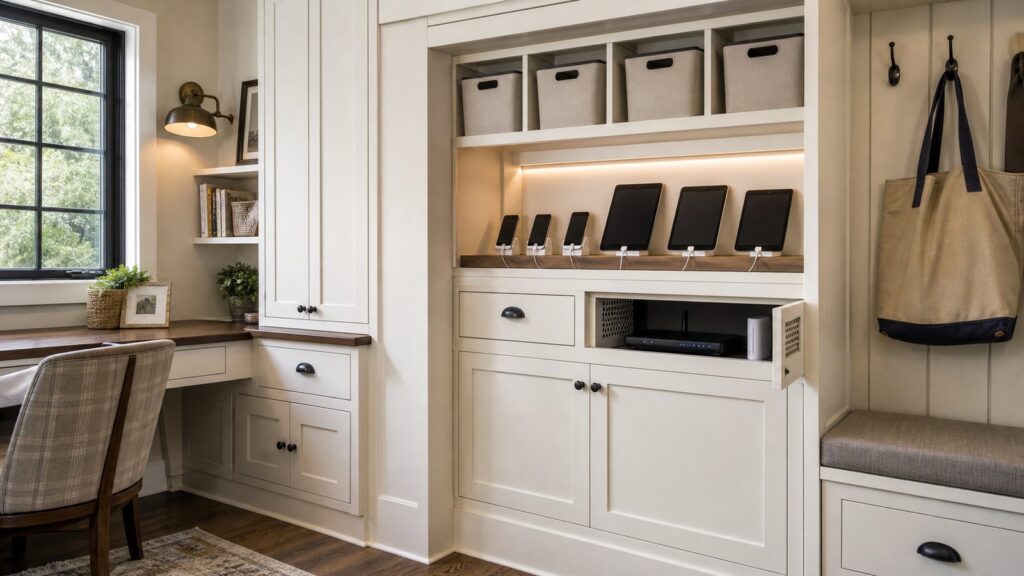
The best fix is to build a digital drop zone: one planned location in the home for daily charging, network gear, backups, important records, spare cords, batteries, and electronics waiting for donation or recycling. On our job sites, the homes that stay calmer are not the ones with the fewest devices. They are the ones where every device has a home, every cord has a label, and every piece of equipment has enough power, airflow, and access to be maintained without tearing apart a cabinet.
This guide walks through the practical, homeowner-level version: what to keep, what to clear, how much storage to allow, where to place outlets and low-voltage cabling, what it costs in 2026, and when a carpenter, electrician, low-voltage installer, or professional organizer is worth bringing in.
Why Digital Clutter Has Become a Home Infrastructure Problem
The average home now carries a digital load that would have sounded excessive a generation ago. DataReportal reported 324 million internet users in the United States at the end of 2025, with internet penetration at 93.1%. The same report counted 417 million cellular mobile connections, equal to about 120% of the population. Pew’s 2025 survey, published in January 2026, found that about 9 in 10 U.S. adults use the internet daily, 41% are online almost constantly, about 8 in 10 subscribe to home broadband, and 16% depend on a smartphone for internet access.
Crashes, No Sound, or Screen Glitches?
Random freezes, missing sound and display glitches usually trace back to one bad driver. Find and replace yours safely.Free scan · under a minutePC Slower Than It Used to Be?
A free scan shows the junk files, broken settings and background clutter dragging Windows down - then fixes them in one click.Free scan · Windows 10 & 11#1 Best Overall

- Dimensions: 7.5" x 4.3" x 2.2". Compact size and lightweight make it easy to carry and put into your backpack, handbags or laptop bag without taking much space. Suitable for family use and daily organization. Note: Small mesh pockets are ideal for charging cords no longer than 3ft; longer cables (over 3ft) fit better in the larger compartments
- Quality Material: This electronic organizer travel case made of high quality durable waterproof oxford and soft sponge inside to secure your gadgets in place and deliver a quick access whenever you want. Water-resistant fabric protects your gear from unexpected splashes, keeping all your electronic essentials safe and secure
- Double Layers Design: This tech pouch features a double-layer interior design with 8 compartments, including multiple see-through mesh pockets and ample space to store your cords, cables, USB drives, cellphone, charger, mouse, flash drive and more, keeping all accessories neatly organized and tangle-free
- Practical and Convenient: Comes with a comfortable hand strap for easy carrying; You may carry it in your hand when heading out. Durable and smooth zipper closure keeps your favorite device securely, convenient for you to have quick access to the items inside the case
- Portable and Lightweight: The small size and lightweight design durable cable organizer pouch is a perfect choice when going on holiday, business trip, travel, office. Enjoy hassle-free travel without wasting time on tangled accessories. Great gift for yourself also a nice share with families and friends. (No include cords, electronic accessories)
Inside the home, the device count is just as telling. ConsumerAffairs cites an average of 21 connected devices across 13 categories in U.S. households as of 2023. Parks Associates reporting cited by the Fiber Broadband Association puts U.S. internet households at about 17 connected devices. RubyHome’s 2026 smart-home statistics estimate that 51.4% of U.S. households have at least one smart-home device and project the U.S. smart-home market at $54.53 billion in 2026.
That means a typical household may be managing phones, watches, tablets, laptops, earbuds, cameras, gaming devices, printers, thermostats, speakers, doorbells, security equipment, smart lighting hubs, backup drives, remotes, batteries, and a box of cables nobody wants to identify. If those items are spread across the house, the clutter is not a personality problem. It is a storage and infrastructure problem.
A good digital declutter should answer five questions:
- Where do daily devices charge without taking over counters?
- Where do records, backups, passwords, manuals, and warranties live?
- Where is the router or smart-home hub placed for performance and access?
- Where do old electronics wait before donation or recycling?
- Does the home have enough safe power, ventilation, and cable management to support the system?
Start With a 90-Minute Digital Inventory
Before buying bins or calling a contractor, gather the mess. A digital drop zone works only if it is sized to your real household, not an idealized version of it.
Free tools Windows power users keep installed
One-click scans. No signup required.
Set a timer for 90 minutes and collect devices and related items from the kitchen, bedrooms, office, entry, garage, basement, junk drawers, and travel bags. Put everything on a table or clean floor. Sort into these groups:
- Daily devices: phones, tablets, watches, earbuds, laptops, school devices, work devices.
- Network and smart-home gear: router, modem, mesh nodes, hubs, bridges, cameras, sensors, spare remotes.
- Records and backups: external hard drives, USB drives, password recovery notes, manuals, warranties, tax files, insurance documents.
- Power and cables: chargers, adapters, HDMI cords, Ethernet cords, power strips, extension cords, battery chargers.
- E-waste outbox: broken devices, obsolete phones, old tablets, dead laptops, outdated routers, mystery electronics.
Then apply a simple rule: if you cannot name the device a cable belongs to, it does not get prime storage. Put mystery cords into one labeled quarantine bag with the date. If nobody claims them within 90 days, most can leave the house. Keep only a modest set of useful spares: two USB-C cables, one Lightning cable if your household still uses Apple devices that need it, one HDMI cable, one Ethernet patch cable, one laptop-compatible travel charger if you have a universal model, and one small set of charging bricks.
For households with children, keep the sorting system visible and physical. Labeled bins for “school,” “work,” “travel,” and “recycle” beat a complicated filing scheme that depends on everyone remembering rules when life is busy.
Design the Digital Drop Zone Around Four Working Zones
The most reliable layout is a four-zone system. It can fit inside a kitchen command center, mudroom cabinet, home office built-in, laundry room storage wall, or a dedicated closet. The right location depends on your floor plan, but the function should stay the same.
Recommended Free Tools
Zone 1: Daily Charging
This is the high-use section. It should be easy to reach, close to where people enter or work, and built so cords do not spill across a countertop.
Good dimensions for a family charging bay are 24 to 36 inches wide, 14 to 18 inches deep, and at least 10 inches tall per shelf if tablets or small laptops charge there. For a drawer-based charging station, allow 18 to 24 inches of drawer width and 16 to 20 inches of depth. Use dividers so devices stand vertically, with at least 1 inch of air space between them.
We prefer one charger per location: desk, kitchen command center, bedroom, and travel pouch. Label duplicates and eliminate the rest. This prevents the common problem where every room has three charging bricks and nobody knows which one is safe, fast, or compatible.
Rank #2

- Compact & Portable - Size: 10.5 X 7.75 X 3.5 inches (similar to a 10-inch tablet, or smaller than letter size), this cord organizer will be a perfect helper while you are on travel or business trip. Its external dimensions fit easily into backpack compartments, carry-ons, and luggage. The 7.5*3.75 inch internal mesh pocket can hold a phone, while the large zippered mesh layer fits 7.9" tablets perfectly, making it suitable for family use, and daily tech organization
- Double Layers & Well Organized - This travel electronics organizer is designed with multiple pockets and various size of elastic bands providing great flexibility for organizing electronics accessories such as USB Cable Cord, Flash Drive, Wall Charger, SD Card, Hard Drive, Power Bank, Earbuds, Camera. With a large zipper mesh pockets suitable for tablet
- DIY & Large Capacity - Gadget storage case has 3 removable padded dividers, so you can design the layout as you wish to keep all your electronic travel accessories in perfect order. If you are looking for cool gifts either for men, women, this gadget will be your good choice
- Waterproof & Protected - The cable case is made of waterproof and shockproof material. Strong and heavy-duty material with padded foam around to protect all the things inside against scratches, dust, impacts and accidental dropping
- Travel Easier - Designed with a sturdy handle for carrying everything you need easily. Smooth zippers make it easier to open and close the bag to get your charger, cable or any other electronic accessories in a short time. If you are tired of rummaging around the house for your little gadgets, this cord organizer can do you a favor. Also it will be a great gift for Thanksgiving Day, Christmas, New Year, Valentine's Day, for father, mother, family, friends and your lover
Zone 2: Records and Backups
This is the calm, boring section, which is exactly what you want. Use one file drawer or file box for household records, plus a shelf for backup drives and manuals. A standard letter file drawer needs about 15 inches of clear interior width and 10 to 12 inches of height. If you are building custom cabinetry, specify a true file drawer with full-extension slides rather than a deep drawer where folders slump sideways.
For digital backups, keep one external drive on site and one backup method off site or cloud-based. Label drives with the device name and last backup date. A small external backup drive commonly costs $60 to $250 in 2026, depending on capacity and speed. Do not bury backup drives behind routers or hot equipment.
Zone 3: Network and Smart-Home Hub
This area is for the router, modem, switch, structured media panel, smart-home bridge, or mesh base station. It needs central placement, ventilation, power, and access. A router sealed in a decorative cabinet may look tidy and perform poorly. Heat, metal, stone, mirrors, appliances, and dense walls can all weaken signal or shorten equipment life.
For new work, a structured media panel is often the cleaner answer. Manufacturers recommend placing these panels in an accessible, central, conditioned location when possible. That usually means an interior closet, office, utility room, or low-traffic hallway cabinet rather than a hot attic, damp basement corner, or crowded garage wall.
Plan for more space than your current router needs. A useful equipment bay may be 24 inches wide by 18 inches deep, with adjustable shelves, cord grommets, a power strip or UPS, and open ventilation slots. Leave one empty shelf or 20% free capacity for future equipment.
Zone 4: E-Waste and Donation Outbox
Old electronics should not drift around the house for years. Give them a defined outbox: one labeled bin for donation-ready devices and one for recycling. Include a small envelope or pouch for SIM cards, memory cards, and device notes. Before any phone, tablet, computer, or drive leaves the house, back it up, sign out of accounts, remove personal data, and perform a factory reset.
The EPA says used electronics can have real reuse and recycling value. It also notes that recycling 1 million laptops saves energy equal to the electricity used by more than 3,500 U.S. homes in a year. Recycling 1 million cell phones can recover about 35,000 pounds of copper, 772 pounds of silver, 75 pounds of gold, and 33 pounds of palladium. That is why e-waste deserves a storage plan, not a trash-day impulse.
Choose the Right Location in the House
A digital drop zone should be convenient, conditioned, and serviceable. In construction terms, the best location is not always the prettiest wall. It is the wall where storage, power, cable routing, ventilation, and daily traffic all make sense.
Good candidates include:
- Kitchen command center: best for family charging, calendars, school tablets, and shared records.
- Mudroom: best for devices that leave the house daily, including school laptops, work bags, and travel tech.
- Home office: best for backups, paperwork, printer storage, network equipment, and work devices.
- Interior closet: best for structured media panels and network equipment if ventilation and access are handled properly.
- Laundry or utility area: workable if conditioned, dry, and not overloaded with heat, lint, or moisture.
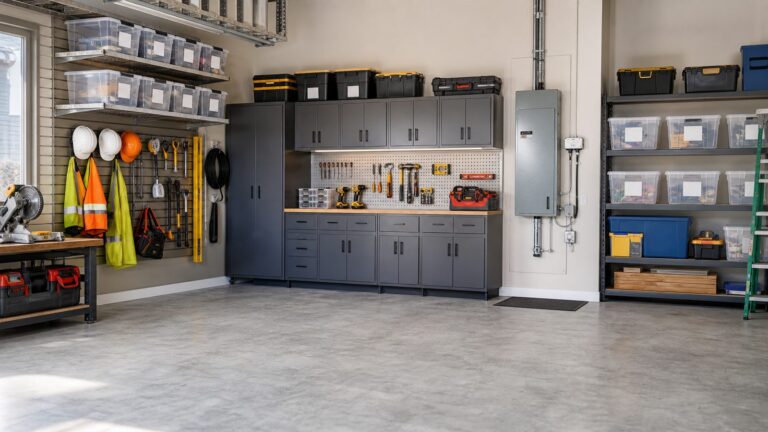
Avoid locations where electronics will sit in direct sun, near sinks, under plumbing connections, inside unvented closed cabinets, or in unconditioned spaces with high heat or humidity. Garages and attics can be convenient for cabling but rough on equipment. If a garage is the only practical location for a panel, ask the installer how they will protect the gear from heat, dust, pests, and accidental impact.
For cabinetry, we typically design a digital drop zone with these minimums: 15 to 18 inches of counter depth, 18 inches of clearance above a work surface for small shelves or mail slots, 24 to 36 inches of width for a family charging area, and at least one closed lower cabinet or drawer stack for less attractive equipment. A tall cabinet can work well if it has adjustable shelves, a file drawer, a ventilated equipment bay, cord grommets, and one empty shelf for growth.
Power, Outlets, and Cable Planning Come Before Cabinetry
The cleanest projects happen when electrical and low-voltage work are planned before cabinets, drywall patching, paint, or finish carpentry. Adding outlets after built-ins are installed usually costs more, looks worse, and may require cutting into new work.
Rank #3

- Double Layers & Well Organized - This travel electronics organizer is designed with multiple pockets and various size of elastic bands providing great flexibility for organizing electronics accessories such as USB Cable Cord, Flash Drive, Wall Charger, SD Card, Hard Drive, Power Bank, Earbuds, Camera, clipper. With a large zipper mesh pockets suitable for tablet(up to 12.9inch)
- DIY & Large Capacity - Gadget storage cases has 3 removable padded dividers, so you can design the layout as you wish to keep all your electronic travel accessories in perfect order. If you are looking for cool travel gifts either for men, women, this gadget will be your good choice
- Compact & Portable - Size: 12.4 x 3.94 x 10.04 inch, this cord organizer will be a perfect helper while you are on travel or business trip. Its perfect size allows it to be easily put into your backpack and luggage. And it is also very suitable for family use and daily organization
- Waterproof & Protected - This cable case is made of waterproof and shockproof material. Strong and heavy-duty material with padded foam around to protect all the things inside against scratches, dust, impacts and accidental dropping
- Travel Easier - Designed with a sturdy handle for carrying everything you need easily. Smooth zippers make it easier to open and close the bag to get your charger, cable or any other electronic accessories in a short time. If you are tired of rummaging around the house for your little gadgets, this cord organizer can do you a favor. Also it will be a great gift for Thanksgiving Day, Christmas, New Year, Valentine's Day, for father, mother, family, friends and your lover
For a serious digital drop zone, plan these items before construction starts:
- At least two duplex receptacles for charging and equipment.
- A surge protector or UPS for network gear and backup equipment.
- Cord grommets or brush plates where cables pass through shelves or desktops.
- Ethernet runs to home offices, TVs, access points, or mesh nodes where wired backhaul improves performance.
- A labeled patch panel or structured media enclosure if multiple low-voltage cables terminate in one location.
- Ventilation openings if equipment sits behind doors.
In 2026, Angi lists the average cost of adding an outlet at about $300, commonly $100 to $450 per outlet. Permits, new wiring, difficult fishing, dedicated circuits, or drywall repairs can add $150 to $1,000 or more. Home Depot lists replacement outlets around $65 to $125, while new outlets can cost $200 or more. The spread is real: replacing an accessible outlet is a different job than fishing a new circuit across a finished house.
For Ethernet and structured cabling, Wolverine Low Voltage cites average home Ethernet projects around $750 to $2,500, with a broader possible range of $350 to $10,000 depending on drops and complexity. The Network Installers’ 2026 guide gives $100 to $250 per drop and notes that labor can be 60% to 70% of total cost. Finished-wall fishing, attic or crawlspace access, cable rating, patch panel work, testing, labeling, and drywall repair drive the final number.
Code matters here. The 2026 National Electrical Code includes changes related to limited-energy cable, and industry summaries note that low-voltage and communications content has been reorganized around Chapter 7 “limited energy” terminology. Local jurisdictions may still enforce the 2020 or 2023 NEC, so homeowners should verify with the authority having jurisdiction before work starts. For line-voltage outlets, expect requirements around tamper-resistant receptacles, GFCI or AFCI protection where applicable, box fill, cable protection, permits, and inspection. A licensed electrician should handle new outlets, new circuits, and panel work.
What a Digital Drop Zone Costs in 2026
Costs vary by region, wall access, finish level, and how much custom work you want. A simple shelf and charging tray can be a weekend project. A built-in home office wall with file drawers, lighting, outlets, Ethernet, and concealed equipment can become a real construction project.
| Project scope | Typical 2026 cost | What affects the price |
|---|---|---|
| Small materials-only reset | $140-$700 | Charging tray, cable clips, Velcro ties, labels, surge protector or UPS, backup drive, fire-resistant document box, bins |
| Professional organizer | $227-$640 per project; many around $380 | Metro labor rates, number of rooms, donation or recycling handling, whether digital file cleanup is included |
| Hourly decluttering help | $75-$150 per hour; common projects $251-$840 | Project size, sorting volume, family systems, e-waste staging, records organization |
| Built-in bookcase or office storage | $1,000-$2,000 common range | Linear footage, paint-grade MDF vs hardwood, doors, drawers, lighting, wall repair, finish quality |
| Premade built-ins installed | $150-$300 per linear foot | Cabinet quality, trim integration, site conditions, wall straightness |
| Fully custom built-ins | $400-$1,200 per linear foot | Custom sizing, hardwood, inset doors, file drawers, equipment bays, finish work |
| Custom home-office cabinetry | About $3,335 starting; $6,000-$25,000+ for higher-end systems | Size, countertop or desk surface, drawer hardware, lighting, doors, finish, labor market |
| New outlet installation | Often $100-$450 per outlet; average about $300 | Existing wiring, distance to panel, permits, wall fishing, GFCI/AFCI needs, patching |
| Home Ethernet or structured cabling | Commonly $750-$2,500; broad range $350-$10,000 | Number of drops, wall access, cable rating, testing, labeling, patch panel, drywall repair |
If you are budgeting, separate the project into three buckets: organization, storage, and infrastructure. A $300 organizing session can make a major difference if the cabinet and outlets already exist. A $2,500 cabinetry upgrade can disappoint if there is no power where the devices actually need to charge. A $1,500 cabling project can improve the whole house if the router and access points are finally placed correctly.
Storage Details That Make the System Last
Small construction details decide whether a digital drop zone works after the first month. The goal is not to hide clutter for a photo. The goal is to make the correct behavior easier than the messy one.
Use the 80% Storage Rule
Leave about 20% of every category empty: charging slots, file drawers, cord bins, cloud folders, and equipment shelves. After the holidays, a household can add a new gaming system, headphones, tablet, watch, camera, or smart-home device in a single week. If the system is already full, the overflow lands on the counter.
Specify Adjustable Shelves
Fixed shelves look clean but age poorly around technology. Adjustable shelves let you change from tablets to laptops, from a small router to mesh hardware, or from binders to file boxes. Standard 32 mm shelf-pin spacing is common in cabinetry and gives enough flexibility for most storage changes.
Build in Ventilation
Routers, modems, switches, hard drives, and UPS units produce heat. If equipment is behind a door, use ventilation slots, grille inserts, open backs, or a toe-kick vent path where appropriate. As a rule of thumb, avoid packing electronics tight against cabinet sides. Give network gear at least 2 inches of open space around vents and keep power bricks off soft surfaces.
Quick wins for a faster PC:
Repair Windows errors before they cause bigger problemsFix Now →Scan for outdated or missing drivers - takes under a minuteDriver Scan →Clear out junk files and repair common Windows errorsFree Scan →Use Real Cable Management
For desks and charging counters, use 2-inch to 3-inch grommets, brush plates, adhesive cable anchors, Velcro ties, and short cables sized to the space. Avoid permanent zip ties on cords you may need to move. Label both ends of Ethernet cables, power supplies, backup drives, and device-specific adapters. A $30 to $100 label maker is one of the cheapest upgrades in the whole project.
Rank #4

- Double Layers & Organized: With two main separate layers, cable organizer bag keeps electronics accessories well organized. Plenty of pockets well made for flash drive, SD card, phone. Cord organizer bag features different size of elastic bands for USB cable cord, power bank, earbuds. The charging cable organizer box ensures all your gear stays visible and easily accessible
- Waterproof & Shockproof: The surface of this electronics organizer travel case is made of advanced & water-resistant PVC material which has a strong waterproof effect providing great protection for your stuff from getting wet. The travel cord organizer box features padded foam and a sturdy PVC honeycomb board for effective shock absorption, ensuring your electronics devices remain well-cushioned against bumps and drops during travel or daily use
- Diy & Large Capacity: This charging cord organizer bag has an amazing storage space. Four removable strong shock-absorbing partition protect all items inside from scratches, impact and accidental falling. The usb cable organizer bag allows you to effortlessly customize your internal storage space using adjustable dividers to match your exact needs. The cord storage box opens up unlimited layout possibilities, giving you the freedom to rearrange your organization setup in multiple ways
- Excellent Design: The tech organizer travel case is crafted with an innovative and contemporary design, featuring a premium textured surface that catches the light with a sleek, glossy sheen. Dual zippers provide instant access to your essentials, and the sturdy leather handle offers both comfort and durability for everyday carry. The cord organizer bag works as a perfect gifts for your friend, husband, or father, and equally as a top pick for office professionals and travelers
- Portable & Travel Easier: The tech cord organizer travel case measures 10×8.85×4.72 inches. Designed for travelers & professionals, it fits securely in most backpacks & luggage – keeping gadgets protected & neatly arranged for business trips, daily commutes. Tired of tangled cords & misplaced accessories? This cable organizer box turns chaotic piles into a clearly-sectioned, grab-and-go station that keeps all in place – so you can quickly grab or put back what you need during busy hours
Keep Fire and Water in Mind
Do not charge devices under pillows, inside sealed fabric bins, or near paper piles. Do not store backup drives or vital records under plumbing traps or in damp basement cabinets. For critical documents, use a fire-resistant document box, often $40 to $150 for common household sizes. For network equipment and backup drives, consider a surge protector or UPS in the $30 to $250 range.
Independent reader supportYour contribution helps us test, update, and keep practical guides available for everyone.A Practical 30-60-90 Decluttering Cadence
The first cleanup matters, but the routine is what keeps the home calm. We like a 30-60-90 approach because it is simple enough to remember and frequent enough to prevent another drawer full of tangled cords.
Every week: clear screenshots, downloads, duplicate scans, and desktop clutter. Empty the device charging area of receipts, school papers, and unrelated mail. Return travel chargers to the travel pouch.
Do these 3 things before closing this tab:
1Fix the driver behind crashes, sound loss and screen glitches2Repair Windows errors before they cause bigger problems3Scan for outdated or missing drivers - takes under a minuteEvery month: review subscriptions, unused apps, shared family devices, and recurring cloud storage warnings. Check the e-waste outbox. If a device has sat there for 30 days and the data has been removed, schedule donation or recycling.
Every quarter: check photo backups, external drive backups, password recovery options, router firmware, and smart-home app access. Confirm that important documents are filed by category: tax, insurance, home, medical, vehicle, school, and warranty.
Every year: do an e-waste drop-off, shred expired documents, update the household inventory, and review whether the digital drop zone still fits the number of devices in the home. The week after New Year’s is a good time, but so is the week after school ends or before a major home office project.
When to DIY and When to Hire a Pro
A homeowner can handle much of the first pass. Sorting cords, labeling chargers, creating a recycling bin, deleting old apps, organizing folders, and setting up a backup routine are good DIY tasks. A basic materials-only reset can run $140 to $700, including a charging tray, cable clips, Velcro ties, labels, a surge protector or UPS, an external backup drive, a fire-resistant document box, and a few bins.
The Tool Desk
Outbyte Driver Updater FREEScan for outdated or missing drivers - takes under a minuteDriver Scan →Outbyte PC Repair FREEClear out junk files and repair common Windows errorsFree Scan →Hire a professional organizer if the project has stalled for months, if multiple family members need a shared system, or if you want help sorting records, donations, and recycling. Current 2026 estimates put many home organizing projects around $227 to $640, with plenty of homeowners near $380. Hourly organizer rates commonly run $75 to $150 per hour, and larger projects can reach $251 to $840 or more.
Hire a carpenter or cabinetry contractor when the storage itself is the problem. If devices live on counters because there is no drawer, no shelf, no file storage, and no place for equipment, bins will only help for a few weeks. Built-ins make sense for home offices, mudrooms, kitchen command centers, and family rooms where the system needs to look finished and survive daily use.
Hire a licensed electrician for new outlets, new circuits, outlet relocation, recessed receptacles, under-cabinet power, hardwired lighting, and any panel work. Charging stations often need more outlets than people expect. A home office with monitors, a laptop dock, printer, shredder, router, lamp, and backup equipment can overwhelm a single old duplex receptacle.
Hire a low-voltage installer when Wi-Fi is unreliable, when you want Ethernet drops, when the router needs to move, or when smart-home equipment has outgrown a shelf. Ethernet is not glamorous, but a wired backbone can make a home office, streaming setup, or mesh network far more stable.
Best Value

- Dimensions: The Size of the cable storage travel case: 8.3" x 5" x 2.6". Compact size and lightweight make it easy to carry and put into your backpack, handbags or laptop bag without taking much space. Suitable for family use and daily organization
- Quality Material: This electronic organizer travel case made of high quality durable waterproof oxford and soft sponge inside to secure your gadgets in place and deliver a quick access whenever you want. Water-resistant fabric protects your gear from unexpected splashes, keeping all your electronic essentials safe and secure
- Double Layers Design: This tech pouch features a double-layer interior design with 8 compartments, including multiple see-through mesh pockets and ample space to store your cords, cables, USB drives, cellphone, charger, mouse, flash drive and more, keeping all accessories neatly organized and tangle-free
- Practical and Convenient: Comes with a comfortable hand strap for easy carrying; You may carry it in your hand when heading out. Durable and smooth zipper closure keeps your favorite device securely, convenient for you to have quick access to the items inside the case
- Portable and Lightweight: The small size and lightweight design durable cable organizer pouch is a perfect choice when going on holiday, business trip, travel, office. Enjoy hassle-free travel without wasting time on tangled accessories. Great gift for yourself also a nice share with families and friends. (No include cords, electronic accessories)
Safety, Permits, and Code Notes Homeowners Should Not Skip
Digital clutter often hides electrical clutter. We have seen too many overloaded strips, daisy-chained extension cords, warm power bricks under paper, and routers wedged into sealed cabinets. A clean-looking setup is not enough. It has to be safe and serviceable.
Do not run extension cords through walls, behind permanent cabinetry, under rugs, or through doorways as a long-term solution. Do not bury power strips inside closed drawers unless the product and installation are designed for that use and heat can escape. Do not mix low-voltage cables and line-voltage wiring casually inside cabinets or walls; there are separation, rating, and protection requirements.
Permits depend on the jurisdiction and scope. Replacing a device in an existing box may be treated differently than adding a new outlet, running a new circuit, opening walls, or installing structured cabling. Because local areas may enforce NEC 2020, 2023, or newer 2026 provisions, verify with the local authority having jurisdiction before work starts. A reputable electrician or low-voltage contractor should be able to explain what applies in your area without making it mysterious.
For families with children, specify tamper-resistant receptacles where required, keep small batteries and SIM cards out of reach, and use bins with lids for e-waste waiting to leave the house. For lithium-ion devices, stop using anything swollen, hot, leaking, or physically damaged, and follow local disposal guidance.
The Calmer New Year Plan: One Weekend, One Wall, One Routine
If you want a realistic starting point, do not try to perfect your entire digital life in one day. Start with one wall, one cabinet, or one home office corner.
On Friday, gather devices, cords, records, and e-waste. On Saturday, sort into the four zones: daily charging, records and backups, network and smart-home gear, and outbox. Label what stays. Bag the mystery cords with a 90-day date. On Sunday, measure the space, count the outlets, check ventilation, and decide whether the current furniture can handle the job or whether built-ins, electrical work, or Ethernet should be planned before you buy more organizers.
A strong digital drop zone does three things at once. It clears visual noise from the home, gives every device a predictable place to land, and supports the wiring, charging, cooling, and recycling that modern households actually need. That is the difference between a January cleanup and a system that still works in June.
Frequently Asked Questions
What is a digital drop zone?
A digital drop zone is one planned area for charging devices, storing records and backups, organizing network or smart-home gear, keeping labeled cables, and staging old electronics for donation or recycling.
Crashes, No Sound, or Screen Glitches?
Random freezes, missing sound and display glitches usually trace back to one bad driver. Find and replace yours safely.Free scan · under a minuteWindows Errors? Fix Them Before They Spread
Repair common Windows errors and clear accumulated junk for a smoother, more stable PC - no reinstall needed.Free scan · no reinstallHow much does it cost to build a digital drop zone?
A simple materials-only setup may cost $140-$700. Built-ins commonly run $1,000-$2,000 or more, custom cabinetry can reach $6,000-$25,000+, new outlets often cost $100-$450 each, and Ethernet projects commonly run $750-$2,500.
Where should I put my router in a decluttered home?
Place the router or structured media panel in a central, accessible, conditioned location when possible. Avoid sealed cabinets, hot attics, damp basements, metal enclosures, and spots blocked by dense walls or appliances.
Do I need an electrician for a charging station?
You can organize chargers yourself, but hire a licensed electrician for new outlets, relocated receptacles, new circuits, hardwired lighting, recessed power, or any panel work. Electrical requirements vary by jurisdiction.
How often should I declutter digital files and devices?
Use a 30-60-90 routine: weekly downloads and screenshots, monthly apps and subscriptions, quarterly backups and password checks, and an annual e-waste drop-off and document shredding session.
Do these 3 things before closing this tab:
1Scan for outdated or missing drivers - takes under a minute2Repair Windows errors before they cause bigger problems3Fix the driver behind crashes, sound loss and screen glitchesQuick Recap
Product prices and availability are accurate as of the date/time indicated and are subject to change. Any price and availability information displayed on Amazon at the time of purchase will apply.