If a Bali motorized blind will not move, first identify its motor system and controller, then check the selected channel, controller response and power source before attempting a reset. Bali uses different instructions for RTS and Bluetooth/Z-Wave AutoView systems, and the right battery, LED meanings and pairing steps depend on the hardware.
Identify your Bali motor and controller first
Look for the motorization label, the owner’s manual, or the name and model on the remote. Bali’s motorized products include RTS, Bluetooth/Z-Wave AutoView, and motorized wands for certain shades. Available controls and power options vary by shade and motor, so do not apply an instruction for one system to another. Bali’s motorization information describes its current options.
- RTS: Use the RTS owner manual for its remote, wall-switch, range, antenna and power checks.
- AutoView: Use the manual matching your remote—standard, Plus or Premium—and your shade’s power setup. LEDs and reset sequences differ across configurations.
- Motorized wand: Follow the documentation for that shade and wand; do not assume remote-control pairing or battery directions apply.
If the shade does not respond
RTS remote or wall switch
Bali’s RTS owner manual gives these checks for RTS systems:
- Confirm the remote or wall switch is powered and responding. On a multi-channel remote, select the channel assigned to the shade.
- Move within approximately 65 feet of the shade, Bali’s recommended RTS control range, and press UP or DOWN for at least one second.
- Check that the motor antenna is exposed and not concealed or obstructed.
- Check the installed power source. For a battery setup, verify connections and battery orientation. For a plug-in system, check the transformer, outlet and wiring as appropriate.
These are RTS-specific checks; use the matching manual for other Bali motor systems.
#1 Best Overall
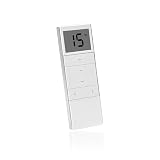
- Compatibility: Can be a replacement of model DC1602, DC1650, DC1651, DC2700, DC2702, DC2760
- Tips for ordering: Please double-check the brand before ordering to ensure compatibility, same shape can be a replacement
- 15 Channel shade remote: Controls up to 15 motorized product (awning, shade, rolling shutter, etc.) and up to 15 group of product within a range of 115 feet (655 feet in open field)
- How to pair with your shades: Press the P2 button on an already matched transmitter A twice. The motor jogs. Press the P2 button on the new transmitter B, the motor jogs. Now the electric shade remote is paired successfully
- What you get: 1xModel dc1602 remote for blinds, 1x Magnetic holder, 1x Instruction, and friendly customer service
Bluetooth/Z-Wave AutoView remote
On a multi-channel AutoView remote, verify that the correct shade channel is selected. Then check the remote and shade LEDs separately: a remote light can indicate remote-battery status, while a shade light reports shade power status. Consult the AutoView manual matching your controller and shade before interpreting a blink pattern; meanings are not interchangeable across devices.
What Bali motorization LEDs and batteries mean
For the AutoView remote covered by Bali’s AutoView owner manual, a remote LED flashing green and red indicates that its battery should be replaced with a CR2430 lithium coin battery. That battery instruction applies to the documented remote, not every Bali controller.
Rank #2

- Strict Compatibility Warning --This remote transmitter ONLY works with 433MHz learning-type tubular roller blind motors. It is NOT compatible with Zigbee, WiFi, Bluetooth, or any proprietary non-433MHz motor systems.Please double-check your motor’s frequency before purchasing to avoid mismatched returns.
- Simple pairing setup is required before first use--Every channel needs to be paired with your corresponding blind motor separately.Step-by-step detailed pairing instructions are included in the package.The remote cannot control your blinds without completing correct pairing procedures.
- 14-Channel Individual & Group Control--Supports independent control of up to 14 separate roller shades, plus a convenient "ALL" group channel. You can operate single windows, grouped blinds, or all shades at one time via the group button. Perfect for residential homes, commercial offices, and multi-window sunshade setups
- Ideal Replacement for Lost & Broken RF Remotes--Specially designed as a spare replacement for damaged, lost, or worn-out original 433MHz RF shade remotes.
- Clear Non-Universal Notice to Avoid Mispurchase--This is NOT a universal remote for all window blinds.If your original remote uses different frequency or non-learning protocol, this unit will fail to operate your shades. Confirm your motor model in advance
The same manual specifies eight AA lithium batteries for the applicable shade battery case. Other shades use different arrangements, including rechargeable packs. Identify the battery case or pack before buying replacement cells; do not treat eight AAs as a universal shade requirement.
For Bali’s rechargeable pack, the current motorization page estimates about five hours for charging and describes life as about a year, while also giving an estimate of up to six to twelve months depending on shade size. These are manufacturer estimates for the described pack, not a guaranteed interval for every shade or motor. The RTS manual says a battery charger can recharge batteries; confirm that a charger is compatible with your specific pack before using or purchasing one.
Windows Errors? Fix Them Before They Spread
Repair common Windows errors and clear accumulated junk for a smoother, more stable PC - no reinstall needed.Free scan · no reinstallCrashes, No Sound, or Screen Glitches?
Random freezes, missing sound and display glitches usually trace back to one bad driver. Find and replace yours safely.Free scan · under a minuteRank #3
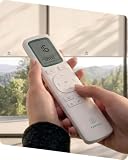
- 【Clear Display for Easier Control】The Yoolax EaseOne Remote features a built-in display that helps show channel, battery, and remote status, making daily control easier to follow when managing multiple compatible Yoolax motorized blinds
- 【16 Channels and Up to 6 Groups】Control up to 16 individual blinds and organize them into 6 groups by room, window, or daily routine for simpler, coordinated control across your home
- 【Timer Control for Daily Routines】Schedule your blinds to open or close at specific times to match your daily routine—morning light, afternoon shade, or evening privacy—making everyday blind management effortless
- 【Favorite Position and Fine-Tune Adjustment】Save a favorite blind position for your preferred light, privacy, or glare control. Fine-tune the blind position when needed, then return to a commonly used setting more easily
- 【Long-Lasting and Reliable】Powered by 2 AAA batteries for long-lasting use. Always confirm compatibility with your Yoolax motorized blinds before purchase to ensure proper functionality
Pairing, direction and travel limits
Repair a lost AutoView pairing
Use the pairing and unpairing section of the AutoView manual for the exact remote model. Bali documents different pairing sequences for standard/Plus and Premium remotes. Its shade-unpairing procedure uses the shade program button and preserves the programmed upper, lower and home positions, but the button sequence still depends on the system.
Do not begin with a full reset. Bali restricts the Premium remote’s Z-Wave reset to specified circumstances or cases directed by customer service. A reset can affect connections beyond the single shade, so follow the relevant manual rather than trying an unrelated reset sequence.
Rank #4

- EASY INSTALL BLINDS: The remote blinds have a simple and practical no-drill mechanism(suitable for inside mount). Attach the adhesive extension block to the groove of the upper rail (it is forbidden to put more than one block), and then push it into the window frame. There is a battery compartment at the top to supply power for the shades. If the batteries are low, just take them out and replace. A stylish valance is included to block the light from the gap between fabric and the top rail
- EXCELLENT SHADING EFFECT: The fabric is made of a three-layer blackout textured fabric, which is safe and durable. It is a great combination of UV and privacy protection,suitable for bedrooms, living rooms, kitchens and office areas, etc
- SMART IMPLEMENTATION: The AX290 motor requires a smart bridge for APP control/voice control, which requires a hub at home, and you may try our hub. All models of Alexa and Google Assistant can be used to control motorized window shades, and can set timers and other scenes
- CONVENIENT LIFESTYLE: Motorized blinds allow you to achieve a smart home at minimal cost. In the morning, when you are still asleep, the shades in the bedroom open automatically on time, and the warm sunlight spread into the room lightly to wake you up for a new day, and in the evening, when the sun sets, the shades fall on time, creating a private space for the family
- SERVICE: We focus on products and service, if the fabric or components are damaged in any way when you receive the items, please take a photo and send it to us within 60 days, we will replace. Hapadif provides 2-year warranty for motors and controllers
Reverse movement or adjust how far the shade travels
If UP makes the shade go down, use the direction-reversal procedure in the manual for your AutoView remote. If the shade stops too high or low, consult that manual’s upper- and lower-limit instructions. Changing travel limits changes where the shade stops, so use the model-specific steps rather than experimenting with buttons from another remote.
Independent reader supportYour contribution helps us test, update, and keep practical guides available for everyone.When to contact Bali
If the controller responds, the correct channel is selected, and the motor’s power source appears connected but the shade still will not operate, stop trying unrelated reset procedures. Bali directs owners to its Motorization Knowledge Base for troubleshooting guidance and provides customer support and a replacement-parts route.
Do these 3 things before closing this tab:
1Repair Windows errors before they cause bigger problems2Scan for outdated or missing drivers - takes under a minute3Clear out junk files and repair common Windows errorsBest Value

- Makes Retrofitting Blinds Easy: SwitchBot Blind Tilt removes the need to replace existing louvers, and with simple installation, you can make your blinds smart instantly. (Compatible Blinds: Only supports horizontal blinds with a tilt rod. Not compatible with vertical blinds, roller shades, or roller blinds.)
- Endless Solar Battery Life: Our smart blinds feature a built-in 2000mAh lithium battery, and includes a solar panel for endless environmentally-friendly charging.
- Precise Alignment Control: SwitchBot Blind Tilt uses a customized high-precision motor to allow for blind adjustments to the closest 2°. It also includes a built-in light sensor to automatically adjust to help you maintain a constant light intensity depending on the light outside.
- Multiple Control Methods: Use our app or use timers to open and close your smart blinds when in Bluetooth range. And when paired with SwitchBot Hub Mini(sold separately), you'll be able to use smart assistants such as Alexa, Google Home and Siri to control your blinds remotely even when you're outside of the house.
- Control via Groups: When in Bluetooth range you can control up to 4 sets of blinds with one button through our app, and can set unlimited groups when used together with SwitchBot Hub Mini (sold separately).
Have these details ready when you ask for help:
- Shade type and, if available, its product or motor label
- Motor system and controller model
- Power configuration: battery case, rechargeable pack or plug-in transformer
- What the remote or shade LED does, including its color and blink pattern
- Which checks or manual steps you have already tried
Bali’s owner manuals direct readers to the Motorization Knowledge Base for video tutorials and current troubleshooting information. Select the manual that matches the installed motor and controller rather than relying on a generic reset guide.
Quick Recap
Product prices and availability are accurate as of the date/time indicated and are subject to change. Any price and availability information displayed on Amazon at the time of purchase will apply.




