Do these 3 things before closing this tab:
1Fix the driver behind crashes, sound loss and screen glitches2Clear out junk files and repair common Windows errors3Scan for outdated or missing drivers - takes under a minuteSome links on this page are affiliate links: if you buy through them we may earn a commission, at no extra cost to you.
The Yale Approach is a retrofit smart lock that replaces the inside portion of a compatible deadbolt, leaving the exterior hardware and existing key in place. That makes it a promising option for renters—but only if the door has a compatible single-cylinder deadbolt and the landlord permits the installation. The keypad, DoorSense sensor, Wi-Fi bridge, and full app setup each add their own practical considerations.
What the Yale Approach does—and what it leaves alone
Unlike a full-replacement smart deadbolt, the Yale Approach mounts on the interior side of an existing lock and turns its thumbturn for you. The exterior cylinder, latch, and physical keys stay in place. You can use the Yale Access app to lock or unlock the door, manage guest access, and view activity; remote operation requires the included Yale Connect Wi-Fi bridge and a working internet connection. Yale’s product page describes the Approach as an interior retrofit lock, while its launch announcement positions it for people who want smart access without replacing their existing keys.
That design can make move-out simpler: remove the interior device and reinstall the saved original hardware, subject to your lease and the condition of the door. It can also let you share app-based access rather than handing out another physical key. But “renter-friendly” describes the product’s retrofit approach; it is not permission to modify a rental. Check your lease and ask the landlord or property manager before installing anything.
Check the deadbolt before you buy
Yale says the Approach works with most single-cylinder deadbolts: locks with a key cylinder outside and a thumbturn inside. “Most” is important. Single-cylinder construction alone does not guarantee that a particular tailpiece, lock body, or surrounding trim will fit. Yale’s compatibility checker and Approach FAQ should be consulted for your specific lock.
#1 Best Overall
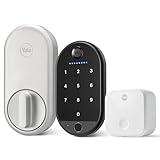
- THE PERFECT TOUCH: Effortlessly enhance your door without altering a single detail about it. This sleek, simple and modern lock installs on the inside of your door, blends right into your home’s décor, and comes with a biometric keypad that can be placed anywhere within Bluetooth(R) range of your lock.
- UNLOCK WITH YOUR FINGERPRINT: Your fingerprint is now the unique key you'll never lose. Simply use the fingerprint scanner to unlock the door with 99% accuracy for ultimate convenience.
- EFFORTLESS INSTALL: The lock is compatible with most single-cylinder deadbolts and the keypad installs with the included adhesive pad or screw mounting options, so all it takes is a screwdriver and a few minutes of time to upgrade your door- making it the perfect choice for renters or first-time smart lock users
- MULTIPLE WAYS TO UNLOCK: Enjoy secure access for your family, friends, and more. Offer fingerprint touch, keypad codes, optional Auto-Unlock, a backup key, or share virtual keys on the Yale Access app.
- LOSE YOUR KEYS: Enjoy secure, keyless, and trackable access with friends, family, vacation rental guests, or anyone else who needs enter your home, by creating customizable entry codes- so you never have to hide a key again.
- Likely not compatible: double-cylinder deadbolts that require a key on both sides, mortise locks, and interconnected locksets. Unusual deadbolt mechanisms can also be a problem.
- Check the tailpiece: the part linking the interior thumbturn to the bolt must work with the supplied adapter. PCWorld reported a compatibility issue with a Kwikset deadbolt that had a double-tailpiece design.
- Check physical clearance: make sure the interior lock body will not hit nearby trim, a wall, or other hardware.
- Check the door’s condition: the existing deadbolt should turn smoothly by hand, and the door and frame should be aligned well enough for motorized locking.
Before ordering, photograph the inside and outside of the lock, identify whether the inside has a thumbturn, and compare the hardware with Yale’s compatibility guidance. Keep all removed parts and the original interior escutcheon; do not discard them. A motorized lock cannot compensate for a stiff or misaligned deadbolt.
Renter-friendly does not mean no holes or no permission
The main Approach unit uses existing deadbolt hardware, but the accessories are separate decisions. The keypad can be attached with adhesive or mounted with screws; adhesive may damage paint or siding when removed, while screws create holes. Yale’s DoorSense sensor reports whether the door is open or closed, but PCWorld reported that mounting it required holes in the door and jamb during its review. Ask the landlord before drilling, and confirm whether adhesive mounting is acceptable too.
At move-out, you may need to remove the Approach and restore the original parts. Ask what the property expects, including whether the keypad and sensor must come off and how any mounting marks or holes should be handled. If the lease prohibits changes to the door area, skip the installation rather than assuming an interior-only device is exempt.
Installation: a screwdriver job, but not always a ten-minute setup
Yale advertises installation in about ten minutes with a screwdriver. That describes the intended physical installation; it does not guarantee that the lock, app, bridge, sensor, and keypad will all be configured in that time. In its independent review, PCWorld found the process more involved than a typical replacement smart lock, reporting multiple mounting and calibration steps as well as firmware-update issues.
Rank #2

- MORE WAYS TO ENTER: Hands full of groceries? This keyless entry door lock recognizes when you’re home and unlocks automatically. For everyone else, there’s a keypad, full smartphone and Apple Watch control, or a backup key if all else fails.
- CONTROL FROM ANYWHERE: This electronic door lock puts home security in your pocket - connecting directly to 2.4 or 5 GHz Wi-Fi without a hub or bridge. Lock up, let someone in, and get real-time alerts with the Yale Access app (US & Canada Only).
- UNLIMITED CODES, TOTAL CONTROL: No more hiding spare keys. Give the dog walker Tuesday access, your parents a permanent code, and your Airbnb guest entry that expires at checkout. Share, schedule, or revoke access in seconds.
- STOP WONDERING IF YOU LOCKED UP: DoorSense knows when your door is fully closed and Auto-Lock secures it for you. Head to bed, rush out the door, or chase after the kids — your smart front door lock handles the details so you don't have to worry.
- ENGINEERED FOR RELIABILITY: Grade 2 certified by BHMA, the industry standard for commercial-grade durability. Built to perform from -22°F winters to 140°F summer heat. Low-power alerts let you know when batteries are about to run out.
In practical terms, expect to hold the exterior hardware in place while removing the inside escutcheon, attach the mounting plate, choose the correct tailpiece adapter, fit the motorized unit, and complete setup in the Yale Access app. If you buy a bundle, you will also need to choose and configure a keypad location. The bridge needs an outlet and must communicate with the lock. Calibration and software setup are part of the job, not optional extras.
Before starting, verify the lock turns smoothly by hand. Follow Yale’s adapter and calibration instructions, and do not force the mechanism if the bolt binds. Set up and test the lock while you still have the physical key available. Treat reports of setup problems as a reason to allow time and test carefully—not as proof every installation will fail.
Lock-only or keypad bundle?
The lock can be useful without a keypad. With the Yale Access app, you can lock and unlock it, manage guest access, and use features such as auto-lock and auto-unlock. You can still use the physical key. Remote access and related activity features depend on the bridge, internet connectivity, the app, and Yale’s services; auto-unlock also depends on phone location settings and background permissions.
Recommended Free Tools
The keypad is mainly for people who want to enter without taking out a phone or share access codes. The original Yale Keypad provides code entry and one-touch locking. Yale’s current product page also shows a Keypad Touch bundle with fingerprint access and custom codes. Do not assume these are the same accessory: check the exact keypad name and included functions before buying. The original keypad’s specifications include a stated operating range of about 30 feet from the lock and an IPX5 weather-resistance rating; do not automatically apply those figures to a different keypad revision.
Rank #3

- SMARTER LOCK, SAME DEADBOLT: Your August Wi-Fi Smart Lock installs on the inside of your door without having to replace your existing deadbolt, so you can keep your keys. Mount your Yale Keypad anywhere within Bluetooth range of your smart lock.
- ACCESS FOR ALL: Everyone in your household can come and go as they please by using Auto-Lock, Auto-Unlock, custom entry codes on the Yale Keypad, or the Yale Access app for ultimate convenience. *Already have an August Home account? You can use your existing August credentials to log into the Yale Access app.
- NO MORE HIDING KEYS: Share custom entry codes through the Yale Keypad to provide access to family members, friends, or guests and know they’ve arrived home safe with the 24/7 Activity Feed in the Yale Access app.
- SMART FROM THE START: Everything you need to get phone-free and key-free entry to your home is already in the box, plus with built-in Wi-Fi, there's no additional hubs or hardware required.
- Heading out in a rush? Your door will Auto-Lock behind you once DoorSense detects that your door is closed.
- Choose lock-only if app control is enough, you are comfortable keeping the physical key as backup, or you want to minimize cost, mounting decisions, and setup.
- Consider the keypad bundle if household members, guests, a cleaner, or a dog walker need code-based access, or you regularly want phone-free entry. First confirm you have a suitable mounting surface and permission to use adhesive or screws.
A keypad is not automatically an upgrade for every renter: it adds another battery-powered device, another place to mount, and another potential source of installation friction.
Independent reader supportYour contribution helps us test, update, and keep practical guides available for everyone.Connectivity, batteries, and smart-home features
Setup and app features use the Yale Access app on an iOS or Android smartphone. The included Yale Connect bridge provides remote access over 2.4-GHz Wi-Fi; the lock and bridge also need to communicate locally. A nearby outlet is not enough by itself: the bridge must be within workable Bluetooth range of the lock. PCWorld flagged this range as a consideration, so test a likely bridge location before settling on an installation.
It helps to separate the different ways the lock can work. App control nearby is not the same as remote control through the internet. Remote access depends on the bridge, home internet, app account, and Yale’s service. Voice assistants require account linking and a compatible platform. Auto-unlock depends on the phone being present, Bluetooth and location access, and the app being allowed to run in the background. Building layouts, weak reception, or phone power-saving settings can make that feature inconsistent. Keep a physical key—and, if installed, a working keypad code—as a fallback. Do not treat remote features as guaranteed during an internet or service outage.
Free tools Windows power users keep installed
One-click scans. No signup required.
Yale lists integrations including Amazon Alexa, Google Assistant/Google Home, Samsung SmartThings, and Philips Hue. Check Yale’s current model-specific compatibility information before buying if a particular smart-home ecosystem is essential; the available product information does not establish Apple Home or HomeKit support for this model.
Rank #4

- THE PERFECT COMPANION: Accessing your home just became even easier. The Yale Keypad pairs with compatible Yale Approach and August smart locks for phone-free and key-free access to your home. *Check ShopYaleHome.com for the latest compatibility.
- SECURE ACCESS FOR ALL: Share convenient, key-free and trackable access with family, friends, vacation rental guests, and service people by creating customizable entry codes in the Yale Access App. No more key copies floating around. *Remote access requires a Wi-Fi connected Yale or August Smart lock. Will not operate outside the US and Canada.
- CAN BE PLACED ANYWHERE: Place it on your doorframe, exterior wall, or on your door itself—anywhere within Bluetooth range of your smart lock.
- LOCK WITH ONE TOUCH: Heading out in a rush? Lock your door by simply pressing the Yale logo, or enable Auto-Lock.
- NO DIY EXPERIENCE NEEDED: Installs with included adhesive pad or screw mounting options, making it the perfect choice for renters, first time homeowners or anyone looking for a simple and convenient way to upgrade their front door. No complicated wiring or power tools needed.
The lock uses four AA alkaline batteries. Yale/August estimates about 12 months for the lock and about seven months for the original keypad, but actual life varies with use and conditions. Treat those figures as estimates, not guarantees, and pay attention to low-battery notices. The listed lock dimensions are 5.6 × 2.6 × 1.6 inches. Yale/August product information lists the bridge, DoorSense, batteries, and mounting hardware among the lock-only components; confirm the contents of the exact package you order.
Price and availability: verify the exact package
Availability and configurations can vary by seller. On August 16, 2026, Yale’s product page displayed a $179.99 Approach bundle with Keypad Touch but marked it out of stock. Yale/August comparison material separately showed $129.99 for the lock-only configuration. Those are dated price signals, not a promise of today’s price or stock. Check the seller’s current listing, exact keypad model, included bridge and sensor, warranty, return policy, and availability before purchasing.
How it compares with the alternatives
| Option | When it makes sense | Main trade-off |
|---|---|---|
| Yale Approach, lock only | You want app-based retrofit control while retaining the existing exterior hardware and key. | Phone-based access is central; guests do not get keypad codes unless you add a compatible keypad. |
| Yale Approach with keypad | Household members or guests need phone-free access, codes, or—on Keypad Touch—fingerprint entry. | More cost, batteries, setup, range considerations, and mounting questions. |
| Yale Assure Lock 2 | You are allowed to replace the existing deadbolt and want a full-replacement Yale lock family. | It is not a like-for-like renter substitute: changing the exterior hardware may violate lease requirements. |
| August retrofit options | You already use the August ecosystem and want to compare retrofit approaches. | Check model-specific features and compatibility; do not assume support for a desired standard such as Matter or HomeKit. |
| Level Bolt / Level Bolt Connect | You are comparing another retrofit design, including a less visually prominent option. | Verify current availability, compatibility, connectivity, and support for the particular model before choosing. |
The Approach adds convenience and access-management features; it does not, by itself, prove that the underlying mechanical deadbolt is stronger or that the door is more secure. The physical lock and frame still matter. A full-replacement lock such as the Assure Lock 2 is a different choice for someone who has permission to change exterior hardware, not a workaround for an incompatible Approach installation.
Outdated Drivers Are Slowing You Down
One free scan finds every outdated or missing driver and matches the right update for your exact hardware.Free scan · exact hardware matchWindows Errors? Fix Them Before They Spread
Repair common Windows errors and clear accumulated junk for a smoother, more stable PC - no reinstall needed.Free scan · no reinstallWho should buy it?
- Good candidate: a renter with landlord approval, a compatible single-cylinder deadbolt, a smooth-turning door, and a useful nearby location for the bridge who wants app control while retaining the key.
- Start with lock-only: if you mainly want phone control and do not need code entry, this is the simpler configuration to consider.
- Choose a keypad only for a clear need: shared codes, frequent guests, or reliable phone-free access can justify the added device—provided mounting is permitted.
- Skip it: if your deadbolt is double-cylinder, mortise, interconnected, or otherwise incompatible; if your landlord prohibits the change; if DoorSense drilling is required but not allowed; or if the bridge cannot reach the lock. If you need a model available immediately, check current stock first.
Keep the physical key accessible even after setup. Batteries, apps, connectivity, calibration, or the motor can fail, and a smart lock should not leave you without a dependable way to enter.
Quick Recap
Product prices and availability are accurate as of the date/time indicated and are subject to change. Any price and availability information displayed on Amazon at the time of purchase will apply.


Leave a Reply