Some links on this page are affiliate links: if you buy through them we may earn a commission, at no extra cost to you.
A dim, indirect light behind your monitor can make a dark-room setup look better and feel less harsh. The technique is called bias lighting: instead of shining light toward your eyes, an LED strip illuminates the wall behind the display and reduces the extreme contrast between a bright screen and a dark room.
It may improve viewing comfort for some people, but it is not a treatment for digital eye strain, blue-light exposure, dry eyes, or vision problems. The best low-cost setup is a dimmable static-white strip aimed at the wall, mounted without blocking vents, and adjusted until the glow is visible but never distracting.
What behind-monitor lighting actually does
A monitor can become the brightest object in an otherwise dark room. Your eyes then move repeatedly between the bright display and the darker surroundings, while reflections and glare can make the image feel harsher. OSHA identifies high contrast, glare, reflections, and uneven illumination as contributors to visual fatigue and recommends diffuse, indirect lighting. OSHA’s workstation guidance explains the underlying lighting principles.
The Tool Desk
Outbyte PC Repair FREERepair Windows errors before they cause bigger problemsFix Now →Outbyte Driver Updater FREEFix the driver behind crashes, sound loss and screen glitchesFind Drivers →Bias lighting raises the light level behind the screen without putting a lamp directly in your field of view. That can make the monitor feel less glaring and reduce the perceived contrast between the display and the wall. It does not change the monitor’s measured contrast ratio, reduce its pixel brightness, protect your eyes from blue light, or make unlimited screen time safe.
#1 Best Overall
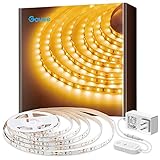
- Warm White LED: With 300 LEDs and a 3000K color temperature, you'll enjoy an incredibly warm and bright illumination with improved color quality. Light up those dark rooms, cabinets and any corners with ease.
- Dim to Desired Level: 6 levels of brightness allow you to adjust your LED strip lights for any occasions. Simply use the control box to dim or brighten your under cabinet lights to the desired level. The LED lights is suitable as a room decor.
- Easy to Install: Simply stick the light strip to a dry, clean surface for use. Strong adhesives and strong clips further ensure your light will not fall or hang. Trim the strip light to desirable lengths to satisfy your DIY room lighting needs.
- User-Friendly Flexibility: Stretching to 16.4ft, the LED strip lights is flexible enough to be mounted in various locations. Enjoy brighter lighting in your favorite places, like your living room, classroom, kitchen cabinets, closets and more.
- Safe to Use: Powered by a 12V working voltage, an ETL listed power adapter, and built-in short circuit prevention technology, the LED lights emits low heat and is incredibly safe and touchable for users.
The most defensible claim is simple: indirect rear lighting can make screen viewing more comfortable for some people, especially in a dark room.
Bias lighting versus other monitor lights
| Type | What it does | Best use |
|---|---|---|
| Static bias lighting | A single white or adjustable-white glow behind the display | Comfort and everyday work |
| RGB ambient lighting | Adds colored light for atmosphere | Gaming and decoration |
| Reactive lighting | Changes color with on-screen content | Immersion and visual effects |
| Monitor light bar | Shines downward onto the desk and keyboard | Desk illumination, not rear-wall bias lighting |
| Room lighting | Illuminates the wider workspace | Preventing the monitor from being the room’s brightest object |
For eye comfort, the strongest case is for soft, static, indirect light. RGB and screen-reactive effects can look excellent, but they are primarily aesthetic features. Bright animated colors may be more stimulating or distracting rather than more comfortable.
What you need for a low-cost build
Basic setup
- A dimmable USB-powered LED strip or short LED light bar.
- Adhesive mounting clips, reusable cable clips, or removable double-sided tape.
- A nearby white or light-colored wall.
- A USB extension cable or cable-management sleeve if the monitor port is inconvenient.
A diffuser is optional but useful. You can use a purpose-built LED channel, a thin frosted plastic channel, or simply mount the strip so the LEDs face the wall and cannot be seen from your chair.
Free tools Windows power users keep installed
One-click scans. No signup required.
When it is worth spending more
A better setup may include an adjustable-white or high-CRI strip, a reliable low-level dimmer, an aluminum channel, and a separate power adapter. These additions can improve diffusion, heat management, color consistency, and dimming behavior.
Do not assume every inexpensive USB strip is equally suitable. Cheap products may have visible hotspots, weak adhesive, poor color consistency, unknown power requirements, or flicker that becomes noticeable when dimmed. Philips’ EyeComfort information identifies flicker, stroboscopic effects, glare, dimming behavior, color rendering, and tunability as relevant lighting considerations. Avoid calling a strip “flicker-free” unless the maker provides an appropriate specification or testing basis.
Rank #2

- Smart RGBIC Effects: RGBIC LED Strip lights for bedroom display multiple colors on one line at a time compared with traditional RGB lights. A colorful combination of LED strip lighting for bedroom brings a strong visual impact. (Not Support Alexa)
- Smart APP Control: You can unlock various features to personalize smart LED strip lighting via Govee Home App, getting rid of simple remote control. Adjust the colors and brightness to your preferences, turning a single light to vivid light shows.
- DIY with Inspiration: You can choose from a variety of lighting effects (16 million colors) and share your piece of art on the APP community. Also, we will regularly update AI-created themes on the APP to provide you with more options.
- Upgraded Music Sync Mode: Make your smart LED strip lighting for dance for an immersive home concert experience. Choose from 11 music modes and the integrated high-sensitivity mic will effortlessly sync with your favorite audio.
- 64+ Preset Scenes: Find the proper lighting effects that fit your emotions. You can choose from a selection of scenes to bring vivid colors, inspired by party, holidays, movie and more with a simple click on the Govee Home App.
How to install the strip safely
- Power off and unplug the monitor. Inspect the rear panel before attaching anything.
- Identify hazards. Keep the strip, cable, controller, and power brick away from ventilation openings, hot components, speakers, ports, buttons, hinges, VESA hardware, and moving stand or arm joints.
- Clean the mounting area. Use a suitable electronics-safe cleaner or a small amount of isopropyl alcohol on a cloth. Let the surface dry completely.
- Dry-fit the strip. Decide whether to cover three sides or the entire perimeter. The bottom edge can usually be omitted if the desk blocks the light.
- Mount near the outer rear edge. Position the LEDs so they aim toward the wall, not toward your face. Do not make sharp folds around curved corners.
- Use clips at corners and cable exits. Factory adhesive alone often fails on dusty, textured, warm, or frequently moved surfaces.
- Leave a service loop. If the monitor is on an arm, leave enough slack for height, tilt, and rotation adjustments without pulling on the strip.
- Route the cable downward. Secure it so it cannot snag, pull on the monitor, or hang across the desk.
- Connect power and start at minimum brightness. If the strip is long or bright, use its supplied adapter or a suitable powered USB source rather than assuming a monitor USB port can provide enough power.
- Check the result from your normal chair. No bare LEDs should be visible directly. Increase brightness only until the wall is softly lifted from black.
The monitor should not be pressed tightly against the wall. Philips recommends about 10 cm of clearance for its Play Gradient PC strip; that is product-specific guidance, but it illustrates the general benefit of allowing light to spread before it reaches the wall. A larger gap is not automatically better if it creates a visible halo or exposes the LEDs.
Layouts for different monitors
One monitor
A three-sided rectangle is usually sufficient. Place the strip around the top and sides, then omit the bottom if the desk hides it. The strip should be invisible from the normal seated position.
Windows Errors? Fix Them Before They Spread
Repair common Windows errors and clear accumulated junk for a smoother, more stable PC - no reinstall needed.Free scan · no reinstallCrashes, No Sound, or Screen Glitches?
Random freezes, missing sound and display glitches usually trace back to one bad driver. Find and replace yours safely.Free scan · under a minuteTwo or three monitors
One strip can create uneven brightness at the seams. Better options include one matched strip per monitor, a continuous strip around the outside perimeter, or two light bars aimed at the wall. Match brightness and color temperature across displays, and avoid placing a bright source directly in the gap between bezels.
Curved and ultrawide monitors
Use flexible clips and avoid bending the strip beyond its stated limits. Check that mounting does not interfere with ventilation or the curve of the rear housing. A wide screen may need more total output, but brightness should still be controlled carefully.
Choosing the right color
Neutral white for work and color-sensitive tasks
A commonly cited professional reference for bias lighting is 6500 K, or D65, particularly when evaluating display color. Bias Lighting’s D65 explanation describes that practice and also discusses how wall color affects reflected light.
Rank #3

- APP and IR Remote Contorl: With a stable connection,control your LED lights,freely change in 16 million colors,adjust brightness,customize modes (Flashing,Jump,Fade,etc) in different speeds.
- Music Sync: The built-in mic make the LED lights color-changing with the ambient music,easily create party atmosphere.
- Timing Setting: The Led strip will turn on/off automatically at the setting time, repeat this seting on date you set.
- Widely use: The led strip lights 100FT is long enough, perfect for decorating your bedroom, kitchen, ceiling, living room . Widely used on holidays and party (such as christmas, halloween, birthday,wedding .etc )
- Easily Setup: Tear off strong adhesive tape on light strips,stick the strip lights on a clean,dry surface,finish in minutes.
That does not make 6500 K the most comfortable setting for everyone. It is a color-accuracy reference, not a medical prescription. A neutral static-white setting is generally a safer starting point for photo, video, design, and other color-sensitive work because colored or reactive light can alter how colors are perceived.
Quick wins for a faster PC:
Scan for outdated or missing drivers - takes under a minuteDriver Scan →Clear out junk files and repair common Windows errorsFree Scan →Fix the driver behind crashes, sound loss and screen glitchesFind Drivers →Adjustable white for mixed use
An adjustable-white strip lets you use a cooler setting during the day and a warmer setting in the evening. It is often more useful than RGB when comfort is the main goal. The light should harmonize with the rest of the room rather than being dramatically cooler or warmer than every other source.
RGB and reactive effects for gaming
RGB can add atmosphere, and reactive systems can make games feel more immersive. They also add controllers, apps, calibration, and sometimes a camera, sync box, or smart-home hub. Use them for appearance and entertainment—not as evidence that the lighting is healthier for your eyes.
How bright should it be?
There is no universal brightness number for a DIY strip. The right setting depends on the wall color, wall distance, monitor size, strip output, diffusion, room lighting, and your own sensitivity.
Use this practical sequence:
- Start at the lowest brightness.
- Raise it until the wall behind the monitor is visibly illuminated.
- Stop before the wall becomes a competing light source.
- Lower the setting if the wall appears brighter than the display or distracts you during dark scenes.
- Make sure the LEDs cannot be seen directly from your chair.
Test the setup with a white webpage, a dark video or game scene, and a normal work session lasting at least 30 minutes. A light that looks impressive for five minutes but causes distraction or discomfort is set too bright or is the wrong type of lighting.
Rank #4

- 【Brighter, Lower Voltage Drop】PAUTIX 24V 480 LEDs/m (total 2400 LEDs) COB (chip on board) LED strip light has lower voltage drop and better brightness than conventional 12V. High color rendering index (93+), high light efficiency, rich colors, and strong reduction. 180-degree beam angle design, 50% wider lighting, multiple chips on board, compared with traditional SMD LED strips, more uniform lighting, no worries about dark spots!
- 【Lead-free Materials & UL Listed】Designed with lead-free materials, PAUTIX COB LED strip lights are more environmentally friendly and protect your health than others. 24V low voltage no longer worry about electric shock, safer to use; low power consumption, energy saving. UL Listed, the quality is more trustworthy!
- 【Dimmable with RF Remote Control】The RF (radio frequency) remote control with 13 keys allows you to control the strip light in any area (360°) within 99ft(30m). Four timer setting functions satisfy you to set the ON and OFF time of the light strip well. 3-level dimming function (25%, 50%, 100%) meets your brightness needs in different scenarios. The perfect memory function can keep the last setting when you turn on your light without having to set it repeatedly.
- 【Flexible, Easy to DIY】Cutting can be done every 50mm/1.97in along the middle of the copper sheet metal. The cut strip lights can be reconnected by using PAUTIX 8mm connectors or soldering (connectors sold separately). The ultra-thin PCB board close to 1.3mm/0.05in makes the COB strip light very flexible. You can bend it and even DIY more shapes. Super sticky double-sided adhesive backing tape makes installation more firm!
- 【Durable and Widely Used】Different from single-sided PCB, the true double-layer PCB is more resistant to compression and are not easily damaged or deformed. With strong double-sided adhesive tape, PAUTIX COB LED strip lights can be attached and installed reliably. 16.4ft/5m in length, very suitable for decoration in kitchen, cabinet, bedroom, stairs, mirror, hallway, DIY backlight, table lamp, toy lamp and other places needed.
Static white, adjustable white, RGB, or reactive?
| Option | Comfort suitability | Color accuracy | Complexity | Best for |
|---|---|---|---|---|
| Static white | High when dim and indirect | Good | Low | Office work and first-time testing |
| Adjustable white | High when properly tuned | Good to very good | Moderate | Mixed daytime and evening use |
| RGB | Variable | Reduced while colored | Moderate | Gaming ambience |
| Reactive RGB | Variable and potentially distracting | Least suitable for color-critical work | Highest | Immersion and decorative setups |
Troubleshooting common problems
The lighting causes more discomfort
Lower the brightness, switch to static white, add diffusion, and check for visible LEDs or flicker while dimmed. Strongly saturated colors and a monitor that remains much brighter than its surroundings can also make the setup worse. If the light causes headaches, nausea, or visual discomfort, stop using it and try a different strip or a separate indirect room lamp.
The wall has bright dots instead of a smooth glow
Use a diffuser channel, move the light so it bounces off the wall or desk, increase the distance between the LEDs and wall, use a denser strip, or reduce output. Individual LED points are usually a positioning or diffusion problem, not a reason to increase brightness.
The adhesive keeps falling off
Dust, oils, textured plastic, heat, tight corners, and monitor movement all reduce adhesion. Add mechanical clips or removable cable-management mounts. Do not rely on factory adhesive near moving joints.
The monitor or controller gets hot
Do not cover ventilation openings, wrap the strip around vents, or place the controller against a hot exhaust area. If the monitor’s rear panel becomes unusually hot, remove or reposition the lighting.
USB power is inadequate
Resets, limited brightness, flicker, or shutoffs can indicate that the monitor’s USB port is not supplying enough power. Use the supplied adapter, a powered USB hub, or a dedicated USB power adapter after checking the strip’s input requirements. Some monitor ports also stop supplying power when the display sleeps.
Best Value

- ULTRA-BRIGHT UNIFORM LIGHT: 10mm width; The COB LED strip features a unique transparent diffuser that integrates 1,600 high-density micron-level LED. 180° wide-angle light cascade delivers 98% greater uniform illumination and coverage than other COB strips. CRI 90+ and high luminous efficacy ensure vibrant colors. 24V low-voltage design for reliable use, perfect for kitchen and bedroom lighting
- REMOTE CONTROLLED: COB rope light is dimmable and comes with an remote control that allows you to adjust the brightness , so that you can easily change from 10% to 100% brightness gradually, and the perfect memory function can keep the last setting when you turn on your light without having to set it repeatedly. Timer function allows precise scheduling. Three dynamic modes (fade/jump/flicker) cater to varying ambiance needs
- PRO SELF-ADHESIVE: Lamomo COB led lights feature an exclusive self-adhesive backing with ultra-strong adhesion. The auxiliary mounting clips design enhances grip strength, eliminating detachment issues and extending service life
- EASY TO DIY & QUICK CONNECT: Cut every 5cm (no soldering) with included quick connectors. Reinforced silicone jacket holds curves durably – ideal for DIY signs and commercial displays. The flexible silicon housing can be bent at almost 180° while holding its shape
- IP65 WATERPROOF: Unlike other exposed lights, Lamomo employs integrated silicon sealing tech to prevent moisture intrusion, making it suitable for outdoor use or rain. The flame-resistant silicon material offers enhanced heat dissipation. Warm white rope lights use low-power materials for decorative needs. (Note: power plug and controller are not waterproof)
Colors look wrong
Disable reactive RGB effects for design, photography, and video work. Choose neutral white and remember that the wall’s color changes the reflected light. Colored light falling on the screen or your face can alter perception.
Does bias lighting replace good ergonomics?
No. The American Optometric Association recommends matching room lighting reasonably to screen brightness, reducing glare, taking breaks, blinking frequently, and using an appropriate viewing distance. See the AOA guidance on computer vision syndrome.
- Adjust monitor brightness to the room instead of running it at maximum.
- Position the screen away from direct reflections from windows and lamps. OSHA’s monitor guidance covers viewing distance and height.
- Keep the display roughly 20 to 40 inches away, or about 20 to 28 inches when following the AOA’s commonly cited range.
- Place the top of the screen at or slightly below eye level, with the center approximately 15 to 20 degrees below horizontal eye level.
- Blink regularly, especially during concentrated work.
- Use the 20-20-20 approach: every 20 minutes, look at something about 20 feet away for 20 seconds.
- Arrange a broader room-lighting solution if the entire room is dark, rather than relying only on a small halo behind the monitor.
If symptoms persist, become painful, or include blurred or double vision, arrange an eye examination. Rear lighting cannot correct dry eyes, an outdated prescription, poor viewing distance, or another underlying cause.
What’s actually slowing this PC down?
Pick the symptom - the matching free tool is one click away.
Alternatives to an LED strip
- Shaded desk lamp aimed at a wall: inexpensive, flexible, and easy to reposition.
- Floor or wall lamp behind the desk: useful for illuminating a broad area behind multiple monitors.
- Monitor light bar: good for lighting the keyboard and desk, but it is not the same as rear-wall bias lighting.
- Purpose-built bias-lighting kit: typically offers better mounting, diffusion, and consistency at a higher price.
- Built-in monitor ambient lighting: convenient, but limited to displays that include it and often tied to a particular ecosystem.
- General room-lighting upgrade: the better answer when the workspace—not just the wall behind the screen—is too dark.
Commercial options and realistic budgets
Prices and availability change, so treat these as captured August 2026 price signals rather than permanent prices.
- $10–$20 basic build: a dimmable static-white strip, clips, and simple diffusion. This is the best low-risk way to test whether bias lighting helps you.
- $25–$60 better general setup: adjustable white or better-diffused lighting with a more reliable controller, mounting hardware, and a suitable power source.
- $80 and up smart or reactive system: app control, gaming effects, and screen synchronization. This tier is primarily for aesthetics and immersion.
Readers already invested in Hue can review Philips’ office-lighting options. The page’s August 2026 capture listed the Hue Essential 16-foot strip at $59.99 and the Flux 10-foot strip at $69.99, but current pricing should be checked before purchase.
Philips’ Play Gradient Lightstrip for PC monitors has dedicated versions for single 24–27-inch, single 32–34-inch, and triple 24–27-inch configurations. The listed product includes mounts and a power supply, requires a Hue Bridge, supports 2000–6500 K and dimming, and is not cuttable or extendable. Philips lists approximately 10 cm of wall clearance for light spread. It is a premium gaming option, not the cheapest comfort upgrade.
Govee’s gaming-light collection is aimed more at RGB effects and synchronization. Its August 2026 capture showed Gaming Light Bars Pro for 24–32-inch setups at a $79.99 sale price against a $119.99 comparison price, with other products ranging from about $74.99 to $199.99. Some products were sold out in that capture, so both stock and discounts are volatile.
Recommended Free Tools
For photo, video, design, or grading work, a purpose-built calibrated bias-lighting product with a documented D65 target may be preferable. It costs more than a generic strip and still may not feel ideal in a warm home office.
Quick Recap
A five-minute final check
- Is the screen still much brighter than the wall?
- Can you see individual LEDs from your chair?
- Is there glare or a reflection on the display?
- Does the strip flicker when dimmed?
- Is the wall wash even across the full monitor width?
- Are vents, moving parts, and ports unobstructed?
- Does the cable have enough slack for monitor-arm movement?
- Does the setup remain comfortable after 30 to 60 minutes?
Product prices and availability are accurate as of the date/time indicated and are subject to change. Any price and availability information displayed on Amazon at the time of purchase will apply.


Leave a Reply