Some links on this page are affiliate links: if you buy through them we may earn a commission, at no extra cost to you.
Verdict: The Teckin SP22 remains a capable basic Wi‑Fi smart plug, but it is no longer an easy recommendation. It offers app control, schedules, timers, advertised energy monitoring, Alexa and Google Assistant support, and a physical button. However, regional specifications, changing internal hardware, cloud dependence, uncertain long-term support, and inconsistent availability make it best suited to existing owners or unusually cheap, clearly identified stock—not a new smart-home installation or any safety-critical appliance.
What the Teckin SP22 is
The SP22 is an indoor Wi‑Fi outlet in the Smart Life/Tuya ecosystem. It does not require a separate hub, but “hub-free” does not mean internet-independent: remote access and many integrations depend on Wi‑Fi, the app and vendor cloud services. Older documentation may refer to the TECKIN app, while the current European listing uses Smart Life, so follow the QR code and instructions supplied with your individual unit.
The model name is not a guarantee of identical electronics. Teardown evidence identifies earlier units using a TYWE2S module associated with ESP8266 hardware and later units using a WR2 module based on Realtek RTL8710BN. Teckin’s own listing warns that old and new packages may be shipped randomly (official listing). Treat every SP22 as a specific hardware revision, not as one fixed product.
The Tool Desk
Outbyte PC Repair FREERepair Windows errors before they cause bigger problemsFix Now →Outbyte Driver Updater FREEScan for outdated or missing drivers - takes under a minuteDriver Scan →Specifications—read the regional fine print
| Feature | Documented information | Qualification |
|---|---|---|
| Voltage | 230 V | Specification of the cited European version; verify the label on other regional units. |
| Maximum current | 16 A | Maximum rating, not a blanket recommendation for every appliance or continuous load. |
| Maximum power | 3,680 W | 230 V × 16 A; applies to the European listing. |
| Wireless | 2.4-GHz Wi‑Fi | 5-GHz-only networks cannot pair it. |
| App | Smart Life; older material also mentions TECKIN | Branding and account flow can vary by generation and region. |
| Voice control | Alexa and Google Assistant listed | Discovery and features depend on account, region and integration. |
| Energy monitoring | Advertised | Accuracy is not established by the marketing claim. |
| Operating temperature | −20 °C to 50 °C | Manufacturer-listed European specification. |
The official European page was showing the product out of stock when checked and listed a discounted price, but availability and pricing vary by country and seller. Do not assume a European 230-V, 16-A rating applies to a North American SP22.
#1 Best Overall
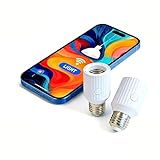
- Smart Wi-Fi E26/E27 bulb socket adapter supports Alexa and Google voice control, allows remote control, group management and timer setting via Smart Life App, features 60W max power load and compatibility with incandescent bulbs, easy to install plug-and-play design perfect for smart home lighting upgrade.
Setup and everyday control
Teckin’s documented setup requires a 2.4-GHz network. Install the current applicable app, keep the phone, router and plug close together, and add the electrical-outlet or Wi‑Fi-plug device. Rapidly flashing blue indicates EZ mode; slowly flashing blue indicates AP mode. If EZ pairing fails, switch to AP mode and follow the app’s temporary-network instructions. The guide describes holding the button for about 10 seconds to restore factory settings, although timing and LED behavior can differ by revision (setup guide).
After pairing, test both the physical button and app. App control on the same network, remote control over the internet, and voice control through Alexa or Google are different paths and can fail independently. A phone command that works locally does not prove that remote control will survive an internet or cloud outage.
If pairing fails
- Use a dedicated 2.4-GHz SSID temporarily, or disable 5 GHz and band steering during setup.
- Move the plug beside the router and confirm the phone has the app permissions it requests.
- Try AP mode after EZ mode fails.
- Reset the plug and repeat setup in the correct app and product category.
Schedules, timers and outages
The app advertises countdown timers and schedules. Before relying on them, check whether a schedule is repeating or one-time, whether location-based options such as sunrise and sunset are available, and what happens after a router outage, internet outage, daylight-saving change or power cut. The available documentation does not establish one universal power-restoration mode for every SP22 revision. Test whether your sample returns to its last state, on, off or another state before automating anything consequential.
Recommended Free Tools
Energy monitoring: useful estimate, not a meter
Teckin advertises real-time consumption reports. That makes the SP22 potentially useful for comparing a lamp, charger or other modest load, but no evidence here proves billing-grade accuracy. A proper evaluation would compare watts, volts, amps and cumulative energy against a trusted reference meter across resistive loads, chargers and low-power LED lamps. Check whether readings and history survive a reboot or account migration. Until measured, treat the graph as approximate.
Safety and load limits
A 16-A headline rating does not make every 16-A appliance a sensible load. Motors, compressors and heating elements can have high startup or continuous stress. Use the exact rating printed on your plug, never exceed local electrical rules, and avoid damaged outlets, loose connections, moisture and overloaded adapters. The cited 3,680-W figure belongs to the 230-V European version.
Rank #2

- Voice Control: Works with Amazon Alexa (Echo/Dot/Tap) and Google Assistant. Say “Alexa, turn on the lamp” for hands-free control—perfect when cooking, holding groceries, or in bed
- App Control + Group Management: Control lights anywhere via Smart Life app (2.4GHz WiFi, no hub). Group multiple sockets to turn all on/off with one tap (e.g., shut off all bedroom lights at bedtime). Schedule auto-on/off for porch lights or vacations
- Timer & Automation: Set auto-on/off timers, countdowns, or custom scenes. Wake up to gentle light, have night lights shut off automatically—slash energy waste effortlessly
- 60W Power + Heat Resistance: Upgraded to 60W max (supports Incandescent, LED, CFL). Heat-resistant design ensures stable performance, even with high-wattage bulbs
- Easy Install (E26/E27): Screw into E26/E27 sockets in 3 minutes—no tools/electrician. Compact 3.4” height fits most lampshades (ideal for hard-to-reach lights like high ceilings)
Teckin’s support material warns against prolonged high-power use and says to unplug an overheating plug, let it cool and contact support if necessary. Stop immediately if the casing, plug or wall receptacle becomes unusually hot, discolored or smells burnt. As a conservative electrical-safety practice, do not put a power strip, extension lead or surge protector arrangement on a smart plug; TP-Link gives similar overload guidance (safety guidance).
Do not use the SP22 for space heaters, medical equipment, sump or aquarium pumps, refrigeration where food loss matters, security systems, essential network equipment or anything that could be dangerous after an unexpected restoration of power. Teckin’s service terms state that remote services and notifications are not guaranteed error-free or continuously available and are unsuitable for life-safety or critical uses (service terms).
Do these 3 things before closing this tab:
1Scan for outdated or missing drivers - takes under a minute2Repair Windows errors before they cause bigger problems3Fix the driver behind crashes, sound loss and screen glitchesPrivacy, cloud dependence and local control
Smart Life/Tuya pairing generally places the device in a vendor account and cloud ecosystem. A third-party technical report describes cloud credentials and re-pairing or key changes when Wi‑Fi networks change; that is an observed account, not a current Teckin guarantee (technical report). Before buying, decide whether an account, remote telemetry and possible future cloud-service changes are acceptable.
The SP22 should not be advertised as universally local, Home Assistant-ready or privacy-preserving. Verify the exact local API or integration for your hardware and firmware; cloud integrations can stop working when services, regions or accounts change.
Independent reader supportYour contribution helps us test, update, and keep practical guides available for everyone.Hardware revisions and custom firmware
Do not assume that a Tasmota, ESPHome, Tuya-Convert or Cloudcutter procedure applies to every SP22. The documented TYWE2S/ESP8266-associated units differ from WR2/RTL8710BN units, and a listed Cloudcutter profile does not prove that your physical plug is vulnerable or modifiable. Some older RTL8710BN devices may not support the relevant wireless method (teardown; hardware list).
Rank #3

- Warm Tips: To use Alexa and Google Home for voice control, please take a minute to connect the Smart Home plug with the Smart Life App first.
- Simplified Setup: Our upgraded smart plug makes connecting a breeze. Just open the Smart Life App, and your phone's Bluetooth will automatically find the plug. No more worrying about complicated setups.
- Voice Control: Smart plugs compatible with Alexa and Google Home Assistant. Operate with a simple voice command: "Alexa, turn on the fan".
- Remote Control: Use your smartphone to turn home devices on and off from anywhere, anytime. Grab an Alexa smart plug for those electronics you sometimes forget, saving energy and ensuring safe power usage.
- Schedule & Timer Function: You can easily set timers, countdowns, cycles, or random schedules. For example, schedule the coffee maker to turn on automatically at 8 a.m. and the lights to turn off at 10 p.m.
Opening or flashing a mains-powered plug carries electrocution and fire risks. Unless you are trained to identify and isolate mains circuitry, leave the enclosure closed and use the stock firmware.
What’s actually slowing this PC down?
Pick the symptom - the matching free tool is one click away.
Who should keep or buy it?
Keep an existing unit when
- It switches reliably and shows no heat, contact or casing damage.
- Your load is modest and non-critical.
- You have dependable 2.4-GHz Wi‑Fi and accept Smart Life/Tuya cloud dependence.
- Alexa or Google Assistant is sufficient and energy data is only an estimate.
Buy only when
- The price is substantially below a current, better-supported plug.
- The seller confirms the plug format, voltage, certification and return policy.
- You can identify the app and, ideally, the hardware revision.
Avoid it when
- You need Apple Home, Matter, Thread or dependable local control.
- You are controlling a heater, motor, compressor, pump or critical appliance.
- The unit is second-hand with discoloration, loose contacts, relay problems or unknown voltage.
- You want clear current firmware support and a predictable warranty.
Better choices for a new installation
For a mainstream replacement, a current Kasa or comparable plug can offer clearer documentation, active support and—on models such as the EP25 and KP125—documented Apple HomeKit support (TP-Link support). Matter plugs are more attractive when cross-platform interoperability is the priority, although they may require a compatible controller or border router. Home Assistant users should favor products that explicitly document local APIs, MQTT, Zigbee, Z-Wave or ESPHome rather than gambling on an unknown SP22 revision. Choose an outdoor-rated model for outdoor work; an indoor SP22 is not automatically suitable.
Final recommendation
The Teckin SP22 still covers the basics, but its age and variation are now the story. Existing owners can continue using a sound unit for low-risk loads. Bargain buyers may accept one if the regional rating, app and return path are clear. For a new installation—especially one requiring local control, Apple Home, Matter, long-term support or high confidence in safety—a newer, clearly documented plug is the more responsible choice.
Frequently Asked Questions
Does the Teckin SP22 work on 5-GHz Wi‑Fi?
No. The documented SP22 setup requires 2.4-GHz Wi‑Fi; use a separate 2.4-GHz network if band steering prevents pairing.
Is every SP22 compatible with Tasmota?
No. SP22 hardware changed between ESP8266-associated TYWE2S and Realtek RTL8710BN-based modules. Identify the exact unit before considering any firmware work, and do not open a mains plug unless qualified.
Can I use the SP22 with a space heater?
It is not a suitable safety recommendation. High-power heating loads can stress a relay, and Teckin says its cloud service is not for critical uses. Use a properly rated, purpose-designed control solution instead.
Quick Recap
Product prices and availability are accurate as of the date/time indicated and are subject to change. Any price and availability information displayed on Amazon at the time of purchase will apply.


Leave a Reply