Recommended Free Tools
Some links on this page are affiliate links: if you buy through them we may earn a commission, at no extra cost to you.
SomfyDuino IO is a 2017 Arduino project that controls a paired Somfy io-homecontrol remote by electrically simulating its button presses. It is not a native Somfy IO radio transmitter: the original remote remains responsible for sending commands to the motor. That makes it a practical local-control hack for a technically capable DIYer, but not a bidirectional controller with verified shutter position or status.
What SomfyDuino IO is
Bjoern Foldenauer (username beejayf) published SomfyDuino IO on May 20, 2017, as a USB-to-Somfy-IO adapter. The project is intended to let a computer or home-automation system operate roller shutters or blinds without relying on a cloud-connected gateway. The original build uses an Arduino and a modified Somfy IO remote; its project pages are available on Arduino Project Hub and Hackster.
The important distinction is what the Arduino controls. The signal path is:
Computer or automation system → USB serial → Arduino → remote button contacts → original Somfy remote radio → motor
#1 Best Overall
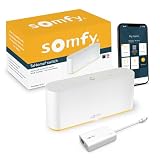
- CONTROL SOMFY RTS SHADES, BLINDS, CURTAINS, AWNINGS: The TaHoma switch connects directly to Somfy RTS (Radio Technology Somfy) motors, enabling smartphone and voice control through the TaHoma by Somfy app. Easily manage up to 40 RTS channels for whole-home shading. Program daily scenes, group shades by room, and enjoy one-touch control from anywhere — no installer required. Tip: Check the back of your remote — if it’s labeled RTS to confirm motor compatibility.
- CUSTOM SCENES, SCHEDULES, AND REMOTE ACCESS: Use the free TaHoma by Somfy app to control shades from anywhere, group multiple window coverings, and create daily schedules that match your lifestyle. Open all shades at sunrise or close them automatically at sunset — even when you’re away.
- FLEXIBLE SETUP WITH TAHOMA BY SOMFY APP: The free TaHoma by Somfy app is available for iOS 11.0+ and Android 7.0+, offering intuitive pairing and programming for RTS devices. Connect via 2.4 GHz Wi-Fi or use the included Ethernet adapter for more stable performance. Setup takes minutes and requires no professional support for RTS installations.
- COMPATIBLE WITH SOMFY ZIGBEE MOTORS (INSTALLER REQUIRED): The TaHoma switch is fully compatible with Somfy Zigbee 3.0 motors, allowing advanced control, position feedback, and Apple Home integration. Setup and pairing of Zigbee motors require a Somfy expert professional using the TaHoma Pro app. Zigbee is not self-installable by end users. Tip: Check the back of your remote — if it’s labeled Zigbee to confirm motor compatibility.
- INTEGRATES WITH YOUR SMART HOME ECOSYSTEM: Compatible with Amazon Alexa, Google Home, Philips Hue, SmartThings, and Apple Home (for select Somfy Zigbee motors; see product documentation). TaHoma lets you automate shade movement alongside lights, alarms, and thermostats for a seamless smart home experience.
The Arduino does not decode, generate, or reverse-engineer io-homecontrol radio traffic. It presses the buttons electrically; the paired remote performs the radio communication. Calling it a “Somfy IO transmitter” without that qualification can give the wrong impression.
Somfy distinguishes its older RTS system from io-homecontrol; they are separate technologies, not interchangeable labels for the same radio interface. See Somfy’s overview of its technologies and protocols. An RTS-only controller is not automatically suitable for an IO motor.
What the original build uses
- An Arduino Nano R3, or another USB-equipped Arduino that can provide the required serial interface and outputs.
- A compatible Somfy IO remote. The author used a GX037 one-channel remote.
- Seven-core flat cable in the original build, plus heat-shrink tubing and soldering tools.
The required conductors depend on which buttons and power connections your particular remote needs. The author reported roughly 20 mA while his remote was transmitting; treat that as an observation about his remote, not a universal specification for every IO handset. The original project also says to remove the remote’s battery when powering it from the Arduino. Follow that instruction only after verifying the remote’s voltage, polarity, and power requirements; do not connect external power by guesswork.
The Tool Desk
Outbyte PC Repair FREERepair Windows errors before they cause bigger problemsFix Now →Outbyte Driver Updater FREEScan for outdated or missing drivers - takes under a minuteDriver Scan →Pair and inspect the remote before modifying it
- Identify the exact model and intended channel. Somfy remote layouts and circuit boards vary. Do not assume a GX037 wiring layout applies to a different handset or PCB revision.
- Pair and test it while intact. Confirm that it controls the intended shutter or group, and check every function you actually need before soldering.
- Document the board. Photograph both sides, record battery polarity and voltage, and identify the button contacts. A multimeter can help verify the contacts and their behavior.
- Decide whether to dedicate the remote. The project modifies the handset. Keep another working manual control if the modified unit will be permanently installed.
The original author describes a one-channel remote and notes that a five-channel handset has a similar layout, but the project does not establish reliable multi-channel behavior across models. The author observed that triggering SELECT did not change channels on his one-channel handset and did not appear to damage it; that is not a guarantee for other remotes.
Rank #2

- CONTROL SOMFY RTS SHADES, BLINDS, CURTAINS, AWNINGS: The TaHoma Switch connects directly to Somfy RTS motors, enabling smartphone and voice control through the TaHoma app. Easily manage up to 40 RTS channels for whole-home shading. Program daily scenes, group shades by room, and enjoy one-touch control from anywhere with a simple Wi-Fi setup.
- COMPATIBLE WITH SOMFY ZIGBEE MOTORS, INSTALLER REQUIRED: The TaHoma Switch is compatible with Somfy Zigbee 3.0 motors, allowing advanced control, position feedback, and Apple HomeKit integration. Setup and pairing of Zigbee motors requires a Somfy expert professional using the TaHoma Pro app. Zigbee is not self-installable by end users.
- CUSTOM SCENES, SCHEDULES, AND REMOTE ACCESS: Use the free TaHoma app to control shades from anywhere, group multiple window coverings, and create daily schedules that match your lifestyle. Open shades at sunrise, close them automatically at sunset, or manage your home while away.
- WI-FI SETUP WITH TAHOMA SMARTPHONE APP: The free TaHoma app is available for iOS 11.0+ and Android 7.0+, offering intuitive pairing and programming for RTS devices. Connect the TaHoma Switch using a 2.4 GHz Wi-Fi network. Ethernet connectivity requires a separate Ethernet adapter, sold separately.
- INTEGRATES WITH YOUR SMART HOME ECOSYSTEM: Compatible with Amazon Alexa, Google Assistant, Philips Hue, SmartThings, and Apple HomeKit for Zigbee motors. TaHoma lets you automate shade movement alongside lights, alarms, and thermostats for a more seamless smart home experience.
Connections and pin assignments
The sketch identifies these Arduino pins for the remote controls and indicator:
| Remote function | Arduino pin |
|---|---|
PROG |
D8 |
UP |
D12 |
DOWN |
D10 |
MY / stop |
D11 |
SELECT |
D9 |
| Indicator LED | D13 |
In the original firmware, button lines are initialized HIGH. To simulate a press, the sketch pulls the selected line LOW for the requested time, then returns it HIGH. These pin numbers describe the Arduino sketch; they are not a universal map of Somfy remote PCB pads. Match each wire to the correct contact on the specific remote you have opened.
Use strain relief and insulate exposed joints with heat-shrink. Remove the remote battery before wiring or externally powering the board, and verify every connection before reconnecting power. The project’s page includes photos and build material, but one schematic attachment has been reported missing; do not treat an absent diagram as a reliable wiring reference. Consult the original project pages for the available images, then confirm the actual contacts on your handset.
What’s actually slowing this PC down?
Pick the symptom - the matching free tool is one click away.
Serial commands and timing
The original sketch identifies itself as SomfyDuino 0.71, dated 05/2017. It listens over serial at 9600 baud. Characters accumulate a command; sending e executes the prepared press.
Rank #3

- CLEAN WHITE FINISH - The Pure finish is a shiny white remote that will complement any interior. Whether you're replacing a remote or looking for an extra to leave in a bathroom, bedroom or living area, the clean white finish will blend right in. Plus, this Situo comes with a mounting plate so you always have somewhere to put it. Our Somfy remote controls are a stylish solution for your smart home.
- OMNI-DIRECTIONAL WORKS FROM ANYWHERE IN THE ROOM - This Somfy hand held remote works from anywhere in the room - no need to point it at the shades. Somfy RTS technology makes it easy to be in control of the natural light in your home - from keeping out sun glare while you're working to letting in the light while you're waking up for the day.
- REPLACEMENT REMOTE CONTROL FOR SOMFY MOTORIZED BLINDS, CURTAINS, SHADES OR SUNSETTER AWNINGS - As long as your motor is made by Somfy and has our wirefree RTS technology, this remote will work! Whether you're replacing a lost remote, have purchased a home with Somfy shades or just need an extra remote control on hand, this RTS compatible controller is a great solution.
- CONTROLS 5 SHADES OR GROUPS OF SHADES - Somfy 5 channel remote can control 5 individual shades or groups of shades. LED indicators on the Somfy remote make it easy to choose which Somfy motor to control. The exclusive Somfy "MY" setting saves your favorite position so getting things just the way you want them is as easy as one touch of a button.
- EASY SET UP - Just a few quick steps will have your new remote up and running and you'll be able to enjoy the convenience of motorized shades once again. Your Somfy home should be convenient and custom and this Situo will get you there.
| Character | Action |
|---|---|
u |
Select UP |
d |
Select DOWN |
m |
Select MY (stop/favorite, depending on handset and setup) |
p |
Select PROG |
s |
Select SELECT |
r |
Add one repeat cycle |
1–9 |
Add 100–900 ms to hold time, respectively |
e |
Execute the prepared command |
The digits are increments, not a conventional number representing milliseconds. For example, u5e prepares an UP press for 500 ms and executes it. Each 9 adds 900 ms, so 999 adds 2,700 ms—not a literal 999 ms. The project’s examples include ud9993e (both UP and DOWN selected, with 3,600 ms accumulated) and p999995e (a 4,500 ms PROG press). These examples reflect the sketch’s behavior, not recommendations to issue long or combined presses.
On execution, somSend() pulls the selected lines LOW, turns on the Arduino LED, waits for the hold duration, returns the lines HIGH, turns the LED off, waits for the same duration, then repeats according to the repeat counter. The loop runs from zero through the repeat count, so the default count of zero still sends once; each r adds another cycle. The firmware clears the prepared buttons, duration, and repeat count afterward and prints done..
Because the sketch uses blocking delays, it cannot respond to other work while a press and its pause are in progress. That is reasonable for a simple serial adapter, but it is not a ready-made multitasking controller. The project author also recommends removing diagnostic serial output for machine-to-machine use; a host integration should account for the exact firmware output it receives.
Testing and connecting a host
After wiring and uploading the sketch, open a serial terminal at 9600 baud and begin with a short, ordinary movement command such as:
Rank #4

- Situo 1 RTS is a single channel remote control:
- Control one motorized product, or one group of motorized products per channel
- Simple intuitive control with Up /My / Down buttons
- “my” function to memorize your favourite position of the application and find it instantly by pressing “my” button
- Range of control is up to 65 feet under optimal conditions
u5eThen test d5e and m5e if those functions are needed. Do not start with p: PROG is a pairing/programming control, not a routine movement command. Protect it from ordinary automations and test it only when you intentionally need a model-specific pairing procedure.
A Raspberry Pi, computer, or automation bridge can send the same command string over the Arduino’s USB serial device. At minimum, host software should:
- Open the correct serial device at 9600 baud.
- Send one complete command at a time and wait for
done.or a defined timeout before sending another. - Serialize commands so they cannot overlap; the original sketch’s delays make overlap particularly unhelpful.
- Log requests and responses, and restrict access to the serial device. The interface has no built-in authentication or access control.
- Keep programming commands out of normal control paths.
The project’s interface is simple enough for scripts, but it reports completion of the local routine—not confirmation that a motor received or carried out the radio command.
Quick wins for a faster PC:
Fix the driver behind crashes, sound loss and screen glitchesFind Drivers →Clear out junk files and repair common Windows errorsFree Scan →Scan for outdated or missing drivers - takes under a minuteDriver Scan →Home Assistant, ESPHome, and other adaptations
The same remote-button method can be adapted to an ESP8266 or ESP32. One documented ESPHome and Home Assistant build connects an ESP to a multi-channel Somfy IO remote. Wi-Fi, OTA updates, and Home Assistant integration can make that controller more convenient than a USB-connected Nano, but they do not turn it into native io-homecontrol radio hardware: the modified remote still transmits.
Best Value

- Centralized Home Automation - The Somfy Telis 16 RTS remote in the Pure finish gives you control over up to 16 individual or grouped motorized applications, providing the ultimate convenience in managing your home's blinds, screens, awnings and more.
- Personalized Experience - Tailor your home environment to your preferences using the "my" button. Set and access your favorite positions for any device instantly. With the option to name each group and assign unique icons, managing your home automation becomes a truly personalized experience.
- Comfortable & Effortless Operation - Designed with a rounded shape for a comfortable grip and a large, clear LCD screen for easy navigation. No more fumbling with separate controls - manage your home's automated features all in one place.
- Sophisticated Pure Finish - The modern Pure finish adds a sophisticated touch to any home decor. Its sleek design is not only functional but also aesthetically pleasing, making it a stylish addition to your living space.
- Simple Installation & User-friendly - Comes with a discreet wall clip for effortless installation and handy storage. Its user-friendly interface and clear on-screen display make programming and use simple, even for those new to home automation. Elevate your home living experience with this high-tech, easy-to-use remote control.
That later project also describes a channel-selection problem after power loss, where its remote defaults to “all channels.” This is a warning to test channel state and recovery on the exact handset, not a universal claim about all Somfy remotes. A SomfyPi IO Raspberry Pi/Domoticz adaptation is another example of controlling a modified remote rather than implementing the radio protocol.
What it cannot tell your automation system
SomfyDuino IO receives no motor feedback. It cannot directly report actual position, movement, obstruction, limit state, or whether a command reached the motor. A Home Assistant cover built around timed presses can show an estimated or optimistic state, but that estimate can drift after manual remote use, a missed transmission, interference, obstruction, a power interruption, or a channel change. Reconcile it using an independent sensor or a separate supported feedback path if accurate state matters.
The approach is most predictable with a dedicated remote for one shutter or group. Multi-channel control may be possible, but it depends on the handset’s selection behavior and pairing. If a restart can alter the selected channel, a command intended for one blind could affect several. Test this behavior deliberately and provide a recovery procedure rather than assuming channel selection persists.
Risks and troubleshooting
- Motor does not move: Verify that the remote was paired before modification, the Arduino uses 9600 baud, the right serial port and button contacts are selected, external power polarity and voltage are correct, and the remote is on the intended channel. Check that the motor is not already at a travel limit and test a suitable hold time.
- Remote stops responding: Disconnect the Arduino and restore the correct battery. Inspect for solder bridges, damaged traces, loose wiring, or incorrect external voltage before trying again.
- The wrong shutter moves: Check whether the remote controls a group, whether its channel has changed, and how its selection behaves after restart. Do not extrapolate one-channel observations to a multi-channel handset.
- PROG was triggered accidentally: Stop sending commands and isolate PROG from ordinary software control. Follow the remote and motor manuals for any pairing recovery; do not improvise a re-pairing sequence from the Arduino sketch.
- Software state is wrong: Treat it as an estimate and reconcile after manual operation, power loss, timeout, suspected obstruction, or a channel-selection change.
The principal hazards are incorrect low-voltage wiring, shorted contacts or GPIO lines, powering a battery-connected remote externally, and unintended programming or movement. Also consider the practical risk of modifying the only remote available for manual operation.
Alternatives and when to choose them
| Option | What changes | Best fit |
|---|---|---|
| SomfyDuino IO or an ESP remote-button adaptation | Keeps the original paired remote as the radio transmitter; adds a wired or network-controlled button actuator. | DIY users who already have a compatible remote, accept soldering and estimated state, and want local control. |
| Official Somfy/Overkiz route | Uses the supported ecosystem rather than a modified handset. Home Assistant’s Somfy integration documentation routes support through Overkiz. | Users prioritizing supported setup, discovery, and broader product integration. Compatibility and service requirements depend on products and setup. |
| Radio-native ESP32 project | Uses dedicated radio hardware and project-specific firmware instead of pressing a remote’s buttons. For example, ESPSomfy documents support for RTS and selected io-homecontrol modes. | Advanced builders willing to assess hardware, firmware, and device compatibility. A project’s stated protocol modes do not establish compatibility with every Somfy product. |
| RTS-specific interface | Targets RTS equipment, which is distinct from IO. | Only when the motor is confirmed to use RTS. Home Assistant’s RFXtrx documentation describes RTS support and its limitations; it is not a general IO solution. |
Before choosing hardware, identify whether the motor uses RTS, io-homecontrol, wired control, or another compatible arrangement. A product described broadly as “Somfy compatible,” particularly a generic 433 MHz controller, is not proof that it supports your IO motor.
Is SomfyDuino IO a good fit?
It is a useful proof of concept and a plausible practical build if you already own a working paired IO remote, need only a small number of commands, can solder carefully, and accept that the system cannot confirm position or movement. It is not a universal wiring recipe, a supported Somfy interface, or a two-way controller. For a cleaner supported installation, investigate the official ecosystem; for direct radio control, evaluate a specific radio-native project against your exact equipment. Choose neither on the basis of the word “Somfy” alone—confirm the protocol and compatibility first.
Quick Recap
Product prices and availability are accurate as of the date/time indicated and are subject to change. Any price and availability information displayed on Amazon at the time of purchase will apply.


Leave a Reply