Quick wins for a faster PC:
Clear out junk files and repair common Windows errorsFree Scan →Fix the driver behind crashes, sound loss and screen glitchesFind Drivers →Repair Windows errors before they cause bigger problemsFix Now →Some links on this page are affiliate links: if you buy through them we may earn a commission, at no extra cost to you.
Verdict: The SimpliSafe Outdoor Camera Series 2 is most worthwhile for people who already use SimpliSafe and want outdoor video tied into their alarm system. It is a much weaker value as a stand-alone camera: recordings require a paid plan, and the headline Active Guard feature requires both a higher-tier plan and continuous outdoor power.
That power requirement matters in practical terms. If you cannot route a cable safely to the camera, you can use battery mode, but not Active Guard. SimpliSafe rates Series 2 battery life at up to three months, depending on use. Plan prices below were listed for U.S. customers on August 18, 2026; check SimpliSafe’s current terms and price before buying.
At a glance
- Best fit: Existing SimpliSafe customers who want an outdoor camera integrated with their alarm system.
- Main strength: A siren, spotlight, two-way audio, and optional agent intervention through Active Guard Outdoor Protection.
- Main drawbacks: Recurring plan costs, a required compatible SimpliSafe system, and wired power for Active Guard.
- Battery estimate: Up to three months, according to SimpliSafe; actual runtime varies.
- Recording warning: Neither the Unmonitored option nor the Standard plan includes camera recordings.
Which SimpliSafe camera is this?
This review covers the Outdoor Camera Series 2, not the original Wireless Outdoor Camera. The distinction is important: SimpliSafe says Series 2 supports Active Guard when wired, while the original model does not. Series 2 also has a revised night-vision system, a louder siren, a larger speaker, and microphones designed to better isolate voices. Older reviews and battery estimates may refer to the earlier camera.
Series 2 is not a conventional stand-alone Wi-Fi camera. Installation requires the latest-generation SimpliSafe Base Station and Keypad, the SimpliSafe app, and a 2.4GHz Wi-Fi connection. If you do not want a SimpliSafe security system, look at a camera designed to work independently. SimpliSafe’s installation guide lists the system and network requirements.
#1 Best Overall
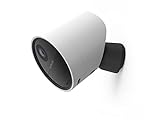
- With 140º field of view, see what happens outside 24/7
- Get alerts whenever someone approaches
- 1080p resolution and 8x zoom lets you see the details
- Color night vision with spotlight lets you see clearly in the dark
- Setup takes 5 minutes—no wiring needed
Features and image quality
The verified specifications include 1080p video, a 140-degree field of view, digital zoom, color night vision, a rechargeable battery, and wired Performance Mode. The camera also has a built-in siren, spotlight, microphone, and two-way audio. SimpliSafe lists an operating-temperature range of -4°F to 122°F. The manufacturer’s Series 2 product page describes the camera and its deterrence features.
1080p is serviceable for seeing people and activity near the camera, but the number alone does not establish how much detail you will get at a distance. Lighting, movement, camera angle, and network conditions matter. Digital zoom also cannot create detail that was not captured in the original image.
Color night vision is most useful where there is some ambient light, such as near a porch or doorway; it should not be read as full-color, long-distance footage in complete darkness. SafeWise reports that in its testing the camera detected motion and captured infrared night vision at about 30 feet, while color night vision was useful at about 10 feet. These are practical estimates from SafeWise’s review, not guaranteed ranges for every mounting location or a claim of testing this review’s author.
Do these 3 things before closing this tab:
1Repair Windows errors before they cause bigger problems2Fix the driver behind crashes, sound loss and screen glitches3Clear out junk files and repair common Windows errorsBattery mode versus wired Performance Mode
In battery mode, the camera sleeps to conserve power. SimpliSafe rates the Series 2 battery for up to three months, but that is a best-case estimate, not a promised interval. Frequent motion events, high sensitivity, repeated live viewing, cold weather, and a busy scene can mean more frequent charging. A camera facing a quiet side yard may be manageable on battery; one covering a driveway or sidewalk may trigger more often. A high mounting point makes every recharge a ladder job.
Wired Performance Mode keeps the camera awake, supports faster live-stream starts, and begins recording when motion is observed while the camera classifies the event. SimpliSafe’s power-mode comparison explains the differences. A solar panel may help where it receives enough direct sunlight, but accessory availability and price can change; confirm them with SimpliSafe rather than assuming they are in stock.
Active Guard: useful, but conditional
Active Guard Outdoor Protection is the feature that most clearly separates this camera from a basic motion camera. Under SimpliSafe’s description, when the system is armed and the camera detects an unknown person during covered hours, an agent may view the live video, speak through two-way audio, and activate the spotlight or siren. In a life-threatening situation, or when requested by the homeowner, SimpliSafe may request priority police dispatch under the program’s conditions.
Rank #2

- Simple to set up. Seriously secure - Get ready to protect right out of the box.
- 1 FREE month of professional monitoring for fast police response when you need it most. With optional monitoring services, our agents keep watch even when you can't, ready to instantly alert emergency responders. All with no long-term contracts or hidden fees. (SimpliSafe products and professional monitoring services are only offered for sale and supported in the US)
- Complete control of your system with the SimpliSafe App - Arm, disarm and protect anytime, anywhere.
- Keep watch outside 24/7 - Outdoor Camera Series 2 has an ultra-wide wide, 140 degree field of view, 1080p HD resolution and color night vision with spotlight so you can see clearly day and night. Wireless and wired installation options available with the included rechargeable battery and outdoor power cable.
- Designed to prevent crime before it happens. With optional SimpliSafe Active Guard Outdoor Protection, the Outdoor Camera uses advanced AI technology to identify potential threats to your home. Then, alerts our team of security agents who use the camera to see the intruder, speak to them directly, sound the built-in siren, and even request police dispatch if needed. Available with select monitoring plans and requires the Outdoor Camera to be wired using the included power cable.
This is not continuous human surveillance of every camera feed, and it is not a guarantee that a crime will be prevented or that police will respond. Coverage hours depend on plan: Pro lists Active Guard from 8 p.m. to 6 a.m. local time, while Pro Plus lists 24/7 coverage. Camera and audio access by agents is governed by SimpliSafe’s Outdoor Monitoring Participant Agreement.
There is a notable trade-off: Active Guard requires Series 2 to be continuously connected to an outdoor-rated power cable and requires Pro or Pro Plus monitoring. In Active Guard mode, the documented settings include 720p video, people-only detection, medium sensitivity, and enabled spotlight and audio. Those fixed settings may suit monitored deterrence, but they offer less control than a buyer seeking customizable detection and maximum resolution might want. The original Outdoor Camera does not support Active Guard.
What it costs to use
The hardware price was not reliably available in the reviewed official material, so check the live U.S. product page for the current price and any temporary promotion. The monthly plan can be the larger long-term expense. SimpliSafe’s U.S. plan documentation listed the following prices on August 18, 2026; annual figures below are simple multiplication of those monthly prices, before taxes, discounts, or changes.
| Option | Monthly price | Approx. annual cost | What it means for this camera |
|---|---|---|---|
| Unmonitored | $0 | $0 | Live feed and app-based arm/disarm, but no camera recordings. |
| Self-Monitoring with Camera Recordings | $9.99 | $119.88 | 30-day recordings for up to 10 cameras; no professional monitoring. |
| Standard | $22.99 | $275.88 | Professional monitoring and app control, but no camera recordings. |
| Core | $32.99 | $395.88 | Professional monitoring, live video, unlimited camera recording, and 30-day cloud storage. |
| Pro | $49.99 | $599.88 | Core features plus overnight Active Guard, 8 p.m.–6 a.m. local time. |
| Pro Plus | $79.99 | $959.88 | Core features plus 24/7 Active Guard coverage. |
Check the current SimpliSafe residential plan comparison before subscribing: plan names, prices, and inclusions can change. In particular, do not assume that professional monitoring automatically means video is saved. Standard includes no camera recordings; the recording-only plan does not include professional monitoring. SimpliSafe advertises monthly plans without contracts, but confirm current terms for your account and location.
Other possible costs include an outdoor cable or power adapter, solar panel, spare battery, installation, and—if you do not already own one—a compatible SimpliSafe system. The installation guide specifies a USB adapter rated at 5V, 7.5W or more, and 1.5A or more, and says the adapter is not included. For Active Guard, plan for safe cable routing and an outdoor-rated power source, not just the camera purchase.
Free tools Windows power users keep installed
One-click scans. No signup required.
Installation and placement matter
For a battery installation, SimpliSafe’s guide calls for its latest-generation Base Station and Keypad, the app, 2.4GHz Wi-Fi, and mounting hardware. The documented tools include a screwdriver for wood or vinyl and a 7/64-inch drill bit for brick, stucco, or tile. Active Guard adds the outdoor cable and power requirements. If the route exposes a cable to weather or tampering, that can undermine an otherwise convenient installation.
Rank #3

- Wired Indoor security camera - See what's happening inside your home. With a wide, 120 degree field of view, 1080p HD resolution and night vision, you can see what's happening at home anytime, anywhere from your phone.
- Get instant phone alerts - The SimpliSafe App notifies you the instant it detects motion so you can see what's happening and take action.
- Keeps you safe - Connect your camera to the latest SimpliSafe security system for award-winning 24/7 whole home protection.
- Faster police response - With video verification, agents can use evidence to verify a break-in and get you priority dispatch for faster police response.* *Vs. non-verified SimpliSafe alarms. Requires Fast Protect monitoring plan with video verification.
- See clearly at night - See who's there, even at night.
SimpliSafe recommends mounting the camera roughly 6 to 8 feet high and angling it slightly downward—about 30 degrees. Avoid mounting upside down: SimpliSafe says stated motion range can fall from around 30 feet to about 15 feet in that orientation. Use Activity Zones to exclude roads, moving trees or flags, hot driveways, and other sources of unwanted alerts. A carefully aimed 1080p camera can be more useful than a higher-resolution camera pointed at the wrong area.
Independent reader supportYour contribution helps us test, update, and keep practical guides available for everyone.Set motion detection to suit the location
In the SimpliSafe app, the documented route is My System → Camera Settings → select the Outdoor Camera → Motion Detection. Turn on Motion Events, choose a Motion Type and sensitivity, then tap Save. The choices include People Only or All Motion, with high, medium, and low sensitivity.
For a battery-powered camera, start with People Only and medium sensitivity. Broaden to All Motion only if you need animals, vehicles, or general activity; extra triggers can mean extra notifications and battery drain. Adjust Activity Zones if the camera repeatedly reacts to an area you do not need to monitor.
Recommended Free Tools
If recordings do not appear
- Confirm the plan includes camera recordings. Unmonitored and Standard do not.
- Check that Motion Events are enabled for this camera.
- Confirm the camera is online and connected to Wi-Fi.
- Review Motion Type, sensitivity, and Activity Zones to ensure the event should trigger.
- Check the camera’s height, downward angle, and orientation.
- Let the camera sleep, then walk through the view to create a fresh test event.
- Check the app timeline and notifications. If the problem persists, verify Wi-Fi strength and contact SimpliSafe support.
A missing recording may be a plan limitation rather than a camera fault—especially on Standard, which provides professional monitoring but no camera recordings. See SimpliSafe’s recording and placement troubleshooting guide.
Who should buy it?
- Existing SimpliSafe owner with a suitable outdoor outlet: The strongest fit. You can use the existing alarm ecosystem, and wired power makes Active Guard possible if you choose Pro or Pro Plus.
- Existing owner without outdoor power: A reasonable add-on if battery operation and periodic recharging work for your location, but do not buy it expecting Active Guard.
- New buyer who only wants one outdoor camera: A weak fit. You also need a compatible SimpliSafe Base Station and Keypad, and useful recording adds a monthly plan.
- Budget-conscious buyer or someone opposed to subscriptions: Look elsewhere if saved clips are essential. Live view without recordings is not equivalent to having a searchable recording history.
- Buyer prioritizing agent intervention: Potentially a good fit if you accept the plan price, arming conditions, coverage hours, wired installation, and Active Guard’s fixed settings.
- Buyer needing local storage, continuous recording, high detail at long distance, or broad third-party compatibility: Compare other systems carefully; the supplied specifications do not establish those capabilities for this camera.
Alternatives to compare
If you want the camera to be part of an existing smart-home setup, compare Ring for a Ring/Alexa household, Google Nest for a Google Home household, and Arlo for a camera-first ecosystem. Wyze is another candidate for a budget-oriented buyer, but review its current storage and subscription terms. These are comparison directions, not a tested ranking; prices, recording policies, local-storage support, compatibility, and monitoring options vary by model and plan. Check each maker’s current camera lineup: Ring, Google Nest, Arlo, and Wyze.
Compare the complete setup rather than the camera sticker price: whether a hub is required, what recording costs, whether clips are stored locally or in the cloud, how battery charging works, and whether the system offers the specific deterrence or professional response you want. For a SimpliSafe customer, integration may justify paying more; for a camera-only buyer, it may not.
Final verdict
The SimpliSafe Outdoor Camera Series 2 earns its keep when it extends a SimpliSafe alarm system and the owner values deterrence and monitored intervention. The most distinctive feature, Active Guard, is also the most constrained: it requires wired outdoor power, an eligible plan, and acceptance of fixed detection and video settings. If you mainly want an inexpensive independent camera, local recording, or no monthly cost, choose a camera built around that use instead.
Quick Recap
Product prices and availability are accurate as of the date/time indicated and are subject to change. Any price and availability information displayed on Amazon at the time of purchase will apply.


Leave a Reply