The Tool Desk
Outbyte Driver Updater FREEFix the driver behind crashes, sound loss and screen glitchesFind Drivers →Outbyte PC Repair FREERepair Windows errors before they cause bigger problemsFix Now →Some links on this page are affiliate links: if you buy through them we may earn a commission, at no extra cost to you.
Clean a Samsung refrigerator water dispenser with a soft, damp lint-free cloth and mild soap, clean only model-approved removable parts, replace the water filter when due, and flush about 2–3 gallons after a new filter or refrigerator installation. Do not force a nozzle, spray liquid into the appliance, or pour bleach, vinegar, or descaling chemicals into the water line unless your exact manual expressly allows it.
The dispenser recess, outlet, filter, reservoir, pitcher, and water line are separate parts. Wiping the visible opening removes surface residue but does not clean or replace the internal filtration system.
Before you start: identify the refrigerator model
Samsung refrigerators differ in nozzle design, drip-tray construction, filter location, controls, and AutoFill features. Find the complete model code on the refrigerator label and use it to open the correct manual through Samsung Support. Check whether your unit has a removable nozzle, removable tray, AutoFill pitcher, or Beverage Center outlet.
Disable the dispenser lock before testing it. If you will remove a component, follow the model manual’s electrical and water-supply instructions; unplug the refrigerator when the manual requires it. Put a towel below the dispenser.
#1 Best Overall

- FRESH FILTERED WATER: Samsung water filters reduce contaminants, giving your family fresh tasting water; Use with your Samsung French Door or Side by Side Refrigerator
- REDUCES CONTAMINANTS: Samsung’s ultra-high-grade carbon block reduces 99% of potentially harmful contaminants
- GENUINE SAMSUNG FILTERS: Samsung filters are designed to work with your refrigerator to avoid the risk of flooding while giving you clean, filtered water; Use our Authentication Tag to make sure your filter is a genuine Samsung filter
- LONG LASTING USE: Samsung refrigerator water filters offer long-lasting use and easy installation; It is recommended to replace your water filter every 6 months
- AVOID WATER DAMAGE: Only Samsung filters are guaranteed to perform correctly with your refrigerator, avoiding the risk of water damage to your fridge and your home
Safe supplies—and what to avoid
Use
- Soft microfiber or other lint-free cloth
- Lukewarm water
- A small amount of mild dish soap for approved removable parts and stubborn residue
- Soft-bristled detailing brush or toothbrush for external crevices
- Clean towel and a large container for flushing
Samsung recommends a moistened soft cloth or paper towel and warns against rough-textured sponges. Apply cleaner to the cloth, not directly to the refrigerator. See the cleaning warnings in the Samsung/Dacor refrigerator manual.
Do not use or do
- Abrasive pads, steel wool, sharp tools, needles, toothpicks, or pipe cleaners in the outlet
- Benzene, thinner, automotive or household detergents, or bleach-based products unless your model manual specifically permits them
- Spray liquid into the outlet, control panel, seams, or door
- Force a fixed nozzle, valve, tray, or cover
- Pour vinegar, bleach, or descaling solution into the water line without model-specific authorization
Step-by-step dispenser cleaning
1. Wipe the dispenser recess and paddle
- Dampen a microfiber cloth with lukewarm water and, if needed, a little mild dish soap.
- Wipe the recess, dispensing paddle or lever, outside of the water outlet, and surrounding door surface.
- Use a soft brush only on accessible external crevices.
- Wipe again with a clean damp cloth to remove soap, then dry completely.
Clean spills immediately. A practical routine is to wipe the recess, lever, outlet, and tray weekly or whenever residue appears; Samsung does not publish one universal U.S. interval for every dispenser component.
Rank #2

- Note: This product is square, not round. Replacement for DA97-17376B (HAF-QIN), not compatible with DA29-00020B (HAF-CIN). The Waterspecialist refrigerator water filter features filtration performance is comparable to the original brand. It is also certified by authority NSF 42 and 372. Far different from generic brand, Waterspecialist only adopts superior coconut shell carbon block to improve taste and odor.
- Great filtration: Waterspecialist refrigerator filters can reduce many harmful substances in water including heavy metals, mercury, chlorine, odor, THM, VOCs (volatile organic compounds), particles, copper, cadmium, chromium, and all other major impurities. This has been tested and proven by an independent third-party laboratory. While the impurities are reduced, every beneficial mineral in your water is kept, ensuring that your body functions properly.
- Premium filter material: Waterspecialist selected BPA-free and food-grade filter housing that passed NSF 372 certification for lead-free filtration. We also adopt natural coconut shell carbon block that contains larger surface area and more micropores. Thus, the filter cartridge can efficiently reduce chlorine, bad taste and odor.
- Perfect fit: Waterspecialist combines precision measurement technology to produce refrigerator filters with exquisite engineering designs, unlike inferior replacement filters that can cause water leakage issues. Also, Waterspecialist saves you time and hassle by offering tool-free refrigerator filter replacements.
- Fresh-tasting water: The natural coconut shell carbon block absorbs more impurities. The Waterspecialist refrigerator filter provides you a unique filtration experience.
2. Remove and clean a nozzle only when the manual allows it
Some Samsung models have a removable nozzle; others have a fixed outlet. One Samsung manual describes holding the nozzle, turning it left while pulling it downward, washing it thoroughly, and reinstalling it fully. That motion is model-specific. If the part does not turn or pull down easily, stop and check the manual rather than forcing it.
Do these 3 things before closing this tab:
1Clear out junk files and repair common Windows errors2Scan for outdated or missing drivers - takes under a minute3Repair Windows errors before they cause bigger problems- Confirm removal is permitted for your exact model.
- Remove it using the prescribed motion.
- Wash with lukewarm water and mild soap, using a soft cloth or brush.
- Rinse completely and dry fully.
- Reinstall until it is fully seated.
Do not insert an object into a fixed outlet. A missing or cracked model-specific nozzle may require an original replacement part; search by model code at Samsung Parts.
Rank #3
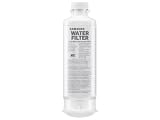
- FRESH FILTERED WATER: Samsung water filters reduce contaminants, giving your family fresh tasting water
- REDUCES CONTAMINANTS: Samsung’s ultra-high-grade carbon block reduces 99% of potentially harmful contaminants
- GENUINE SAMSUNG FILTERS: Samsung filters are designed to work with your refrigerator to avoid the risk of flooding while giving you clean, filtered water
- TO AUTHENTICATE: Use Authentication Tag to make sure your filter is a genuine Samsung filter; 1. Detach Authentication Tag from filter; 2. Place Tag over the back of provided magnet; 3) Green stripes will appear if it’s an authentic Samsung water filter
- LONG LASTING USE: Samsung refrigerator water filters offer long-lasting use and easy installation; It is recommended to replace your water filter every 6 months
3. Clean the drip tray and grate
- Remove the tray or grate only if it is designed to come out.
- Empty standing water.
- Wash with lukewarm water and mild dish soap.
- Brush corners and textured areas softly.
- Rinse, dry completely, and reinstall securely.
If the tray is fixed, wipe it in place. Do not pry it out.
Replace the water filter; do not wash it
A disposable filter is a consumable component, not a washable dispenser part. Samsung recommends replacement about every six months, with earlier replacement when flow becomes significantly slower or water or ice develops a new unpleasant taste or odor. The correct filter must match the refrigerator model; common Samsung families include HAF-CIN, HAF-QIN, and HAFCU1, but they are not interchangeable by name alone. Samsung also recommends genuine filters and warns that an incorrect or incompatible filter can leak or restrict flow. See Samsung’s filter instructions.
Rank #4

- Note: This product is round, not square. Replacement for DA29-00020B (HAF-CIN), not compatible with DA97-17376B (HAF-QIN).
- Replacement for models: Samsung DA29-00020B, DA29-00020A, HAF-CIN, HAF-CIN-EXP, HAF-CINEXP, HAFCIN, 04609101000, 09101, 46-9101, DA-97-08006A, DA97-08006A/B, DA29-00019A, DA2900020A, RF28HMEDBSR, RFG298HDRS, RS25J50, RF263TEAES, RF4287HARS, RS25J500DSR, RS25J500DWW, RF28HFEDTWW, RF26HFENDWW.
- Compatible with Refrigerator Models: RF265BEAESG, RF265BEAESR, RF26HFENDSR, RF26J7500BC, RF26J7500SR, RF26J7500WW, RF28HDEDBSR, RF28HDEDPWW, RF28HDEDTSR, RF28HFEDBBC, RF28HFEDBSG, RF28HFEDBSR, RF28HFEDBWW, RF28HFEDTBC, RF26HFENDBC, RS265TDRS, RS261MDWP, RS261MDBP, RS263TDBP, RS265TDBP.
- The Waterspecialist refrigerator water filter features filtration performance. It is also certified by authority NSF 42 and 372. Waterspecialist only adopts coconut shell carbon block to improve taste and odor.
- Great filtration: Waterspecialist refrigerator filters can reduce many harmful substances in water including chlorine, taste and odor. This has been tested and proven by an independent third-party laboratory.
Flush after a new filter or refrigerator installation
- Install the matching filter according to the model manual. Shut off the water supply first if that manual requires it.
- Put a large container beneath the dispenser.
- Dispense water in batches, emptying the container as needed.
- Continue until approximately 2–3 gallons have passed, or use the different quantity specified by your manual.
- Watch for leaks, sputtering, discoloration, or persistent odor.
- Reset the filter indicator using the button sequence for your exact control panel. Samsung uses different reset paths for standard panels, Family Hub, arrow-button, and older models.
Sputtering immediately after installation commonly reflects trapped air; repeated dispensing can purge it. Do not treat flushing as proof that an internal water line has been sanitized.
Free tools Windows power users keep installed
One-click scans. No signup required.
Cleaning an AutoFill pitcher
An AutoFill pitcher is separate from the door dispenser and may have its own reservoir, valve, and leak points. Remove it and hand-wash it with mild soap and water. Samsung says some AutoFill pitchers are not dishwasher-safe; do not assume dishwasher compatibility. Inspect the pitcher and lid for cracks, and drain the compartment through its rubber drain cap if your model has one. Use the model-specific guidance at Samsung’s refrigerator leak support page if the pitcher leaks.
Best Value

- [Replacement for models] Samsung DA97-17376B, DA97-08006C, HAF-QIN, HAF-QIN/EXP, GF-841, CF-17, AQF-FF45, WS645A, FL-RF45, MB-F45, RWF4200A, PP-RWF4200A-S. Please note it fits DA97-17376B (HAF-QIN), not DA29-00020B (HAF-CIN).
- [Replacement for models] RF28R7351SG, RF28R7201SR, RS27T5200SR, RF23M8070SR, RF27T5201SR, RF28T5001SR, RF28R7201SG, RF28R7351SR, RF23R6201SR, RF28R6201SR, RF27T5241SR, RF22R7351SG, RF22R7351SR, RF24R7201SR, RS27T5200SG, RF28R6301SR, RF23M8090SG, RF28R6241SR, RF27T5201SG, RF29A9671SR, RF28R7201SR/AA, RF28R7351SG/AA, RF28R7351SR/AA, RF23M8070SR/AA, RF27T5201SR/AA, RF28R7201SG/AA, RF28R6201SR/AA, RF24R7201SR/AA, RF23R6201SR/AA, RF28R6241SR/AA, RF28R6301SR/AA, RF22R7351SR/AA, RF22R7351SG/AA.
- NSF/ANSI 42 & 372 Certified: Our fridge filter replacement for the Samsung fridge is NSF/ANSI 42 & 372 certified, ensuring that it is lead-free and safe. Water is purified and that the amount of harmful contaminants while retaining beneficial minerals such as calcium, magnesium, potassium, and sodium. Because these naturally occurring minerals contribute to TDS levels, the reading may not decrease significantly. This is normal and helps maintain fresh-tasting water for everyday drinking.
- Engineered for Reliability: Rigorously tested to withstand high pressure and 100,000 cycles, this leak-free refrigerator water filter guarantees dependable operation and peace of mind against drips or bursts.
- Superior Filtration: Our refrigerator water filter uses activated carbon from Sri Lankan coconuts to effectively reduce chlorine, sand, sediment, rust, and more, delivering clean, better-tasting water, giving you confidence. *Tested by a third-party laboratory.
Diagnose problems that cleaning does not solve
| Symptom | Likely area | First action |
|---|---|---|
| Sticky recess or lever | Surface spill | Wipe with mild soapy water and dry. |
| Slimy or stained outlet | Outlet or removable nozzle | Clean only if the manual permits removal; never probe a fixed outlet. |
| Bad taste after a new filter | Air or carbon fines | Flush approximately 2–3 gallons. |
| Bad taste on an older refrigerator | Expired filter or household supply | Replace the filter, flush, and reassess. |
| Slow stream | Filter, pressure, or kinked line | Check the filter, supply valve, tubing, and any reverse-osmosis system. |
| A few drops for several seconds | Residual water or trapped air | Keep the glass below the outlet for about 3–5 seconds; purge air after filter work. |
| Continuous dripping or pooling | Filter seal, valve, line, or coupler | Stop the supply if necessary and troubleshoot or arrange service. |
| Drip only during ice dispensing | Ice chute or chute seal | Clean and inspect the chute and gasket. |
| No water after moving the refrigerator | Coupler or kinked line | Inspect connections only with the correct manual. |
| Missing nozzle | Model-specific part | Obtain the exact replacement by model code. |
Samsung’s published flow benchmark is about 6 ounces (¾ cup) in less than 10 seconds, and its troubleshooting guidance cites at least 30 psi water pressure. Reverse-osmosis systems can reduce pressure substantially. For filterless testing, Samsung limits the procedure to models manufactured in 2024 and earlier; do not remove the filter as a universal test on 2025-and-newer models. Consult Samsung’s dispenser troubleshooting guide.
If the dispenser will not work
- Check Child Lock or Control Lock.
- Confirm the household water valve is open.
- Look for a kinked or pinched supply line.
- Verify that the filter is the correct part and fully locked.
- If the doors were removed, check the water-line couplers using the manual.
- On applicable models, consider a frozen door water tube, especially if the freezer is unusually cold.
Well-water systems, reverse osmosis, and unusually low pressure may need plumbing diagnosis rather than dispenser cleaning.
When to stop and call for service
- Water continues leaking after the filter is correctly reseated or replaced.
- Tubing, a valve, coupler, or dispenser housing is cracked or damaged.
- Access requires removing a door or disconnecting internal tubing.
- Mold or contamination appears in an inaccessible water path.
- Water reaches electrical controls or the refrigerator trips electrical protection.
- Foul taste or odor remains after a correct filter replacement and adequate flushing.
Use Samsung Support, a qualified appliance technician, or a plumber for supply-pressure, reverse-osmosis, well-water, or water-line work. Samsung’s guidance identifies a few post-dispense drops as potentially normal, but persistent dripping or pooling is not a surface-cleaning task.
Quick Recap
Maintenance checklist
- Wipe the recess, lever, outlet exterior, and nearby door after spills and during routine weekly cleaning.
- Wash an approved removable tray or nozzle whenever buildup appears.
- Replace the filter around every six months, or sooner for slow flow, odor, taste changes, or the filter indicator.
- Flush approximately 2–3 gallons after filter replacement or new installation.
- Check for leaks after any filter work.
- Dump unused ice periodically and inspect the ice chute if dripping occurs during ice dispensing.
Product prices and availability are accurate as of the date/time indicated and are subject to change. Any price and availability information displayed on Amazon at the time of purchase will apply.


Leave a Reply