Some links on this page are affiliate links: if you buy through them we may earn a commission, at no extra cost to you.
A Raspberry Pi can read RFID credentials and control a door, cabinet, or gate, but it is a controller—not a complete or certified access-control product. It suits learning, prototypes, and low-risk private projects. For employee entrances, public doors, valuable assets, or any opening with life-safety requirements, use a properly designed access-control system and qualified installation.
How a Raspberry Pi RFID access system works
The reader supplies credential data to the Pi; software checks that credential against an access policy, records the decision, and briefly activates a relay or protected driver. A separately powered lock then operates. A practical installation may also include an exit button, door-position sensor, buzzer or status LED, tamper input, backup power, and mechanical override.
- Present a card, fob, or tag to a compatible reader.
- Read its data and check authorization locally or through a service.
- Log the result and deny unknown, disabled, or expired credentials.
- For an authorized credential, pulse a relay or driver for a defined interval.
- Monitor the door and return the output to its secure idle state.
“RFID” covers different frequencies and protocols. A common RC522/MFRC522 module is a 13.56 MHz SPI reader; it will not read every badge or proximity card. Check the module documentation and credential type before buying (RC522 module manual).
Recommended Free Tools
Choose the reader for the installation
RC522 / MFRC522
This inexpensive module is a useful learning reader for compatible 13.56 MHz cards and tags. It connects over SPI and has many example projects, but board quality and software compatibility vary. Its short range and common UID-only examples make it a poor choice for high-assurance door access. The open-source pi-rc522 library is a development reference; check its dependencies and compatibility with your specific Pi and OS rather than assuming an old tutorial still applies.
#1 Best Overall
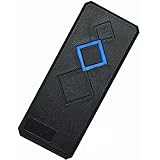
- Card Type: EM-ID Card (Can't support HID, Cobra, APCiK etc)
- Type: EM RFID 125khz reader, Can't work alone, Normally work with Control board/Fingerprint devcie/Master controller to build completely Security Access Control System.
- Support Wiegand 26-Bit and Wiegand 34-Bit; Built-in LED (Double Color LED) and Loud Speaker (Buzzer).
- WatherProof, Water Proof, can Install outside,Small and Beautiful Reader.
- Intput Voltage: DC 9-15V, Can stable running for many years.
PN532
A PN532-based reader offers NFC support and multiple host interfaces, including SPI, I²C, and UART on suitable boards. That flexibility can help with development and a broader set of tags, but the reader alone does not provide secure commercial access control.
Wiegand reader
Commercial Wiegand readers can be a better physical fit for outdoor use, longer cable runs, or keypad-and-card installations. Their D0/D1 outputs need an appropriate protected interface: some readers use 5 V logic, while Raspberry Pi GPIO is 3.3 V. Do not connect potentially 5 V signals directly to GPIO. See the Pi Doors project for its specific warning and example architecture.
Pick a Raspberry Pi
| Board | Good fit | Relevant considerations |
|---|---|---|
| Zero 2 W | One reader, lightweight local decisions, compact or low-power projects | Quad-core 64-bit 1 GHz processor, 512 MB RAM, Wi-Fi and Bluetooth; its 40-pin GPIO footprint is unpopulated unless you buy a pre-headered board or solder a header. Raspberry Pi lists it at $15 and states production is planned until at least January 2030. Product page |
| Pi 4 | Existing projects, USB peripherals, dashboards, or several local services | May be convenient when adapting older examples, but verify current OS and GPIO-library compatibility. |
| Pi 5 | Multiple services or readers, local dashboards, cameras, and integrations | Uses a 2.4 GHz quad-core Cortex-A76 processor. Raspberry Pi recommends a high-quality 5 V, 5 A USB-C supply and says active cooling gives best performance. Its December 2025 published prices were $45 (1 GB), $55 (2 GB), $70 (4 GB), $95 (8 GB), and $145 (16 GB). Specifications · Price announcement |
For a single-reader prototype, a Zero 2 W is often enough. Use a larger board when its processing, connectivity, or peripheral capacity serves a real need. Pi 5 projects in particular should not assume that older RC522 examples using RPi.GPIO will work unchanged; select and verify the GPIO library, reader library, OS release, and board together. Raspberry Pi’s hardware documentation covers GPIO and SPI configuration, but does not establish one universal third-party RC522 software stack.
Wire an RC522 to SPI0
A common SPI0 wiring arrangement is shown below. Module labels vary: SDA, SS, and NSS may all refer to the SPI chip-select pin.
| RC522 module | Raspberry Pi signal | Physical pin |
|---|---|---|
| 3.3V | 3.3 V | 1 |
| GND | Ground | 6 |
| SDA / SS / NSS | GPIO8 / CE0 | 24 |
| SCK | GPIO11 / SPI0 SCLK | 23 |
| MOSI | GPIO10 / SPI0 MOSI | 19 |
| MISO | GPIO9 / SPI0 MISO | 21 |
| RST | GPIO25, one example choice | 22 |
| IRQ | Usually unused | — |
Use the voltage specified for the particular breakout board; common RC522 boards use 3.3 V logic, but clones can differ. Pi GPIO is 3.3 V. Raspberry Pi warns against applying 5 V to 3.3 V components and against connecting motors directly to GPIO (GPIO and SPI guidance). The GPIO pins are for signals, not for powering a strike, lock, motor, or other high-current load.
Rank #2

- ✅ The RFID card reader can't work-alone and it needs to work with Wiegand protocol access controller, such as access control panel, fingerprint device or master controller.
- ✅ Standard Wiegand Communication Protocol - This RFID card reader supports both Wiegand 26 and Wiegand 34 bit output, compatible with most mainstream access control panels.
- ✅ Waterproof Structure - Epoxy potting waterproof design allows wall mounting outdoors or indoors.
- ✅ LED Light & Buzzer Alert - Visible light and sound notification to indicate successful or failed card swiping.
- ✅ Please notice that our wiegand reader can't be compatible with some encrypted cards, such as HID, Indala, Cobra, APCiK, Paradox, Radio, Honeywell, etc.
Prepare Raspberry Pi OS and enable SPI
Install a supported Raspberry Pi OS image, complete first-boot setup, and configure networking before connecting lock hardware. Package names, Python environments, and GPIO libraries can change across OS releases, so treat these as a current setup pattern rather than an eternal recipe.
-
Update the system, then reboot:
sudo apt update sudo apt full-upgrade -y sudo reboot -
Enable SPI with
sudo raspi-config, choose the interface option for SPI, enable it, and reboot if prompted. Raspberry Pi documentsdtparam=spi=onfor configuration-file-based systems; on current installations the file may be under/boot/firmware/, not only the historical/boot/config.txtpath.What’s actually slowing this PC down?
Pick the symptom - the matching free tool is one click away.
Special offer. See more information about Outbyte and uninstall instructions. Please review EULA and Privacy policy. -
Check that the SPI device appears:
ls -l /dev/spidev*A typical result includes
/dev/spidev0.0and/dev/spidev0.1. -
Create an isolated Python environment and install the SPI package:
sudo apt install -y python3-venv python3-pip
python3 -m venv ~/rfid-access-venv
source ~/rfid-access-venv/bin/activate
python -m pip install --upgrade pip
python -m pip install spidev
Choose a GPIO package for the specific board, OS, and reader library. Do not blindly copy old RPi.GPIO installation instructions onto a Pi 5.
Rank #3
 MENGQI-CONTROL Proximity RFID ID Card Door Access Control Keypad Reader 125KHz Wiegand 26/34 Bit Black Color
- Type: EM RFID 125khz Keypad reader, Can't work alone, Normally work with Control board to build completely Security Access Control System.
- Install working in in-door environment, can't expose to rain( If need Water Proof one, Pls contact us)
- Standard wiegand 26 and 34 bit output format for connect to a controller.
- Card Type: 125khz EM-RFID Card/Fob, (Can't support encrypted cards, such as HID, Cobra, APCiK etc)
- Reading range: 3-15 cm, Built-in LED and Loud Speaker (Buzzer)
Test reads before adding access control
Start with a reader-only program. It should report a credential identifier, handle repeated presentation and removal, and never operate a lock. Present a compatible card several times and confirm consistent reads before proceeding. If the reader is not detected, troubleshoot its power, ground, SPI enablement, chip select, reset, wiring, and library compatibility first.
Do not enroll the first card seen as an administrator by default. Make enrollment an explicit, administrator-controlled action that records who or what was enrolled and when, supports revocation, and does not print secrets into general logs.
Store credentials and make an access decision
A small, local SQLite database is suitable for a single-controller prototype. Separate credential records from access events so a credential can be disabled or expire without erasing its history.
CREATE TABLE credentials (
    id INTEGER PRIMARY KEY,
    credential_ref TEXT UNIQUE NOT NULL,
    person TEXT NOT NULL,
    enabled INTEGER NOT NULL DEFAULT 1,
    access_group TEXT NOT NULL DEFAULT 'default',
    created_at TEXT NOT NULL,
    expires_at TEXT
);

CREATE TABLE access_events (
    id INTEGER PRIMARY KEY,
    credential_ref TEXT,
    decision TEXT NOT NULL,
    reason TEXT,
    event_time TEXT NOT NULL
);
The control flow should reject unknown or disabled credentials, record decisions, and activate the output only on an authorized decision:
credential = reader.read_credential()

if credential is None:
    return

record_event(credential, "presented")
entry = database.lookup(credential)

if entry is None or not entry.enabled:
    indicate_denied()
    record_event(credential, "denied", "unknown-or-disabled")
else:
    indicate_granted()
    record_event(credential, "granted", entry.person)
    unlock_for(seconds=3)
This is pseudocode, not a complete door-control application. A real program also needs duplicate-read suppression, clear database-failure behavior, a safe startup output, watchdog recovery, log rotation, and backup and restore procedures. If access depends on time or expiration, define what happens when the system clock is inaccurate.
Quick wins for a faster PC:
Scan for outdated or missing drivers - takes under a minuteDriver Scan →Repair Windows errors before they cause bigger problemsFix Now →Fix the driver behind crashes, sound loss and screen glitchesFind Drivers →Rank #4

- ✅ The RFID card reader can't work-alone and it needs to work with Wiegand protocol access controller, such as access control panel, fingerprint device or master controller.
- ✅ Standard Wiegand Communication Protocol - This RFID card reader supports both Wiegand 26 and Wiegand 34 bit output, compatible with most mainstream access control panels.
- ✅ Waterproof Structure - Epoxy potting waterproof design allows wall mounting outdoors or indoors.
- ✅ LED Light & Buzzer Alert - Visible light and sound notification to indicate successful or failed card swiping.
- ✅ Widely used in factories, houses, residential quarters, offices, mechanical and electrical control equipment and so on.
Test the output without a lock
- Connect a relay input or protected driver, not the lock itself.
- Use an LED, test lamp, or multimeter to establish the idle output state.
- Verify an authorized test credential produces only the intended pulse; a denied credential must not change the output.
- Reboot and shut down the Pi while observing the output. It must not briefly unlock during startup, shutdown, or GPIO initialization.
Connect door hardware with its own power design
The Pi should operate a relay input or suitable driver; the lock needs a separate supply rated for its voltage and current. Select contacts and protection for the specific load. Inductive loads may require appropriate suppression. A project example shows relay contacts switching a separate 12 V lock supply, but that is one project’s wiring—not a universal prescription (example project).
Choose hardware by door and release behavior
Electric strikes, magnetic locks, cabinet locks, and gate operators differ in power, wiring, and release behavior. A normally open or normally closed relay contact does not, by itself, determine whether a door is safe. Confirm what happens on loss of power, controller failure, broken wire, emergency release, and fire alarm for the actual lock and installation.
- Provide an appropriate request-to-exit method and door-position monitoring where the application needs them.
- Plan mechanical override, emergency egress, backup power, and battery monitoring.
- Use protected terminals, an enclosure, strain relief, secure cable routing, and weather protection as appropriate; a breadboard is for testing, not a finished door installation.
- Check applicable local building, fire, accessibility, and electrical requirements. For a real personnel door, involve a qualified access-control installer.
Understand the security limits
A UID list is identification, not strong authentication
A simple program may compare a read UID with a list such as 12:34:56:78. That can demonstrate the full input-to-output flow for a classroom project or low-consequence cabinet. A UID is an identifier, not necessarily cryptographic proof that a trusted credential is present, so do not describe UID matching as secure RFID authentication.
Use stronger credentials for meaningful access control
For personnel access, valuable assets, or business premises, choose credential and reader technology that supports cryptographic authentication, protected key provisioning, and revocation. Consider whether you need distinct administrator roles, tamper detection, audit records, anti-passback, or secure reader-to-controller communication. The Pi can still handle a dashboard, database, or integration while a dedicated reader/controller handles credential authentication.
Do these 3 things before closing this tab:
1Repair Windows errors before they cause bigger problems2Fix the driver behind crashes, sound loss and screen glitches3Clear out junk files and repair common Windows errorsProtect the computer, network, and logs
- Use key-based SSH administration where practical, change default credentials, and restrict management to a trusted network or VPN.
- Do not expose a lock-control API directly to the public internet. Protect a dashboard with HTTPS or a properly configured reverse proxy.
- Keep secrets out of source code, protect logs from unauthorized changes, and apply updates during a planned maintenance window.
- Mount the controller on the protected side of the opening. An exterior reader and its cabling should be treated as replaceable and potentially tamperable.
Plan for faults before installation
| Symptom or event | Likely causes or required behavior |
|---|---|
| Reader does not detect cards | Check reader power and ground, SPI enablement and device, chip select, MOSI/MISO/SCLK, reset, card compatibility, and library support. Investigate electrical noise after the lock output is introduced. |
| One card presentation triggers repeated reads | Wait for card removal, suppress duplicate reads briefly, and define card-present and card-removed states. |
| Pi reboots when the lock activates | Suspect shared or inadequate lock power, voltage drop, relay noise, missing suppression, poor grounding, or high-current wiring routed with reader signals. Separate the lock supply and correct the electrical design. |
| Network fails | Decide whether local credentials keep working, whether enrollment stops, how events queue, and how time-dependent rules behave. A single-door controller should not need cloud connectivity for every local decision. |
| Power fails or the Pi becomes unavailable | Specify the door’s required locked/unlocked behavior, emergency release, mechanical override, backup power, safe shutdown, restart behavior, and a documented manual recovery path. |
| Reader is replaced or tampered with | Keep the controller protected, detect tampering where needed, and avoid relying on a visible identifier as proof of credential authenticity. |
| Database is corrupt, relay sticks, or door is held open | Define a safe failure state, test the fault, and provide a service procedure; a normal successful card read is not enough to validate the installation. |
When a Raspberry Pi is the wrong controller
Use a dedicated access-control controller, with the Pi limited to optional integration or reporting, when the opening is part of a commercial or public building, affects fire egress, requires dependable auditability, controls several doors, or needs vendor-supported operation. Commercial Wiegand or OSDP readers and access controllers may be appropriate, but the right product depends on the site and its requirements. A Pi project should not be presented as commercial-grade or code-compliant merely because it can switch a relay.
For low-power embedded experiments, an ESP32 or Raspberry Pi Pico may be a better fit; for NFC input to a conventional computer, a USB reader may be simpler. Those alternatives do not remove the need to design the lock, power, egress, and security model correctly.
Quick Recap
Product prices and availability are accurate as of the date/time indicated and are subject to change. Any price and availability information displayed on Amazon at the time of purchase will apply.


Leave a Reply