Recommended Free Tools
Some links on this page are affiliate links: if you buy through them we may earn a commission, at no extra cost to you.
LG TVs do not all use the same wall-mount screws. Model-specific LG manuals specify M4, M6 or M8 screws, and the correct length depends on the TV’s permitted thread depth, bracket thickness, washers and any spacers. Find the complete model number and verify its manual before buying or installing hardware. The screws that attach the TV to a bracket are not the same as the fasteners that secure the bracket to the wall.
What “LG mounting screw size” means
Three different kinds of fasteners are easy to confuse:
- TV-to-bracket screws: Metric machine screws that thread into the mounting holes on the TV. These are the VESA screws discussed in this guide.
- Bracket-to-wall fasteners: Structural screws, lag screws or appropriate masonry fasteners chosen for the wall and mount. The mount manufacturer’s instructions govern these.
- Stand screws: Screws for attaching a tabletop stand. They may differ from the VESA screws. LG’s 55LF5700 quick-start guide, for example, distinguishes M5 stand screws from M6 VESA screws (LG 55LF5700 Quick Start Guide).
For a conventional VESA bracket, identify the TV-side screw’s diameter, thread, length, head style and quantity from the exact model’s instructions. A screw that happens to enter the hole is not necessarily safe to use.
Free tools Windows power users keep installed
One-click scans. No signup required.
LG screw diameters: M4, M6 or M8
LG documentation includes all three sizes. The examples below show why a blanket answer such as “LG uses M6” is unreliable. They are examples from LG manuals, not a substitute for checking your own model.
#1 Best Overall

- Packed in a Box:Store and organize mounting accessories in one place. Not only does this box keep screws, washers, and spacers neatly categorized, it also ensures that they are protected, dust-free, and ready to use
- Pre-Divided and Labeled:This TV wall mount hardware kit is pre-divided and labeled, and each screw is clearly labeled with its name and size, and the washers and spacers are separated for your convenience in selection and use
- Wide Application:Our universal TV mount screws are suitable for most TV brands. Whether you need to install or replace, this screw is perfect for TV accessories
- Durable & Strong:Constructed from high-quality materials, these screws and accessories are designed to provide a secure and long-lasting mounting solution for your television or monitor
- All in One Pack:Pack contains a variety of M4, M5, M6, M8 screws, washers and spacers for mounting virtually all TV's up to 80". In case of missing pieces or other problems, we have professionals ready to help. Please buy with confidence
| LG model examples in documentation | VESA pattern | Specified TV-side screw |
|---|---|---|
| 24MT57S | 75 × 75 mm | M4 × L10 |
| 28LX53 | 100 × 100 mm | M4 × L10 |
| 32LX33, 32LX53 and 43LX31 | 200 × 200 mm | M6 |
| 42LX33 and 42LX53 | 400 × 400 mm | M6 |
| 70- and 79-inch UF-series examples | 600 × 400 mm | M8 |
| 55LF5700 | 400 × 200 mm | M6 |
The examples are drawn from LG owner’s manuals and model documentation, including the 24MT57S manual, LX-series manual, UF-series manual, and LM-series manual. Many LG VESA tables specify four screws, but follow the quantity in your TV and mount instructions. Proprietary or gallery-style mounts may use a different attachment arrangement.
“M” denotes a metric thread family; the number is its nominal diameter in millimeters. M4 is nominally 4 mm, M6 6 mm and M8 8 mm. The designation does not tell you the screw length: M6 × 20, for example, is an M6 screw with a nominal 20 mm length. Metric and imperial screws are not interchangeable just because their diameters seem close.
Find the exact model number first
- Read the model label on the rear of the TV. If the set is already mounted, check the original box, receipt or purchase record.
- If available, open the TV’s support or product-information area to view its model information.
- Record the entire model designation, including regional or retailer suffixes. Similar-looking names can refer to different variants.
- Search LG Support for that complete designation and open its model-specific manuals and guides.
LG support pages provide model-specific documents; for example, see the OLED77G5WUA support page. Manual availability, product versions and accessories can vary by country, so use the support site for the region and exact variant of your TV.
Rank #2

- Come with a Box: Store and organize mounting accessories in a box. Not only does this box keep screws, washers, andspacers neatly categorized, it also ensures that they are protected and ready to use
- Wide Range of Compatibility: Suitable for most TV and monitor, includes replacement screws for various models to ensure fit
- 92Pcs Pre divided and Labeled: Contains M4 M5 M6 and M8 screws washers and spacers totaling 92 pieces for easy selection and use
- Strong and Durable: Made of good materials to support TVs and monitors up to 80 inches for a secure and long-lasting mount
- Service: Our screws are designed to provide sturdy support for TV and monitor mount. In case of missing pieces or other problems, we have professionals ready to help. Please buy with confidence
Read the VESA information without confusing it with screw size
A VESA pattern is the horizontal-by-vertical distance between the TV’s threaded mounting holes, measured in millimeters. Common patterns include 75 × 75, 100 × 100, 200 × 200, 300 × 200, 300 × 300, 400 × 400 and 600 × 400. A 300 × 200 pattern means the holes are 300 mm apart horizontally and 200 mm vertically; it does not specify the screw diameter or length.
VESA dimensions help determine whether the mount plate matches the TV. They do not establish how far a screw may enter the TV, how thick the plate is, or whether spacers are required. Two TVs with the same screen size—or even the same VESA pattern—may need different hardware.
LG’s U.S. product pages for 2025 OLED models illustrate that patterns vary by model and size. The G5 listings give 300 × 200 for 55 inches, 300 × 300 for 65 and 77 inches, 400 × 400 for 83 inches, and 600 × 400 for 97 inches; the C5 listings give 300 × 200 for 42- through 77-inch models and 400 × 400 for 83 inches. These are product-page compatibility details for those listed products, not a rule for all LG generations or regional variants. See LG’s G5 product page and C5 product page.
Rank #3

- 【ALL IN ONE PACK】Our tv wall mount screws kit is packed in a box, so each component can be identified and kept in place when not in use. Includes M4, M5, M6, and M8 screws, plus washers and spacers, covering the common sizes used in TV/ monitor wall mount installation.
- 【WIDE TV COMPATIBILITY】Designed for TV wall mount applications and compatible with most TVs and monitors up to 80 inches. Works with common mounting patterns.
- 【MULTI-SIZE CONFIGURATIONS】Multiple screw lengths and spacer thicknesses are provided to accommodate different TV back panel depths and mounting configurations.
- 【EASY SIZE IDENTIFICATION】Each compartment in the storage box is labeled by screw size and component type, allowing quick identification during installation.
- 【MOUNTING HARDWARE KIT】Includes screws, washers, and spacers for use with compatible TV/monitor wall mounts. The soundbar or TV itself is not included.
Where to verify the exact screw specification
Use sources in this order:
- The model’s Owner’s Manual: Search for “Mounting on a wall,” “VESA,” “standard screw,” “wall mount,” “number of screws,” “screw length” and “spacer.”
- The Quick Setup Guide or wall-mounting diagram: Check whether it gives a separate screw specification or a warning about depth.
- The instructions for your specific LG or third-party mount: Confirm the mount’s compatible pattern, supplied hardware and assembly requirements.
- LG product support or customer service: Ask about the exact model and regional suffix if the documents do not settle the question.
- Existing hardware or thread measurement: Use it as a cross-check only, not as the primary authority. A previous installation may have used the wrong screw.
Older LG manuals may put model, VESA dimensions, standard screw, screw quantity and recommended mount in one table. An example is the LG UF-series owner’s manual. Do not assume the length is listed in every manual; if it is not, seek the model-specific mount instructions or confirmation from LG rather than estimating.
Crashes, No Sound, or Screen Glitches?
Random freezes, missing sound and display glitches usually trace back to one bad driver. Find and replace yours safely.Free scan · under a minutePC Slower Than It Used to Be?
A free scan shows the junk files, broken settings and background clutter dragging Windows down - then fixes them in one click.Free scan · Windows 10 & 11Choose screw length from the complete stack
The bracket and any hardware between it and the TV consume part of the screw’s length. Use this stack-up as a check:
Required screw length = bracket thickness + spacer thickness + washer thickness + permitted thread engagement inside the TV.
Rank #4
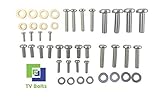
- Set of screws/ bolts and washers to wall mount any LG flatscreen TV
- Zinc plated steel with ESD discharge preventive
The permitted thread engagement, or maximum insertion depth, must come from the model’s instructions or LG’s mount guidance. The formula is not permission to exceed that depth: the TV’s stated maximum governs. If the manual gives a screw length for a specific supplied bracket, do not transfer it automatically to a thicker universal plate.
- A recessed mounting area may need a spacer; adding one changes the required screw length.
- A soundbar adapter or other plate adds thickness to the stack. Use it only if the combined arrangement remains within the TV’s permitted depth.
- Washers supplied with the mount also affect how much screw reaches the TV.
- A screw that is too short may not engage enough threads. One that is too long can bottom out or damage internal components.
Never pick the longest screw in a universal kit, add spacers without recalculating, or keep tightening a screw that has stopped. LG manuals warn that an excessively long or improper screw can damage the product; see the 24MT57S owner’s manual.
Do these 3 things before closing this tab:
1Fix the driver behind crashes, sound loss and screen glitches2Repair Windows errors before they cause bigger problems3Scan for outdated or missing drivers - takes under a minuteStandard VESA, supplied LG mounts and Gallery-style installations
A standard VESA installation uses a compatible plate attached to the TV’s threaded holes. An LG-supplied or proprietary wall mount may instead require model-specific hardware, brackets, spacers or cable routing. Do not assume that screws supplied with a generic plate can replace the hardware for a flush-fit or Gallery-style system.
Best Value

- UNIVERSAL COMPATIBILITY: This product is a whole package of screws with washers and spacers. It includes M4, M5, M6, and M8 TV screws and spacers up to 80" TV, including curved TVs.
- 68-PIECE SET: Our hardware kit was designed to maximize compatibility between all types and brands of TV such as Samsung LG curved TVs.
- ALLOY STEEL HARDWARE: The 68 pieces include all shapes/ sizes of screw, washers, and spacers, our complete set of pre-divided hardware ensures your installation to be easier, along with washers and spacers for use with compatible TV mounts.
- EASE OF USE: The size of all the screws shown on the package, it is easier for people to figure out easily what they need to use. Ideal for mounting new TVs, replacing lost or damaged original screws, or adding spacers for better cable management.
- PACKAGE INCLUDES: 1 x WALI UVSP Package, User Manual
LG’s G5 product information lists compatible LG brackets by configuration and describes a supplied wall-mount arrangement for the product. Check the page and the instructions for your exact size and variant rather than extrapolating to another G-series generation. The LG G5 product page distinguishes mount compatibility information from the VESA arrangement.
Independent reader supportYour contribution helps us test, update, and keep practical guides available for everyone.Safe installation sequence
- Verify the model and instructions. Record the VESA pattern, screw diameter and length or depth limit, quantity, and any spacer requirements.
- Verify the mount and wall separately. Confirm the bracket supports the TV’s pattern and weight. Identify the wall construction and select wall-side fasteners according to the mount maker’s instructions; TV VESA screws are not wall fasteners.
- Prepare the TV. Work with a second person where size or weight makes handling difficult. Place the screen face-down only on a clean, soft, flat, padded surface, following the TV instructions.
- Assemble the TV-side stack. Position the bracket, washers and any required spacers as instructed. Confirm that the plate will not press on the housing or obstruct cables.
- Start every screw by hand. Each should turn freely for several turns. If one resists, stop and check alignment, diameter and thread; do not force it with a drill.
- Tighten carefully. Follow the mount maker’s stated torque if provided. Otherwise tighten by hand without over-tightening; do not use an impact driver.
- Secure the wall plate. Use fasteners suited to the actual wall structure and the mount instructions. LG’s TV wall-mounting guidance calls for considering wall type and suitable anchors.
- Hang and check the TV. With appropriate help, engage the TV and mount as directed, confirm it is locked, level and secure, and check that cables are not pinched or under pressure.
LG recommends professional installation where conditions warrant it. Its OLED mounting guidance is relevant for OLED-specific precautions. Uncertain wall structure, large displays, unusual masonry or a proprietary mount are good reasons to use a qualified installer.
Troubleshoot a screw that does not fit or tighten
| Symptom | Possible causes | Safe response |
|---|---|---|
| Screw will not start by hand | Wrong diameter or pitch; poor alignment; a plug, transport screw or old hardware remains in the hole | Stop. Check the manual, clear only identified removable obstructions, align the plate and verify the screw. Do not force it with a drill. |
| Screw starts but stops quickly | Screw may be too long and bottoming out; bracket may be too thick; a spacer may be missing or misplaced; insert may be damaged | Remove it and inspect the stack and permitted depth. Do not tighten through resistance. |
| Screw head tightens but bracket stays loose | Screw may be too short; spacer or washer combination may be wrong; plate may not sit flat | Support the TV, remove the hardware and verify the complete assembly against both sets of instructions. |
| Screw spins without tightening | Stripped threads, damaged captive insert, wrong pitch or cross-threading | Stop. Do not substitute a larger screw or enlarge the hole; contact LG or a qualified repair professional. |
| Bracket blocks a port or presses on a cable | Plate position, spacer arrangement or mount shape is unsuitable | Do not force the TV against the bracket. Reposition or choose a compatible mount while preserving the permitted screw depth. |
Replacement hardware and common shortcuts to avoid
A universal metric TV-mount kit can be useful when original hardware is missing, but an assortment is not proof of compatibility. Check that its listing identifies screw diameters, lengths and metric thread pitch, and includes suitable head styles, washers or spacers if your mount requires them. Verify the chosen pieces against the LG manual and mount instructions.
What’s actually slowing this PC down?
Pick the symptom - the matching free tool is one click away.
- Do not assume every LG TV uses M6, every 55-inch set uses M6 × 20, or every OLED shares the same screw specification.
- Do not treat VESA spacing as the screw size, or a correct diameter as proof that length is safe.
- Do not reuse stand screws for wall mounting unless the model’s instructions expressly specify them for that purpose.
- Do not use drywall screws or random wood screws in the TV’s threaded inserts.
- Do not assume a generic VESA plate preserves the fit, cable clearance or appearance of an LG Gallery-style installation.
- Do not rely on drywall anchors alone for every TV and wall. Wall-side support depends on the wall, mount and load.
- Do not assume tightening harder makes an installation safer.
When to use a professional
Choose a qualified installer if the TV-side insert is damaged, you cannot verify the permitted screw depth, the mount is proprietary and its instructions are unclear, or the wall’s structure and suitable fasteners are uncertain. Professional help is also prudent for large or heavy displays, difficult masonry, or a lift that cannot be managed safely. LG’s mounting guidance addresses wall conditions and recommends professional installation where appropriate: LG TV wall-mounting steps.
Quick Recap
Product prices and availability are accurate as of the date/time indicated and are subject to change. Any price and availability information displayed on Amazon at the time of purchase will apply.


Leave a Reply