The Tool Desk
Outbyte Driver Updater FREEFix the driver behind crashes, sound loss and screen glitchesFind Drivers →Outbyte PC Repair FREERepair Windows errors before they cause bigger problemsFix Now →Some links on this page are affiliate links: if you buy through them we may earn a commission, at no extra cost to you.
A Raspberry Pi can run access-control software, connect readers, make local authorization decisions and integrate door events with building systems. It is best treated as a flexible edge controller or gateway—not as a complete, certified door-control system. For a prototype or a carefully engineered small deployment, it can be useful; for high-consequence doors, life-safety interfaces or a building that needs turnkey support, a purpose-built access-control panel is usually the stronger choice.
What role should the Raspberry Pi play?
Start by deciding what the Pi is responsible for. That boundary determines the hardware, security controls, failure behavior and maintenance burden.
Standalone door controller
The Pi reads credentials, checks permissions and commands a lock interface. This can suit a prototype, makerspace, laboratory or a small, controlled indoor installation where the operator can maintain Linux devices and has an acceptable outage plan. It also places authorization and door behavior on a general-purpose computer, so storage failure, software defects, exposed services or poor credential handling can affect entry.
Quick wins for a faster PC:
Scan for outdated or missing drivers - takes under a minuteDriver Scan →Repair Windows errors before they cause bigger problemsFix Now →Edge gateway
The Pi connects an existing access-control panel to property-management software, an intercom, building automation or a visitor platform. This is often the more defensible production role: the purpose-built panel continues enforcing door rules, while the Pi handles integration and local services.
#1 Best Overall

- Pan Tilt Kit: Specifically designed for a broader view on raspberry pi camera V3/V2/V1 and Arducam 16mp/64mp/Mini HQ cameras.
- More Coverage: Free 180° panning and tilting in a smaller PT bracket. Work with all Raspberry Pi models, as well as on Jetson Board and other platforms (RPi demo only).
- Customized Control Board: I2C controlled, outputs the PWM signals to drive the servo motors directly, allowing the camera can be mounted in the base bracket. Only simple wiring for use.
- Mini Digital Servos: Two GH-S37D digital servos for a faster speed, higher torque and better holding capability (than analog servos).
- You'll be Getting: 1 set pan tilt bracket kit, 2 digital servo motors, a PTZ controller board (with 4 jumper wires), and a pack of screws.
Credential and event gateway
A Pi can collect reader events, translate protocols and forward records to a central service. That does not mean it controls access. Be precise about whether it only reports a credential, recommends a decision, or directly enforces authorization at the door.
Development platform
For a pilot, it can help validate reader compatibility, credential workflows, door-state logic, offline rules, event formats and software integrations before committing to a larger system.
A RealPage/Stratis IoT deployment discussed a Raspberry Pi 4 in a multi-dwelling building access-control application. The account reports a 16-door application and describes GPIO capacity, relay interfacing, scaling, reliability and fail-safe/fail-secure behavior as design considerations; it is an example implementation, not a universal Pi specification. Read the deployment discussion.
Reference architecture: keep the lock power separate
A typical system has a reader provide a credential event to an interface; software evaluates that event; a separate, isolated access-control interface switches the lock circuit. Door contacts and exit devices provide feedback. The Pi’s GPIO is a logic-level interface, not a power output for an electric strike, maglock or gate operator.
Credential → Reader → Reader interface → Raspberry Pi
                                      (local authorization, event log,
                                       watchdog, network client)
                                      → Isolated access-control interface
                                      → Lock power supply → Lock

Door-position sensor ─┐
Request-to-exit device ├──→ Pi or supervised access module
Emergency release ───┘
Use a dedicated, appropriately rated lock supply and an interface designed for the electrical load. The Pi should not be able to compromise the lock circuit through an improvised connection. In the cited deployment, an external voltage relay board was used; that does not establish a general wiring design for other doors.
A door system also needs more than a credential and an unlock relay. Consider door-position monitoring, forced-open and held-open detection, request-to-exit input, lock-state feedback where available, manual override, emergency release, tamper detection and event logging.
Rank #2
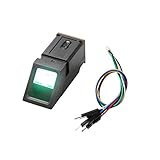
- It's an Optical Fingerprint Reader Sensor, green light.
- It is composed of software and hardware such as optical fingerprint sensor, high-speed DSP processor, high-performance fingerprint comparison algorithm, and large-capacity Flash chip.
- Simple usage: The fingerprint sensor module can work with any microcontroller with serial port.
- Function: It has stable performance and complete functions, and has various functions such as fingerprint collection, fingerprint registration, fingerprint comparison, and fingerprint search.
- Application: Fingerprint door locks, safes, finance and other security fields; identification in access control systems, industrial computers, POS machines, attendance, driving trainingand other fields; fingerprint payment, software management, authorization and other management fields.
Choosing the Raspberry Pi hardware
Raspberry Pi 5
The Pi 5 product brief lists a quad-core 2.4-GHz 64-bit Arm Cortex-A76 processor, dual-band 802.11ac Wi-Fi, Bluetooth 5.0/BLE, Gigabit Ethernet, a 40-pin GPIO header, USB 3 and USB 2, and USB-C power. It lists an operating temperature range of 0–70 °C and production commitment through at least January 2036. Optional PoE+ requires a separate HAT; an optional real-time-clock battery is also available. These are board specifications, not environmental or lifecycle guarantees for an assembled access-control product. See the Pi 5 product brief.
Free tools Windows power users keep installed
One-click scans. No signup required.
Raspberry Pi’s installation documentation recommends a 5 V/5 A supply for Pi 5; with a 5 V/3 A supply, peripheral current is limited to 600 mA. Account for reader, storage and other USB loads, but do not treat the Pi supply as the lock supply. Check the installation and power guidance. The official product page currently labels Raspberry Pi OS “Trixie” as current and “Bookworm” as the legacy version compatible with Pi 5; OS labels can change, so confirm what the page says when selecting an image. Check the Pi 5 product page.
Raspberry Pi 4, Compute Module and Pi Zero
A Pi 4 may have enough capacity for a small controller or gateway; the cited RealPage/Stratis example used one. Raspberry Pi business materials state different product lifetimes across models, so check the applicable lifecycle information before designing a long-lived installation. Review Raspberry Pi business hardware information.
For a repeated product deployment, a Compute Module and a purpose-designed carrier can provide a more controlled mechanical and electrical integration than a loose desktop board. Neither the module nor a carrier automatically certifies the finished access-control system. A Pi Zero-class device may suit a narrow gateway role, but is not a default choice for a security-critical multi-door controller if it lacks the required interfaces, storage resilience or headroom.
Budget for the complete installation
The board is only one component. A working installation may also need readers and credentials, lock hardware, an isolated relay or access module, door contacts, request-to-exit devices, lock power, battery backup, enclosure, surge protection, network equipment, software, installation, monitoring and ongoing maintenance. Compare total installed and operating cost rather than the Pi board price alone.
Choosing credentials and readers
NFC and RFID
“RFID” covers different technologies, including 125-kHz proximity cards and 13.56-MHz credentials. NFC phones and tags, MIFARE-family products, secure smart cards and proprietary facility credentials are not interchangeable security designs. A reader that reports a card’s visible identifier does not necessarily authenticate a secure credential: UID-only acceptance can be cloned or replayed in some deployments. Prefer authenticated credentials with protected keys, a revocation process and a reader ecosystem that supports them.
Rank #3

- IoT Starter Kit for Beginners: The SunFounder Raspberry Pi Pico W Ultimate Starter Kit offers a rich IoT learning experience for beginners aged 8+. With 450+ components, 117 projects, and expert-led video lessons, this kit makes learning microcontroller programming and IoT engaging and accessible, RoHS Compliant
- Expert-Guided Video Lessons: This kit includes 27 video tutorials by the renowned educator, Paul McWhorter. His engaging style simplifies complex concepts, ensuring an effective learning experience in microcontroller programming
- Wide Range of Hardware: The kit includes a diverse array of components like sensors, actuators, LEDs, LCDs, and more, enabling you to experiment and create a variety of projects with the Raspberry Pi Pico W
- Supports Multiple Languages: The kit offers versatility with support for three programming languages - MicroPython, C/C++, and Piper Make, providing a diverse programming learning experience
- Dedicated Support: Benefit from our ongoing assistance, including a community forum and timely technical help for a seamless learning experience
Keypads
PINs avoid badge issuance, and temporary codes can be convenient for shared spaces. Codes can be observed, shared or retained too long; static PINs also provide weaker accountability. Limit who can issue codes, set expiry dates, avoid shared master codes and review how emergency credentials are controlled.
Bluetooth and mobile credentials
Digital issuance and revocation can simplify administration, but phone battery state, app behavior and Bluetooth proximity can create edge cases. The service may also depend on a vendor identity platform. A phone identifier alone should not be treated as a cryptographically authenticated credential.
QR codes and biometrics
QR codes can work for visitors, deliveries or events, especially when tokens are time-limited. They are a weaker fit for exposed, high-security entrances or for offline revocation unless the token and verification design address those risks. Biometric systems require attention to privacy, consent and local law, accessibility, false accepts and rejects, template protection and spoof resistance; provide an alternative access method. Camera-based facial recognition is not a simple general-purpose Pi add-on for building entry.
Connecting a reader: GPIO is not a universal reader interface
Choose the interface the reader and access design actually support. Do not connect unknown reader wiring directly to GPIO or assume that a protocol’s signal is safe for the Pi’s pins.
- GPIO: Useful for simple switches and low-speed signals such as door contacts, when voltage, protection and wiring are appropriate.
- UART or serial: Used by some reader modules and peripherals; verify voltage levels and the device’s documented protocol.
- USB: Convenient for supported reader hardware and bench development.
- Wiegand: Common in legacy access installations, but limited compared with modern authenticated communication. Use a suitable interface adapter rather than improvised level conversion.
- OSDP: A bidirectional reader protocol that can support supervision and encrypted communication when the devices and configuration support those features. Use an appropriate interface.
- Ethernet or vendor API: Useful for networked readers and integration with an existing panel. Segment and authenticate network connections; if a panel already makes the security-critical decision, an API is often a sensible integration boundary.
Before wiring, confirm logic voltage, pull-up or pull-down behavior, current limits, cable length, shielding and grounding, surge and ESD exposure, environmental conditions, shared power arrangements and what happens electrically if the Pi fails. Never connect a 12-V output to a Pi GPIO, an inductive lock to a GPIO pin, or an unverified relay board to a production door.
Build a bench prototype before touching a building door
The following is a development sequence for a low-voltage bench setup, not an installation procedure for a life-safety door. Use a test lock or relay load and keep building fire-alarm, emergency-release and live door wiring out of the prototype unless a qualified professional has reviewed the design.
Rank #4

- ❤ Supports 10,000 large user capacity. Supports RFID Cards, Password, RFID Card plus Password, Tuya APP verification mode. The door can be set normally open mode.
- ❤ Supports Wifi Tuya. You can use the Tuya APP to add users, open the door, view unlock records, it is very convenient. Tuya APP supports Chinese, English language.
- ❤ Working with 125KHz and 13.56MHz dual frequency, can set management card. All programming can be done on the keypad and Tuya APP, don't need any software.
- ❤ Made of high quality plastic, touch screen panel. The access control keypad is IP68 waterproof, can be used outside. Has a door bell button. Has backlight, work indicating light, very convenient to use even at dark.
- ❤ NC type (fail safe type) Electric strike lock, the door will locked when power turn on, unlocked when power turn off. Very suitable for wooden door, metal door.
- Prepare the platform. Use a Pi 4 or Pi 5, an appropriate power supply, reliable boot media, an enclosure and cooling suited to the test environment, and Ethernet for initial setup. Raspberry Pi boards require separately supplied boot media. Use Raspberry Pi Imager to install a supported OS image, then configure a hostname, non-default user, SSH key authentication, network, locale and time zone. Follow the current installation guidance.
- Update and harden. On a Debian-based Raspberry Pi OS image, a typical package update sequence is
sudo apt update,sudo apt full-upgrade, thensudo reboot. Confirm package behavior for the image in use. Raspberry Pi documentsraspi-configfor supported configuration tasks; some hardware changes require a reboot. See Raspberry Pi computer documentation. - Connect a supported reader. Start with a USB or serial reader documented to work with Linux. For Wiegand or another field interface, use an appropriate protected adapter and confirm electrical compatibility.
- Add door-state inputs and a test output. Wire a door-position contact, request-to-exit input, lock-command output and, where available, lock-state feedback. Add a tamper input if the enclosure is part of the test.
- Implement a bounded authorization path. Parse and validate the reader event, check status, time window and door permission, record the result, then issue a time-limited command to the isolated test interface. Monitor door state and raise an alert for forced-open or held-open conditions.
- Define and exercise failure behavior. Test power loss, network and server outages, invalid, expired and revoked credentials, reader disconnect, relay fault, clock changes, storage corruption, unexpected reboot, emergency release and simultaneous requests. Record the expected result and observed result for each case before considering a pilot.
Design software and offline behavior deliberately
A minimal authorization record can include a credential identifier, person or account reference, authorized door, permission, validity start and end, revocation status and last-seen time. Avoid retaining raw card secrets or unnecessary personal information.
What’s actually slowing this PC down?
Pick the symptom - the matching free tool is one click away.
Decide in advance what the controller does if the central service or WAN is unavailable, the clock is untrusted, the local database is damaged, or a reader or relay stops responding. One option is a signed, time-limited local authorization cache. That preserves some local operation but creates a revocation window: a centrally revoked credential may remain accepted until the cached authorization expires. The cache’s signature verification, expiry, clock trust and refresh behavior must be tested; offline operation should not be an accidental result of a lost connection.
Protect the management plane as well as the reader path. A practical baseline includes SSH key authentication where feasible, disabling unused services, a firewall, a dedicated management or building-automation VLAN, restricted outbound access, TLS for server communication, secrets kept out of source code, least-privilege service accounts, authentication and authorization logs, a tested recovery image and monitoring for disk capacity, temperature, time synchronization and service health.
Independent reader supportYour contribution helps us test, update, and keep practical guides available for everyone.Power, storage and serviceability
Power and backup
Size the access-control power supply for lock inrush, reader draw, interface loads, cable voltage drop and backup needs. Consider surge protection, grounding and emergency-release circuits. A separate PoE+ HAT can power a Pi 5 from a suitable network supply, but it does not provide the supervised lock power or battery backup a door may require. Raspberry Pi’s documentation describes product compliance testing and a compliance-support program; that does not certify a finished access-control system or its installation. Read Raspberry Pi’s compliance information.
Storage and recovery
Continuous event logging makes a single microSD card a potential failure point. Depending on the design, consider higher-endurance storage, reducing or shipping logs, database rotation, a more resilient boot medium where supported, and tested backup and restore procedures. Keep a replacement image and configuration backup separate from the device.
Recommended Free Tools
Monitoring and maintenance
Use service supervision, health checks, remote monitoring, local status indicators and a documented replacement procedure. Plan patch windows, configuration versioning, audit review and a spare-hardware strategy. A controller that can operate a lock but cannot reliably report its own failure is not operationally complete.
Best Value

- The module use a voltage of 3.3V, it can connected communication with user's any CPU mainboard through several lines of SPI interface, it can ensure stable and reliable work, and reader distance.
- Current: 13-26mA/DC 3.3V; Idle Current: 10-13mA/DC 3.3V; Data Transfer Rate: Max.10Mbit/s; Power Voltage: 3.3V; Operating frequency: 13.56MHz, MFRC522 Supports MIFARE series higher-speed contactless communication, bidirectional data transmission rate up to 424kbit/s
- RFID RC522 Module is a better choice for the development of smart meters and portable handheld devices, the module can be directly loaded into the various reader molds.
- RC522 is a highly integrated contactless (13.56MHz) card reader chip, applicable for the user who need to design or manufacture the RF card terminal.
- The module can connected communication with user's any CPU mainboard through several lines of SPI interface, it can ensure stable and reliable work, and reader distance
Fail-safe, fail-secure and emergency release
A fail-safe lock releases when power is removed; a fail-secure lock remains secured when power is removed, subject to the specific hardware and egress design. Those labels do not determine whether an installation is suitable: the decision depends on the door, occupancy, lock hardware, emergency release, fire and life-safety requirements, jurisdiction and authority having jurisdiction. Egress requirements still apply when entry is secured. Do not copy a universal wiring diagram or let a prototype determine behavior for an occupied building.
The RealPage/Stratis industry discussion identifies UL 294 and local requirements as considerations, but it is not a complete certification or legal analysis. Have the door and electrical design reviewed by qualified access-control and life-safety professionals and the relevant local authority. See the cited industry discussion.
Scaling beyond a single door
One Pi 4 implementation described in the cited account handled 16 doors and discussed a 26-entry/exit-point GPIO-related ceiling for that design. That is not a universal Raspberry Pi door limit: readers, contacts, request-to-exit devices, relays, expansion modules and software all affect capacity. Read the implementation account.
Windows Errors? Fix Them Before They Spread
Repair common Windows errors and clear accumulated junk for a smoother, more stable PC - no reinstall needed.Free scan · no reinstallOutdated Drivers Are Slowing You Down
One free scan finds every outdated or missing driver and matches the right update for your exact hardware.Free scan · exact hardware matchFor more than a few doors, consider distributed door controllers, supervised I/O expansion, RS-485 or Ethernet-connected controllers, and a central policy service that distributes locally cached authorization. Separate controllers by building or riser where that improves fault containment, and add hardware watchdogs and supervisory monitoring. Count every input and output requirement before treating GPIO as a capacity plan.
Choose the controller that matches the risk
| Criterion | Raspberry Pi architecture | Commercial access-control panel |
|---|---|---|
| Customization | High; software and integrations are yours to build and maintain. | Usually bounded by the vendor’s ecosystem. |
| Initial hardware cost | The board may cost less, but the complete installed cost is not established by the board price alone. | Typically higher hardware cost; compare the whole deployment and support package. |
| Software and administration | Requires development or integration work, plus patching and monitoring. | Often includes administration tools and centralized management. |
| Offline behavior and supervised I/O | Must be designed, implemented and tested with suitable additional hardware. | Often part of the controller architecture; verify the specific product. |
| Certification and support | The integrator or product maker owns the assembled system’s validation and support. | May offer a documented certification path, installer support and formal service; verify scope and terms. |
| Best fit | Prototype, custom edge solution or gateway around an existing panel. | Standardized production deployment where support, commissioning and lifecycle matter. |
Choose a microcontroller or industrial controller instead
A microcontroller can be a better fit for deterministic lock timing, low power, rapid startup and a smaller attack surface. A Pi is stronger for databases, web interfaces, TLS-heavy integrations, dashboards and complex business rules. A hybrid design can use a dedicated module or microcontroller for real-time door I/O and the Pi for policy, integration and event handling.
Choose an industrial controller or computer where electrical noise, harsh conditions, deterministic I/O, formal support or a long service life are central requirements. For high-security perimeters, hospitals, airports, prisons or other high-consequence environments, do not rely on a custom Pi architecture without a professionally engineered and appropriately certified system.
Compliance and project review
Board-level compliance documentation does not establish that an assembled access-control product, wiring plan, lock installation or building deployment meets a particular certification or code. Requirements vary by location, occupancy, door type and authority having jurisdiction. Get professional review for emergency egress, fire-alarm interfaces, fail-safe/fail-secure behavior, accessibility, electrical code, biometric and tenant-privacy rules, video surveillance, credential retention, cybersecurity obligations, insurance, inspection and product certification.
Do these 3 things before closing this tab:
1Fix the driver behind crashes, sound loss and screen glitches2Repair Windows errors before they cause bigger problems3Scan for outdated or missing drivers - takes under a minuteQuick Recap
Product prices and availability are accurate as of the date/time indicated and are subject to change. Any price and availability information displayed on Amazon at the time of purchase will apply.


Leave a Reply