Some links on this page are affiliate links: if you buy through them we may earn a commission, at no extra cost to you.
Some Google Nest owners may qualify for a complimentary Nest Power Connector, but it is not a universal free accessory for every thermostat owner. Google’s current support guidance ties the offer to a Google Home setup or power test that reports a Nest Power Connector is needed. If you see that warning, follow the in-app offer or contact Google support. If you do not, the ordinary Google Store listing should not be assumed to be free.
What the Nest Power Connector does
A Nest Power Connector is a power accessory for compatible HVAC systems that do not have a usable C wire, also called a common wire. A C wire supplies the thermostat with continuous power; it does not directly control heating or cooling.
Many Nest thermostats can draw enough power through the heating and cooling wires during normal operation. Some systems cannot provide stable power that way, however, which can lead to battery drain, power warnings, intermittent operation, or an installation that fails the thermostat’s power test. Google explains the C-wire and power-accessory requirements in its Nest wiring guidance.
The connector is not a universal fix for every wiring or HVAC-compatibility problem. The thermostat model, wiring, control board, and HVAC configuration all matter.
#1 Best Overall
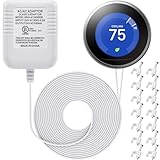
- 24V C wire power adapter for thermostat: plugs into your standard 110v/ 120v outlet and converts to 24V, 500mA
- Designed for thermostats power supply: widely applied for thermostats, powers up smart thermostats Compatible with Nest, Ecobee, Sensi, Hive, etc.; Charge for thermostats directly, without needing to remove your thermostats to charge up the battery, convenient and practical to solve the problem of "thermostats low battery"
- UL certified: UL certification passed, stable and durable 24V transformer for thermostats
- Easy installation: 2 pin non-polarity wires support easy and quick install, 23 ft cable is long enough to plug it into an electrical outlet inside or outside your house
- Packing list: 1 x C wire adapter, 1 bag (50 pieces) of cable clips; The brand mentioned above is just for demonstrating compatibility
Who may qualify for a free connector?
The clearest current qualification signal is an in-app message such as “You need a Nest Power Connector” during a Google Home power test. Google says users who receive that error can request a free connector.
For the Nest Thermostat and Nest Learning Thermostat, 4th gen, the Google Home app may check for C-wire requirements during setup. For the Nest Thermostat E and Nest Learning Thermostat, 3rd gen or earlier, power problems may become apparent after installation instead. Do not assume that every generation uses the same setup screens or has the same offer.
Historically, Google promotions have also appeared in targeted emails or during the app’s compatibility-checking and “Testing your Power” stages. Community guidance has described household limits for some email promotions, but those reports are not a current universal terms page.
Is it free for every Nest owner?
No. Google’s current support wording is conditional: the owner may request a complimentary connector when the thermostat’s power test says one is required. There is no verified evidence in the cited Google material that every Nest owner, every thermostat model, or every household automatically qualifies.
Rank #2
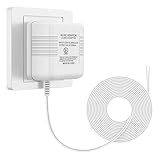
- 【More Power】Transformer Input: 120V AC 60Hz 0.2A, Output: 24V AC 500mA. No more interrupted operation when you’re away. The power adapter can keep your doorbell / thermostat constantly powered;
- 【Widely Applicable】Compatible with most doorbells (Nest, Arlo, Ring, Amcrest, Logitech, Eufy, Remo, SkyBell, Simplysafe), thermostats (Honeywell, Nest, Ecobee, Wyze, Emerson, Sensi) and other devices that require 24 volt power for operation;
- 【Easy to Install】Just run the wire from the socket to the doorbell or thermostat, and the installation can be completed in a few minutes. There is not need to distinguish between positive and negative of the wires;
- 【Long Cable】The length of cable is 26ft (8m). You can plug the adapter into a socket far away from the thermostat or doorbell. If you don't like the extra wire, you can cut it to a suitable length;
- 【Service】We provide 24 hours support online. If you have any questions about this charger, please feel free to contact us whenever.
Be skeptical of claims that:
- Google is giving every thermostat owner a free connector;
- each thermostat automatically receives one;
- the connector is always free through the standard Google Store listing; or
- buying a new Nest thermostat guarantees eligibility.
A separate public promotion reported in June 2021 advertised a free connector until July 7, 2021, or while supplies lasted. That was a historical promotion, not proof of a current open-ended deadline. See the contemporary 9to5Google report for that older offer.
How to try to claim the connector
- Start setup in Google Home. Select the correct thermostat model and enter the wiring information accurately.
- Complete the compatibility and power checks. Do not skip the “Testing your Power” stage if the app presents it.
- Look for the offer. If the app reports that a Nest Power Connector is needed, follow the associated order or Google Store link.
- Review checkout carefully. A promotional link or code may be different from the normal product page. Do not assume a standard store search will apply the offer automatically.
- Save evidence if the link is missing. Take a screenshot showing the exact warning, including the Google account and thermostat setup context.
- Contact Google support. Ask Google Store or Nest support to verify account, household, device, and promotion eligibility. You can begin with Google Store support.
Community reports describe cases in which a customer saw a free-offer message but had to contact support to obtain a link or code. Those reports show a possible escalation route, not a guaranteed result. See examples from the Nest Community and its discussion of obtaining a second connector.
HVAC systems that may need a C wire or connector
Google identifies several system categories that may require a C wire or compatible power accessory:
- heating-only systems;
- cooling-only systems;
- zone-controlled systems; and
- heat-pump systems.
These categories are not automatic diagnoses. The exact requirement depends on the thermostat and HVAC wiring. Google’s compatibility and power tests are more useful for an individual installation than wire color or a generic online diagram. Google says the current Nest Thermostat works with about 85% of systems, while separately warning that some of these system types may need a C wire or Power Connector. That manufacturer coverage figure is not a guarantee for a particular home; check the current Google Store product information.
Rank #3

- Nest thermostats are designed to work without a C wire in most homes but for some systems, including heating-only, cooling-only, zone-controlled, and heat pump systems, you'll need a Nest Power Connector or C wire.
- The Nest Power Connector is a simple affordable alternative to a C wire if your heating and cooling system requires one to power your Nest Thermostat
- Installation is simple; the Nest Power Connector attaches to your furnace air handler, or zone controller and comes with simple instructions.
- The Nest Power Connector is only compatible with 24 VAC systems; it won't work with millivolt or high voltage systems
- The Nest Power Connector is the Nest thermostat C wire adaptor that's designed specifically for Nest thermostats
C wire or Nest Power Connector?
| Situation | Likely next step | Important caution |
|---|---|---|
| An unused thermostat conductor is available and correctly connected | Verify whether it can serve as the C wire | A wire at the wall is not enough; it must also be connected correctly at the HVAC control board and provide power. |
| No spare conductor is available | Consider the Power Connector if Google Home identifies it as necessary | The accessory still requires wiring at the HVAC equipment. |
| Heat pump, zoning panel, or multiple thermostats | Use the app’s compatibility result and consider a qualified HVAC professional | One connector may not solve a multi-zone or broader compatibility issue. |
| Power warning persists after installation | Recheck the wiring and power source | The warning does not by itself prove that the thermostat is defective. |
A correctly connected C wire can be the cleaner long-term solution when the existing thermostat cable has a suitable conductor. It avoids mounting an external accessory and may eliminate the need to obtain a promotion. However, a supposedly unused wire may be disconnected at the furnace, attached to the wrong terminal, mislabeled, or not powered.
The Power Connector can avoid running a new thermostat cable through finished walls. It is still not a plug-and-play answer for every HVAC system, and incorrect low-voltage wiring can damage equipment, blow a control fuse, or leave the home without heating or cooling.
If you already have a C wire
Do not rely on wire color alone. Blue is commonly used for a C wire, but color does not prove that the conductor is connected or functioning correctly.
Do these 3 things before closing this tab:
1Repair Windows errors before they cause bigger problems2Fix the driver behind crashes, sound loss and screen glitches3Clear out junk files and repair common Windows errorsGoogle recommends checking both ends of the connection: the thermostat and the HVAC control board. Turn off HVAC power at the circuit breaker before handling thermostat or control-board wiring. If you cannot confidently identify the terminals and system type, stop and contact a Nest Pro or qualified HVAC technician. Google’s official troubleshooting guidance also recommends professional help when wiring is uncertain.
Rank #4

- Compatibility: This replacement for Nest c wire adapter for smart thermostat compatible with Nest Thermostat(2020), for Nest Learning Thermostat 3rd gen, and for Nest Thermostat E(Note: Nest Thermostat (2020) needs to run version 1.1 or later. On the device, go to Settings > Version > Update)
- C-Wire Adapter Substitute: For Nest Thermostats, it's designed to work without a C wire in most homes. But for some systems, including heating-only, cooling-only, zone control, and heat pump systems, It needs to work with Nest power connector or C-wire
- For 24VAC HVAC System Only: This replacement for Nest power connector C-wire substitute only works for 24VAC HVAC System. Millivolt or high voltage syatems are incompatible
- Easy to Install: The Nest Power Connector connects to your furnace air handler or zone controller and comes with simple instruction
- Worry-Free Purchase: If you have any question about this replacement for Nest thermostat c wire adapter kit, please feel free to contact us
What if the offer does not appear?
The missing offer does not necessarily mean Google’s system is broken. Possible explanations include:
- the thermostat does not actually require a Power Connector;
- the app has not completed its power test;
- you are signed into a different Google account;
- the promotion was targeted, limited, expired, or out of stock;
- your household already redeemed an offer;
- the app failed to display the order link; or
- the installation has a different compatibility problem.
Confirm the thermostat model and wiring information, complete the power test, and retry using the account associated with the setup. If Google Home clearly says a connector is needed but no free-order path appears, keep a screenshot and contact support before paying for the normal listing. Google does not publish, in the cited current support material, a universal expiration date, nationwide eligibility table, guaranteed fulfillment process, or permanent one-per-home rule.
Independent reader supportYour contribution helps us test, update, and keep practical guides available for everyone.Can a household receive more than one?
Do not assume that each thermostat qualifies separately. Historical Google Nest Community guidance said one email promotion could be limited to one code per home, while a separate setup-based offer might appear when another installation independently triggered the requirement. Those historical details should not be treated as current guaranteed terms.
What’s actually slowing this PC down?
Pick the symptom - the matching free tool is one click away.
If your home has multiple thermostats or zones, ask Google support to confirm the account’s current eligibility. Also have the HVAC configuration checked: one connector may not address every thermostat in a zone-controlled system.
Best Value

- If your home doesn’t have a pre-installed C-wire, Solopen C Wire Adapter delivers the full power functionality of a common wire, with zero need to run new wiring through your walls. It reuses your thermostat’s existing R, W, Y, and G wires, eliminating the hassle of wall demolition, complex rewiring, and costly electrician visits — making it the most cost-effective solution to your C-wire power needs.
- Solopen adapter provides consistent, 24/7 stable 24VAC power supply to keep your Smart Thermostat operating at full performance. It enables you to monitor and control your home’s HVAC system anytime, anywhere, for reliable, hassle-free home comfort all year round.
- Purpose-built for Google Nest thermostats, this adapter is fully compatible with the Nest Thermostat, Nest Learning Thermostat (3rd Generation), and Nest Thermostat E. Please confirm compatibility with your thermostat model before purchase.
- Unlike the costly, time-consuming process of tearing open walls to run a new C-wire, this C Wire Adapter is designed for ultra-simple, DIY-friendly installation. Just follow the included step-by-step instructions to make secure, correct wiring connections, and you’ll have it fully set up and ready to use in minutes.
Buying one is different from receiving one free
The regular Google Store product listing and a promotion-specific order link are not necessarily the same transaction. A normal listing may show a price even when an eligible customer has a separate free-offer path. Conversely, a “free” message that changes to a charge at checkout should not be treated as confirmation that the offer applies.
Before placing a paid order, verify that the connector is appropriate for your HVAC system and ask Google support whether the account-specific offer can be honored. The connector may be unnecessary if a properly powered C wire is available.
Safe installation decision
Installation involves low-voltage thermostat wiring, but that does not make trial-and-error wiring risk-free. Before changing connections, shut off the HVAC system at the circuit breaker and follow the instructions for the exact thermostat and HVAC configuration.
Use a qualified HVAC technician or Google-recommended Nest Pro if you have a heat pump, zone controls, multiple thermostats, an unfamiliar furnace or air handler, a recurring power warning, or any uncertainty about the control board. An HVAC professional is generally better positioned than a general handyman to diagnose thermostat-control wiring and equipment compatibility.
Bottom line
The free Nest Power Connector offer is real in certain Google Home setup and power-test situations, but it is not a blanket benefit for all Nest thermostat owners. Let the app’s compatibility diagnosis and your account-specific offer determine eligibility. If Google says a connector is needed, follow the in-app claim route or contact support; if no offer appears, verify the wiring and compatibility before buying anything. A properly connected C wire may be the better solution, and complex HVAC installations should be handled by a qualified professional.
Quick Recap
Product prices and availability are accurate as of the date/time indicated and are subject to change. Any price and availability information displayed on Amazon at the time of purchase will apply.


Leave a Reply