What’s actually slowing this PC down?
Pick the symptom - the matching free tool is one click away.
Some links on this page are affiliate links: if you buy through them we may earn a commission, at no extra cost to you.
IoT-based home automation connects lights, switches, thermostats, locks, sensors, cameras, appliances, and entertainment equipment so they can be monitored and controlled through apps, voice commands, schedules, and automatic triggers. Google Home and Amazon Alexa are useful control platforms, but neither is the entire smart-home system. A reliable installation also depends on compatible devices, Wi-Fi or another wireless protocol, a hub or bridge where required, cloud services, and well-designed routines.
For most homeowners and renters, the best approach is to choose one primary ecosystem, start with a small Matter-compatible installation, keep manual controls available, and expand only after the first automation works reliably.
How IoT home automation works
A smart home is a collection of connected systems rather than one universal network. The basic chain looks like this:
User voice command, app, sensor, or schedule
        ↓
Google Home or Alexa
        ↓
Hub, bridge, skill, or Matter controller
        ↓
Wi-Fi / Thread / Zigbee / Z-Wave / Bluetooth
        ↓
Smart device
        ↓
Physical action or sensor result
The devices at the end of the chain perform the useful work:
#1 Best Overall

- Getting started with smart home has never been easier - An all-in-one kit with a quick guided setup makes starting your smart home easy.
- A setup so easy, it feels like magic - Just unbox, plug it in, and tap to get started.
- One hub with endless possibilities - the Echo Hub works with thousands of connected cameras, lights, locks, plugs, thermostats, speakers, and more—bringing your smart devices together in one convenient hub.
- Peace of mind, anytime - The included four lights can be easily set to make it look like you’re home when you’re away.
- Works with thousands of Alexa-compatible devices like Ring security cameras to build a smarter, safer home.
- End devices: bulbs, switches, plugs, thermostats, locks, blinds, sensors, cameras, speakers, and appliances.
- Connectivity: Wi-Fi, Thread, Bluetooth Low Energy, Zigbee, Z-Wave, Ethernet, or a manufacturer-specific radio system.
- Controller or hub: a compatible Google Home or Echo device, manufacturer bridge, or an independent platform such as Home Assistant.
- Cloud services: commonly used for account linking, remote access, voice processing, notifications, updates, and third-party integrations.
- Automation logic: rules that determine what happens when a schedule, sensor, presence event, or voice command occurs.
It helps to distinguish several commonly confused functions:
- Remote control: turning a light on from a phone app.
- Voice control: saying, “Hey Google, turn on the kitchen lights,” or “Alexa, turn off the bedroom fan.”
- Automation: a device acts without a direct command, such as a hallway light turning on when motion is detected.
- Scene: several devices change state together, such as a “Movie time” scene.
- Routine: a named sequence started by voice, time, a sensor, location, or another event.
- Monitoring: sensors, cameras, smoke alarms, leak detectors, and energy meters report conditions.
- Actuation: a command causes a physical action, such as switching power, changing temperature, locking a door, or closing blinds.
Google Home and Alexa are therefore best understood as user interfaces and automation platforms within a larger IoT architecture.
Google Home versus Alexa
Neither ecosystem is universally better. The right choice depends mainly on the phones, media equipment, services, devices, and household habits you already have.
The Tool Desk
Outbyte PC Repair FREERepair Windows errors before they cause bigger problemsFix Now →Outbyte Driver Updater FREEScan for outdated or missing drivers - takes under a minuteDriver Scan →| Consideration | Google Home | Alexa |
|---|---|---|
| Best ecosystem fit | Android, Google, Nest, Chromecast, and Google TV households | Echo, Amazon services, Fire TV, eero, and Alexa Skills households |
| Matter | Requires a compatible Google Home Matter hub | Compatible Echo and eero devices can act as Matter controllers |
| Automation | Google Home automations and routines | Alexa routines, groups, skills, and device triggers |
| Displays | Nest Hub and Google TV ecosystem | Echo Show and Echo Hub ecosystem |
| Device discovery | “Works with Google Home” and Matter labels | “Works with Alexa” and Matter labels |
| Local control | Matter devices can use local Wi-Fi or Thread paths in supported scenarios | Matter devices can connect locally to compatible Alexa controllers |
| Important qualification | Assistant names, features, and availability are changing as Gemini for Home rolls out in supported markets | Alexa and Alexa+ capabilities vary by device, account, language, market, and subscription |
Choose Google Home if your household already uses Android phones, Nest products, Chromecast, Google TV, Google services, or a Nest smart display. Google maintains a current compatible-device directory.
Choose Alexa if Echo speakers or displays, Amazon services, Fire TV, eero, or Alexa Skills are central to your home. Check Amazon’s Matter controller documentation by exact model and generation, particularly if you need Thread support.
You can use both platforms, but it is usually simpler to designate one as the primary automation controller. A mixed system can create duplicate rooms, conflicting routines, different device capabilities, multiple accounts, and more difficult troubleshooting.
Matter, Thread, Wi-Fi, Zigbee, and Z-Wave
Compatibility labels describe different things and should not be treated as interchangeable.
Rank #2

- Complete Project-Based Learning Path – Build 13 progressive projects (LED blink → button control → PIR motion sensor → music playback → motorized doors/windows → SK6812 RGB lighting → fan control → LCD display → gas alarm → temperature/humidity monitor → RFID door unlock → Morse code access → WiFi control → mobile APP remote control). Each project builds on the previous one, ensuring you understand both the electronics and the programming logic behind every smart home feature.
- Master Two Industry-Standard Languages – Learn to code in both Arduino C++ and MicroPython with 13 detailed tutorials for each language. Compare how the same hardware behaves under different programming approaches – a valuable skill for any aspiring engineer. Perfect for classrooms teaching multiple coding languages or self-learners who want flexibility.
- Build a Real WiFi-Controlled Smart Home – Assemble the wooden house structure and integrate sensors to create a functioning smart home system. Control lights, fans, door servos, and RGB lighting directly from your mobile APP (iOS/Android) . Experience how IoT works in real life – from manual control to automated responses based on temperature, humidity, motion, and gas detection.
- Comprehensive Online Wiki with No Guesswork – Our detailed online tutorials (also accessible via the packaging) include wiring diagrams, full code explanations, and step-by-step assembly guides for every project. Whether you're a complete beginner or a teacher preparing lessons, the structured content eliminates confusion and helps you succeed from project 1.
- Everything You Need to Get Started – (TIPS: Batteries are NOT Included)This kit includes the ESP32 development board, expansion board, wooden house parts, all sensors and modules (DHT11, PIR motion, gas sensor, RFID, SK6812 RGB, servo motors, fan, LCD1602, etc.), and connection cables. NOTE: 6x AA batteries are required (NOT Included). The kit is unassembled – you'll build it yourself following our online tutorials, making the learning experience truly hands-on.
Matter
Matter is an interoperability standard intended to let certified devices work across platforms such as Google Home, Alexa, Apple Home, and others. It can provide local control over a home network, but it does not guarantee that every advanced feature appears in every app.
A Matter device still needs a compatible controller or hub. Thread-based Matter devices additionally need a Thread border router. Manufacturer apps may still be needed for firmware updates, calibration, battery data, advanced modes, or factory resets.
Thread
Thread is a low-power IPv6 mesh networking technology. It is not the same as Matter. A Thread device is not automatically a Matter device, and a Matter device may use Wi-Fi rather than Thread.
Wi-Fi
Wi-Fi devices are often straightforward to install and widely available. They can, however, increase network congestion and may rely heavily on a manufacturer’s cloud service. Verify whether the product continues to operate locally if the internet is unavailable.
Do these 3 things before closing this tab:
1Clear out junk files and repair common Windows errors2Fix the driver behind crashes, sound loss and screen glitches3Repair Windows errors before they cause bigger problemsZigbee and Z-Wave
Zigbee and Z-Wave are separate smart-home radio protocols. They normally require a compatible hub or bridge, but they can be attractive for established lighting, security, and sensor installations because they avoid putting every device directly on Wi-Fi.
Bluetooth
Bluetooth Low Energy is frequently used during commissioning or for nearby device control. It is not generally a whole-home automation network by itself.
“Works with Google Home” and “Works with Alexa” do not mean Matter, local control, or feature parity. Before buying, check the exact model, supported device functions, required hub, firmware, manufacturer app, subscription, and behavior during an internet outage.
Rank #3
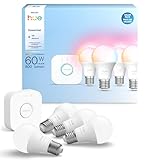
- WHAT'S IN THE BOX - This starter kit includes one Hue Bridge and four E26 smart light bulbs; to get started, install your Bridge and color changing light bulb using the Hue app, and you’re ready to go
- CREATE AMBIANCE WITH COLOR - Set the mood with millions of colors and a library of preset light scenes designed by Hue’s lighting experts—with special holiday scenes and the option to create your own
- DIM EASILY - Adjust from full brightness all the way down to 2% using the Hue app to achieve the right level of lighting with your smart light bulb, whether you’re reading or unwinding before bed
- CONTROL WITH YOUR VOICE - Connect to your preferred home assistant and control your led light bulb effortlessly with voice commands—compatible with Alexa, Google Assistant, and Apple Home
What to prepare before buying
- Stable Wi-Fi with adequate coverage in the areas where devices will be installed.
- A Google Account for Google Home or an Amazon account for Alexa.
- A compatible phone or tablet for commissioning.
- One primary platform for household routines.
- A compatible controller, bridge, or Thread border router where required.
- IPv6 enabled for Matter on Google Home. Google warns that Matter setup and control can fail when IPv6 is unavailable; see its Matter prerequisites.
- A plan for account ownership, household access, and multifactor authentication.
- A naming scheme such as “Kitchen ceiling,” “Bedside lamp,” and “Front-door lock.”
A practical starter system is one controller or smart speaker, one Matter smart plug or light, and one motion or contact sensor. Add a display, thermostat, lock, camera, or additional sensors only after that first automation is dependable.
Recommended Free Tools
Google Home setup
App labels can change with software updates and regional rollouts, but the documented process is generally:
- Install or update the Google Home app and sign in.
- Set up a compatible Google Home hub.
- Confirm that the home Wi-Fi network is available and IPv6 is enabled for Matter.
- Power on the device and place it near the phone and router during commissioning.
- Open Google Home and use the device-add flow.
- Scan or enter the Matter QR code or setup code.
- Choose the correct home and assign the device to a room.
- Give it a short, unique name.
- Test control in the app before testing voice commands.
- Create a routine or automation after basic control works.
Expected result: the device appears in the selected room, responds in the app, and becomes available to supported Google voice commands such as “Hey Google, turn on the kitchen lights.” Not every device supports every brightness level, color, mode, or adjective.
Google explains Matter setup and control in its official support guide.
Alexa setup
For a Matter device, the general Alexa process is:
- Set up a compatible Echo or eero Matter controller.
- Install or update the Alexa app.
- Confirm that the controller is on the home network.
- Put the device into pairing or commissioning mode.
- Use Alexa’s device-add flow.
- Scan the Matter QR code or enter the setup code.
- Assign the device to a room or group.
- Test app control, then test a voice command.
- Add the device to an Alexa routine.
Amazon states that Alexa can connect directly to Matter devices over Wi-Fi or Thread, with Bluetooth Low Energy commonly used during commissioning to transfer network credentials. See Amazon’s Matter documentation.
Examples include “Alexa, turn on the porch light,” “Alexa, set the thermostat to 72 degrees,” and “Alexa, start movie time.” Locks, garage doors, alarms, and other sensitive devices may require a PIN, confirmation, or may restrict certain operations.
Useful automation examples
Morning routine
Trigger: scheduled time or voice phrase. Actions: turn on bedroom and kitchen lights, adjust the thermostat, open compatible blinds, and provide weather information. Fallback: keep manual switches available. Avoid opening blinds automatically if privacy or security is a concern.
Rank #4

- WHAT'S IN THE BOX - Includes one Hue Bridge and four Hue White and Color Ambiance smart 75W A19 light bulbs suitable for most fixtures; Perfect for decorative and general lighting anywhere in your home
- UNLOCK THE FULL POWER OF HUE WITH THE INCLUDED BRIDGE - Enjoy automations control from anywhere in the world, and a secure, stable connection that won't drain your Wi-Fi. Use Matter to connect smart home devices to your Hue smart lighting system.
- ENJOY PRESET SCENES - Light your routines throughout the day; Set a 24-hour natural light scene that mimics the sun or choose light to help you focus unwind, and more
- VOICE CONTROL - Convenient smart control; Set up voice control in the Hue app and use simple voice commands to control your lights with Alexa or Google Assistant
- PERSONALIZE YOUR LIGHT - Create the ultimate mood lighting with dynamic light effects that show subtle changes in brightness and color; Customize in the app
Motion-triggered hallway lighting
Trigger: motion detected between sunset and sunrise. Condition: the hallway light is off and the household is home. Action: turn the light on at a low brightness for two minutes. Safety: use a reliable sensor and retain a physical switch.
Movie scene
Trigger: “Movie time.” Actions: dim lights, turn on the television, and adjust compatible entertainment devices. Caution: do not make the scene dependent on a single cloud service if manual control is important.
Windows Errors? Fix Them Before They Spread
Repair common Windows errors and clear accumulated junk for a smoother, more stable PC - no reinstall needed.Free scan · no reinstallOutdated Drivers Are Slowing You Down
One free scan finds every outdated or missing driver and matches the right update for your exact hardware.Free scan · exact hardware matchAway routine
Trigger: household leaves or a voice command. Actions: turn off selected lights, adjust heating or cooling, and send a status notification. Test presence detection before using it for security decisions.
Water-leak response
Trigger: a water sensor detects moisture. Actions: send an alert and, where professionally installed and supported, close an automatic water valve. Fallback: provide a manual shutoff and do not rely on one sensor or one cloud service for property protection.
Door or garage notification
Trigger: a contact sensor changes state or a garage remains open beyond a set time. Action: send an alert or announce the condition. Automatic closing or locking requires careful testing, safety equipment, and a manual override.
Energy-saving routine
Trigger: a schedule, occupancy state, or open-window sensor. Actions: adjust the thermostat and switch off selected loads. Do not use smart plugs with loads that exceed their electrical rating, and do not control space heaters or gas appliances without confirming that the equipment and controller are designed for that use.
Matter Multi-Admin and mixed-platform homes
Matter Multi-Admin can allow one compatible device to be commissioned into more than one certified ecosystem. This is useful when one household member prefers Google Home and another prefers Alexa.
Best Value

- 【Easy Setup, One Control】With Matter, Skip the step of downloading and registering multiple manufacturers' apps every time you buy a new device. Instead, head straight to certified smart home platforms like Apple Home, Alexa, Google Home, SmartThings, or AiDot to control all your Matter devices.【TIP】Matter-certified hub or controller (HomePod, Echo Dot, Nest, SmartThings Hub) is required for Apple Home/Alexa/Google Home/SmartThings platforms. Alternatively, the AiDot app can be used without hub
- 【Offline-Ready Control】Once you've set up your Matter-certified devices on your LAN, they'll be able to communicate with each other directly, using the Matter protocol. This means that if your home internet connection goes offline, your Matter-certified devices will still be able to communicate and be controlled within your LAN, without relying on the internet or cloud services.
- 【Remote Control from Anywhere】Use the app to turn electronics on before you arrive home and off after you leave, no matter where you are. Using the smart plug that work with alexa manage your power usage and save money.
- 【Hands-free Voice Control】Control linkind homekit plug using simple voice commands through Apple HomeKit, Siri, Amazon Alexa, Google Assistant, and SmartThings, without the need for physical input such as buttons or switches.
- 【Flexible Scheduling & Timer】Effortlessly reduce energy usage with automatic device shutdown after a set time. For example Chrismas Tree, TV, Lamp, Fan, Humidifier,Blenders, Lightbulbs
It does not guarantee identical controls. One platform may expose a device’s basic on/off function while the manufacturer app or another platform exposes additional modes. Mixed homes also require consistent room names, device names, permissions, and routine ownership. Avoid resetting a device unnecessarily; if it is already commissioned to another Matter fabric, use the supported sharing or Multi-Admin process where possible.
Local control versus cloud control
Matter can enable devices to communicate over the local Wi-Fi or Thread network. Local operation may improve response time, privacy, and resilience during some internet outages. It does not make the entire smart home offline.
Internet or cloud services may still be required for:
- Voice recognition and natural-language processing.
- Remote control while away from home.
- Camera recording and cloud storage.
- Push notifications.
- Account linking and household management.
- Firmware updates.
- Manufacturer-specific scenes and modes.
- Third-party skills and integrations.
When evaluating outage behavior, distinguish between local app control, local automation, local voice control, remote app control, and cloud-dependent routines. They may fail differently.
Security and privacy
- Use strong, unique passwords and multifactor authentication for Google, Amazon, manufacturer, and hub accounts.
- Keep routers, hubs, phones, and IoT device firmware updated.
- Review voice history, activity, microphone, camera, and notification settings.
- Use camera privacy controls and disable microphones or cameras when appropriate.
- Consider a guest or segmented network for IoT devices, provided it allows the local discovery and multicast traffic your platform requires.
- Never expose a smart-home hub directly to the public internet.
- Use PINs or confirmation settings for locks, purchases, garage doors, and sensitive actions.
- Prefer devices with physical switches or manual overrides.
- Remember that local Matter control does not prevent all data collection by platforms or manufacturers.
Troubleshooting common problems
| Symptom | Likely causes | First action |
|---|---|---|
| Device will not pair | Wrong code, unsupported hub, missing IPv6, absent Thread border router, or incorrect pairing state | Confirm the exact model, controller, firmware, IPv6, and pairing mode |
| Matter setup succeeds but later fails | IPv6, multicast, Wi-Fi isolation, or Thread mesh problems | Check IPv6, router isolation settings, multicast behavior, and Thread coverage |
| Device works only in the manufacturer app | Expired account link, missing skill, permissions issue, or limited platform integration | Reauthorize the integration and check the manufacturer’s supported-function list |
| Wrong device responds | Duplicate names, incorrect rooms, or ambiguous voice interpretation | Rename devices uniquely, correct room assignments, and test from the app |
| Response is slow | Weak Wi-Fi, congestion, cloud routing, low battery, or poor Thread coverage | Check signal, battery, network load, and whether the action is cloud-dependent |
| Routine runs inconsistently | Faulty trigger, condition, conflicting routine, or service dependency | Test each component separately: trigger → condition → action → expected state → actual state |
| Device disappears after a reset | It remains associated with another Matter fabric or account | Remove or share it correctly before factory-resetting as a last resort |
Do not add delays to every routine as a substitute for diagnosis. A delay may hide a network or device fault. Also avoid stacking multiple routines that control the same device unless their interaction is intentional.
When an independent controller makes sense
Home Assistant or another independent controller may suit technically capable owners who want local processing, cross-brand automations, detailed dashboards, advanced conditions, and greater control over data. Google Home or Alexa can still serve as voice interfaces.
The trade-off is maintenance. You become responsible for hardware, backups, networking, integrations, updates, and recovery. It is not automatically easier than Google Home or Alexa and is a poor fit for someone seeking a completely plug-and-play installation.
Free tools Windows power users keep installed
One-click scans. No signup required.
A practical buying decision
- Select the primary ecosystem: Google Home for a Google/Nest/Android-centered home, Alexa for an Echo/Amazon-centered home, or an independent controller for a local-first technical installation.
- Choose the controller by exact model: a speaker is not necessarily a Matter controller or Thread border router.
- Prefer Matter where its device category and features fit: verify the controller, radio, firmware, and platform feature support.
- Buy one plug, switch, bulb, or sensor first: test pairing, app control, voice control, routines, and outage behavior.
- Retain manual controls: especially for lighting, heating, locks, garage doors, and safety equipment.
- Expand in stages: add cameras, thermostats, locks, blinds, and appliances only after the network and naming scheme are stable.
Google’s official U.S. product pages listed the Nest Hub (2nd generation) and Google TV Streamer (4K) at $99.99 and Nest Hub Max at $229 in the August 18, 2026 storefront snapshot. Prices and promotions change, so verify them before purchase. Amazon pricing is similarly dynamic and should be checked for the exact Echo, Echo Hub, Echo Show, or eero model.
Quick Recap
Product prices and availability are accurate as of the date/time indicated and are subject to change. Any price and availability information displayed on Amazon at the time of purchase will apply.


Leave a Reply