What’s actually slowing this PC down?
Pick the symptom - the matching free tool is one click away.
Some links on this page are affiliate links: if you buy through them we may earn a commission, at no extra cost to you.
Yes—you can screen a roof remotely with free overhead imagery, but you cannot replace a roof inspection. Google Earth, USGS aerial imagery, and Copernicus satellite data can reveal large, visible clues such as missing roof sections, major debris, tree contact, broad discoloration, roof additions, and changes between historical images.
They generally cannot confirm small hail impacts, flashing failure, hidden leaks, soft decking, exact shingle age, structural soundness, or code compliance. Use the process below to identify questions, document visible changes, and decide whether a roofer or insurance inspector should investigate further.
What “free satellite data” actually means
The sharpest free image of a house may not come from a satellite. Google Earth combines satellite imagery, aircraft photography, 3D imagery, and other sources. Its imagery is not live and may be a mosaic assembled from photographs taken on different dates. Google also warns that imagery dates can vary across a property and that zooming in does not create additional detail. See Google’s imagery-date guidance.
For U.S. properties, NAIP is another useful source. It is orthorectified aerial imagery collected by aircraft, not satellite imagery. Copernicus Sentinel data is genuinely satellite-based, but its resolution is usually better suited to neighborhood-scale or environmental change than to individual shingles, vents, or flashing.
#1 Best Overall
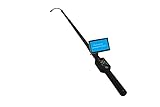
- Flexible camera head size Φ23 x 320mm. The minimum length up to 88cm. The maxium total length up to 460 cm (15 feet).
- Sensor size 1/4 inch. Field of view 120°. 12 high intensity white LED lights with adjustable brightness. Camera can see more than 5 meters under total darkness.
- 5" LCD screen. Resolution: 840 x 480. Monitor size: 130 x 80 x 10 mm.
- Control Box with Power supply 12V, DVR control buttons, SD card(max 32G) jack, LED brighness adjusting knob, AV&photo selection, On/off MIC control button.
- High capacity 1400MAH lithium battery power supply. Charging time: 4 hours. Working hours: 5 hours.
What you can and cannot see from above
Often visible
- Missing or visibly displaced roof sections.
- Large debris after a storm.
- Tree limbs touching or overhanging the roof.
- Broad stains or discolored areas.
- Large sag-like or uneven areas, when resolution and viewing angle permit.
- Missing or displaced skylights, vents, solar panels, or other rooftop equipment.
- Roof shape, approximate footprint, additions, and major drainage geometry.
- A likely roof replacement between historical image dates.
Usually not visible or verifiable
- Small hail bruises, granule loss, or hairline cracks.
- Flashing, underlayment, or membrane-seam failure.
- Hidden leaks or moisture below the surface.
- Soft decking or structural weakness.
- Exact material age.
- Whether a dark patch is mold, dirt, wet material, shadow, or an image artifact.
- Code compliance or insurance-claim eligibility.
Call these findings possible anomalies or areas requiring verification—not confirmed damage.
The easiest free method: Google Earth
1. Find and confirm the property
Open Google Earth on the web or use Google Earth Pro on a computer. Search the complete address and zoom in until the roof is distinguishable.
Confirm that you have the correct property using several landmarks: nearby streets, driveways, fences, pools, outbuildings, lot shape, and neighboring structures. Do not rely on the street number alone.
Free tools Windows power users keep installed
One-click scans. No signup required.
2. Check the imagery date before interpreting anything
Look for the displayed imagery date or date range. Move the cursor around the roof and nearby property because the date can change across an imagery mosaic. Record the date shown for the roof itself.
Treat a range as approximate. A Google Earth historical timeline date may represent imagery captured on or before the selected date, rather than a photograph taken precisely that day. Imagery can also be affected by time-zone handling.
3. Use a straight-down view
Switch to a top-down view and keep the roof centered. Turn off labels, borders, 3D buildings, terrain, or other clutter if they obscure the roof. Google Earth Pro provides layer controls for these options; see Google’s layer help.
Rank #2

- Triple Lens Endoscope with 5" Handheld Screen: Discover a smarter way to inspect,Featuring a 1080P HD triple-lens system, this upgraded industrial borescope captures forward and side views simultaneously, The large 5-inch IPS display delivers bright, real-time visuals, helping you identify problems instantly without relying on a mobile app or Wi-Fi.
- Honest About 50FT Semi-Rigid Cable: This semi-rigid cable performs well in straight sections, but its flexibility is significantly limited when passing through 90-degree sharp bends and P-shaped drain bends. The turbid water reduces visibility. Before conducting the test, flushing the pipeline with clean water will yield the best observation results. Whether you’re checking household plumbing, car engines, or electrical conduits, this versatile inspection camera ensures you never miss a detail.
- Photo and Video Recording with 32GB Card: Unlike basic borescopes, this upgraded snake camera supports both photo capture and video recording. Every detail is stored on the included 32GB TF card for easy review and sharing. Ideal for documenting repair work, creating inspection reports, or tracking plumbing and HVAC maintenance over time.
- Bright LED Lights & Rechargeable Design:Built-in adjustable LED lights illuminate dark or confined spaces, ensuring clear visibility even in total darkness. The rechargeable battery offers long-lasting use without the hassle of replacing disposable batteries, making this endoscope eco-friendly, cost-effective, and always ready for the next inspection task.
- Multipurpose Tool & Practical Gift for Men:Perfect for sewer inspection, pipe maintenance, HVAC troubleshooting, wall and automotive checks, this versatile borescope camera is a must-have tool for professionals and home users alike. Packaged as a high-tech gadget, it also makes an ideal birthday or Christmas gift for men who enjoy DIY repairs or need reliable plumbing camera tools.
Zoom only until the roof is as clear as the source image allows. Once pixels become visibly enlarged or blurred, further zooming adds no information. USGS explains why enlargement does not add detail in its aerial-imagery resolution guidance.
4. Rotate and tilt the view
View the roof from several compass directions. Tilt slightly to examine ridges, valleys, roof-plane height, and shadows. A suspected depression or missing section should remain plausible from more than one angle.
Do not mistake a shadow for a defect. Three-dimensional imagery may combine images from different dates and may not have one reliable collection date.
5. Compare historical imagery
In Google Earth Pro, use the clock-style historical-imagery control or choose View > Historical Imagery. The web interface may use different labels, so the timeline or clock icon is the useful fallback. Google’s instructions are available under historical imagery help.
Move through several dates rather than comparing only the newest and oldest image. Keep the camera orientation, zoom, and roof position as consistent as possible.
Roof-by-roof visual checklist
Roof planes and surface
- Inspect each plane separately: front, rear, left, right, garage, porch, and additions.
- Look for large areas with a different color or texture from adjoining planes.
- Note broad stains, exposed-looking underlayment, missing sections, debris, or persistent unevenness.
- Check ridges, valleys, and transitions between older and newer roof sections.
Edges and drainage
- Look for apparent gutter distortion, detachment, or heavy vegetation.
- Check valleys and lower roof sections for visible debris accumulation.
- Trace likely water-flow paths from upper roofs onto lower roofs.
- Inspect tree limbs near roof edges and areas where vegetation touches the roof.
Penetrations and equipment
- Compare skylights, chimneys, vents, plumbing stacks, exhaust outlets, solar panels, and satellite dishes across dates.
- Record features that appear displaced, missing, unusually dark, or newly installed.
- Check whether a new dormer, extension, or rooftop system changed drainage geometry.
Surrounding property
Scan beyond the roof. Storm-felled branches, scattered debris, nearby construction, changed trees, new additions, and altered drainage can explain what you see—or provide important context for a professional.
Rank #3

- Easily Maneuver Your View: Tired of struggling with hard-to-reach areas during inspections? This two-way articulating borescope effortlessly navigates tight and complex spaces with its flexible and maneuverable probe. Enjoy crystal-clear visual feedback that saves you both time and money. Whether for automotive maintenance or household inspections, this tool transforms your inspection journey, making the process faster and easier than ever.
- See Every Detail in Vivid Clarity: Experience the exceptional image quality of our 4.5-inch IPS LCD color screen, delivering sharp, high-resolution visuals. Whether you’re in bright sunlight or dim conditions, this display ensures you won’t miss a thing. Plus, with no app required, it's ready to go whenever you are!
- Master the Most Challenging Inspections: Equipped with a 5FT semi-rigid gooseneck cable, this borescope provides the ideal combination of flexibility and stability, allowing you to navigate tight, intricate spaces with ease. The cable retains its shape as you guide it, giving you precise control for thorough inspections. Designed for versatility, it adapts effortlessly to various environments, ensuring no detail goes unnoticed.
- Light Up the Darkest Corners: Equipped with built-in high-brightness LED lights on the camera probe, you’ll have the visibility you need even in the darkest environments. The adjustable illumination allows you to customize the brightness for every inspection, ensuring that no detail goes unnoticed in tight or confined spaces.
- Ergonomics Meet Efficiency: This borescope is thoughtfully designed for maximum comfort and usability. The centrally located articulating joystick allows for effortless one-handed operation with either hand. The photo button is conveniently positioned on the back, making it easy to capture images or videos during inspections. Lightweight and compact, this borescope ensures prolonged use without fatigue, perfect for on-the-go inspections.
How to compare old and new images without fooling yourself
| Field | What to record |
|---|---|
| Image date | Displayed capture date or date range |
| Orientation | North-up, rotated, or tilted |
| Roof plane | Front, rear, side, garage, or addition |
| Observation | The specific visible change |
| Confidence | High, medium, or low |
| Verification | Ground photos or professional inspection needed? |
High confidence: the change is visible across multiple angles or dates and is clearly larger than the image resolution.
Medium confidence: the anomaly is plausible but partly obscured by shadows, trees, weather, or image quality.
Low confidence: it appears in one angle, near an image seam, after extreme zooming, or with an uncertain date.
Be especially cautious with straight-line color changes. They may be seams between mosaic images captured under different lighting. Seasonal differences, wet roofs, snow, leaves, haze, and cloud shadows can also create false changes.
Independent reader supportYour contribution helps us test, update, and keep practical guides available for everyone.If Google Earth is blurry or too old
USGS EarthExplorer and NAIP
For a U.S. property, try USGS EarthExplorer:
- Enter the address or define the location on the map.
- Select imagery datasets for the relevant area and period.
- Look for National Agriculture Imagery Program (NAIP) imagery.
- Compare available acquisition dates.
- View or download the imagery where the interface permits.
- Save the source metadata with each screenshot.
USGS lists NAIP aerial-imagery coverage from 2003 to the present, although exact dates and availability vary by location. The USGS NAIP service is primarily a mosaic of approximately 0.6-meter, four-band imagery, with natural-color, false-color, and NDVI views supported by the service. Start with the USGS dataset guidance and NAIP service information.
NAIP can be valuable for broad historical comparisons, but its acquisition date may not match the date of a storm, repair, or sale.
Rank #4

- 1️⃣ 360° Adjustable Camera Head for Full Visual Coverage Explore confined spaces with precision. The self-rotating 360° probe ensures a clear, stable image in every direction — ideal for sewer lines, industrial machinery, and rescue operations.
- 2️⃣ 1080P HD Display with 7-Inch Monitor Experience crisp and detailed visuals through the large 7” LCD monitor. The 1080 Full HD camera captures every detail of pipe interiors, joints, or blockages clearly for faster diagnostics.
- 3️⃣ IP68 Waterproof & Durable Construction Built to withstand harsh environments. The stainless steel camera head and waterproof cable design (IP68 rating) ensure reliable operation in water, mud, or confined pipelines.
- 4️⃣ Extendable 9.8ft Telescopic Rod for Deep Access Reach inaccessible areas without ladders or disassembly. The industrial-grade telescopic rod allows stable operation for inspecting ceilings, sewers, chimneys, and high installations.
- 5️⃣ Versatile Applications – Field, Rescue & Maintenance Perfect for pipeline inspection, water conservancy, disaster rescue, building maintenance, or workshop diagnostics. Comes with a 16GB SD card for easy recording and sharing of inspection footage.
Copernicus Browser
Use Copernicus Browser when you specifically need satellite-based imagery or a wider-area time series:
PC Slower Than It Used to Be?
A free scan shows the junk files, broken settings and background clutter dragging Windows down - then fixes them in one click.Free scan · Windows 10 & 11Crashes, No Sound, or Screen Glitches?
Random freezes, missing sound and display glitches usually trace back to one bad driver. Find and replace yours safely.Free scan · under a minute- Search the address or zoom to the property.
- Select available Sentinel imagery.
- Filter by date and cloud cover.
- Compare images before and after a known event.
Copernicus Sentinel data is available on a free, full, and open basis subject to applicable access and security exceptions; see the Copernicus FAQ. Sentinel imagery is generally not suitable for diagnosing shingles, flashing, or small roof defects.
Document what you find
For every notable observation, save:
- A screenshot showing the complete property.
- A closer screenshot with the suspected area marked.
- The displayed image date or date range.
- The address, orientation, and imagery source.
- A short neutral description, such as “dark area on rear roof plane.”
- A confidence label.
- The date of any storm, repair, purchase, leak, or prior inspection.
Keep weather-service, municipal, contractor, and insurance records separately. A pre-storm image can provide context, but overhead imagery alone does not prove when damage occurred or establish claim eligibility.
Important roof-specific limitations
- Trees: Can hide large roof areas. Do not assume an unseen area is undamaged.
- Flat and low-slope roofs: Broad surfaces may be visible, but subtle ponding, blisters, seams, and drainage failures usually are not resolvable.
- Metal roofs: Reflections and glare can mimic damage or discoloration.
- Snow and leaves: Can conceal the surface or create misleading patterns.
- Dense properties: Apartments, row houses, and condominiums may not be separable at available resolution.
- New construction: Additions, solar arrays, dormers, and nearby trees can make date-to-date comparisons unreliable.
- Non-U.S. properties: NAIP is U.S.-focused; other countries require different public datasets.
When free imagery is not enough
Arrange a ground-level or professional inspection if:
- Water is entering the building or there are interior stains.
- The roof appears to sag or a large section is missing.
- Decking, framing, or other structural components may be exposed.
- A recent storm may have caused damage and an insurance claim is involved.
- Trees block important roof planes.
- The available imagery predates the event or is too blurry to answer the question.
- The roof is unsafe to access.
Do not climb onto the roof simply to verify a satellite-based suspicion. Use safe ground-level photographs when possible, then ask a qualified roofing professional for close visual inspection, moisture assessment, or other appropriate testing.
Recommended Free Tools
When a paid service makes sense
Free imagery is usually enough for visual screening. Paid tools become more useful when you need measurements, a standardized report, oblique or 3D views, repeated monitoring, or contractor-ready estimating.
- EagleView provides roof measurements, aerial imagery, and reports for roofing and insurance workflows.
- Nearmap focuses on frequently refreshed high-resolution aerial imagery, property intelligence, and oblique views.
- HOVER creates models and measurements from defined sets of ground-level smartphone photographs, without a drone.
- Roofr offers roof measurements, outlining, estimates, and proposals aimed primarily at roofing operations.
- Sentinel Hub commercial imagery can provide access to commercial collections, but requires paid quota and is generally aimed at GIS, analysis, and repeat-monitoring use.
None of these categories should be treated as a guaranteed way to diagnose concealed leaks, flashing failures, or structural defects solely from overhead imagery. Verify current coverage, deliverables, licensing, and pricing before purchasing.
Quick Recap
Product prices and availability are accurate as of the date/time indicated and are subject to change. Any price and availability information displayed on Amazon at the time of purchase will apply.


Leave a Reply