The Tool Desk
Outbyte Driver Updater FREEScan for outdated or missing drivers - takes under a minuteDriver Scan →Outbyte PC Repair FREERepair Windows errors before they cause bigger problemsFix Now →Some links on this page are affiliate links: if you buy through them we may earn a commission, at no extra cost to you.
Most small USB fans draw about 0.5–3.5 watts. A typical personal or desk fan is near 1–4 W, while an unusually large USB stand fan can approach 9 W. To find the figure for a particular fan, multiply its input voltage by its current: watts = volts × amps. The label, the operating speed, and accessories such as oscillation or lighting determine the actual draw.
The practical power range
| Fan category | Representative input | What that means |
|---|---|---|
| Small electronics or cooling fan | About 0.5–1 W | Suitable for enclosures, electronics and light ventilation |
| Personal or small desk fan | About 1–4 W | Common range for compact workspace airflow |
| Larger USB desk fan | About 3–5 W | Usually needs a higher-current 5-V source |
| Large USB stand fan | About 9 W or more | May exceed the capability of a traditional computer port |
These are representative manufacturer specifications, not an industry-wide standard. A USB-powered product may also include a battery, boost converter, display, LEDs, oscillation motor or charging circuit. Those parts change the total input.
How to calculate wattage from the label
- Find the fan’s rated voltage, usually nominally 5 V for common USB models.
- Find its current in amps (A) or milliamps (mA).
- If the label uses milliamps, divide by 1,000: 100 mA = 0.1 A and 500 mA = 0.5 A.
- Multiply voltage by current: W = V × A.
| Label rating | Approximate input power |
|---|---|
| 5 V × 0.1 A | 0.5 W |
| 5 V × 0.2 A | 1 W |
| 5 V × 0.4 A | 2 W |
| 5 V × 0.7 A | 3.5 W |
| 5 V × 2 A | 10 W nominal electrical capacity |
“Approximate” matters: a printed current may be nominal, rounded or a maximum supply requirement rather than a continuously measured draw. If only wattage is known, current is watts ÷ volts; a 2-W, 5-V fan therefore needs approximately 0.4 A.
Free tools Windows power users keep installed
One-click scans. No signup required.
Examples from USB-fan specifications
- PASCO’s 40-mm USB fan is specified at 5 V and 0.1 A, or approximately 0.5 W.
- Adafruit’s 40-mm, 60-mm and 70-mm 5-V fans are each specified at 0.2 A, approximately 1 W.
- A USB desk-fan datasheet lists 5-V models drawing 0.4 A (2 W) and 0.7 A (3.5 W).
- A 14-inch USB stand fan specification lists 5 V, 2 A and 9 W. Because 5 V × 2 A equals 10 W, use the manufacturer’s product-specific 9-W consumption rather than treating the multiplication as an exact continuous measurement.
How much electricity does continuous operation use?
Power is an instantaneous rate. Energy accumulates over time:
#1 Best Overall

- Personalized Cooling: With the three speed wind modes, you have the flexibility to choose the airflow intensity that suits your needs. Press the button on the back of this desk fan to operate
- Compact Size: Diameter in 4.5 inch, this mini fan is space-saving on desktop or nightstand and portable enough to carry for trip. The 4.9ft longer cord solved the distance issue with outlet
- USB Powered Fan: TriPole table fan comes with 5V USB-A port, you can plug it into USB charger, computer, power bank, etc. No need to worry about voltage difference when travel overseas
- Stable Base: The wide fan base can keep this personal fan firm on desk and won’t fall over, and there are four silicone pads at the bottom, they reduce vibration and decrease noise when use
- Adjustable Angle: The head of this small fan can rotate 360 degree up and down, you can easily change the angle and direct the air to your face, this USB fan will provide rapid cooling for you
Energy (Wh) = watts × hours
Energy (kWh) = watts × hours ÷ 1,000
| Fan power | 24 hours | 30 days continuously | One year continuously |
|---|---|---|---|
| 0.5 W | 0.012 kWh | 0.36 kWh | 4.38 kWh |
| 1 W | 0.024 kWh | 0.72 kWh | 8.76 kWh |
| 2 W | 0.048 kWh | 1.44 kWh | 17.52 kWh |
| 3.5 W | 0.084 kWh | 2.52 kWh | 30.66 kWh |
| 9 W | 0.216 kWh | 6.48 kWh | 78.84 kWh |
To estimate cost, multiply kWh by your tariff. At an illustrative $0.16/kWh, annual continuous operation would cost about $0.70 for 0.5 W, $1.40 for 1 W, $2.80 for 2 W, $4.91 for 3.5 W and $12.61 for 9 W. Replace $0.16 with your local rate; taxes, time-of-use pricing and fixed charges differ by location.
Can a USB port power the fan?
Computer USB ports
USB-IF compliance guidance gives a standard USB 2.0 downstream port a 500-mA allowance and a standard USB 3.0 downstream port up to 900 mA: USB-IF compliance guidance. These figures describe traditional computer data ports, not every charging port. A USB 2.0 peripheral remains subject to its USB 2.0 allowance even when plugged into a USB 3.0 port.
Rank #2
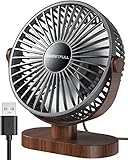
- Large Airflow & Quiet: Wide 5.8-inch airflow area delivers broader cooling at under 25 dB. Lightweight at only 10 oz
- 360° Adjustable: Tilt from 0–360° to direct airflow exactly where you need it. Anti-slip base helps reduce vibration
- 3-Speed Cooling: Choose Low, Medium, or High with simple one-button control for personalized comfort
- USB Powered: Includes a 4.7 ft USB cable. Works with laptops, power banks, USB adapters, car chargers, and more. No battery included
- Easy to Clean: Removable front cover makes it easy to clean the blades and grille for smooth everyday airflow
A 0.1–0.4-A fan is commonly within that range, but check the host, hub and fan rating. A large 0.7-A or 2-A fan may trigger over-current protection or run unreliably. Disconnect it if the computer reports a USB over-current condition. A powered hub or wall supply is safer for sustained high-current use than an unpowered hub.
Wall chargers and USB-C sources
A suitable 5-V charger can normally run a 5-V fan when the connector matches and the charger can provide at least the fan’s required current. A charger marked 5 V/2 A does not force 2 A into the fan; the fan draws what its circuit requires. The connector alone does not establish USB-C Power Delivery support or voltage. Do not connect a fan to a higher voltage unless its specification explicitly permits it.
Can a power bank run a USB fan?
Use watt-hours rather than comparing milliamp-hours directly:
Rank #3

- Classic Design & Small Size: Classic design and more compact, less than 8 ounces, take up small space; it's very suitable for home, car, office, outside or traveling
- Quiet Operation: The fan is very strong and the noise is less than 50dB even when a strong wind is provided; at work and rest, this is a good friend who is quiet and comfortable for you
- Three-Speeds Setting: Low/medium/high-speed setting; press the power button repeatedly to adjust the appropriate fan speed(Note Please: 3rd speed, need to make sure the power source is 5V/1A )
- Adjustable Wind: The fan head can rotate vertically from 0 to 30 degrees, providing the most suitable angle wind to quickly cool you down
- High Compatibility USB-powered: Compatible with PC/laptops, mobile power, AC adapters, car chargers, and other power supplies that support USB
Runtime (hours) = battery Wh × conversion efficiency ÷ fan watts
What’s actually slowing this PC down?
Pick the symptom - the matching free tool is one click away.
For a bank rated 10,000 mAh with a nominal internal battery voltage of 3.7 V:
10,000 × 3.7 ÷ 1,000 ≈ 37 Wh
At an assumed 85% conversion efficiency, usable output energy is approximately 31.5 Wh. That suggests roughly 31 hours for a 1-W fan or 9 hours for a 3.5-W fan. These are estimates, not guarantees. Conversion losses, battery age, temperature, fan speed and the bank’s minimum-load threshold reduce runtime. A very small fan on low speed may cause an automatic shutdown; a long, thin cable can also introduce voltage drop.
Rank #4
- [Quiet Cooling Airflow]: This small desk fan features 7 curved fan blades and a brushless motor, providing a gentle and refreshing airflow. It operates quietly, with noise levels as low as 25 dB, making it easy you to work, study, relax, or nap comfortably for long periods.
- [4-Speed Adjustable Control]: The mini USB fan offers four adjustable wind speeds, reaching a maximum speed of 5.2 m/s. Lower speed settings provide a soft, gentle breeze suitable for work or rest, while higher speeds deliver powerful turbo airflow for quick cooling, all easily adjusted with a simple button control.
- [Versatile USB Power]: This desktop fan is powered via USB and works with USB chargers, computer USB ports, power banks, car chargers, etc. The 4.9 ft cable allows flexible placement while keeping the fan lightweight and energy-efficient. No built-in battery is included.
- [360°Adjustable & Detachable Cover]: The small table fan features a 360°adjustable head, letting you enjoy cooling airflow from all directions, whether sitting, lying, or in any comfortable position.The portable desk fan also has a detachable rear cover for easy cleaning the blades and interior, helping maintain optimal performance over time.
- [Compact & Lightweight]: Measuring 5.67×2.60×6.06 inches and weighing only 0.61 lb, this USB desk fan is compact and portable. It fits easily on your nightstand, desk, or in your bag, making it ideal for bedroom, home, office, travel, cruise cabin, etc. Ideal as a perfect gift for friends and family.
How to measure the real draw
- Insert an inline USB power meter that supports the connector and the fan’s expected current.
- Record voltage and current at startup, when motor surge may be highest.
- Measure every speed setting, with oscillation or tilt motors off and on.
- Calculate instantaneous watts as measured volts × measured amps.
- For a cycling or variable-speed fan, average readings over several minutes.
- To estimate electricity from a wall outlet, measure the complete charger-and-fan combination; charger conversion losses are not included in the fan’s USB-side rating.
Do not treat one meter reading as a universal value. Startup surge, speed control and manufacturer rounding can all produce different results.
What changes a fan’s consumption?
- Speed and motor size: maximum speed generally requires more current than low speed.
- Diameter and blade design: larger blades can move more air but often require more input.
- Oscillation, tilt and displays: additional motors, LEDs and electronics add load.
- Internal batteries: USB input may run the motor, charge the battery or do both.
- Mechanical condition: dust, blocked airflow and bearing friction can alter current and noise.
- Cable and conversion losses: resistance lowers voltage at the fan; boost or charging circuits consume energy.
- Standby electronics: an indicator or controller may draw power even when the blades are stopped.
USB fan versus an AC fan
USB fans usually have lower absolute wattage and are convenient for laptops, power banks, solar batteries and temporary construction-site work. An AC fan may consume more but move substantially more air across a larger area. Compare airflow, coverage, noise, static pressure and comfort alongside watts; wattage alone does not measure cooling effectiveness. A 0.5-W electronics fan may ventilate an enclosure but is not automatically an adequate personal or room fan.
Choosing a source: a practical checklist
- Confirm the fan’s voltage, normally 5 V, and never exceed it without explicit support.
- Confirm rated current and choose a source with comfortably greater capacity; a 0.7-A fan is better paired with a 5-V, 1-A-or-higher source.
- Include oscillation, lights, displays and charging circuits in the expected load.
- For battery operation, compare watt-hours and allow for conversion losses and auto-shutoff.
- Use intact cables, a compliant charger and a powered hub when several fans share one supply.
- For a jobsite or enclosure, verify that airflow—not just low wattage—meets the cooling requirement.
Frequently asked questions
How many watts does a 5-V USB fan use?
Multiply its current by 5. A 0.2-A rating is approximately 1 W; larger models can be 3.5 W or about 9 W.
Best Value

- 3-Speed Adjustable: The desk fan is equipped with 3-speed airflow, Speed 1: soft wind, 3.1m/s, 1500rpm; Speed 2: high wind, 4.0m/s, 2000rpm; Speed 3: strong wind, 4.8m/s, 2500rpm; 3 wind speeds of the USB fan can reach your various cooling demands
- Ultra Quiet: With upgraded motor, the table fan has stronger wind and less noise, max wind speed reaches 4.8m/s at highest speed; The personal fan is powerful and quiet enough to give you a comfortable working and resting environment
- Small & Light Portable Fan: The travel fan size is only 5.5*5.9*2.2in, and about 6.5oz lightweight, so it can be easily carried in your bag for traveling; The cooling fan comes with a 4.9ft long cord, it's great for home, office, dorm, library
- USB Powered Fan: The mini fan is USB powered, you can directly connect by PC/laptop, power bank, AC adapter, car charger or other USB-enabled power supply; Small fan is more energy-saving and more friendly to your electricity bill
- Stable & Easy to Clean: The desktop fan can be tilted 90° to meet your different needs; The wide base is equipped with 4 rubber pads to reduce vibration and prevent the fan from slipping even when it's running at high speed
Is a USB fan cheaper to run than a regular fan?
Often in absolute electricity use, yes, but comparable airflow is not guaranteed. Use each fan’s measured watts and airflow when making a fair comparison.
Can a USB fan drain a laptop battery?
Yes. The fan’s USB power comes from the laptop, adding to battery drain. A 1-W fan is a small load, while a high-current fan can be significant and may exceed a port’s limit.
Will a 10,000-mAh power bank run a fan overnight?
It may. A 1-W fan has an idealized runtime of about 31 hours under the 37-Wh, 85%-efficiency assumptions above; real runtime can be shorter.
Do these 3 things before closing this tab:
1Fix the driver behind crashes, sound loss and screen glitches2Repair Windows errors before they cause bigger problems3Scan for outdated or missing drivers - takes under a minuteDoes a USB fan use power when switched off?
A simple motor may draw essentially nothing, but indicators, controls or charging circuits can consume standby power. Measure the complete device if that matters.
Why does a fan slow down on a power bank?
Likely causes include voltage drop in the cable, insufficient current capability, conversion losses or the bank entering a low-load protection mode.
Quick Recap
Product prices and availability are accurate as of the date/time indicated and are subject to change. Any price and availability information displayed on Amazon at the time of purchase will apply.


Leave a Reply