Some links on this page are affiliate links: if you buy through them we may earn a commission, at no extra cost to you.
“CupCake CNC build, part 1: Introduction & background” is Marc de Vinck’s introductory Make: post, published November 4, 2009. It begins a 13-part diary of assembling a MakerBot CupCake CNC kit; it is not a complete construction manual, operating guide, or modern buying recommendation.
What Part 1 covers
De Vinck describes receiving a large cardboard box containing a CupCake kit he had ordered weeks earlier. He presents the project as an “out of box experience” for Make: Online: a running account of what it takes to turn a kit into a working desktop 3D printer. He did not know in advance how many installments the project would require.
The post establishes the author’s perspective, explains why he bought the machine, and previews the work ahead. The later series addressed unboxing, electronics, bootloader updates, enclosure and frame construction, motion stages, the Plastruder extruder, software, calibration, and the first print. Part 1 itself does not provide a bill of materials, wiring procedure, firmware workflow, calibration sequence, or first-print tutorial. Read the original installment at Make:.
The Tool Desk
Outbyte Driver Updater FREEFix the driver behind crashes, sound loss and screen glitchesFind Drivers →Outbyte PC Repair FREERepair Windows errors before they cause bigger problemsFix Now →The author’s CNC experience
At publication, de Vinck reported roughly 10 years of CNC tinkering. He described himself as an enthusiast rather than an expert, while noting that he owned CNC mills, routers, and lathes, had retrofitted older mills, and had built a CNC machine from scratch. His “MobileC” project put CNC electronics and a computer in a mobile tool cart for hackerspaces, workshops, and events; the pictured machine was based on a retrofitted Sherline 5400 mill.
#1 Best Overall

- All-Aluminum Structure & Enhanced Stability: Engineered with an all-metal framework and linear rail Z-axis, the FoxAlien Masuter Pro offers superior precision, durability, and stability for detailed engraving and cutting on wood, acrylic, MDF, nylon, and more.
- Upgraded Dust-Proof Controller & User-Friendly Design: Features a compact, dust-resistant controller box with easily accessible emergency stop and home buttons for safer, more convenient operation.
- Versatile Spindle Compatibility & Customization: Includes two spindle clamps (52mm & 65mm) compatible with 60W and 300W spindles, as well as custom upgrade options like 65mm router or 1.5KW spindle for advanced carving needs. It also supports the 69mm spindle clamp, please buy separately.
- Quick Assembly & Pre-Wired Components: Main parts are pre-assembled with pre-wired wiring to the controller, plus a detailed step-by-step manual—set up in just 10-15 minutes, ideal for hobbyists and DIY enthusiasts.
- Large Working Area & Expandability: Features a generous 15.75” x 15.75” x 2.36” (400 x 400 x 60mm) engraving surface, with optional Y-axis extension kit, perfect for larger projects and versatile woodworking applications.
That background matters. He approached the CupCake as someone comfortable with mechanical alignment, wiring, and troubleshooting. A beginner should not assume that tasks appearing straightforward to an experienced hobbyist will be equally obvious without the accompanying diagrams and instructions.
Why he purchased the kit
De Vinck gives two reasons: to support MakerBot’s open-source and open-manufacturing work, and to document the experience honestly for readers. He says he purchased the kit himself rather than receiving a review sample or special treatment. The result is a firsthand build diary, not a controlled product test.
What the CupCake CNC was
The CupCake was an early MakerBot desktop extrusion printer derived from the RepRap movement. MakerBot’s historical description says the design shared RepRap’s open-source, low-cost ambitions while concentrating on a kit-based machine intended to be usable, reliable, and easy to modify. “CNC” in the name can mislead modern readers: this machine deposited thermoplastic layer by layer; it was not primarily a subtractive mill, router, or lathe.
Recommended Free Tools
Rank #2

- 【CNC Router Machine with V-Wheel + Linear Rail Structure】Built as a desktop cnc machine, this wood cnc machine features 2GT belt + V-wheel on X/Y axes and round linear guide + TR8-2T screw on Z axis with 42 stepping motor, delivering stability for cnc machine for metal and cnc milling machine tasks.
- 【CNC Router Machine with V-Wheel + Linear Rail Structure】Built as a desktop cnc machine, this wood cnc machine features 2GT belt + V-wheel on X/Y axes and round linear guide + TR8-2T screw on Z axis with 42 stepping motor, delivering stability for cnc machine for metal and cnc milling machine tasks.
- 【52mm/65mm Spindle Clamps + 500W Spindle】Comes with a 500W spindle and Φ52/65mm clamps for easy upgrades. Whether you need a cnc router machine woodworking or cnc router machine industrial setup, this cnc router adapts to your needs.
- 【Ready-to-Use Full Accessory Kit】Unlike a bare cnc mill, this desktop cnc comes with clamps, Z-probe, test wood board, brush, wrenches, hex keys, USB cable, power cable, and manual. Pre-wired parts let you assemble quickly – ideal for hobbyists.
- 【GRBL + Candle USB Control】Fully supports GRBL control platform like Candle via USB interface. Features 3D preview, origin setting, axis unlocking, and real-time display. Works as wood router, milling machine, or even cnc router machine with laser (laser optional).
Its system combined a three-axis positioning mechanism, a toolhead, and control electronics. The period overview is archived at MakerBot Wiki’s CupCake CNC page.
Historical place
RepRap helped popularize open experimentation in 3D-printing hardware. MakerBot translated much of that culture into a kit that makers could assemble, repair, and modify themselves. The CupCake’s wooden structure, printed mechanical parts, open documentation, and user assembly reflect the priorities of that period. It helped make desktop extrusion printing visible in maker communities, but it should not be judged as though it were a current consumer printer with automatic calibration, quiet operation, mature software, or guaranteed support.
How the machine moved
The archived MakerBot specification describes Cartesian X, Y, and Z motion. X and Y used belts; Z used a screw. The toolhead was mounted on the Z stage, while the build platform moved in X and Y. Belt drives can move quickly but depend on correct tension and generally offer less nominal positioning precision than a screw drive. A screw-driven Z axis can provide fine incremental movement, but at a much lower travel speed.
Rank #3

- START YOUR CNC JOURNEY – The Genmitsu 3018-PRO is a compact desktop CNC router machine designed for beginners, makers, and DIY projects. Its upgraded assembly reduces setup complexity while the raised base improves stability, giving you an approachable way to learn CNC carving, engraving, and milling
- CREATE WITH MULTIPLE MATERIALS – Take on CNC projects in wood, acrylic, PVC, plastic, PCB, and soft aluminum with the right bits and cutting settings. From signs and custom parts to circuit board prototypes, this 3-axis CNC milling machine gives makers room to explore different applications
- PROVEN GRBL CONTROL – Built around open-source GRBL control for a flexible CNC workflow with extensive community resources. Use Candle to control movement and run G-code files, making it easier to learn the fundamentals of CNC machining and move from your first test cut to custom projects
- COMPACT SIZE, PRACTICAL WORKSPACE – The 300 x 180 x 45 mm XYZ working area provides useful capacity for small woodworking, engraving, PCB milling, and prototype projects without taking over your workbench. A practical mini CNC machine for home workshops, classrooms, and maker spaces
- WORK WITH OR WITHOUT A COMPUTER – The included offline controller lets you operate basic CNC functions and run compatible G-code files without keeping a computer connected. Use computer-based GRBL control when you want a more complete workflow, giving you flexibility for different projects and setups
| Archived specification | Value | How to interpret it |
|---|---|---|
| Usable build area | 100 mm × 100 mm × 130 mm | Period MakerBot specification, not a current measurement |
| X/Y positioning resolution | 0.085 mm | Nominal positioning figure, not guaranteed print accuracy |
| Z positioning resolution | 3.125 microns | Nominal step resolution, not surface finish or repeatability |
| Maximum X/Y feed rate | 5,000 mm/min | Archived maximum, not evidence of practical print speed |
| Maximum Z feed rate | 200 mm/min | Archived maximum |
| Typical layer height | 0.3725 mm | Period-typical operating figure |
| External dimensions | 350 mm × 240 mm × 450 mm | Archived overall size |
These figures describe the documented design, not modern accuracy, reliability, surface quality, or productivity. Mechanical looseness, belt tension, frame alignment, extrusion temperature, material behavior, and calibration all affect actual results.
Quick wins for a faster PC:
Repair Windows errors before they cause bigger problemsFix Now →Scan for outdated or missing drivers - takes under a minuteDriver Scan →What a complete CupCake build involved
Part 1 is best understood as the project’s orientation. The archived build documentation shows the substantially larger task required to reach a first print:
- Identify the correct electronics and assemble the control hardware.
- Build pulleys and the wooden body.
- Construct and install the Y, X, and XY stages.
- Assemble the Z stage and fit endstops.
- Build and install the Plastruder toolhead.
- Connect boards and cables.
- Install or update firmware and host software.
- Calibrate the machine and use the troubleshooting guidance.
The archived instructions are at MakerBot Wiki’s CupCake build instructions. They estimate that two people might assemble a machine in about a weekend, but that was a historical estimate for a known kit and should not be treated as a promise for a surviving machine or incomplete parts set.
Rank #4

- High-Efficiency Engraving: Equipped with a 300W spindle, our CNC router machine delivers smooth and precise engraving or cutting on wood, clear acrylic, MDF, leather, plastic, foam, vinyl, and soft metals. Bring every creative idea to life
- Large Work Area: Create without limits on a 15.75 x 15.75 x 2.36 in (400 x 400 x 60 mm) work area. With an aluminum alloy body and heavy-duty base, our CNC wood router provides high stability and vibration reduction. Repeat positioning accuracy: ≤0.05 mm
- Secure & Durable Performance: Powered by a stepper motor, this desktop CNC router machine runs smoothly and quietly. The spindle motor features current detection protection, minimizing malfunctions and extending the system’s lifespan to up to 5,000 hours
- Broad Software Compatibility: This CNC wood router machine is compatible with all software that supports GRBL f1.1 firmware. The 2.4-inch touchscreen offline controller allows operation without a computer, so you can engrave anytime, anywhere
- Easy Assembly & Operation: Key components come pre-assembled and pre-wired for quick setup. Spend less time setting up and more time creating. A rotary knob provides precise spindle control, making this CNC router engraver machine user-friendly
What the unboxing installment adds
The related Part 2 article documents one particular kit containing electronics, pulleys, lead screws, cables, tools, hardware, printed pulleys, three NEMA 17 stepper motors, and ABS filament. That kit included one pound of natural ABS and five pounds of black ABS. Those contents belong to the kit shown in that article, not automatically to every CupCake batch. See Make: Part 2.
Independent reader supportYour contribution helps us test, update, and keep practical guides available for everyone.Batch differences are essential
Do not apply a scanned instruction page to a CupCake merely because the title matches. The archived documentation says the original instructions cover batches 1–9 from 2009; Batch 10 and later machines had different instructions. The overview also separates documentation for batches 1–9, Batch 10 and later, Starter Kits, and Ultimate Kits.
Part 1 concerns a kit ordered in 2009, but it does not identify every batch-specific electronic, extruder, firmware, or mechanical revision. Before restoring one, photograph the boards and motors, inspect labels and connector arrangements, and match the hardware to the appropriate archived documentation at the CupCake overview and the batch-specific instructions.
Best Value
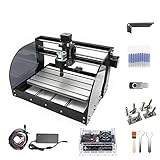
- Upgrade Version CNC3018-PRO-MAX: Mini CNC machine small size, light weight, USB interface, GRBL control systems, great cnc router machine for beginers;3018-PRO-MAX machine is very easy to install,stable structure,our parcel also include english user manual; Supporting files:G-code .nc/.txt/.tape/.gcode
- Working area: 30x18x4.5cm / 11.8 x 7.1 x 1.8 inches;Frame size: 42x35x27cm / 16.53 x 13.78 x 10.63 inches; Type:USB port Desktop cnc router; System requirements: Windows XP / Win 7 / Win 8 / Win 10 / Linux
- Spindle Motor: 775 120W spindle motor (12-36V) 24V:10000 r/min; Collet: ER11 3.175mm Can be equipped with 0-7mm; Stepper Motor: Nema17 42 stepper motor 1.33A/0.3N.m/43oz-in/42x42x34 mm
- GRBL Software: Our parcel include a 4G USB flash drive,it include the installation instructions,user manual and GRBL software; Upgraded GRBL1.1f Control Board: Added the outer casing,E-stop button port,probe port,limit port,offline controller port and add the power button switch,with the fan,enhanced spindle drive,can support max 20000rpm spindle,and also can support 12V 3-PIN PWM/TTL 0.5W-20W module
- Application: Can be engraved plastic, wood, acrylic, pvc, pcb, wood and the like material.soft metal like copper and aluminum and other materials; If you have the engraver module,you also can change the spindle to a 3-pin PWM engraver module,then also can carve on kraft paper, wood, leather etc
What the article means for a modern reader
For historians and educators
The post is a useful primary source for the maker movement’s transition from experimental RepRap hardware to a purchasable, community-built desktop printer. It records the kit culture, expectations, and language of 2009 more effectively than a retrospective specification sheet.
For collectors and restoration builders
Treat Part 1 as orientation, then obtain the correct batch documentation. Expect to identify missing or mixed-batch parts, replace aged belts, bearings, fasteners, printed pulleys, endstops, heaters, thermistors, motors, or power components, and solve obsolete software and firmware issues. Assembly is only one stage of making a surviving machine operational.
For anyone seeking an everyday printer
The CupCake is primarily a restoration or educational artifact today. Its open construction and hackability can be valuable, but they come with alignment work, calibration, version fragmentation, limited archived software support, and far less convenience than current printers. ABS-era operation also calls for attention to heat, warping, bed adhesion, fumes, enclosure practice, and electrical safety.
Do these 3 things before closing this tab:
1Repair Windows errors before they cause bigger problems2Fix the driver behind crashes, sound loss and screen glitches3Clear out junk files and repair common Windows errorsBottom line on Part 1
“CupCake CNC build, part 1: Introduction & background” is a historical project introduction and build diary, not a standalone assembly guide. It explains who Marc de Vinck was, why he bought the kit, and why the CupCake mattered in early open-source desktop 3D printing. For reconstruction, use the batch-matched MakerBot documentation and the remaining installments—such as Part 12’s electronics and software coverage—while treating every specification and software reference as period-specific.
Quick Recap
Product prices and availability are accurate as of the date/time indicated and are subject to change. Any price and availability information displayed on Amazon at the time of purchase will apply.


Leave a Reply