Free tools Windows power users keep installed
One-click scans. No signup required.
Some links on this page are affiliate links: if you buy through them we may earn a commission, at no extra cost to you.
Short answer: A conventional plug-in surge protector is not a dependable, fully functioning solution for an outlet that lacks an equipment ground. The safest long-term fix is to have a qualified electrician diagnose the circuit and install proper grounding or a new grounded circuit where appropriate. A GFCI may add shock protection in some permitted retrofits, but it does not create a ground or turn an ungrounded outlet into a suitable one for a standard surge protector.
Do not use a three-to-two-prong adapter, remove a ground pin, or attach an adapter tab to a nearby screw or pipe. First resolve the outlet condition; choose surge protection only after the installation is confirmed compatible.
| # | Preview | Product | Price | |
|---|---|---|---|---|
| 1 |
|
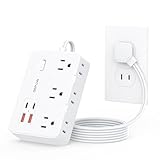
DEPOW 2 Prong to 3 Prong Adapter Power Strip-6 Outlets 4 USB Port (2USB-C | $13.99 | Buy on Amazon |
| 2 |

|
2 Prong Power Strip, WRXDMC 2 Prong to 3 Prong Outlet Adapter with 5ft Cord | $16.99 | Buy on Amazon |
Can you use a surge protector with an ungrounded outlet?
Usually, no—not as a reliable, manufacturer-supported surge-protection setup. Many conventional protectors use components such as metal-oxide varistors (MOVs) in a circuit designed around line, neutral, and equipment-ground connections. The protection modes and fault behavior assume a correctly wired receptacle. Eaton says standard AC surge protectors require a properly wired, grounded outlet; APC says its surge protectors and UPS products are not supported in ungrounded applications. Eaton/Tripp Lite’s guidance and APC’s grounding requirements are explicit on this point.
The Tool Desk
Outbyte PC Repair FREERepair Windows errors before they cause bigger problemsFix Now →Outbyte Driver Updater FREEFix the driver behind crashes, sound loss and screen glitchesFind Drivers →A protector may still pass electricity to your devices, but that only proves it is supplying power. Some units show a “Not Grounded” warning; some may stop supplying power; others can continue operating without the installation their protection design requires. Do not ignore a warning light or assume a working television or computer means the protector is protecting it correctly. Belkin likewise directs users to grounded outlets and warns that improper grounding can affect warranty coverage. See its grounding FAQ.
#1 Best Overall
- 【2 Prong to 3 Prong Outlets Adapter】-This adapter converts a polarized two prong outlet into a three prong grounded socket, ideal for ungrounded outlets in older homes. This 2 prong power strip solves old house wiring issues. Turn your two-prong outlet into a safe, organized power stations, ideal for personal electronics, small appliances and more.
- 【10-in-1 Desktop Power Strip】- Power up to 10 devices! Features 6 AC outlets(1625W/13A), 2 USB-C and 2 USB-A ports (total output 12W/2.4A), Charge phones, laptops, appliances—perfect for offices, kitchens, and cramped spaces. The unique side-mounted two prong plugs offer flexible adapter use.
- 【1050J 2 Prong Surge Protector with 7 Safeguards】- Defend devices from spikes! This robust surge protector offers 1050J protection plus overload, over-current, short-circuit, over-voltage, overheat protection & flame-retardant materials . Peace of mind during storms.
- 【Space-Saving Flat Plug & 5FT Cord】- Fits effortlessly behind furniture with its ultra-thin (0.33") flat plug and 45° right-angle design. This two prong to three prong adapter solves placement challenges with a 5-foot cord for hard-to-reach areas.
- 【Wall-Mountable & Old House Solution】 Includes 2 mounting holes to secure this slim power strip anywhere. The ultimate two prong to three prong adapter for vintage homes, dorm rooms, and workshops.
Surge protection is also not a guarantee against every electrical event. A plug-in unit cannot guarantee protection from a direct lightning strike, and it is not a repair for defective wiring, lost neutral, or abnormal utility voltage. A surge protector reduces certain risks when installed and used as its manufacturer specifies.
What “ungrounded” means—and why appearance is not enough
- Two-slot receptacle: Often found on older two-wire circuits, but appearance alone does not establish the wiring condition or tell you whether a permitted upgrade is possible.
- Three-slot receptacle with an open ground: A three-slot face does not prove an equipment-grounding conductor is present. It may have been installed on an older two-wire circuit or have another wiring defect.
- Neutral is not ground: They have different functions and must not be substituted for one another at the receptacle.
- GFCI protection is not equipment grounding: A GFCI can detect leakage and interrupt power; it does not add the equipment-grounding conductor a grounded appliance or protector expects.
A plug-in receptacle tester can be a useful initial indicator, but it is not a full diagnosis of wiring, bonding, or circuit condition. Have a qualified electrician assess a questionable receptacle, especially if it is loose, warm, damaged, sparking, buzzing, scorched, or associated with tripping breakers.
Why grounding matters to surge protection
A surge protector is not simply a device that sends every spike “into the ground.” Its protective components work across defined electrical relationships among line, neutral, and ground, and the exact modes vary by product. The equipment-grounding conductor also provides a path for fault current and helps keep exposed conductive parts bonded to the electrical system. Without the intended path, a fault or transient may behave differently than the product’s design assumes.
The risk can extend beyond the wall outlet. A computer, television, router, or home-theater system may also connect to coax, Ethernet, telephone, antenna, USB, or other equipment. In a fault, current can seek an unintended path through interconnected devices or a person. APC warns that ungrounded equipment may appear to work normally but behave unpredictably when a fault occurs. Grounding is a safety condition, not just a feature that improves a product’s performance.
Surge suppression, overcurrent protection, filtering, voltage regulation, and backup power are different functions. A basic power strip provides extra outlets; it is not automatically a surge protector. A UPS may provide battery backup and surge-related features, but it is not a workaround for an ungrounded outlet: APC includes its UPS products in its grounding guidance.
GFCI versus ground versus surge protector
| Function | GFCI | Equipment ground | Surge protector |
|---|---|---|---|
| Detects current leakage imbalance | Yes | No | Not its primary function |
| Provides an equipment fault-current path | No | Yes, when correctly installed | Depends on design and installation |
| Can reduce shock risk | Yes, when correctly installed | Helps clear certain faults when correctly installed | Not by itself |
| Suppresses transient voltage | No | No | Yes, within its design limits and installation requirements |
| Makes an ungrounded outlet grounded | No | Yes, if a proper grounding conductor is installed | No |
In some existing installations, applicable rules allow a GFCI device or breaker as part of a retrofit without adding an equipment-grounding conductor. The receptacle may need to be marked “No Equipment Ground.” OSHA discusses this distinction in its interpretation on grounding requirements. Requirements depend on jurisdiction, circuit, and the applicable code; ask an electrician. Even when a GFCI retrofit is permitted, the outlet remains ungrounded and the GFCI does not provide surge suppression.
The safest options, in order
- Have the circuit properly grounded or replaced. An electrician can determine whether an existing grounding conductor can be used, a branch circuit should be rewired, or a new grounded circuit should be run. If multiple outlets or the panel show problems, the electrician can assess whether the issue is broader. This is the preferred route for expensive electronics, workstations, networking gear, home theaters, and equipment with exposed conductive parts.
- Ask whether a code-compliant GFCI retrofit is appropriate. It may improve shock protection for an older ungrounded circuit where permitted, with required labeling. It is not a ground and does not make a standard surge strip fully grounded.
- Use only compatible equipment while arranging a repair. Some devices are double-insulated or designed with two-prong plugs and do not require an equipment ground. That is a device-specific compatibility point, not evidence that the outlet is correctly wired or that surge protection is present. Follow the equipment maker’s instructions.
- Consider specialized conditioning only with explicit manufacturer approval. Series-mode or other designs differ from ordinary MOV strips, but phrases such as “zero ground contamination” do not establish that a product is approved for an ungrounded circuit. Check the exact model manual and ask the manufacturer about the precise installation before use.
- Avoid improvised fixes. Do not defeat the ground pin, use a cheater adapter, attach its tab to a random screw or pipe, or assume a long extension cord from another room solves the problem. Eaton cautions that extension cords may be unsuitable for a load and that long runs can add resistance and overheating risk.
What to buy after grounding is corrected
Once an electrician confirms the receptacle is grounded and correctly wired, choose a protector for the circuit and connected equipment—not by joule number alone.
Recommended Free Tools
- Verify the exact model and listing. Look for a legitimate certification mark and documentation for the exact product. UL identifies UL 1449 as the relevant standard for cord-connected surge-protective devices for general-use applications. Do not confuse it with UL 62368-1, a different standard.
- Check rating and load. Match voltage and maximum current to the application and follow the maker’s instructions. Many household strips are rated for 15 A, but check the label. Do not connect heaters, cooking appliances, or other heavy loads to an electronics strip unless both strip and circuit are explicitly suitable.
- Compare protection and shutdown features. Thermal protection, automatic disconnect, overvoltage shutdown, line-to-neutral/line-to-ground modes, replaceable modules, and filtering may matter. A higher joule rating alone does not show that the protector is compatible, safely designed, or a better fit.
- Plan for signal cables. If coax, telephone, or antenna cables enter the system, a protector with compatible signal-line connections may be relevant. Ethernet and other connections also need appropriate equipment and installation. Follow the protector maker’s instructions; simply plugging in the power cord does not protect every connected path.
- Check status and replacement guidance. A “protected” indicator is useful, not proof that every protective function is intact. Belkin notes that some units can continue acting as a power tap after the protection indicator goes out. Follow the exact model’s replacement guidance, and replace equipment that is damaged, overheated, or has reached its indicated end of life. There is no universal replacement interval for every model.
- Buy from a credible source. Confirm the model number and find an accessible manual. Be wary of implausible ratings, vague certification claims, and listings that do not identify the exact product.
Examples for a properly grounded outlet—not for an ungrounded one
These examples illustrate different use cases after the outlet has been confirmed compatible. They are not recommendations for the ungrounded receptacle in question, and specifications, stock, and prices can change.
Rank #2
- 2 Prong to 3 Prong Outlets Adapter: This product can convert a polarized two prong outlet to a three prong outlet, ideal for the non-grounded outlets in you older house. Transform your 2-prong outlet into a safe, organized powering station. Ideal for personal electronics, small appliances and more.
- 2 Prong Flat Plug Power Strip: with only 0.27inch flat plug design, flat wall plug is much thinner than traditional plugs, which can close to the wall easily, and hide in the back of furniture, bed or refrigerator, no waste for every inch space for your home.The 45° angle flat plug design keeps another outlet free.
- 12-in-1 Design Charging Station: The two prong to three prong outlet adapter with 8 outlets + 4 USB ports can safely charge up to 12 devices from a single small wall charging unit. Max Capacity Up to 1625 Watt(Max 125 Volt, 13 A). The USB ports of the 3 prong adapter will automatically detect devices and deliver the optimal charging current. Maximum 2.4A output for 2 USB-A ports, maximum 3.0A output for 2 USB-C ports,3.4A/17W total. Compatible with mobile phone, camera, e-readers and more.
- Two Prong Surge Protector : Safe guard your valuable and vulnerable electronics against voltage spikes and serious power events such as lightning-induced surges with 1400 joules AC suppression; a white 'Surge Protection' indicator illuminates when the surge protector is turned on, so you know the power outlet is functioning properly; Lighted on/off switch with integrated circuit breaker for overload protection of all outlets.(The "Surge Protected” indicator light on to show your devices are protected)
- Multiple Safety Protection:Built-in On/Off switch and 13 amp circuit breaker offers power control and overload protection over all outlets; constructed with fire-resistance material, this 2 prong extension cord ensures your home and equipment stay safe.
- Belkin BE108230-06: An eight-outlet home/office unit with coaxial and telephone/fax protection, a 3,550-joule rating, and status indicators. See the Belkin product page for current specifications and availability. Belkin requires grounded use.
- Belkin BE106000-10: A six-outlet option with a 10-foot cord for a suitable grounded setup where reach matters. Check the manufacturer page for current details.
- Furman PST-8: A higher-end audio/video conditioner described by Furman as using Series Multi-Stage Protection, filtering, extreme-voltage shutdown, and signal-line protection. Its “zero ground contamination” language is not permission to use it without a ground; consult the PST-8 documentation for installation requirements and current availability.
- Tripp Lite/Eaton models: Options vary by application and configuration. Eaton’s surge-protection guide says standard AC protectors require a properly wired, grounded receptacle. Check the exact model’s manual.
Prices are intentionally omitted because they change and do not alter the key compatibility requirement: none of these examples should be treated as an ungrounded-outlet solution unless its manufacturer explicitly documents that exact use.
How to respond to a warning or suspicious outlet
- Unplug sensitive equipment if the receptacle is damaged, hot, loose, buzzing, scorched, or sparking.
- Check the surge protector’s manual if its “Not Grounded” light is on. Do not bypass the warning or keep using it as though protection were confirmed.
- If using a listed receptacle tester, treat its result as an initial clue—not a complete electrical diagnosis.
- Arrange an electrician’s inspection. Tell them whether the outlet has two or three slots, what indicator appeared, and what equipment is connected.
- If lights suddenly brighten or dim, appliances act erratically, or voltage seems abnormal, shut down sensitive equipment if safe and contact an electrician or utility provider promptly. A surge strip is not a remedy for a possible lost neutral; Schneider Electric/APC explains that a lost neutral in a typical 120/240-V residential system can expose loads to abnormal voltage. See its lost-neutral guidance.
For renters, report the outlet condition to the landlord or property manager in writing and request an inspection by a qualified electrician. Do not alter the wiring yourself or rely on an adapter as a substitute.
Frequently Asked Questions
Will a power strip work on a two-prong outlet?
It may physically supply power if used with an adapter, but an adapter does not supply the missing equipment ground. Do not use a three-to-two-prong adapter to connect a grounded surge protector.
Can I use a UPS on an ungrounded outlet?
Do not assume so. APC does not support its UPS products in ungrounded applications; follow the exact UPS manufacturer’s instructions and have the outlet evaluated.
Can a whole-house surge protector fix an ungrounded receptacle?
No. Whole-house protection may reduce some incoming transient risks, but it does not repair an ungrounded branch circuit or replace correct receptacle grounding.
Can a surge protector protect Ethernet, coax, or HDMI?
Only compatible signal-line protection can address the connections it is designed for, and installation matters. A power-only strip does not protect every signal path; HDMI is not automatically protected by coax or Ethernet ports.
When should I call an electrician urgently?
Stop using the outlet and seek prompt help if it is hot, sparking, buzzing, scorched, damaged, or associated with shocks or repeated trips. Sudden brightness changes or erratic appliance behavior may indicate abnormal voltage and also merit prompt attention.
What’s actually slowing this PC down?
Pick the symptom - the matching free tool is one click away.
Quick Recap
Product prices and availability are accurate as of the date/time indicated and are subject to change. Any price and availability information displayed on Amazon at the time of purchase will apply.


Leave a Reply