Some links on this page are affiliate links: if you buy through them we may earn a commission, at no extra cost to you.
Automate Things’ IR Bridge is an open-firmware Wi-Fi controller for sending and receiving infrared commands. Its “two-board” design means an ESP8266 Wemos D1 mini paired with a custom IR interface PCB—not two complete hubs. It could suit a Home Assistant maker who wants to control older TVs, air conditioners, amplifiers or projectors, but it is not a straightforward current retail recommendation: Tindie lists the v1.4 product as retired, and stock and pricing at the seller’s store could not be confirmed.
What the IR Bridge does
Many older TVs, soundbars, projectors, amplifiers and air conditioners accept commands from an infrared remote but have no network API. The IR Bridge connects that kind of appliance to a Wi-Fi-based smart home: firmware on the bridge sends IR commands to the appliance and can capture signals from a handheld remote.
That can let an automation send a volume command when a media scene starts, transmit an air-conditioner command in response to occupancy, or use a remote button as a trigger. It can also relay an IR command between rooms when a second bridge and suitable software configuration are available. Infrared is still a direct, room-level link: the appliance itself does not join Wi-Fi. Home Assistant describes this distinction in its Infrared integration documentation.
The design was promoted for open firmware such as Tasmota and ESPHome, rather than requiring a separate vendor cloud subscription. That describes the bridge’s intended firmware approach; it does not remove any separate requirements for remote access to Home Assistant or third-party voice-assistant services.
#1 Best Overall

- 【Note】MOES SMART IR blaster come with UL certified adapter and USB 2.0 cable,you may plug wherever there is a socket or USB port.One single room one smart IR is recommended as infrared can not break through the wall.Only supports 2.4G Wifi connection.For brands supported by IR blaster, please check the users' guide and use the search function to inquire.
- 【All-in One Control】MOES All-in-one IR remote controller devote to activate Air conditioners,TVs,fans,DVDs,STBs,TV BOXes etc Infraed device with one single MOES SMART IR(Only support Ir (38KHZ), RF not included)
- 【Remote Control from Anywhere】Equip with MOES Smart IR Controller,you may control IR devices with free mobile "Smart Life/Tuya" app anytime anywhere(Compatible with Android&iOS).
- 【Hands-free Voice Control】Alexa,set A/C to 77 degrees Fahrenheit.A voice command can activate MOES Smart IR controller to remotely control most infrared control device.Such as air condition,FAN,TV,DVD,STB,TV BOX etc.(Furthermore compatible brand or device,please check attached list or Smart Life APP.
- 【Customized DIY Copy Function】If you can not find IR device brand in "Smart Life"App,Programable DIY learning function may help to copy same function from orginal remote.Most IR remote control Device will be applicable such as fireplaces,heater,ceiling fans.
How the two-board hardware is arranged
The documented architecture pairs an ESP8266 controller with a custom IR driver and receiver board. The controller handles Wi-Fi and firmware; the interface board provides the circuitry that drives the LEDs and receives incoming IR. The product documentation and Tindie coverage do not establish that every kit revision included the same controller board, so check the exact listing and physical hardware before assuming what is in a used or remaining-stock kit.
Home Assistant / MQTT / ESPHome API
              │
            Wi-Fi
              │
       Wemos D1 mini
          ESP8266
              │
       Custom IR PCB
       ├── GPIO4 → IR drivers → 9 IR LEDs
       └── GPIO5 ← TSOP38238 38-kHz receiver
The Blakadder device template documents this parts list and pin mapping for AT-IRBR v1.0: a Wemos D1 mini, nine TSAL6400 IR LEDs, three 2N2222 transistor drivers, three 6.8-ohm resistors, and a TSOP38238 38-kHz receiver. It lists GPIO4 for IRsend and GPIO5 for IRrecv. It also specifies a user-supplied 5-V/1-A Micro USB power supply. See the Automate Things template.
That template is labeled v1.0, while the Tindie product listing is for v1.4. Do not transfer the template’s pin assignments, parts list or Tasmota configuration to a v1.4 board without checking the board or revision-specific seller information.
What’s actually slowing this PC down?
Pick the symptom - the matching free tool is one click away.
Rank #2

- SMART IR REMOTE HUB - Support 50,000+ IR controlled devices such as TV, STB, Air conditioner, Fan, Video Recorder, DVD and more. Does not support Bluetooth and RF Devices. The cloud is continuously updating supported devices library, so your RM4 mini is always compatible with newer devices. Option to program your devices and learn buttons if certain cloud data is unavailable.
- BUILT-IN REMOTE LIBRARY & CUSTOM LEARNING - Access a wide range of preloaded remote templates by brand and model. If your device is not listed, you can manually teach the RM4 mini using your original IR remote. IR control requires line-of-sight. Please ensure there are no obstacles between RM4 Mini and your devices.
- TECH SUPPORT - One-Year Warranty, 24/7 Technical Support. This device supports only infrared (IR) control and is not compatible with Bluetooth, Zigbee, or RF-based devices. Please check if your appliance uses IR before purchasing.
Why nine LEDs and transistor drivers?
Multiple LEDs driven through transistors are intended to provide more IR output and coverage than a tiny single-LED module. They do not make the signal omnidirectional or guarantee a particular working distance. The product listing advertises a range greater than 10 metres; treat that as a seller claim, not a measured guarantee. Practical range depends on alignment, the appliance’s receiver, room lighting, reflections, power quality, protocol and repeat behavior. Tasmota likewise notes that basic IR transmitters can have short effective range and discusses stronger transmitter designs in its IR Remote documentation.
Firmware choices and setup
The board is a maker-oriented device rather than a one-click appliance controller. Its documented firmware options include Tasmota, ESPHome and custom Arduino/IRremoteESP8266 projects. Choose based on the integration path and how much configuration you want to maintain.
| Firmware path | Useful when | What to expect |
|---|---|---|
| Tasmota | You want a familiar web interface, command-driven operation or MQTT-based control. | Assign the transmitter and receiver GPIOs, test capture and replay, then connect through MQTT or another supported path. Protocol coverage depends on the firmware build. |
| ESPHome | You manage devices as YAML configurations and want a Home Assistant-oriented API path. | Configure the ESP8266 board, Wi-Fi, GPIO4 transmitter and GPIO5 receiver; select the appropriate IR behavior and test raw reception as needed. Exact configuration depends on the board revision and current ESPHome component behavior. |
| Arduino / IRremoteESP8266 | You want to build custom behavior or have specific development requirements. | This offers more implementation control, but requires the most firmware development and maintenance. |
Tasmota route
- Identify the board revision. Confirm that the controller is an ESP8266 and inspect the PCB or seller documentation. Do not assume the v1.0 template applies to v1.4.
- Flash firmware over USB-to-serial. The available documentation supports USB-to-serial installation, but does not establish a revision-specific flashing command or wiring procedure. Confirm the module, adapter, bootloader state and current firmware instructions before flashing.
- Join the device to Wi-Fi. Complete Tasmota’s network setup, then open its configuration interface.
- Assign the IR pins. In Tasmota, use Configuration → Configure Module. Set GPIO4 to
IRsend (8)and GPIO5 toIRrecv (51), if those assignments match the identified board revision. - Connect the control path. Set up MQTT or another supported Tasmota/Home Assistant route; the bridge is not automatically recognized by product name just because it is on the network.
- Test receive, then transmit. Point a handheld remote at the receiver, inspect the captured command, and replay it at the target appliance. Verify repeat and long-press behavior before depending on it in an automation.
The device template provides this Tasmota module configuration JSON for its v1.0 template only:
Rank #3

- 【HIGH COMPATIBILITY】: The WiFi universal remote control is a smart IR remote controller used for household appliances such as TV,Air conditioner,Set-Top Box,Fan and DVD etc.It supports 50000 + devices with an infrared frequency of 38kHz.You can also use the DIY function of Smart Life to configure and add more devices with an infrared frequency of 38kHz and your own infrared remote control.
- 【APP CONTROL 】: You can control all household appliances by hand to any extent via Tuya APP/Smart Life APP, your phone will be a smart remote, you can remotely control your IR devices no matter you are at home or away.
- 【VOICE CONTROL & IFTTT】: Compatible with Alexa,Google Home,IFTTT. An ideal Alexa/Google Home accessories for home. You can use it to control home electronic devices by voice.If the associated device has its own voice function, after being associated with this product,you can remotely control home electronic devices by voice without distance limitation.
- 【SMART HOME AUTOMATION 】: Wi-Fi smart hub can connect to 2.4GHz WiFi, Supports Android 4.4 or newer and iOS 8.0 or newer. Power on remote control,and then use the Smart Life app to add this device.There is no object blocking between IR remote and electric device.(The package includes a USB charging cable, no plug, you can use your phone charging plug to charge.)
- 【QUALITY & TECH SUPPORT】: We offer a 24-month warranty. If you have any questions about our Universal Infrared Remote Controller Hub, please feel free to connect with Customer Service Support. SENCKIT Service team will reply you within 24 hours.
{
  "NAME": "AT-IRBR-1.0",
  "GPIO": [0,0,0,0,1056,1088,0,0,0,0,0,0,0,0],
  "FLAG": 0,
  "BASE": 18,
  "CMND": "Module 0"
}
ESPHome route
ESPHome is a natural choice for users already managing Home Assistant devices that way. Its infrared component documents transmission of raw timing arrays, optional carrier frequency and repeat count, reception of raw timings, and runtime learning and replay. An adapted configuration needs the correct ESP8266 board definition, Wi-Fi, Home Assistant API or MQTT path, GPIO4 transmitter and GPIO5 receiver, plus any required carrier and receive settings. The exact YAML is revision- and component-dependent; there is no verified universal configuration for every IR Bridge revision. After an initial wired flash, OTA updates may be used if configured and working.
Learning and replaying commands
The receiver can capture many remote-control signals, but “learning” does not mean every button becomes a neat protocol-and-value pair. A decoded result may include a protocol, bit count and data value; for example, Tasmota documents a response shaped like this:
{
  "IrReceived": {
    "Protocol": "NEC",
    "Bits": 32,
    "Data": "0x00FF00FF"
  }
}
Other remotes may require raw timing capture, repeats, toggle bits, long presses or stateful frames. A practical workflow is to place the remote near the receiver, capture a button, inspect the decoded or raw result, replay it through the chosen firmware path, and test it repeatedly at the appliance. For uncommon or unrecognized protocols, Tasmota says common protocols are supported in most builds, while tasmota-ir.bin supports almost all protocols available through the IRremoteESP8266 library.
Rank #4

- Easy to use - Easy to set up the Hub Mini in SwitchBot App. With "Smart learning" mode, it can mimic your existing remote control in 5s. USB-powered and portable, you can take & place it everywhere. (*5G Wi-Fi is not supported, so please use 2.4G Wi-Fi. There are two routers, 5G and 2.4G Wi-Fi, but be sure to connect to 2.4G Wi-Fi)
- One for all - Pair your air conditioner, TV, and other infrared appliances to the Hub Mini. All devices in ONE App. Enjoy the convenience at fingertips. Please note that construction materials and metal objects between the WiFi router and the Hub Mini or between the Hub Mini and the IR device it controls can interrupt the connection. If possible, set the Hub Mini within a clear line of sight of the infrared device.
- Your "Mini" step to a smart home - It's the gateway of SwitchBot ecosystem. Connect all SwitchBot devices and home appliances to the Internet, enable the Cloud Service of your SwitchBot devices. Start building up your own smart home with SwitchBot!
- Enjoy voice control - Works with Alexa, Google Assistant, Siri and IFTTT. Control your SwitchBot devices and home appliances with a simple voice command.
- Save energy and save money - Wondering if you have turned off the bedroom AC or not? Just turn it off in SwitchBot App or set a helpful scene, you will NEVER forget to turn off the appliances.
Air conditioners are a particular case: their IR frame often encodes a complete desired state, including mode, temperature, fan and swing settings. A frame for a temperature adjustment may not behave like a simple TV-style “volume up” button. Prefer a device-specific integration or a verified full-state/raw-code workflow where possible.
Independent reader supportYour contribution helps us test, update, and keep practical guides available for everyone.What Home Assistant compatibility means
Home Assistant’s infrared support is a building block, not a standalone hardware integration that discovers this product by name. The usual chain is an adapter integration such as ESPHome or BroadLink, followed by an appliance-specific integration where one exists, or by commands sent through the adapter. See the Home Assistant Infrared integration page for the current architecture.
It is important to distinguish three outcomes:
- Command transmission: the bridge sends a signal such as “volume up.”
- State control: a system represents a desired setting, such as a particular air-conditioner temperature.
- State feedback: the system confirms that the appliance actually changed state.
An IR bridge generally provides command transmission; it does not inherently provide confirmed appliance state. Home Assistant’s infrared entities are stateless in the conventional on/off sense: their state represents the timestamp of the last command or signal, not proof that a device is powered on. The standardized infrared entity platform announced by Home Assistant on March 30, 2026, separates emitter integrations such as ESPHome and BroadLink from consumer-device integrations such as LG, Samsung and Daikin. That architectural change does not establish a first-party Automate Things integration; compatibility still depends on the firmware and adapter path.
Best Value
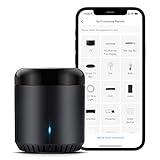
- Support 50,000+ IR(38KHz) controlled devices such as TV, Set-up Box, A/C, Personal Video Recorder, DVD, receiver and more. Supported devices library is constantly being updated by the cloud so your RM Mini3 is always compatible with newer devices. Large IR database that over 98% IR remote function. Option to program your devices features if certain cloud data is unavailable.
- Control IR appliances with BroadLink App anywhere anytime. Set up timers to turn on/off appliances at a specific time or customize scenes with multiple devices. Turning your basic home devices into smart devices and making life smarter and more convenient. (Note: Please download the latest Broadlink App – BroadLink. The previous app e-Control does not work with Alexa.
- Compatible with Alexa to voice control your TV, STB, Air Conditioner and Fans; Compatible with Google Home to voice control your Air Conditioner.
- Enable and schedule features on a daily basis and customizable for your needs. The RM Mini3 only supports 5V 1A adapter and 2.4 GHz (not 5 GHz) Wi-Fi for configuration in the App, does not support mesh router.
- Please note: IR signals can only be received in the absence of obstacles, please make sure there are no obstacles between the RMmini 3 and your device. One-Year Warranty. Video Guide are available on our Amazon Brand Store and YouTube.
Limits to plan for
Placement and intermittent response
IR needs an unobstructed path or a useful reflection. It does not pass through walls, furniture or closed cabinet doors; Home Assistant advises clear placement and avoiding strong infrared light sources in its placement guidance. If commands work intermittently, check alignment, distance, sunlight or lighting interference, power supply quality, whether the appliance needs repeats, and whether the bridge is hidden behind a TV or in a cabinet.
Toggle commands and state drift
A power button commonly toggles rather than explicitly setting on or off. If one command is missed, Home Assistant’s assumed state can diverge from the appliance. Use discrete on/off codes if the remote protocol provides them, use a native integration with feedback where available, or make recovery behavior explicit in automations. A stateless IR sender is not equivalent to a network API or a smart plug that reports state.
Protocol and revision uncertainty
Some signals will not decode into simple commands, and uncommon protocols may need raw timings or a different firmware build. The documented pin map and template apply to v1.0, not automatically to the v1.4 listing. If the bridge is unavailable, check 5-V power, Wi-Fi, MQTT or API connectivity, GPIO assignments and firmware before considering a serial reflash; identify the exact board first.
The Tool Desk
Outbyte PC Repair FREERepair Windows errors before they cause bigger problemsFix Now →Outbyte Driver Updater FREEFix the driver behind crashes, sound loss and screen glitchesFind Drivers →Availability, cost and alternatives
The v1.4 Tindie listing is marked retired and directs buyers to the seller’s store, but current stock, price and continued manufacture could not be confirmed. Consequently, “low-cost” is not a verified current buying comparison. A fair total-cost comparison would include the board, controller if not bundled, power supply, USB-to-serial adapter if needed, shipping, enclosure and the time required to flash and troubleshoot.
| Option | Best fit | Main trade-off |
|---|---|---|
| Automate Things IR Bridge | Makers who can obtain it and want the documented multi-LED, open-firmware design. | Retired listing, uncertain stock, older ESP8266 hardware, revision ambiguity and setup work. |
| DIY ESPHome bridge | People who want current, repairable hardware and control over the emitter and receiver design. | Requires choosing parts, assembling the driver circuit, configuring firmware and providing an enclosure. |
| BroadLink RM4 Mini / RM4 Pro | Buyers seeking a compact commercial option with established Home Assistant support for learning and sending IR commands. | Initial network setup requires the manufacturer’s app; RM4 Pro adds RF capabilities, while the Automate Things design is more open to custom hardware and firmware. See Home Assistant’s BroadLink integration. |
| SwitchBot Hub 2 | Buyers wanting a finished product with app setup, sensors, scenes, voice-assistant support and selected Matter functionality. | It is an ecosystem product rather than an open-firmware IR board. The US product page showed $69.99 on August 18, 2026; that is a dated US price, not a global or guaranteed current price. See the official Hub 2 page. |
| IR2MQTT | Advanced users who want a documented DIY MQTT route with Home Assistant MQTT Discovery. | It is a community project, not a polished retail device; follow its project documentation and hardware setup guide. |
A current ESPHome build is the closest route for a technically capable reader who wants to reproduce the open design without depending on uncertain stock. BroadLink is the more direct choice for many users who want a commercial bridge with a documented Home Assistant path; SwitchBot Hub 2 suits buyers who also value its additional ecosystem features. For official ESPHome IR capabilities, see the ESPHome infrared component.
Quick Recap
Product prices and availability are accurate as of the date/time indicated and are subject to change. Any price and availability information displayed on Amazon at the time of purchase will apply.


Leave a Reply