Some links on this page are affiliate links: if you buy through them we may earn a commission, at no extra cost to you.
Hikvision can be a good-value camera system for some private construction sites, but a low equipment price is not the whole investment. Its broad range of cameras, local-recording options and features such as low-light imaging and human/vehicle classification can help monitor a site. The trade-offs are firmware and network maintenance, authorized-channel and warranty risks, and significant U.S. procurement restrictions for certain buyers and uses. For a federally funded, government-related, critical-infrastructure or policy-sensitive project, check the applicable requirements before buying; for a private site, compare the complete installed system and its replacement risk against alternatives.
What “worth the investment” means on a jobsite
A construction-site camera is useful only if it captures the right detail, records for long enough, stays online, and can be maintained throughout the project. Compare the installed, supported system, not just camera prices.
Include cameras, NVR, surveillance-rated storage, PoE switching, cable, mounts and weatherproof junction boxes, surge protection and UPS, installation and commissioning, secure remote access, firmware upkeep, and eventual repair or replacement. Also account for the cost of configuring network separation and the time someone will spend managing users, reviewing alerts, exporting footage and preserving evidence. For a temporary site, include removal and redeployment costs.
What’s actually slowing this PC down?
Pick the symptom - the matching free tool is one click away.
There is no defensible universal “Hikvision system price”: the bill depends on camera count, lenses, recording retention, installation conditions and distributor pricing. Ask for comparable quotes with the same coverage, night performance, retention, analytics, warranty and support. A camera with a wide view may show that someone entered a yard without resolving a face or identifying a vehicle; a higher-resolution model will not fix poor placement or insufficient storage.
#1 Best Overall
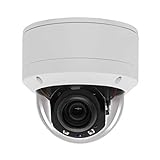
- Please notice: This is a Professional 3.5" Metal Pan-Tilt-Zoom IP IR PTZ Dome Security Camera. Pan Range: 0°~355°, Pan Speed: 45°/s, Tilt Range: 0°~90°, Tilt Speed: 25°/s. Remote Control Pan/Tilt/Zoom Functions, 2.7~13.5mm 5x Optical Zoom,with built-in 2pcs Strong IR Array Leds, 100ft Long Distance IR Night Vision.
- 【H.265 Super HD 5MP】The 5 Megapixel Super-high-definition security camera provides you smooth Stream Video, 2.7-13.5mm 5X Motorized lens and a night-vision distance of up to 100ft. H.265 video compression features efficient video recording to save storage space while providing smoother video.
- 【Plug&Play with Hikvision NVR】No need power adapter, optional PoE switch or injector, easy plug&play with multiple 5MP PoE NVRs such as Hikvision, Laview, LTS, EZVIZ etc.And it also can work with Lorex and Dahua 5MP NVRs after enabled DHCP.
- 【IP66 Waterproof】The case is made of anti-explosion metal with brown color anti-explosion cover,IP66 waterproof Level. Built-in Surge and Lightning Protection Devices for Bad Weather.
- 【1 Year Warranty and Satisfy Guarantee】 This camera requires a separated POE injector,POE switch or POE NVR to operate. (Notice: Power supply and POE injector are NOT included). We Provider 1 year warranty for you. Also,we could provide SDK for our IP camera, if you need, please contact us for tech support.
What Hikvision may offer a construction site
Hikvision sells a wide range of fixed, turret, dome, bullet, PTZ, fisheye, thermal and specialty cameras, along with NVRs and related security products. Its product families include ColorVu low-light cameras, AcuSense human/vehicle classification, and models with features such as H.265/H.265+ compression, wide dynamic range, infrared or supplemental visible-light illumination. Features vary substantially by model, region and compatible recorder. Hikvision’s 2025 U.S. product guide describes current product families; it is not a promise that every camera includes every feature.
As one model-specific example, Hikvision lists a 2 MP AcuSense bullet with a 2.8 mm lens, 107-degree horizontal field of view, human/vehicle classification, H.265+ compression, up to 40 metres of IR range and IP67 weather resistance. Those specifications apply to that model, not the whole brand. See the product specification.
Low light and image detail
ColorVu is designed to preserve color in low light, using a wide-aperture lens and, on some products, supplemental visible light. Color footage can help distinguish clothing or vehicle colors, but it needs usable light. A built-in white light can also disturb neighbors, workers or nearby road users. Infrared footage is monochrome, and neither approach guarantees usable identification footage in every scene.
Quick wins for a faster PC:
Clear out junk files and repair common Windows errorsFree Scan →Scan for outdated or missing drivers - takes under a minuteDriver Scan →Repair Windows errors before they cause bigger problemsFix Now →On a site, assess the actual distance and task: a gate, equipment yard, material storage area and site entrance have different coverage needs. Lens choice, sensor, mounting height, angle, backlighting, rain, dust and subject movement all affect results. Test the view at night and during operating conditions. If license plates or faces matter, design a dedicated view rather than expecting one wide-angle overview camera to do both.
Analytics and alerts
AcuSense human and vehicle classification is intended to reduce irrelevant motion alerts, such as those caused by foliage or animals. Check whether the particular camera performs the analytics itself or needs a compatible Hikvision NVR, and whether the features you need work through a third-party VMS. Detection is not the same as identity verification, and classification can miss or mislabel events, especially with poor lighting, rain, oblique angles or a badly configured detection zone. Treat alerts as a review aid, not proof that every event will be detected.
Construction-site realities that affect value
- Power and connectivity: PoE simplifies cabling where a powered network switch or NVR is practical, but a remote or temporary location may need a separate power, network or wireless design. Confirm that the camera remains recording through the outages your project is likely to experience.
- Retention: Size storage for camera count, resolution, bitrate, frame rate, recording schedule and required retention. High-resolution continuous recording can overwrite footage sooner than expected. Verify retention after installation rather than assuming the NVR’s drive capacity is enough.
- Vandalism and weather: Check the exact camera’s ingress and impact ratings, mounting method and environmental limits. An IP67 rating on a particular model does not make all cameras vandal-proof or protect exposed cabling and junctions.
- Portability: If equipment will move between phases or projects, document camera locations, credentials, firmware, cable routes and NVR compatibility. A proprietary system may be convenient initially but can complicate a later vendor change.
- Evidence handling: Decide who can view footage, how incidents are exported, where copies are stored and how long recordings are retained. Restrict access and preserve relevant footage promptly under the project’s procedures.
The risks that can outweigh a low purchase price
Cybersecurity and maintenance
Network cameras and NVRs are computers connected to a sensitive network. Hikvision has published security advisories and firmware guidance on its cybersecurity resources page. That is useful, but the buyer still needs to track exact model and firmware versions and apply relevant updates.
A concrete historical example is CVE-2021-36260, a command-injection vulnerability affecting some Hikvision products. NIST assigns it a CVSS 3.1 score of 9.8, and it was included in CISA’s Known Exploited Vulnerabilities Catalog. This example is a reason to take patching seriously, not evidence that every current model is vulnerable. Check the NIST vulnerability record and CISA catalog for details.
Recommended Free Tools
For any network-camera deployment, and especially one on an active construction network:
- Do not expose cameras or the NVR directly to the public internet or rely on port forwarding.
- Change default credentials; use unique passwords and least-privilege accounts.
- Put cameras on a separate VLAN or otherwise segregated network, with firewall rules that limit access to what is required.
- Disable unused services, including UPnP and Telnet where present, and restrict administrative access to trusted devices.
- Keep firmware and NVR software current, maintain an inventory of models and versions, and review logs and unexpected outbound traffic.
- Use a VPN or another approved secure method for remote access. If using a vendor app or cloud-linked service, understand the account and data flows for the exact configuration.
- Keep important exported footage in a separate, appropriately protected location.
Segmentation reduces exposure; it does not make a vulnerable device harmless. A camera may still reach other internal systems if firewall rules are broad, and compromised remote-access credentials can undermine a well-segmented network.
Rank #2

- [5mp AI poe Security camera]- With a Super high definition of 2592x1944 at 25 fps, the security ip camera features a 2.8mm lens which brings 97°viewing wide angle. With the built-in microphone, it can make preview and playback with sounds. Night Vision is up to 100ft, the infrared lights can be turned off in certain circumstances.
- [Easy Setup, Compatible with Third Party Software]-With a Plug-and-Play reliable connection, this Poe camera uses a single Ethernet cable to transmit both data and power. Supports 3rd Party nvr and works well with Blue Iris, Milestone, ISpy etc. You can use Html5 to access the camera, watch real-time video and audio on the page, no need to install plug-ins.
- [Smart Ai Detection/Snapshot Alarm]- Supported by smart motion detection technology, this Poe ip camera can identify people among all movements. It will send you email alerts with snapshots and real-time pushes to the App when any suspicious person is detected. You can create more areas for accurate notifications, such as Human Detection, Intrusion Detection, Line Crossing Detection and check them on the live or the Playback via our software.
- [Secure Cloud Service/Flexible Recording Options]- The surveillance camera supports 24/7 continuous recording when any movement is detected or during a scheduled time. Videos can be saved in a micro sd card (up to 256gb, not included), you can also save them to the Cloud, our nvr, or other Ftp servers.
- [Advanced Detection]- Receive alerts when a person is detected. You can create more areas for accurate notifications, such as Human Detection, Intrusion Detection, Line Crossing Detection. Please take a look at product description page to learn more about these features.
Firmware region, seller and warranty
For a project that depends on equipment for a defined period, an unsupported or region-mismatched camera is a poor bargain. Hikvision says products are region-specific and warns that gray-market units may not accept North American firmware; an incorrect update can cause problems, and warranty coverage may be unavailable. Its U.S. legacy firmware guidance describes these risks. Before purchase, confirm the exact model, region, authorized seller, manufacturer-backed warranty and firmware availability. Keep invoices and serial-number records. Do not force firmware intended for another region onto a camera.
Independent reader supportYour contribution helps us test, update, and keep practical guides available for everyone.U.S. restrictions: check the project before procurement
“Hikvision is banned in the United States” is too broad. Several distinct questions matter: federal procurement restrictions under Section 889, FCC equipment-authorization rules and the Covered List, restrictions connected to specified national-security or critical-infrastructure uses, and separate requirements imposed by a state, funder, customer, insurer or company.
The FCC has treated covered Hikvision equipment as presenting an unacceptable national-security risk in relevant contexts. A 2024 D.C. Circuit decision upheld the FCC’s authority to restrict equipment authorization for covered uses, and FCC materials in 2026 continued to address restrictions affecting Hikvision equipment. Read the FCC material and the court decision; determine how the rules apply to the specific equipment, transaction and intended use.
These restrictions should not be collapsed into a claim that every private owner must remove existing cameras or that every camera is illegal to buy or use. Conversely, a system that works technically may still be unacceptable under a project’s contract, federal funding terms, customer requirements or organizational procurement policy. If your construction firm is bidding on federally funded work, serving a federal customer, protecting critical infrastructure, or subject to a strict vendor list, get the applicable procurement determination before specifying or purchasing the equipment. “NDAA compliant” is not a universal cybersecurity certification; even Hikvision notes that the phrase is not an official security certification or formal logo-based standard in its NDAA explanation.
Privacy and jobsite policy
Cybersecurity and privacy are related but separate. Establish what the cameras record, whether audio is enabled, who can view footage, whether remote access or cloud-linked features are used, and the retention and deletion schedule. Construction employers should also consider required notices, worker expectations, neighboring properties and local rules on audio or video recording. The exact data flows depend on the model, NVR, app, settings and network design; do not assume every installation sends footage to the cloud—or that none does.
When Hikvision may be worth considering
It may suit a private, non-regulated site when the exact camera meets the coverage and night-time requirements, the equipment is bought through an authorized regional channel, the system can be isolated and maintained, and the project accepts potential policy or replacement friction. It can also be sensible to keep a functioning existing system while securing it and reviewing its support and compliance status.
Crashes, No Sound, or Screen Glitches?
Random freezes, missing sound and display glitches usually trace back to one bad driver. Find and replace yours safely.Free scan · under a minutePC Slower Than It Used to Be?
A free scan shows the junk files, broken settings and background clutter dragging Windows down - then fixes them in one click.Free scan · Windows 10 & 11It is a poor new choice when the site is subject to federal or critical-infrastructure procurement restrictions, the customer or insurer prohibits the brand, or future eligibility matters. It is also a weak fit if no one can patch and manage the equipment, the cameras would be internet-exposed, or the only available units are gray-market imports. A project with a high cost of migration should weigh the possibility of replacing the system earlier than planned.
Alternatives by construction use case
- Axis Communications: A professional option to evaluate for enterprise, government and lifecycle-sensitive projects. Axis describes its U.S. government and associated customer portfolio’s Section 889 position here. It generally carries a higher upfront cost, which may be justified where support and procurement positioning matter.
- Hanwha Vision or i-PRO: Professional alternatives for commercial deployments. Verify compliance, warranty, manufacturing and support for the exact model and procurement requirement rather than generalizing across a portfolio.
- Ubiquiti UniFi Protect: Worth considering for a smaller site already using UniFi networking and seeking an integrated management experience. Check camera choice and ecosystem limits against project needs at Ubiquiti’s camera-security page.
- Reolink or Amcrest: Potential lower-cost options for modest private deployments. Compare specific models for firmware support, storage, analytics, VMS compatibility and warranty; do not assume consumer-oriented products meet enterprise or procurement needs. See Reolink and Amcrest.
“Supports ONVIF” is not a guarantee that every analytics event, audio feature or control will work through another recorder or VMS. Confirm the integration you need before committing.
Quick Recap
Buyer checklist before ordering
- Confirm eligibility: Ask the owner, general contractor, funder and procurement team about applicable restrictions and approved-vendor requirements.
- Specify the job: Identify the areas to cover, target distance, night conditions, required evidence detail and retention period.
- Verify the exact model: Check lens, sensor, illumination, weather rating, analytics, recording compatibility and regional firmware.
- Buy through an authorized channel: Confirm manufacturer warranty, support route and return terms.
- Design storage and network: Size the NVR and drives for retention; plan PoE, UPS, segmentation and remote access.
- Test at the site: Check views at night and in realistic weather and movement conditions; tune zones and alerts before relying on them.
- Document upkeep: Assign responsibility for updates, credentials, logs, footage exports and eventual replacement.
Verdict by buyer
- Private project or small contractor: Potentially worthwhile if the system is authorized, correctly specified, isolated and actively maintained.
- Small business or subcontractor: Conditional. Include customer rules, insurance, IT support and replacement risk in the quote evaluation.
- Federal, federally funded or critical-infrastructure project: Do not select Hikvision on price alone. Obtain a formal procurement review and consider an alternative with verified eligibility for the project.
- Existing owner: Do not assume immediate replacement is required solely because of the brand. Check the applicable policy, update supported equipment, remove internet exposure, restrict access and plan migration if support, risk or project rules warrant it.
- International buyer: U.S. procurement rules may not apply in the same way, but regional firmware, privacy law, cybersecurity maintenance, authorized support and supply-chain considerations still matter.
Product prices and availability are accurate as of the date/time indicated and are subject to change. Any price and availability information displayed on Amazon at the time of purchase will apply.


Leave a Reply