A good home office should make work easier every day: fewer cords, better light, quieter calls, enough storage, comfortable temperature, and a layout that fits how you actually work. With hybrid and remote work now a normal part of American households, the home office has become a practical remodeling category, not just a styling project.
On our job sites, the best offices are planned around five construction variables: power and data placement, layered lighting, HVAC comfort, acoustic separation, and storage. Paint color and furniture matter, but they should come after the room works.
For 2026 budgeting, a light cosmetic refresh may run about $300 to $2,500. A furniture-based office setup often lands around $600 to $5,000 or more. Built-in desks and cabinetry commonly range from $3,000 to $15,000+, while basement, attic, garage, detached studio, or addition projects can move into five figures or six figures depending on the scope.
Start With the Work Pattern, Not the Desk
Before choosing finishes, write down what the room needs to support. A person who spends six hours on video calls needs different lighting, acoustics, and background control than someone doing paperwork twice a week. A two-person office needs separate task zones, not one long counter with shared outlets and tangled chargers.
#1 Best Overall

- Keep Your Desk Organized: By lifting screen off the desktop, this monitor arm opens up valuable space for your keyboard, notebook, docking station or a simple, clutter-free work area. Built-in cable management guides wires along the arms, keeping cords out of sight and out of the way. Enjoy a tidy, modern workstation that looks as good as it feels to use.
- Wide Compatibility: WALI single monitor arm is designed to fit most flat or curved LCD/LED screens up to 34", regular screen up to 32 inch, max load capacity 26.4 lbs for flat screens and 19.8 lbs for curved screens, with standard Mounting Pattern mounting holes 75x75mm and 100x100mm. Be sure to verify your monitor’s VESA pattern, size, and weight before purchasing to ensure a perfect fit.
- Full Motion for Ergonomic Comfort: WALI single vesa monitor mount allows to extend your screen out by 19.3" and raise the arm up to 17.3" above the desktop. It swivels +180°/-180°, tilts +70°/-45°and rotates 360°. Whether you’re working from home, gaming through the night, or switching between video calls and documents, getting the screens to your natural line of sight helps relieve neck, shoulder and back strain so you can stay focused longer with less fatigue.
- Engineered for Lasting Performance: This adjustable monitor stand features wider VESA head and tighter-fitting VESA panel to enhance stability and keep your monitor firmly in place. The high-performance durable core has been tested through 20,000+ cycles, delivering smooth, effortless adjustments and dependable performance for years of daily use.
- Two Ways to Install: We offer two desk mounting options: C-clamp mounting for desks 0.39″–2.76″ thick, or grommet base mounting for desks 0.39″–2.76″ thick. With straightforward instructions, you can set up your monitor arm effortlessly, making it a hassle-free addition to your desk. We only recommend installing it on a wooden desk, preferably with no crossbeam blocking the underside.
Use these planning targets as a starting point:
- Desk height: about 28 to 30 inches works for many seated desks, but chair height, keyboard position, and user height matter.
- Desk depth: 24 inches can work for a laptop; 30 inches is better for monitors, paperwork, and keyboard trays.
- Chair clearance: plan at least 36 inches behind the chair where possible.
- Walkway clearance: 30 to 36 inches keeps the room usable.
- Monitor position: top of screen at or slightly below eye level for most users.
- Electrical: plan outlets where the desk, printer, charging station, and task lighting will actually sit.
If the office will run multiple monitors, a printer, chargers, task lights, a docking station, and a portable heater or AC unit, ask an electrician about circuit capacity. Adding a standard outlet can cost a few hundred dollars per outlet, but new circuits, panel work, AFCI/GFCI protection, floor outlets, data cabling, or recessed lighting can push electrical work into the $1,000 to $5,000+ range.
30 Modern Home Office Design Ideas
1. Built-In Wall Desk
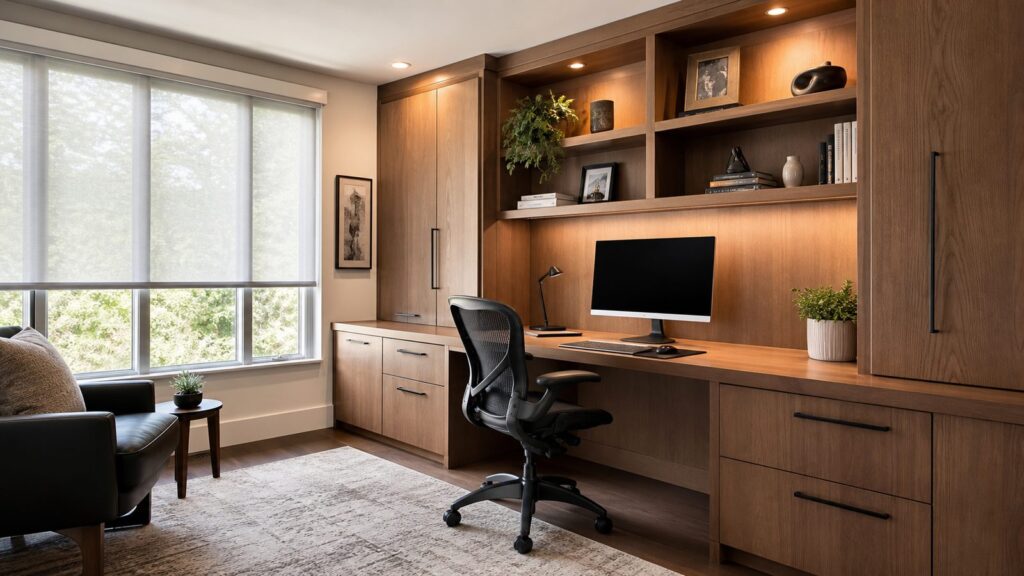
A built-in wall desk is one of the cleanest ways to turn a spare room into a serious office. It can include drawers, file storage, upper cabinets, open shelves, integrated lighting, and a continuous work surface. For a typical 8- to 12-foot wall, expect roughly $3,000 to $15,000+ depending on cabinet grade, countertop material, paint or stain finish, and lighting.
Buildability tip: decide printer size, monitor count, file needs, and outlet locations before cabinet drawings are finalized. Moving an outlet after cabinetry is installed is slower and more expensive.
2. Floating Desk Nook
A floating desk works well in bedrooms, hallways, loft landings, and small dens. A 20- to 24-inch-deep work surface can hold a laptop without consuming the room. Use wall blocking or proper anchors; do not rely on drywall alone for a daily-use desk.
Recommended Free Tools
This can be a $400 to $2,000 project if it uses a simple surface, paint, and plug-in lighting. Add hardwired sconces, custom shelves, or concealed outlets and the cost rises.
3. Dual-Workstation Office
For two users, plan two real workstations. Each person should have separate task lighting, outlets, monitor space, cable routing, and storage. A 10- to 12-foot wall can often support two seated stations, but a back-to-back layout may work better in a square room.
Do not make one person sit with their back to the door if privacy or video calls matter. On remodels, we often place desks on adjacent walls so both users get defined zones.
4. Pocket-Door Office
A pocket door can save 8 to 10 square feet of swing space compared with a standard hinged door. That can be the difference between a cramped office and a comfortable chair clearance. Pocket doors are especially useful for small offices off hallways, kitchens, and primary bedrooms.
The Tool Desk
Outbyte Driver Updater FREEScan for outdated or missing drivers - takes under a minuteDriver Scan →Outbyte PC Repair FREERepair Windows errors before they cause bigger problemsFix Now →They are easiest during framing or larger remodels. Retrofitting one can involve drywall, trim, electrical relocation, and wall repair, so it is typically a pro project.
5. Glass-Partition Office
A glass partition borrows light while still defining a work zone. It works well in open-plan homes where a full wall would make the room feel chopped up. For better call privacy, consider laminated glass, a solid-core door, and seals at the jambs.
Glass gives visual separation, not complete sound isolation. If confidentiality matters, specify acoustic performance before ordering.
6. Murphy Desk
A Murphy desk folds away when not in use and is ideal for apartments, guest rooms, and multipurpose spaces. It is best for laptop work, bill paying, or occasional use rather than a full multi-monitor setup.
Quick wins for a faster PC:
Repair Windows errors before they cause bigger problemsFix Now →Fix the driver behind crashes, sound loss and screen glitchesFind Drivers →Clear out junk files and repair common Windows errorsFree Scan →Keep the closed depth, open work surface depth, and wall mounting method in mind. A poorly anchored fold-down desk is a failure waiting to happen.
7. Closet-to-Office Conversion
A closet office can turn a reach-in closet into a compact workstation. Typical scope includes removing doors, patching walls, adding a desktop, shelves, lighting, paint, and possibly an outlet. In 2026, many closet office conversions fall around $1,000 to $6,000.
The key is ventilation and light. A closet with no outlet and no task light will feel temporary. If you want doors, consider bifold, sliding, or pocket doors so the chair has room to move.
8. Under-Stair Office
The space under a stair can become a focused desk nook if headroom, lighting, and knee clearance work. This is best for light work, homework, or household admin, not all-day video calls.
Check for stair structure, plumbing, electrical, and HVAC runs before opening walls. Stairs are structural assemblies, so modifications need care.
Rank #2

- Ultrawide Compatibility: The ErGear heavy-duty monitor arm is compatible with most 13″–34″ flat or curved monitors up to 19.8 lbs with VESA mounting patterns 75x75mm or 100x100mm. Please verify the screen size, weight, and VESA pattern of your monitor before purchase.
- Engineered for Lasting Performance: This adjustable monitor arm features a 40% wider VESA head and a tighter-fitting VESA panel to enhance stability and keep your monitor firmly in place. The high-performance durable core has been tested through 20,000+ cycles, delivering smooth, effortless adjustments and dependable performance for years of daily use.
- Full Motion Flexibility: This premium VESA monitor mount delivers precise height adjustment up to 17.5″ and reach up to 18.1″, helping you achieve the perfect eye-level position to reduce neck and shoulder strain. It features +80°/-50° tilt, ±90° swivel, and 360° rotation, so you can always find your ideal viewing angle.
- Streamlined Finish with Cable Management: The upgraded cable clips open easily with no tools required, making cable organization faster and more convenient. This monitor arm lifts your screen to free up desk space while keeping cables tidy, helping you stay focused and productive in a clean, clutter-free workspace.
- Quick Setup with Tool-Free VESA Mounting: Set up in just three easy steps! Our computer monitor mount upgraded VESA plate enables tool-free mounting, saving time and avoiding complex installation. We offer two desk mounting options: C-clamp mounting for desks 0.39″–2.56″ thick, or grommet base mounting for desks 0.39″–2.95″ thick.
9. Attic Office
An attic office can be excellent if comfort is solved first. Heat, insulation, access, headroom, electrical capacity, and code requirements matter more than finishes. Finished attic offices may require improved stairs, insulation, drywall, HVAC, lighting, and egress review.
Because scope varies widely, attic office conversions commonly land in five figures. If the attic is already finished and conditioned, the project may be much lighter.
10. Basement Office
A basement office gives separation from the main household, but moisture and air quality must be addressed before finish work. Check for water intrusion, humidity, radon considerations, insulation, egress requirements, ceiling height, and HVAC.
Basement finishing commonly becomes a five-figure project because it may include framing, drywall, flooring, electrical, lighting, HVAC, moisture control, and permits.
11. Sound-Dampened Office
For calls, start with the basics: solid-core door, weatherstripping or door seals, rugs, curtains, upholstered furniture, and sealed gaps. Decorative acoustic panels can help with echo, but they do not replace wall, door, and ceiling assemblies.
Budget about $300 to $2,000 for soft finishes and basic panels. Insulated interior walls, resilient channels, specialty drywall assemblies, and upgraded doors can cost several thousand dollars depending on room size and access.
12. Library Office
A library office combines work surface, bookshelves, display space, and closed storage. Keep open shelves for books and attractive objects; use doors and drawers for office supplies, cords, files, and printer paper.
Do these 3 things before closing this tab:
1Clear out junk files and repair common Windows errors2Scan for outdated or missing drivers - takes under a minute3Repair Windows errors before they cause bigger problemsFor tall built-ins, plan anchoring, lighting, and outlet locations. Full-height cabinetry can look finished and intentional, but it needs field measurement and careful installation.
13. Guest-Room Office
A guest-room office works best when the office remains the primary function. Use a sleeper sofa, wall bed, or daybed instead of letting a full bed dominate the room. Keep the desk on the best power and lighting wall, not wherever the bed leaves leftover space.
If using a Murphy bed, confirm clearances for desk chair, cabinet doors, ceiling fan blades, and wall sconces.
14. Standing-Desk Zone
A sit-stand desk gives flexibility without remodeling the room. Plan power so cords do not stretch when the desk rises. If using a built-in counter, consider a separate standing-height surface around 40 to 44 inches, adjusted to the user.
Anti-fatigue mats, monitor arms, and cable chains make the setup more usable.
15. Video-Call Backdrop Wall
Treat the video-call wall like a small media set. The camera should see a clean background, controlled daylight, concealed cords, and enough depth that the person is not pressed against the wall. Front or side lighting matters more than the decoration behind you.
A simple backdrop wall with paint, shelves, a sconce, and cord management can be under $1,500. Built-ins, wallpaper, cabinet lighting, and electrical changes raise the budget.
16. Ergonomic Task-Lighting Setup
Task lighting should brighten paper and keyboard areas without creating screen glare. Adjustable lamps, under-shelf LED strips, and dimmable sconces all work. For color-sensitive work, look for higher-CRI LEDs; for general office comfort, warm-neutral light is usually easier to live with than harsh cool light.
Free tools Windows power users keep installed
One-click scans. No signup required.
Plug-in lamps may cost under $300. Hardwired sconces, recessed lights, dimmers, and under-cabinet LEDs commonly run $500 to $4,000+ depending on fixture count and wall or attic access.
17. Window-Facing Desk With Glare Control
A window-facing desk can be pleasant, but direct glare can make screens miserable. Use adjustable shades, side-mounted desk placement, or a monitor arm that allows angle changes. North-facing light is often easier to manage than direct west sun.
Rank #3

- Great Adaptability: This HUANUO single monitor arm fits 13-32 inch monitors, holds 4.4-19.8 lbs, suitable for VESA patterns of 75x75mm & 100x100mm. This monitor mount is specially designed for ergonomics, aiming to help people work comfortably, and to help people have a better viewing experience.
- Full Adjustable: This PC monitor stand can remain completely stable at any angle without any extra work. Compared with other single monitor arm adjustment methods, huanuo can make you adjust screws repeatedly, this monitor arm is easy to use and has a tilt range from -50°to +85°, ±90 ° swivel, and 360°rotation, so your screen can be lifted up to 39.6cm from desktop with one hand.
- 80% Sturdier Than Others: At HUANUO, we focus on improving the strength and stability of our single monitor stand. The single desk monitor mount uses automotive-grade components and has undergone 20,000 motion tests, which means it can be used continuously for more than 5 years without issue.
- Installed In 3 Minutes: The 1-piece design monitor arm simplifies the installation, so all necessary hardware is included; The setup can be completed in 3 minutes. Step 1: Affix the bracket to your table; Step 2: Attach your monitor to the VESA plate; Step 3: Adjust tension according to your monitor weight.
- Two mounting options : You may choose to use either a C-clamp or grommet mount. For best results, make sure your table meets the following criteria: wood tabletop is recommended; the underside of the tabletop should ideally be free of any beams or panels that may interfere with the installation; the tabletop thickness and grommet mounting can support 0.59"-3.54”.
Window treatments are not just decor in an office. Solar shades, lined drapery, or layered treatments can make the room usable through a full workday.
18. Layered Lighting Plan
A strong office lighting plan has three layers: ambient light for the room, task light for the work surface, and front or side light for video calls. Dimmers are worth including because the room needs different light levels at 8 a.m., noon, and evening.
PC Slower Than It Used to Be?
A free scan shows the junk files, broken settings and background clutter dragging Windows down - then fixes them in one click.Free scan · Windows 10 & 11Crashes, No Sound, or Screen Glitches?
Random freezes, missing sound and display glitches usually trace back to one bad driver. Find and replace yours safely.Free scan · under a minuteRecessed lighting can work, but avoid placing cans directly behind the chair where they cast shadows onto the desk. Layout matters as much as fixture selection.
19. Hidden Printer and Storage Cabinet
Printers, shredders, paper, routers, and extra cables create visual noise. A cabinet with a pull-out shelf, ventilation gaps, and nearby power keeps the office clean. Confirm printer dimensions with trays open, not just the closed footprint.
For built-ins, we often design one utility bay with power, cable pass-throughs, and adjustable shelving so equipment can change later.
20. Full-Height Cabinetry
Full-height cabinetry gives a home office real storage density. It works especially well in rooms that also store files, samples, craft supplies, homeschool materials, or household documents. Mix drawers, doors, and a few open shelves instead of making the whole wall open display.
What’s actually slowing this PC down?
Pick the symptom - the matching free tool is one click away.
Expect cost to vary heavily by linear footage, finish, hardware, and whether the cabinets are stock, semi-custom, or fully custom.
21. Cable-Managed Workstation
Cable management is one of the cheapest upgrades with the biggest daily payoff. Use grommets, raceways, under-desk trays, floor boxes where appropriate, and enough outlets to avoid extension-cord chains.
In finished rooms, peel-and-stick cable channels are DIY-friendly. In new built-ins, plan hidden routing before fabrication.
22. Acoustic Wall Panels
Acoustic panels reduce echo inside the room, which improves call quality. Place them near reflection points, behind the speaker, or on large blank walls. Fabric-wrapped panels can look tailored if they align with the room’s paneling or shelving rhythm.
Free tools Windows power users keep installed
One-click scans. No signup required.
Remember the limitation: panels help interior sound quality; they do much less to stop noise passing through walls or doors.
23. Cork or Tack Wall
A cork wall, tackable fabric panel, or magnetic board gives paper-heavy workers a useful visual planning surface. It works well above a desk or beside a command center.
Use framed panels or full-wall material with clean trim. Random small boards tend to look temporary and fill up quickly.
24. Dark Moody Office
A dark office can feel focused and polished, especially in a room used for reading, writing, or calls. Charcoal, deep green, navy, and brown-black finishes work best with layered lighting and warm wood or brass accents.
Recommended Free Tools
Do not make a small dark office rely on one ceiling light. Add task lighting, shelves lights, or sconces so the room feels intentional rather than dim.
25. Warm Wood Office
Wood brings warmth to a work room that could otherwise feel sterile. White oak, walnut, maple, and rift-cut veneers are common choices. Solid wood costs more and moves with humidity; quality veneer panels can be more stable for large built-ins.
Use durable finishes on desktops. A work surface sees keyboard wear, coffee cups, monitor bases, and daily cleaning.
Rank #4

- Compatible with Wide Screens - To ensure compatibility with the dual monitor mount, your each monitor must meet three conditions at the same time: First, computer screens size range: 13 to 32 inches. Second, screen weight range: 4.4 to 19.8 lbs. Third, the back of the monitor screen must have VESA mounting holes with a pitch of 75x75mm or 100x100mm.
- Regarding the compatibility with desks - Your desk must meet three conditions at the same time: First, desk material: Only wooden desks are recommended, plastic or glass desks cannot be used. Second, desk thickness range: 0.59" - 3.54". Third, the bottom of the desk should not have any cross beams or panels, as this will interfere with installation. We recommend carefully checking that your desk and monitors meets all above conditions before purchasing.
- Dual C-Clamp Hold - Worried your dual monitors might wobble or slip? Our upgraded base uses a larger platform plus a dual C-clamp structure to lock the dual monitor arm firmly to your desk. Each arm safely keeps your screens steady while you type, click and game—no shaking, no sliding, just a clean and secure setup you can trust every day. It also provides Grommet Mounting installation choice, both options ensure stable and secure fixation for your 0.59" - 3.54" desk.
- Full-Motion Adjustment For Comfortable View - Pull the screen closer when you’re deep in a spreadsheet, push it back to watch videos, or rotate to portrait for coding — moving everything smoothly with just one hand. The monitor stand offers +85°/-50° tilt, ±90° swivel and 360° rotation. Raise your monitor up to 15.75″ to support a healthy sitting posture. Whether you’re working from home, gaming through the night, or switching between video calls and documents, getting the screens to your natural line of sight helps relieve neck, shoulder and back strain so you can stay focused longer with less fatigue.
- Keep Your Desk Organized: By lifting both screens off the desktop, this dual monitor stand opens up valuable space for your keyboard, notebook, docking station or a simple, clutter-free work area. Built-in cable management guides wires along the arms, keeping cords out of sight and out of the way. Enjoy a tidy, modern workstation that looks as good as it feels to use.
26. Biophilic Office
A biophilic office uses natural light, plants, wood, stone, textured fabrics, and outdoor views to make the room calmer. The construction side is simple: protect daylight, manage glare, and include surfaces that can handle watering and humidity.
If adding many plants, avoid placing them over outlets, computers, or paper storage.
27. Minimalist White Oak Office
A minimalist white oak office works when the storage is disciplined. Use flat-panel cabinets, integrated pulls, concealed outlets, and a limited palette. Minimal does not mean no storage; it means clutter has a place to go.
Spend on alignment, reveals, and cabinet quality. Simple rooms make poor workmanship more visible.
28. Color-Zoned Office
Color zoning is useful in multipurpose rooms. Paint, wall paneling, a ceiling treatment, or a rug can define the work area without building walls. This works in guest rooms, family rooms, and finished basements.
Do these 3 things before closing this tab:
1Repair Windows errors before they cause bigger problems2Scan for outdated or missing drivers - takes under a minute3Clear out junk files and repair common Windows errorsA color-zoned refresh can fit into a $300 to $2,500 cosmetic budget if it uses paint, rug, simple shelving, and window treatments.
29. Compact Corner Office
A compact corner office can fit into a bedroom, loft, kitchen edge, or living room. Use a 42- to 60-inch-wide desk, vertical storage, a task lamp, and a chair that tucks fully under the surface.
Keep the footprint stable. Oversized chairs and deep file cabinets are what usually make small offices fail.
30. Family Command-Center Office
A family command center blends office work with household management. It may include a calendar wall, charging drawer, mail drop, printer cabinet, school paperwork storage, and a small writing surface.
Quick wins for a faster PC:
Fix the driver behind crashes, sound loss and screen glitchesFind Drivers →Repair Windows errors before they cause bigger problemsFix Now →Scan for outdated or missing drivers - takes under a minuteDriver Scan →This belongs near the kitchen, mudroom, or main circulation path, not hidden in a remote bedroom. Use closed storage so the area does not become a permanent pile.
2026 Home Office Cost Guide
Home office costs vary because the word “office” can mean a painted bedroom with a new desk or a permitted garage conversion with HVAC and custom cabinetry. Use the table below to frame the first budget conversation.
| Project Type | Typical 2026 US Cost Range | What Drives the Price |
|---|---|---|
| Cosmetic refresh | $300-$2,500 | Paint, rug, window treatment, simple shelving, cable management, fixture swaps |
| Furniture-based setup | $600-$5,000+ | Desk, ergonomic chair, lamps, monitor arms, file storage, accessory quality |
| Closet office conversion | $1,000-$6,000 | Desktop, shelving, patching, paint, lighting, outlets, door changes |
| Built-in desk and cabinetry | $3,000-$15,000+ | Linear feet, cabinet material, drawers, counters, finish, integrated lighting |
| Electrical and lighting upgrades | $500-$5,000+ | Outlets, circuits, panel work, dimmers, recessed lights, data cabling |
| Sound control upgrades | $300-several thousand | Rugs, curtains, panels, solid-core doors, insulation, specialty assemblies |
| Basement, attic, or garage office | Often five figures | Insulation, drywall, HVAC, flooring, moisture control, egress, permits |
| Addition or detached office | Tens of thousands to six figures | Foundation, framing, roof, utilities, zoning, HVAC, finish level |
The most common surprise costs are hidden wiring conflicts, inadequate HVAC capacity, moisture remediation, permit requirements, cabinet finish upgrades, and changes made after built-ins are ordered.
Independent reader supportYour contribution helps us test, update, and keep practical guides available for everyone.Electrical, Lighting, HVAC, and Code Planning
A home office can look finished and still perform poorly if the construction planning is weak. Before pricing the project, document existing outlets, switch locations, light fixtures, HVAC supply and return locations, internet equipment, and any walls you plan to open.
The Tool Desk
Outbyte PC Repair FREERepair Windows errors before they cause bigger problemsFix Now →Outbyte Driver Updater FREEFix the driver behind crashes, sound loss and screen glitchesFind Drivers →Power and Data
Plan outlets around the final desk location, not the old room layout. A serious workstation may need power for two monitors, a laptop dock, speakers, task lighting, printer, charger bank, router or mesh node, and a sit-stand desk motor. Avoid long-term reliance on extension cords.
Electrical work should follow locally adopted code, and many jurisdictions use versions of the National Electrical Code with local amendments. Adding outlets, circuits, recessed lighting, or panel work is typically licensed trade work and may require permits and inspections.
Lighting
Use dimmable ambient lighting, glare-free task lighting, and front or side video lighting. For most offices, warm-neutral LEDs are comfortable. For design, art, photography, or finish-selection work, higher color rendering can matter.
Place lights so they do not reflect directly off monitors. Under-shelf lighting and wall sconces can be better than adding more ceiling fixtures.
Best Value

- Check Desk & Monitor Compatibility: To ensure a proper fit, your monitor must meet these 3 conditions at the same time: First, screen size ranges 13"–32". Second, monitor weight must be between 4.4–19.8 lbs (flat screens) or 4.4–15.4 lbs (curved screens). Third, supports VESA 75×75mm or 100×100mm. Meanwhile, we recommend mounting this arm only on wood desks 0.59"–3.54" thick (other desk types not recommended). Note: If your desk has irregular edges, please choose this monitor arm carefully.
- MechaSpring Arm — Built for 2× Longer Life: Featuring the MechaSpring arm, this VESA monitor mount delivers consistent support over time for dependable performance that lasts. Unlike gas-based designs that may lose pressure, this monitor desk mount helps keep your monitor steady through everyday adjustments, offering up to 2× the service life of conventional mounts. Moreover, with 90% professional-grade metal construction, the single monitor arm delivers strong reliability, day after day.
- LockSteady System — Adjust with Ease, Hold with Strength: With the upgraded system, the monitor mount helps resist screen droop and moves smoothly with just one finger if you adjust screens often. For set-and-forget setups or deep focus work—like designing, coding and data analysis—where the monitor stays in place most of the time, it holds steady right where you leave it for reliable viewing. This monitor stand is also TÜV Rheinland certified and tested at 3x its load for added safety.
- ACA-Endorsed Design for Ergonomic Comfort — Backed by the American Chiropractic Association (ACA), the desk monitor mount helps reduce neck & back strain by raising your monitor to eye level and fine-tuning it. It transitions smoothly between focused coding, intense gaming and screen sharing during meetings, creating a more comfortable setup for both work and play. Not only does it transform your desk into a professional workstation, but it also supports your health as much as your productivity.
- PrecisionView Window — Tension Adjustment Made Visible: Stop guessing. Start seeing. Unlike a traditional monitor mount where tension is adjusted by feel alone, our integrated PrecisionView window provides instant visual feedback through the yellow indicator movement. You'll know exactly when the tension is perfectly calibrated for your monitor's weight — no more over-tightening or endless trial and error. This professional-grade precision puts you in full control from the first turn.
HVAC and Comfort
Small rooms with computers can heat up quickly. Attics, basements, and garages need extra attention because comfort problems are often built into the space. Before finishing one of these areas, confirm insulation, air sealing, heating, cooling, ventilation, and moisture control.
Adding a room or converting a garage may require HVAC load review. A room that is beautiful but too hot or too cold will not get used.
Basement, Attic, and Garage Code Triggers
Conversions can trigger requirements for egress, ceiling height, stairs, smoke and carbon monoxide alarms, insulation, fire separation, electrical protection, and permits. The International Residential Code is widely used in the US, but local adoption and amendments vary.
Before spending on design drawings or cabinets, ask your local building department or contractor what permits and inspections apply.
What’s actually slowing this PC down?
Pick the symptom - the matching free tool is one click away.
When to DIY vs When to Hire a Pro
Many home office improvements are DIY-friendly. Painting, freestanding furniture, plug-in lamps, rugs, basic shelves, peel-and-stick cable raceways, acoustic panels, and simple organization systems are reasonable for a handy homeowner.
Hire licensed trades or a qualified contractor for new outlets, dedicated circuits, recessed lighting, hardwired sconces, structural wall changes, pocket doors, built-ins tied to walls, basement finishing, attic finishing, garage conversions, additions, and any work involving moisture, egress, or HVAC capacity.
On our projects, the line is simple: if the work affects safety, code compliance, building structure, electrical systems, HVAC, or long-term moisture performance, it should be planned and executed professionally.
Common Home Office Design Mistakes
The biggest mistake is starting with furniture before planning power, data, lighting, and storage. That usually leads to visible cords, awkward desk placement, and a room that looks finished only from one angle.
Outdated Drivers Are Slowing You Down
One free scan finds every outdated or missing driver and matches the right update for your exact hardware.Free scan · exact hardware matchPC Slower Than It Used to Be?
A free scan shows the junk files, broken settings and background clutter dragging Windows down - then fixes them in one click.Free scan · Windows 10 & 11Other common mistakes include relying on one overhead light, ignoring screen glare, using open shelves for clutter, underestimating printer and file storage, forgetting sound control, placing the desk in the main traffic path, and converting a basement or attic before solving moisture, insulation, access, and temperature.
Another expensive mistake is ordering built-ins too early. Finalize equipment dimensions, outlet locations, chair clearance, monitor arms, printer trays, and cable routing before fabrication. A quarter-inch matters when drawers, trim, and wall outlets all have to line up.
How to Choose the Right Idea for Your Home
If you need a low-cost improvement, start with lighting, cable management, a better chair, paint, window treatments, and closed storage. If you need daily professional performance, prioritize outlets, task lighting, acoustic separation, and built-ins. If you need a separate work zone, look at a basement, attic, garage, addition, or detached studio only after checking code, HVAC, and budget.
A modern home office should fit the house, the worker, and the way the room will be used five days a week. When those pieces are planned together, the result is not just better-looking. It is quieter, more comfortable, easier to maintain, and more valuable as part of the home.
Frequently Asked Questions
How much does it cost to remodel a home office in 2026?
A cosmetic home office refresh often costs about $300 to $2,500. A furniture-based setup may run $600 to $5,000+. Built-in desks and cabinetry commonly range from $3,000 to $15,000+, while basement, attic, garage, addition, or detached office projects can reach five figures or six figures depending on scope.
Do I need a permit to add outlets or lighting in a home office?
Often, yes. New outlets, new circuits, recessed lighting, hardwired sconces, panel work, and data cabling may require licensed electrical work and permits depending on your jurisdiction. Always check local code requirements before opening walls or changing wiring.
What is the best layout for a small home office?
Use a compact desk, vertical storage, shallow cabinetry, wall-mounted shelves, and a chair that tucks fully under the work surface. Pocket doors, sliding doors, floating desks, and closet offices help preserve floor area. Plan at least 30 to 36 inches of circulation where possible.
How can I make a home office quieter for calls?
Start with a solid-core door, sealed gaps, rugs, curtains, upholstered furniture, and soft wall surfaces. Acoustic panels can reduce echo, but sound transfer through walls and doors requires heavier construction measures such as insulation, upgraded doors, resilient channels, or specialty assemblies.
Can I turn a closet, basement, attic, or garage into a home office?
Yes, but the scope varies. Closet offices are often $1,000 to $6,000 projects. Basements, attics, and garages usually require more planning for moisture, insulation, HVAC, electrical, access, egress, and permits, so they commonly move into five-figure budgets.
What lighting is best for working from home and video calls?
Use layered lighting: dimmable ambient light, glare-free task light, and front or side lighting for video calls. Warm-neutral LEDs are comfortable for most offices, while higher-CRI lighting is useful for color-sensitive work.
Quick Recap
Product prices and availability are accurate as of the date/time indicated and are subject to change. Any price and availability information displayed on Amazon at the time of purchase will apply.