Recommended Free Tools
A well-organized home office starts with a simple rule: do not buy storage until you know what you are storing. On our job sites, the best office upgrades usually begin with a trash bag, a tape measure, painter’s tape, and a clear plan for where paper, cords, printers, files, books, and daily tools should live.
That matters because home offices are no longer a temporary setup for many households. Census data showed that more than 22 million U.S. workers usually worked from home in 2023, and newer labor analysis places remote and hybrid work at roughly 22% of employed workers when hybrid schedules are included. A home office now has to function like a real work area, not a corner where a laptop lands.
The good news is that most organization improvements are not full remodels. Many cost $75 to $500 in basic supplies and a weekend of work. Larger upgrades, such as built-in shelving, closet systems, new outlets, or lighting, can solve bigger problems when they are planned around actual workflow, clearances, wall structure, and electrical safety.
Start by Measuring the Mess, Not the Room
Before you shop for bins or call a cabinetmaker, take inventory. Count your paper files, books, devices, office supplies, printer paper, shipping materials, reference binders, video-call gear, and anything that regularly lands on the floor or desktop. This tells you whether you need a drawer insert, a file cabinet, wall shelves, a closet organizer, or a built-in wall.
Free tools Windows power users keep installed
One-click scans. No signup required.
#1 Best Overall

- 【No Drill Mounted】Cable management tray can be assembled in as little as 3 minutes or less-simply. Side clips easily clampe the edge of desk, pass through the holes on the sides, and secure excess cables with baskets. Desk cable management supports inward or outward installation to meet your needs in different scenarios, and provides you with great convenience when collecting and organizing wires.
- 【Rubber Pad Protects Desk】Wire organizer under desk built-in soft rubber pads on the clamp protect your desk from scratches, so you will not damage your furniture or office.
- 【Sturdy and Beautiful】Cord management under desk is made of high-quality carbon steel and holds about 15 lbs. The wire basket has 2 holes on each side of the tray to enable your cables to pass freely. Cable baskets are suitable for desk thickness use from 0.4" to 2.4".
- 【Space Saving & Keep Organized】Desk cable management tray holds all your power cords, outlet strips, USB hubs and computer transformers hidden from your feet, and the data cables will not enter the vacuum cleaner to keep your desk clean and tidy. Desk wire organizer is also suitable for use in the kitchen and outdoors.
- 【Reduce Safety Risks】Cable tray under desk keeps all plugs away from your kids, no more worry about tripping. Using 2 holes wire tray saves extra space, helps you easily cabling and wire protection. The mesh design is not easy to accumulate dust, but avoids safety accidents caused by messy wires.
We like using painter’s tape for the first layout pass. Tape the desk footprint on the floor. Mark bookcase depth on the wall. Swing the door open and tape where the chair needs to roll. Most home office problems show up quickly when you test the layout at full scale.
Use these practical clearances as a starting point:
- Chair movement: keep 30 to 36 inches behind the desk if the chair backs into a wall or cabinet.
- Walk path: leave 30 inches minimum for a comfortable route through the room.
- Desk depth: 24 inches works for laptop use; 30 inches is better for monitors, notebooks, and paperwork.
- Shallow shelving: 10 to 12 inches deep handles most books and office supplies without crowding a small room.
- Printer zones: many printers need 18 to 24 inches of depth, plus clearance for trays and rear access.
This step prevents the most common mistake: adding storage that looks nice but blocks outlets, crowds the chair, or fails to hold the actual items you own.
1. Purge Paper Before You Add Storage
Paper is usually the biggest visual clutter source in a home office. Start there. Sort paper into four groups: action, file, scan, and shred or recycle. Keep only active documents on the desk. Archived documents should go into labeled file boxes, a file drawer, or a closed cabinet.
Do these 3 things before closing this tab:
1Clear out junk files and repair common Windows errors2Fix the driver behind crashes, sound loss and screen glitches3Repair Windows errors before they cause bigger problemsA simple paper reset can be done in 2 to 4 hours for a small office. A larger office with years of mixed documents may take a full day or several short sessions. If the backlog is overwhelming, hiring a professional organizer can be worth it. In 2026, typical rates run about $50 to $150 per hour, with many complete projects landing around $252 to $843. Local organizers are often in the $55 to $100 per hour range, depending on market, clutter level, session count, and whether they source products for you.
For most homeowners, the best paper system is not complicated: one inbox tray, one file drawer, one shred or recycle location, and one labeled archive area. If paper has more than one temporary home, it will spread again.
2. Create Work Zones Instead of One Big Catch-All Desk
Organize by workflow, not just category. A home office usually needs three zones: a daily work zone, a support zone, and an archive zone.
The daily work zone is what you can reach from your chair: laptop or keyboard, mouse, notebook, pen, calendar, charging pad, and active files. The support zone is nearby but not on the desktop: printer, scanner, extra paper, envelopes, reference books, and backup supplies. The archive zone holds documents or materials you need monthly or yearly.
On a real desk surface, use the 80/20 rule. Keep only daily-use tools on top. Weekly and monthly items belong in drawers, cabinets, or shelves. This one decision can make a small 48-inch desk feel larger than a cluttered 72-inch desk.
3. Build a Command Zone Near the Desk
A command zone is the organized landing area for the items you touch every workday. It can be a desktop tray, a wall pocket, a shallow drawer, or a small cabinet immediately beside the desk.
A good command zone usually includes active files, charging, a notebook or planner, writing tools, sticky notes, headphones, and one small tray for incoming items. Keep it within arm’s reach. If you have to stand up every time you need a pen, charger, or current folder, the desk will become the storage zone again.
For a compact setup, use a 12-inch-wide desktop file sorter and a drawer divider. For a larger office, a 15- to 18-inch-wide base cabinet with one file drawer and one utility drawer is often enough. The goal is not more compartments. The goal is fewer decisions.
PC Slower Than It Used to Be?
A free scan shows the junk files, broken settings and background clutter dragging Windows down - then fixes them in one click.Free scan · Windows 10 & 11Outdated Drivers Are Slowing You Down
One free scan finds every outdated or missing driver and matches the right update for your exact hardware.Free scan · exact hardware match4. Use Wall-Mounted Shelves, But Respect Weight and Structure
Vertical storage is one of the easiest ways to organize a home office, especially in bedrooms, dens, and shared rooms. Wall shelves keep books and supplies off the desk without using much floor area. The construction detail that matters is anchoring.
Fasten shelves, cabinets, and standards into studs whenever possible. If the wall is open during a remodel, add blocking between studs where shelves, cabinets, or slatwall will mount. Heavy books, printers, and paper reams should sit low, not on long unsupported spans high on the wall.
Rank #2

- 【25'' Large Size】The 25'' cable management provides enough space for all your cables. Desk cable management can withstand a weight of approximately 15 lbs. This cable tray perfect for your standing desk and home.
- 【Under Desk Cable Management Tray】Our cable management under desk are suitable for the desk within 0.4" to 2" thick. The cable management tray built-in non-slip rubber pads on the clamp to protect the desk surface from scratches. The under desk cable tray supports both inward and outward installation, you can easily change its position as needed.
- 【Sturdy Structure】The under desk cable management is made of sturdy metal. The mesh structure can maintain good ventilation to prevent the power supply from overheating and also reduce dust accumulation.
- 【No Drill Mounted】Cable tray under desk are easy to install, you only need to turn the adjustable desk clamp to install it very firmly on the edge of the desk. The side of the cord organizer adopts an open design, allowing cables to pass through freely. You can easily change its position as needed.
- 【No More Mess】Keep the cables and sockets tidily stored to maintain a clean and organized desk and floor. The desk organizer keeps all cables and sockets away from your kids, no more worry about tripping.
As a practical rule, shallow 10- to 12-inch shelves are excellent for books, binders, and bins. For heavier loads, use shorter spans, stronger brackets, or cabinet-grade shelving. Adjustable shelf pin holes are worth specifying for built-ins because monitors, printers, and work habits change over time.
5. Add Closed Storage for Visual Clutter
Open shelves look good when they hold a few neat items. They look busy when they hold extra cables, paper stacks, office supplies, camera gear, and shipping materials. Closed storage is what keeps an office calm on video calls and easy to reset.
Quick wins for a faster PC:
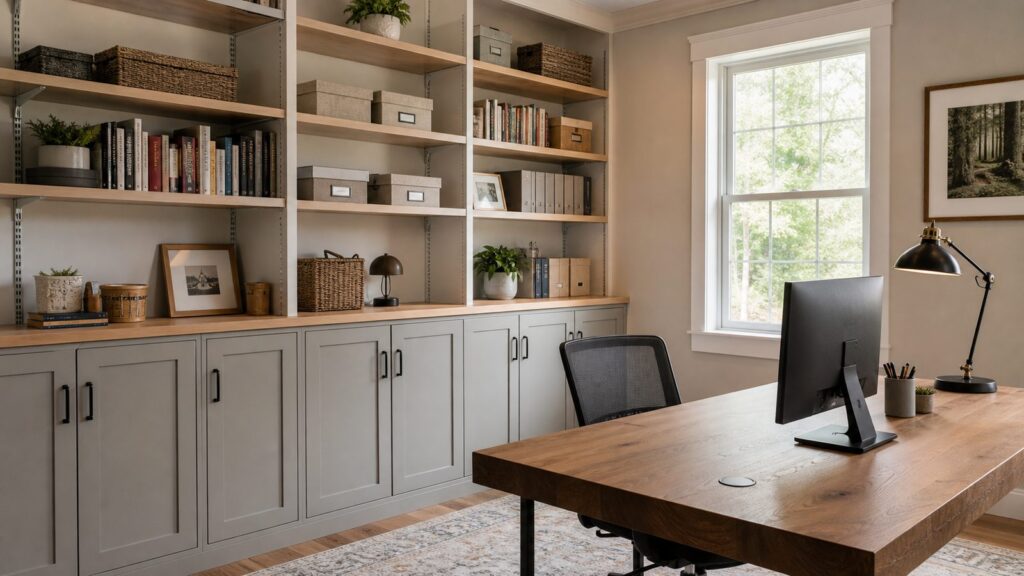
Fix the driver behind crashes, sound loss and screen glitchesFind Drivers →Repair Windows errors before they cause bigger problemsFix Now →Scan for outdated or missing drivers - takes under a minuteDriver Scan →In many home offices, the best combination is closed lower storage and open upper shelves. Put heavy items low: paper, books, binders, printers, and equipment. Use upper shelves for lighter items, reference materials, or display. Doors and drawers cost more than open shelves, but they reduce daily visual noise.
If you are planning custom built-ins, include at least one concealed section sized for the least attractive items in the room. A 30- to 36-inch-wide lower cabinet can hold a printer, paper, files, router, or office supplies if it is planned with the right depth and ventilation.
6. Label Bins, Files, and Cables Clearly
Labels sound small, but they are what make the system survive after the first week. Label file folders, storage boxes, cord ends, chargers, and supply bins. Use plain names: taxes, contracts, printer paper, envelopes, receipts, device cables, camera gear.
A basic label maker, file tabs, and clear bins may cost $30 to $100. Full matching storage systems can push a DIY organization supply run into the $200 to $500 range. The better test is not whether the bins match. It is whether another person in the house can find and return the item without asking.
The Tool Desk
Outbyte Driver Updater FREEFix the driver behind crashes, sound loss and screen glitchesFind Drivers →Outbyte PC Repair FREERepair Windows errors before they cause bigger problemsFix Now →7. Install a Cable Raceway or Grommet System
Cords make even a clean office look unfinished. More importantly, poor cord planning can create avoidable hazards. Do not run extension cords under rugs, pinch cords behind furniture, or overload a single power strip with monitors, printers, heaters, lamps, and chargers.
For a simple fix, use adhesive cable clips, a desk-mounted cable tray, Velcro wraps, and a paintable cable raceway. Many homeowners can improve cord control for $25 to $150. For a more permanent setup, place cable grommets where cords actually exit devices, not automatically centered on the desk or wall.
Plan power before furniture. Desks often block existing outlets. If the only outlet is behind a file cabinet, the room will end up with visible cords across the floor. Adding a new outlet typically costs about $100 to $450 per outlet, with many projects near $300. Other 2026 cost guides place typical outlet installation around $150 to $350, while national unit-cost estimating starts around $297 to $360 per outlet. Costs rise when new wiring, dedicated circuits, wall fishing, drywall repair, panel work, or permits are needed.
8. Move the Printer and Scanner Off the Desk
Printers take up too much prime desk space. They also bring paper, ink, cables, envelopes, and noise with them. Move the printer to a support zone: a lower cabinet, rolling cart, closet shelf, or credenza.
Measure before you move it. Many printers need 18 to 24 inches of depth, room for the paper tray to open, and space above for scanning. If the printer is enclosed in cabinetry, allow ventilation and easy access for jams and cartridge changes.
A rolling printer cart can cost less than $100. A cabinet solution may cost several hundred dollars. A built-in printer bay costs more, but it can be the right answer when the office needs to look finished and the printer is used daily.
9. Use Drawer Dividers for Small Supplies
Small office supplies create daily friction when they are loose. Drawer dividers are an inexpensive fix for pens, clips, sticky notes, chargers, stamps, batteries, adapters, and flash drives.
For most desks, one shallow utility drawer and one deeper supply drawer are enough. Keep duplicates under control. If you only use two pens, do not store forty within reach. Extra supplies can move to a labeled bin in closed storage.
Rank #3

- Large Capacity and Durable. The cable tray size 36"L x 5.5"W x 5.5"H (The product images include detailed dimension diagrams. Please measure your table before purchasing to select the appropriate size.), it fits all size adapters and sockets, holds and hides everything under your table. It is ideal cable management under desk.
- Two Ways Installations. This under desk organizer supports both no drill clamp on and screw fixing installation, it fits all table top materials such as wood table, glass table, and metal table.
- Make Cable Management Much Easier. You can unfold the tray for much easier adding or removing items, every item can be fixed in the tray by using the build-in ties.
- Premium Quality. The screw free clamp is heavy duty for weight loading, the thick 600D oxford fabric is flame retardant, the tray has bottom support for loading heavy weight keep elegant shape. Premium quality in all details.
- Excellent Customer Service. We are the reliable brand who take customers service in top priority, strictly obey amazon customers service policy with many years reputation. Reminder: If the table has built-in drawers or back-rod, make sure there is a space of at least 5.3 inches along the edges. Otherwise, our products cannot be used. The product is fixed under the table using clips. Space needs to be left on the tabletop for the clips, and it is impossible to make it completely invisible.
Drawer inserts usually cost $10 to $50 per drawer. This is one of the highest-value upgrades because it removes clutter without changing the room.
10. Add Pegboard or Slatwall for Flexible Storage
Pegboard and slatwall work well in craft offices, design studios, homeschool areas, and shared workrooms. They are best for lightweight, frequently used items: scissors, tape, headphones, rulers, small tools, baskets, and cables.
The installation details matter. Mount panels level, fasten into studs or furring strips, and keep heavy items off weak hooks. If the wall area is near a desk, leave enough clearance so hanging items do not bump the monitor or chair.
For a cleaner residential look, consider painted wood slatwall or a framed pegboard panel that matches the trim. This gives you flexibility without making the room feel like a garage workspace.
11. Choose a Desk With Real Storage
A beautiful table is not always a good desk. If your work involves paper, accessories, chargers, and office supplies, choose a desk with actual storage or pair a simple desktop with a cabinet base.
Look for a file drawer if you handle paperwork weekly. Choose a keyboard tray only if it fits your ergonomics and does not force your knees into a bad position. For two monitors, check both desktop width and depth. A 60- to 72-inch-wide desk is often more comfortable than a 48-inch desk for monitor-heavy work, but it still needs room clearance around it.
If you are planning built-ins, do not lock yourself into a desk opening that only fits one chair or monitor layout. We often prefer adjustable shelving above, a durable work surface, cable pass-throughs, and lower cabinets that can adapt.
12. Use Vertical Bookcases Carefully
Tall bookcases are a fast way to add storage, but they need to be anchored. Any tall furniture, especially in a room used by children or pets, should be fastened to the wall with the manufacturer’s anti-tip hardware or appropriate anchors into studs.
Put heavy books and equipment on lower shelves. Keep lighter items high. Avoid overloading long shelves with dense books unless the shelf is designed for that span and weight. Sagging shelves are usually a sign that the span is too long, the material is too thin, or the load is too heavy.
Freestanding bookcases are a good first step because they are movable and inexpensive compared with built-ins. Custom built-ins make sense after the layout is proven and the storage need is clear.
13. Improve Lighting Before Adding More Storage
Poor lighting makes an organized room feel cluttered and tiring. Layer the lighting before you assume you need more cabinets.
A functional home office needs three types of light: ambient room light, task lighting at the desk, and front-facing light for video calls. A desk lamp may solve the problem for under $100. Better ceiling lighting, hardwired sconces, shelf lighting, or recessed lights require more planning and may require permits depending on the work and local rules.
What’s actually slowing this PC down?
Pick the symptom - the matching free tool is one click away.
Good lighting placement also affects storage. Shelf lights need wire paths. Desk lamps need outlets. Video-call lights need a power source near the monitor. Plan those items before the furniture is fixed in place.
Rank #4

- 【Effortless No-Drill Installation】This under desk cable management tray requires no tools or drilling—simply clamp it securely to any desk up to 2" thick. The adjustable clamp mount with soft rubber pads protects your desktop from scratches, making it ideal for home office and standing desk cord organization.
- 【Durable Metal Construction】Made of high-quality metal, this 25.3” cable organizer offers exceptional strength, supporting up to 15 lbs. The open mesh design improves airflow to reduce dust buildup while providing easy access to power strips, adapters, and cords.
- 【Smart Cable Organization】Keep cords tidy and out of sight with this under desk cable management system. The two large access holes allow easy cord routing, helping you neatly organize power cables, USB hubs, and more—keeping your workspace clean and trip-free.
- 【Versatile & Space-Saving】Perfect as a desk accessory, this cable management tray fits various settings including home offices, gaming desks, and kitchens. It hides clutter effectively while offering quick access to plugged-in devices.
- 【Safe & Family-Friendly】Designed to protect both cables and users, this cord organizer keeps wires away from children and pets. The sturdy clamp and reinforced structure ensure a secure hold, reducing safety risks from loose or tangled cords.
14. Set a Weekly 10-Minute Reset Routine
Organization is not a one-time project. It is a maintenance system. Build the reset into the room.
Keep one inbox tray, one shred or recycle location, one donation box or outgoing bin, and one place for items that belong elsewhere in the house. Once a week, spend 10 minutes clearing the desk, filing active papers, returning supplies, and emptying the trash or shred pile.
The reset works because every item has a destination. If you find yourself moving the same object around every week, the room is missing a storage decision.
Recommended Free Tools
Home Office Organization Cost Guide for 2026
Most homeowners should stage the work. Start with decluttering and movable storage. Add wall shelves or a closet organizer if needed. Only invest in custom built-ins after the desk location, printer location, power needs, and storage inventory are proven.
| Upgrade | Typical 2026 Cost | Best For |
|---|---|---|
| Basic DIY supplies | $75 to $500 | Labels, bins, trays, cable clips, drawer dividers, file boxes, small carts, or a bookcase |
| Professional organizer | $50 to $150 per hour; many projects $252 to $843 | Paper backlogs, downsizing, shared offices, or decision fatigue |
| Closet or office organizer system | $627 to $2,526 for many installed systems; custom closet projects can range from $1,500 to $20,000 | Turning a closet into office storage or adding closed supply zones |
| Built-in bookshelves | $300 to $850 per linear foot installed; many projects average $2,000 to $7,500 total | Permanent book, file, and display storage with a finished look |
| Built-in desk with cabinetry | Roughly $3,000 to $10,000+ | Integrated office walls, custom storage, premium finishes, and cable planning |
| New electrical outlet | Commonly $100 to $450 per outlet; many projects near $300 | Safer power access, better desk placement, printer zones, and lighting |
| Home office remodel | About $50 to $200 per square foot for existing space | Flooring, lighting, sound control, built-ins, HVAC, windows, and layout changes |
Costs vary with region, access, materials, finish level, wall repairs, electrical scope, and whether the work touches structure or mechanical systems. A small office can be dramatically improved for a few hundred dollars. A fully integrated office wall with cabinets, lighting, outlets, hardwood materials, and finish carpentry is a construction project.
Independent reader supportYour contribution helps us test, update, and keep practical guides available for everyone.When to DIY and When to Hire a Pro
Many home office organization tasks are good DIY projects. Decluttering, labeling, drawer dividers, freestanding furniture, cable clips, desktop trays, rolling carts, and simple bookcases are well within reach for most homeowners.
Call a professional organizer when the volume of paper or possessions is keeping the project from moving. The right organizer can help sort, categorize, and build a system faster than most homeowners can do alone.
Free tools Windows power users keep installed
One-click scans. No signup required.
Call a contractor or carpenter for built-ins, wall-mounted cabinetry, custom closet conversions, trim integration, structural changes, or turning a non-office space into a finished room. Built-ins need proper fastening, level installation, durable materials, scribe work, and planning for baseboards, outlets, vents, and wall irregularities.
Call a licensed electrician for new outlets, hardwired lighting, dedicated circuits, panel work, or any wiring hidden in walls or ceilings. Do not treat extension cords as a permanent design solution.
Permit and Safety Notes Homeowners Should Not Skip
Permit rules vary by city and state, but the pattern is consistent: cosmetic organization work usually does not require a permit, while electrical work, structural changes, new walls, converted spaces, and some lighting changes often do. Some cities publish lists of permit-exempt work, but those lists are local. A shelf project in one city may be simple finish work; a closet-to-office conversion with electrical changes may need permits and inspections.
Before starting permanent work, check your local building department requirements. This is especially important if you are adding outlets, changing lighting, removing walls, finishing a basement or attic, converting a garage area, or modifying HVAC. Proper permits protect resale value and reduce the risk of hidden electrical or life-safety issues.
The Tool Desk
Outbyte PC Repair FREERepair Windows errors before they cause bigger problemsFix Now →Outbyte Driver Updater FREEFix the driver behind crashes, sound loss and screen glitchesFind Drivers →For safety, anchor tall furniture, fasten shelves into studs or proper blocking, keep heavy items low, avoid overloaded power strips, and make sure cords do not cross walking paths. These details are not decorative. They are what make the office reliable after the cleanup photos are taken.
How to Make a Small or Shared Office Work
Small offices need shallow storage, clear zones, and fewer surface areas where clutter can collect. Use 10- to 12-inch-deep shelves for books and supplies. Choose a desk with drawers or add a mobile file pedestal. Move the printer to a closet shelf or cart if it is not used daily.
Best Value

- We used ChatGPT to analyze our reviews and determine the main benefits our customers received. Here is the summary:
- IMPROVED DESK AESTHETICS: Users reported that the cable management trays helped make their desk setup look clean and organized, reducing the visible cable clutter and providing a neater appearance.
- EASY INSTALLATION: The trays come with strong adhesive backing, making them easy to install without the need for drilling or additional tools. The adhesive was praised for its strength and durability.
- VERSATILE AND SPACIOUS: Users found the trays to be spacious enough to accommodate multiple cables, power strips, and even transformers. The design allows for efficient cable organization without occupying too much space.
- DURABLE AND STURDY: The cable management trays were described as robust and solid, capable of securely holding various cables and equipment without bending or losing adhesion over time.
In a shared room, closed storage matters more. A bedroom-office or guest-room office should reset quickly at the end of the workday. Use doors, drawers, lidded bins, or a closet system so work items do not visually take over the room.
If two people share the office, duplicate the command zones instead of sharing one messy center pile. Each person needs a tray, charging location, file area, and supply drawer. Shared equipment such as printers and paper can live in the support zone.
What’s actually slowing this PC down?
Pick the symptom - the matching free tool is one click away.
Are Custom Built-Ins Worth It?
Custom built-ins are worth considering when the office layout is proven, the storage inventory is stable, and the room needs a permanent finished solution. They are especially useful for awkward walls, alcoves, converted closets, offices visible from main living areas, or households that need durable long-term storage.
They are not the first move for every office. If you are still testing where the desk should go, start with movable furniture. Live with the layout for a few weeks. If the same storage problem keeps showing up, then design the built-in around that problem.
For the strongest result, specify adjustable shelves, closed lower cabinets, cable pass-throughs, printer depth where needed, outlet access, and lighting before fabrication starts. Built-ins should solve measured problems, not just fill a wall.
The Bottom Line
An organized home office is built in layers. First, remove what does not belong. Second, create zones for daily work, support items, and archives. Third, add vertical and closed storage sized to the actual inventory. Fourth, plan lighting and power so the room works safely. Finally, maintain it with a weekly reset.
The easiest home office organization ideas are usually inexpensive: purge paper, label storage, clear the desk, use drawer dividers, and tame cords. The bigger upgrades, such as built-ins, closet systems, outlets, and lighting, are worth it when they support a real workflow and are installed with proper structure, clearances, and code awareness.
Frequently Asked Questions
How do I organize a small home office without remodeling?
Start by purging paper, then use a desk with drawers, shallow 10- to 12-inch shelves, labeled bins, drawer dividers, and a rolling printer cart. Keep daily items within arm’s reach and move weekly or archived items into closed storage.
What is the best way to hide cords in a home office?
Use a desk cable tray, Velcro wraps, adhesive clips, and a paintable cable raceway. For a permanent setup, add outlets or cable grommets where devices actually sit. Avoid extension cords under rugs or overloaded power strips.
How much do built-in shelves or cabinets cost for a home office in 2026?
Built-in bookshelves commonly run $300 to $850 per linear foot installed, with many projects averaging $2,000 to $7,500 total. A built-in desk with cabinetry often lands around $3,000 to $10,000 or more depending on size, materials, finish, lighting, and electrical integration.
Do I need a permit to add outlets or lighting in a home office?
Often, yes. Permit rules vary locally, but new outlets, hardwired lighting, new wiring, dedicated circuits, and panel work commonly require a licensed electrician and may require permits. Cosmetic organization work usually does not.
What should stay on my desk?
Keep only daily-use items on the desk: computer, keyboard, mouse, notebook, active files, one pen cup or drawer insert, and current charging needs. Weekly and monthly items should move to nearby drawers, shelves, or cabinets.
When should I hire a professional organizer, electrician, or contractor?
Hire an organizer for large paper backlogs or decision-heavy decluttering, an electrician for outlets or hardwired lighting, and a contractor or carpenter for built-ins, wall-mounted cabinetry, structural changes, or converting a space into a finished office.
Quick Recap
Product prices and availability are accurate as of the date/time indicated and are subject to change. Any price and availability information displayed on Amazon at the time of purchase will apply.