Some links on this page are affiliate links: if you buy through them we may earn a commission, at no extra cost to you.
For an online AI vocal remover, Vocal Remover AI is the most direct fit: it separates an uploaded audio or video file into vocal and instrumental tracks, with browser previews and downloads. For more stem choices, compare Fadr, Moises, and LALAL.AI. The right choice depends on whether you need a quick backing track, separate instruments, or a workflow across devices.
Best Online AI Vocal Remover Tools At A Glance
| Rank | Tool | Best Fit | Free Access | Output Or Device Detail |
|---|---|---|---|---|
| 1 | Vocal Remover AI | Quick vocal and instrumental split | 120 minutes free per day | Browser tool; WAV or MP3 downloads |
| 2 | Fadr | Free separation with remix features | Unlimited stems and MP3 downloads on Basic | Vocals and 15 other instruments; Plus adds WAV downloads |
| 3 | Moises | Separating vocals on several device types | Up to 5 uploads per month, files up to 5 minutes | Web, desktop, iOS, Android |
| 4 | LALAL.AI | Browser separation with more processing options | Free previews; full downloads unavailable on Starter | Web, desktop, mobile, VST3 DAWs, API |
| 5 | TuneStems | Trying vocal removal with video or audio | Free to try, no signup, tracks up to 5 minutes | MP3, WAV, FLAC and other listed formats; web-only |
| 6 | StemConsole | Adjusting the vocal-free mix in a browser | 5 splits a month on the free account | Free vocal remover, live mixer and MP3 downloads |
| 7 | PhonicMind | Separating lead and backing vocals | No free plan | Online upload, preview, mix and download |
| 8 | Suno | Extracting vocal and instrument stems in a broader music workspace | Free plan; stem separation is excluded | Web, iOS, Android; paid subscribers can export stems |
How To Choose A Vocal Remover For Your Track
Vocal removal is a separation task: the service estimates which parts of a mixed recording belong to the voice and which belong to the accompaniment. A useful result for karaoke or rehearsal is an instrumental track with the lead vocal reduced while the rhythm and harmony remain usable. A two-track split may be enough for that job. If you need to lower backing vocals separately, or isolate guitar, keys, or drums, look for a tool that explicitly offers those stems.
Source material matters. A dense mix, layered voices, or instruments that overlap the vocal range can leave audible traces in either output. None of the listed product facts establishes a genre-specific guarantee, a particular degree of vocal cleanliness, or support for every file. Check the vendor’s current upload requirements and supported formats before preparing a large project.
Do these 3 things before closing this tab:
1Clear out junk files and repair common Windows errors2Fix the driver behind crashes, sound loss and screen glitches3Repair Windows errors before they cause bigger problemsRanked Online AI Vocal Remover Tools
1. Vocal Remover AI For A Direct Browser Split
Vocal Remover AI is the clearest match when the task is simply to remove or isolate vocals from an uploaded file. It accepts audio and video uploads up to 500 MB, previews the separated tracks in the browser without signup, and downloads isolated vocals and instrumentals as WAV or MP3. The listed free allowance is 120 minutes per day. The service says uploads are processed in an isolated server instance and automatically deleted within one hour.
#1 Best Overall

- 🎤 Turn Any Song into Instant Karaoke: This karaoke vocal remover is powered by a millisecond-level AI chip and intelligent audio analysis technology, this AI vocal remover can accurately detect and separate vocals in real time. Instantly remove singer voice from music and transform your favorite songs into karaoke backing tracks straight from your phone—no app, no editing, no waiting.
- 🎶 3 Smart Modes for Singing, Practice & Fun: Choose the perfect mode for every vibe: 0% Vocal Mode – complete vocal remover mode for pure accompaniment 25% Vocal Mode – lower the original singer’s voice and sing along for easy practice 100% Vocal Mode – restore the original song anytime Whether you’re practicing vocals or hosting karaoke night, this karaoke voice remover keeps the party going.
- 🔊 Works with Almost Any Speaker or Karaoke Machine: This portable vocal remover is compatible with all AUX-supported devices, including 3.5mm speakers, karaoke machines, home audio systems, and portable speakers. Just plug in and enjoy real time voice elimination anywhere—from your bedroom concert to your living room world tour.
- 📱 Bluetooth Vocal Remover with Stable Connection: The bluetooth vocal remover is built with Bluetooth functionality for quick wireless pairing with smartphones, tablets, and music players. Stream music easily and enjoy smooth AI voice cancellation without complicated setup. Your playlist is ready. Your audience probably isn’t—but that’s okay.
- 🔋 Fast Charging & 6 Hours of Playtime: Our this AI voice cancellation is equipped with a 400mAh rechargeable battery and Type-C fast charging, this real time vocal remover fully charges in just 30–40 minutes and provides up to 6 hours of continuous use. Small enough to carry anywhere, powerful enough to turn every gathering into karaoke night.
It is web-only, has no batch processing, API, or integrations, and works from uploaded files rather than live input. Its stated over-95% accuracy is the vendor’s claim, not a guarantee for a particular song; check its site for the method and conditions behind that figure.
2. Fadr For Free Stems And Remix Tools
Fadr suits someone who wants a vocal split but may also need instrumental parts or remix tools. Fadr Basic provides unlimited stems, remixes, and DJ sets with high-quality MP3 downloads for free. Its separation covers vocals and 15 other instruments. Fadr Plus is listed at $10 per month or $100 per year and adds features including individual drum separation, lossless WAV downloads, a stems plugin, and API access.
Basic gives you a vocal-removal route, while the listed WAV downloads and plugin require Plus. Check Fadr’s site for supported uploads, export details, and current plan terms.
Quick wins for a faster PC:
Fix the driver behind crashes, sound loss and screen glitchesFind Drivers →Repair Windows errors before they cause bigger problemsFix Now →Rank #2

- AI Real-Time Vocal Remover: This AI Vocal remover adopts a millisecond-level AI chip and is equipped with intelligent AI audio analysis technology. The Vocal elimination can accurately identify and separate human voice tracks, reducing the volume of human voice tracks and blocking them.This AI Vocal remover turns the original songs played on your phone into accompaniment songs in an instant, allowing you to enjoy pure sound quality
- Universal Compatibility: Compatible with any Speakers and Karaoke Machines via 6.35mm/3.5mm 2-in-1 AUX, works seamlessly with any music player app on your smartphones or tablets via Bluetooth connection then use the app to control the vocal removal mode. You don't need to purchase any paid app to find the background accompaniment music you want!
- APP Control /Adjustable Voice Elimination: Features 10 customizable levels from 10%-100% on our smart app. When setting the 0% mode, the voice will not be processed and remains as original music; When setting the 50% mode, it will eliminate 50% of the lead singer's voice, you can practice the songs you like by singing along; When setting the 100% mode, it will completely eliminate the lead singer's voice and only the accompaniment is available
- Long-Lasting Battery: The rechargeable Vocal Remover built in large capacity battery(400mah) with a Type-C fast charging interface, it only takes 30-40 minutes to fully charge and can provide up to 5-6 hours of battery life to meet different kinds of needs, such as outdoor karaoke, video production, music teaching, singing performance, live-streaming and so on
- Portable and Compact Design: The sturdy construction ensures long-lasting performance while the compact size makes it portable for parties, gatherings, or studio sessions. It is the perfect birthday gift or christmas gift for music lovers and people who are interested in Karaoke
3. Moises For Separating Vocals Across Devices
Moises is a strong choice if you want a browser workflow with companion apps. It separates vocals, drums, bass, guitar, keys, and more, and is available on the web, desktop, iPhone, iPad, and Android. The free tier allows up to five uploads per month, with files up to five minutes long; some separation options require a paid plan.
Check the current plan details if a specific separation target or longer source file is essential. Moises says it trains its models only on licensed materials and does not train on music without the owner’s approval.
4. LALAL.AI For Broader Separation Options
LALAL.AI removes or isolates vocals and can separate a wider set of instruments. Its listed options include previews, batch processing, selectable neural networks, and uploads up to 2 GB. Access is listed for web, desktop, mobile, VST3 DAWs, and API. The free Starter plan provides previews but not full result downloads; batch processing is reserved for paid plans.
Rank #3
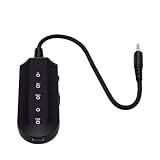
- Vocal Control: The karaoke vocal eliminator allows users to easily switchover between various vocal modes, adjusting between full vocals and reduced vocals, providing flexibility when singing along with favorite tracks.
- Background Vocal Balance: This device features selectable vocal modes, enabling you to balance the artist's sound and background vocals, making it easier to practice or enjoy karaoke sessions.
- Bluetooth Connectivity: With built in Bluetooth 5.3, this karaoke vocal eliminator offers seamless wireless audio connection. The blue status indicator light shows when a connection is successful.
- Audio Output Options: Equipped with a standard 3.5mm audio output jack, users can conveniently connect compatible audio devices for a simple wired audio setup, enhancing the karaoke experience.
- User Friendly Controls: Featuring dedicated power and mode selection controls, the device ensures straightforward operation, while the Type C charging port and charging indicator light offer convenient daily use.
The listed paid monthly rates use annual billing, so check the vendor’s site for the current total and plan conditions. Confirm the available output stems and upload limits for your intended file there.
Free tools Windows power users keep installed
One-click scans. No signup required.
5. TuneStems For Trying Audio Or Video Files
TuneStems supports vocal removal alongside six-stem and single-instrument separation. It accepts audio or video, and its listed input guidance is up to 100 MB or five minutes. You can try it free without signing up for tracks up to five minutes. Outputs include MP3, M4A, WAV, and FLAC; advanced formats are reserved for Premium, and access is web-only.
TuneStems describes its use as 100% commercial, but check the current terms for your project and make sure you have permission to upload and use the source recording.
Rank #4

- Quiet Practice Singing Equipment: This vocal dampener (vocal dampener for singers) effectively reduces vocal volume for daily singing practice and warm-ups. Ideal for singers & vocal trainers, it allows free practice at home, studio or dorms without disturbing others.
- Soft Liquid Silicone Grip: Made of skin-friendly liquid silicone, this vocal dampener features a flexible, non-slip design that ensures comfort for singers, students & vocal trainer users during long practice sessions.
- Dual-Layer Sound-Dampening: This professional vocal dampener has a 2-piece structure, mimicking a portable vocal booth to soften volume while preserving voice clarity for effective vocal trainer for singing.
- Easy to Clean Singing Equipment: This vocal dampener has a smooth, non-porous surface, easy to rinse with water and air dry, making it low-maintenance for daily vocal training use.
- Portable & Perfect Holiday Gift: This compact portable vocal dampener (a practical vocal trainer accessory) is ideal for home, studio and travel. It’s also a great holiday, Christmas or New Year gift for singers, vocal trainers and vocal enthusiasts.
6. StemConsole For Mixing The Separated Result In Your Browser
StemConsole combines a free vocal remover with a live mixer. The free account includes five splits per month, a vocal-and-instrumental option, a four-stem basic split, solo and mute controls, levels, basic looping, MP3 downloads, and MP3 mix bounces. The Pro subscription is listed at $6.99 per month or $49 per year. A single $1.99 credit unlocks Full Separation for one song without a subscription and does not expire; credits do not include WAV or practice tools.
StemConsole is web-only and has no batch processing, integrations, or public API. Check its pricing page for the current split allowances and the details of Full Separation.
7. PhonicMind For Lead And Backing Vocal Separation
PhonicMind is worth considering when separating lead and backing vocals matters. Its V.2.0 description says it can separate backing vocals and recognize up to 16 stem classes, delivering up to eight usable stems plus a metronome depending on the song and conversion tier. It works online through upload, preview, mixing, and download. There is no free plan, and separation and export depth vary by plan.
Best Value

- 【Upgraded】Compared with the standard version, our upgraded vocal training device features a newly refined rounded-corner design, providing a more comfortable grip and user experience. We have also optimized and upgraded the material and details of the adjustment wheel, making it smoother to operate and improving the overall quality of the product
- Varihum&Innvox Vocal Trainer for Progressive Vocal Training: Easily adjust resistance with a smooth rolling wheel to match your comfort and training level. One vocal trainer supports multiple pressure settings, making it suitable for step-by-step vocal training without the need for multiple devices
- Scientifically-Backed SOVT Design Inspired by Singing Straw Exercises: Built around the scientifically-backed SOVT (Semi-Occluded Vocal Tract) principle, commonly used in singing straw exercises. Helps focus airflow, increase beneficial back pressure, and reduce unnecessary vocal fold strain for better voice vocal training
- Ultra-Light & Portable Vocal Training Tool Only 20g: Weighing just 20 grams, this vocal trainer is easy to carry and use anywhere. Made from PLA, it is lightweight, durable, and suitable for daily vocal training and warm-up routines
- Ergonomic Mouthpiece for Comfortable Singing & Vocal Training: Ergonomic mouthpiece design follows the natural curve of the lips, minimizing friction at the corners of the mouth. Comfortable for extended siVocal Trainer for Singing: Ergonomic mouthpiece design follows the natural curve of the lips, minimizing friction at the corners of the mouth. Comfortable for extended singing practice, warm-ups, and repeated vocal training sessionsnging practice, warm-ups, and repeated vocal training sessions
The Sing plan is listed at $9.99 per month and does not include downloads, so check which plan includes the files you need before paying. The available stem count depends on the song and tier; check the vendor’s site for current plan details.
8. Suno For Stem Export Inside A Music Workspace
Suno is a broader AI music workspace rather than a dedicated vocal-removal service, but its stem separation can pull a song into vocal and instrument stems. Paid subscribers can use the feature; stem separation is not included in the Free Plan. Suno is available on the web, iOS, and Android.
Choose it if your workflow already involves Suno or you want separated stems alongside its music-creation and editing tools. Check the vendor’s site for the current plan required for stem export and for details on working with tracks that you did not create there.
What’s actually slowing this PC down?
Pick the symptom - the matching free tool is one click away.
A Practical Vocal Removal Workflow
- Choose a file you have permission to upload and use, then confirm the service accepts its file type, size, and length.
- Upload the mixed recording and select vocal-and-instrumental separation, or the closest equivalent the service offers.
- Preview both outputs. Listen for leftover vocal sounds in the instrumental and for accompaniment that has leaked into the vocal stem.
- If the instrumental needs more work, try a service with additional instrument stems or mixer controls, then listen again before exporting.
- Download the format you need for your player or audio editor and keep the original recording so you can compare or retry with another service.
For karaoke, start with the instrumental output. For rehearsal where a singer needs to hear a reference, keep the vocal stem too. For a mix that needs a quieter backing singer but a clear lead, use a tool that explicitly separates lead and backing vocals, such as PhonicMind; do not assume a basic two-track remover can split those parts.
Rights, Uploads, And Vendor Terms
Only upload recordings you are allowed to submit, and get the relevant vocalists’ consent when your project involves their voices. A tool’s technical ability to separate a voice does not itself establish permission to use the resulting vocal or instrumental. Check each service’s current terms for upload handling, ownership, downloads, and commercial use. TuneStems states that its use is 100% commercial; Suno says songs created as a paid subscriber are yours to keep and use. Those statements do not establish rights for every source recording or cover, so check the applicable platform terms and permissions for your specific material.
Quick Recap
Product prices and availability are accurate as of the date/time indicated and are subject to change. Any price and availability information displayed on Amazon at the time of purchase will apply.


Leave a Reply