Some links on this page are affiliate links: if you buy through them we may earn a commission, at no extra cost to you.
The most useful smart-home gadgets are the ones that make a home safer, more comfortable, or easier to manage—not the ones with the longest feature list. Start with a few devices that suit your household and wiring, then add more only when they solve a real problem. This guide covers 13 practical categories for U.S. homes, with notes on installation, compatibility, subscriptions, and who can skip each one.
Updated September 23, 2026: The original title referred to 2025. This guide retains its focus on practical smart-home upgrades while reflecting current compatibility considerations. Product features, availability, and prices can change; confirm details for the exact model before buying.
What makes a smart-home gadget essential?
“Essential” does not mean every home needs all 13 devices. It means each category can deliver a repeatable benefit—less manual work, better awareness, lower waste, or protection from a foreseeable problem. Before buying, consider how often you will use it, whether it works with your preferred platform, what happens if the internet goes down, and whether the device adds a subscription, maintenance task, or privacy concern.
What’s actually slowing this PC down?
Pick the symptom - the matching free tool is one click away.
Choose a primary platform—Apple Home, Google Home, Amazon Alexa, or Samsung SmartThings—before filling a home with accessories. Matter, an IP-based interoperability standard, can make it easier to use supported devices across platforms, but it does not guarantee identical features or setup in every app. Some devices still need their own app for advanced functions. Matter uses Wi-Fi or Thread for networking and Bluetooth Low Energy during commissioning; Thread devices also need a compatible Thread border router. The Connectivity Standards Alliance’s Matter overview explains the standard.
#1 Best Overall

- Getting started with smart home has never been easier - An all-in-one kit with a quick guided setup makes starting your smart home easy.
- A setup so easy, it feels like magic - Just unbox, plug it in, and tap to get started.
- One hub with endless possibilities - the Echo Hub works with thousands of connected cameras, lights, locks, plugs, thermostats, speakers, and more—bringing your smart devices together in one convenient hub.
- Peace of mind, anytime - The included four lights can be easily set to make it look like you’re home when you’re away.
- Works with thousands of Alexa-compatible devices like Ring security cameras to build a smarter, safer home.
For any product, distinguish four things: whether it supports Matter, whether it works with your chosen platform, whether its key functions run locally, and whether it depends on a vendor’s cloud or paid plan. A smart-home app is not a substitute for checking the device’s exact model, wiring, door, HVAC, or network compatibility.
Quick comparison
| Device | Useful first job | Typical setup | Best fit |
|---|---|---|---|
| Controller or speaker | Run voice commands and household routines | Plug in; configure platform | Most homes beginning an ecosystem |
| Smart switch or bulb | Automate a light without losing convenient control | Bulb: plug in; switch: electrical work | Renters (bulbs) and owners (switches) |
| Smart plug | Schedule a lamp or other suitable appliance | Plug in | Nearly any home |
| Smart thermostat | Adjust heating and cooling schedules | HVAC and wiring check; sometimes professional install | Homes with compatible HVAC |
| Smart lock | Share temporary access and check lock status | Replace or retrofit deadbolt | Owners and permitted renters |
| Video doorbell | See and speak with visitors remotely | Wired or battery installation | Homes with a useful entry view |
| Security camera | Check a room, pet, entrance, or yard | Wi-Fi, power, and storage setup | Households that need visual confirmation |
| Motion, contact, or presence sensor | Trigger lights, alerts, or other routines | Battery or hub-based setup | Homes ready to automate around activity |
| Leak sensor or shutoff | Catch a leak or stop water automatically | Sensor: place and pair; shutoff: plumbing work | Homes with water-damage exposure |
| Robot vacuum | Reduce routine floor cleaning | Clear routes; map rooms | Busy, pet-owning, or child-filled homes |
| Air-quality monitor or purifier | Track or respond to indoor air changes | Place in room; purifier needs filter upkeep | Homes with specific air-quality concerns |
| Energy monitor | Identify what uses power | Plug in or electrician-installed | Households willing to act on usage data |
| Garage-door controller | Check whether the garage is open | Check opener compatibility and sensor setup | Homeowners with a compatible garage |
1. Smart-home controller or speaker
A controller is the place where devices, routines, and notifications come together. A smart speaker adds voice commands and timers; a display can also show doorbell feeds, cameras, and a household dashboard. Depending on the model, a speaker, display, TV box, or dedicated hub may act as a Matter controller or Thread border router—but those roles are not interchangeable, so check the exact device’s specifications.
Product direction: Consider an Amazon Echo or Echo Show for Alexa, a Google Nest speaker or Hub for Google Home, a HomePod mini or Apple TV 4K for Apple Home, or a Samsung SmartThings hub if you need support for a broader mix of protocols and devices. Apple describes its home ecosystem and compatible accessories at its smart-home accessories page.
Do these 3 things before closing this tab:
1Scan for outdated or missing drivers - takes under a minute2Clear out junk files and repair common Windows errors3Fix the driver behind crashes, sound loss and screen glitchesCheck before buying: Confirm which family members’ phones and accounts need access, which protocols the controller handles, and whether remote access requires a hub or cloud account. A speaker that accepts voice commands is not necessarily a hub. Voice control also does not mean that routines run locally.
Trade-off: Speakers and displays have microphones, and displays may have cameras. Use mute controls or choose a hub without a microphone if that better fits your privacy preferences. Skip a new controller if your existing platform already supports the devices and routines you need.
2. Smart lighting: switches for permanent lights, bulbs for flexible ones
For ceiling lights used by several people, a smart wall switch is often more practical than smart bulbs: the physical control remains familiar, and nobody can accidentally make a smart bulb unreachable by switching off its power. Smart bulbs are easier to install and better for lamps, color effects, temporary setups, and many rentals.
Product direction: Philips Hue offers a broad lighting ecosystem; Lutron Caséta is a strong direction for switch-centered control; Nanoleaf and other Matter-labelled products may suit shoppers prioritizing cross-platform options. See Philips Hue’s lighting range and Lutron Caséta.
Recommended Free Tools
Check before buying: For a switch, verify neutral-wire needs, dimmer compatibility, LED load, electrical-box depth, and whether a three-way circuit is supported. For bulbs, check their base, brightness, color-temperature range, and whether a bridge is required. Matter support does not ensure every scene or advanced lighting feature appears in every platform.
First routine: Turn the entry or kitchen light on at sunset, with a manual switch still available. Electrical work on a switch should be done safely and, if you are not qualified, by an electrician. Renters should usually begin with bulbs and get permission before changing wiring.
3. Smart plugs
A smart plug can automate an existing lamp, holiday lights, or another suitable on/off appliance without replacing it. Some models also report energy use. Choose an established product with a clear electrical rating and recognized safety certification, such as UL or ETL; Tapo, Kasa, and Eve offer product lines worth comparing. Check the exact model’s Matter and platform support rather than relying on the brand name alone. See Tapo’s smart-plug range.
Rank #2

- Complete Project-Based Learning Path – Build 13 progressive projects (LED blink → button control → PIR motion sensor → music playback → motorized doors/windows → SK6812 RGB lighting → fan control → LCD display → gas alarm → temperature/humidity monitor → RFID door unlock → Morse code access → WiFi control → mobile APP remote control). Each project builds on the previous one, ensuring you understand both the electronics and the programming logic behind every smart home feature.
- Master Two Industry-Standard Languages – Learn to code in both Arduino C++ and MicroPython with 13 detailed tutorials for each language. Compare how the same hardware behaves under different programming approaches – a valuable skill for any aspiring engineer. Perfect for classrooms teaching multiple coding languages or self-learners who want flexibility.
- Build a Real WiFi-Controlled Smart Home – Assemble the wooden house structure and integrate sensors to create a functioning smart home system. Control lights, fans, door servos, and RGB lighting directly from your mobile APP (iOS/Android) . Experience how IoT works in real life – from manual control to automated responses based on temperature, humidity, motion, and gas detection.
- Comprehensive Online Wiki with No Guesswork – Our detailed online tutorials (also accessible via the packaging) include wiring diagrams, full code explanations, and step-by-step assembly guides for every project. Whether you're a complete beginner or a teacher preparing lessons, the structured content eliminates confusion and helps you succeed from project 1.
- Everything You Need to Get Started – (TIPS: Batteries are NOT Included)This kit includes the ESP32 development board, expansion board, wooden house parts, all sensors and modules (DHT11, PIR motion, gas sensor, RFID, SK6812 RGB, servo motors, fan, LCD1602, etc.), and connection cables. NOTE: 6x AA batteries are required (NOT Included). The kit is unassembled – you'll build it yourself following our online tutorials, making the learning experience truly hands-on.
Good first uses: Schedule a lamp for sunset, switch decorative lights off at bedtime, or measure the consumption of a compatible appliance. Some devices should not be power-cycled, and smart plugs are not universally appropriate for motors, compressors, medical equipment, or heating appliances. Do not put a space heater on one unless both the heater’s instructions and the plug’s rating explicitly allow that use. A plug’s maximum wattage and amperage are hard limits, not suggestions.
Check before buying: Look for load rating, certification, local-control behavior, energy monitoring if needed, and a compact shape that does not block the neighboring outlet. Skip bargain products with unclear ratings or update support.
4. Smart thermostat
A smart thermostat can make heating and cooling schedules easier to adjust, respond to occupancy, and provide remote control. It can be a useful upgrade, but HVAC compatibility matters more than a smart-home protocol logo.
Product direction: Compare Ecobee, Google Nest, and Honeywell Home/Resideo models against your equipment. Ecobee describes the Smart Thermostat Premium as including air-quality monitoring and an occupancy sensor. Ecobee advertises potential savings of up to 26% or up to $284 per year under specified conditions; those are company claims, not a guaranteed result. Actual savings depend on climate, equipment, insulation, utility prices, schedules, and behavior.
Check before buying: Identify whether your system is central air, heat pump, boiler, radiant, mini-split, dual fuel, or multi-stage. Check the C-wire, reversing-valve configuration, number of stages, and any humidifier, dehumidifier, or ventilator controls. Confirm whether remote sensors are included or sold separately, whether a power extender is supported, and whether your utility offers a rebate. If the system is complex or you are unsure about the wiring, ask an HVAC professional to verify compatibility and install it.
Skip it if: The thermostat is incompatible, you cannot safely install it, or a simple programmable thermostat already handles your schedule. Do not buy solely for a savings claim or Matter support.
5. Smart lock
A smart lock can provide temporary access codes, remote status checks, auto-locking, and an activity history. It is useful for households that share access with family, guests, or service providers, but it does not make a weak door physically secure.
Product direction: Compare Schlage Encode models, Yale Assure Lock 2, Level Lock Pro, and Aqara locks according to keypad, phone-key, and ecosystem needs. Apple’s accessory listings include Matter-capable lock options and models with Apple Home Key support; support varies by exact model.
Check before buying: Measure door thickness and deadbolt backset; confirm the interior thumb-turn has room, the lock fits the existing hardware, and a key or other emergency fallback is available. Check battery warnings, remote-access hub requirements, and whether PIN, NFC, fingerprint, or Home Key access is supported in your chosen platform. Renters should get permission before replacing a lock.
The Tool Desk
Outbyte Driver Updater FREEScan for outdated or missing drivers - takes under a minuteDriver Scan →Outbyte PC Repair FREERepair Windows errors before they cause bigger problemsFix Now →Use it carefully: Auto-unlock and access logs have security and privacy consequences. Use strong account authentication, keep credentials limited, and retain a mechanical fallback. A reinforced strike plate and sound door frame remain important. Skip a smart lock if the door is unusual or the household cannot maintain batteries and emergency access.
Rank #3
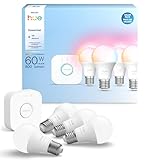
- WHAT'S IN THE BOX - This starter kit includes one Hue Bridge and four E26 smart light bulbs; to get started, install your Bridge and color changing light bulb using the Hue app, and you’re ready to go
- CREATE AMBIANCE WITH COLOR - Set the mood with millions of colors and a library of preset light scenes designed by Hue’s lighting experts—with special holiday scenes and the option to create your own
- DIM EASILY - Adjust from full brightness all the way down to 2% using the Hue app to achieve the right level of lighting with your smart light bulb, whether you’re reading or unwinding before bed
- CONTROL WITH YOUR VOICE - Connect to your preferred home assistant and control your led light bulb effortlessly with voice commands—compatible with Alexa, Google Assistant, and Apple Home
6. Video doorbell
A doorbell camera can show who is at the entry, support two-way conversation, and help monitor deliveries. It is often more useful than a camera pointed at an arbitrary part of the home because it covers a predictable access point.
Product direction: Ring can suit Alexa-centered homes; Google Nest Doorbells fit Google Home; Logitech Circle View is an option to investigate for Apple Home; Eufy, Reolink, and Aqara models may suit buyers comparing local storage. Compatibility and subscription features vary by model and should be verified with the vendor.
Check before buying: Decide between wired and battery installation; confirm existing chime compatibility, field of view, low-light performance, privacy zones, storage method, notification speed, and whether clips can be exported. Check which person, package, or other detection features require a paid plan. A device with a lower purchase price can cost more over time if useful alerts or video storage are subscription-only.
Windows Errors? Fix Them Before They Spread
Repair common Windows errors and clear accumulated junk for a smoother, more stable PC - no reinstall needed.Free scan · no reinstallOutdated Drivers Are Slowing You Down
One free scan finds every outdated or missing driver and matches the right update for your exact hardware.Free scan · exact hardware matchPrivacy and installation: Doorbells may record visitors, delivery workers, neighbors, and passersby. Aim the camera narrowly, use privacy zones where offered, limit retention, secure the account with multifactor authentication, and follow local recording and surveillance rules. If installing a wired unit, confirm the existing transformer and wiring meet the model’s requirements; use a qualified installer if needed.
7. Indoor or outdoor security camera
A camera can provide visual context that a contact or motion sensor cannot. It may help check a pet, entry, garage, or yard, but a camera does not guarantee detection, response, or protection.
Product direction: Compare Logitech Circle View or Eve Cam for Apple Home-oriented setups, and models from Reolink, Eufy, Aqara, or Tapo if local-storage options matter. Ring, ADT, and SimpliSafe offer cameras within broader security-system ecosystems. Check each exact model’s platform support, recording plan, and storage policy. Consumer Reports’ smart-home coverage describes evaluating privacy and security as well as device performance.
Check before buying: Compare indoor/outdoor rating, power source, night vision, resolution, local microSD or NVR storage, cloud plan, person/pet detection, export options, and physical privacy shutter. Secure the account and install firmware updates. Cloud-only functions can change if a plan ends or a service is discontinued. AI detection can produce false alerts or miss events, particularly with poor lighting, weak Wi-Fi, or obstructed views.
Quick wins for a faster PC:
Fix the driver behind crashes, sound loss and screen glitchesFind Drivers →Repair Windows errors before they cause bigger problemsFix Now →Privacy rule: Avoid unnecessary cameras in private spaces, use physical shutters or power-off controls indoors, and tell household members how recordings are handled. Skip a camera if a door/contact sensor or better lighting solves the actual problem with less data collection.
8. Motion, contact, and presence sensors
Sensors make other smart devices respond to what is happening rather than merely following a clock. A motion sensor can trigger a hallway light; a contact sensor can report that a door or window is open; a presence sensor may detect that someone remains in a room even when still. Temperature and humidity sensors can help trigger ventilation or alerts.
Product direction: Aqara’s FP2 is marketed as a presence sensor with spatial-awareness features. Aqara also sells a broader sensor and hub ecosystem; check the exact model’s hub and platform requirements at its FP2 product page.
Rank #4

- WHAT'S IN THE BOX - Includes one Hue Bridge and four Hue White and Color Ambiance smart 75W A19 light bulbs suitable for most fixtures; Perfect for decorative and general lighting anywhere in your home
- UNLOCK THE FULL POWER OF HUE WITH THE INCLUDED BRIDGE - Enjoy automations control from anywhere in the world, and a secure, stable connection that won't drain your Wi-Fi. Use Matter to connect smart home devices to your Hue smart lighting system.
- ENJOY PRESET SCENES - Light your routines throughout the day; Set a 24-hour natural light scene that mimics the sun or choose light to help you focus unwind, and more
- VOICE CONTROL - Convenient smart control; Set up voice control in the Hue app and use simple voice commands to control your lights with Alexa or Google Assistant
- PERSONALIZE YOUR LIGHT - Create the ultimate mood lighting with dynamic light effects that show subtle changes in brightness and color; Customize in the app
Check before buying: Distinguish motion from presence detection; compare battery life, connectivity (Matter, Thread, Zigbee, or proprietary), hub requirements, placement, privacy implications, and whether the automation runs locally. Radar-style sensing can reveal occupancy patterns, while motion sensors may not notice a person sitting still. Presence sensors can be affected by pets, fans, curtains, furniture, or placement.
Free tools Windows power users keep installed
One-click scans. No signup required.
First routines: Turn on an entry light after sunset when motion is detected; alert if a basement door opens; or turn on bathroom ventilation when humidity rises. Test the trigger and action at different times, and ensure a manual control remains available. A sensor is of little use if its automation relies on an unavailable cloud service.
9. Water-leak sensor or automatic shutoff
Leaks often start out of sight under sinks, beside washing machines, behind toilets, near water heaters, or in basements. A point sensor can alert you when water reaches it; a cable sensor can cover a longer area. Neither stops water by itself. A whole-home monitor or automatic shutoff valve can go further, but usually costs more and may require plumbing work.
Product direction: Eve Water Guard uses a sensing cable and Thread; Eve says additional cable elements can extend coverage. Remote access, notifications, and automations require a compatible home hub, such as supported HomePod mini or Apple TV 4K models. Confirm current requirements on Eve’s product page. Flo by Moen is one example of a whole-home monitoring and shutoff system; see Moen’s Flo information.
Choose the right level: Use a basic sensor for a single vulnerable spot, a cable for a broader perimeter, or consider a whole-home flow monitor and automatic valve if the exposure justifies the expense. A shutoff system may need a plumber and should be checked for compatibility with your water service and household needs.
Limitations: Alerts depend on power, network, and sometimes cloud services. Test sensors, replace batteries, and know how to shut water off manually. Renters can usually consider removable point sensors but should not modify plumbing without permission. Consumer water monitoring is not a substitute for appropriate insurance or prompt repairs.
Independent reader supportYour contribution helps us test, update, and keep practical guides available for everyone.10. Robot vacuum
A robot vacuum can reduce the frequency of routine floor cleaning, particularly in homes with pets, children, hard floors, or regular debris. It does not eliminate maintenance or replace every deep clean.
Product direction: Compare iRobot Roomba, Roborock, Eufy, Dreame, Ecovacs, and Tapo by navigation, obstacle avoidance, carpet performance, and service support rather than feature count alone. Some higher-end models add auto-emptying or mop-washing docks. Consumer Reports includes robotic vacuum and vacuum-mop models among its tested smart-home categories.
Check before buying: Assess brush design for hair, mapping and no-go zones, carpet and mopping needs, dock footprint, replacement filter and bag costs, and whether useful features need an app account or subscription. If the unit has a camera or maps rooms, consider where that data is stored and whether mapping can be deleted.
Reality check: You still need to clear cords and clutter, empty bins, clean brushes, refill water, and replace filters. A robot vacuum is a poor fit for homes with many stairs, frequent floor obstacles, or no suitable storage and charging space.
Best Value

- 【Easy Setup, One Control】With Matter, Skip the step of downloading and registering multiple manufacturers' apps every time you buy a new device. Instead, head straight to certified smart home platforms like Apple Home, Alexa, Google Home, SmartThings, or AiDot to control all your Matter devices.【TIP】Matter-certified hub or controller (HomePod, Echo Dot, Nest, SmartThings Hub) is required for Apple Home/Alexa/Google Home/SmartThings platforms. Alternatively, the AiDot app can be used without hub
- 【Offline-Ready Control】Once you've set up your Matter-certified devices on your LAN, they'll be able to communicate with each other directly, using the Matter protocol. This means that if your home internet connection goes offline, your Matter-certified devices will still be able to communicate and be controlled within your LAN, without relying on the internet or cloud services.
- 【Remote Control from Anywhere】Use the app to turn electronics on before you arrive home and off after you leave, no matter where you are. Using the smart plug that work with alexa manage your power usage and save money.
- 【Hands-free Voice Control】Control linkind homekit plug using simple voice commands through Apple HomeKit, Siri, Amazon Alexa, Google Assistant, and SmartThings, without the need for physical input such as buttons or switches.
- 【Flexible Scheduling & Timer】Effortlessly reduce energy usage with automatic device shutdown after a set time. For example Chrismas Tree, TV, Lamp, Fan, Humidifier,Blenders, Lightbulbs
11. Indoor air-quality monitor or smart purifier
An air-quality monitor can show changes associated with particles, cooking, smoke, humidity, or ventilation. A purifier can filter air in a specific room. The most useful setup connects a meaningful reading to an action, such as running a purifier or opening a window when appropriate.
Product direction: Compare monitors by the pollutants they measure—such as PM2.5, VOCs, CO₂, temperature, and humidity—and compare purifiers by room coverage, noise, and filter availability. Ecobee’s Smart Thermostat Premium includes air-quality monitoring, which may be enough for some households’ awareness needs, but it is not a dedicated laboratory instrument.
Check before buying: Find out whether readings are relative or calibrated, whether sensors need replacement, if data is exposed locally, and what filters cost and how often they need replacement. A monitor does not clean air; a purifier does not diagnose a health condition.
Safety distinction: A general air-quality monitor is not a replacement for a functioning, standards-compliant smoke alarm or carbon-monoxide alarm. Those life-safety devices should work independently of the smart-home app and network.
12. Energy-monitoring plug or whole-home monitor
Energy monitoring can reveal how much power a single appliance or the whole home uses. Data is only useful if it prompts a change, such as moving a load to a different time, replacing an inefficient device, or correcting a schedule.
Product direction: Start with a rated energy-monitoring plug or smart power strip for one suitable appliance. Eve Energy is one example of a plug with consumption tracking; see Eve Energy’s product information. For broader measurements, compare circuit-level options such as Emporia or Sense, and confirm installation requirements.
Check before buying: Consider accuracy at low loads, maximum current, data export, cloud retention, solar or battery integration, and whether an electrician must access the electrical panel. Plug-level readings cannot explain whole-home use; panel monitors may require professional installation.
PC Slower Than It Used to Be?
A free scan shows the junk files, broken settings and background clutter dragging Windows down - then fixes them in one click.Free scan · Windows 10 & 11Crashes, No Sound, or Screen Glitches?
Random freezes, missing sound and display glitches usually trace back to one bad driver. Find and replace yours safely.Free scan · under a minuteDo not assume savings: Monitoring alone does not reduce consumption. Savings depend on what you learn and whether you change usage or automate it. Skip a monitor if you will not review the data or act on it.
13. Smart garage-door controller
For a homeowner with an attached garage, a compatible controller can report whether the door is open, send a reminder, and sometimes close it under defined conditions. It can also support arrival or departure routines. It is irrelevant to many apartments and homes without a compatible opener, so treat it as a conditional essential.
Product direction: Compare myQ, Tailwind iQ3, and Meross options against your opener and preferred platform. Confirm the exact model’s support for Alexa, Google Home, Apple Home, SmartThings, or Matter; do not assume all models offer the same integrations.
Check before buying: Verify opener compatibility, door-position sensing, guest access, local operation, and whether remote access depends on a cloud service. Configure auto-close cautiously, accounting for people, pets, and vehicles, and retain the opener’s physical safety sensors and controls. A smart controller does not replace a properly functioning opener or its safety reversal system.
Choose devices around the house you have
- Renters: Begin with smart plugs, bulbs, removable sensors, a portable leak sensor, and an indoor camera if permitted. Check lease terms before installing a lock, doorbell, or wired switch.
- Homeowners: Consider a compatible thermostat, switches, smart lock, garage controller, and water shutoff where installation and budget make sense.
- Families: Doorbell alerts, access codes, contact sensors, useful lighting routines, and a robot vacuum may solve recurring needs.
- Pet owners: A robot vacuum, a camera for a specific room, and an air-quality device may be more useful than extra voice-controlled appliances.
- Caregivers or older adults: Prioritize clear lighting, practical access management, leak alerts, and reliable notifications. Keep critical safety functions usable without the app.
- Privacy-sensitive households: Favor physical controls, local-storage options, fewer microphones and cameras, and automations that run locally where possible.
Build a reliable system, not a pile of gadgets
- Check infrastructure first. Identify your Wi-Fi coverage, controller and Thread-border-router capability, wiring, HVAC type, deadbolt dimensions, doorbell wiring, and opener model before ordering devices.
- Start with one repeatable routine. For example, a motion sensor turns on a hallway light after dark. Test the trigger, action, manual fallback, and behavior when the internet is unavailable.
- Price the whole lifecycle. Include hubs, subscriptions, batteries, filters, replacement bags, storage plans, and installation—not just the device price.
- Secure accounts and data. Use multifactor authentication where available, unique passwords, limited household access, firmware updates, and sensible camera privacy zones. Check how long vendors retain recordings and activity histories.
- Keep essential safety independent. Locks need an emergency method of entry; smoke and CO alarms must operate without the app; leak sensors need testing; and any shutoff valve needs a manual plan.
A sensible first-five buying order
For many households, a smart plug and a few lights offer the least expensive way to test whether automation is genuinely useful. Add contact or motion sensors to create routines that respond to the home. Then consider a thermostat only after checking HVAC compatibility. Finally, choose either leak protection or a doorbell based on the most consequential risk at your property. This sequence is a starting point, not a prescription: a home with a vulnerable basement may put leak detection first, while an apartment renter may get more value from removable devices and avoid permanent installation.
The best smart-home setup is selective. Buy gadgets that work with your home’s wiring and routines, preserve useful manual controls, and remain understandable when an app, network, or subscription fails. If a device adds complexity without solving a real household problem, it is not essential.
Quick Recap
Product prices and availability are accurate as of the date/time indicated and are subject to change. Any price and availability information displayed on Amazon at the time of purchase will apply.


Leave a Reply